What Better Prompts Do
When you first open ChatGPT or another AI tool, it can feel a little like standing in front of a helpful stranger who knows a lot but cannot see what you mean unless you say it clearly. That is where better prompts matter. A prompt is the instruction or question you type into an AI tool, and better prompts turn that first message from a rough guess into a useful conversation. If you have ever wondered, “Why does one prompt get a great answer while another gets something vague?” you are already noticing the difference that good prompt writing makes.
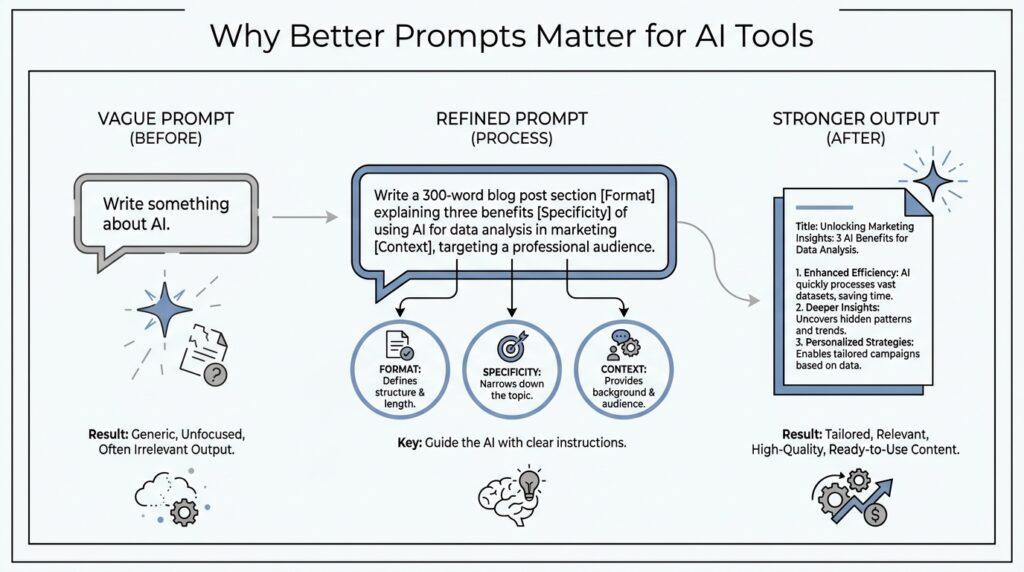
Better prompts do one very important thing first: they give the AI a shape to work within. Think of it like asking a friend to help you pack for a trip. If you say, “Help me pack,” your friend has to guess the destination, the weather, and how long you will be gone. If you say, “Help me pack for three days in Seattle in October, and keep it light because I only have a carry-on,” the help becomes more focused because the situation is clearer. In the same way, ChatGPT works best when your prompt supplies context, which means the background details that explain what you need.
They also reduce the back-and-forth that makes first attempts feel frustrating. A vague prompt often leads to a vague answer, and then you spend extra time correcting, narrowing, and repeating yourself. A better prompt can save that energy by including the goal, the audience, and the format from the start. For example, instead of asking an AI tool to “write about dogs,” you might ask for a short, friendly explanation for beginners, or a comparison between two breeds for someone choosing a pet. That small change gives the AI a clearer path, and it usually gives you a more useful result on the first try.
Another thing better prompts do is set boundaries. Boundaries are the limits you place so the answer stays on track, like telling a storyteller how long the story should be and what style to use. In prompt engineering, which is the practice of shaping instructions so an AI gives better output, these limits can include word count, tone, format, or topics to avoid. When you ask for a “three-paragraph explanation in plain language with one everyday example,” you are not restricting the AI in a bad way; you are guiding it the way a map guides a trip. The answer becomes easier to read because the AI knows what kind of road it is supposed to travel.
Better prompts also improve the quality of the ideas themselves. That may sound surprising, because the AI does not become smarter in the human sense, but the answer often looks smarter because your request invites more precision. A clear prompt can encourage the AI to organize information, compare options, or think through steps instead of producing a loose pile of text. This is one reason people get better results with ChatGPT when they ask for a role, a task, and a specific outcome. The prompt acts like a lens, and the output becomes sharper because we have pointed that lens at something real.
They can also help the AI sound more like the voice you want. Maybe you want a calm explanation, a friendly email, or a practical checklist written in plain English. The prompt gives the model clues about tone, which means the feeling of the response, and style, which means the way the response is phrased. Without those clues, the AI may choose a tone that feels too stiff, too formal, or too broad for what you had in mind. With them, the answer starts to match the moment you are in, which makes the whole interaction feel more natural.
In practice, better prompts do not make AI perfect, and they do not remove the need to think. They do, however, make the tool easier to steer, much like turning the wheel of a car instead of hoping it goes where you want. When you learn to ask for context, constraints, examples, and format, you begin to see why prompt writing matters so much. That is the real shift: the prompt stops being a throwaway line and starts becoming the part that shapes everything that follows.
Add Clear Context
When you sit down to ask ChatGPT for help, the first thing it needs is not a clever question but a clear setting. That is where clear context comes in, and it is one of the quiet secrets behind better prompts. If the AI knows who you are, what you are trying to do, and why it matters, it can stop guessing and start aiming. What does clear context mean in a prompt? It means giving the background details that help the model understand the situation, the goal, and the kind of answer you want.
Think about how differently we respond to a request when we know the story behind it. If a friend says, “Can you help me write this?”, we naturally ask follow-up questions: Who is it for? What is it supposed to do? How long should it be? ChatGPT needs that same kind of setup, because it cannot see your desk, your deadline, or the person who will read the final draft. Clear context turns a vague request into a usable brief, and that is why prompt engineering often starts there.
The easiest way to picture this is to imagine giving directions. If you tell someone, “Meet me downtown,” they may end up on the wrong block, in the wrong parking lot, or at the wrong time. If you say, “Meet me at the north entrance of the library at 3 p.m. after the meeting ends,” the path becomes much easier to follow. A prompt works the same way. When you include the audience, purpose, and situation, you are not overexplaining—you are removing the fog that makes AI responses feel generic.
This matters even more when the task has more than one possible answer. A request to “write an email” could become a sales email, a polite apology, a project update, or a message to a teacher, depending on the context. Without those details, the model has to choose a direction on its own, and that choice may not match what you had in mind. With clear context, better prompts give ChatGPT a narrower lane to drive in, which usually leads to sharper, more useful output. That is why two people can type something similar and get very different results.
Context also helps the AI sound like it belongs in your situation instead of floating above it. If you are a beginner, you may want plain language and a patient tone. If you are drafting something for work, you may want professional wording, a specific format, and a focus on action steps. When you include those clues, the AI can adjust its voice and shape its answer around your real needs. In other words, clear context does not only improve what the response says; it also improves how the response feels to read.
The strongest prompts often combine context with one or two practical details that anchor the task. You might mention the audience, the purpose, the format, or the constraints before you ask for the result. Those details act like a map legend, showing the model which pieces of information matter most. In prompt engineering, this is one of the most useful habits you can build, because it saves time on revisions and helps the first draft come closer to what you actually want. Better prompts do not need to be long, but they do need to be grounded.
Once you start adding clear context, you begin to notice a pattern: the more real the situation feels, the more useful the answer becomes. That is the real payoff. You are no longer tossing a question into the dark and hoping for the best; you are giving ChatGPT the scene, the role, and the purpose so it can respond with intention. And once that foundation is in place, we can start shaping the prompt even further with the kind of details that turn a good answer into a great one.
Specify Format and Tone
Once we have clear context, the next thing to name is the shape of the answer and the feeling it should carry. This is where format and tone become part of prompt engineering, and they matter more than many beginners expect. If context tells ChatGPT what room it is standing in, format tells it what furniture to arrange, and tone tells it how the room should feel when someone walks in. That is why better prompts often improve fast when you ask for the output in a specific form, not just a general answer.
Format is the structure of the response, meaning the way the information is organized on the page. A format can be a paragraph, a list, a table, an email, a script, or a step-by-step guide. Tone is different: it is the emotional temperature of the writing, such as friendly, professional, reassuring, playful, or direct. When you ask ChatGPT for both, you are giving it two important signals at once: what to say and how to say it. That small distinction is one of the easiest ways to get more useful results from ChatGPT and other AI tools.
You can feel the difference when you imagine asking for help with the same idea in two different ways. If you say, “Explain how to start a workout routine,” the model has to guess whether you want a short overview, a plan, or a motivational note. If you say, “Write a five-sentence beginner-friendly explanation in a calm, encouraging tone,” the answer has a clearer job. Better prompts work because they remove that guessing. In prompt engineering, the more you can name the target shape, the less time you spend reshaping the result afterward.
This is especially helpful when you need the answer to fit a real-world use. Maybe you want a customer email that sounds warm but still professional, or maybe you need a study guide that feels simple and not intimidating. What does the best prompt look like when you want both clarity and personality? It usually names the audience, the format, and the tone in one sentence, because those three pieces work together like a script, a stage, and the mood lighting. ChatGPT can then focus its effort instead of wandering across every possible style at once.
Tone also helps the response feel appropriate for the moment, which is easy to overlook when you are focused only on facts. A cheerful tone can make instructions feel more welcoming, while a serious tone can make a policy summary feel more trustworthy. If you skip tone, the model may produce something technically correct but oddly flat, too formal, or mismatched to the reader. That is why better prompts do more than ask for information; they shape the relationship between the writing and the person reading it.
The easiest way to use format and tone well is to think like a director giving scene notes. You are not rewriting the whole performance yourself, but you are telling the actor what kind of scene this is and how the audience should experience it. A prompt like “Answer in three short paragraphs, use plain language, and keep the tone friendly and confident” gives the model a clear path to follow. Add that to the context you already provided, and you start to see why prompt writing matters so much in practice.
When you learn to specify format and tone, you stop hoping the AI will intuit your needs and start guiding it with intention. That is the real shift: better prompts turn a general assistant into a tool that can match the situation in front of you. And once the structure and voice are in place, we can move on to the details that make the answer even more precise.
Use Examples and Constraints
After we have set the scene, named the audience, and chosen the tone, we still have one more way to guide the answer: we can show the AI what success looks like. That is where examples and constraints come in, and they often make the biggest difference in prompt engineering. An example is a model answer or sample input you include so the tool can imitate the pattern, while a constraint is a boundary that keeps the response from drifting. Together, they turn a general request into a clear path forward.
Think about how we learn from a friend who is teaching us a new skill. If they only describe the goal, we may understand the idea but still miss the shape of the final result. If they point to one finished example and say, “Make it look like this, but shorter,” the task becomes much easier to picture. ChatGPT responds in a similar way, because examples show the style, structure, and level of detail you want, while constraints tell it where the edges are.
This is why a prompt like “Write a summary” often feels too open, while “Write a 120-word summary for a busy manager, using plain language and ending with one next step” gives the model a clearer job. The example is not always a full sample paragraph; it can be a sentence, a format, or even a phrase that captures the pattern you want. What does a strong ChatGPT prompt look like when you want it to stay on task? It usually combines a real example with a few constraints that keep the response focused and useful.
Constraints are especially helpful when the answer could easily become too broad, too long, or too formal. You might limit the length, the reading level, the number of ideas, or the topics to include and avoid. Those limits are not there to make the AI weaker; they work like guardrails on a road, keeping the conversation from sliding off into a direction you never wanted. In prompt engineering, constraints help the model spend its effort where it matters most, instead of filling space with extra words.
Examples also help when the task depends on taste, not just information. If you want a product description, a headline, a lesson plan, or a social post, there are many possible right answers, and the model may not know which flavor you prefer. A small example can solve that problem quickly because it gives the AI something concrete to mirror. Instead of asking for a “creative caption,” you might offer a sample like “Short, upbeat, and a little playful,” then ask the model to follow that pattern for your topic.
The best part is that examples and constraints work even better when they travel with the other pieces we have already added. Context tells the model where it is, format tells it how the answer should look, tone tells it how it should feel, and examples tell it what the target resembles. Constraints then trim away the extra branches so the result stays manageable. When all of those pieces work together, better prompts stop feeling like guesswork and start feeling like instructions someone can actually follow.
If you are wondering why some AI responses still miss the mark, the answer is often that the prompt described the goal but never showed the shape of the finish line. A few well-chosen examples can close that gap faster than a long explanation ever could. Add a few thoughtful constraints, and you give ChatGPT the kind of direction that helps it produce cleaner first drafts, sharper wording, and fewer surprises. That is the real power of prompt engineering: not more words, but the right ones, placed where they can do the most work.
Test and Refine Prompts
The real work begins after the first prompt leaves your fingers. At that moment, you are not looking for a perfect answer so much as a useful first draft, because better prompts usually grow through testing, not guessing. If you have ever wondered, “How do you test a prompt without getting lost in endless rewrites?”, the answer is to treat prompt engineering like a conversation in progress rather than a one-shot assignment.
The easiest way to start is to change only one part of the prompt at a time. That might mean adjusting the audience, trimming the length, or asking for a different tone, but not all three at once. When we change everything together, we cannot tell which detail helped and which one made the answer worse, and that makes it hard to learn from ChatGPT or any other AI tool.
This is why small comparisons matter so much. Think of it like tasting soup while you cook: if you add salt, pepper, and lemon all at once, you will not know what fixed the flavor. In prompt engineering, each revision gives us a clue, and those clues slowly reveal what the model needs from us. One version might be too broad, another too formal, and a third finally feel close to what you imagined.
A good habit is to keep a simple note of what changed and what happened. You do not need a formal system; you only need enough memory to spot patterns, such as “adding an example made the answer more concrete” or “asking for fewer words improved clarity.” That kind of reflection turns better prompts into a skill you can reuse, instead of a lucky accident you can never repeat. Over time, you start to recognize which prompt elements do the heavy lifting.
It also helps to test prompts against the kind of mistake you actually want to avoid. If the answer keeps sounding vague, ask for more specificity. If it feels too stiff, adjust the tone. If it drifts off topic, add a constraint that narrows the scope. Prompt tuning works best when we respond to a real problem in the output, because then each revision solves something visible instead of chasing an abstract idea of “better.”
Another useful step is to ask the AI to improve its own draft. You might say, in plain language, that the response is too long, too technical, or not structured the way you need, and then ask for a revision. That feedback loop is powerful because it shows you how ChatGPT responds when we give it correction instead of a brand-new request. The model does not magically know our preference, but it can often adapt quickly once we point at the gap.
This is where prompt engineering starts to feel less like writing and more like steering. A first prompt opens the door, but testing and refining shape the room behind it. Each round makes the answer a little closer to your goal, and each small correction teaches you something about how the tool interprets language, context, and structure. That is why better prompts are rarely born finished; they are built through careful, patient revision.
The payoff is larger than one good response. Once you learn how to test prompts and refine them, you begin to trust the process instead of hoping for a lucky result. You know how to compare versions, spot weak spots, and guide the next draft with more confidence. And that sets us up for the next part of the journey, where we can look at how to turn all of these habits into a repeatable way of getting stronger results from ChatGPT and other AI tools.
Avoid Common Prompt Mistakes
The fastest way to get better results from ChatGPT is not to write longer prompts, but to avoid the mistakes that quietly blur your meaning. Many prompt mistakes happen because we ask for too much, too little, or the wrong thing all at once, and the AI has to guess its way through the fog. If you have ever wondered, “Why does ChatGPT ignore part of my prompt?” the answer is often that the prompt never gave it a clean target to hit. Better prompts begin with clarity, but they also depend on what we leave out.
One common mistake is stacking ideas together without a clear order. When a prompt asks for a summary, a rewrite, a comparison, and a tone change in one breath, the model may respond unevenly because it cannot tell which task matters most. That is where prompt engineering starts to feel less like wishful thinking and more like directing traffic. We do better when we name the main task first, then add the supporting details, because the AI can follow a path more easily than a pile of instructions.
Another trap is assuming the model already understands your situation. ChatGPT can be very capable, but it cannot see your audience, your deadline, or the reason the message matters unless you tell it. If you say, “Write about this,” the answer may sound generic because the tool has no setting to stand on. Clear context is one of the simplest ways to avoid prompt mistakes, and it often saves us from the frustration of reworking the same answer again and again.
A third mistake is being vague about the shape of the output. You may want a short email, a friendly explanation, or a practical checklist, but if the prompt never names the format, the result can drift into something that feels close but not quite useful. The same thing happens with tone, which is the feeling of the writing, such as calm, professional, or warm. When better prompts specify format and tone together, the answer stops wandering and starts fitting the moment.
We also run into trouble when we leave constraints out entirely. A constraint is a limit that keeps the response on track, like a word count, a reading level, or a topic to avoid. Without those guardrails, AI tools often expand more than we want, especially when the task sounds broad. That is why prompt engineering works best when we say what the answer should include and what it should leave behind, because both sides of the instruction matter.
Then there is the mistake of expecting perfection from the first try. A prompt is not a magic spell; it is a starting point, and the first draft often teaches us what to fix next. When we change too many parts at once, though, we lose the trail of what helped. The better habit is to revise one piece at a time, so we can see whether the issue was context, structure, tone, or example. That steady approach turns prompt mistakes into useful feedback instead of dead ends.
Another subtle problem is asking the model to read our mind through examples that are too thin. One short phrase can help, but sometimes the AI needs a clearer sample to follow the pattern we want. What should a prompt include when the answer keeps missing the mark? Usually the fix is not more pressure but more precision: a concrete example, a few constraints, and a clear audience. Once we learn to spot these prompt mistakes, we stop blaming the tool for guessing and start guiding it with more care.