Define goals and target users
If your AI chatbot integration doesn’t start with clear, measurable goals and well-defined users, you will iterate on features that don’t move the needle. In the first planning pass we need to state business and technical objectives up front: are we improving support deflection, increasing lead conversion, or accelerating developer productivity? Who are we building this for — customers, agents, or internal engineers — and what success metrics will tell us we delivered value? Framing goals this way anchors the rest of the integration work and prevents scope creep in conversational AI projects.
Start by separating business outcomes from technical constraints so you can make pragmatic trade-offs. Business goals are things like reducing average handle time by 30%, raising CSAT by two points, or increasing self-service resolution rate; technical goals are latency targets (p95 < 300ms), throughput (requests/sec), model cost per query, and compliance requirements. Define SLAs and cost ceilings alongside KPIs so you can choose model sizes, caching strategies, and rate-limiting rules that meet both objectives and budgets. This dual framing makes architecture decisions intentional rather than reactive.
Define target user personas with context, not generic labels. For external support bots you might have “novice shoppers” who need short, guided flows and fallbacks to escalate for ambiguous intents; “power purchasers” who expect fast, transactional responses and token-optimized prompts; and support agents who use a human-assist interface to draft responses. For internal tools you could target platform engineers requiring reproducible code snippets, or sales reps needing CRM-lookup shortcuts. For each persona list typical environment (mobile, web, Slack), error tolerance, and privacy expectations so design maps directly to real usage patterns.
Translate goals and personas into prioritized features and acceptance criteria. If your goal is deflection, prioritize intent classification accuracy, slot extraction, and reliable entity resolution tied to backend APIs; if developer productivity is the focus, prioritize code generation safety, reproducibility, and IDE plugins. Use concrete rules such as: “If intent_confidence < 0.6 then route to human” or “cache responses for repeated identical queries for 60s to reduce model calls.” Specify required integrations (CRM, knowledge base, auth) and the API contracts they must satisfy before implementation begins.
Decide MVP scope by mapping features to measurable experiments and telemetry. Instrument events for intent, confidence, fallback rate, user sentiment, and conversion outcomes so you can A/B model variants and prompt templates. Track operational metrics too: token usage, model latency, error rates, and cost per resolved conversation. How do you know when to retrain or refine prompts? Set thresholds (e.g., fallback rate > 8% or drift in entity extraction accuracy) that trigger data collection and model updates, and run controlled rollouts to validate improvements.
Do not overlook privacy and supportability constraints when defining users and goals. Specify data retention policies, PII redaction rules, and role-based access controls tied to each persona; for example, customer-facing chat transcripts may require anonymization after 30 days while internal developer sessions are retained longer for debugging. Define onboarding flows and SLA expectations per user type so you can shape UX and monitoring around concrete service levels. Building on this foundation, we can now translate prioritized requirements into architecture and integration patterns that meet both user needs and operational realities.
Choose chatbot platform and tools
Building on this foundation, choosing the right chatbot platform shapes everything from latency and cost to observability and compliance. The platform you pick will determine which model providers, SDKs, and integrations you can realistically use, so treat selection as an architectural decision rather than a procurement checkbox. Early in the project you should require demonstrable support for the channels and personas you defined earlier, because a mismatch here forces expensive workarounds later. Prioritize platforms that make AI chatbot integration transparent at the API level so teams can reason about requests, tokens, and failure modes.
Start by codifying evaluation criteria that map to your goals: channel support (web, mobile, messaging), authentication and RBAC, model routing and A/B testing, telemetry hooks, and compliance controls (PII redaction, retention policies). Quantify nonfunctional requirements: acceptable p95 latency, throughput, cost-per-query, and maximum fallback rate before human escalation. Demand testable SLAs and clear observability—trace IDs propagating from user message through prompt-engineering layer to model inference and downstream API calls. These criteria let you compare platforms using the same experiments and metrics instead of vendor claims.
Decide between hosted, self-hosted, or hybrid deployment models based on control and operational capacity. A hosted platform abstracts inference, scaling, and security but can constrain customization of models, embeddings, or vector stores; a self-hosted stack gives you full control of GPUs, model versions, and data planes at the cost of ops work. Hybrid platforms that support private model endpoints or bring-your-own-vector-store strike a middle ground for regulated data or low-latency requirements. Consider where your vector DB lives, whether embedding pipelines can run in your VPC, and how autoscaling affects your cost model.
Evaluate the surrounding toolchain and integrations as part of platform choice: model orchestration, prompt templating, retrieval-augmented generation (RAG) connectors, and monitoring/alerting. For example, ensure the platform can call your knowledge base, apply deterministic extraction (for invoices or SKUs), then route to a generative model only when necessary to save tokens. Check for native or SDK-based support for caching, response deduplication, and async job processing so you can offload heavy tasks. The right set of chatbot tools reduces custom glue code and accelerates safe, repeatable deployments.
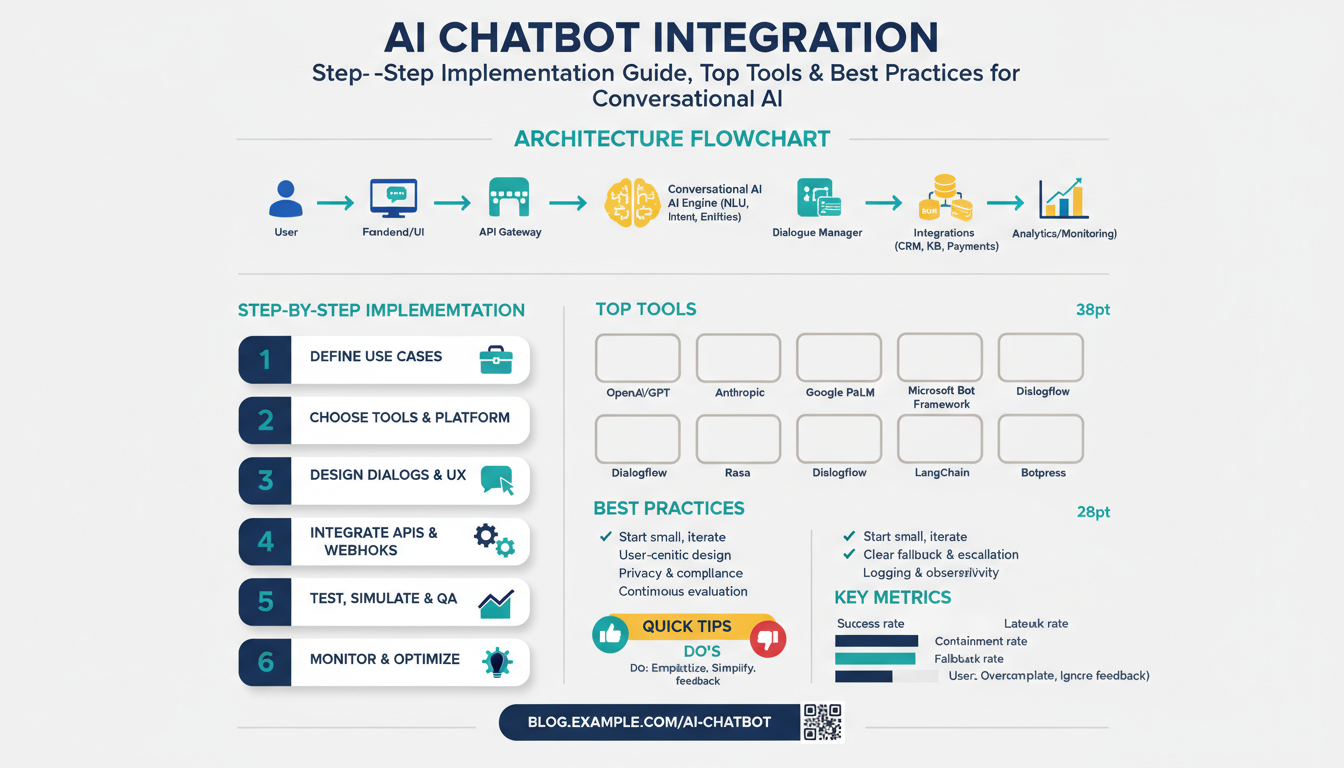
Integrate developer experience into the decision—good SDKs, local emulators, and CI-friendly testing hooks speed delivery. Your team will move faster with a platform that supports unit tests for prompt templates, mockable inference endpoints, and replayable transcripts for debugging. Architect the request pipeline explicitly: authentication → NLU/classifier → entity resolution → RAG retrieval → safety/filters → answer generation → telemetry. That pattern clarifies where to add retries, rate limits, and the rule you already defined: if intent_confidence < 0.6 then route to human.
Factor cost and security into feature trade-offs: use smaller models for classification and routing, reserve larger models for contextual generation, and cache identical responses for short windows to reduce token spend. Enforce PII redaction before logs leave your environment and apply role-based access to transcripts for debugging. Make retention configurable by persona—customer-facing chats may be purged sooner than developer sessions—and validate encryption-in-transit and at-rest for any vendor you consider. These controls are nonnegotiable when regulatory or contractual requirements exist.
How do you pick between multiple viable platforms? Run a fast two-week proof-of-concept that implements one or two high-value flows from your MVP scope, measure deflection, latency, and cost-per-resolved-conversation, and score each platform against your predefined acceptance criteria. Use the same data, prompts, and traffic patterns across tests to ensure apples-to-apples comparisons and involve engineers who will maintain the system in the evaluation phase. With empirical results and the telemetry you defined earlier, you can move from preference to an evidence-based selection that supports scalable conversational AI.
Taking this selection step seriously saves rework during implementation; next we’ll translate the chosen platform and toolchain into concrete architecture diagrams and integration contracts that map back to the SLAs and KPIs we defined earlier.
Gather data and design intents
Building on this foundation, the first practical step is to collect representative examples that reflect real user behavior; this shapes both your intent taxonomy and the training data you’ll use for models. Start with dialogue logs, support transcripts, search queries, and telemetry events because these sources show the language users actually use and the contextual signals you’ll need for accurate intent classification. Capture channel-specific variants (SMS abbreviations, voice ASR artifacts, Slack shorthand) so the dataset mirrors production noise. How do you know when you have enough coverage? Prioritize breadth across high-value flows rather than equal counts per intent—focusing on the actions tied to your KPIs reduces time-to-value for the chatbot integration.
When you prepare data, define your labels and annotation rules up front so everyone annotates consistently. An intent is the user’s goal (for example, refund_request), and slots are structured pieces of data you must extract (order_id, reason, amount); state these definitions explicitly in an annotation guide. Create examples for positive, negative, and ambiguous utterances, and include fallbacks and escalation triggers in your labels so the model learns when to say “I don’t know” or route to a human. Apply automated PII redaction before annotators access transcripts to satisfy privacy rules you defined earlier; annotate both the redacted and original fields in a secure environment if you need to debug extraction failures.
Design the intent taxonomy with pragmatic granularity: merge intents that produce identical backend actions and split those that require different API calls or security checks. For instance, “update_payment_method” and “add_new_card” may be separate intents if they trigger different verification flows, but “track_order” and “where_is_my_order” can be one intent if they map to the same order-lookup endpoint. Use rules for splitting: if intent-specific logic or compliance differs, make a new intent. Set routing rules tied to confidence thresholds (for example, route to human if intent_confidence < 0.6) so small taxonomy errors don’t cause poor user experiences in production.
Gather edge cases and negative examples deliberately—these improve precision and reduce fallback churn. Include out-of-scope chatter, abusive language, short fragments, and multi-intent utterances in your training and validation sets so the classifier learns boundaries. Sample according to expected production distribution rather than uniform sampling: if 60% of live queries are password resets, allocate more labeled examples there. Track inter-annotator agreement metrics like Cohen’s kappa during labeling cycles; low agreement signals ambiguous intent definitions that require clarification before training.
Operationalize a repeatable data pipeline: ingest raw logs, apply PII redaction, normalize text (tokenization, casing, ASR error correction), annotate, and split into train/validation/test sets with time-based holdouts to detect drift. Augment intent detection with lightweight models for routing (smaller classification models) and reserve larger generative models for contextual answer generation or RAG (retrieval-augmented generation). RAG, which combines vector search over documents with generation, reduces hallucinations when you need precise, source-backed answers—embed KB passages and link retrievals to the intent flow so generation is grounded.
Prioritize quality, not just volume: consistent labels, representative negative examples, and clear intent-to-action mappings will reduce production incidents and lower model cost by avoiding unnecessary large-model calls. Instrument the pipeline to capture telemetry that matters—fallback rate, intent distribution, slot extraction accuracy, and cost-per-resolved-conversation—and set concrete retraining triggers (for example, fallback rate > 8% for seven days). Building this data-first approach sets us up to iterate on prompts, model sizes, and the retrieval layer in a controlled way; next we’ll use these artifacts to evaluate platforms and implement the integration contracts that enforce your SLAs and KPIs.
Prepare WordPress site prerequisites
Building on this foundation, the first practical step is getting your WordPress environment production-ready for AI chatbot integration and evaluation. Start with a hardened, up-to-date WordPress core and plugins, a dedicated staging site, and HTTPS enforced by a valid TLS certificate so API calls and token exchanges never travel unencrypted. We recommend treating the site that will host the chat UI or webhook endpoints as an integration surface: keep it isolated from experimental features, snapshot the database before changes, and enable developer-friendly error logging so you can iterate on prompts without breaking live flows.
Make hosting and environment choices that match expected traffic and latency SLAs. Use a staging environment that mirrors production (same PHP version, MySQL/MariaDB configuration, object cache) and validate permalinks and the REST API endpoints (wp-json) there before you enable live traffic. Ensure automatic backups and a rollback plan are in place — a broken webhook handler or corrupt plugin update should be revertible in minutes, not hours. This preparation reduces deployment risk when your chatbot starts making hundreds of model calls per minute.
Secure authentication and secret management before you wire up model providers or CRM integrations. Create least-privilege WordPress accounts or application-passwords for services that need REST API access, and route third-party credentials through a secrets manager rather than hard-coding them in wp-config.php. How do you safely store API keys and tokens? Use environment variables, short-lived OAuth tokens where supported, and rotate credentials on a schedule; we also recommend a Web Application Firewall (WAF) and CORS rules that only allow your front-end origins to call the chatbot endpoints.
Decide early whether you’ll embed the chat as a plugin or run WordPress headlessly and serve the frontend separately. If you use a plugin, prefer one that exposes clear webhook hooks and doesn’t interfere with permalinks or caching headers; if you go headless, verify your endpoint that proxies messages (for example, /chat-api/message) supports authentication and rate limiting. Prepare your content and knowledge base for retrieval-augmented generation by exporting FAQs, KB articles, and changelogs into a searchable format or embedding pipeline — this is the content the chatbot will rely on, so normalize and de-duplicate it before you index into a vector store.
Plan for performance and asynchronous processing from day one. Never block user interactions on a synchronous external model call: queue requests with a lightweight job runner or background worker (WP Cron + a proper queue like Redis + worker), use object caching (Redis or Memcached) for repeated intent lookups, and cache generated responses for brief windows when appropriate. Configure your CDN and TLS termination to handle static assets for the chat UI, and test end-to-end under load to find bottlenecks in PHP-FPM, database connections, or outbound request concurrency to model providers.
Instrument, test, and validate before you flip the switch to production. Add structured logging for request IDs, intent confidence, and external API responses, and ensure logs do not contain PII. Run acceptance tests that simulate low-confidence routes, entity extraction failures, and large payloads, and validate fallback-to-human flows in staging. With telemetry, rate limits, secret rotation, and a rollback plan in place, we can translate these prerequisites into concrete integration contracts and architecture diagrams that meet your SLA and KPI targets.
Install plugin or embed script
Getting your chatbot live on a site often boils down to one practical choice: do you install plugin code into WordPress or embed a client script in the page? If you want predictable lifecycle hooks, admin controls, and server-side webhooks, install plugin packages that surface settings in wp-admin and handle authentication server-side. If you need a fast front-end rollout across multiple sites or non-WordPress frontends, embed script snippets that load the chat widget and call your proxy endpoints. Early in the integration, call out whether you need admin-level controls or lightweight client injections—this decision shapes deployment and security.
Deciding between a plugin install and an embed script is about control, portability, and ops overhead. How do you decide which path fits your SLA and telemetry needs? Choose a plugin when you require role-based configuration, scheduled background jobs, or direct access to WordPress REST API hooks; pick an embed script when you prioritize rapid rollout, CDN delivery, and minimal server-side changes. Consider whether your team can maintain plugin updates and compatibility versus using a managed script you can swap without a deployment.
When you install plugin packages in WordPress, validate compatibility first and automate installation where possible. Start by checking PHP and WP core versions and confirm the plugin supports your staging environment and permalink structure. Use WP-CLI to script installs in CI/CD pipelines, for example:
wp plugin install my-chatbot-plugin.zip --activate --allow-root
Enable logging and set environment-specific API credentials via a secrets manager or environment variables rather than hard-coding into plugin settings. Test plugin activation hooks and deactivation behavior in a staging site so database migrations and cron jobs won’t surprise you in production.
If you embed a script, treat the snippet like a first-class asset with versioning, integrity checks, and async loading for performance. Place the loader near the end of the body or use dynamic injection in your SPA bootstrap to avoid blocking render, for example:
<script async defer src="/assets/chatbot-loader.v2.js" data-client-id="SITE_CLIENT_ID"></script>
Add Content-Security-Policy allowances for your CDN and use Subresource Integrity (SRI) if you host the script externally. When the widget requires auth, never embed long-lived API keys in the client—exchange a short-lived token from a server-side endpoint that we control.
Building on the prerequisites we discussed earlier, secure token exchange and secret management are critical whether you install plugin code or embed script assets. Use a server-side proxy to hold provider credentials, mint session tokens with tight TTLs, and log only non-PII telemetry. Configure role-based admin screens in the plugin or an admin-only endpoint for token issuance so you can rotate keys without rolling front-end code.
Performance and resilience differ between the two approaches and should drive implementation patterns. For plugins, offload heavy model calls to background workers and cache deterministic responses at the object-cache level (Redis or Memcached) to meet p95 latency targets; for embedded scripts, lazy-load the widget and queue messages locally until the network handshake completes. In high-traffic storefronts we’ve seen deflection improve while model cost drops simply by caching common FAQ responses for 60 seconds and queuing retries asynchronously.
Before any production flip, validate the integration in a staging environment, run canary rollouts, and verify telemetry and fallback flows. Run smoke tests that simulate low-confidence routes, entity extraction failures, and escalation to human agents, and use feature flags to gate broader rollout. Once tests pass, promote the plugin or swap the embed script CDN target; from here, we’ll map the chosen approach into observability dashboards and rate-limiting rules so you can safely scale the chatbot integration.
Configure API and train bot
Building on this foundation, the practical work begins with a hardened API contract and a repeatable training pipeline that together determine whether the chatbot behaves predictably in production. Start by treating the API as the chatbot’s electrical wiring: clear endpoints, strict auth, and observable responses keep the system debuggable and auditable. We’ll assume you want low-latency classification for routing and occasional large-model calls for contextual answers, so design your API and model routing around those responsibilities from day one. How do you keep costs and latency bounded while still delivering helpful responses? The answer is intentional routing, caching, and session-aware tokenization.
Define a minimal, versioned REST or gRPC contract for every operation the chat front end needs: open_session, classify_intent, extract_slots, retrieve_documents, and generate_reply. Each endpoint should return a correlation_id and timing metadata so you can trace a request through the classifier, vector search, and generation stages. Enforce strict authentication via short-lived session tokens minted by a server-side proxy that holds provider credentials; never embed long-lived keys in the client. For example, a session-init call might look like this:
curl -X POST https://api.example.com/v1/session \
  -H "Authorization: Bearer <SHORT_LIVED_SERVER_TOKEN>" \
  -H "Content-Type: application/json" \
  -d '{"user_id":"user-123","channel":"web"}'
Design the request/response schema to surface confidence scores, provenance for retrieved passages, and deterministic fallbacks. Return intent_confidence and extraction_confidence on every classify_intent call so the front end can apply your routing rules (for example, route to human if intent_confidence < 0.6). Include source_ids for retrieved documents and a token_estimate field so you can measure and cap cost-per-turn. Instrument p95 latency and error_rate at each stage (classifier, embedding lookup, generation); these are the operational knobs you’ll tune to meet your SLAs.
Train the bot on a reproducible dataset pipeline: ingest logs, apply PII redaction, normalize ASR and chat noise, then annotate for intents and slots with an annotation guide. Split data using time-based holdouts to capture drift; keep a validation set that mirrors the most recent production week. Augment sparse intents with paraphrasing and controlled negatives (out-of-scope chatter, multi-intent utterances) to reduce false positives. Keep an “ambiguity” label so the model learns to ask clarifying questions rather than hallucinate answers.
Use a two-stage modeling strategy in training: a compact classifier for intent routing and slot extraction, and a larger generative model for grounded responses and RAG (retrieval-augmented generation). Generate embeddings for your KB and push them to a vector store that supports approximate nearest neighbor search; this lets the generation model condition on concise, source-backed text. A common pipeline pattern looks like: classify -> if confident and deterministic call backend -> else retrieve top-k passages from vector store -> build prompt with sources -> call generator. Pseudocode:
intent = classify(text)
if intent.confidence > 0.8:
  return call_backend(intent)
docs = vector_search(embeddings(text), top_k=5)
prompt = compose_prompt(text, docs)
reply = generate(prompt)
Measure what matters and automate retraining triggers: fallback_rate, intent_confusion_matrix, slot_accuracy, hallucination_incidents, and cost-per-resolved-conversation. Ask yourself: when should you retrain? Set thresholds (for example, fallback_rate > 8% for seven consecutive days or a drift in slot F1 > 5%) to kick off a data collection + labeling sprint. Run A/B tests of prompt templates and model sizes, canary the new model on a small percentage of traffic, and roll back quickly if observability shows regressions.
Finally, make the API and training artifacts part of your CI/CD pipeline so models, prompts, and vector indexes are treated as deployable, versioned code. We should monitor telemetry, automate retraining when thresholds fire, and maintain a clear rollback path for both the API and model deployments. From here, we’ll map these contracts into integration tests, observability dashboards, and rate-limiting rules that enforce your SLAs and keep the chatbot reliable as it scales.