Why Robotic Tone Matters
Robotic tone undermines trust fast, and in developer-facing content that loss is costly. When ChatGPT or your documentation reads like a checklist with no human context, readers hesitate to follow instructions, ask clarifying questions, or adopt your tooling. Building on this foundation, we need to treat tone as a measurable quality of technical writing: it affects comprehension, error rates, and team velocity. Front-load clarity and natural phrasing so readers recognize intent immediately and keep momentum through technical tasks.
A robotic-sounding message increases cognitive load and slows down decision-making for engineers. Short, decontextualized sentences like “Run the migration” leave out the why and the risk, forcing readers to pause and infer missing steps; contrast that with “Run the migration to update schema X; if you see error Y, rollback with pg_restore --clean.” That small shift—adding purpose and a concrete fallback—reduces ambiguity and fewer support tickets follow. We should aim to reduce inference work for readers by giving clear intent, expected outcomes, and a concrete example when a step has nontrivial consequences.
Tone directly affects collaboration and onboarding in real engineering workflows. In pull request descriptions, terse robotic phrasing (“Refactor auth module. Tests updated.”) pushes reviewers to ask follow-ups, delaying merges; a conversational but precise alternative explains the rationale, trade-offs, and system impact. For customer-facing docs, robotic language increases misinterpretation of error messages and support volume; including short examples, expected outputs, and troubleshooting steps makes your docs act like a teammate rather than a transcript. These are practical trade-offs we see every day when triaging production incidents or training new hires.
How do you tell when your output sounds robotic? Look for three signals: absence of purpose (no “why”), brittle instructions (no fallbacks), and lack of conversational markers that map to human workflows (no examples, no common errors). If your ChatGPT prompt or documentation contains only imperative commands without context, it will likely produce robotic results. Detecting these patterns early—during draft review or automated linting for docs—lets you iterate the tone before engineers depend on the content in staging or production.
Different technical artifacts require different balances between precision and warmth; knowing when to favor one over the other prevents robotic drift. API reference material should be concise and precise—one-line signatures, parameter descriptions, and exact examples—but even here we add a “When to use” note or a short example to orient readers. Onboarding guides, migration playbooks, and runbooks benefit from a conversational cadence that states intent, shows an example command, and calls out common failure modes. Treat tone as part of the API contract: who is the consumer, what decisions must they make, and what friction can we remove with a single clarifying sentence.
Taking this concept further, improving tone is a repeatable engineering task, not an aesthetic afterthought; we can bake it into templates, PR checklists, and even automated content linters. If we standardize small patterns—state the goal, show an example, list one fallback—authors get consistency and readers get predictability. In the next section we’ll examine specific mistakes that push prose toward a robotic voice and quick fixes you can apply immediately to your ChatGPT prompts and documentation.
Avoid Overly Formal Language
Building on this foundation, the quickest way to make technical content feel usable is to drop unnecessary formality that creates distance between the reader and the task. Engineers notice a robotic tone in documentation and ChatGPT outputs when sentences sound like legalese or process descriptions instead of guidance from a teammate. We want technical writing that signals intent and trade-offs immediately, because that reduces cognitive overhead and speeds decision-making during incidents or reviews.
Overly formal phrasing raises the barrier to action and hides intent behind passive constructions and nominalizations. When you write “The configuration file must be created prior to service startup,” readers spend effort translating that into what to run, where to look for errors, and what success looks like. In contrast, saying “Create config.yaml in /etc/myapp; if startup fails, check journalctl -u myapp.service for permission errors” maps instructions to observable outcomes and reduces follow-up questions.
You can spot overly formal language by looking for long noun phrases and passive voice: “The deployment of the service will be performed by the CI pipeline” vs “Our CI pipeline deploys the service on merge to main.” Replace bureaucracy-style nouns like “implementation,” “provisioning,” or “execution” with concrete actions and tools. For example, replace “Ensure the necessary certificates are provisioned” with “Run certbot certonly –standalone -d example.com and copy the resulting fullchain.pem to /etc/ssl/certs.” That change makes the step actionable and debuggable.
How do you keep precision without sounding like an instruction manual? State the goal, show a short example, and call out one likely failure mode. We’ve used this pattern earlier as a tone checklist: goal → example → fallback. Apply it in pull request descriptions by explaining the intent, past behavior, and how you validated the change: “Fix race in auth refresh so background jobs don’t fail intermittently; reproduced locally with a 2x concurrent login test; added retry with exponential backoff.” This reads like a teammate summarizing work, not a formal report.
When prompting ChatGPT, steer away from “Explain X formally” and instead instruct the model to adopt a peer persona: “Explain X as a senior engineer to a colleague, include one working example and a common failure mode.” That single tweak nudges responses away from sterile definitions toward contextual, example-rich guidance. In practical docs, censoring verbosity matters less than surfacing intent: replace a paragraph of abstract benefits with a two-line purpose and a one-line command or code snippet.
There are times when concise, formal wording is required—API signatures, schema definitions, and security policies need precision and minimal ambiguity. The balance is to keep those artifacts terse but pair them with a short, conversational “When to use” note and one example showing a typical call/response. Doing so preserves the accuracy required for formal reference material while giving readers the orientation they need to apply it in real systems.
We’ll carry this pragmatic, peer-oriented approach into the next set of errors to fix: specific phrasing patterns that trigger robotic tone and exact prompt edits you can apply immediately. For now, adopt the simple rule we use in engineering: write like you’ll have to explain it on a call—state the goal, give a reproducible example, and surface the most likely failure mode so someone can act without asking for clarification.
Cut Jargon and Buzzwords
A reader loses trust the moment your prose swaps specific actions for vague managerial language; jargon and buzzwords are the fast track to a robotic tone that increases cognitive load and stalls decisions. How do you strip jargon without losing precision? Start by treating each sentence as an instruction to a teammate: if a phrase like “optimize for scale” doesn’t tell someone what to change, measure, or expect, it’s doing harm. We want technical writing that maps intent to observable outcomes immediately—state the goal, show an example, and surface one likely failure mode.
Building on this foundation, detect problematic jargon by looking for abstraction without context. Phrases like “leverage,” “enterprise-grade,” or “best-in-class” are red flags because they describe aspiration, not action; they invite readers to infer the missing steps. Replace them with concrete decisions: instead of “leverage a cache to improve throughput,” write “add Redis as a near-cache with a 30s TTL for user sessions and fall back to the database on cache miss.” That single swap gives the reader an implementation to try and a measurable effect to validate.
You’ll notice the problem quickly in PR descriptions and ChatGPT prompts. For example, a robotic PR title reads: “Refactor auth module to be enterprise-grade and scalable.” That’s jargon-heavy and forces reviewers to ask follow-ups. A pragmatic rewrite reads: “Refactor auth to remove the global token lock by introducing a per-user token cache; validated with a 2x concurrent-login load test and added retry on 429.” The second version documents intent, the code-level change, and the validation method—everything a reviewer needs to assess risk and approve.
There are times when domain-specific terminology is necessary; the rule is to define terms on first use and anchor them with examples. If you must use “idempotent,” define it briefly: idempotent = repeated requests have the same effect as one request, then show how you implement it (for example, accept an Idempotency-Key header and return existing resource if the key already exists). A short snippet or pseudocode helps: if exists(job.idempotency_key) return existing_job makes the guarantee tangible and prevents readers from guessing contract behavior.
Adopt a small editing pattern to excise buzzwords without losing precision: find the abstract phrase, replace it with a measurable goal, add an example command or SQL, and call out one failure mode. For instance, swap “optimize query performance” with “reduce 95th-percentile read latency from 120ms to 40ms by adding CREATE INDEX idx_orders_created_at ON orders(created_at);; if latency doesn’t improve, check for table-level locks during peak writes.” That pattern—goal, example, fallback—keeps your docs action-oriented and reduces back-and-forth during incidents.
When you edit prompts or documentation, be ruthless about replacing marketing-sounding language with implementation detail and instrumentation. We don’t remove precision; we convert it from a slogan into a concrete instruction that a developer can run, test, and observe. In the next section we’ll look at specific phrasing patterns that trigger robotic responses and exact prompt edits you can make to get clearer, more human outputs from tools like ChatGPT.
Stop Over-Explaining and Hedging
You probably recognize the pattern: an otherwise useful instruction bloats into a paragraph of qualifiers, caveats, and “you might” clauses that leave readers guessing what to do next. This habit—over-explaining coupled with hedging—creates a robotic tone that undermines confidence and slows execution in real engineering workflows. Front-load the goal and outcome in the first sentence so readers immediately know whether the step applies to them and what success looks like.
Start by defining the two problems so you can spot them quickly: over-explaining is giving every possible background detail instead of the minimal context needed to act; hedging is adding soft qualifiers (might, could, possibly) that avoid making a clear recommendation. How do you know when you’re doing it? If a reader has to re-read to find the actionable command or the expected result, you are either over-explaining or hedging. Call out hedging explicitly during reviews: highlight modal verbs and length of background sections, and ask whether each sentence helps someone make a decision or just reduces liability.
Over-explaining and hedging increase cognitive load because they force readers to extract the signal from noise. In incident runbooks and pull request descriptions this manifests as slower triage and more follow-up questions, which directly impacts team velocity. Replace a paragraph of history with a single intent sentence and one reproducible step that produces an observable output. For example, instead of “You might want to run migrations if your schema is out of date,” write “Run alembic upgrade head to apply schema migrations; a successful run prints Revision X applied and the API will accept POST /orders again.” That small change reduces ambiguity and speeds decision-making.
When editing prompts or docs, prefer the pattern we mentioned earlier: state the goal, give a concrete example, and list a single fallback. Replace hedged language like “consider adding retries” with a prescriptive choice plus rationale: “Add retries with exponential backoff (3 attempts, base 200ms) to reduce transient 502s; if errors persist, log and escalate to SRE.” Show a one-line config or pseudocode so the reader can copy-paste: retry(policy{attempts:3, backoff:exp(200)}). This removes guesswork while preserving necessary technical justification.
There are legitimate cases for cautious language, and knowing when to hedge is part of good technical writing. Hedge precisely when you truly lack information (unknown environment variables, breaking changes in a dependency, or experimental features), and when you do, quantify the uncertainty: give ranges, state assumptions, and provide a quick verification step. For example, instead of “This may increase latency,” say “Expected p95 latency increase: 10–20ms in our staging environment; run wrk -t4 -c100 -d30s to measure before and after.” Quantified hedging preserves credibility and helps readers decide.
You can operationalize this editing habit across your team. Add a line to your PR template that requires an “Intent” sentence and an “Observable outcome” line, and teach reviewers to flag hedge words that obscure actionable steps. Use simple pattern checks in docs CI to find modal verbs, then enforce that any flagged sentence must either become prescriptive or include a quantified assumption and a test. These lightweight guardrails shift writing from defensive to collaborative.
Building on our earlier points about reducing robotic tone, treat clarity as a small engineering task: aim for one-line intent, one short example, and one fallback per nontrivial step. That keeps your ChatGPT prompts and your technical writing actionable, reduces back-and-forth during incidents, and makes documentation read like a teammate handing you a tested command. In the next section we’ll dissect common phrasing patterns that still produce robotic outputs and show precise prompt edits you can apply immediately.
Vary Sentence Length and Rhythm
A steady, unvaried cadence in your prose is one of the fastest paths to a robotic tone in technical writing. When every sentence climbs and falls at the same pitch and length, readers stop listening—they skim, misinterpret, or disengage. We want your documentation and ChatGPT outputs to read like a colleague explaining a fix, not a machine reciting instructions. Front-load that intention: start with a clear action or goal, then follow with a longer explanatory sentence so the reader both knows what to do and why it matters.
Building on our earlier points about purpose and observable outcomes, deliberately varying sentence length and sentence rhythm reduces cognitive load during incident response and code review. Short sentences act as pivots: they call out decisions, errors, or commands. Longer sentences let you unpack rationale, show trade-offs, or provide a one-line example. By alternating short directives with compact explanations, you give readers anchors they can scan quickly while preserving the context they need to act safely.
A practical editing pattern works well. First, convert a long instruction-heavy paragraph into a sequence that mixes terseness and explanation. Compare a robotic line: Run the migration and ensure backup with a humanized pair: Run the migration now. followed by If it fails, restore the latest dump withpg_restore –cleanand check journalctl for permission errors. The first version buries intent; the second uses a one-line command for action and a longer follow-up for troubleshooting—this rhythm makes behavior predictable and actionable in real systems.
How do you vary sentence length without sounding arbitrary? Start by mapping the reader’s decision points: when they need to act, use a short, imperative sentence; when they need to understand risk, expand into a compound sentence with specifics. Use questions sparingly to focus attention—“Is this a hotfix or a routine change?”—then answer in a longer sentence that outlines the verification step. Vary your openings: sometimes begin with a verb, sometimes with a condition, sometimes with an example; that alternation creates natural sentence rhythm.
Apply a few concrete techniques on each pass. Read the draft aloud to hear monotony; if your voice flattens, split or merge sentences until the cadence changes. Replace repeated leading phrases with varied constructions—move between imperative, conditional, and explanatory sentences. Add a one-line code snippet or command after a short directive to provide immediate utility; following it with a two- or three-clause sentence gives the why and the fallback. These edits take minutes but dramatically reduce a robotic tone.
In pull requests and runbooks this practice pays off immediately. Start a PR description with a concise intent sentence—“Fix race in auth token refresh”—then follow with a longer paragraph that documents validation steps, trade-offs, and observability changes. In runbooks, keep the escalation steps short and let the recovery instructions be the longer, example-rich sentences. This pattern improves handoff during incidents and lowers follow-up questions because readers can both act quickly and verify effects.
Varying sentence length and rhythm is a small authoring discipline that yields outsized payoffs in clarity and trust. When we intentionally alternate short, directive sentences with longer, contextual ones, our technical writing stops sounding like a checklist and starts sounding like a teammate. Use the read-aloud test, split and merge edits, and the intent-then-example pattern to build that rhythm into your docs and ChatGPT prompts. In the next section we’ll apply these phrasing strategies to specific prompt edits you can copy into your workflow.
Add Personality and Context
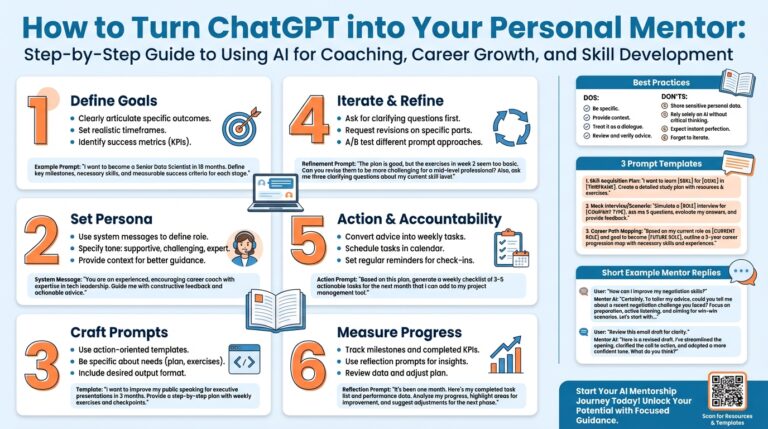
Building on this foundation, the fastest way to stop sounding like a machine is to give outputs a clear persona and the concrete context they need to act. Personality here means an explicit voice directive—who is speaking and why—while context is the minimal, local state that makes instructions actionable (environment, goal, and failure modes). When ChatGPT or any model knows who it should sound like and what specific environment it’s addressing, the result shifts from generic instructions to guidance you can run and verify. This reduces follow-ups and speeds decision-making in real engineering workflows.
Set the persona first, then the objective and constraints, and you get a predictable, human-sounding reply. Try a three-line prompt scaffold: first the persona (for example, “You are a senior backend engineer who explains trade-offs plainly”), second the goal (“Help me migrate DB schema with zero downtime”), and third the constraints (“Postgres 13, no write downtime, max 60s locks”). What does that look like in practice? System: You are a senior backend engineer. User: Migrate schema X on Postgres 13 with zero downtime; show commands, risks, and a rollback. That pattern gives ChatGPT the voice, the why, and the runtime constraints so you get specific commands and a realistic fallback.
Include concrete artifacts as context rather than vague descriptions so the model can produce exact steps. Instead of saying “the app,” paste the small relevant snippet: DB URL, migration SQL, or a log excerpt showing the failure; for example, ALTER TABLE orders ADD COLUMN shipped_at timestamptz; plus ERROR: could not obtain lock. When you supply a short log or the exact migration command, the response can include precise troubleshooting like pg_restore --clean or SET lock_timeout = '60s' rather than abstract advice. We want the model to output run-ready commands and observable success signals.
Decide when personality should be prominent and when brevity wins. For API references and schema docs prioritize precision and an extremely terse voice, but still add one orientation sentence: “When to use: call this for synchronous order creation.” For runbooks and onboarding guides, favor a teammate persona that states intent, shows an example, and calls out one fallback—goal, example, fallback. When should you switch? Use the consumer’s decision points: if a step can cause production impact, make the voice conversational and invite verification steps; if it’s a signature or schema, make it compact and exact.
Manage conversational state deliberately so context doesn’t drift into noise. Keep the active context small: current branch, deployment target, recent error, and a single test command. For multi-step procedures, number the steps in the prompt’s context block (e.g., Context: branch=release/1.2, db=staging, last-error=lock timeout) and ask the model to assume those values unless overridden. This prevents the model from inventing details and lets us validate outputs against observable checks such as SELECT count(*) FROM migrations WHERE applied = true; or a wrk latency run.
Small prompt templates create big returns: set persona, state the goal, paste 1–3 relevant artifacts, request a one-line verification, and ask for one fallback. For example, You are a pragmatic SRE. Goal: rotate TLS certs on ingress. Artifacts: certificate fingerprint, helm values snippet. Give commands, one verification command, and one rollback command. Use that template as a habit and your ChatGPT responses will gain personality, practical context, and fewer ambiguous steps. This sets us up to apply phrasing patterns that prevent hedging and reduce robotic tone in the next section.