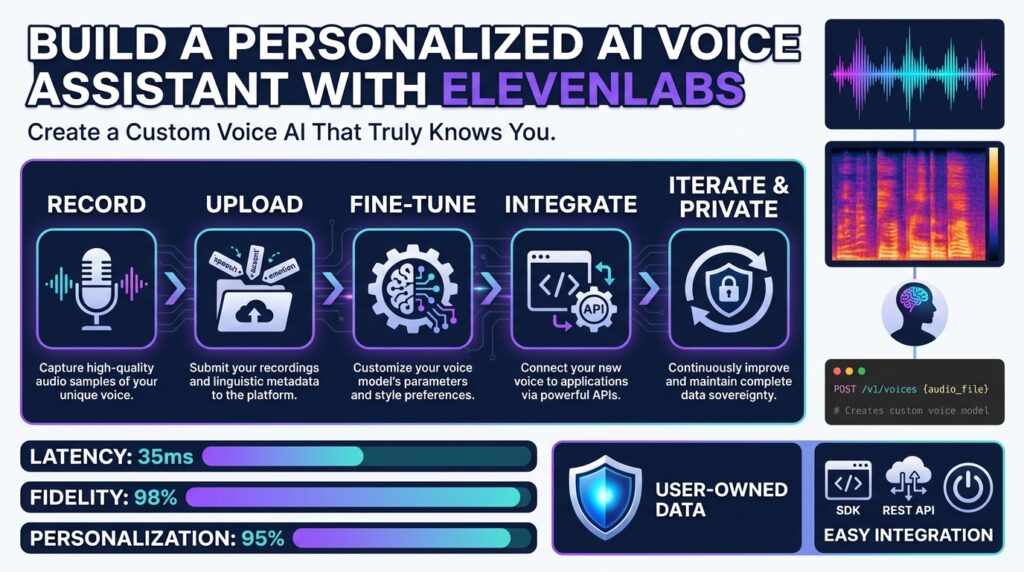
Overview and prerequisites
If you want a personalized AI voice assistant that actually sounds and behaves like you—or like a persona tailored to customers—you need to be deliberate about what we build and why. Building on this foundation, we’ll target a production-ready pipeline that uses ElevenLabs for high-fidelity TTS and voice modeling, but the same principles apply for any provider when you’re designing a custom voice AI. This section explains the essential prerequisites you must satisfy before coding: accounts and credentials, development environment, data and consent, compute needs, and security considerations.
Start with the mandatory accounts and access controls. You’ll need an ElevenLabs account and API keys for programmatic access to text-to-speech and voice-model endpoints; treat those keys like secrets and store them in a secrets manager rather than environment variables when possible. Also provision a version-controlled code repo and CI/CD pipeline so you can iterate safely. If you plan real-time audio streaming, ensure your network and server architecture support low-latency connections (WebSocket or gRPC) and that your API plan covers the expected throughput and rate limits.
Define the development stack and system requirements early so you avoid surprises. Choose a language ecosystem with robust HTTP and WebSocket clients—Node.js and Python are common choices—and include an audio-processing library (FFmpeg, SoX, or soundfile). If you intend to run local model fine-tuning, provision GPU-enabled instances; for inference-only deployments you can often use CPU instances but should benchmark throughput. Ensure your build machine can handle common audio formats and sample rates; the ability to transcode reliably during preprocessing will save hours of debugging.
Data collection and labeling are where most projects succeed or fail. Voice cloning and TTS quality depend on varied, well-labeled audio: multiple speaking styles, controlled mic distance, and clean background conditions improve generalization. We recommend capturing at least several tens of minutes of high-quality audio for a usable voice clone and multiple hours for studio-grade fidelity; augment with scripted prompts that exercise phonetic coverage. Also generate accurate transcripts—automatic speech recognition (ASR) plus human review works well—since aligned text/audio pairs are required for many voice-model pipelines.
Privacy, compliance, and cost are non-negotiable prerequisites. Obtain explicit consent from speakers for cloning and production use, log consent records, and design a retention policy for raw audio and derived models. Protect API keys, encrypt audio at rest, and isolate voice models that contain personally identifiable characteristics. Finally, estimate costs up front: API usage (synthesis and storage), compute for model training or fine-tuning, and CDN/streaming charges—budgeting avoids mid-project surprises.
How do you prepare your voice dataset for quality output? Collect diverse prompts that cover intonation, question forms, numerics, dates, and edge-case phonemes; normalize sample rates consistently and remove long silences or clicks in preprocessing; and label metadata (speaker, style, locale) so we can route inputs to the correct model at runtime. Perform a small pilot: synthesize a handful of sentences, validate perceptual quality, iterate on recording protocol, and then scale the dataset. These steps drastically reduce downstream tuning time.
With accounts, a reproducible dev environment, a vetted dataset, and security controls in place, you’ll be ready to implement authentication and a minimal end-to-end pipeline. Taking care of these prerequisites up front keeps iteration fast, reduces compliance risk, and ensures the ElevenLabs-powered personalized AI voice assistant you build will meet fidelity, latency, and privacy expectations as you move to implementation.
Create account and API key
If you want programmatic access to high-fidelity text-to-speech and voice-model endpoints, the first step is an ElevenLabs account and a programmatic API key you treat like a secret. Create an account in the ElevenLabs dashboard, sign in, and open the Developers (or API Keys) area to create a key; the dashboard shows the full key only at creation, so copy it immediately and store it in a secrets manager. Getting this right avoids hard-to-debug failures later when keys are accidentally leaked or rotated without notice. (help.elevenlabs.io)
After you have an account, generate a named API key and scope its permissions to the minimum required for your pipeline. Give the key a descriptive name (for example, “voice-assistant-prod”), enable only the features you need (Text-to-Speech, Voices, etc.), and optionally set a credit quota to limit accidental spend; these restrictions are available in the key creation UI. Naming and scoping let you revoke or rotate just one key without affecting other systems. (help.elevenlabs.io)
Treat the key as a secret in your infrastructure: never embed it in client-side code or checked-in repositories, and prefer a managed secrets store (AWS Secrets Manager, HashiCorp Vault, GCP Secret Manager, or your CI/CD secrets vault). At runtime, inject the key into your service container or function via environment variables and have your SDK or HTTP client read it from there; ElevenLabs examples use the xi-api-key header for every request, so centralizing header injection in a small client wrapper reduces repetition and accidental exposure. We recommend automatic key rotation and CI/CD integration so deployments never require manual key copies. (elevenlabs.io)
You can harden access further by using scoped keys, credit limits, or single-use tokens for front-end flows. Scoped API keys let you restrict which API endpoints a key can call; credit quotas limit spend per key; and single-use tokens provide short-lived credentials for browser or mobile clients so you never expose a long-lived secret to an untrusted environment. Use single-use tokens when you must allow client-side synthesis or streaming while preserving your primary key in a backend-only vault. (elevenlabs.io)
For team and production deployments, prefer service accounts and a clear rotation policy. Workspaces can create service accounts (recommended for multi-seat organizations) so machine identities own the keys instead of individuals, and you can rotate keys via the UI or the API while preserving access scopes; when rotating, create the new key, update consumers, then revoke the old key to avoid downtime. Treat each service account like a role: assign it to a group with the minimal resource access and log all key creation/deletion events for auditability. (elevenlabs.io)
As a practical check: after creating a key, run a single authenticated request from a secure host to validate the header format and connectivity. For example, a simple curl call that includes the xi-api-key header verifies both network egress and that your key has the expected permissions; if the request fails with a permissions error, adjust the key scope or credit limits in the dashboard rather than embedding broader privileges. Save the raw key immediately after creation—ElevenLabs only displays it once—so your automation can securely persist it into your secrets store. (elevenlabs.io)
With your account, scoped API keys, and secrets plumbing in place, you’re ready to install the SDKs and wire the credentials into your local dev environment and CI pipeline; next we’ll show how to initialize the official client, manage environment variables securely, and run a first synthesis end-to-end while keeping keys and consent records auditable.
Design or clone custom voice
Building on this foundation, the decisions you make when creating a custom voice determine how authentic, controllable, and compliant your personalized AI voice will be. Start by deciding whether you need a designed persona or a voice cloning approach: a designed voice gives you complete behavioral control and consistent prompts, while voice cloning maps to a real speaker and accelerates adoption with familiar tonality. This choice drives dataset requirements, consent models, and the synthesis pipeline we’ll build with ElevenLabs or comparable text-to-speech providers. How do you choose between designing a new persona and cloning an existing voice?
A designed persona works best when you want predictable emotional range and repeatable behaviors across contexts. When we design a custom voice from scratch, we craft style guides, phonetic coverage tests, and dialogue-level rules (for example, shorter sentences for alerts, warm intonation for onboarding). This lets you enforce brand-safe vocabulary, guardrails for sensitive topics, and determinism for regulatory scenarios—things that are harder to guarantee with a direct clone. Use scripted recording sessions to capture target prosody examples and create a small style-transfer dataset to teach the model the desired cadence.
Cloning a real speaker is preferable when familiarity and trust matter—customer-facing assistants, accessibility voices, or an internal executive voice for briefing summaries. For cloning, collect varied samples: read speech, spontaneous responses, question-answers, and emotive lines to capture prosody and pragmatics. We recommend at least tens of minutes of clean audio for a usable clone and more for studio-grade fidelity; align transcripts carefully and flag utterances with background noise or artifacting so you can exclude them during training or fine-tuning. Remember that cloning increases privacy and legal obligations: store consent records, limit model export, and version-control who can synthesize the cloned voice.
From a technical pattern standpoint, treat preprocessing and augmentation as the most impactful levers for quality. Normalize sample rates, trim leading/trailing silence, apply noise gating as needed, and generate phoneme-rich synthetic prompts to fill phonetic gaps. For example, a minimal inference flow looks like this in pseudocode: synthesize(text, voice_id, style_hint, sample_rate) -> audio_bytes; for cloning training you add train_cloning_model(audio_transcript_pairs, speaker_meta) -> voice_model_id. Centralize these calls behind a small client wrapper so you can swap providers or change parameters (e.g., temperature, intonation control) without touching business logic.
Control and iteration are easier when you expose style tokens and prosody knobs to the runtime. Offer a small set of styles (neutral, friendly, assertive) and numeric intensity controls so integrators can adjust delivery without retraining a model. In practice, implement an A/B test harness: route identical prompts through two model variants, collect MOS-like subjective feedback, and add automated checks for clipping, unnatural pauses, and mispronunciations. This lets you tune trade-offs between naturalness and safety—higher naturalness can increase risk of impersonation, so balance fidelity with ethical guardrails.
Operationalizing a custom voice requires routing, caching, and access control at runtime. Cache frequently requested utterances as pre-rendered audio for latency-sensitive paths, but keep dynamic synthesis for personalized content like names and real-time data. Enforce scoped API keys and rate limits for synthesis endpoints, log generation requests for auditability, and tag generated files with model version and consent metadata. These practices let you roll back a voice model quickly if a safety issue is discovered and ensure traceability for compliance reviews.
Taken together, designing or cloning a custom voice is a deliberate engineering trade-off between control, fidelity, and compliance. By aligning dataset strategy, preprocessing rigor, runtime controls, and auditing from the start, we can iterate quickly and safely—whether we’re producing a brand-new persona or faithfully cloning an existing speaker using ElevenLabs or another TTS provider. Next, we’ll wire these design choices into a CI pipeline that automates training, evaluation, and secure deployment.
Implement TTS and STT
Building on this foundation, the runtime that actually speaks and listens is where the assistant earns its stripes. We need a robust text-to-speech pipeline that produces predictable audio and a speech-to-text pipeline that returns reliable transcripts under real operating conditions. Early decisions about sample rates, codecs, and streaming vs. batch synthesis directly affect latency, cost, and perceived quality. If you want studio-grade delivery for notifications but near-instant replies for conversational turns, you must design both flows from the start.
Start by separating synchronous and asynchronous flows so you can optimize each independently. For high-throughput notifications, pre-rendered TTS assets cached at the CDN edge minimize latency; for one-off, contextual replies use low-latency streaming synthesis over WebSocket or gRPC. For STT, choose real-time streaming when you need immediate intent detection and batch transcription when accuracy and post-processing matter more than latency. How do you ensure low-latency streaming without clipping? Tune buffer sizes and use voice activity detection (VAD) to gate transmission so the synthesis and recognition endpoints operate in lock-step.
Standardize audio formats early in the ingest and render chain to avoid lossy transcoding during runtime. For recognition tasks, 16 kHz mono PCM is a pragmatic baseline for telephony and voice commands; for high-fidelity TTS targets, 24 kHz or 48 kHz delivers better spectral richness. Use lossless containers (WAV or FLAC) for training data and Opus for bandwidth-sensitive streaming. Apply silence trimming, normalize RMS loudness, and run a quick noise-gate pass in preprocessing so both TTS voice cloning and STT models see consistent inputs.
Implement TTS and STT behind small, opinionated client wrappers that centralize auth, retries, and parameter defaults. For example, expose a function like synthesize(text, voiceId, options) -> audioStream and transcribe(stream, options) -> partial/ final transcripts. This lets you swap providers (ElevenLabs or others) without touching business logic. In real code, run synthesis on a worker pool that applies caching keys derived from text+voice+style and returns cached audio for repeated prompts while reserving live synthesis for personalized content such as user names or time-sensitive data.
Operational resilience matters as much as model quality. Implement exponential backoff and idempotency keys for synthesis calls, limit concurrency per service key to avoid rate-limit errors, and surface partial transcription events to your intent system so it can act on early hypotheses. Tag every generated audio file and transcript with model version, consent flag, and request ID for auditability and rollback. Encrypt audio at rest and restrict export of cloned-voice artifacts according to your privacy policy.
In practice, a common pattern is to use STT partial results to drive immediate UI feedback and confirm intent while waiting for a higher-quality final transcript for post-action logging. For example, when a user says “send a message to Alex,” the partial transcript can trigger a quick slot-fill dialog and start a TTS preview of the outgoing message; once the final transcript arrives we reconcile and, if necessary, regenerate the audio. This hybrid approach balances responsiveness with correctness in a production voice assistant.
Taking these implementation patterns forward, we can wire the same client wrappers and pre/post-processing steps into CI so voice-model updates, evaluation metrics, and deployment gates run automatically. The next step is automating model evaluation and safe rollout (A/B testing and canary synthesis), which ensures that improvements in TTS naturalness or STT accuracy translate to measurable experience gains without unexpected regressions.
Add personalization and memory
Personalization and memory are what make a voice assistant feel like a colleague rather than a tool. Building on the infrastructure and TTS choices we’ve already described, a personalized AI voice assistant needs a memory system that captures preferences, identities, and conversational context so syntheses from ElevenLabs sound consistently relevant and human. How do you decide what to store, and how long should it live? Answering that up front prevents noisy, irrelevant or privacy-violating outputs as you scale.
Start by separating memory into three clear types: ephemeral session state, short-term conversational context, and long-term user profile. Ephemeral state holds turn-level slots and immediate dialog history used for intent resolution; short-term context preserves facts across a session (recently mentioned names, confirmation tokens); long-term profile stores user preferences, accessibility needs, and permitted personal data. For semantic recall—facts not lexically present—we use embeddings (vector representations) to retrieve related memories by similarity rather than exact key matches.
Choose storage patterns that match access and query requirements. Use a low-latency key-value store for structured profile fields (preferred_name, timezone, speech_rate) and a vector database for semantic memories and paraphrase matching; always include a consent flag and version metadata with each record. For example: user_memory = {"user_id":"u123", "profile":{"preferred_name":"Sam","tts_style":"friendly"}, "consent":{"voice_clone":true,"expires":"2027-01-21"}, "vectors":[...], "version":3}. This lets you perform fast lookups for synthesis parameters while running semantic searches for “how does Sam like summaries?” when composing responses.
Integrate memory into runtime by treating it as a pre-processing layer that decorates prompts and synthesis options. At request time assemble a compact context payload—profile fields, a handful of recent turns, and the top-N semantic hits—then inject those into your prompt template and the ElevenLabs style tokens or prosody knobs you expose. For example: prompt = render_template(base_prompt, profile.preferred_name, recent_topics) followed by synthesize(prompt, voice_id, {style: profile.tts_style, pitch: profile.pitch}); cache pre-rendered audio for stable tokens like greetings and user names to cut latency on repeated interactions.
Privacy and compliance must be enforced at the memory layer, not bolted on later. Persist consent records with each memory entry, encrypt fields containing PII at rest, and apply TTLs (time-to-live) so short-term facts expire automatically; keep export of cloned-voice artifacts tightly controlled and logged. We recommend audit logs that record who requested synthesis with a cloned voice, which memory fields were used, and the model version—this makes it possible to revoke access or roll back specific voice generations if an incident occurs.
Operationalize memory with monitoring, evaluation, and safe rollout practices. Track metrics that matter for personalization: successful name pronunciations, personalization accuracy (did we use the preferred name?), synthesis latency, and subjective MOS-like ratings for voice naturalness. Use A/B tests and canaries when changing retrieval heuristics or voice parameters, and keep migration scripts for evolving schema or vector-space re-embeddings so older memories remain usable after model upgrades.
Taking a disciplined approach to memory lets us deliver consistent personalization while limiting risk and cost. When we design retrieval, storage, consent, and runtime injection as a coherent system, you can iterate voice-cloning quality, add new personalization signals, and automate evaluation and rollout without surprising regressions. Next, we’ll wire these memory patterns into CI so model evaluation, canary syntheses, and access controls run automatically as part of every change.
Deploy, hotword, and testing
Hotword detection, deployment patterns, and rigorous testing are the operational glue that makes a personalized ElevenLabs-powered voice assistant feel responsive and safe in production. In the first interaction the user expects near-instant wake behavior and reliable synthesis; if your hotword (wake-word) misses or your deployment introduces latency, the experience collapses. How do you balance low latency, privacy, and high fidelity while keeping rollout safe? We’ll walk through concrete patterns you can implement right away to deploy reliably, detect wake events locally, and validate behavior with automated and human-in-the-loop testing.
Building on the infrastructure and TTS choices we’ve already discussed, design your deployment pipeline to treat voice models and runtime services as independent artifacts. Package synthesis and hotword services in containers and use orchestration tools to define resource limits so CPU-bound STT and GPU-bound model fine-tuning don’t contend at run time; this keeps per-request latency predictable. Implement canary deployments for new voice model versions and route a small percentage of traffic through the new model while collecting objective metrics (latency, error rates) and subjective signals (MOS-like ratings). Instrument every synthesized audio artifact with metadata: model_id, version, request_id, and consent flag so you can roll back or quarantine generations quickly without disrupting the broader deployment.
Designing hotword detection (the lightweight local model that listens for a wake-word) is a distinct engineering problem from cloud TTS. A hotword is a short, deterministic audio trigger that runs locally to avoid sending raw audio to the cloud until consented; this reduces privacy risk and improves perceived responsiveness. Use a small footprint neural or DSP model optimized for continuous inference on the edge and combine it with simple voice activity detection (VAD) to avoid false wakes caused by background noise. In practice, we run a low-power hotword model in the client that emits a signed token or short-lived assertion to the backend; on assertion, the backend hydrates the full context, pulls the appropriate ElevenLabs voice_id, and begins streaming or batch synthesis for the conversational turn.
Testing must cover audio correctness, UX latency, privacy guards, and safety rules—not just unit tests for code paths. Write deterministic unit tests for your client wrappers (synthesize(), transcribe()) that validate header injection, retries, and idempotency keys; add integration tests that mock ElevenLabs endpoints to assert audio format, sample rate, and model selection. For behavioral testing, run automated phoneme-coverage tests and perceptual checks using a small MOS panel or scripted A/B comparisons; capture metrics such as successful name pronunciation rate and synthesis latency percentiles. Load-test the full path—from local hotword to cloud synthesis—to validate rate limits and concurrency throttles; include fault-injection tests that simulate slow vendor responses so your UI and retry strategies behave predictably.
Operationalize rollout and monitoring so deployment and testing form a continuous feedback loop. Bake synthesis caching into the deployment: pre-render greetings and frequently used prompts at the CDN edge, but keep dynamic synthesis for personalized content like user names or session-specific data. Automate post-deploy quality gates that block promotion if key metrics regress (e.g., 95th percentile latency increases or a drop in pronunciation accuracy); integrate human-in-the-loop review for any voiced content tied to cloned speakers to satisfy consent policies. Tag every artifact with model and consent metadata, and make rollback a single pipeline action so incidents involving impersonation or unexpected output can be contained quickly.
When you combine a reliable hotword layer, containerized deployment practices, and layered testing, you get a voice assistant that scales without surprising regressions. The next step is wiring these operational patterns into your CI so we can automate canaries, subjective evaluations, and safe model promotions into production.



