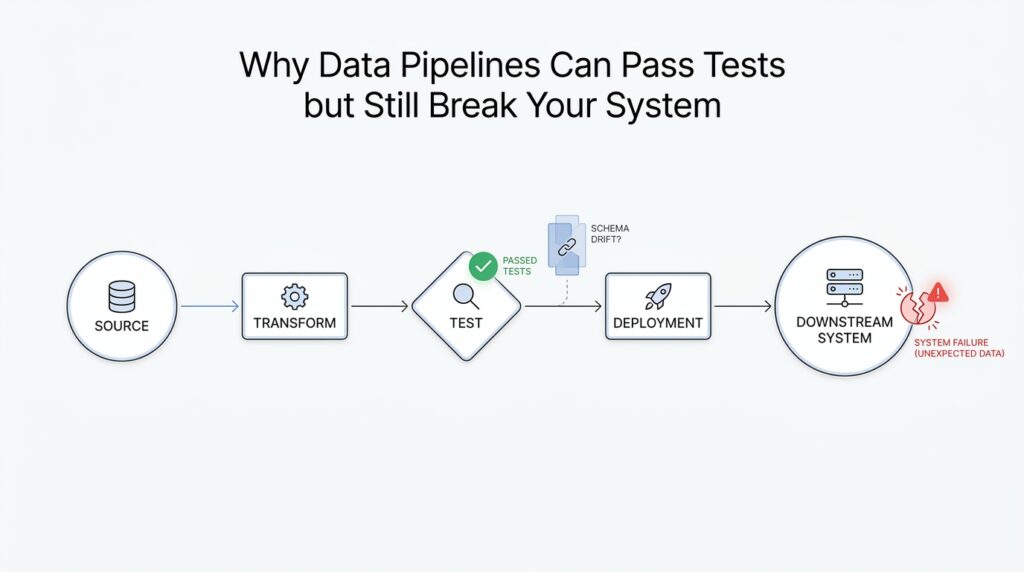
Why Tests Miss Production Reality
You can have a pipeline that looks spotless in the test environment and still watch it stumble the moment real data arrives. That mismatch is one of the hardest parts of working with data pipelines: tests are designed to prove a system behaves as expected, while production is full of surprises. If you have ever wondered, “Why do data pipelines pass every test and still break in production?” the answer usually starts with the fact that tests are built around controlled conditions, not messy reality.
The first gap comes from the fact that tests usually use synthetic data, meaning fake or carefully chosen sample records that are easy to predict. In practice, that is a little like practicing a parade march on an empty street and then expecting the same performance in rush hour traffic. Your test data may have the right columns, the right types, and the right number of rows, but real production data often carries strange edge cases, missing values, duplicate identifiers, late arrivals, and weird formatting that no one thought to model. A data pipeline can pass tests because the samples are polite, while production reality is far less cooperative.
Another reason tests miss production reality is that they usually check correctness in isolation. A unit test, which verifies one small piece of code at a time, is useful for catching obvious mistakes, but it does not show how that piece behaves when it meets a database, an API, a file system, a scheduler, or another team’s dataset. Even an integration test, which checks how multiple parts work together, still runs in a setup that is smaller, cleaner, and more predictable than the live system. The result is that the pipeline can seem healthy in the lab while hidden dependencies wait quietly for the real workload to expose them.
Production also changes in ways tests cannot fully anticipate. Data sources drift, meaning they slowly change shape, meaning, or quality over time, and that drift often slips past tests because the test cases were written for last month’s assumptions. A column might start arriving a few hours late, a partner might change a timestamp format, or a record that used to be optional might suddenly become missing in large batches. When that happens, the pipeline failure is not always dramatic at first; sometimes it is a slow leak, where the output is technically valid but increasingly wrong.
There is also the environment itself. A staging environment, which is a pre-production setup meant to imitate the live system, often behaves differently from production because it has less traffic, smaller datasets, fewer concurrent jobs, and different timing. Those differences matter more than they seem, because data pipelines are sensitive to volume, order, and timing in a way that many software tests are not. A query that finishes instantly on a tiny test table can become slow, unstable, or expensive when production data grows, and that is why passing tests does not always mean a pipeline is ready for the real world.
The deeper issue is that tests usually measure what we already know to look for. Production reality includes what we did not know to ask about yet. That is why resilient data pipelines need more than green test results; they need monitoring, data quality checks, and alerts that watch for broken patterns after deployment. In other words, tests help us prepare, but they cannot replace the feedback we get when the pipeline is actually carrying live data through a living system.
Once you see that difference, the mystery starts to clear. Tests are not failing; they are answering a narrower question than production asks. The next step is learning how to design checks that reflect real workloads, so we can catch the kinds of failures that only appear after the pipeline leaves the safety of the test environment.
Schema Drift at Ingestion
Now the story gets more specific, because the first place a pipeline feels real-world pressure is at the door where data comes in. That doorway is ingestion, the moment raw records enter your system and get checked, copied, or reshaped before anything else happens. This is where schema drift, which means the structure of incoming data changes over time, often shows up first. You can think of it like a warehouse receiving boxes with a packing list; if the list changes, the whole sorting process can wobble before anyone notices.
What happens when a pipeline receives a field it has never seen before? That is the kind of question schema drift raises, and it is much more common than beginners expect. A source might add a new column, rename an existing one, drop a field for a day, or switch a value from text to a number. Each of those changes can look small on paper, but at ingestion they can feel like a wrong key in a lock: the data still arrives, yet the pipeline no longer knows exactly how to open it.
The tricky part is that schema drift does not always fail loudly. Sometimes the ingestion step throws an error and stops the flow, which is actually the easy case because you see the break immediately. Other times the pipeline tries to be helpful by filling missing fields with blanks, guessing types, or quietly discarding unknown columns, and that is where the trouble becomes subtle. The records still move forward, but now you are feeding downstream tables a version of the data that looks valid while carrying the wrong meaning.
That is why ingestion is such an important checkpoint in data pipelines. If the input schema is the blueprint of a house, ingestion is the front gate where we compare the blueprint to the delivery truck before we let anything inside. When schema drift happens here, the system is not just dealing with a formatting annoyance; it is deciding whether a changed payload should be accepted, rejected, or parked for review. A careful pipeline often uses schema validation, which is a check that confirms incoming data matches expected fields and types, so the mismatch is caught before it spreads.
But rigid validation is only part of the answer, because real data sources change for ordinary reasons. A partner team may release a new API version, a vendor may add optional metadata, or a product event stream may start carrying extra context that did not exist last week. If your ingestion layer assumes every message will stay frozen forever, schema drift will keep surprising you. If it instead allows controlled change, with clear rules for what is acceptable and what needs attention, the pipeline can absorb growth without losing trust.
This is also why teams often talk about contracts, which are shared expectations about what data should look like. A data contract gives both sides a common promise: these fields will exist, these types will stay stable, and these changes require advance notice. When that promise is missing, schema drift becomes a guessing game at ingestion, and guessing is expensive. You may not lose the job immediately, but you can lose confidence in the numbers, which is often the more dangerous failure.
The practical lesson is that ingestion should behave like a careful gatekeeper, not a passive hallway. It needs to notice when the shape of incoming data has changed, decide whether the change is safe, and surface the difference before downstream models, reports, or alerts inherit the damage. Once you start looking there, schema drift stops feeling mysterious and starts looking like a solvable boundary problem. That sets us up for the next question: how do we design pipelines that can notice change early without blocking every harmless update?
Synthetic Data Blind Spots
Synthetic data often feels like a safe rehearsal space: the columns are where you expect them, the values behave themselves, and the pipeline runs without complaint. That is exactly why it can create blind spots in data pipelines. When we build fake data that looks tidy, we usually reproduce the shape of reality without reproducing its pressure, and the difference only appears later, when production data arrives with stranger edges and noisier behavior. If you have ever asked, why do synthetic data tests still miss real failures? the answer is that the test data often mirrors our expectations more faithfully than it mirrors the world.
The first blind spot is that synthetic data tends to be too normal. Real data is full of awkward combinations that rarely show up in hand-built samples: a user who signs up, cancels, and reactivates in the same day, or a shipment that arrives late, then backfills an older timestamp, then gets corrected again. A synthetic dataset may cover the happy path and a few obvious errors, but it often misses those messy overlaps that make data pipelines stumble. The problem is not that the fake data is wrong; it is that it is too neat to reveal how the system behaves when life gets complicated.
Another blind spot appears in the relationships between fields. Synthetic data can match types and formats while still missing the deeper correlations that real systems depend on. For example, a status field might usually change only after a timestamp moves forward, or a region code might only appear with certain product lines, or a null value might only happen when a partner API times out. When those dependencies are absent, the pipeline looks healthy in tests but has never been asked to preserve the same hidden logic that production data carries every day.
This is where synthetic data can quietly mislead us in data pipeline testing. We may believe we are covering edge cases because we included blanks, duplicates, and odd dates, but we still leave out the combinations that matter most. Real failures often come from the interaction of several small things at once: a late record plus a type conversion plus a downstream join that assumes uniqueness. Synthetic data blind spots grow in those gaps, because tests can confirm that each part works alone without proving that the whole chain survives under realistic stress.
Timing is another place where fake data often falls short. Production does not send records in a perfect line; it sends bursts, delays, retries, and replays. A synthetic dataset usually arrives in one smooth batch, which means it does not show us how the pipeline handles out-of-order events, duplicate deliveries, or records that show up after downstream reports have already run. That matters because many data pipelines are not only about correct values; they are also about correct order, and timing can change the meaning of the same record.
We also have to remember that synthetic data is shaped by the person who created it. If we do not know which weird cases to model, we will not model them, and the blind spots stay invisible. That is why good synthetic data works best as a rehearsal, not as a promise. It can help us validate basic transformations, catch obvious schema problems, and confirm that the pipeline behaves as expected, but it should not be treated as a full substitute for production-like monitoring, replayed historical data, or checks against real-world distributions.
The practical lesson is that synthetic data should widen our confidence, not replace our curiosity. We want it to ask, “What if this field is missing, late, duplicated, or correlated in a way we did not expect?” and then we want to compare those answers with real observations after release. That is how we move from a polite test environment to a more honest view of data pipelines, one where the test data helps us learn, but the living system still gets the final word.
Freshness and Volume Mismatches
If schema drift is the doorway problem, freshness and volume mismatches are the weather problem. The pipeline can be perfectly wired, the fields can line up, and the tests can still pass, yet the system stumbles because the data arrives at the wrong time or in the wrong amount. What happens when yesterday’s records show up today, or when a quiet stream suddenly turns into a flood? That is where data pipeline testing often meets its next hard lesson: correctness is not only about shape, but also about timing and scale.
Freshness is the age of the data, and it matters because many pipelines assume information arrives in a steady rhythm. A daily report, for example, may expect sales from the last 24 hours, not sales that were delayed for two days and quietly slipped into the next run. When that timing slips, the numbers may still look valid, but they no longer describe the same moment in the business. In practice, a freshness mismatch can make a dashboard tell the truth about the wrong day.
Volume mismatches are the other half of the story, and they can be even trickier because the pipeline may appear healthy right up until the workload changes. A volume mismatch means the amount of data is far smaller or far larger than expected, like a grocery store receiving one box instead of one hundred, or one hundred times more than usual. Tests often run with tidy sample sizes, so they do not reveal how joins, sorts, memory usage, or storage costs behave when production data grows suddenly. In data pipeline testing, that difference can be the line between a fast job and a job that times out, backs up, or drains resources unexpectedly.
The hard part is that freshness and volume mismatches do not always announce themselves with a clear failure. Sometimes the pipeline finishes, but it finishes with stale data, partial results, or delayed downstream updates. Other times the job succeeds technically while silently skipping records because the input batch was too large for an assumption buried in the code. That is why people ask, “Why does my data pipeline pass tests but fail in production?” and the answer often lives in these timing and scale gaps, not in the transformation logic itself.
We can think of freshness like milk and volume like water pressure. Milk can still be milk after sitting too long, but it is no longer fit for the same use; data can still be data after it ages, but it may no longer support a decision made this morning. Water pressure can be fine in a small kitchen test, then overwhelm a pipe when a whole building turns on at once. Production data behaves the same way: the content may be correct, yet the context changes the outcome.
This is where real-world data pipeline testing needs to widen its view. A good test does not only check whether a transformation works on one sample batch; it also asks whether the pipeline can handle late arrivals, duplicate arrivals, missing arrivals, and bursts of arrivals. That means looking at data freshness as a first-class concern and treating expected volume as a contract, not a guess. When those expectations are explicit, we can compare them against reality instead of discovering the mismatch after a report is already out the door.
The downstream effects can be surprisingly broad. A freshness mismatch can break time windows in metrics, which are the slices of time used to calculate totals, averages, or alerts. A volume mismatch can distort those same metrics by making a day look unusually quiet or unusually busy, even when the source system is behaving normally. In other words, one problem changes when the data means something, and the other changes how much of that meaning gets through.
Once we see that pattern, the path forward becomes clearer. We do not want pipelines that merely survive a small, polite test batch; we want pipelines that can recognize stale data, absorb bursts, and tell us when the real world has drifted away from our assumptions. That is the next layer of resilience, and it turns data pipeline testing from a rehearsal into a far more honest conversation with production.
Hidden Dependencies and Lineage
At this point, the pipeline may have already survived schema checks, synthetic data, and freshness tests, yet there is still a quieter failure mode waiting in the wings. Hidden dependencies are the invisible ties between parts of a data pipeline, and lineage is the path data takes as it moves through those parts. When we miss either one, data pipeline testing can look green while the real system is already leaning on a weak spot.
Hidden dependencies are tricky because they often live outside the code you are staring at. A pipeline might depend on a file arriving in a certain order, a table being refreshed before a report runs, or a timezone staying the same across two systems that were never designed together. In a test environment, those assumptions can go unnoticed because everything is controlled and polite, but in production they behave like hidden wires under the floor. The moment one wire is cut, the whole room goes dark.
Lineage gives us the map we need when that happens. Think of lineage as the breadcrumb trail for data: where it came from, what transformed it, and which downstream tables, dashboards, or models now depend on it. That trail matters because a pipeline does not live in isolation; it is part of a larger system of data pipelines, and one small change upstream can ripple outward in surprising ways. Without lineage, we may see the symptom first and spend hours guessing at the cause.
This is why a pipeline can pass tests and still break the business. The test might verify that one transformation works, but it may never reveal that the same output is also feeding a downstream model, a finance report, and a customer-facing dashboard. When you ask, “Why does my data pipeline pass tests but fail in production?” the answer is often that the test only checked the step in front of you, not the chain behind and ahead of it. Hidden dependencies and lineage make that chain visible.
The problem gets sharper when timing enters the picture. A job may quietly depend on another job finishing first, or on a retry mechanism that only exists in production, or on a backfill that replays older records through the same path. In data pipeline testing, those invisible relationships can stay dormant because the test run uses one clean path from start to finish. Real workloads are messier: jobs overlap, sources lag, and one team’s late deployment becomes another team’s broken assumption.
Lineage helps us see the blast radius before a failure spreads. If a source field changes, lineage can show which downstream joins, aggregations, and reports inherit that change, which means we can test the right places instead of poking at random ones. That shift is powerful because it changes testing from a local question, like “Did this step succeed?”, into a system question, like “Who depends on this result, and what will they feel if it changes?” Once we ask that, hidden dependencies stop being mysterious and start looking like traceable relationships.
This is also where a lot of teams discover that the strongest pipelines are not the most rigid ones, but the most observable ones. When lineage metadata, dependency graphs, and runtime alerts work together, we can trace a bad output back to the exact source of the break instead of guessing in the dark. We can also spot fragile assumptions early, before they become the kind of production issue that surprises everyone at once. That is the real value of lineage in data pipeline testing: it turns scattered failures into a visible story.
So the next time a test passes but a live pipeline behaves badly, it helps to look beyond the transformation itself and ask what it secretly depends on. Which upstream job must finish first, which downstream consumer assumes the output never changes, and which path did the data travel to get here? Those questions are where hidden dependencies and lineage reveal the shape of the system, and once we can see that shape, we can design pipelines that fail less mysteriously and recover far more gracefully.
Add Observability and Alerts
After we have watched tests miss schema drift, freshness problems, and hidden dependencies, the next question becomes more practical: how do we notice trouble once the pipeline is already running? That is where observability and alerts come in. In data pipeline testing, observability means building the ability to see what the pipeline is doing in real time, while alerts are the messages that nudge us when something looks off. Think of it like moving from a pre-flight checklist to a cockpit with live instruments, because the plane still needs someone watching the gauges once it is in the air.
This is the shift that changes a pipeline from being merely tested to being understood. Tests tell us whether a pipeline matched expectations in a controlled moment, but observability tells us whether it is still healthy when real data starts flowing. We want to know not only that a job finished, but also how many records it processed, how long it took, how many failed, and whether the output looked normal compared with yesterday. When we ask, “How do you know your data pipeline is broken before users do?”, observability is usually the answer.
The easiest place to start is with metrics, which are numbers that summarize behavior over time. A metric might show row counts, latency, error rates, null values, or the lag between ingestion and delivery. These numbers matter because they turn a vague feeling into something measurable. If a pipeline usually processes one million rows and suddenly drops to ten thousand, that is not a small detail; it is a signal that something changed upstream, even if the job technically succeeded.
Logs and traces add the next layer of clarity. Logs are timestamped messages that record what happened at a particular step, while traces follow a record or job as it moves through the pipeline like a breadcrumb trail. Together, they help us answer the question behind the failure, not just the fact of the failure. Maybe a load step timed out because an upstream API slowed down, or maybe a transformation quietly skipped records because a field changed type; observability gives us the evidence to tell the difference.
Alerts are useful only when they point to meaningful change. A good alert is not a fire alarm for every tiny fluctuation, because that trains people to ignore it. Instead, it should warn us when a metric crosses a threshold, breaks a pattern, or disappears entirely. For example, if a daily batch usually lands by 6 a.m. and nothing arrives by 6:30, that is worth attention. If null values in a critical column jump from 1 percent to 40 percent, that is also worth attention. The alert should feel like a tap on the shoulder, not constant shouting.
This is why alerts work best when they sit on top of business context, not only technical noise. A pipeline can look healthy from a system perspective while still producing the wrong answer for the business. That is why good data pipeline testing should connect technical signals to outcomes the team actually cares about, such as missing revenue records, delayed customer events, or broken report freshness. Observability helps us see the machinery; alerts help us protect the people relying on it.
We also need to think about thresholds carefully. If we set them too tight, the system cries wolf all day and no one trusts it. If we set them too loose, the problem grows quietly until it becomes expensive to fix. The sweet spot comes from watching normal behavior long enough to know what “normal” really looks like. That might mean learning typical record counts by hour, expected delivery windows, or the usual range of nulls and duplicates before deciding what should trigger a warning.
The real value of observability is that it shortens the distance between cause and discovery. Instead of waiting for a broken dashboard or a confused stakeholder to reveal the issue, we get an early sign that something is drifting. That does not eliminate failures, but it changes their shape: problems become smaller, clearer, and faster to repair. In practice, that is what makes data pipeline testing stronger, because the test results and the live signals start working together instead of living in separate worlds.
So if tests are the rehearsal, observability is the live stage crew watching every cue, and alerts are the hand signals that say, “Pay attention right now.” Once we add those layers, we stop hoping the pipeline will stay healthy and start knowing when it does not. That is the point where a fragile pipeline begins to feel trustworthy, and it sets us up to talk about the habits that keep that trust intact over time.