Define Qualification Criteria
Building on this foundation, the next question is not whether the AI voice assistant can answer the phone, but what it should do with the conversation once it starts. That is where qualification criteria come in: they are the clear rules that help the assistant decide whether a caller is a strong sales lead, a support case that needs attention, or a conversation that should be routed elsewhere. Think of them like the recipe we follow before we serve a dish; without the right ingredients, we may still have something on the plate, but it will not be the right result. If you have ever wondered, “How do you know which callers deserve a sales handoff?” this is the part that answers that question.
In simple terms, qualification criteria are the signals that tell us whether someone fits the business goal we care about. For lead qualification, those signals often include company size, budget, purchase timeline, location, industry, or the specific problem they are trying to solve. For intelligent customer service, the criteria may look different: urgency, issue type, account status, or whether the caller needs a human right away. The important idea is that the AI voice assistant is not guessing; it is checking for the markers we have already decided matter most.
This is where many teams get their first big lesson. Not every useful criterion is a sales criterion, and not every caller should be treated the same way. A person calling about a billing error may not be a hot lead, but they may be highly important from a service standpoint, while a curious visitor asking about pricing may be worth nurturing even if they are not ready to buy today. When we define qualification criteria well, we help the AI voice assistant sort those paths cleanly, so people feel heard instead of shuffled around.
The best criteria are usually the ones that are easy to ask, easy to understand, and closely tied to real business outcomes. For example, “How soon are you looking to get started?” is often more helpful than a vague question like “Are you serious?” because it gives the assistant something concrete to work with. In the same way, “What product are you using?” can be a stronger support signal than “Tell me about your issue,” because it narrows the problem faster. We want the conversation to feel natural, but we also want each answer to move us one step closer to the right decision.
As we discussed earlier, a voice assistant works best when it follows a thoughtful path rather than a script that feels robotic. That means we should define qualification criteria in layers, starting with the most important questions and only digging deeper when the first answers point in the right direction. For a lead qualification flow, the first layer might identify the caller’s need; the second layer might check fit; and the final layer might confirm whether a human should take over. This layered approach keeps the AI voice assistant fast, polite, and useful, which matters a lot when someone is calling during a busy workday.
It also helps to remember that good criteria are not about excluding people too aggressively. We are trying to separate the right next step from the wrong one, not build a wall between the caller and the business. If the criteria are too strict, the assistant may miss promising opportunities; if they are too loose, sales teams may waste time on low-fit conversations. The sweet spot is a practical balance: enough structure to qualify leads reliably, but enough flexibility to recognize when a human judgment call is needed.
Taking this concept further, the real value comes from turning those criteria into a shared map between marketing, sales, and support. Once everyone agrees on what counts as qualified, the AI voice assistant can ask better questions, route calls more accurately, and create a smoother experience for the person on the other end of the line. That shared definition becomes the backbone of lead qualification, and it also makes intelligent customer service feel more responsive and intentional. With that in place, we can move from vague conversations to a system that knows what to listen for and what to do next.
Design Conversation Flows
Building on this foundation, the next question is how the AI voice assistant should move through the conversation without sounding stiff or getting lost. A conversation flow is the path the assistant follows: what it asks first, what it asks next, and how it responds when the caller gives a clear answer, a vague answer, or no answer at all. How do you design a conversation flow that feels natural while still qualifying leads and handling customer service well? We start by thinking less like writers of a script and more like designers of a guided path.
The easiest way to picture it is as a hallway with a few doors, not a maze. The assistant opens with one broad question that matches the caller’s likely intent, then narrows the path based on the response. If someone sounds like a potential buyer, the AI voice assistant can move into lead qualification; if they sound frustrated or need help, it can shift into intelligent customer service. That first branch matters because it keeps the conversation relevant, which is what makes the experience feel human instead of mechanical.
Once the first turn is clear, we want each step to earn its place. A good flow asks only what it needs, in the order that helps the caller feel understood fastest. For example, instead of piling on questions, the assistant might first identify the reason for the call, then confirm a detail like company size, product use, or urgency, and then decide whether to continue, route, or hand off. This is where lead qualification becomes practical: the conversation flow turns criteria into a living exchange, not a checklist hidden behind the scenes.
Here is where things get interesting. Real callers rarely follow a neat path, so the flow has to handle detours with patience. Someone may answer indirectly, change the subject, or hesitate when asked about budget or timeline, and the assistant should know how to recover without sounding pushy. In practice, that means planning follow-up prompts, fallback questions, and polite clarifications ahead of time. Think of it like a good host at a crowded event: if one question does not land, they try another route instead of freezing.
A strong flow also separates the moments that need automation from the moments that need a human. In intelligent customer service, this is especially important because some issues are sensitive, urgent, or simply too nuanced for a voice assistant to resolve alone. The flow should make those handoff points feel smooth, with the assistant summarizing what it learned before transferring the call. That way, the caller does not have to repeat themselves, and the human agent starts with context instead of confusion.
As we discussed earlier, the best systems are not rigid; they are layered. The same idea applies here, because the flow should begin with the most common path and only branch deeper when the conversation calls for it. A new visitor asking about pricing may need a short lead qualification path, while an existing customer reporting an outage may need a faster service path with immediate escalation. When you design these paths clearly, the AI voice assistant can stay responsive, avoid wasted questions, and support both sales and service without mixing the two.
The final piece is making the flow feel conversational, not programmed. That means using plain language, one idea at a time, and transitions that sound like a real person keeping the conversation moving. Instead of asking four things at once, the assistant should guide the caller through one step, listen carefully, and then choose the next step based on what it heard. When that design is in place, the conversation flow becomes the quiet structure behind the whole experience, helping the AI voice assistant qualify leads, support customers, and know exactly when to move forward.
Build Voice AI Pipeline
Building on this foundation, the voice AI pipeline is the machinery that turns your conversation rules into a live phone experience. How do you turn a conversation flow into something that actually works in real time? We follow the path in order: the caller speaks, the system captures the audio, speech recognition turns that audio into text, the assistant interprets the meaning, and text-to-speech turns the reply back into voice. OpenAI describes this as a chained architecture, while AWS frames voice agents as a blend of speech recognition, natural-language understanding, and speech synthesis.
The first job in the pipeline is listening well, because a phone call is rarely clean and polished. Automatic speech recognition, or ASR, which means software that converts spoken audio into text, has to handle accents, pauses, background noise, and the quirks of telephony. Google’s Dialogflow documentation points out that voice agents often benefit from telephony-oriented speech models such as telephony_short and phone_call, which is a useful reminder that a caller on a mobile line is not the same as a person typing in chat.
Once the transcript exists, the assistant can do the work we planned earlier: compare what the caller said against the qualification criteria and conversation flow. This is where the language model or dialog manager looks for the signals that matter, decides whether the caller is a sales opportunity, a support issue, or a case for immediate human help, and chooses the next question accordingly. Google also notes that speech adaptation can use conversation state and phrase hints to improve recognition, which helps the pipeline stay aligned with your products, issue types, and common caller phrases instead of drifting off course.
After the assistant decides what to say, the last mile is voice output. Text-to-speech, or TTS, which means software that turns text or Speech Synthesis Markup Language (SSML) into audio, gives the caller a spoken answer that sounds steady and clear instead of robotic text read aloud. OpenAI also notes that newer speech-to-speech approaches can process and generate audio more directly, which can reduce the number of hops in the pipeline when you need a faster, more natural exchange. In practice, that means you can choose between a traditional staged path and a more direct voice model depending on the experience you want to build.
A strong pipeline also knows when to stop trying to be clever and let a human take over. That handoff matters because real callers can be frustrated, urgent, or vague, and a good system should summarize what it learned before transferring the call so the person on the other end does not have to start over. AWS notes that streaming and telephony integration help manage audio I/O, routing, dual-tone multi-frequency input, and media transport, which is the quiet infrastructure that keeps the experience from feeling jumpy or disconnected.
When we put all of this together, the voice AI pipeline looks less like one giant brain and more like a well-rehearsed team. One layer listens, one layer interprets, one layer decides, and one layer speaks, while the orchestration in between keeps timing, fallback prompts, and escalation paths from feeling abrupt. That is the real payoff: the caller experiences a calm conversation, while behind the scenes we have a structured system that can be tuned, measured, and improved one stage at a time. With that structure in place, the next step is to make the pipeline resilient enough to handle mistakes, silence, and messy real-world calls without losing the thread.
Integrate CRM and Support Tools
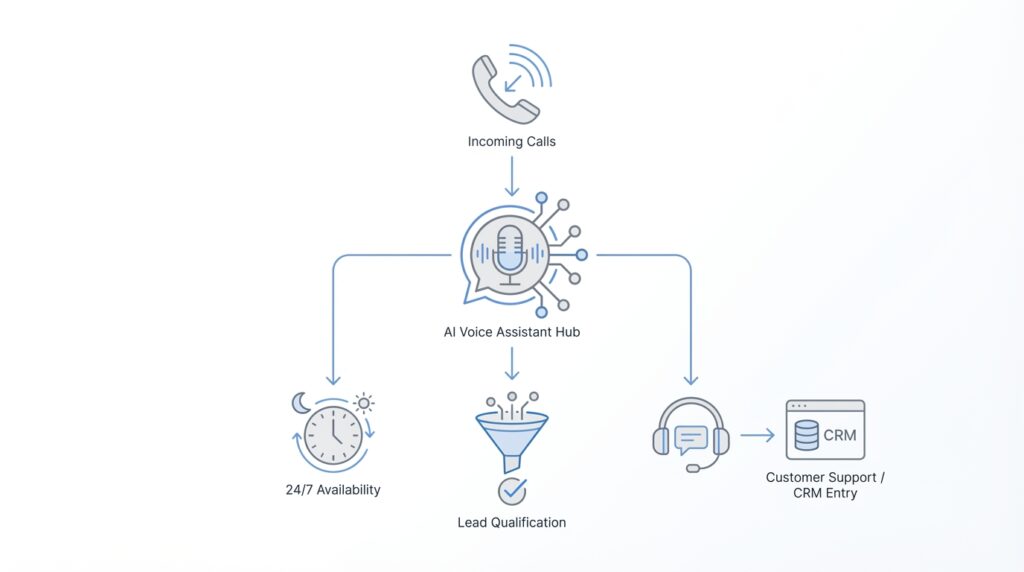
Building on this foundation, the AI voice assistant becomes far more useful when it is connected to the systems your team already trusts. CRM integration, which means linking the assistant to your customer relationship management system, gives every call a memory: who is calling, what they have asked before, and where they are in the journey. At the same time, connecting support tools such as a help desk, ticketing platform, or knowledge base lets the assistant do more than talk; it can look up answers, create cases, and hand off the right context. How do you keep that from becoming a messy web of disconnected data? We start by treating integration as the bridge between a good conversation and a useful business action.
The first step is making sure the AI voice assistant can read the right records at the right moment. When a known contact calls, the assistant can check CRM data such as company name, open opportunities, recent notes, and account status before asking the caller to repeat anything. That small detail changes the whole experience, because the conversation feels informed instead of generic. If the caller is already a customer, the assistant can also pull support history from the ticketing system and see whether there is an open issue, a recent escalation, or a case that was already resolved.
This is where support tools and CRM integration begin working like a shared desk instead of separate filing cabinets. The CRM gives the assistant the relationship picture, while the support platform gives it the service picture. Together, they help the AI voice assistant decide whether the caller is a sales lead, a billing question, a technical problem, or an urgent case that should go straight to a human. That shared view matters because the assistant does not need to guess; it can respond based on the actual state of the account.
Once the systems are connected, the assistant can also write information back where it belongs. After a lead qualification call, it can update the CRM with details like budget, timeline, product interest, and decision-maker status, so the sales team starts with a clean summary instead of scattered notes. After a support call, it can create or update a ticket, tag the issue type, and attach the call summary so the next agent has context from the first second. This back-and-forth is what makes integration feel less like a feature and more like a workflow that keeps moving even after the call ends.
Before we go further, it helps to think about permissions and data quality. Not every system should share everything, and not every field should be editable by the assistant. A well-designed setup gives the AI voice assistant access only to the information it needs, then limits what it can change so records stay accurate and secure. It also uses consistent field names and statuses, because one team’s “high priority” should not become another team’s “urgent,” or the automation will start making confusing choices.
Here is where things get interesting: the assistant can use CRM and support data to make the conversation itself smarter. If the caller is a repeat customer with an unresolved ticket, the assistant can acknowledge that history and route them faster. If the caller is a new prospect whose company already exists in the CRM, the assistant can avoid duplicate records and continue the qualification flow with less friction. This is one of the biggest reasons AI voice assistant systems feel strong when they are connected well: they behave like they remember the relationship, even though they are seeing the call for the first time.
In practice, the best integrations also help teams work together after the call. Sales, support, and operations all benefit when the assistant logs structured notes, updates records in real time, and sends the next person in line a clean summary. That shared handoff is the quiet power of CRM integration and support tools: fewer repeated questions, faster routing, and a smoother customer experience from start to finish. With that bridge in place, the AI voice assistant stops being only a voice at the front door and becomes part of the system that actually keeps the business moving.
Handle Escalations and Routing
Building on this foundation, we now face the moment that decides whether a conversation stays smooth or starts to wobble: what happens when the AI voice assistant reaches a point it should not handle alone? Escalations and routing are the safety rails of the whole experience. They decide when a caller should be moved to sales, support, billing, or a live agent, and they do it before the conversation starts to feel stuck. How do you make that handoff feel helpful instead of abrupt? We do it by treating routing as part of the conversation, not as an emergency exit hidden at the end.
The first step is learning to spot the signs that a human should step in. Sometimes the caller is highly qualified and ready for a specialist; sometimes they are frustrated, confused, or asking about something sensitive that the assistant should not improvise around. In an AI voice assistant for 24/7 lead qualification and customer service, escalation is not a failure. It is the system recognizing that the next best experience is a person with the right context, the right authority, and the right empathy.
Once that idea clicks, routing becomes much easier to design. We can think of it like a front desk in a busy building: the assistant welcomes the caller, listens for the reason they came in, and then directs them to the right room. A sales lead may need routing to an account executive, a technical issue may need support, and an urgent account problem may need immediate escalation to a senior agent. The key is that routing should follow the qualification criteria and the conversation flow we already built, so the assistant is not guessing where to send people.
Good routing also depends on timing. If the AI voice assistant waits too long, the caller may repeat themselves or lose patience; if it routes too early, it may interrupt a conversation that could have resolved itself. That is why the system should watch for clear triggers such as repeated clarification, negative sentiment, high urgency, or a request for a person. In practice, these triggers help the assistant know when to pause the automation and hand the call to someone who can take over with confidence.
Here is where escalation handling becomes especially important. When a handoff happens, the assistant should not disappear without explanation; it should summarize what it learned in plain language and pass along the details already collected. That summary might include the caller’s goal, the issue type, the level of urgency, and any qualification details gathered so far. This small step prevents the painful experience of making someone repeat their story, which is one of the fastest ways to make a voice assistant feel disconnected.
Routing can also work in layers, which gives the system more precision without making it feel complicated. A simple question may send the call to the right department, while a more specific pattern of answers may determine whether the call goes to a general queue, a specialist, or an immediate human escalation. This layered approach is especially useful in customer service, where a billing question, a login issue, and a contract dispute may all need different paths. It is also valuable in lead qualification, because a strong lead may deserve a faster handoff than a casual inquiry.
The best systems keep learning from these handoffs. If callers are often routed to the wrong place, that is a sign the criteria need refining, the prompts need clearer language, or the escalation rules need another pass. We are not building a rigid gatekeeper; we are building an AI voice assistant that can adapt, reroute, and recover while still protecting the caller’s time. When routing and escalation are designed this way, the whole experience feels less like being transferred around and more like being guided to the right person at the right moment.
Test Responses and Latency
Building on this foundation, testing is where the AI voice assistant stops being an idea on paper and starts proving itself on real calls. We are no longer asking whether the flow looks good in a diagram; we are asking whether it sounds helpful when a person is waiting on the line. How do you test responses and latency in a way that feels realistic? We listen for two things at the same time: whether the answer is correct, and whether it arrives fast enough to feel like a conversation instead of a recording.
Latency is the delay between a caller finishing a thought and the assistant starting its reply, and that pause matters more than many teams expect. A short delay can feel natural, like someone taking a breath before answering, but a long delay makes the caller wonder whether the line dropped or the assistant got confused. In an AI voice assistant, response time affects trust, because people interpret silence as uncertainty even when the system is still processing. That is why testing latency is not a technical side note; it is part of the customer experience itself.
The best place to start is with a small set of sample calls that reflect the real world, not an ideal lab. We want to hear a mix of clear speech, rushed speech, accents, background noise, and the kinds of questions your callers actually ask. This is where response testing becomes useful, because we can check whether the assistant answers the right thing, asks a sensible follow-up, and keeps the conversation moving without repeating itself. If the assistant sounds polished in one perfect recording but struggles when someone interrupts or pauses, the test has done its job by revealing the gap early.
Once we have those samples, we can test the AI voice assistant’s timing from end to end. First, we check how long speech recognition takes to capture the caller’s words. Then, we look at how long the language model or decision layer needs to choose a reply, and finally we measure how quickly text-to-speech turns that reply into spoken audio. That whole chain is what people experience as latency, and even small delays can add up if each step is a little slower than expected. When we measure each piece separately, we can tell whether the slowdown comes from listening, thinking, or speaking.
Here is where the testing becomes especially practical: we do not only want fast replies, we want the right kind of fast. A rushed answer that misunderstands a billing issue is worse than a slightly slower answer that gets the caller to the right place. So we test the assistant against the same qualification criteria and conversation flows we defined earlier, making sure speed does not cause it to skip important questions or route too early. In other words, response quality and voice assistant latency have to be tuned together, because a quick mistake still feels like a mistake.
It also helps to test the moments that usually cause friction. Silence, interruptions, unclear answers, and transfers to a human are all places where timing can break down. If the assistant takes too long before acknowledging a caller, or if it pauses awkwardly after a handoff, the whole experience feels less dependable. A strong AI voice assistant should sound calm under pressure, which means we should test not only the smooth path but also the messy one, where real callers often live.
Taking this concept further, we can think of testing as a rehearsal before opening night. The script may be ready, but we still need to see whether the timing lands, whether the responses sound natural, and whether the caller feels cared for at every step. When those pieces are in place, the AI voice assistant becomes easier to trust, easier to scale, and easier to improve as new call patterns appear. That gives us a stable base for the next stage, where we start refining the system from real usage instead of guesswork.
Monitor Calls and Improve
Imagine your AI voice assistant has been answering calls all day, and the phone no longer feels like a mystery. The real question now is not whether it can talk, but whether it is learning from every conversation. This is where call monitoring and improvement begin: we listen to what happened, compare it with what we wanted to happen, and use that gap to make the system better. In practice, that means treating the AI voice assistant like a living process, not a finished machine.
The first step is creating a clear way to review calls without drowning in noise. We look at transcripts, call recordings, and outcome data, then ask a simple question: did the assistant qualify the lead correctly, resolve the issue, or route the caller to the right place? That kind of voice assistant monitoring helps us spot patterns that are easy to miss in the moment, like callers who keep getting asked the wrong question or cases that stall after the first answer. Think of it like reading the receipts after a busy day in a restaurant; the real story appears once the rush is over.
Once we have those conversations in view, we can start measuring what matters. Some teams focus on conversion rate, which means the share of calls that become qualified opportunities, booked appointments, or resolved cases. Others watch escalation rate, first-call resolution, caller sentiment, and transfer success, which is the handoff quality between the assistant and a human agent. How do you know if the system is improving? You look for fewer dead ends, smoother routing, and a better match between the caller’s need and the assistant’s response.
This is also where quality assurance, or QA, becomes useful in a very practical way. QA means reviewing a sample of calls against a checklist so we can judge whether the assistant followed the intended conversation flow and handled edge cases well. A small sample of real calls often teaches more than a large stack of assumptions, because actual callers do not speak like test cases. One person may ramble, another may pause after every sentence, and another may use a phrase the system has never heard before. Those imperfect moments are exactly what help us refine the AI voice assistant.
As we discussed earlier with routing and escalation, the handoff points deserve special attention. A caller should not feel punished for needing a human, and the agent should not feel like they are starting from zero. When we monitor those calls closely, we can see whether the assistant summarized the conversation well, passed along the right details, and handed off at the right time. If the transfer feels abrupt or repetitive, that is usually a sign that the flow needs a better trigger, clearer phrasing, or a more complete summary.
Taking this concept further, improvement works best when it becomes a weekly habit instead of a one-time cleanup. We review a set of calls, identify the most common failure points, update prompts or routing rules, and then test the change against the next batch of conversations. That cycle is what makes an AI voice assistant get smarter in a business sense, even if the underlying model stays the same. The assistant is not learning in a vacuum; we are teaching it through careful feedback.
It also helps to involve the people who hear the calls every day. Sales, support, and operations each notice different problems, and those different perspectives make the system stronger. Sales may notice that the assistant asks about budget too early, while support may notice that an urgent issue is being routed too slowly. When those observations come together, the AI voice assistant becomes less like a generic script and more like a tuned part of the customer experience.
Over time, the goal is not perfect automation but steady improvement. We want the system to recognize more caller patterns, waste less time, and produce cleaner handoffs with each round of review. That is the quiet power of call monitoring: it turns everyday conversations into a source of insight, and it gives us the feedback loop we need to keep the AI voice assistant useful, calm, and ready for the next call.