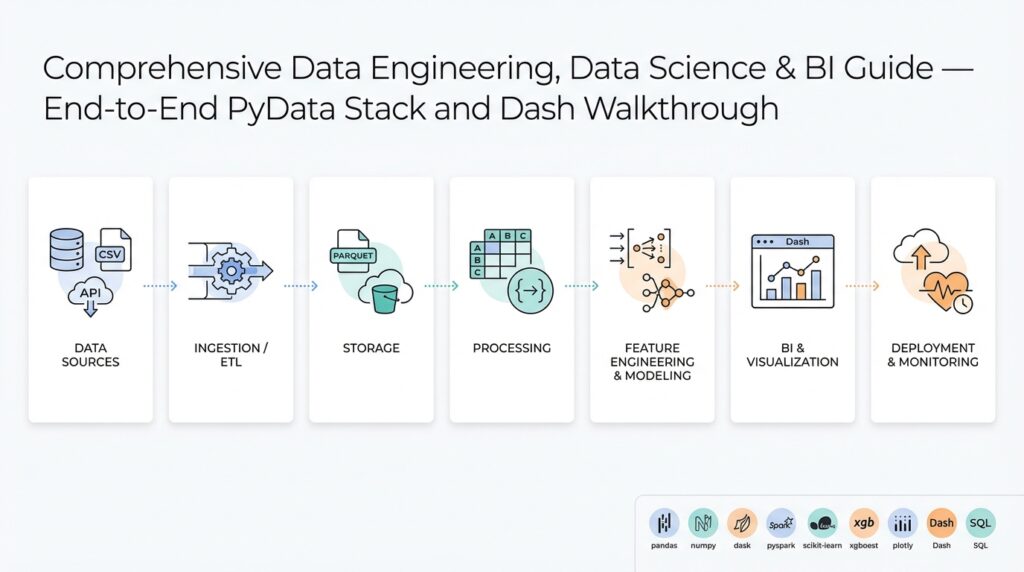
PyData stack: tools and ecosystem overview
When you assemble a modern Python-based data platform, you’re really choosing an ecosystem of interoperable tools rather than a single monolithic framework. The PyData stack centers on NumPy for numerical arrays and pandas for tabular data manipulation; these two libraries define most in-memory data patterns you’ll encounter. Start here: NumPy provides the low-level contiguous arrays and vectorized operations, while pandas gives you a rich DataFrame API for joins, group-bys, and time-series work. Use Jupyter notebooks for iterative exploration and reproducible prototyping—those notebooks act as the glue between small experiments and more formal pipelines.
Building on this foundation, you’ll pick libraries for scaling and parallelism when single-process pandas no longer fits. Dask extends pandas-like APIs across cores or clusters by breaking DataFrames into partitions and executing task graphs; use it when you need horizontal scaling without rewriting code. For columnar in-memory interchange and zero-copy serialization, Apache Arrow lets you move data between Python, Java, and C++ processes cheaply, and it underpins fast I/O and analytics engines. How do you choose between pandas and Dask for a production ETL pipeline? Prefer pandas for development and smaller datasets, migrate to Dask when memory or wall-time grows, and use Arrow as the shared format for connectors.
After ingestion and transformation, modeling and machine learning are natural next steps. scikit-learn remains the pragmatic workhorse for classical models—its estimators, pipelines, and hyperparameter tools are reliable for production-ready feature stores and batch scoring. For GPU acceleration or deep learning, pick frameworks like PyTorch or TensorFlow and consider GPU-aware dataframes such as cuDF where you need to keep data on the device. Build clean interfaces: wrap feature preprocessing in a scikit-learn Pipeline or an sklearn-compatible transformer so you can swap training engines without changing downstream code.
Visualization and reporting complete the loop from data to decision. Use Plotly for interactive charts and Dash for production dashboards when you need programmatic UI and callbacks in Python. Dash integrates well with the same DataFrame objects you transform upstream, so you can pass a Dask or pandas DataFrame into a callback, materialize only the slices you need, and reduce memory pressure. For static reports or embedded analytics, export aggregated results as Parquet (a columnar storage format often used with Arrow) to serve high-performance queries from BI tools.
Operational concerns—testing, deployment, and orchestration—drive many library choices. Containerize reproducible environments with pinned wheels or conda-lock files, and use lightweight orchestration like Prefect or Airflow for ETL schedules and retry semantics. Monitor resource usage and latency: profile pandas operations with sampling and line-profilers, and inspect Dask task graphs when parallelism stalls. For reproducible deployments, freeze your environment (including NumPy and pandas versions), bake Arrow-compatible IO into your contracts, and run end-to-end integration tests that exercise the same APIs your dashboards and models expect.
Taken together, this tooling gives you composability: array math from NumPy, table semantics from pandas, parallel execution from Dask, efficient interchange via Apache Arrow, modeling with scikit-learn, and interactive delivery through Dash and Plotly. In the next section we’ll demonstrate a concrete ETL-to-dashboard workflow that wires these pieces together, showing code-level patterns for moving from exploratory notebook to maintainable pipeline.
Designing data architecture: lake, warehouse, marts
If your data platform were a city, the lake, the warehouse, and the marts are the port, the bank vault, and the storefronts — each optimized for different users, costs, and access patterns. Start by mapping who needs what: analysts want wide, queryable tables; data scientists want raw, high-cardinality snapshots; product teams want low-latency aggregates. That mapping should drive whether you store bytes in an inexpensive object store, normalize and index in a SQL warehouse, or pre-aggregate into targeted data marts for Business Intelligence. Treat this as design by access pattern rather than technology fetishism: match storage characteristics to SLAs and throughput requirements up front.
Building on this foundation of the PyData stack and columnar interchange formats, we can assign clear roles. A data lake (raw object storage) is the canonical landing zone for ingestion and provenance; a data warehouse (SQL-optimized store) enforces schema-on-write and enables performant analytical queries; data marts are curated, denormalized tables or views tuned for specific teams or dashboards. What causes confusion most often is when teams blur these boundaries — when should you keep data in the lake versus promote it to the warehouse? The rule of thumb is simple: if you need frequent, low-latency SQL access and ACID-like guarantees, move it to the warehouse; otherwise keep a versioned raw copy in the lake for reproducibility.
In practice you’ll implement these roles with concrete patterns. Ingest streaming clickstreams and sensor data into the lake as partitioned Parquet files (for example, df.to_parquet(“s3://my-bucket/ingest/date=2026-02-23/part.parquet”) or produce Avro for CDC), then run scheduled or event-driven jobs (Dask, Spark, or Prefect tasks) to transform and upsert into the warehouse using batch or micro-batch approaches. For analytical marts create materialized tables or incremental aggregates keyed by the dimensional model your BI tool expects, e.g., daily_user_metrics(date, user_id, sessions, revenue). Keep a reproducible ETL script and a test dataset so you can replay transformations from raw lake data when models or business logic change.
Schema, governance, and metadata matter more than raw compute choices. Use a central catalog or data catalog API to record schema evolution, owners, and lineage; this lets you validate contracts between producers and consumers and enables automated tests that catch breaking schema changes. Apply schema-on-read for exploratory workflows in the lake and schema-on-write for warehouse tables that back SLAs. Implement column-level sensitivity tagging, retention policies, and compaction strategies (compact small files into larger Parquet files for faster scan and lower request cost) so queries hit fewer objects and your cloud bill doesn’t spike under analytical load.
Performance and cost tradeoffs drive how many and what kind of marts you maintain. Keep high-cardinality, rarely queried sources cold in the lake; keep commonly accessed aggregates hot in marts or materialized views to lower BI query latency and concurrency costs. Choose aggregation frequency based on user needs: hourly for near-real-time dashboards, daily for executive reports. Use incremental CDC pipelines to update marts with low-latency deltas rather than full reloads; this reduces resource usage and shortens recovery windows when backfills are required.
Operationalize the architecture with contracts, observability, and incremental rollout patterns. Define a data contract for each upstream producer and enforce it with lightweight schema checks in CI; log schema violations and metric drift to your observability system so you can triage before dashboards break. Use the Strangler-style approach when migrating: keep raw copies in the lake while you gradually populate warehouse tables and retire legacy sources. With those operational controls in place, we can wire these storage layers into the ETL-to-dashboard workflow and show concrete code patterns and deployment steps for reliable production analytics.
Ingesting and streaming data: tools and patterns
When you design pipelines that are ingesting high-volume event streams you need to treat the ingestion layer as a first-class, observable system rather than a throwaway ETL script. We’re often ingesting raw events, CDC (change data capture) records, and telemetry into the lake or message backbone to preserve fidelity and enable replay. For many teams streaming data is the default transport for low-latency needs, but that doesn’t mean every source should be processed in real time—choosing the right pattern up front reduces rework and cost.
Building on this foundation, decide whether a stream-first or batch-first approach fits each use case. Stream-first works when you require sub-minute freshness, support for event-driven alerts, or continuous feature updates for models; batch-first (periodic micro-batches) is a pragmatic choice for heavier transformations, complex joins, or cost-sensitive analytics. How do you choose between them? Measure latency needs, downstream idempotency constraints, and the complexity of stateful operations—if you can tolerate seconds-to-minutes of delay, micro-batching often gives simpler correctness guarantees.
A few architectural patterns cover most needs: Change Data Capture (CDC) for source-system replication, event sourcing for auditability, the Kappa pattern to keep a single streaming path for both historical and real-time processing, and the Lambda-style hybrid when you need separate optimized paths for batch and speed. Define CDC up front: CDC captures row-level changes from databases and emits insert/update/delete events; it’s the cleanest way to keep a lake and a warehouse synchronized without full-table scans. Event sourcing records immutable events as the source of truth; use it when you need deterministic rebuilds or materialized projections.
Choose your tools to match those patterns and your team’s operational maturity. Apache Kafka (or managed equivalents) is the durable, partitioned log that scales for high-throughput producers; Apache Pulsar and cloud-native streams like Kinesis are viable alternatives with different operational tradeoffs. For stream processing, pick a framework that supports event-time processing and watermarks (Flink, Spark Structured Streaming, or Beam). Use Kafka Connect or Debezium for CDC connectors so you don’t write fragile custom capture logic. These choices let you implement exactly-once or idempotent writes and handle late-arriving events consistently.
Operational concerns are where projects succeed or fail: enforce schema evolution, provide producer contracts, and implement retries with exponential backoff and dead-letter queues. Schema registries (Avro/Protobuf/JSON Schema) make producers and consumers interoperable and let you validate contracts in CI. Make writes idempotent by using stable deduplication keys or transactional sinks when supported; this prevents duplicate aggregates when retries occur. Monitor end-to-end lag, consumer lag, and file/partition sizes for lake writes so you can tune compaction and partitioning strategies.
In practice we often implement a micro-batch landing pattern: consume events from the stream, window them into short intervals (for example, 1–5 minutes), materialize partitioned Parquet files in the lake, then run downstream incremental jobs to upsert warehouse tables. The example below sketches that flow in Python-style pseudocode:
# consume, batch, write partitioned parquet
for batch in consume_kafka(topic, timeout=300):
    df = to_dataframe(batch)
    df = normalize_schema(df)
    df.to_parquet(f"s3://lake/events/date={today}/part-{batch.id}.parquet")
This pattern gives you replayability, controllable latency, and cheaper scan costs for analytical queries compared with tiny-item streaming writes. For use cases needing continuous stateful aggregations (sessionization, rolling metrics), push those into a streaming engine that maintains keyed state and emits compacted updates to the same sink so downstream consumers can choose either the last-known state or the raw event timeline.
Finally, plan for evolution: version schemas, tag sensitive columns, and automate backfills from raw event archives. Observability and lineage let us trace a metric from dashboard back to the exact event file and CDC record; with those controls we can confidently migrate datasets between lake and warehouse without surprises. Taking these patterns together, you’ll balance latency, cost, and correctness while keeping the ingestion layer resilient and auditable as you scale.
ETL pipelines with Pandas, Dask, Airflow
Moving a notebook workflow into a reliable production ETL (extract-transform-load) pipeline is where many projects stall. You’ve prototyped transforms with pandas, validated assumptions with sample data, and then discovered that jobs either blow past memory limits or fail under real-world latencies. We’ll show pragmatic patterns that let you keep pandas for fast iteration, use Dask when you need parallelism and larger-than-memory processing, and orchestrate everything with Airflow so jobs run reliably on schedule or in response to events.
Start by choosing the right runtime for each stage of the pipeline: keep lightweight, row- or column-level cleaning in pandas when the dataset fits memory, and switch to Dask for partitioned, parallel workloads. pandas (the in-memory DataFrame library) is excellent for exploration and deterministic unit tests; Dask (a parallel computing library exposing a pandas-like API) lets you scale those same transforms across cores or a cluster. How do you decide when to prototype in pandas vs scale with Dask? Use pandas while development latency is low and sample sizes are representative; move to Dask when wall time or OOM errors exceed your SLA or when you can exploit partition-level parallelism across independent keys.
Implement hybrid execution patterns so you don’t rewrite transforms twice. One pattern is “develop in pandas, run in Dask”: keep your functions pure and DataFrame-centric, then apply them via map_partitions or by converting a pandas DataFrame to a Dask DataFrame for large runs. For files you can switch at IO time: use pd.read_parquet for local tests and dask.dataframe.read_parquet for production. Small example to illustrate the switch:
# dev: pandas
pdf = pd.read_parquet('data/sample.parquet')
res = transform(pdf)

# prod: Dask
ddf = dask.dataframe.read_parquet('s3://bucket/data/')
res = ddf.map_partitions(transform)
res.to_parquet('s3://bucket/processed/')
When datasets grow but transforms remain embarrassingly parallel, partitioning and incremental processing keep cost and latency manageable. If you’re ingesting event batches, write partitioned Parquet files into the lake (date/hour/partition-key) and materialize incremental aggregates into the warehouse. For smaller sources, stream-chunking in pandas with read_csv(chunksize=…) lets you maintain a single code path for validation and idempotent writes. Make schema checks part of the pipeline (for example, assert column types and nullability) so you can fail fast before downstream jobs consume bad data.
Orchestration ties these pieces into a dependable delivery system. Use Airflow as the scheduler and DAG engine to express dependencies, retries, SLA monitoring, and backfills; treat each transformation as an idempotent task so retries don’t double-write. In practice we trigger a Dask cluster (or Kubernetes job) from an Airflow DAG, pass parameters via XCom or templated runtime configs, and rely on sensors or event triggers for file arrival. A compact pattern is to separate extract, transform, and load into distinct tasks with clear checkpoints (raw landing, validated staging, final store) so you can restart mid-flight and run targeted backfills without recomputing everything.
Operational quality comes from testing, lineage, and idempotency. Unit-test transforms against deterministic fixtures and maintain integration tests that run on CI against a miniature dataset or a local Dask cluster. Add lightweight schema validation (Pandera or Great Expectations) in the transform layer and implement deterministic dedupe keys for upserts into the warehouse. Instrument task durations, partition sizes, and end-to-end freshness in your monitoring system so you can trace a metric from dashboard back to the exact partition. These guardrails let us iterate quickly in pandas while ensuring production runs in Dask and Airflow remain debuggable and reproducible.
Building on the architecture and ingestion patterns we covered earlier, the next step is wiring the transformed artifacts into serving layers and dashboards. We’ll next show concrete code and deployment steps that move validated outputs into materialized marts and interactive views so you can close the loop from raw events to actionable insights.
Exploratory analysis, features, and model prep
Start with a clear investigative goal: what business question or metric will the model affect, and what signals do we expect to move that metric? That question directs every choice during exploratory analysis and keeps us from chasing spurious correlations. In practice, start by sampling representative slices (for example, df.sample(frac=0.1) or time-windowed extracts) so your intuition matches production distributions; when you need scale, swap to Dask partitions with the same transformation functions so behavior stays consistent across runtimes.
During exploratory analysis we quantify distributional shape, missingness, cardinality, and time-based drift. Run column-wise summaries (counts, null rates, unique counts, percentiles) and visualize tail behavior for numeric fields and top-k frequencies for categorical fields. Ask: which features are stable over time and which drift seasonally or after releases? Use group-by aggregations with rolling windows for time series and validate that aggregations used as features won’t leak future information into training folds.
Feature engineering transforms raw signals into predictive inputs; prioritize transformations that are robust and explainable. For numeric skew use log or quantile transforms; for heavy-tailed counts consider np.log1p and clip outliers to a sensible percentile. For categorical high-cardinality variables, prefer frequency or target-based encodings combined with smoothing and noise regularization to avoid overfitting. When creating cross-features, compute them in the same pipeline stage as their base features and preserve provenance (column names and transformation metadata) so downstream audits can trace a coefficient back to source columns.
Preventing leakage is the top practical concern during model prep. Never compute aggregation features across the entire dataset and then split; compute aggregations inside cross-validation folds or use out-of-fold strategies for training features and a holdout-time window for validation. For time-series and sessionized data, use time-aware splits (for example, expanding-window validation or PurgedKFold when labels bleed into adjacent intervals) so performance estimates reflect production latency. If you derive features from downstream events (e.g., conversion timestamps), enforce feature availability windows that match real-time serving constraints.
Production-ready model prep means packaging preprocessing as repeatable, testable pipelines. Implement transformations with sklearn Pipelines and ColumnTransformer so you can serialize the entire preprocessing graph with the model. Example pattern:
from sklearn.pipeline import Pipeline
from sklearn.compose import ColumnTransformer
from sklearn.preprocessing import StandardScaler, OneHotEncoder

num_pipe = Pipeline([('scaler', StandardScaler())])
cat_pipe = Pipeline([('ohe', OneHotEncoder(handle_unknown='ignore'))])
preproc = ColumnTransformer([('num', num_pipe, num_cols), ('cat', cat_pipe, cat_cols)])
model_pipe = Pipeline([('preproc', preproc), ('clf', SomeEstimator())])
When datasets grow, keep the same API but switch implementations: use dask-ml transformers or apply map_partitions to run the same transform functions on Dask DataFrames. Maintain lightweight unit tests that assert transform invariants (no new nulls, expected dtype changes, stable cardinality for categories) and include a small integration test that runs the serialized pipeline against a canned Parquet partition to guard against drift.
Finally, tie feature engineering decisions to operational concerns: compute cost, memory footprint, and latency for online serving. Prefer compact feature representations for low-latency scoring (hashed features, reduced cardinality), and precompute expensive aggregations in materialized marts or feature stores used by both batch and online inference. How do you decide which features run at training time versus serving time? Base that decision on freshness requirements, compute cost, and whether the aggregation can be deterministically reconstructed from inputs available at scoring.
Taking these practices together, exploratory analysis, careful feature engineering, and disciplined model prep reduce surprise during deployment and make retraining and debugging practical. Building on our ETL and serving patterns, next we’ll show how to wire these prepped artifacts into materialized marts and live dashboards so models feed measurable decisions.
Build, visualize, and deploy Dash apps
Interactive, production-ready analytics depend on a tight feedback loop between data transforms and user-facing visualizations. If you want a responsive, maintainable Plotly-driven dashboard that developers can iterate on, choose Dash for its Python-first callback model and tight integration with pandas and Dask—this lets you reuse ETL artifacts directly in the UI. How do you keep interactive dashboards responsive with large datasets? We’ll show patterns for building components, visualizing efficiently, and deploying Dash apps so they behave predictably in production.
Start by designing the app as a thin presentation layer that consumes pre-aggregated artifacts from your ETL. Build the layout with component primitives (html.Div, dcc.Graph, dcc.Store) and keep heavy work in callbacks that accept small query parameters (date ranges, user id, sample size) rather than whole DataFrames. This separation aligns with the earlier ETL-to-dashboard workflow: materialize incremental marts or Parquet partitions and fetch only the slices needed for a view. When you structure data access this way, you can reuse the same pandas/Dask transforms you validated in CI and avoid shipping full tables to the browser.
Implement callbacks that operate on identifiers and load data lazily on demand. For example, have a callback signature that receives a date range and returns a Plotly figure after reading a partitioned Parquet file or querying a materialized view. Keep functions pure so you can unit-test them and swap implementations between local pandas and dask.dataframe without changing the callback logic:
@app.callback(Output('main-fig', 'figure'), [Input('range', 'value')])
def update_figure(date_range):
    df = read_partitioned_parquet(date_range)  # returns small slice
    fig = make_plotly_figure(df)               # pure plotting function
    return fig
Control client-side cost by minimizing the points sent to Plotly and by choosing the right renderer. Use WebGL-backed traces (scattergl) for millions of points, aggregate with binning for heatmaps, or compute summaries server-side for categorical comparisons. For time-series with dense sampling, downsample using LTTB (largest-triangle-three-buckets) or compute rollups per pixel width to preserve visual fidelity while reducing payload. These approaches let you keep rich interactivity—hover, zoom, linked brushing—without overloading browser memory or network bandwidth.
Manage state and caching intentionally to preserve latency SLAs. Use dcc.Store for small client-side state, but keep larger caches on the server using flask-caching, Redis, or diskcache and key them by query parameters or partition id. Memoize expensive transforms and invalidate keys on upstream schema or business-rule changes. When concurrency grows, isolate expensive transforms in background workers and return placeholders to the UI while materialization finishes; the UI can poll for readiness or subscribe to a websocket update to avoid blocking user interactions.
Deploy with infrastructure that matches your concurrency and resiliency requirements. Containerize the app with a minimal Python base, run Gunicorn with multiple worker processes, and place a reverse proxy (NGINX) or a load balancer in front. A compact Dockerfile pattern works well: build a slim wheel install, expose the Flask server, and run gunicorn -w 4 “app:server”. For autoscaling and orchestration, deploy to Kubernetes or a managed container service and use readiness/liveness probes plus resource requests/limits so pods scale predictably under load.
Instrument, test, and iterate after deployment so dashboards remain reliable as data evolves. Add request and metric logging, export latency and error metrics for Prometheus, and include end-to-end UI tests that validate a rendered figure against a known fixture. Building on our ETL and orchestration patterns, these operational practices let you ship interactive Plotly dashboards with confidence—deploying updates, scaling workers, and debugging regressions without interrupting analytics consumers.