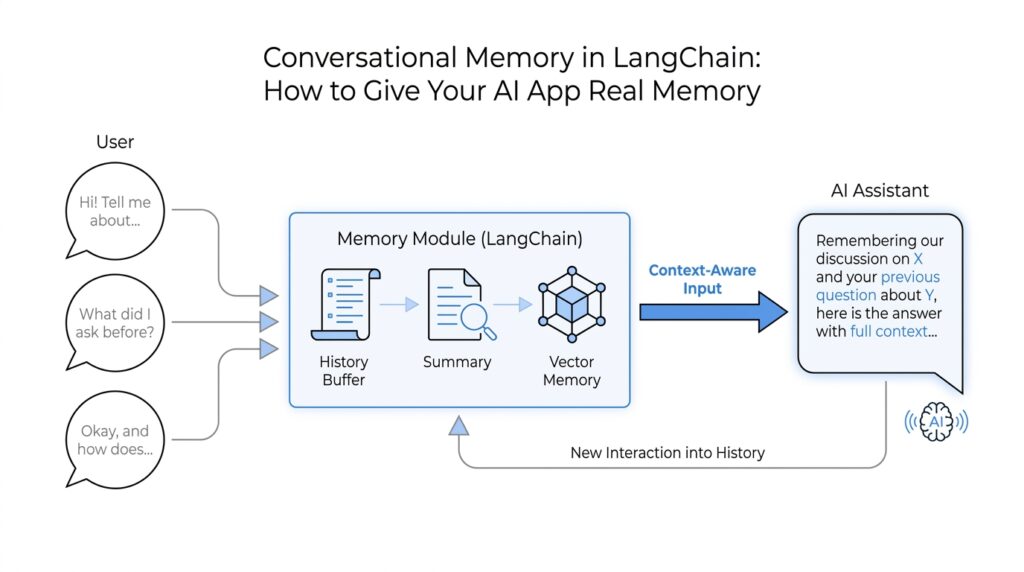
Why Memory Matters
Imagine you ask an AI app for help planning a weekend trip, and it remembers your budget, your city, and the fact that you hate early flights. That experience feels smooth because the conversation keeps its shape instead of restarting every time you send a new message. Without memory, the app feels like it wakes up with amnesia on each turn. LangChain’s memory story matters because it gives your AI that sense of continuity, helping it remember previous interactions, learn from feedback, and adapt to user preferences instead of treating every message like a fresh conversation.
The first layer is short-term memory, which means memory inside a single conversation or thread. A thread is just a sequence of messages that belong together, like one email chain instead of a pile of separate notes. In LangChain and LangGraph, this short-term memory lives in the agent’s state, so the model can see the earlier parts of the chat while it is still working through the current one. That matters because multi-turn conversations are where users naturally reveal the details that make an answer useful, and without that shared state the assistant would keep asking the same questions over and over.
Here’s the catch: more history is not always better. A large language model, or LLM, can only look at a limited amount of text at once; that limit is called the context window, which is the amount of conversation the model can hold in view while answering. LangChain’s docs note that long chats can run into that limit, and even before they do, the model can slow down, cost more, and get distracted by old or off-topic messages. So memory is not only about remembering more; it is about remembering the right things, which is why trimming, summarizing, or otherwise managing chat history becomes such an important part of building a reliable LangChain app.
The second layer is long-term memory, which stretches beyond one chat session. This is the part that lets your app remember a user’s preferences, past experiences, or application-level facts across different conversations, even when the thread changes. LangChain builds this on LangGraph stores, which organize saved memory by namespace and key, a bit like folders and filenames for remembered facts. That structure is what makes it possible for a chatbot to remember that you prefer concise answers, or that a project already uses a certain naming style, without forcing you to repeat yourself every time.
What does all of this mean in practice? It means memory turns a chatbot from a clever text generator into something that feels more like a helpful collaborator. You waste less time repeating background details, the assistant makes fewer careless assumptions, and the interaction starts to feel personal instead of mechanical. It also makes the system easier to scale, because each conversation can stay focused on what is relevant now while still keeping the useful parts of the past nearby. Once you see that shift, the next question becomes clear: how do we choose what to keep in short-term memory, what to store long term, and what to let go?
Choose the Right Memory Type
When we reach the point of choosing a memory type, the conversation stops being abstract and starts feeling like architecture. You may have one set of facts that only matters while this chat is alive, and another set that should follow the user into the next session. Which memory type should you use in LangChain? The answer depends on whether the information belongs to the current thread or needs to survive beyond it. LangChain treats those two jobs differently on purpose: short-term memory lives in the agent’s state, while long-term memory lives in a store.
Short-term memory is the notebook on the desk. It is scoped to a single thread, which means it helps the agent keep track of the current conversation without mixing in other chats, and LangChain persists that state with a checkpointer so the thread can resume later. The agent reads that state at the start of each step, which makes it a good fit for details that matter right now, like a user’s current goal, an in-progress task, or a tool result that the next reply depends on.
That notebook can still get too full. Because the large language model, or LLM, only sees a limited amount of text at once, long conversations can run into the context window, which is the maximum amount of text the model can hold in view while answering. LangChain’s docs point to three common ways to keep short-term memory useful: trim old messages, delete messages you no longer need, or summarize earlier parts of the chat and replace them with a shorter version. In other words, short-term memory is not about keeping everything; it is about keeping the right slice of the conversation visible.
Long-term memory is the filing cabinet in the next room. It persists across threads and sessions, so it is the right place for user preferences, recurring project details, or facts the agent should remember even after the conversation ends. LangChain builds this on LangGraph stores, which organize saved data as JSON documents using a namespace and a key, a little like a folder name and a filename. That structure makes it possible to separate one user’s memory from another’s, and to read or write those memories from tools through runtime.store.
A practical rule of thumb is this: if the information only helps the current conversation make sense, keep it in short-term memory; if it should still matter after the thread ends, move it to long-term memory. That distinction is not only cleaner for the model, it is safer for the user experience, because stale details can distract the agent and make answers worse. So when you are deciding between LangChain memory types, ask a simple question: “Will this still matter in the next chat?” If the answer is yes, store it; if the answer is no, let it stay in the thread.
Once you start seeing memory this way, the design choice becomes much easier to make. Short-term memory carries the conversation; long-term memory carries the relationship. The next step is deciding what gets promoted from one to the other, and that is where memory starts to feel less like storage and more like judgment.
Store Conversation History
How do you store conversation history in LangChain so the assistant remembers the right things without carrying around a backpack full of old chatter? That is the heart of the problem here. In LangChain, conversation history lives inside short-term memory, which means the agent keeps the message trail for the current thread, and a checkpointer is the piece that saves that state so the thread can be resumed later. Think of it like pausing a conversation, closing the notebook, and opening it again from the same page when you return.
Once we start storing the history, the shape of the conversation matters. LangChain treats short-term memory as part of the agent’s state—the working data the agent reads while it is thinking—and that state is updated as the agent runs and as steps like tool calls finish. The state is read at the start of each step, which is why the assistant can answer follow-up questions without asking you to repeat yourself. In practice, conversation history is the most common thing you keep here, because it helps the model preserve the flow of a single thread while still keeping other chats separate.
But there is a catch, and it becomes obvious once a chat gets long. A large language model, or LLM, can only see a limited amount of text at once, which is called the context window; if the history grows too large, the model can lose context, slow down, cost more, or get distracted by stale details. That is why storing conversation history is not the same as keeping every message forever. LangChain’s guidance points to familiar ways of managing the thread: trim old messages, delete ones you no longer need, or summarize earlier parts so the important thread stays visible without overcrowding the model.
What if the conversation itself should survive beyond this one session? That is where long-term memory enters the story. Long-term memory persists across threads and sessions, and LangChain builds it on stores, which save data as JSON documents organized by a namespace and a key—a bit like folders and filenames for remembered facts. Tools can then read from and write to that store through runtime.store, which makes it possible to preserve durable context such as user preferences, recurring project details, or other information that should outlive the current chat.
So the practical move is to treat conversation history like a living record, not an archive dump. Keep the current thread in short-term memory with a checkpointer, and use a store only when the information should follow the user into future sessions. In production, LangChain recommends database-backed persistence rather than an in-memory setup, because real applications need the history to survive restarts and handle repeated use reliably. If we keep that split clear, the assistant feels coherent in the moment and still remembers what truly matters later.
Add Summarization for Long Chats
Once a chat starts stretching out, memory can feel less like a superpower and more like a crowded desk. If you are wondering, “How do I keep a LangChain assistant from losing the thread after dozens of turns?”, summarization is the answer we reach for here. Instead of feeding the model every message forever, we compress earlier parts of the conversation into a shorter recap so the model can keep working inside its context window, which is the amount of text it can look at at one time.
The key idea is that a summary is not a transcript; it is the shape of the story so far. We keep the goals, the decisions, the preferences, and the open loops, while letting the word-for-word chatter fade into the background. That matters because LangChain’s docs point out that trimming or deleting messages can cause you to lose useful information, while a summary gives you a more careful way to preserve meaning without carrying the full weight of the history.
In LangChain, the built-in piece that handles this is SummarizationMiddleware, a middleware component that watches the growing chat history and rewrites older turns into a compact summary. The docs show it working with a trigger such as ("tokens", 4000), which means the summarizer can kick in when the message history reaches a token threshold; a token is a chunk of text the model counts as it processes input. You can also tell it how much recent conversation to keep, such as ("messages", 20), so the assistant still has the latest back-and-forth in full while older material gets condensed.
That pattern feels a lot like a travel journal. You keep the latest pages open on the table, but once the notebook gets heavy, you copy the important details into a clean trip log and leave the rest behind. LangChain’s example shows this working in practice: after several exchanges, the assistant can still answer “what’s my name?” correctly because the important detail survived in the summarized history. The point is not to memorize everything; the point is to keep the conversation legible enough that the model can still respond like it understands what is happening.
So when should you add summarization for long chats? Use it when the thread has lots of back-and-forth, when tool calls make the history bulky, or when you care more about preserving the gist than every exact sentence. In practice, summarization works best as a middle ground: recent messages stay intact, older turns become compressed context, and the assistant keeps moving without dragging a huge message list through every step. That is especially helpful in LangChain short-term memory, where the state needs to stay useful without overflowing the model’s limit or slowing the conversation down.
The nice part is that this does not replace the rest of your memory strategy; it supports it. Summarization gives short-term memory a way to stay lightweight and readable, which makes it much easier to decide later what deserves to be kept, trimmed, or promoted into longer-lived memory. Once we have that compact running summary in place, the conversation can keep growing without feeling like it has to start over from scratch.
Persist Memory Between Sessions
The moment your app closes and opens again is where memory either proves itself or disappears. If you want to persist memory between sessions in LangChain, the idea is to save the right conversation state somewhere durable so the assistant can pick up the story later instead of starting from zero. That durable place is usually a database or store, which means the memory can survive restarts, deploys, and all the ordinary interruptions that happen in real software.
This is where the earlier distinction between short-term and long-term memory starts to matter in a practical way. Short-term memory lives with the current thread, but to make it survive a gap in time, LangChain uses a checkpointer, which is a component that saves the agent’s working state so it can be restored later. Think of it like putting a bookmark in the middle of a notebook and handing that notebook to a safe-keeping service, so when the user returns, we can reopen the same page instead of rebuilding the whole conversation.
A good question to ask here is: what exactly should we save? The answer is not “everything,” because saving every message forever makes the system noisy and expensive. Instead, we persist the conversation state that matters for the next turn, such as the latest user goal, recent tool results, and any summary we already built from older messages. That is how LangChain memory stays useful after a session ends: the app restores a compact, meaningful snapshot rather than dragging back a pile of irrelevant chatter.
To make that work across sessions, we need a stable way to identify whose memory we are loading. In practice, that often means tying the saved state to a thread ID, a user ID, or another application key that acts like a label on a folder. Without that label, two conversations could blur together, and the assistant might accidentally mix one person’s context with another’s. This is one of those behind-the-scenes details that feels invisible when it works well, but it is essential if you want LangChain memory to feel trustworthy.
Persistence also changes how we think about failure. If the server restarts in the middle of a chat, or if the user comes back tomorrow, the app should not lose the thread; it should reload the last saved state and continue naturally. That is why production setups usually lean on database-backed persistence instead of in-memory storage, which only lasts as long as the process is alive. In-memory storage is like writing on a whiteboard, while database-backed LangChain memory is more like writing in a locked filing cabinet that stays put after the room lights go off.
There is one more subtle benefit here: persistence gives you control over memory quality. Once the state lives in a store, you can decide when to update it, when to overwrite it, and when to let older information fade out. That matters because persistent memory should feel like a helpful assistant’s notebook, not a cluttered attic, and the safest systems are the ones that store only what the user would expect to survive. In other words, to persist memory between sessions is not only to save data; it is to save the right data in a way that keeps the conversation coherent, private, and ready for the next visit.
When we put it all together, the pattern becomes clear: save the current thread with a checkpointer, anchor it to a reliable identifier, and move only durable facts into long-lived storage. That gives LangChain memory the continuity users notice, even when the app itself has been closed and reopened in the meantime.
Test Memory in Your App
Once the wiring is in place, the real question becomes much more practical: how do you know your LangChain memory is actually working? This is the moment to test memory in your app by treating it like a conversation you can inspect, not a magic trick you have to trust blindly. We want to see whether short-term memory keeps the thread coherent, whether long-term memory survives a restart, and whether the app remembers the right things without leaking old noise into new replies.
The easiest place to begin is with a simple two-turn story. Ask the assistant for a preference, give it a follow-up that depends on that preference, and see whether it carries the detail forward. For example, if the user says they prefer concise answers, the next response should reflect that choice without being reminded. This kind of test sounds small, but it tells you a lot: the agent state is being read correctly, the thread is staying intact, and your LangChain memory is behaving like a notebook instead of a scratch pad that gets wiped between turns.
From there, we make the test a little more realistic by adding a few unrelated messages in the middle. That matters because memory often looks fine when the conversation is short, then starts to wobble when the thread gets crowded. A good test asks whether the assistant still remembers the important detail after several side questions, especially if you are using trimming or summarization. If the model forgets the user’s goal too early, the problem is usually not memory itself, but how you are managing what stays in the context window and what gets compressed or removed.
A strong memory test also checks the boundary between short-term memory and long-term memory. Short-term memory should help the current thread flow naturally, while long-term memory should survive into a fresh session. So we should close the app, reopen it, and ask for a fact that should have been stored, such as a saved preference or recurring project detail. If the assistant remembers after a restart, then your checkpointer or store is doing its job. If it does not, you have probably found a gap in persistence, storage keys, or the way the app loads memory back into the conversation.
How do you test memory in LangChain without accidentally testing the wrong thing? We separate the checks. One round validates in-thread recall, another validates persistence across sessions, and a third validates isolation between users or threads. That last part is easy to miss, but it is essential: one user’s memory should never bleed into another’s chat, and one thread should not quietly inherit facts from an unrelated one. When we test these boundaries, we are really testing whether the app can remember with discipline.
It also helps to test the failures on purpose. Ask the assistant to hold onto too much history, then see whether it still answers accurately once the conversation grows long. Try a case where the summary should preserve a key fact, and confirm that the fact still appears after older messages have been condensed. Then try a case where a detail should be forgotten, and make sure the assistant does not keep repeating stale information. These edge cases tell us whether the memory logic is helping the model think clearly or just carrying baggage forward.
The best memory tests feel a little like checking a travel bag before a trip. You want the essentials inside, the unnecessary items left out, and nothing from someone else’s suitcase mixed in by mistake. That is why testing LangChain memory is not only about correctness; it is about trust. When the assistant remembers the right things at the right time, the conversation feels steady, personal, and safe to continue, even after the app has been closed and reopened.



