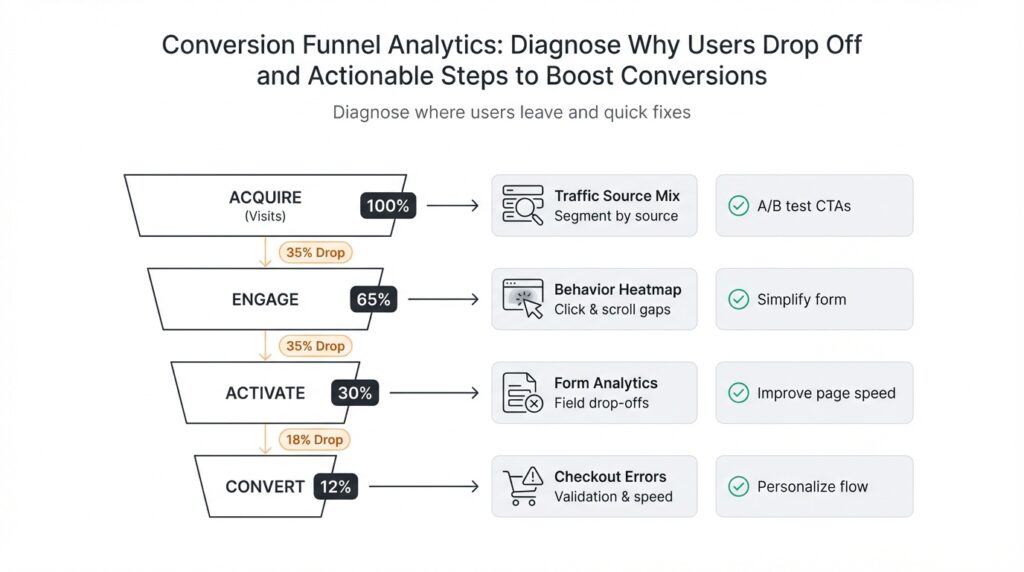
Map funnel steps and events
Building on this foundation, start by treating the conversion funnel as a precise map of user intent: identify the discrete funnel steps you care about, then agree on the exact events that signal each step. Conversion funnel and funnel steps should appear immediately in your measurement plan so everyone — product, analytics, engineering — knows whether a checkout_started or payment_info_submitted event counts as progress. If you want actionable diagnostics for why users drop off, map events to business actions (view, engage, commit) rather than vague labels, and capture the core identity and timing fields for every event.
How do you decide which events become funnel steps? Pick moments that change a user’s intent or likelihood to convert: landing-page view, product view, add-to-cart, begin-checkout, payment-submission, and purchase-confirmation are classic examples. Each step should be measurable as a distinct, earliest-occurrence event per user-session or user-id so you can compute first-touch progression and time-between-steps. We favor a small set of high-signal steps over an exhaustive event list; too many micro-steps create noise and dilute the conversion rate signal you need to diagnose drop-off.
Design a strict event schema and naming convention so your analytics are queryable and durable. Include user_id, session_id, timestamp (ISO 8601), step_index, event_name, and a minimal set of contextual properties such as product_id, price, and campaign_id. For example, instrument add_to_cart as {"event":"add_to_cart","user_id":"u123","session_id":"s456","timestamp":"2026-02-24T14:32:00Z","product_id":"SKU123"}. Consistent names and typed properties make it trivial to write deterministic SQL or pipeline transforms and prevent confusion when correlating events across clients, servers, and SDKs.
Decide where to fire events and how to guarantee delivery: client-side SDKs capture UI interactions and reduce latency in real time dashboards, while server-side events provide authoritative truth for billing and order completion. Implement idempotency keys on server events and deduplication logic in your ingestion pipeline so retries don’t inflate step counts. Batch events to reduce network overhead but preserve ordering and accurate timestamps, and instrument health metrics (event success rate, latency, backlog) so you can detect telemetry regressions that masquerade as user drop-off.
When it’s time to analyze, construct a funnel table that records the earliest timestamp per user per step and then compute metrics like conversion rate, step conversion, and median time-to-step. Use window functions to establish the first occurrence and progression: identify each user’s t1, t2, t3… and then calculate conversion_rate = COUNT(users_with_tN)/COUNT(users_with_t1). Also model optional or non-linear behavior by allowing branches: for example, some users skip add_to_cart and go straight to buy_now; support alternative paths in your analysis so you don’t misattribute drop-off to the wrong funnel leg.
Validate the map with sampling and QA before trusting it for decisions. Replay event streams against session recordings or server logs for a few cohorts, confirm that measured drop-offs align with observed friction (form errors, payment declines, slow asset loads), and set acceptance thresholds for instrumentation coverage. Once the map is stable and validated, you’ll be positioned to run cohort analyses, A/B tests, and targeted remediation on the exact steps where users abandon the flow — and in the next section we’ll dig into how to prioritize and test fixes for the highest-impact drop-off points.
Collect and validate funnel data
Building on this foundation, the first priority is making funnel data trustworthy before you run any diagnostics or experiments. If the conversion funnel is instrumented but the underlying events are incomplete, duplicated, or late, your hypotheses about user drop-off will be wrong and your remediation work will waste time. How do you know the data reflects real user behavior? You need a deliberate collection and validation workflow that treats event capture as production software: schema contracts, delivery guarantees, observability, and automated checks.
Start by enforcing a strict event schema at ingestion and validating it continuously. Define a JSON/schema contract for every event with typed fields (user_id, session_id, timestamp ISO 8601, step_index, idempotency_key) and reject or quarantine anything that fails type or required-field checks. Run lightweight, real-time validators in your ingestion path so malformed events are flagged immediately; use a separate staging stream for quarantined payloads and a dead-letter topic for later replay. This prevents bad data from contaminating downstream transforms and keeps the event schema durable across SDK and server releases.
Instrument both synthetic and real traffic to test collection end-to-end. Create deterministic synthetic users that step through the conversion funnel and assert the earliest-occurrence timestamps appear in the analytics table within expected windows. Integrate these checks into CI so every SDK or backend change triggers collection tests. For example, produce a synthetic checkout sequence and then run a query that verifies exactly one checkout_started and one purchase_confirmed event for that idempotency_key; any deviation should fail the build or open an alert.
Use automated data-quality checks to monitor completeness, duplication, ordering, and freshness. Implement SQL-based checks that run hourly: count events missing timestamps, compute the deduplication rate using idempotency_key, and measure median ingestion latency (now() – timestamp). A simple dedupe check looks like: SELECT idempotency_key, COUNT() FROM events WHERE event_name=’payment_submission’ GROUP BY idempotency_key HAVING COUNT()>1. Set Service-Level Objectives (SLOs) such as ≥99% coverage for critical funnel steps, ≤1% duplicate rate, and median ingestion latency under 5s. When those thresholds break, route the alert to an on-call engineer and include the failing query results so troubleshooting starts from evidence, not guesswork.
Reconcile analytics counts against authoritative systems to validate accuracy. Periodically compare unique purchasers in the analytics warehouse with orders in the transactional database or payment gateway reports; large divergences point to missing server-side events, SDK regressions, or ingestion backlogs. When you see a gap, narrow the window: compare events by user_id and date, examine backlog metrics in your pipeline, and sample raw payloads from the dead-letter stream. Common root causes include client SDK version mismatches, lost network requests during connection churn, or incorrectly applied sampling flags on high-traffic endpoints.
Instrument observability for the pipeline itself: emit metrics for accepted events, validation rejects, backlog length, and consumer lag. Visualize these alongside funnel conversion metrics so you can tell whether a sudden drop in conversion rate is a behavioral signal or a telemetry regression. Use lightweight anomaly detection to surface sudden changes in event volume or schema rejects and include playbooks that map each type of telemetry failure to a triage step: check SDK health, inspect ingestion logs, validate idempotency handling, and replay quarantined events if safe.
When collection and validation are automated and monitored, your conversion funnel analysis becomes actionable rather than speculative. With trusted funnel data we can confidently prioritize the highest-impact drop-off points, design targeted experiments, and measure remediation without guessing whether the numbers are real — and in the next section we’ll use these validated signals to decide what to fix first and how to test it.
Identify major drop-off steps
Building on this foundation, start by treating the funnel data as a diagnostic instrument: the highest-impact problems are the funnel steps that account for the largest absolute and relative loss of users. In the first 100–150 words we need to identify the conversion funnel signals that indicate real behavioral drop-off rather than telemetry noise, so prioritize steps with both a large number of lost users and high confidence in instrumentation. We’ll assume your event map and validation checks are in place, and use those trusted earliest-occurrence timestamps to surface the candidate legs for deeper analysis. This approach keeps you focused on business-impactful funnel steps, not low-signal micro-events.
Measure each step with two complementary lenses: absolute lost users and step conversion rate. Compute absolute loss as the difference in unique users between consecutive steps, and compute step conversion rate as users(tN)/users(tN-1). For prioritization you want to surface steps that combine high absolute loss with a low conversion rate and long median time-to-step; for example, a 30% drop that represents 1,000 lost users is higher priority than a 60% drop that affects 12 users. A short SQL sanity check you can run is a two-step aggregation that returns user counts per step and the delta—this gives immediate visibility into where volume is leaking.
Prioritize remediation using a pragmatic impact framework that weighs impact, fixability, and data confidence. Impact is the expected increase in conversions if the step converts at a reasonable benchmark; fixability is how many engineering, product, or policy changes the fix requires; and confidence is how reliable your instrumentation and root-cause evidence are. For instance, a payment-decline leg with high volume, clear gateway error codes, and a backend fixable retry strategy scores high on all three axes and should jump to the top of your backlog. This triage prevents chasing low-probability, hard-to-fix hypotheses.
Segment the drop by device, source, and cohort to uncover where the conversion funnel behaves differently. Ask targeted questions: are mobile users abandoning after payment submission more often than desktop users? Do new users coming from a paid campaign drop earlier than organic visitors? Splitting the funnel by channel, browser, OS, and new-vs-returning often reveals that a single funnel step contains multiple, distinct failure modes that require different mitigations—so treat the step as a series of sub-flows rather than a monolith.
Triangulate causes using logs, domain-specific telemetry, and qualitative replay. Where step-level metrics point to a high-volume drop, inspect server logs for error_code frequencies, payment gateway decline reasons, and idempotency_key anomalies; query form-error events to see which fields fail validation most, and correlate page load and asset timings to rule out performance-induced abandonment. If telemetry shows a spike in payment_submission errors with decline_reason=‘3DS_REQUIRED’, you’ve moved from measurement to repairable diagnosis. Don’t skip session replays or quick user interviews for high-value cohorts—these often reveal UX friction (confusing button copy, hidden fees, unexpected form fields) that quantitative signals can’t explain alone.
Translate identified high-impact legs into targeted experiments and monitoring changes that feed back into the conversion funnel analysis. For each prioritized step, define a hypothesis, a measurable primary metric (step conversion or conversion rate), and a guardrail metric (error rate, fraud signals, backend latency). Instrument any additional properties needed to validate the hypothesis (error_code, gateway_response, input_validation_fail) and expose a live dashboard that tracks conversion rate, absolute lost users, and median time-to-step by segment. With that pipeline in place we can move to concrete remediation and A/B tests focused on the exact funnel steps that are costing you conversions.
Use heatmaps and session recordings
Building on this foundation, start by treating aggregate visualizations and qualitative replays as complementary diagnostics that reveal where users hesitate, misclick, or never see critical controls. Heatmaps and session recordings surface the behavior signals your event table can’t: where users click, how far they scroll, and which micro-interactions trigger rage clicks or long hesitations. How do you convert click and scroll data into actionable remediation for a high-volume drop-off? By anchoring every heatmap and replay to the same user_id, session_id, and earliest-occurrence timestamps you already rely on in the conversion funnel, we keep qualitative evidence tightly coupled to quantitative metrics from the previous sections.
A heatmap is an aggregate visualization—clickmap, move-map, or scrollmap—that highlights patterns across thousands of sessions, while a session recording (session replay) is a time-sequenced playback of one user’s interactions. Use heatmaps first to prioritize where to drill down: extreme cold zones on a product page or a steep scroll drop-off above the pricing block flag systemic UX problems. Then use session recordings to confirm hypotheses and observe micro-behaviors like form corrections, accidental taps, and visible confusion that event counters and error codes cannot capture.
Instrument collection so replays are queryable and privacy-preserving: attach session recordings to the canonical session_id and timestamp used in your analytics pipeline, mask or redact PII in the recorder SDK, and apply deterministic sampling to control storage costs. For example, record 100% of failed payment flows and a 5–10% stratified sample of successful purchases; index recordings by event flags such as payment_submission:error or form_validation:field_failure so you can pull relevant replays with a single query. We recommend keeping the same idempotency_key and session metadata in the recorder payload so a replay can be replayed alongside server logs and gateway responses for root-cause analysis.
Analyze visualizations with a hypothesis-driven workflow: use heatmaps to generate 2–3 testable hypotheses (e.g., CTA visibility, confusing microcopy, or scroll-depth mismatch), then select a representative set of session recordings to validate each hypothesis. Look for telltale replay symptoms—repeated clicks in the same area (rage clicks), mouse movement that skips over a CTA (attention bypass), or rapid back-and-forth field edits (validation friction)—and map those observations back to funnel metrics by segment (device, campaign, OS). If your heatmap shows a 40% drop in scroll depth on mobile, filter replays to mobile sessions that reached the prior step and watch for slow asset loads, sticky elements obscuring CTAs, or intrusive banners.
Translate findings into targeted experiments and remediation that respect both signal and effort. If recordings show users missing a CTA because it sits below the fold on high-resolution displays, move the CTA higher and measure step conversion; if many replays reveal a validation message hidden off-screen after submission, surface inline errors and reduce required fields before the next experiment. Instrument the change by adding an experiment flag and an event property (e.g., validation_flow_v2=true) so you can compute step conversion and median time-to-step per variant; that keeps your A/B test grounded in the same deterministic funnel metrics you used to prioritize the fix.
Be mindful of the limits: heatmaps average behavior and can hide minority failure modes, and recordings are costly to store and can bias interpretation if sampling isn’t stratified. Integrate recordings into your monitoring playbook—automatically surface replays for sessions that fail SLOs, enrich replays with backend error_code and gateway_response, and periodically reconcile replay-derived insights against your event-level checks for duplicates and freshness. Taken together, these practices let us move from detection to repair: heatmaps point to systemic UX problems, session recordings show the micro-interactions that cause abandonment, and the combined evidence feeds experiments that measurably improve conversions in the validated conversion funnel.
Segment users by source and device
Building on this foundation, start by treating source and device as first-class diagnostic axes in your conversion funnel: segment users by source and device early in the analysis so you can see where volume and conversion quality diverge. When you front-load these dimensions—campaign, referrer, channel, and device family—you reduce the risk of chasing a universal fix for a problem that only affects a single acquisition path or form factor. This focus lets us move quickly from an aggregate drop-off number to a specific, testable hypothesis tied to real traffic patterns and revenue impact. Segment users by source and device to surface where the funnel actually breaks, not where averages hide problems.
The primary reason to split by source and device is that different traffic sources carry distinct intent and technical constraints, and devices impose unique UX and performance characteristics. Paid search or paid social users often have higher intent but lower tolerance for friction because of campaign spend accountability; organic visitors might tolerate slower flows but are more sensitive to content mismatch. Likewise, mobile users face bandwidth limits, smaller viewports, and touch interaction patterns that can create different failure modes than desktop. By acknowledging these differences, you avoid one-size-fits-all hypotheses and design targeted fixes that respect both behavioral and technical realities.
Operationally, start with a two-dimensional pivot: compute step conversion and absolute loss grouped by source and device for your canonical funnel steps. How do you write that as a repeatable query? Use earliest-occurrence logic to avoid double-counting and group by campaign/utm_source and device_family (mobile/desktop/tablet). For example, a simplified SQL pattern looks like:
SELECT utm_source, device_family,
  COUNT(DISTINCT user_id) FILTER (WHERE step_index=1) AS users_step1,
  COUNT(DISTINCT user_id) FILTER (WHERE step_index=2) AS users_step2,
  (users_step2::float / NULLIF(users_step1,0)) AS step2_conversion
FROM funnel_earliest_events
WHERE event_date BETWEEN '2026-01-01' AND '2026-01-31'
GROUP BY utm_source, device_family;
Run this across rolling windows and cohorts so you can see temporal regressions and campaign-level shifts. This query pattern gives you the core metrics—absolute lost users and conversion rate—by acquisition source and device, which you can then filter to high-volume, low-conversion quadrants for prioritization.
Use real-world examples to guide remediation priorities. If paid search on mobile shows a 40% drop at payment submission while desktop remains healthy, we prioritize mobile UX and payment flow fixes for that campaign cohort rather than a global redesign. If a specific referrer (e.g., an affiliate or embedded webview) produces high bounce rates before add-to-cart, investigate referrer headers, cookie availability, and viewability—these are technical fixes that differ from copy or pricing experiments. Translate each segmented finding into a narrow hypothesis, an instrumentation change (extra error_code or gateway_response properties), and a short A/B or rollout plan targeted to that segment.
Don’t forget the instrumentation side: capture utm parameters (utm_source, utm_medium, utm_campaign) and persist them to user and session records at first touch, and parse user-agent into a normalized device_family and os_version server-side. UTM stands for Urchin Tracking Module and is the common query-parameter format used to attribute campaign traffic. Tie these attributes to the same user_id and session_id you used in event schema validation so you can join reliably in analytics. Also record whether the session originated from an in-app webview, deep link, or external browser—these contexts often explain payment or cookie-related drop-offs.
Finally, use segmented analysis to design experiments and monitoring that reflect real traffic differences rather than global averages. Launch targeted experiments by campaign-device cohort, expose experiment flags in your event payloads, and track primary metrics (step conversion) with guardrails (error rate, fraud signals) per segment. Set alerting thresholds for sudden divergence in conversion by source and device so you can triage telemetry regressions separately from behavioral changes. Taking this approach lets us prioritize the right fixes, run focused experiments, and measure impact where it matters most in the conversion funnel.
Prioritize fixes and A/B tests
Building on this foundation, you can turn diagnostic signals into prioritized work without guessing which experiments actually move the needle on your conversion funnel. When engineering capacity is limited and stakeholders push for fixes, ask one question: which change yields the largest, measurable uplift in conversions per engineering week? Framing prioritization around impact, fixability, and data confidence keeps you focused on business outcomes rather than interesting but low-impact UI tweaks. This section shows practical ways to decide what to build, what to A/B test, and how to instrument outcomes so you can trust the result.
Start with a quantitative impact model that uses the funnel metrics you already collect: absolute lost users, step conversion rate, and median time-to-step. Calculate expected uplift by estimating a realistic target conversion rate (a benchmark or achievable improvement) and multiplying by lost users at that step: expected_lift = lost_users * (target_rate – current_rate). Use cohort-specific numbers (device, source, campaign) so your estimates reflect the traffic that actually pays. With those concrete uplift estimates you avoid chasing small-percentage wins in low-volume segments.
Decide whether to A/B test or implement a direct fix by inspecting diagnosis confidence and risk. If telemetry and logs point to a clear engineering bug (missing server-side event, idempotency issues, or an API returning 5xx), prioritize a direct fix behind a feature flag because the root cause and remedy are deterministic. If the cause is behavioral or UX-driven—copy, placement, friction—default to A/B tests because they measure causal impact. For mixed cases (e.g., third-party gateway failures that only affect certain browsers), consider a targeted rollout: fix the server logic for all, and A/B test a UX fallback for affected cohorts.
Design experiments the way you design software: state a concise hypothesis, pick a single primary metric, and add guardrails. Example hypothesis: “Reducing required checkout fields for mobile will increase payment_submission conversion by 8% for paid-search mobile users.” Primary metric: step conversion (payment_submission / begin_checkout). Guardrails: fraud_rate, payment_error_rate, and median backend latency. Instrument an experiment flag and expose it in every event payload (experiment_variant=A/B) so you can compute conversion by variant. A minimal SQL check looks like:
SELECT experiment_variant,
  COUNT(DISTINCT user_id) FILTER (WHERE step_index=2) / NULLIF(COUNT(DISTINCT user_id) FILTER (WHERE step_index=1),0) AS step2_conversion
FROM funnel_earliest_events
WHERE event_date BETWEEN '2026-01-01' AND '2026-01-31'
GROUP BY experiment_variant;
Estimate sample size and minimum detectable effect (MDE) before launch; don’t run tests until you can detect a business-meaningful uplift. If your expected lift is small relative to current variance, either widen the test cohort (target high-volume campaigns) or convert the idea into a deterministic rollout for high-confidence fixes. Always pre-register your analysis (primary metric, segmentation, and stopping rules) to prevent p-hacking and ambiguous decisions.
Operationalize priority by converting expected uplift into cost-adjusted value: compute expected extra conversions per week and divide by estimated engineering weeks to produce an uplift-per-week-per-engineer number. Rank fixes and A/B tests by that ratio and include data-confidence as a multiplier (e.g., 0.8 for strong telemetry, 0.4 for weak signals). This arithmetic turns subjective debates into defensible backlog order: high-impact, low-effort, high-confidence items rise to the top, and long-shot UX experiments are scoped accordingly.
Finally, make experiments and fixes observable from day one: capture the experiment flag in events, track primary and guardrail metrics by segment, and implement automated early-stopping rules for safety signals. Segment results by device and source so you don’t conflate a global lift with a cohort-specific change. Taking this concept further, the next step is designing rollouts that preserve learnings and measuring downstream effects such as retention and lifetime value, which we’ll instrument and test against the funnel metrics you already trust.