Identify Log Event Types
Building on this foundation, the next step is to name the different kinds of things your log can record before you design the table around them. In a complex logging system, that means identifying log event types: the distinct categories of activity your application wants to remember, such as a login, a payment, a password reset, or a file upload. How do you decide what counts as a separate event type? You start by watching the story your system is already telling, then group the repeated patterns that matter for reporting, troubleshooting, and audits.
This part matters because not every line in a log deserves its own shape. Think of it like sorting mail before delivery: a letter, a package, and a postcard are all mail, but they travel differently and need different handling. Log event types work the same way. Once you identify them clearly, you can decide which details belong to the shared log record and which details belong to the specific event itself.
A good place to begin is with the actions your users and services actually perform. A login event might need a user ID, an IP address, and a success or failure status. A payment event might need an order ID, an amount, and a currency. A support ticket update might need a ticket ID and the field that changed. These are all part of a broader log event model, but each one carries its own shape because each one answers a different question later on.
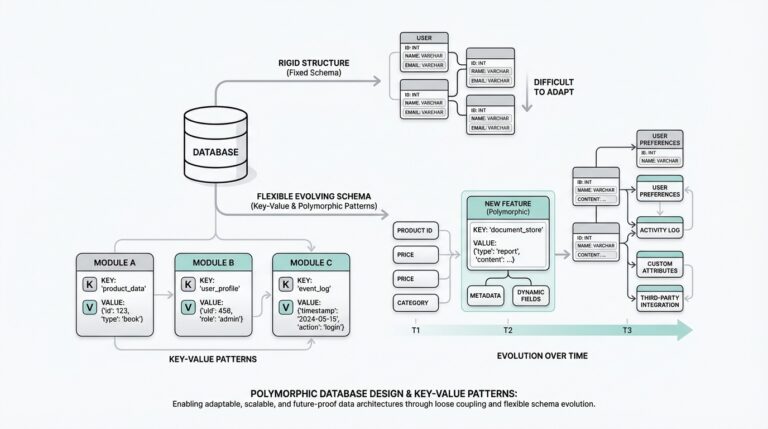
Now we can separate the broad event family from the individual member. The family is the shared log record: who did something, when it happened, and what general type of event it was. The individual member is the event-specific payload, the extra information that only makes sense for that one kind of action. This is where polymorphic associations become useful in SQL, because they let one log table connect to many possible detail tables without forcing every row to carry the same clutter.
As you identify log event types, look for differences that affect how you search, filter, or analyze the data. If you will often ask, “Which logins failed this week?” then login should be its own event type. If you will need to compare “successful payments” against “refunded payments,” those deserve clear distinctions too. On the other hand, if two actions always share the same fields and business meaning, combining them may keep the design cleaner and the queries easier to read.
It also helps to think about stable categories rather than temporary labels. A vague type like “user action” may sound convenient at first, but it hides useful structure. A stronger type like “profile update” or “email verification” tells you what happened and what kind of detail table might follow. That clarity pays off later when you build indexes, write reports, or validate incoming data, because the database can only protect what you define well.
You should also ask whether an event type is truly different or just a variation of the same core event. For example, “order created” and “order canceled” may belong to one order event family if the shared fields are nearly identical, while “order refunded” might need its own structure if it introduces different rules and extra metadata. This judgment call is one of the quiet skills in database design for complex logs: we are not merely listing actions, we are deciding which actions deserve their own homes.
Once those event types are clear, the rest of the schema becomes much easier to reason about. The shared log table can stay lean, the polymorphic links can stay predictable, and each detail table can focus on one meaningful shape. That is the practical payoff here: when you identify log event types carefully, you give your log design a vocabulary that is precise enough for the database and understandable enough for the people who will query it later.
Design Core Log Tables
Building on this foundation, the core log table is where the whole system learns to breathe. This is the table every event passes through first, so it needs to feel dependable, narrow, and easy to scan, like the front desk in a busy office where every visitor checks in before going anywhere else. In a SQL logging design, the core table should hold only the facts that almost every query will want: when the event happened, what kind of event it was, who caused it, and where it came from. That keeps complex logs readable, searchable, and far less brittle when the application grows.
When you design core log tables, the first question is not “What can we store?” but “What will we need every time?” That small shift matters. If a column is useful for nearly all event types, it belongs in the shared table; if it only makes sense for one event family, it belongs elsewhere. Think of it like packing a suitcase for every trip: you keep the essentials in the main compartment, then move the specialized gear into separate pouches so the whole thing does not turn into a jumble. In practice, that means the core log table often includes an event identifier, an event type, a timestamp, and maybe actor information such as the user or service that triggered the action.
How do you keep the table useful without stuffing it full of unrelated fields? You protect the difference between the log record and the payload. The core record should answer the universal questions first: what happened, when it happened, and to which broad event family it belongs. If you are using polymorphic associations in SQL, this is also the place to store the lightweight pointers that connect the row to its detailed record, such as a detail table reference or a generic subject reference. That connection acts like a labeled hallway leading to the right room, rather than forcing every room to be rebuilt around the same furniture.
This is where naming and consistency start to pay off. A core log table becomes much easier to trust when its columns follow a clear pattern and its meaning never changes from one event type to another. You might keep the table centered on a single immutable row per event, with values that rarely need rewriting after insert. That design choice supports audit trails, because logs feel more reliable when they behave like a written record instead of a document that keeps being edited. In a complex logging system, that stability is one of the quiet strengths of good SQL design.
We also need to think about the relationships around the table, not just the table itself. A core log table usually works best when it links cleanly to actors, event categories, and event-specific detail tables, but does not try to own all of that information directly. For example, you can record a user ID or service ID in the shared row and leave the full profile data in its own table. That separation keeps complex logs from duplicating the same information hundreds of thousands of times, which saves space and makes updates less risky. It also makes reporting easier, because the core table gives you one stable place to start before you join outward.
Once the shared structure is in place, indexing becomes the next quiet hero. If you expect to search by event type, timestamp, or actor, those columns deserve careful indexing so the database can find rows quickly without reading the entire table. This matters even more when the log volume grows, because a beautifully designed table can still feel slow if the most common filters do not have support from indexes. So when you design core log tables for polymorphic associations, you are not only choosing columns; you are shaping the path your queries will travel.
With that in place, the rest of the model starts to feel less mysterious. The core table holds the universal story, the detail tables carry the event-specific chapters, and the polymorphic links stitch them together without forcing every log entry into the same mold. That balance is the real goal of database design for complex logs: give every event a shared home, but keep enough room for each one to tell its own story clearly.
Map Polymorphic References
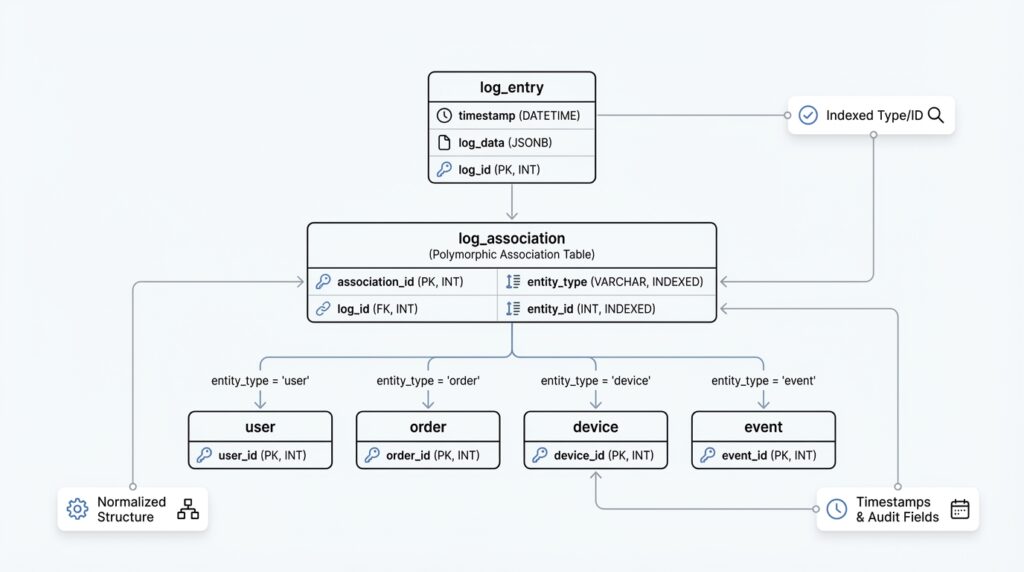
Building on this foundation, the next puzzle is how one log row finds the right detail record without turning the schema into a tangle. That is where polymorphic references come in: a single shared log entry can point to many different detail tables, depending on the event type. If you have ever wondered, “How do you connect one log table to several kinds of records without losing clarity?”, this is the heart of the answer. In database design for complex logs, a polymorphic association gives you one stable path in and many possible destinations.
The simplest way to picture it is to imagine a mailbox with a label and an address. The label tells us what kind of package we are dealing with, and the address tells us where to deliver it. In SQL, that usually means storing two pieces of information together: a reference type, which names the target table or entity class, and a reference ID, which names the exact row. For example, a login event might point to a user detail record, while a payment event points to an order detail record. The core log table stays lean, but it still knows exactly where to look next.
This pattern works well because it separates identity from content. The shared log row answers the universal questions we covered earlier, while the polymorphic reference carries the map to the event-specific payload. Instead of stuffing every possible field into one oversized table, you let each detail table keep its own shape and rules. That is why polymorphic references are so useful in polymorphic associations in SQL: they let one logging system speak to many record types without forcing those records into the same mold.
Of course, the design becomes more trustworthy when the reference names are consistent. If you call one target user in one place and account_user in another, the map starts to feel blurry. A clear naming convention for the reference type column helps the whole system stay readable, especially for people writing reports or debugging logs later. It also helps when you build application code that creates the rows, because the code and the schema can follow the same vocabulary instead of inventing new names on the fly.
There is also a practical choice to make about where the reference lives. Some designs keep the polymorphic reference directly in the core log table, while others store it in a separate link table when the relationship needs more room to grow. The direct approach feels lighter and is often enough when each event has one target record. The separate-table approach can be better when you need extra metadata about the link itself, such as whether the reference was primary, secondary, or derived from another action. What matters is that the mapping stays predictable enough for your future queries to trust.
How do you keep this flexible without letting bad references slip through? You add guardrails in both the database and the application. A check constraint or lookup table can limit the allowed reference types, and application logic can verify that the reference ID belongs to the right kind of record before the insert happens. This matters because polymorphic references are powerful, but power without boundaries can make complex logs harder to validate. In practice, you want the database to accept many shapes only when those shapes are well defined.
Once the mapping is in place, the real payoff becomes visible in everyday querying. You can start with the shared event row, read the reference type, and then follow the reference to the matching detail table without guessing. That makes polymorphic associations in SQL feel less like a trick and more like a routing system: the core log tells you which road to take, and the polymorphic reference points the way. With that map established, you are ready to think about how those linked records stay consistent over time and how the whole structure behaves when the log starts growing fast.
Enforce Integrity Constraints
Building on this foundation, the next question is not how to store the log, but how to keep it honest. A logging system can look perfectly organized on paper and still slowly drift into nonsense if one row points to the wrong detail table, a type name is misspelled, or a required field is left blank. That is where integrity constraints come in: they are the database rules that stop invalid data before it becomes part of your history. In database design for complex logs, those rules are what turn a flexible schema into one you can actually trust.
The easiest place to start is with the values every log entry must have. A core record should not exist without an event ID, an event type, and a timestamp, so those columns belong under NOT NULL constraints, which tell the database that a missing value is not acceptable. If your system treats each log event as a one-time occurrence, a UNIQUE constraint on the event identifier can prevent duplicates from sneaking in during retries or background jobs. These may sound like small rules, but they protect the shape of the log in the same way a door latch protects a room: quietly, constantly, and before anything else gets damaged.
Now that we have the basics, we can look at the part that feels trickier. How do you keep a polymorphic log from pointing to nowhere? A regular foreign key is a rule that links one table to one other table, and it works beautifully when the relationship is fixed. A polymorphic association in SQL is different because one row may point to several possible detail tables, so a single foreign key cannot cover every case. That is why integrity constraints need to work together here instead of relying on one magic column.
The first layer is usually a controlled list of allowed types. A CHECK constraint is a rule that only accepts values meeting a condition, and it can keep the reference type column from drifting into vague labels like thing or misc. Better yet, you can point that type column at a lookup table of approved event or target names, which gives you a single source of truth for the vocabulary your logs are allowed to use. This matters in database design for complex logs because a clean type list keeps the schema readable for humans and predictable for the database.
The next layer is making sure the detail row actually exists. Because a single foreign key cannot directly validate many possible target tables, teams often add enforcement through triggers, which are database routines that run automatically when data changes, or through application logic that checks the destination before insert. Triggers are useful when you want the database itself to reject broken references, while application checks help catch mistakes earlier in the workflow. In practice, many teams use both, because integrity constraints work best when they form a net rather than a single rope.
It also helps to protect the relationships between the core row and its detail row with matching rules. If one log event should have exactly one detail record, then the insert process should create both records together or fail together. If the detail record can appear later, the schema should make that delay explicit instead of pretending the row is complete when it is not. That same idea applies to nullable columns: leave them nullable only when the absence of data is part of the business meaning, not because it was convenient during design. When should a column be empty? Only when “empty” is a real and useful state.
You can make the system even stronger by deciding which changes are allowed after insert. Logs are most valuable when they behave like a record of what happened, so many designs treat the core row as effectively immutable and avoid updates that rewrite history. If a correction is necessary, a new log entry often tells a more truthful story than altering the old one. This is one of the quiet strengths of integrity constraints: they do not only block bad inserts, they also help preserve the meaning of the data over time.
Taken together, these rules do more than prevent errors. They give your database design for complex logs a clear contract: the shared table stays complete, the polymorphic links stay meaningful, and each detail record stays attached to a valid event family. Once those integrity constraints are in place, the log stops feeling like a loose collection of rows and starts behaving like a reliable narrative that can survive growth, audits, and the occasional messy edge case.
Index Common Query Paths
Building on this foundation, we can now talk about the paths your queries actually take through the data. An index is a database lookup structure that helps the database find rows faster, the same way a book index helps you jump to the right page instead of reading every chapter. When you design logs around polymorphic associations in SQL, indexing common query paths matters because the shared table gets hit constantly, and the detail tables only help if the database can reach them without wandering through unrelated rows. In practice, this is where a good log design starts to feel responsive instead of merely organized.
How do you know which columns deserve that extra attention? You start with the questions people will ask most often. Maybe they want failed logins from the last seven days, recent payment events for one account, or every action performed by a specific user or service. Those patterns usually point to the same small set of columns: event_type, created_at, and an actor or subject reference such as user_id, service_id, or entity_id. If those are the roads your application travels again and again, indexing common query paths gives those roads a clear lane.
The next step is to think about column order, because indexes are not all equally useful. A composite index, which is a single index built from more than one column, works best when the leftmost column matches the way your query filters data first. For example, a query that asks for event_type = 'login' and then sorts by created_at can benefit from an index that begins with event_type and continues with created_at. That same index may help a “recent logins” report, but it will be less useful if the query filters only by time and ignores event type, so we choose the order based on the most common route, not the most imaginable one.
This is where the story gets practical. In a complex logging system, you often need one index for the shared log table and smaller indexes for the detail tables. The shared table usually serves broad searches like “show me all events for this actor,” while a detail table may serve narrower lookups such as “find this payment by order ID” or “find this profile update by field name.” When you index common query paths in both places, you are helping the database answer the first question quickly, then follow the polymorphic association without paying a heavy scanning cost at each step.
We also need to remember that not every path deserves a full index. Every index adds work when rows are inserted, updated, or deleted, because the database must keep the lookup structure in sync. That means a table with many indexes can slow down writes, even if reads feel wonderful. So when you ask, “Why does my log feel slower after I added more indexes?”, the answer is often that the database is doing more bookkeeping for each new row. The goal is balance: enough indexes to support the real query patterns, but not so many that the log becomes expensive to maintain.
One useful trick is to index the queries that appear in dashboards, audits, and incident response. These are the moments when people want answers fast, and they usually ask the same questions over and over. If your team often filters by time ranges, then created_at deserves special care. If they often narrow results by type and then drill into a specific actor, then a composite index can turn a long search into a short, predictable one. In database design for complex logs, that kind of planning pays off because the schema starts serving the workflow instead of fighting it.
Sometimes the best index is a partial index, which only covers rows that meet a condition. For example, if failed login events are queried far more often than successful ones, a partial index can focus only on the failed rows and stay smaller and faster to scan. That is a useful fit for polymorphic associations in SQL, because not every event family has the same access pattern. Some paths are hot, some are cold, and the smartest design gives more structure to the hot ones.
Once you think this way, indexing common query paths becomes less mysterious. You are not indexing “the table” in the abstract; you are indexing the questions your readers, dashboards, and services will ask most often. That mindset keeps complex logs fast, keeps polymorphic joins manageable, and gives your SQL design a practical rhythm: shared fields for broad searches, detail fields for precise lookups, and indexes where the traffic actually flows.
Partition and Archive Logs
Building on this foundation, partitioning and archiving are the two moves that keep a growing log from turning into a slow, oversized attic. A partition is a way of splitting one logical table into smaller physical pieces, often by time or by category, while still querying it as one table. An archive is older data moved out of the hot path so it can live somewhere cheaper and quieter. If you have ever asked, “How do you keep log tables fast when the volume keeps climbing?”, this is where the answer starts to take shape.
The first question we should ask is what kind of growth your logs are actually experiencing. If new rows arrive constantly and most of your searches focus on recent events, database partitioning by date is often the clearest fit. Think of it like storing receipts in monthly folders instead of one giant pile on your desk: the structure stays the same, but each folder is easier to manage. When your queries usually ask for “this week” or “this month,” the database can skip older partitions and search only the relevant ones, which keeps the shared log table from doing unnecessary work.
That same idea applies when your log data has natural boundaries beyond time. In a multi-tenant system, for example, you might partition by tenant if one customer produces far more activity than the others. In a polymorphic log design, you may also find that some event families deserve special treatment because they are especially large or especially noisy. The key is to partition on a column that matches real access patterns, not on a label that merely looks tidy on paper. Good partitioning should feel like arranging the shelves where you already reach most often.
Now that we understand partitioning, archiving becomes easier to place in the story. Archiving is what you do with cold data, meaning records that you still need for history, compliance, or troubleshooting, but rarely need in day-to-day queries. Instead of leaving every old event in the active log table, you move completed partitions or aged rows to a separate archive table, cheaper storage tier, or dedicated archive database. This keeps the working set small, which matters because even a well-indexed log slows down when it has to carry years of dormant history.
The best archive strategy usually starts with a retention rule. You decide how long the active log should stay online, then move anything older than that cutoff into archive storage on a schedule. For example, you might keep ninety days of operational logs in the live system and preserve anything older for audits. That separation gives you a practical balance: the database stays responsive for current work, while the archive still preserves the story of what happened before. In database design for complex logs, that is a powerful tradeoff because you are protecting both performance and memory.
Of course, partitioning and archiving work best when they respect the shape of the data you already designed. The shared log row should still hold the event’s identity, timestamp, and type, while the event-specific detail tables keep their own records aligned with the same retention policy. If a log entry points to a polymorphic detail record, both sides need to age together or you risk leaving behind a broken trail. That is why planning for lifecycle management matters early: the schema is not only about inserting events, but also about how those events age, migrate, and eventually leave the hot path.
You should also think about how you will query archived data later, because “out of sight” should not mean “out of reach.” Sometimes the archive needs its own indexes, summaries, or reporting tables so old records remain searchable without dragging the active system into a long scan. Other times, you may keep archived partitions attached in read-only mode, which lets you preserve the same structure while limiting writes. Either way, the goal is the same: let recent logs stay nimble, let old logs settle down, and give your SQL design a clear boundary between what is live and what is historical.