Define System Requirements
Building on this foundation, the first real task in database design for a sales and inventory management system is to decide what the system must do before we draw a single table. That may sound backward, but it keeps us from building a storehouse full of shelves before we know what items belong on them. How do you know what the database must store, and what it can safely ignore? We answer that by defining system requirements, which are the clear statements of what the system must support in day-to-day use.
At this stage, we are listening for the story behind the software. A sales and inventory management system usually has a few familiar characters: products, customers, suppliers, orders, stock levels, and payments. Each one plays a role, and the database design needs to reflect that role accurately. If a cashier records a sale, the system should reduce inventory; if a manager checks stock, the system should show what is available right now; if a supplier delivers new items, the system should capture that incoming stock without confusion.
The easiest way to think about requirements is to split them into two kinds. Functional requirements are the actions the system must perform, such as creating sales orders, updating stock quantities, tracking product categories, and producing reports. Nonfunctional requirements describe how well the system must perform those actions, such as keeping data accurate, responding quickly, allowing multiple users at once, and protecting sensitive information. Both matter in database design for a sales and inventory management system because a database that stores the right data but handles it poorly still creates problems.
While we covered the big picture earlier, now we need to get more specific about the people who will use the system. A store owner may want a simple view of daily sales, while a warehouse clerk may care more about low-stock alerts and receiving shipments. An accountant may need reliable transaction records, and a sales associate may only need fast access to product lookup and pricing. When we define system requirements, we make room for each of these viewpoints so the database supports real workflows instead of an imaginary one.
This is where data requirements come into focus, and they are the bridge between business needs and table design. We need to know which data must be stored, how long it should be kept, and how different pieces of data relate to one another. For example, a product record may need a name, SKU (stock keeping unit, which is a unique product code), sale price, cost price, and current quantity on hand. A sales transaction may need a date, customer reference, cashier reference, and line items, which are the individual products inside one order. Once these requirements are clear, the database can preserve the history of each sale instead of overwriting important details.
Taking this concept further, we also need to define rules and limits. Should the system allow negative inventory, or should it warn users when stock is too low? Should prices be editable after a sale has been completed, or should completed transactions remain locked for accuracy? These questions matter because they shape how the database behaves under pressure. In practice, the requirements document becomes a kind of recipe: it tells us which ingredients we need, how they should combine, and which mistakes we must avoid.
Finally, good requirements protect the project from hidden surprises. If we know the system must support reports, search, user roles, and future growth, we can design the database with those needs in mind from the start. That means choosing structures that can handle more products, more users, and more transactions without becoming messy. With these system requirements in place, we are ready to move from planning the business rules to shaping the database tables that will carry them.
Identify Core Entities
Building on this foundation, we can now turn the requirements into the cast of characters that will live inside the database. In database design for a sales and inventory management system, these characters are the core entities, meaning the real-world things the system must keep track of as separate records. If the requirements were the recipe, the core entities are the ingredients we decide to keep on the counter instead of leaving in the pantry of vague ideas. How do you know which ones matter? You look for the nouns in the business story: the things people buy, sell, stock, deliver, and pay for.
The first entity most systems need is Product, because everything else usually revolves around what is being sold. A product record gives each item a clear identity, often through fields like name, SKU, price, and cost, so the system does not confuse one item with another. Once you start thinking this way, it becomes easier to separate what is truly a product from what is only a description or a label. For example, “red running shoes” may be a product, while “red” alone is just a detail attached to it.
Next, we usually identify Customer, Supplier, and Employee or User as people-based entities. A customer is the person or business buying items, a supplier is the source providing inventory, and an employee is the person handling sales, receiving stock, or managing records. These entities matter because they help the database tell a complete story instead of storing transactions as floating numbers with no context. In a sales and inventory management system, that context is what allows you to answer practical questions like who bought the item, who delivered it, and who processed the transaction.
Now that we have the main actors, we need the events they participate in. Sale, Sales Order, Purchase Order, and Inventory Movement are the kinds of entities that capture activity instead of identity, and that distinction is important. A product tells you what exists; a sale tells you what happened. When a cashier completes a sale, the system should not overwrite the product record with that event, because the sale deserves its own place in the database history.
This is where line-item entities often appear, and they are easy to miss at first. A sale usually contains more than one product, so the database needs a Sales Item or Order Line entity to store each product, quantity, and price inside that transaction. Think of it like a receipt with multiple rows: the sale is the receipt as a whole, while each row is one line item. This small design choice is one of the most important parts of database design for a sales and inventory management system, because it keeps the database flexible enough to handle one-item purchases and large orders with equal clarity.
We also need to decide whether Inventory should be a separate entity or a set of values attached to Product. In many designs, inventory is tracked through stock records or inventory transactions so the system can show current quantity while still preserving a history of increases and decreases. That history becomes especially useful when stock arrives from a supplier, moves between locations, or drops after a sale. Instead of treating stock like a single number that changes in place, we treat it like a story made of updates.
As we discussed earlier, good database design protects accuracy and makes future growth possible, and core entities are the first step in that direction. Once you can name the essential entities and explain why each one deserves its own record, the rest of the design starts to feel less like guesswork and more like careful organization. This is the point where the database begins to take shape around real business activity, which is exactly what we want before we move on to relationships and table structure.
Map Entity Relationships
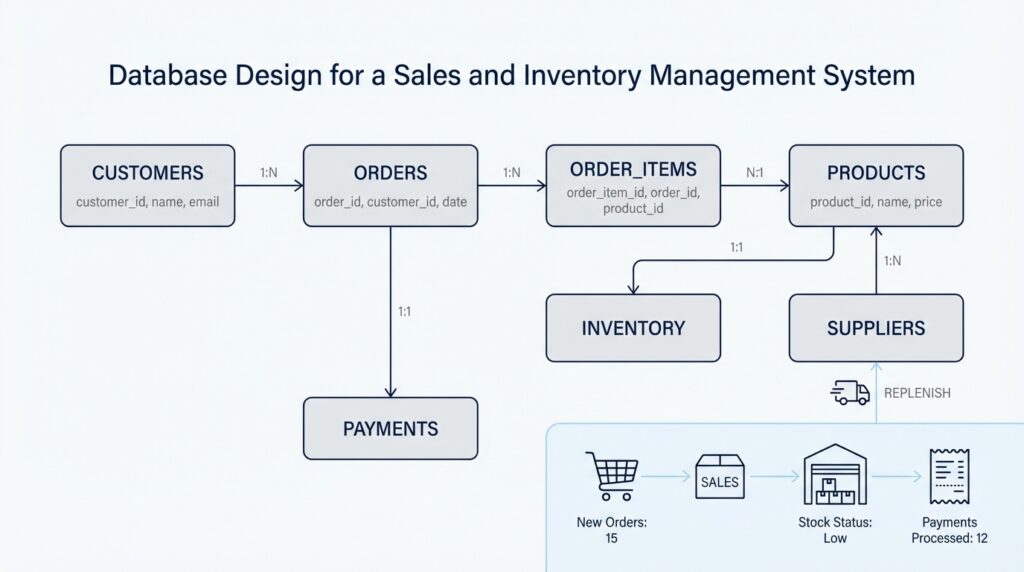
Building on this foundation, the next step in database design for a sales and inventory management system is to connect the core entities we identified earlier. At first, those entities can feel like separate people standing in a room with no introductions, but the real work begins when we show how they depend on one another. How do you know which records should point to which others? You follow the business story: a customer places a sale, a sale contains items, a product appears in many sales, and a supplier replenishes stock. Those links are the backbone of the database.
A relationship is the connection between two entities, and it tells us how the system should store shared meaning. In practical terms, we are asking whether one record relates to one record, one record relates to many records, or many records relate to many records. That sounds technical, but the idea is familiar if you think about a notebook with labeled tabs. One tab might hold a single customer profile, while another tab might hold many sales for that customer. In database design for a sales and inventory management system, this structure keeps us from stuffing everything into one oversized table.
The most common pattern you will meet first is one-to-many. One customer can place many sales, but each sale belongs to one customer. One employee can process many transactions, but each transaction is handled by one employee at a time. One supplier can deliver many products over time, depending on the business model, while each delivery record usually points back to one supplier. Once you see that pattern, you can start drawing it into the design with a foreign key, which is a field in one table that stores the primary key, or unique identifier, of a related table.
That foreign key is the bridge that lets the database understand the connection without repeating full details. Instead of copying a customer’s name into every sale, we store the customer’s identifier inside the sale record. This keeps the data cleaner and reduces the risk of mismatched information later. In database design for a sales and inventory management system, that small choice matters a great deal because sales records, stock updates, and reports all depend on consistency.
Now we reach the relationship that often causes the most confusion: many-to-many. A single sale can include many products, and the same product can appear in many sales. You cannot store that relationship neatly in one table without creating duplication, so we introduce a junction table, which is a linking table that sits between the two entities. In this case, a Sales Item table connects Sales and Product, and it usually stores quantity, unit price, and discount information for each line item. Think of it like the rows on a receipt: the receipt is the sale, and each row explains one product inside it.
Taking this concept further, we also need to decide whether each relationship is mandatory or optional. A sale should probably have at least one line item, because a sale with nothing in it does not make business sense. A product, on the other hand, may exist before it has ever been sold, so it can stand on its own. A supplier might exist in the system before the first purchase order arrives, and an employee might be recorded before they process their first transaction. These rules are part of database design for a sales and inventory management system because they protect the business logic, not just the data.
As we discussed earlier, inventory also needs careful treatment. A stock movement record might point to a product, a user, and sometimes a warehouse location, because that one event can tell a full story about what changed and who caused it. When you map these relationships clearly, you make it possible to trace every increase, decrease, and transfer without guessing. That is the real payoff here: the database stops feeling like a pile of tables and starts behaving like a reliable model of the store itself, ready for the next step where those connections become table structures.
Design Table Structure
Building on this foundation, the next move in database design for a sales and inventory management system is to turn those entities and relationships into real tables. This is the moment where the abstract story becomes something the database can actually store and understand. How do you know whether a detail belongs in its own table or inside an existing one? We answer that by thinking carefully about structure, because a good table design keeps data readable, dependable, and ready for growth instead of turning every report into a puzzle.
The first rule is to give each table one clear job. A product table should describe products, a customer table should describe customers, and a sales table should describe completed sales, not mix all three together. That may feel repetitive at first, but it is the cleaner path because each record then represents one thing in one place. In database design for a sales and inventory management system, this separation helps you avoid duplicate data, makes updates safer, and keeps the system from collapsing into a giant spreadsheet with too many responsibilities.
Once the table’s purpose is clear, we decide on its columns, which are the fields that hold the details. Every table needs a primary key, meaning a unique identifier that tells one row apart from every other row, such as product_id or sale_id. After that, we add only the columns that truly belong there, like product_name, sku, unit_price, or created_at. This is where table structure starts to feel practical: instead of asking, “What can we store?”, we ask, “What must this table know in order to do its job well?”
Taking this concept further, we connect tables with foreign keys, which are fields that point to the primary key of another table. A sale table might store customer_id, and a sale_item table might store both sale_id and product_id so the database can trace each line item back to its parent records. This is the same idea we explored earlier with relationships, but now we are giving it a physical shape. When you design table structure this way, the database can follow the business story without forcing you to repeat customer details or product information in every transaction.
Now we reach a part that often separates a tidy database from a troublesome one: normalization, which is the practice of organizing data so each fact appears in the best place once and only once. Think of it like packing for a trip. You would not put every item into one random bag if a suitcase, toiletry kit, and document folder make more sense. In the same way, product details stay in the product table, sale details stay in the sales table, and repeated line-item information stays in a separate sales items table. That structure reduces errors and makes future changes much easier.
As we discussed earlier, inventory also needs careful treatment, and table design decides whether stock feels alive or frozen. Many systems use an inventory table or inventory_transaction table to record every increase, decrease, transfer, or adjustment instead of overwriting one quantity field over and over. This gives you a history you can trust, which matters when you need to explain why stock changed on a certain date. It also makes database design for a sales and inventory management system more flexible, because you can support multiple warehouses, returns, and manual corrections without rewriting the whole model.
Finally, good table structure respects the rules of the business as much as the data itself. Required fields, default values, unique constraints, and not-null rules act like guardrails, keeping bad records out before they cause trouble. A SKU should not appear twice, a sale item should not exist without a sale, and a quantity should not quietly drift into nonsense. When you design the tables with those protections in place, the database becomes more than storage; it becomes a reliable partner that supports accurate sales, clean inventory tracking, and smoother reporting as the system grows.
Normalize the Schema
Building on this foundation, the next challenge is to make the schema lean, consistent, and easy to trust. A schema is the blueprint of your database, meaning the way tables, columns, and links are arranged. In database design for a sales and inventory management system, that blueprint can quietly become messy when the same fact shows up in too many places. How do you keep that from happening? We normalize the schema, which means we organize the data so each piece of information lives in the most appropriate place and is not copied everywhere for convenience.
That idea matters because repeated data creates trouble in ways that are easy to miss at first. If a customer’s phone number appears in five sales records, you now have five places to update it when it changes, and one missed edit can leave the database telling two different stories. That kind of mistake is called an update anomaly, which is a situation where one real-world change must be made in many rows and can be applied unevenly. Normalization also helps prevent insert anomalies, where you cannot add a new fact without stuffing it into the wrong table, and delete anomalies, where removing one record accidentally erases useful history. In a sales and inventory management system, those problems can distort reports, confuse staff, and make stock records less reliable than they should be.
So where do we begin? We start by making sure each table stores one kind of thing and that each field holds one clear value. This is the heart of normalized database design: product details belong with products, sale details belong with sales, and the individual items inside a sale belong in a separate line-item table. Think of a receipt as a helpful picture here. The receipt itself is the sale, while each row on it is one item with its own quantity and price. When you separate those ideas, the database stops forcing one table to carry too many responsibilities, and the data becomes much easier to read, update, and report on.
Taking this concept further, normalization also helps us handle categories, statuses, and other repeated labels with more care. If many products belong to the same category, it is better to store that category once and reference it from each product than to type the category name repeatedly into every row. The same idea applies to payment methods, order statuses, or warehouse locations. These reference tables may seem small, but they keep the database from drifting into inconsistency, where one row says “electronics,” another says “Electronic,” and a third says “elec.” That small difference can create big headaches when you filter reports or count inventory by group. In database design for a sales and inventory management system, consistency is not a cosmetic detail; it is what makes the numbers believable.
Now that we understand the pattern, it becomes easier to ask the right question: when should you split a table into another table? Usually, the answer is when a column describes a different kind of thing, repeats across many rows, or starts carrying a bundle of unrelated facts. A customer table should describe the customer, not also store every sale that customer has ever made. A sales table should describe the transaction, not repeat product names over and over. Once you see those boundaries clearly, the schema starts to feel less like a pile of records and more like a careful map of the business.
Normalization is not about making the database as broken into pieces as possible. It is about finding the right level of separation so the data stays accurate without becoming difficult to use. Sometimes later performance tuning may add summaries, indexes, or views, but those come after the core structure is clean. For now, the goal is to give the system a dependable shape: one that protects history, reduces duplication, and makes everyday maintenance far less stressful. With the schema organized this way, we have a solid base for the next stage of the design, where the clean structure starts turning into a working database.
Add Keys and Indexes
Building on this foundation, we now give the database a way to recognize each record and move through it quickly. In database design for a sales and inventory management system, keys are the labels that keep rows from blending together, while indexes are the shortcuts that help the system find information without scanning everything one row at a time. If normalization gave us a clean layout, keys and indexes make that layout usable in real life. How do you make sure one product does not get confused with another, or that a sale can be traced back to the right customer? We answer that by choosing the right keys first, then adding indexes where search and reporting need speed.
A primary key is the unique identifier for a row, and every table needs one. Think of it like a library card number: the person’s name might be shared by many people, but the card number points to one exact person. In a product table, that might be product_id; in a sales table, it might be sale_id. This matters because the database can rely on that value to update, delete, and relate records without guessing, which is especially important in a sales and inventory management system where accuracy is part of daily work.
While we covered relationships earlier, now we can see how foreign keys make those relationships real inside the tables. A foreign key is a column that stores the primary key from another table, so one record can point to another record without copying all of its details. For example, a sales table might keep customer_id, and a sales item table might keep both sale_id and product_id. That small design choice lets you ask useful questions later, such as which customer bought which products, without repeating names, addresses, or product descriptions in every transaction.
Taking this concept further, some tables need more than one column to identify a row. That is where a composite key, which is a key made from two or more columns working together, can help. A sales item table may use sale_id and product_id together so the same product cannot appear twice in the same line-item slot. In contrast to the previous approach of storing one label per row, this method matches the real business rule: one sale can contain many products, but each line item should still be distinct and traceable. This is a common pattern in database design for a sales and inventory management system because it protects both structure and meaning.
Now that the records are identifiable, we can talk about indexes, which are separate data structures that help the database find rows faster. Think of an index like the tabbed divider at the front of a notebook: instead of flipping through every page, you jump straight to the section you need. If your team often searches by SKU, customer_id, or sale_date, an index on those fields can make lookups, filters, and joins feel much faster. This is why indexes matter so much in a busy sales and inventory management system, especially when reports, dashboards, and product searches happen all day long.
At the same time, indexes are not free, and that is the part beginners often miss. Every time you insert, update, or delete a row, the database may also need to update its indexes, which adds extra work and storage. So what should you index? We usually start with columns used for searching, joining, sorting, and enforcing uniqueness, then leave rarely used fields alone. That balance keeps the database responsive without turning every write into a slow, expensive operation.
As we discussed with normalization, good design is about placing each fact where it belongs and supporting it with the right structure. Keys protect identity and relationships, while indexes protect speed and usability. Once those pieces are in place, the database starts to feel less like a pile of tables and more like a well-organized system that can keep pace with daily sales, stock checks, and reporting without losing its footing.