Define Tenant Boundaries
Imagine you are building a platform where two customers sign in on the same morning and both feel like they own the place. That is where tenant boundaries enter the story: they define where one customer’s world ends and another begins in a multi-tenant RBAC data model. Microsoft’s multitenant guidance frames this as a set of trade-offs between scale, isolation, cost, performance, and complexity, so the boundary is not decoration; it is the core design decision.
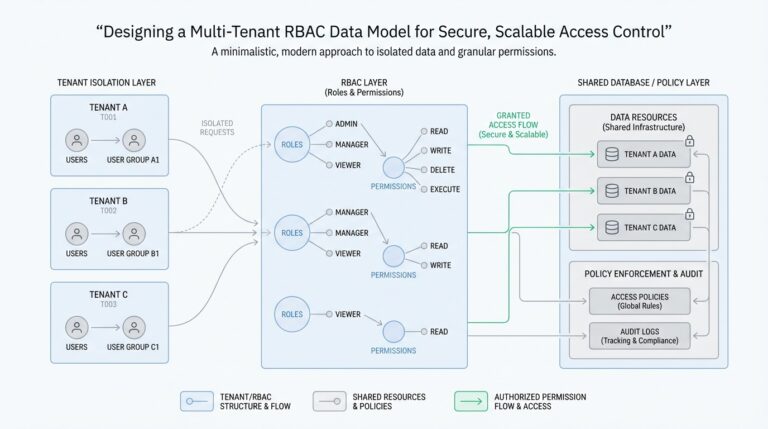
Think of a tenant as a neighborhood and the boundary as the fence around it. Inside that fence sit the customer’s users, roles, records, and settings, while the fence keeps those assets from bleeding into the next customer’s space. RBAC, or role-based access control, is the model where access flows through roles instead of being granted one account at a time, which is why the fence has to be drawn before the roles can make sense.
So what does that mean in practice? It means every request needs a tenant context, and every tenant-owned table, document, or partition needs a way to point back to that context. In Azure Cosmos DB guidance, the tenant can be the partition key, container, database, or even a dedicated account, and the platform calls out that shared models rely on application-level security isolation while dedicated models provide stronger separation. That is the heart of tenant boundaries: you decide how much separation lives in the data layer and how much must be enforced by your application.
This is also why roles must be scoped carefully. A user might belong to more than one tenant in your product, but their permissions should follow the tenant they are acting inside right now, not their global identity. NIST describes RBAC as access mediated through roles, and Azure’s multitenant guidance notes that data-access security isolation can come from tenant-aware RBAC when resources are separated per tenant. If the same person wears two hats, the system must know which hat they are wearing on this request.
How do you keep the boundary from slipping when the system grows? You carry tenant identity through the whole request path, from authentication to authorization to storage, so nothing has to guess which customer owns the action. AWS’s tenant isolation mode uses a customer-supplied tenant identifier to route work into tenant-specific execution environments, showing the same principle at the runtime layer: the boundary should travel with the request, not live in a single forgotten check. That same mindset protects a multi-tenant RBAC data model from accidental cross-tenant access.
Picture a manager from Tenant A opening a report that accidentally includes Tenant B’s team members. That is not just a bad query; it is a boundary failure, because the system failed to keep identity, data, and permissions aligned. Once you define tenant boundaries clearly, you can build the rest of the model with confidence: roles attach to tenant-scoped membership, resources carry tenant ownership, and every lookup answers the same quiet question, ‘Who does this belong to?’ That clarity is what turns a multi-tenant RBAC data model from a shared database into a trustworthy access-control design.
Design Core RBAC Tables
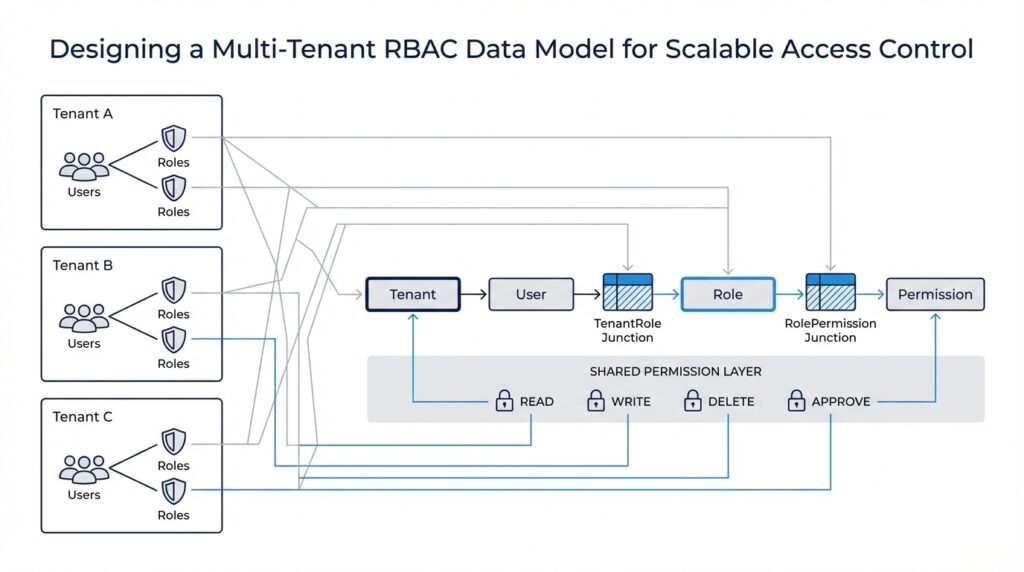
Building on this foundation, we can start shaping the core RBAC tables that make a multi-tenant RBAC data model feel organized instead of tangled. Think of the schema as a set of labeled drawers: one drawer holds tenants, another holds users, another holds roles, and another holds permissions. When the labels are clear, the system can answer a simple but important question every time someone clicks a button: who is this person, which tenant are they acting in, and what are they allowed to do?
The first drawer is the tenant table, because every other relationship needs a home address. In practice, this table usually stores a tenant ID, a display name, and a few lifecycle fields such as status or created date, so the platform can tell active customers from archived ones. This table does not grant access by itself; instead, it gives every role assignment and every resource reference a stable boundary, which is why the multi-tenant RBAC data model starts here rather than with users.
Next comes the user table, but in a multi-tenant system we often separate identity from membership. A user can exist as a global identity, while a membership table links that person to one or more tenants with tenant-specific context such as invited, active, or suspended. That separation matters because the same human may work inside several tenant spaces, and their access should change depending on which membership they are using right now. How do you keep that straight? By making the tenant relationship explicit in the data rather than assuming the user record alone can carry the whole story.
Once identity and tenancy are in place, roles become the bridge between people and action. The role table usually stores a role ID, tenant ID, role name, and perhaps a description like “billing admin” or “project viewer,” because roles should feel like business language, not database jargon. In a multi-tenant RBAC data model, roles are typically tenant-scoped unless you intentionally create global roles, and that choice keeps one customer’s role names from colliding with another customer’s. This is where the design starts to look like a real system instead of a naming exercise.
Permissions are the smallest meaningful units in the model, and they describe what can actually happen. A permission table might hold entries such as “read invoice,” “create project,” or “delete workspace,” turning broad roles into precise capabilities. Then a role_permissions table connects roles to permissions, much like a recipe card connecting ingredients to a dish: the role is the dish, and the permissions are the ingredients that make it possible. This two-step structure gives you flexibility, because you can change what a role means without rewriting every user assignment.
The user_roles table is the piece that brings the story to life, because it links a specific user or tenant membership to a specific role. That link is where many systems earn their reliability, since it prevents access from being inferred too loosely. A person does not become an admin everywhere by accident; they become an admin in a particular tenant because a row says so. When you design core RBAC tables this way, every assignment stays readable, auditable, and easy to reason about.
As we discussed earlier, tenant boundaries only work if the data model reinforces them everywhere, and these tables do exactly that. You want tenant_id columns on the tables that belong to a customer space, foreign keys that preserve referential integrity, and unique constraints that prevent duplicate role names inside the same tenant. That combination gives you a multi-tenant RBAC data model that can grow without blurring customers together, because the schema itself keeps asking the same steady question: does this user, role, or permission belong here?
Map User-Tenant Memberships
Building on this foundation, we now need the bridge that turns a global identity into a real participant inside a customer space. In a multi-tenant RBAC data model, that bridge is the user-tenant membership record, and it answers a question that comes up all the time: how do you know a person belongs to this tenant at all? Think of it like a passport stamp. The user may exist in the system as one person, but the membership row says, “This person is allowed into this specific tenant, in this specific state, at this specific time.”
That distinction matters because identity and access are not the same thing. A user table tells you who someone is, but a membership table tells you where they belong. If you merge those ideas too early, the model becomes harder to reason about, especially when one person works with several tenants and carries different responsibilities in each one. This is why many teams keep a separate user_tenant_memberships table instead of putting tenant_id directly on the user record: it preserves the idea that one human can wear many tenant-specific hats.
So what does a membership row usually hold? At minimum, it links user_id to tenant_id and gives the relationship a status, such as invited, active, suspended, or removed. That status is more than paperwork; it lets the system distinguish between someone who has been invited but not yet accepted, someone who is fully onboarded, and someone whose access should be paused without deleting history. You may also see fields like joined_at, invited_by, or last_active_at, because membership is often an eventful relationship, not just a yes-or-no switch.
Here is where the design starts to feel practical. Suppose one consultant works with three customers, and each customer sees them differently. In Tenant A, they are an active project lead; in Tenant B, they are only a reviewer; in Tenant C, their invite has been sent but not accepted. The same global user can appear in all three places, but the multi-tenant RBAC data model should never guess that one state applies everywhere. The membership table is what keeps those stories separate and honest.
How do you keep the data clean as the system grows? You make the membership table enforce the rule that one user can have only one membership per tenant, using a unique constraint on the user_id and tenant_id pair. That small guardrail prevents duplicate rows from creating confusing access checks later. It also gives you a reliable place to hang audit data, because when access changes, you want to update the existing relationship rather than invent a brand-new one every time someone’s role shifts.
This is also the point where membership and role assignment start working together. The membership row says the person belongs here, and the role assignment says what they can do here. That two-step pattern keeps the model flexible: if a user is suspended, you can block their tenant membership without rewriting every role link; if a user changes teams, you can update the role while preserving the same tenant relationship. In other words, the membership table becomes the stable doorway, while roles remain the keys that hang on that doorway.
As we discussed earlier, tenant boundaries only stay trustworthy when the data model reinforces them everywhere, and membership is one of the strongest places to do that. Every authorization check can begin with a simple chain: does this user have a valid membership in this tenant, and if so, which tenant-scoped roles are attached to that membership? That is the kind of structure that keeps a multi-tenant RBAC data model readable, auditable, and safe as more customers come onboard. Once this mapping is clear, the rest of the access-control story can move forward without confusion.
Scope Roles and Permissions
Building on this foundation, we now need to answer the question that turns a useful access model into a trustworthy one: how far does each role reach? In a multi-tenant RBAC data model, scope is the part that keeps a role from becoming a blanket pass. One manager might need power across an entire tenant, while another might only need access to a single workspace or project, and those are very different promises. When we scope roles and permissions well, we give each person the right amount of reach without letting their access spill into places it should never touch.
Think of scope like the room key on a hotel bracelet. The bracelet may identify you as a guest, but the key decides which doors open when you walk down the hall. A role is the label on that key, while scope is the set of doors it can unlock. In practical terms, a tenant-wide role applies everywhere inside that customer’s boundary, but a workspace-scoped role only applies inside one smaller area. That distinction matters because the same action can be safe in one place and dangerous in another.
Permissions are the verbs in this story, and scope is the place where those verbs are allowed to happen. A permission might say “read invoice,” “edit project,” or “invite member,” but that permission should never float around without a location attached to it. A user may be allowed to read invoices for Tenant A and edit projects in Project 12, yet those two abilities should stay separate in the model. So when we design a multi-tenant RBAC data model, we are really pairing two ideas: what action can happen, and where that action is valid.
This is where the schema needs to grow more precise. Many teams use a role assignment table that links a user or membership to a role, and then add scope fields such as scope_type and scope_id to say whether the role belongs to a tenant, workspace, or resource. That structure gives the application something concrete to evaluate during authorization, which is the process of deciding whether a request should be allowed. Instead of guessing from a user’s global identity, the system can read the role, inspect the scope, and make a decision that matches the current context.
How do you keep that from becoming messy as the product expands? By treating scope like a first-class part of the access rule, not an afterthought. If a role is assigned at the tenant level, it can often inherit broader permissions; if it is assigned at a narrower level, it should only carry the permissions needed there. This is one of the places where a multi-tenant RBAC data model earns its keep, because it lets you express both broad administrative power and narrow operational access without inventing a new access system for every feature.
The biggest mistake is letting permissions escape their scope through vague naming or loose checks. A role called admin sounds powerful, but powerful where? Inside one tenant, one workspace, or one shared system area? When you name roles and permissions clearly, you help future you understand the decision path during debugging, audits, and product changes. That clarity also protects against accidental overreach, which is exactly what can happen when a role becomes a master key instead of a scoped tool.
A good rule of thumb is to start with tenant-wide scope for platform administration, then narrow permissions as you move closer to shared or customer-owned data. The closer a permission gets to a specific record or workspace, the more explicit the scope should be. If you keep asking, “Where is this action allowed?” and “Who is acting inside that boundary?”, your multi-tenant RBAC data model stays readable and safe. That sets us up nicely for the next step, where enforcement turns these stored rules into real checks on every request.
Enforce Tenant Isolation Rules
Building on this foundation, enforcement is where tenant isolation stops being an idea and starts acting like a lock. If the earlier tables told us who belongs where, now we need every request to prove that answer again before it touches data. How do you keep one customer from seeing another customer’s rows? The safest pattern is to carry tenant identity all the way from authentication into authorization and then into the query itself, because shared multitenant databases can use row-level security for tenant-specific isolation, while PostgreSQL row security policies turn access into row-by-row checks.
That means tenant context should travel with the request like a passport stamp, not live as a guess inside the application. When a user signs in, the system should resolve the active membership, check its status, and attach the current tenant to every downstream call so later checks never have to infer intent. AWS’s tenant isolation mode follows the same pattern by routing work with a customer-specified tenant identifier, and it even requires that identifier on invocation. In a multi-tenant RBAC data model, that habit keeps the boundary honest when one person belongs to several tenants at once.
At the database boundary, row-level security becomes the inner door that only opens for the right tenant. PostgreSQL says that when row security is enabled, normal selects and data changes must be allowed by a policy, and if no policy exists, the default is deny. That is exactly the behavior we want for tenant isolation: a query that forgets to filter by tenant_id should return nothing instead of everyone’s data. In practice, a policy compares the row’s tenant ownership to the current tenant context, so the database itself can reject cross-tenant reads and writes before the application ever sees them.
The strongest designs also separate read rules from write rules, because those are different moments with different risks. PostgreSQL supports policies for SELECT, INSERT, UPDATE, and DELETE, and it lets you define different expressions for what a user may see versus what they may change. That matters in a multi-tenant RBAC data model because someone might be allowed to view a tenant’s projects but only edit records in one workspace inside that tenant. When we scope enforcement this carefully, tenant isolation stays precise instead of turning into a blunt all-or-nothing switch.
But row-level security should not be your only guardrail. Azure’s multitenant guidance warns that using row-level security in a shared database means you must propagate both user identity and tenant identity through the application and into the data store with every query, and it calls that design complex to build, test, and maintain. That is why the schema still matters so much: keep tenant_id on tenant-owned tables, enforce foreign keys and unique membership rules, and let the database preserve referential integrity even when security policies are active. PostgreSQL also notes that referential integrity checks bypass row security to protect data integrity, which is another reason to make the schema a second line of defense.
The last step is to test the rules the way a tired engineer or a curious attacker might accidentally break them. PostgreSQL recommends checking row security carefully, and it provides a row_security setting that can raise an error if a query would be filtered, which is useful for validation and backup safety. So we should try the same request from two memberships, verify that a suspended user loses access immediately, and confirm that tenant-scoped admins can only touch their own boundary. When those checks feel boring and repetitive, that is a good sign: the multi-tenant RBAC data model is doing exactly what it should.
When a tenant needs stronger separation than shared tables can comfortably provide, Azure’s guidance points to more isolated storage choices such as separate databases or accounts per tenant. That is the practical fallback when compliance, geography, encryption keys, or risk tolerance demand a harder boundary than policy checks alone can provide. In other words, enforcement is not one trick; it is a stack of aligned decisions, from request context to policies to schema constraints. That steady layering is what keeps tenant isolation believable as the system grows.
Optimize Authorization Queries
Building on this foundation, the next challenge is speed. Every authorization check is a tiny trip through the same maze: find the tenant membership, find the role assignment, find the permission, and do it without pausing the request long enough for the user to notice. PostgreSQL, like most relational databases, chooses a query plan for each request, and EXPLAIN shows you the plan it picked; that makes authorization queries a performance problem you can actually inspect instead of guess at.
The first place to win time is the index shape. When your authorization queries filter by tenant_id and then user_id or membership_id, a multicolumn index can work well because PostgreSQL uses leading columns first, especially when those columns appear in equality conditions. That means the order of the columns is not cosmetic; it decides whether the database can jump straight to the right slice of the table or wander through a broader range than you intended. Think of it like arranging books by aisle before shelf, not shelf before aisle.
From there, we can trim away noise with partial indexes. PostgreSQL supports indexes over only a subset of rows, and the docs call out that this is especially useful when a query targets a common subset of the table rather than the whole thing. In a multi-tenant RBAC data model, that often means indexing active memberships, live role assignments, or non-revoked permission links instead of every historical row you have ever kept. Smaller indexes are easier to search and cheaper to maintain, which matters when authorization queries run on almost every request.
There is another quiet upgrade hiding in plain sight: index-only scans. PostgreSQL can answer a query from the index alone when the needed columns are already there, and CREATE INDEX ... INCLUDE lets you add non-key columns to support that pattern. For an authorization lookup, that can mean storing the exact fields you need to confirm access, such as a role ID, status, or expiry flag, so the database does not have to bounce back to the heap for every check. When that works, the check feels lighter because the engine is doing less unnecessary walking.
Repeated authorization queries also benefit from predictable SQL. PostgreSQL can execute prepared statements with either custom plans or generic plans, and it automatically chooses between them based on whether the parameter values are likely to change the best plan. That is useful for access checks because the query shape is often stable even when the tenant, user, or role changes from one request to the next. In practice, the goal is not to force one plan forever; it is to keep the query structured well enough that the planner has a fair chance of reusing work without choosing a bad shortcut.
How do you know whether those ideas are actually helping? You measure the real plan, not the plan you hoped for. EXPLAIN shows the path the optimizer chose, and EXPLAIN ANALYZE executes the query so you can compare estimated cost with actual runtime, while up-to-date statistics help the planner make better decisions in the first place. That combination is especially important for authorization queries, because a query that looks harmless in code can still turn into a slow scan if the table grows or the data distribution changes.
So the practical habit is to keep the hot path narrow, index it for the exact tenant-scoped lookup you perform most often, and then verify the result with the planner. If your query always begins with the current tenant and the current membership, make that the shortest possible route through the data, not a detour through every historical row. That is the difference between an authorization check that quietly disappears into the background and one that starts to feel like friction as the platform scales.