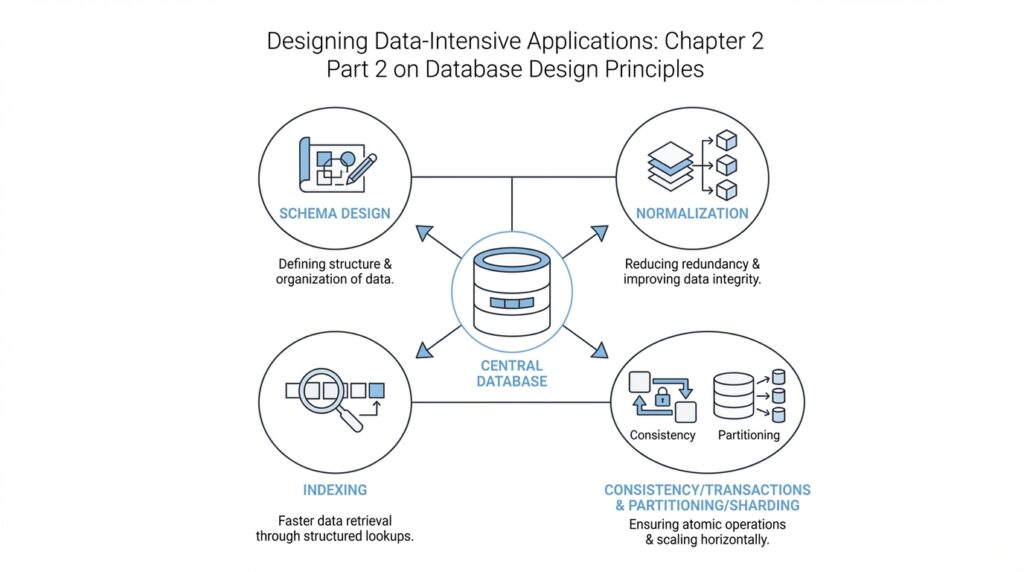
Data Modeling Basics
Imagine you are sketching a new app on a whiteboard, and the first real question appears: where does all the information live, and how should it be arranged so it does not turn into a mess later? That is where data modeling begins. Before we write queries or choose tables, we need a mental picture of the data itself, because database design is really the art of turning a real-world situation into a structure a database can store, search, and update without confusion.
Building on this foundation, a data model is the story we tell about the data in our system. It describes the main things we care about, the details we store about them, and the relationships between them. If we were designing a bookstore app, the obvious characters might be books, authors, customers, and orders. In data modeling basics, we ask what each character needs to remember and how they connect, much like making a cast list before writing a play.
That is why the first step is usually to identify entities, which are the main things we want to track. An entity can be a person, a product, a payment, or anything else that deserves its own place in the design. Then we define attributes, which are the facts that belong to each entity, such as a book’s title, price, or ISBN number. Once that starts to click, you can see the shape of the database design more clearly: the model is not random storage, but a careful map of meaning.
Now that we understand the pieces, we can look at relationships, which are the links between entities. One customer can place many orders, one order can contain many items, and one book can be written by one or more authors. These connections matter because data rarely lives in isolation. If you have ever tried to organize family photos, you know the difference between a pile of files and a system that tells you who is in each picture, when it was taken, and how the images are related. Data modeling does the same thing for information.
How do you know whether your model is good? A useful test is whether it reflects the real world clearly without forcing you to repeat yourself too much. Repetition creates problems later, because if the same fact appears in several places, it can drift out of sync. That is why database design often tries to reduce redundancy, which means storing the same piece of information in more than one spot. In practice, a cleaner data model makes updates safer, searches more predictable, and errors easier to spot.
This is also where the idea of a schema enters the picture. A schema is the blueprint for how data is organized inside the database, including tables, columns, and the rules that connect them. Think of the schema as the floor plan of a house, while the data itself is the furniture you move into that house later. When we shape a schema well, we give the system a structure that supports both the current application and the changes it may need later, which is one of the core goals of database design.
Taking this concept further, good data modeling is not about predicting every future feature. It is about understanding the present clearly enough to leave room for growth. You start with the important entities, define the relationships that make sense, and choose a structure that keeps the data honest and manageable. If you have ever wondered, “Why does my database feel harder to change than my code?”, the answer is often that the underlying model was rushed. When the model is thoughtful, the rest of the system has a much steadier place to stand.
Relational vs Document
Building on this foundation, we can now look at one of the most important choices in database design: relational database or document database. Both are ways of storing structured data, but they organize that data with very different instincts. A relational database arranges information into tables that are linked together, while a document database stores each record as a self-contained document, often in JSON format, so related data can travel together like a bundle in one envelope. If you have ever wondered, “When should I use a relational model instead of a document model?”, this is the question that starts the real trade-off.
The relational approach feels familiar because it mirrors the careful modeling work we already discussed. Each entity gets its own table, and relationships are represented by keys that connect one table to another. That means a customer can live in one place, an order in another, and the order items somewhere else, with the database using those links to keep the pieces connected. This structure is powerful because it keeps repeated facts under control and makes it easier to protect the integrity of the data, which is the database’s way of making sure the information stays consistent and trustworthy.
A document database takes a different path. Instead of splitting one real-world object across several tables, it often stores the whole object together in a single document, along with the fields that belong to it. Think of it like keeping all the pages of one recipe in the same folder instead of scattering the ingredients, steps, and notes across different binders. That can make the document model feel natural when your data already looks like a nested object, such as a blog post with comments, a user profile with preferences, or an order with its line items.
So what does that mean in practice? The document model often shines when you usually read or write one thing at a time as a whole unit. If your application loads a user profile, display settings, and recent activity together, storing them in one document can reduce the number of separate lookups you need. This is where people talk about data locality, which means keeping related data physically close together so the database can retrieve it in one pass. The result can be a design that feels fast and convenient, especially when the data naturally belongs together.
But here is where things get interesting. The same structure that makes document databases convenient can become awkward when the relationships grow more tangled. Relational databases handle many-to-many relationships, which are cases where one row can connect to many rows on the other side and vice versa, with a kind of disciplined clarity. Document databases can represent those links too, but once you start needing shared references, repeated updates, or queries across many documents, the neat one-document story starts to fray. In other words, the document model is often happiest when your data forms a tree, while the relational model is more comfortable when your data looks like a network.
This difference also shapes how you think about schema, which is the blueprint for where your data lives and how it fits together. Relational databases usually expect a more fixed schema, so the structure is planned up front and changes are managed carefully. Document databases tend to allow more flexible schemas, which can feel liberating when your application is still evolving and you do not yet know every field in advance. That flexibility is real, but it is not free: if you let every document drift in its own direction, the application code can end up doing the work that the database once handled for you.
In contrast to the previous approach, the real decision is not “Which model is better?” but “Which shape matches the data and the way you use it?” If your system depends on strong consistency, complex joins, and reporting across many related records, the relational model often gives you a steadier foundation. If your data is naturally grouped into self-contained objects and your main access pattern is to fetch or save those objects as a unit, a document database can feel more direct. That is why database design is less about loyalty to one style and more about choosing the structure that makes your data easiest to reason about, now and as it grows.
Normalize Your Schema
Building on this foundation, database normalization is where a relational schema starts to feel disciplined instead of improvised. If the earlier design phase helped us name the important things in the system, normalization helps us place each fact where it belongs so we do not end up copying the same information across multiple tables. How do you know when to normalize your schema? A good clue is when one change would need to be repeated in several places, because that is where inconsistency begins to sneak in.
At its heart, normalization is a way of organizing data so each fact lives in one clear place. Microsoft describes it as creating tables and relationships according to rules that eliminate redundancy and inconsistent dependency, while Oracle frames the goal as keeping each fact in just one place to avoid insert, update, and delete anomalies. Those anomalies are the little database traps that appear when one table tries to carry too much information at once: you add a row and accidentally repeat something, you update one copy but miss another, or you delete one record and lose a fact you still needed elsewhere.
The easiest way to picture this is to imagine a table that stores customers, their orders, and the shipping address for every order all together. That may look convenient at first, but the same address can now appear many times, and a single move creates a pile of edits. When we normalize the schema, we separate the customer, order, and address facts into related tables, then connect them with keys so the database knows how the pieces fit together. This is why normalized database design often feels calmer over time: the structure matches the meaning of the data instead of forcing one table to do everything.
Once that idea clicks, the word dependency becomes the next character in the story. A dependency is a relationship where one fact determines another, such as a customer ID determining that customer’s name or a product ID determining its description. Normalization pays close attention to these relationships because a column should depend on the whole key and nothing but the key; when it depends on something else, the table often contains hidden duplication. In practice, that is the signal that a field may belong in a different table, not because the database is being fussy, but because the data itself is asking for a cleaner home.
The normal forms are the rulebook for this cleanup. First normal form asks us to avoid repeating groups, so one row does not pretend to hold a list of similar items in separate columns. By the time a design reaches third normal form, most applications have already removed the major sources of redundancy, which is why Microsoft notes that 3NF is usually enough for most systems. You do not need to memorize every normal form on day one; what matters is understanding the direction they point you in, which is toward smaller, clearer tables with fewer duplicated facts.
So what does that mean in practice when you are actually designing a schema? It means we first identify the core entities, then ask which attributes truly belong with each one, and finally split out anything that repeats or depends on something else indirectly. That process often makes reads and writes a little more intentional, because the database no longer has to untangle a crowded table every time you ask a question or change a value. Normalization also makes maintenance easier, since a customer address, for example, can be updated once instead of hunted down across several rows.
Of course, normalization is a tool, not a ritual. In real systems, we sometimes accept a small amount of redundancy when performance or reporting needs make it worthwhile, but the normalized schema gives us the clean starting point we can reason about first. That is the practical lesson to carry forward: design the database so each fact has a home, and only relax that rule when you understand exactly what you are trading away.
Use Joins Wisely
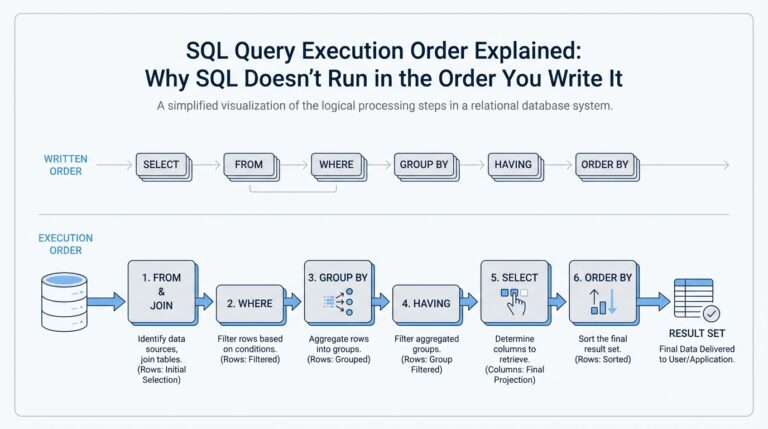
Building on this foundation, we arrive at one of the quiet power tools of a relational database: the join. A join is the operation that combines rows from two tables when they share a matching value, usually through a key such as a customer ID or order ID. If normalization gave each fact a clean home, joins are how we bring those facts back together when we need the full story. How do you know when a join is helping and when it is slowing you down? That is the question that separates tidy database design from fragile design.
Think of a join like matching puzzle pieces on a table. One piece holds the customer’s name, another holds the order details, and a join lets the database place them side by side without forcing us to copy the same name into every order row. This is why joins matter so much in database design: they preserve the benefits of normalization while still letting us ask rich questions about the data. Without joins, a relational database would feel like a library where every book is split across separate shelves and you are not allowed to connect the chapters.
While we covered relational structure earlier, now we need to face the trade-off it creates. Joins give you flexibility, because you can keep related data separate and combine it only when needed. At the same time, each join adds work for the database, especially when you chain several of them together across large tables. In practice, that means the neatest schema on paper is not always the fastest query in the real world, and database design often lives in that tension.
This is where thoughtful modeling starts to pay off. If your application always needs order data together with customer details, you should ask whether those tables are joined constantly enough to deserve special attention. The database can perform joins efficiently, but it still has to compare keys, find matching rows, and assemble the result set. That is usually fine for a small lookup, yet it can become expensive when a query pulls in many tables, many rows, or many optional relationships at once.
Taking this concept further, we should think about join-heavy queries the way we think about assembling furniture. One or two screws is no problem, but a table with fifty tiny fasteners takes longer to build and is easier to get wrong. The same idea applies to relational database queries: a few joins can be elegant, but too many can make the query harder to read, harder to tune, and harder for the database optimizer to execute well. The optimizer is the part of the database that chooses a query plan, meaning the sequence of steps it will use to answer your request.
That is why wise use of joins is not about avoiding them. It is about using them where they express real relationships and where the cost is worth the clarity they provide. If a join is needed to keep data accurate and avoid duplication, that is often a good trade. If you find yourself joining the same tables in the same way every time an endpoint runs, you may have discovered a hot path, which is a piece of the system that gets used so often that even small inefficiencies matter.
As we discussed with normalization, a clean schema gives each fact a single home; joins are the bridge that lets us move across those homes when we need to. That makes them essential, but also easy to overuse without noticing the shape of the query workload. In a healthy design, joins do their job quietly in the background, bringing together related records without turning every request into a scavenger hunt. Once you start seeing them as a bridge rather than a burden, you can design with much more confidence, and that sets us up to think about the next question: how do we balance elegant structure with practical performance?
Handle Complex Relationships
Building on this foundation, the real test of database design begins when the data stops looking like neat boxes and starts looking like a web. A bookstore is one thing; a bookstore with discounts, bundles, authors, publishers, reviews, and shared inventory is another. This is where complex relationships enter the picture, and database design has to do more than store facts — it has to preserve meaning without turning the schema into a tangle.
The first challenge is recognizing that not every relationship behaves the same way. A one-to-many relationship is familiar: one customer can place many orders. A many-to-many relationship is trickier, because one student can enroll in many classes and one class can contain many students. How do you model that without repeating data everywhere? In a relational database, we usually create a junction table, which is a table whose job is to connect two other tables and record the link between them.
That small middle table is easy to miss, but it carries a lot of responsibility. Think of it like a guest list at a wedding: the guest is not the table, and the table is not the venue, but the list tells us who is connected to what. In database design, the junction table often stores more than just the connection itself. It may also hold extra details such as enrollment date, role, quantity, or status, which makes the relationship an active part of the model rather than a hidden afterthought.
Now that we understand many-to-many links, we can look at relationships that point inward. Sometimes an entity refers to another row in the same table, and that is called a self-referential relationship. An employee table, for example, might include a manager_id column that points back to another employee. This pattern is powerful because it lets you represent hierarchies, org charts, comment threads, and category trees without inventing a separate structure for every level. At the same time, it asks you to think carefully about how the data will be read, updated, and moved around.
This is where the shape of the relationship starts to matter as much as the data itself. Some structures behave like trees, where each item has one parent and possibly many children. Others behave more like graphs, where a node can connect to many other nodes in different directions. A social network is a good example: one person can follow many people, and many people can follow that person back. In that case, the database design has to support complex relationships that are richer than a simple parent-and-child chain.
Taking this concept further, we also need to think about optional relationships, because real systems are full of incomplete stories. An order may have many items, but a draft order may have none yet. A profile may belong to a user, but a guest checkout may not. These nullable or optional links sound minor, but they affect how we enforce rules in the schema and how confidently the application can rely on related data being present. Good database design makes these choices explicit, so the system does not have to guess.
This is also why complex relationships can expose weaknesses in a schema that looked fine at first. If you store related data in a way that hides the connection, you may later struggle to ask simple questions like, “Which books share the same author?” or “Which employees report to this manager?” That is often the moment when a database starts to feel awkward. The data is still there, but the path between the pieces has become harder to follow.
So what is the practical lesson? When relationships get complicated, we should model the connection as carefully as the entities themselves. We name the link, decide whether it is one-to-many, many-to-many, or self-referential, and choose the right table structure to keep it clear. That discipline pays off because the schema becomes easier to understand, safer to update, and much more honest about how the real world fits together.
Choose the Right Model
Building on this foundation, the real question is no longer whether a relational database or a document database sounds more modern. The question is which data model matches the way your application thinks and behaves day after day. When you are doing database design, you are not picking a label for your system; you are choosing the shape that makes your data easiest to store, retrieve, and trust. That is why the right model usually reveals itself by looking at your access patterns, which are the common ways your application reads and writes information.
Imagine you are building a travel app. If each screen pulls one trip, one traveler, and one set of booking details together, a document model can feel natural because those pieces travel as a bundle. If the same app also needs careful reporting across airlines, cities, refunds, and shared loyalty accounts, the relational model may give you a steadier base because it handles cross-linked data with more discipline. How do you choose the right model when both seem plausible? We start by asking which data belongs together as one unit and which data needs to stay separate so it can be reused safely.
This is where consistency becomes a major clue. A relational database usually shines when you need strong guarantees that a change is correct everywhere it matters, especially when one update affects many related records. That matters in systems like banking, inventory, and order management, where one mistake can create a chain of confusing results. A document database can still support reliable applications, but if your data has many shared references or frequent updates to the same fact from different paths, the document model can make those changes harder to coordinate. In other words, the more your data behaves like a network, the more the relational model tends to earn its keep.
Taking this concept further, think about how often your application changes shape. If your product is still exploring new fields, new content types, or new customer workflows, a document model can give you room to evolve without redesigning every table first. That flexibility is one reason people reach for document databases during early development. But flexibility can become a hidden cost if every document starts growing its own custom structure, because then the application code has to remember all the rules the schema no longer enforces for you. A good database design balances freedom with enough structure to keep future maintenance from becoming a guessing game.
Performance is another piece of the story, but it only makes sense once the data shape is clear. If you usually read an object whole, keeping it together can reduce the number of lookups the database must perform, which is why data locality matters so much. On the other hand, if your queries constantly slice across many entities, a relational database can be faster in practice because it is built to join related tables efficiently instead of duplicating information everywhere. So the model choice is not about speed in the abstract; it is about which kind of work your system repeats most often.
As we discussed earlier, normalization helps us keep facts in one place, and joins help us reunite them when needed. That same idea becomes a practical test for choosing the right model: if your application spends most of its time reassembling data that was split apart, the relational model may be doing exactly what you need. If your application mostly handles self-contained records, and those records rarely need to be shared in pieces across the system, the document model may feel cleaner and more direct. The best database design is the one that makes your most common questions feel natural instead of forced.
So when should you pause and switch from intuition to inspection? The moment you notice repeated queries, awkward data duplication, or a schema that seems to fight the story your application is trying to tell. At that point, we do not ask which model is fashionable; we ask which one makes the data easier to reason about, easier to change, and easier to keep consistent as the system grows. That is the mindset that turns model choice from a guess into a deliberate design decision, and it sets us up to look at how those decisions behave once real workloads start pressing on them.