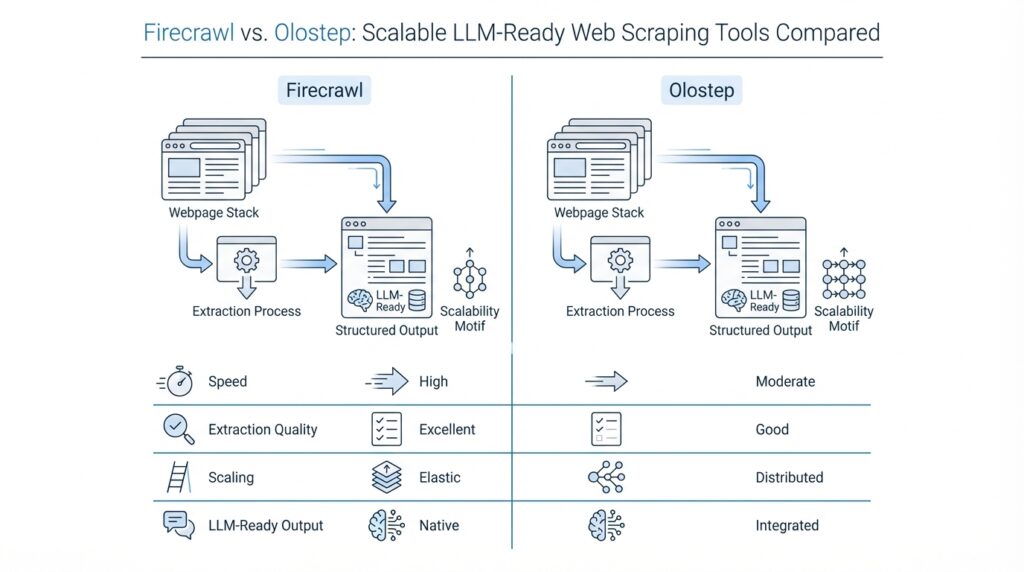
Firecrawl vs. Olostep Overview
Imagine you have a stack of websites and you want their content to arrive in a form an AI system can actually read. That is the heart of the Firecrawl vs. Olostep comparison: both tools turn live web pages into LLM-ready data, but they do it with slightly different personalities. Firecrawl centers on scraping, crawling, mapping, and search, and it can turn sites into clean markdown or structured data. Olostep takes a broader Web Data API approach, combining scraping, crawling, maps, batches, answers, parsers, and agents for AI and research workflows.
On the Firecrawl side, the story starts with clarity. You give it a URL, and it can scrape a single page, crawl through reachable subpages, or map a site to discover its URLs. Its search endpoint goes one step further by combining web search with scraping, so you can search and collect page content in one pass. That makes Firecrawl feel especially comfortable when you are building documentation tools, knowledge-base ingestion, or any AI app that needs steady, clean website text without a lot of manual cleanup. Firecrawl also supports cloud and self-hosted use, which matters if you want to keep control over your own infrastructure.
Olostep follows a wider path. Its scrape endpoint can return markdown, HTML, text, screenshots, or structured JSON, and it explicitly supports dynamic content, login flows through actions, and PDFs. Beyond that, Olostep adds tools that feel more like a research workspace than a pure scraper: the answers endpoint returns web answers with sources, parsers turn messy pages into backend-friendly JSON, and agents help automate research workflows. For higher-volume jobs, Olostep also offers crawl, map, and batch options, with batches designed for processing thousands of URLs in parallel.
So how do you choose between Firecrawl vs. Olostep in practice? Think of Firecrawl as the tool you reach for when you want a focused pipeline from web pages to LLM-ready content, with strong crawl, map, and search primitives. Think of Olostep as the tool you reach for when the job stretches beyond scraping into search, structured extraction, batching, and research automation. In other words, Firecrawl feels like a sharp blade for web ingestion, while Olostep feels more like a full workstation built for larger web data workflows.
What matters most is the shape of your workflow. If you are gathering content from docs sites, help centers, or a set of pages you already know you need, Firecrawl gives you a direct and tidy path. If you need to discover URLs, run larger batches, extract structured records, or turn web research into a more automated system, Olostep gives you more moving parts in one place. That is why the Firecrawl vs. Olostep decision is less about which one is “better” and more about whether you want a focused web-to-LLM pipeline or a broader research and extraction platform.
LLM-Ready Output Formats
Imagine you open a page and it comes with a headline, a sidebar, a signup box, and three things you never asked for. The real task is not only to scrape that page, but to turn it into a shape your model can read without getting lost in the noise. That is where LLM-ready output formats start to matter: Firecrawl turns pages into clean markdown by default and can also return cleaned HTML, raw HTML, links, images, summaries, branding data, screenshots, and structured JSON, while Olostep can return markdown, HTML, text, screenshots, raw PDF, or structured JSON from the same kind of URL.
Now that we have the big picture, think of output formats like choosing the right container for soup. Markdown is the most comfortable shape for an LLM because it keeps the words and headings while trimming away much of the visual clutter, so it feels close to reading a clean article. HTML and raw HTML serve a different purpose: they preserve more of the page’s structure, which can matter when you care about sections, links, or embedded elements. Firecrawl gives you both cleaned HTML and raw HTML, while Olostep exposes HTML and plain text, which can be useful when you want a simpler string for the next step in your pipeline.
Here is where structured JSON becomes the star. JSON, or JavaScript Object Notation, is a way to store information as named fields, almost like a form with labeled boxes instead of a free-flowing paragraph. Firecrawl lets you request JSON with either a schema or a prompt, so you can tell it which fields to extract and how to shape them, while Olostep supports JSON through parsers or LLM extraction and can also provide a hosted JSON file in the response. If you are building product catalogs, lead lists, article metadata feeds, or any workflow where the model needs exact fields rather than loose prose, this format turns web content into data you can sort, filter, and reuse.
So how do you choose the right format in practice? What causes one pipeline to feel smooth and another to become messy is often the output shape, not the scrape itself. If you want a chatbot, retriever, or summarizer to read the page like a person would, markdown is usually the friendliest path; if you need to preserve page structure, HTML gives you more context; if you want speed and a plain string, text can be enough; and if you need exact fields, JSON keeps everyone honest. Firecrawl leans toward a broad set of web-content shapes, while Olostep leans into multi-format capture across text, HTML, PDF, screenshots, and structured records, so the best choice depends on whether your next step is reading, parsing, or extracting.
Crawling and Search Capabilities
Building on the foundation we already laid, the next question is not just how these tools scrape pages, but how they find the right pages in the first place. That is where the Firecrawl vs. Olostep comparison starts to feel practical: Firecrawl leans into fast website mapping and recursive crawling, while Olostep leans into broader discovery workflows that combine crawl rules, search queries, and URL filtering. If you have ever wondered, “How do I get from one homepage to the exact pages I care about?”, this is the part of the journey where the answer starts to take shape.
Firecrawl’s crawler is built like a careful explorer with a good flashlight. You give it a starting URL, and it recursively discovers reachable subpages, handles sitemaps, renders JavaScript, and respects rate limits so the crawl can keep moving without constant babysitting. It also gives you controls for path filtering, crawl depth, and whether to include subdomains or external links, which makes it a strong fit when you want a focused crawl rather than an indiscriminate sweep. The result can come back through polling, WebSocket updates, or webhooks, so you can choose the pace that matches your pipeline.
Firecrawl’s search capability adds a different kind of power. Instead of starting from a URL you already know, you can search the web and optionally scrape the results in the same operation, which is useful when discovery matters as much as extraction. The search endpoint supports output formats like markdown, HTML, links, and screenshots, and it also accepts location, country, timeout, and scrape options so you can shape the results before they enter your system. In practice, that means Firecrawl vs. Olostep is not only a question of crawling versus search, but also a question of how tightly you want those two steps fused together.
Olostep takes a broader route through the same forest. Its crawl endpoint can search through a site’s subdomains and gather content, and it exposes controls such as max_depth, include_external, include_subdomain, search_query, top_n, and webhook support. That means you can start with a site, narrow the crawl to the most relevant pages, and push the results into later automation without manually stitching together extra tools. When the workflow feels more like research than scraping, Olostep’s crawl setup gives you more knobs to turn.
The discovery story gets even more interesting with Olostep’s maps endpoint. It returns all the URLs on a website, including sitemap entries and discovered links, and it supports include/exclude patterns, top-N limits, cursor-based pagination, and large-response handling. That makes it useful when you are trying to answer a very human question: “What is actually on this site, and what should we process next?” Unlike a narrow crawl that only follows one path, the map gives you a planning layer, which can be especially helpful before batch processing or large-scale extraction.
So when should you reach for one tool over the other? If you want a fast, focused path from a known site to the pages you need, Firecrawl’s crawl and search primitives feel streamlined and direct. If you want richer discovery controls, URL mapping, query-aware crawling, and a workflow that can flow into answers or agents, Olostep gives you more room to orchestrate the journey. That is the real Firecrawl vs. Olostep distinction here: one emphasizes a clean route from seed URL to content, while the other emphasizes a wider discovery system that can keep expanding as your research grows.
Dynamic Pages and Login Flows
Building on the foundation we already laid, dynamic pages and login flows are where a scraping tool either feels smooth or starts to stumble. A dynamic page is one that loads part of its content with JavaScript after the first HTML arrives, and a login flow is the extra set of steps that unlocks content behind authentication. This is exactly why the Firecrawl vs. Olostep comparison gets interesting here: both tools can deal with modern, interactive sites, but they reach that goal in slightly different ways. Firecrawl says it handles dynamic websites and JS-rendered sites, while Olostep says every scrape uses JS rendering by default and can handle login flows through actions.
With Firecrawl, the story starts with page actions, which are like telling a browser what to do before you read the page. Firecrawl supports wait, click, write, press, scroll, screenshot, scrape, and executeJavascript, and those actions run in sequence, so you can open a menu, type into a field, submit a form, and then collect the result. The docs also note that write expects the field to be focused first, which is a small but important detail when you are dealing with login forms or pop-ups that do not behave like plain text pages. In practice, that makes Firecrawl a strong fit when you need to click through a consent banner, enter credentials, or move through a page that only reveals data after interaction.
Taking that one step further, Firecrawl also has a more agent-like option for tougher pages. Its FIRE-1 agent can interact with buttons, links, inputs, and other dynamic elements, and it is designed for pages that require multiple steps or pagination. Firecrawl also offers a browser sandbox aimed at help centers, docs, and support portals that require clicks, pagination, or authentication, which is a useful clue when you are dealing with protected content. So if you are asking, “How do I get past a page that keeps changing under me?”, Firecrawl’s answer is: use actions first, and move up to the agent or browser layer when the flow becomes more like a conversation than a single scrape.
Olostep takes a more native approach to interactive sites. Its docs say every scrape uses JS rendering by default, which helps with React, Angular, Vue, infinite scroll, and lazy-loaded content, and its scrape endpoint supports actions such as wait, click, fill_input, and scroll. That means a login flow can feel like a small scripted walkthrough: wait for the form, fill in the email field, fill in the password field, click submit, and then continue scraping the authenticated page. For pages that do not behave like static documents, this default JS-first setup removes a lot of friction before you even start tuning the request.
Where Olostep really pulls ahead for authenticated workflows is its Context feature, which lets you reuse custom cookies, authentication, and cached data across requests. The docs describe a flow where you log in once in the browser plugin, submit the context, and then pass that context_id into later API requests. That is a helpful mental model if you are scraping a dashboard, member area, or internal portal that should stay logged in from one run to the next. One important caveat is that this feature is currently enabled for selected users only, so it may not be available in every account yet.
So what does this mean in practice for Firecrawl vs. Olostep? My rule of thumb is that Firecrawl feels best when you want a clean action chain for a page that needs a few interactions, while Olostep feels better when you expect dynamic pages and login flows to be part of the normal workflow, not the exception. That is an inference, but it follows the shape of the docs: Firecrawl emphasizes browser actions, FIRE-1, and browser sandbox navigation, while Olostep emphasizes JS-by-default scraping plus reusable authentication through Context. If your data lives behind a one-time form or a modal, Firecrawl can be enough; if it lives behind a persistent login, Olostep is often the more natural fit.
API Setup and Examples
Building on that big-picture comparison, the easiest way to feel the difference is to make the first request. How do you set up Firecrawl vs. Olostep when you are ready to code? Firecrawl starts with an SDK-first path: install firecrawl-py, create a Firecrawl client with your API key, or set FIRECRAWL_API_KEY. Olostep is more HTTP-first: create a token in the dashboard, send it as Authorization: Bearer <API-TOKEN>, and call endpoints such as /v1/scrapes, /v1/crawls, or /v1/maps.
If you are making your first Firecrawl request, it feels a lot like opening a notebook and writing one clean line of code. The client wraps the API setup for you, so you can focus on the URL and the output you want instead of building the whole request by hand.
from firecrawl import Firecrawl

firecrawl = Firecrawl(api_key='fc-YOUR-API-KEY')
doc = firecrawl.scrape('https://example.com', formats=['markdown'])
print(doc.markdown)
That is the basic shape Firecrawl leans into: one client, one URL, one format choice. The docs show the same pattern for scraping and crawling, and they also support environment-based authentication, which keeps your key out of the code when you move from a quick test to a real app.
Once that first scrape clicks, the next step is usually a crawl, which is where Firecrawl starts to feel like a guided tour rather than a single snapshot. You give it a seed URL, set a limit, and optionally pass scrape_options so every page comes back in the shape your pipeline expects.
from firecrawl import Firecrawl

firecrawl = Firecrawl(api_key='fc-YOUR-API-KEY')
job = firecrawl.crawl(
    'https://example.com',
    limit=10,
    scrape_options={
        'formats': ['markdown']
    }
)
print(job)
This is useful when you want the crawler to discover subpages and extract them in one pass. Firecrawl’s crawl feature is built for recursive site discovery, and its scrapeOptions carry the same output controls you use on a single page, so you do not have to redesign the request for every URL.
Olostep takes a different route, and that difference shows up the moment you write the request. Instead of a client object, you send a structured payload to the API, which makes the setup feel more explicit and more manual at first. That extra ceremony can be helpful, though, because you see every field in the request body right away.
import requests

endpoint = 'https://api.olostep.com/v1/scrapes'
headers = {
    'Authorization': 'Bearer <API-TOKEN>',
    'Content-Type': 'application/json'
}
payload = {
    'url_to_scrape': 'https://example.com',
    'formats': ['markdown']
}

response = requests.post(endpoint, json=payload, headers=headers)
print(response.json())
Olostep’s scrape endpoint accepts url_to_scrape and formats as core inputs, and the docs note that it can return markdown, HTML, text, screenshots, or structured JSON. It also supports options like wait_before_scraping, remove_css_selectors, and country, while the service uses JavaScript rendering by default for modern pages.
The same pattern carries into crawling and discovery, where Olostep gives you a few more knobs to turn. Its crawl endpoint supports max_pages, max_depth, include_external, include_subdomain, search_query, top_n, and webhook_url, while the maps endpoint helps you list URLs on a site before you decide what to process next.
import requests

endpoint = 'https://api.olostep.com/v1/crawls'
headers = {
    'Authorization': 'Bearer <API-TOKEN>',
    'Content-Type': 'application/json'
}
payload = {
    'url': 'https://example.com',
    'max_pages': 20,
    'max_depth': 2,
    'search_query': 'pricing'
}

response = requests.post(endpoint, json=payload, headers=headers)
print(response.json())
That is why the API setup feels different in practice. Firecrawl gives you a compact client-centered flow that is fast to read and fast to reuse, while Olostep gives you a more explicit request-body workflow that can feel easier to inspect when you are orchestrating scrapes, crawls, and maps together. Once you have the first request working, the real question becomes which setup style fits the rest of your pipeline.
Choosing the Better Fit
Building on this foundation, the real decision is not about which tool looks stronger on paper, but which one fits the shape of your workday. If you are asking, “How do I choose between Firecrawl and Olostep without overcomplicating things?”, the answer starts with the next step in your pipeline. Firecrawl tends to fit teams that want a clean path from a URL to LLM-ready content, with crawling, search, and extraction staying close together. Olostep tends to fit teams that want a broader web data API, where scraping, mapping, batching, and research-style automation all live under one roof.
That difference matters most when your job is predictable. Imagine you are building a documentation assistant, a knowledge base, or a content ingestion flow where the pages are known ahead of time and the goal is to keep the text tidy. Firecrawl feels like the steadier choice here because it stays focused on web scraping for AI and keeps the workflow compact. You do not have to juggle as many moving parts, and that can make your pipeline easier to reason about when you are still learning the ropes. In practice, Firecrawl often suits teams that value a direct route over a highly configurable one.
Olostep becomes more attractive when the problem keeps expanding. If your work starts with scraping but quickly grows into discovery, structured extraction, screenshots, PDF handling, or repeating batches across thousands of URLs, then the broader Web Data API approach starts to pay off. Think of it like moving from a pocketknife to a full toolkit: the pocketknife is perfect for one or two tasks, but the toolkit helps when the project keeps changing shape. That is why Olostep often makes sense for research-heavy workflows, lead enrichment, competitive monitoring, or data gathering jobs where the output needs to be reshaped in multiple ways.
Another useful way to decide is to ask what the data needs to become. If your model wants readable article-like text, Firecrawl’s LLM-ready output feels natural because it keeps the pipeline centered on clean ingestion. If your system needs a mix of markdown, text, HTML, JSON, screenshots, or repeated browser-like interactions, Olostep gives you more formats to work with in one place. Why does that matter? Because the right scraper is not only the one that fetches the page, but the one that makes the next transformation feel effortless. The less you have to clean up afterward, the smoother the whole workflow becomes.
There is also a human side to the choice. Firecrawl often feels easier when you want to move fast with fewer decisions, especially if your team is already thinking in terms of docs sites, crawls, and simple ingestion jobs. Olostep often feels better when you expect to orchestrate several steps and want one platform to carry more of that weight for you. Neither tool is universally better; they are built around different working styles. So when you compare Firecrawl vs. Olostep, the most honest question is not “Which one is more powerful?” but “Which one will let us build, test, and maintain this workflow with the least friction?”
A practical way to finish the choice is to run a small pilot. Use the same target site, the same output shape, and the same downstream task, then see which tool gets you there with fewer adjustments. If the path is known, the pages are stable, and you want a focused ingestion pipeline, Firecrawl will likely feel like the better fit. If the work is broad, the inputs are messy, and you want a richer system for scraping and research, Olostep may be the stronger match. Once you test both against a real use case, the answer usually stops feeling abstract and starts feeling obvious in the best possible way.