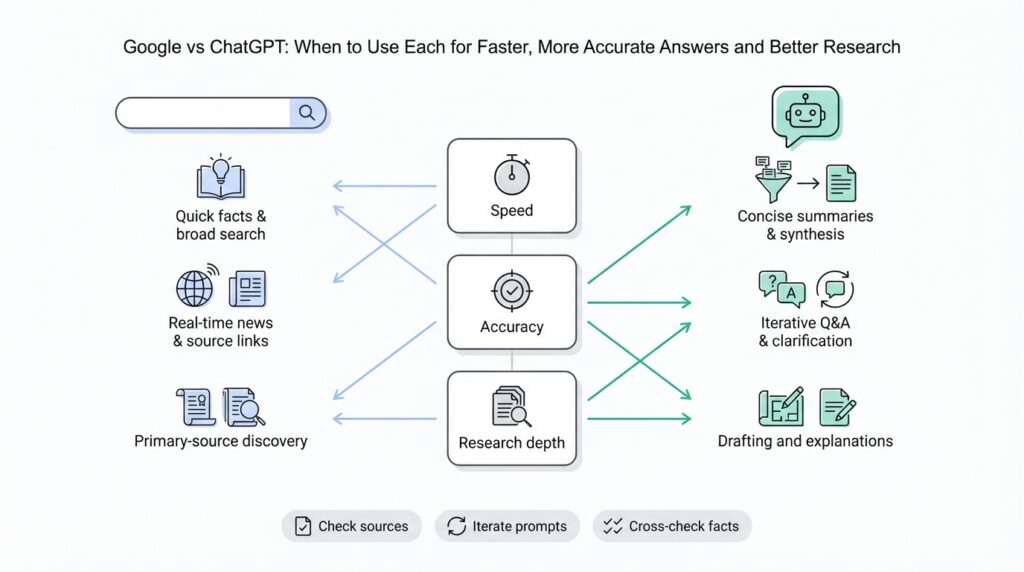
Quick tool comparison
Google and ChatGPT solve overlapping but distinct problems, and choosing between them affects speed, accuracy, and the shape of your research. Google is a web-scale search engine optimized for recall, freshness, and direct links to primary sources; ChatGPT is a large language model built for synthesis, context-aware explanations, and conversational troubleshooting. Front-load your query with the right tool: use Google when you need official docs, error-code lookup, or the latest news; use ChatGPT when you want step-by-step synthesis, rewritten examples, or a quick prototype from an ambiguous brief. This distinction frames how we approach faster, more accurate answers in real work.
Building on this foundation, compare their core strengths in practical terms. Google excels at information retrieval—finding the authoritative specification, the exact CLI flag, or a vendor’s breaking-change note—because it indexes the live web and preserves provenance via links. ChatGPT excels at conversational workflows: iterative refinement, combining scattered facts into a single narrative, and producing runnable code sketches or mental models that you can test immediately. Use Google to locate primary sources and evidence; use ChatGPT to convert that evidence into an implementation plan or a human-readable summary.
Consider a debugging scenario to see when each tool wins. If your CI job fails with a specific ERROR: E1234 from a cloud SDK, Google will quickly surface the vendor issue tracker, release notes, and Stack Overflow threads that mention the exact code string; those links let you verify whether this is a regressions, a patched bug, or a configuration mismatch. If you instead have a failing integration with no clear error, bring the stack trace and relevant snippets to ChatGPT to generate hypotheses, a reduced reproducible example, and a prioritized checklist for root-cause analysis. In practice, we use Google to confirm the facts and ChatGPT to accelerate the investigative workflow.
In longer-form research and synthesis, combine search operators and prompt patterns, not just tools. Use advanced Google operators (site:, filetype:pdf, inurl:) to narrow to RFCs, spec PDFs, or specific vendor domains, then paste the most relevant excerpts into ChatGPT with a prompt like: “Extract the versioned API changes and convert them into upgrade steps with commands.” This hybrid pattern helps you retain provenance while leveraging the model’s text-manipulation strengths. Always validate model-generated claims against the original sources you found with Google, because factual drift or hallucination can occur in generative outputs.
Non-functional constraints often decide the toolchain more than pure capability. If you need repeatable, auditable answers for compliance or legal review, favor Google-sourced artifacts and store exact URLs and timestamps; ChatGPT outputs are great for draft documentation but require a verification step before you commit them as authoritative. For automation at scale, evaluate cost and latency: calling a ChatGPT API to summarize thousands of documents incurs compute costs and rate limits; programmatic scraping and indexing with a search engine, followed by targeted model calls on high-value chunks, frequently offers a better price-performance trade-off. Also weigh data sensitivity—avoid sending proprietary logs or secrets to third-party models without checking your organization’s data-handling policy.
How do you decide in the moment? Use a simple heuristic: if you need provenance and the latest authoritative answer, reach for Google; if you need synthesis, iteration, or code transformation, reach for ChatGPT. In tightly constrained workflows we start with a targeted Google search to collect source artifacts, then loop with ChatGPT to synthesize, refactor, and generate concrete next steps—verifying the model’s claims back against the sources before deployment. This combined approach gives you both speed and accuracy while keeping your research reproducible and actionable as you move to the next part of the process.
When to use Google
When a problem requires an authoritative, time-stamped source or an exact string match, reach for Google first. You want use Google when provenance matters—release notes, vendor advisories, API reference pages, or a specific error string that maps to a tracked issue. In the first 100–150 words of your investigation, front-load queries that target official docs and primary sources so you can capture URLs and timestamps for audits or rollout notes. How do you quickly locate the vendor’s breaking-change note for a library or confirm whether a CVE affects your version? That’s a search-engine job.
Start with precision queries that return primary artifacts rather than commentary. Use quoted strings for exact error-code lookup (for example, "ERROR: E1234"), and narrow domains when you need vendor provenance (site:github.com org/vendor "E1234" or site:vendor.com "release notes"). Filetype filters are indispensable when hunting specifications or PDFs (filetype:pdf "schema" site:ietf.org), and inurl: or intitle: quickly surface changelogs and migration guides. When you need to copy a canonical configuration snippet or a CLI flag for a deployment script, these operators get you to the source you can cite or paste into a PR.
Use Google when freshness and breadth trump synthesis. For live incidents, press coverage, or a library that released a patch this morning, Google’s crawl and index will surface the latest threads, vendor tweets, and issue tracker comments. You’ll be able to cross-reference multiple primary sources—release notes, commit logs, and support tickets—to determine whether an observed failure is a regression, a misconfiguration, or a known incompatibility. That multiplicity of sources is what makes search engines the right tool for validation before you change production systems.
There are practical, reproducible ways to collect evidence during a search-driven investigation. Save the canonical URLs, capture the exact snippet that influenced your decision, and annotate timestamps in your ticket or changelog. For compliance or postmortem work, export the page to PDF or snapshot it with an archive tool so reviewers can verify the state of the source at the time of the decision. If you’re working inside a ticket, paste the source link and the precise quoted snippet so reviewers don’t have to re-derive the claim.
Search is also better for narrow, high-signal lookups like protocol specifications, RFCs, and vendor compatibility matrices. When you need the exact header name, a wire format example, or the precise semantics of an API parameter, the authoritative doc is what you’ll implement against. In these scenarios, use Google to locate the canonical spec and then lock that URL into your dependency checklist—this reduces the risk of implementing against stale, paraphrased blog posts or forum summaries.
That said, search results rarely replace the need for synthesis and iteration. After we collect a set of primary sources with Google, we typically bring those artifacts into a drafting or synthesis tool to produce upgrade steps, migration commands, or a consolidated troubleshooting checklist. Use Google to gather and verify; use an LLM or a focused write-up to convert verified facts into step-by-step actions. This hybrid pattern preserves provenance while accelerating execution.
When deciding in the moment, apply a compact heuristic: if you need exact text, proof, or the newest public signal, use Google; if you need to merge multiple facts into a runnable plan, iterate with a synthesis tool next. Use Google two to four times per investigation phase—scoping, verification, and auditing—to keep your evidence trail tight without slowing down the workflow. In the next section we’ll take those verified artifacts and show how to turn them into a prioritized, actionable plan you can run against your CI and production environments.
When to use ChatGPT
When your problem starts as ambiguity and needs synthesis rather than a single authoritative citation, reach for ChatGPT to convert noise into structure. ChatGPT shines when you need context-aware explanations, iterative refinement, or a runnable prototype from an underspecified brief. How do you turn an ambiguous bug report into a prioritized debugging plan? Use the model to generate hypotheses, reduce the surface area to a reproducible example, and produce a short checklist you can execute against CI — then validate the facts you relied on with a search engine.
Start interactions by defining the concrete artifact you want back: a reduced reproducible example, a test, a migration script, or a step-by-step remediation. When you paste a stack trace and 8–12 lines of surrounding code, ask the model to produce a minimal repro and a prioritized list of probable root causes; that prompt pattern consistently yields actionable next steps because the model can synthesize across context windows. For example, give the trace, include your runtime and dependency versions, and say: “Produce a minimal repro and three prioritized hypotheses with commands to validate each.” That framing gives you a short, testable plan rather than a long essay.
Building on this foundation, use the model for rapid prototyping and code transformation where iteration matters more than citation. If you need a migration script that converts legacy config into a new format, paste representative config files and ask for both a transformation script and unit tests that verify semantics. ChatGPT can refactor snippets, rewrite SQL to parameterized queries, or scaffold an integration test suite that exercises the parts you plan to change—cutting the time between idea and executable artifact from hours to minutes. This is where synthesis and runnable output provide real velocity for engineers.
Treat the model as a collaborative teammate for documentation, PR drafts, and test generation. When you give a function signature or a small module and ask for tests, the model will synthesize edge cases, happy-path assertions, and failing scenarios you might have missed. For instance, give a function like def normalize_user(data): and ask: “Generate pytest tests covering validation, missing fields, and idempotency.” The return will typically include concrete assertions and sample inputs you can drop straight into your test suite. Use that result as a first pass, then run and iterate: failing tests reveal assumptions you can correct with a narrow follow-up prompt.
Be explicit about the model’s limits: ChatGPT does not replace provenance, live evidence, or legal-grade sourcing. In contrast to search engines, it may hallucinate specifics like exact CLI flags, CVE identifiers, or recent vendor advisories; when those matter, validate generated claims with Google or an authoritative doc before changing production. Also avoid sending private keys, secrets, or sensitive logs to third-party models without your organization’s data-handling approval—use local LLMs or on-prem pipelines when data sensitivity is non-negotiable.
Use a simple decision loop in practice: synthesize with ChatGPT to get a prioritized, testable plan; validate the high-stakes facts with Google or vendor docs; then iterate on the model using the verified excerpts you collected. This hybrid pattern preserves provenance while keeping the speed advantage of model-driven synthesis. Next, we’ll take those verified artifacts and convert them into prioritized upgrade steps and concrete commands you can run against CI and production.
Query strategies for Google
Building on this foundation, treat Google search as a precision tool: your first job is to translate an investigation goal into an intentional query that returns primary artifacts rather than commentary. Start by stating the exact artifact you need in the query — a release note, an RFC, an issue thread, or an example config — and use search operators to force results toward that artifact type. When you front-load intent this way, you reduce noise and get to verifiable evidence faster, which matters when you’re deciding whether to patch, roll back, or proceed with a migration.
Use exact-match and boolean logic to capture the signal you care about. Enclose error codes, function names, or exact messages in quotes: "ERROR: E1234" or "def normalize_user(". Combine OR and - to broaden or exclude noisy sources: "ERROR: E1234" OR "E-1234" -forum. Parentheses help when you mix qualifiers (("ERROR: E1234" OR "E-1234") site:github.com). These search operators let you find the same string across issue trackers, commit messages, and docs without wading through commentary.
Narrow by domain and content type when provenance matters. Use site:vendor.com to prioritize official docs, inurl:changelog or intitle:"release notes" to surface migration guidance, and filetype:pdf when you need a spec or RFC PDF. For example, site:ietf.org filetype:pdf "schema" gets you to protocol specs; site:github.com org/vendor "E1234" pulls referenced issues and commits. These operators let you leapfrog blog summaries and get directly to canonical sources you can cite or snapshot for audits.
Don’t overlook time filtering for freshness. When you need to know if a problem is new, use Google’s date restrictions or after:/before: qualifiers to limit results (for example, after:2026-02-01 "breaking change" site:vendor.com). How do you quickly confirm a vendor’s breaking change on a weekend? Filter to the last 24–48 hours, couple that with intitle:"breaking change" OR intitle:deprecated, and check the vendor’s release notes and issue tracker timestamps to verify scope.
Search code and issue trackers with function- and signature-oriented queries to find reproducible examples and patches. If you want to locate a failing test or a community workaround, search site:github.com "def normalize_user(data):" or site:stackoverflow.com "TypeError: foo() takes". This surfaces real-world snippets you can copy into a local repro, and it helps you trace whether a reported fix is present in main, a release branch, or only in forks — crucial context when planning a hotfix or backport.
Iterate rapidly: start broad, then add qualifiers as you confirm or refute hypotheses. Save the canonical URLs and the exact snippets you relied on, and create snapshots for postmortems or compliance reviews; include the URL, the retrieval timestamp, and the quoted text in your ticket. Use cache: to inspect an older page state when timelines matter, and prefer downloadable artifacts (PDFs, tagged releases, commit SHAs) as your single source of truth rather than ephemeral blog posts.
After you collect authoritative artifacts with these techniques, we bring them into a synthesis step to produce a prioritized remediation plan or migration commands. Use Google search and search operators to gather the verified facts, then paste the critical excerpts into your drafting tool to convert them into step-by-step actions you can run in CI. This pattern gives you both provenance and speed: evidence you can cite plus a runnable plan you can execute and iterate on with colleagues.
Prompting tips for ChatGPT
ChatGPT can feel like a superpower when you want a concise plan, runnable code, or a prioritized troubleshooting checklist—but only if you prompt it deliberately from the start. Front-load your intent and the artifact you want (a repro, a migration script, unit tests, or a one-paragraph executive summary) within the first two sentences so the model knows what success looks like. How do you convert an ambiguous request into a testable deliverable? State the required format, constraints, and acceptance criteria up front so the model returns something you can run or review immediately.
Begin every session by scoping the context and role. Use a short system-style instruction to set the model’s perspective (for example: “You are a senior backend engineer writing a migration script that preserves idempotency and logs each step”), then attach a one-paragraph summary of environment details: runtime, dependency versions, and any non-negotiable constraints. Define technical terms on first use—explain what you mean by “idempotency” or “repro” if your shorthand could vary—and keep crucial facts within the model’s context window so they aren’t lost during iteration. This is core prompt engineering: precise scope reduces ambiguity and prevents wasted cycles.
Use concrete prompting patterns that encourage stepwise reasoning and testable output. Ask for prioritized hypotheses and explicit validation commands rather than open-ended explanations; for example: “Produce three prioritized hypotheses with a shell command to validate each and one reduced reproducible example to demonstrate the failure.” Provide a few-shot example when the task is nontrivial: paste one input and expected output so the model can infer the transformation. Request machine-readable formats—JSON, CSV, or a bash script—so you can pipe the result straight into CI or a test harness, and ask the model to wrap scripts with safety checks like version assertions.
Iterate aggressively and treat the model as a collaborator, not an oracle. After the first response, run the suggested commands or tests and return the failing output to the model with a focused follow-up: “Given this new error, produce two revised hypotheses and the minimal code change to test hypothesis A.” Use progressive prompting: narrow the scope with each turn and prune unlikely paths as you gather evidence. Building on this foundation, always validate any high-stakes claim—exact CLI flags, CVE IDs, or vendor advisories—against authoritative sources because models can hallucinate precise identifiers.
Protect sensitive data and structure prompts to minimize risk. Never paste credentials, API keys, or full production logs; instead, redact secrets and give the model sanitized, representative samples. When you need to work with proprietary context, consider local LLMs or an on-premises inference endpoint that conforms to your organization’s data-handling policy. For debugging, paste a reduced trace and the smallest code chunk that reproduces the issue, and explicitly ask the model to output only the repro and validation commands so you don’t accidentally leak metadata in interactive transcripts.
Finally, optimize for verification and reuse as part of your workflow. Ask the model to include a short “how to validate” section with exact commands and expected return values, and request a one-line changelog entry you can drop into a PR description. When provenance matters, export the model’s assertions into your ticket with the results of your independent checks attached, then iterate with ChatGPT using those verified snippets to produce polished runbooks or migration steps. This keeps the tempo fast while ensuring the artifacts you run against CI and production are auditable and actionable.
Hybrid workflow combining both
Google and ChatGPT each bring complementary strengths to an investigative pipeline, and a deliberate hybrid workflow combining both gives you speed plus provenance from the start. We start with search to collect authoritative artifacts and then switch to an LLM for synthesis, so you benefit from Google’s freshness and ChatGPT’s ability to turn fragments into runnable plans. How do you preserve provenance while gaining synthesis speed? The pattern below shows concrete prompts, commands, and redaction steps you can drop into a postmortem or incident runbook.
Building on the decision heuristics you already use, make the first turn a targeted search pass: capture the exact error string, release notes, and dated vendor advisories with search operators, then snapshot those pages for auditability. For example, run a precision query to surface a changelog or RFC, save the URL and retrieval timestamp, and copy the minimal excerpt that justifies a remediation action. Once you have those canonical artifacts, paste the critical excerpts into the model and ask for a specific deliverable—an upgrade script, a prioritized checklist, or a reduced reproducible example—so the model’s output directly maps back to the sources you archived.
Use explicit prompt scaffolds to keep synthesis testable and tethered to sources. Give ChatGPT a short system instruction, the pasted excerpts, and an exact format request such as a bash script plus a validation command. For instance, provide:
System: You are a senior site reliability engineer drafting an upgrade script.
Context: [paste 2–3 small excerpts from vendor release notes and the CI error log]
Task: Produce a bash script that upgrades component X, a one-line changelog entry, and two shell commands that verify success.
That framing produces executable artifacts you can run immediately and then validate against the URLs you saved during the search pass.
In a real-world example—say a failing CI job with a vendor SDK error—start with Google to find the vendor’s issue and release notes, then use the model to reduce the scope to a minimal repro and prioritized remediation steps. We often iterate: search to verify a suspected breaking change, paste the verified snippet into the model, run the generated validation commands, and report the results back into the next prompt. This loop turns noisy investigation into a short, repeatable script of actions and checks that developers can run in CI, reducing time-to-diagnosis without sacrificing audit trails.
When you scale this pattern, optimize for cost and traceability by programmatically combining a search indexer with targeted LLM calls on high-value document chunks. Store provenance metadata alongside each chunk (URL, retrieval timestamp, SHA of the snapshot) and send only the minimal, redacted excerpt to the model. For automation, a simple JSON payload pattern works well for pipeline calls:
{"source_url":"https://vendor.example/release","retrieved_at":"2026-02-27T12:00:00Z","snippet":"...breaking change affects X...","task":"generate_upgrade_script"}
This keeps the heavy lifting in your search/index layer while using the model for transformation and synthesis.
Security and compliance should shape the hybrid workflow’s boundary conditions: redact secrets and PII before sending any logs to third-party models and prefer on-prem LLMs for sensitive data. For quick redaction, use a shell filter like:
sed -E 's/(api_key|token)=[^\s]+/\1=[REDACTED]/gi' ci.log > ci.redacted.log
We recommend storing original snapshots in an internal vault and attaching only the redacted snippets to model prompts so reviewers can reconstruct decisions without exposing secrets.
Taken together, this pattern—search for provenance, snapshot for audit, synthesize for action, and validate back against sources—gives you a hybrid workflow that balances speed, accuracy, and compliance. Use the approach as a template: customize the prompt scaffolds, validation commands, and archival metadata to match your team’s risk profile, and then iterate on the loop until the cadence fits your incident and release processes.