Chatbot Fundamentals
When you first meet a chatbot, it can feel a little like walking up to a helpful clerk who is always on shift. A chatbot is a computer program built to carry on a conversation, usually through text, voice, or both. In the world of chatbot fundamentals, the big idea is that these tools let you ask a question, make a request, or solve a problem without digging through menus or waiting for a human to reply. What makes a chatbot feel helpful instead of robotic? Usually, it is the combination of clear purpose, a simple conversation flow, and a system that knows how to respond in a way that fits the moment.
At the heart of chatbot fundamentals is a simple exchange: you say something, and the chatbot tries to understand what you mean. That understanding happens through a process called natural language processing (NLP), which means teaching software to work with human language instead of rigid commands. Think of it like learning to listen for intent, not just words. If you type, “I need to reset my password,” the chatbot does not need to memorize that exact sentence; it needs to recognize that you want help with account access.
Once the chatbot understands the request, it has to decide what to do next. Some chatbots follow a rule-based approach, which means they use prewritten paths and if-then rules, like a choose-your-own-adventure book with limited branches. These are great for predictable tasks such as answering store hours, checking order status, or helping with basic troubleshooting. Other chatbots use artificial intelligence (AI), which means they can learn patterns from data and generate more flexible replies. Those are often called AI chatbots or part of conversational AI, a broader term for systems designed to simulate natural back-and-forth conversation.
This is where the story gets interesting, because not every chatbot is trying to do the same job. Some act like digital receptionists, guiding you to the right information. Others behave more like assistants, helping you complete tasks such as booking appointments, finding products, or summarizing a message. The best chatbot fundamentals always start with purpose, because a chatbot that tries to do everything often does nothing well. If the goal is simple support, a narrow and reliable design usually wins. If the goal is a richer conversation, the chatbot needs more context, better language handling, and a stronger memory of what has already been said.
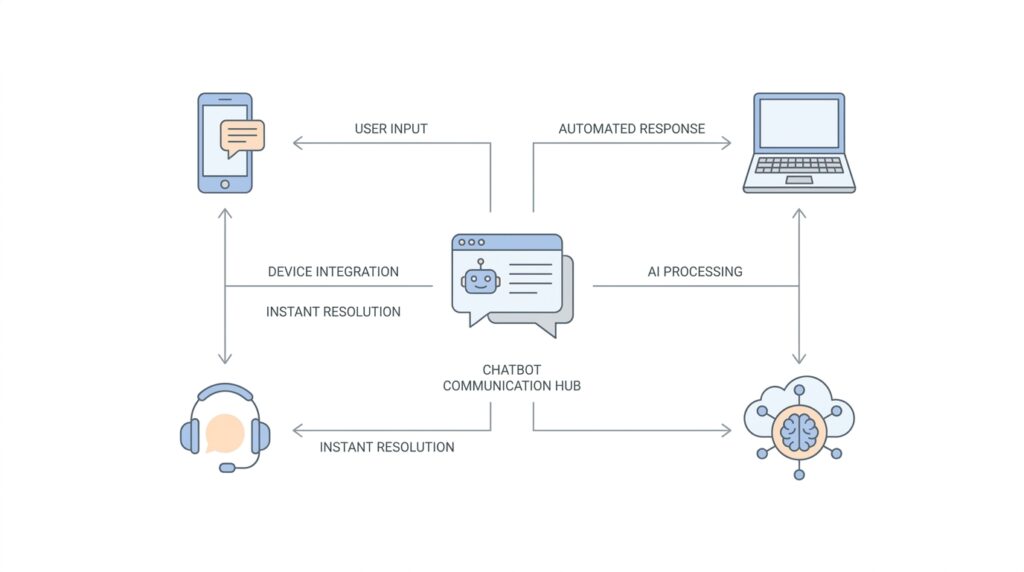
To make that conversation feel smooth, chatbots often rely on a few building blocks working together. One piece listens to the user’s message. Another identifies the intent, which is the user’s goal. A third piece may pull in data from a database, a website, or a customer service system. Then the chatbot turns all of that into a response that feels timely and relevant. You can think of it like a small team passing notes behind the scenes so the chatbot can sound like one calm, unified voice.
And here is the part many beginners find reassuring: you do not need to understand every technical layer to understand how chatbots help. In practice, chatbot fundamentals come down to three questions. What does the chatbot need to help with? How will it understand the user? What will it do when it does not understand? That last question matters a lot, because even the best conversational AI will sometimes miss the point. Good chatbots handle those moments by asking a clarifying question, offering choices, or admitting they need more detail instead of pretending to know.
When we look at chatbots this way, we can see why they have become such a familiar part of modern technology. They reduce friction, answer quickly, and meet people where they already are: in a conversation. As we move forward, this foundation will make it easier to understand how chatbots are built, why some feel natural while others feel clumsy, and how the right design choices turn a basic script into a genuinely useful assistant.
How NLP Reads Intent
If you have ever typed a half-finished request and still hoped the chatbot would understand you, you have already met the real challenge behind natural language processing (NLP): it has to read past the surface and find what you mean. In practice, the system treats your message as an utterance, which is a single user message, and then breaks it into meaning, goal, and useful details. That is why NLP feels less like matching a script and more like listening for the point of your sentence.
The first thing NLP looks for is intent, which is the user’s goal or purpose. If one person types ‘I forgot my password,’ and another says ‘Can’t log in,’ the wording changes, but the intent is the same: account access help. Training phrases, meaning example sentences used to teach the system, help the model learn that different phrasings can still belong to the same intent. This is the heart of intent classification, the process of assigning a message to the best matching goal.
Once the goal is clear, NLP starts looking for entities, which are the specific pieces of information tucked inside the message. Think of intent as the reason you walked into a shop and entities as the items you are pointing to on the shelf. In a request like ‘Book a flight to Paris next week,’ the destination and time are entities, while the broader goal is still booking travel. Those extracted details become structured data, which means the chatbot can use them more reliably than raw text.
What makes this feel human is that NLP does not stop at a single guess. Many systems score possible matches with a confidence score, which is a measure of how sure the model is about its choice, and then compare that score with a threshold. If the best match clears the threshold, the chatbot moves ahead; if not, it falls back to a no-match or fallback path. That fallback moment matters, because it gives the chatbot a chance to ask for clarification instead of pretending it understood.
Context is the quiet partner that keeps the conversation from falling apart. Natural language understanding, the part of NLP that focuses on meaning, intent, and context, helps the system remember what is already being discussed so it can interpret a short follow-up correctly. Without context, a phrase like ‘that one’ or ‘cancel it’ can feel vague; with context, the same words become much easier to place. In other words, NLP reads intent by using the current message, the surrounding conversation, and the patterns it learned from examples.
When those pieces work together, the process starts to feel less mysterious. NLP identifies the intent, pulls out the entities, checks its confidence, and reaches for fallback when the meaning is still fuzzy. That sequence is what turns a messy sentence into something a chatbot can act on, which is why intent recognition sits so close to the center of good conversational design. From here, we can follow that path into what happens after the system understands you, because understanding is only the first step in a useful conversation.
Building Contextual Replies
When a chatbot begins building contextual replies, it stops treating every message like a brand-new puzzle and starts treating the conversation like an unfolding thread. That matters because people rarely speak in full, neatly labeled sentences; we ask, correct ourselves, and leave out details we already mentioned a moment ago. In conversational AI, context is the shared memory that helps the system understand what a short phrase like “that one” or “yes, book it” is actually pointing to. In Google’s Dialogflow docs, contexts are described as similar to natural language context, and they help the system understand references by keeping the conversation anchored to what is already active.
This is where contextual replies start to feel human. If you ask about a flight and then say “tomorrow morning,” the chatbot should not force you to repeat the destination, because the earlier message already supplied that missing piece. The same idea shows up in follow-up questions, where the bot uses what it knows so far to interpret a short answer in the right frame, rather than reading it in isolation. That is why contextual replies are so powerful: they make the chatbot act less like a search box and more like a conversation partner that remembers what the two of you were just discussing.
Behind the scenes, systems keep that thread alive with input contexts and output contexts. An output context is a signal the chatbot sets after matching an intent, and that context then becomes active; an input context is a condition that makes certain intents more likely to match while that context is active. In plain language, it works like placing a bookmark in the conversation, then checking that bookmark before deciding what the next reply should be. This is how a chatbot can handle two identical questions differently, because the surrounding conversation gives each one a different meaning.
Contextual replies also protect the conversation when the system is not fully sure what you mean. Intent detection often uses a confidence score, which is a measure of how certain the model is about its match, and it compares that score with a threshold before deciding whether to continue or fall back. If the score is too low, the chatbot can use a fallback response, which is a safe reply that asks for clarification instead of guessing. That small pause is one of the most helpful habits a chatbot can develop, because it keeps a shaky conversation from drifting into confusion.
Entities also make contextual replies sharper. An entity is a specific piece of information the chatbot extracts from a message, such as a date, a place, or a product name, and that extracted detail becomes structured data the system can reuse later. So when you say “Paris next week,” the chatbot can hold on to both the destination and the timing instead of treating the sentence as a single blob of text. That is the quiet magic of strong NLP: the bot does not only hear what you said, it organizes it so later replies can stay relevant, specific, and easy to follow.
Once you see this pattern, contextual replies stop feeling mysterious. The chatbot listens for intent, tracks the active context, stores the useful details, and checks whether it has enough confidence to move ahead or needs to ask a cleaner question. That sequence is what makes a conversation feel stitched together instead of chopped into separate turns, and it is one of the main reasons modern chatbot systems feel so much more natural than older rule-only scripts.
Adding Personalization
Once the chatbot already understands context, personalization is the next step that makes the conversation feel less like a form and more like a relationship. Instead of asking you to repeat the same details every time, a personalized chatbot can remember useful things such as your preferences, your usual goals, or the style of reply you like best. How does a chatbot remember what matters without feeling invasive? The answer is that good systems separate short-lived conversation context from longer-term memories, so the bot can stay helpful without treating every message as brand new.
The easiest way to picture this is to think of a desk and a filing cabinet. Short-term context is the paper on the desk: it holds what we are discussing right now, like the destination you just named or the question you asked a minute ago. User profile memory, on the other hand, is more like the filing cabinet: it stores stable details such as a preferred language, a usual response format, or a recurring task. Microsoft and AWS both describe memory systems that can retain user preferences and conversation history across sessions, which is what lets chatbot personalization feel consistent instead of accidental.
That distinction matters because personalized replies work best when the chatbot learns the kind of detail that saves you effort. If you often ask for brief answers, the assistant can keep its responses compact. If you usually care about a specific city, account, or workflow, the bot can surface that context first, the way a good shop clerk remembers your regular order and reaches for it before you even finish speaking. Amazon’s documentation on chat memory and agent customization shows this idea in practice by describing systems that can remember preferences, past interactions, response style, and even user history to make replies more relevant over time.
Here is where personalization becomes especially powerful: the chatbot can use what it already knows to narrow the conversation instead of restarting it. A customer support bot might remember that you prefer email over phone callbacks, while a travel assistant might remember the last route you searched or the kind of trip you are planning. In enterprise settings, this can also connect to profile data such as loyalty status or frequent tasks, which helps the system recommend the next useful action rather than offering a generic menu. In other words, chatbot personalization turns memory into momentum.
At the same time, personalization only works when it feels respectful. The best systems keep memories organized by user or session so one person’s details do not spill into another person’s experience, and some cloud services explicitly describe memory isolation as part of privacy protection. That is a good reminder that a personalized chatbot should remember what helps, not everything it could possibly collect. A warm assistant should feel attentive, not nosy, so the design goal is to store the smallest set of stable details needed to make the next interaction smoother.
So if you are building or evaluating a chatbot, the question is not “Can it remember things?” but “Can it remember the right things?” Start with the details that change the conversation in a meaningful way: preferred language, common requests, formatting preferences, and other stable facts that make follow-up turns easier. Then let the chatbot use that memory alongside the context we explored earlier, so each reply feels like it belongs to the same unfolding conversation instead of landing in a vacuum. That is what gives chatbot personalization its human touch.
Supporting Multiple Channels
When a chatbot grows beyond one window, the real question becomes whether it can keep its voice while moving between places. A website chat widget, a mobile app, SMS, WhatsApp, Slack, and even a phone call all feel different to the person using them, but a strong omnichannel chatbot should still feel like the same helpful assistant behind each doorway. Google Cloud’s Dialogflow CX docs describe this kind of reach as the ability to design a conversational interface for a mobile app, web application, device, bot, or interactive voice response system, which is the phone-menu style experience many people know from support calls.
The trick is that the chatbot does not have to rebuild its brain for every channel. Instead, the core logic can stay in one place while an integration or adapter translates between the bot’s internal message format and the channel’s own format, which is why platforms like Microsoft Bot Framework talk about one bot running on one or more channels. In plain language, the chatbot reasons the same way everywhere, while the channel layer handles the local rules of the road. That separation is what keeps a multi-channel chatbot from turning into a pile of disconnected copies.
Of course, each channel speaks its own dialect. Twilio’s messaging documentation lists channels such as SMS, MMS, RCS, WhatsApp, and Facebook Messenger, and Microsoft’s Bot Framework catalogs channel IDs for places like web chat, Slack, Telegram, email, and Teams. That means the chatbot has to respect the medium as well as the message, because what works in a rich web interface may need to be shorter, simpler, or more text-focused in SMS or messaging apps. Supporting multiple channels is not about repeating the same reply everywhere; it is about shaping the reply so it still fits the room it entered.
This is also where continuity matters, because people rarely want to restart the conversation when they switch devices. Twilio’s Conversations API is built to create a shared conversation space across multiple channels, and its assistant tooling shows how an identity and session ID can preserve message history. That shared thread matters in real life: you might start asking about an order on a website, then continue the same discussion in WhatsApp while commuting, and a well-designed omnichannel chatbot should remember that you are still in the same story.
Different channels also ask for different kinds of pacing. A phone-based conversation needs clear turn-taking and often audio handling, while a website integration can use embedded chat UI and richer controls; Google’s Dialogflow CX docs make that split visible by offering both web-embedded messenger experiences and a phone gateway for call-based interactions. If you have ever tried to read a long paragraph on a tiny screen, you already understand why channel-aware design matters: the best response is not always the longest one, but the one that matches the moment.
Behind the scenes, this is where good channel design protects both consistency and trust. The bot should keep the same intent handling, the same contextual memory, and the same personality, while the channel layer adapts the delivery so the experience feels native instead of forced. In other words, supporting multiple channels is less like cloning the chatbot and more like dressing one assistant for different rooms, so the conversation stays familiar even as the setting changes. That is the foundation that lets the next layer of design decisions—routing, formatting, and escalation—feel coordinated instead of chaotic.
Designing Accessible Interactions
Once a chatbot starts feeling useful, accessibility is the quiet design choice that decides whether it works for everyone or only for people using a mouse and perfect eyesight. When we design accessible interactions, we are making sure the conversation can be entered, followed, and finished through more than one route—keyboard, screen reader, speech, or touch—because W3C’s accessibility guidance and its Natural Language Interface Accessibility User Requirements both emphasize multiple modes of input and output, along with support for different sensory, physical, and cognitive needs. If you’ve ever wondered, “How do you design chatbot interactions for accessibility?”, this is the answer in miniature: keep the path flexible, and keep the meaning clear.
The first path to clear is the keyboard path. A keyboard is the set of keys people use to move around and activate controls, and W3C’s WCAG says functionality should be available from a keyboard without requiring specific timings; it also warns against keyboard traps, where focus gets stuck. For a chatbot, that means send buttons, suggested replies, history, and settings must all work without a mouse, and Microsoft’s accessibility guidance adds that interactive elements should have accessible names and descriptions so screen readers, software that reads or brailles on-screen text, can announce them in plain terms. This is the kind of detail that makes a chat widget feel steady instead of fussy.
Then comes language, and this is where many teams underestimate the work. Accessible chatbot interactions should use plain language, which government guidance describes as communication people can understand the first time they read or hear it, because short, direct wording helps people who are tired, distracted, or using assistive technology. W3C’s guidance on labels and instructions also notes that people need clear prompts when input is required, because those cues prevent incomplete or incorrect submissions. So instead of asking “Provide your query parameters,” a bot that wants to be welcoming might say, “What do you want help with today?”
Good accessibility also shows up when the bot gets confused, because confusion is part of real conversation. W3C’s error-identification guidance says errors should be identified, and labels or instructions should help people recover; in chatbot terms, that means the fallback reply, a safe reply that asks for clarification, should say what went wrong, repeat the understood pieces, and offer the next safe step rather than leaving you stranded. If the conversation involves booking, money, or other high-stakes actions, WCAG’s error-prevention guidance pushes us to add a confirmation step before anything becomes final. That extra pause can feel small, but it protects people from a mistyped date or an unintended purchase.
Voice deserves special care because speech can open doors and also create new barriers. W3C’s Natural Language Interface Accessibility User Requirements say natural-language systems should support keyboard input and textual output, and they note that users should be able to review the conversation history; that is a strong hint that voice experiences need a text backchannel, not a speech-only tunnel. In practice, accessible chatbot design often means pairing spoken replies with on-screen text, preserving transcripts, and letting users switch modes when the environment changes. That way, a noisy bus ride, a hearing aid, or a temporary speech issue does not end the conversation.
The best test is still the simplest one: step into the chatbot the way a person with a different need would. Try it with only a keyboard, try it with a screen reader, try it with short follow-up questions, and try it after the conversation has wandered a few turns away from the original topic; Microsoft’s accessibility guidance treats accessibility as something to design, implement, and test, not as a polish pass at the end. When we make accessible interactions part of chatbot design from the beginning, the result is not only more inclusive, but calmer for everyone, because the bot explains itself better, recovers faster, and asks fewer people to fight the interface before they can get help.