Identify query failure symptoms and patterns
Imagine you just pushed your app and a report that once took a second now takes thirty, or worse — returns the wrong totals. Right away you feel the sting of a query failure: a database query (a question your app asks the database) that times out, errors, returns incorrect results, or behaves unpredictably. How do you tell when this is caused by poor database design rather than a fluke network hiccup or momentary load spike? Building on what we’ve already explored about structure and intent, the first step is learning to read the symptoms and patterns the system gives you, like following footprints back to the source.
Start by cataloging concrete failure symptoms you can observe. A timeout is when the database doesn’t respond within your configured time limit; an error is a thrown exception such as duplicate key or foreign key violation; incorrect results mean the query returns mismatched or stale data. Each of these symptoms points at different classes of problems: timeouts and slow queries often signal missing indexes or full-table scans; foreign key violations or duplicates hint at schema issues or denormalized data; errors during concurrent writes may indicate race conditions or locking problems. Naming the symptom clearly makes the next step — mapping it to causes — far easier.
Now look for repeating patterns, because patterns tell the story of why a problem happens. Does the slowdown happen only during nightly batch jobs, or whenever a certain page loads? Is it gradual (performance degrading over weeks) or sudden (an immediate spike after a deploy)? Recurrent spikes linked to specific queries suggest a structural issue in how data is stored or queried — for example, frequent JOINs on unindexed columns produce predictable full-table scans under load. Think of pattern detection like listening for a recurring cough: one cough might be an irritation, but a rhythm of coughs reveals an underlying condition.
Let’s make this practical: reproduce the failure deliberately so you can observe it in isolation. Capture a sample of the offending SQL from logs or an application trace, then run it directly against a representative dataset. Use a small, realistic dataset first to confirm logical correctness, then scale data size to mimic production and watch how execution time and resource usage change. This process reveals whether the problem is algorithmic (bad query shape), structural (schema or missing index), or operational (hardware, connection pool limits). If the query performance collapses as row count grows, you’ve found the data-size sensitivity that points toward normalization or indexing fixes.
Measure the right signals: latency (how long queries take), throughput (queries per second), error rate, CPU and disk I/O, and lock contention (when transactions block each other). Define baselines so you can say, “normal latency is 50 ms; it’s now 800 ms for this query.” Alerts for slow queries and elevated error rates surface problems early; logs with execution plans (the database’s step-by-step map for running a query) show whether the engine is performing index seeks or costly table scans. These metrics are your diagnostic tools — without them you’re guessing.
Translate symptoms into targeted next moves rather than random tinkering. Repeated full-table scans on a filtered query often need an index; inconsistent or duplicated values suggest normalization — organizing data to remove redundancy and enforce relationships — or fixing missing constraints. Frequent write conflicts or cascading updates can mean tables are too denormalized and carry duplicate state that’s hard to update atomically. Weigh fixes: add a focused index, refactor a table into a normalized join table, or change the query shape to avoid N+1 patterns (when one query triggers many similar queries). Each action should be justified by the symptom-pattern you observed.
With that map of symptoms and patterns in hand, you’re ready to convert detective work into surgical fixes. Next we’ll take the specific failure signatures you now recognize and show step-by-step normalization and indexing techniques to repair the schema and restore reliable, fast query performance.
Spot common poor database design patterns
Imagine you’ve opened a slow report and felt the stomach-drop of seeing a once-fast page crawl to a halt; that moment is where our story begins. Right away, two phrases matter: database design — the plan for how you store and relate your data — and normalization — the process of organizing that data to remove unnecessary duplication and enforce clear relationships. Both directly shape query performance, which is how fast and reliably your questions to the database return results. If those three elements are out of step, your app will tell you in delays, wrong totals, and intermittent errors.
One common character you’ll meet is the missing index. An index is a data structure the database uses to find rows quickly, like an index at the back of a book that points to pages instead of scanning every page. When an index is absent for a column you filter or join on, the engine performs a full-table scan — reading every row — and that’s what turns 50 ms into 5 seconds as the table grows. Another recurring design pattern is denormalization, which means copying the same piece of data into multiple places to avoid joins; this can feel handy at first but becomes a maintenance and consistency problem as writes and updates multiply.
Here’s a pattern that shows up in the wild: many tiny queries inside a loop, known as the N+1 problem. The N+1 problem happens when one query (N) triggers many additional queries (+1 each), often because related records weren’t modeled or fetched efficiently. You’ll notice it when a page that shows a list of users loads slowly because each user triggers a separate call to fetch their profile or settings. Similarly, missing foreign keys — the constraints that link rows across tables and enforce referential integrity — make it harder to reason about relationships and can hide the root cause of inconsistent joins and surprising deletes.
Data integrity failures have their own signature. Look for duplicated records, mismatched status codes, or totals that don’t add up: these are clues that constraints (rules the database can enforce) or transactions (groups of operations that succeed or fail together) are missing or misused. For example, storing calculated totals in multiple places to save time turns into a sync problem: an update that should change three fields may change only two, creating incorrect reports. When you see such inconsistencies, think about moving toward normalization and adding appropriate constraints so the database becomes an active guardrail rather than a passive store.
Operationally, some patterns hide behind the scenes: overly wide tables with dozens of nullable columns, storing comma-separated lists inside a single column, or leaning heavily on free-form JSON where relational structure would help. These designs make filtering, indexing, and joining harder and push complexity into application code. On the flip side, watch for too many indexes as a pattern; while indexes speed reads, they slow writes and increase storage. If write-heavy workloads suddenly slow, ask whether an index proliferation is the guilty party.
How do you turn recognition into the next step? Building on this foundation and the failure symptoms we discussed earlier, the trick is to map the symptom to the pattern: slow reads and full-table scans point to missing indexes or bad join keys; inconsistent data points to missing constraints or denormalized copies; N+1 behavior suggests query shape or schema that forces round-trips. Now that we’ve learned to spot these recurring anti-patterns in database design and how they harm query performance, we can move into concrete normalization and indexing techniques that repair the schema and restore predictable speed.
Review normalization basics 1NF to 3NF
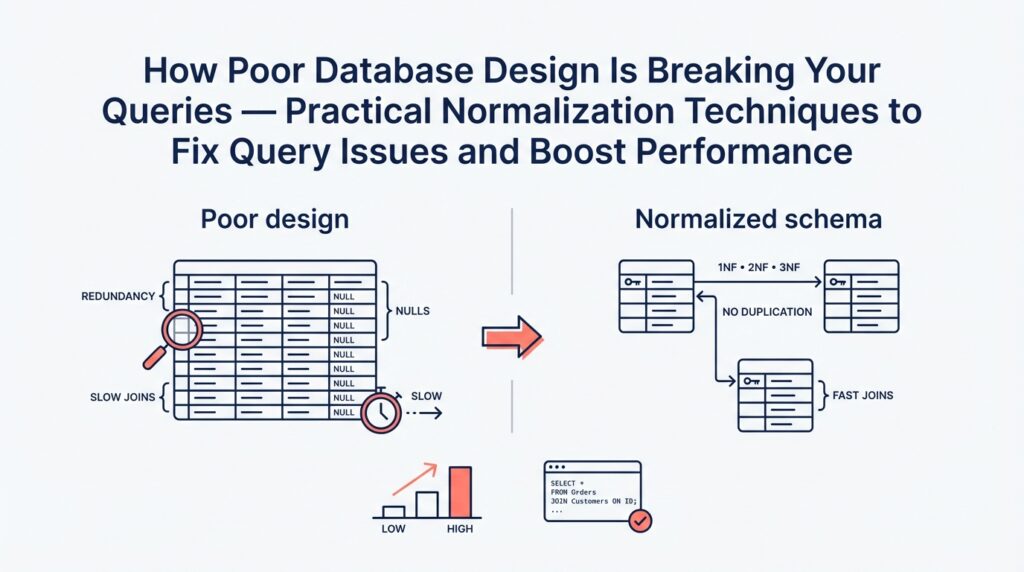
Imagine you’ve tracked a sluggish report back to a single table and you’re wondering whether the way the data is organized is to blame. Database normalization — organizing data to remove unnecessary duplication and enforce clear relationships — is the toolkit we reach for when structure is causing wrong totals or slow JOINs. Think of normalization like arranging ingredients in a kitchen: when things are grouped logically you cook faster and make fewer mistakes. First we’ll meet three core steps (1NF, 2NF, 3NF) as friendly rules that help your queries run predictably and keep totals correct.
First Normal Form (1NF) is the foundation: every column must hold atomic values (that is, a single, indivisible piece of data) and each row should be uniquely identifiable by a primary key (a column or set of columns that uniquely identifies a row). If you’re storing comma-separated tags in one column or stuffing multiple phone numbers into one field, you’re violating 1NF. That design forces the database to scan text and parse values at query time, which kills index usage and makes filters unreliable. The practical fix is to split repeating groups into their own rows or tables so the database can index and join efficiently — for example, move tags into a tag table with one row per tag and link it with a join table.
Second Normal Form (2NF) builds on 1NF and matters when your table uses a composite primary key (a primary key made of more than one column). 2NF says non-key columns should depend on the whole primary key, not a part of it; a dependency means one column’s value is determined by another. Imagine an order_items table keyed by (order_id, product_id) that also stores product_name and product_price — that duplicates product data across many lines. Under 2NF, we move product details into a products table and keep only the product_id on each order line. This reduces repeated writes, shrinks row size, and makes updates safe because changing a product name happens in one place.
Third Normal Form (3NF) asks us to remove transitive dependencies, where a non-key column depends on another non-key column instead of depending directly on the key. A common example is storing zip_code, city, and state in a customer table where city/state are determined by zip_code. If the city record changes or is inconsistent, reports break; moving zip-to-city/state into a lookup table means the customer row stores only the zip_code key and looks up the rest when needed. 3NF improves consistency and simplifies constraints: you can enforce correctness at the database level so your queries return predictable aggregates. Be aware this introduces more joins, so performance gains depend on indexes and query patterns.
As we discussed earlier about symptoms and patterns, normalization helps when you see duplicated updates, inconsistent totals, or queries that grow worse as table size grows. How do you know when to stop normalizing? Use 3NF as a practical baseline for correctness and maintainability, then measure: if a normalized schema causes hot-path queries to slow, consider targeted denormalization (copying a small piece of data into a read-optimized table) combined with appropriate indexes. In other words, normalization and indexing work together — normalization reduces redundancy and makes constraints reliable while indexes and occasional denormalization tune read performance.
Putting these ideas into action is like refactoring a messy recipe into mise en place: first make sure ingredients are separated and labeled (1NF), then keep related ingredients in the right container so nothing is repeated (2NF), and finally remove hidden dependencies that cause surprises (3NF). We’ll use this baseline to pick specific refactors: identify the offending table, verify which normal form it violates by testing for repeated values or transitive dependencies, and then apply a refactor with measurements before and after. With normalization and targeted indexing as our compass, we’ll be able to convert the failure symptoms you saw earlier into surgical fixes that restore both accuracy and speed.
Stepwise normalization split extract relate tables
Imagine you’ve just traced a slow, wrong-reporting query back to a single sprawling table and you’re asking: how do you methodically split, extract, and relate tables so queries stop breaking and reports stay correct? This is exactly the moment where a stepwise approach to normalization earns its keep — normalization is the practice of organizing data to remove duplication and clarify relationships so queries are predictable and totals stay accurate. Building on the basics we covered earlier, we’ll walk through a gentle, practical sequence that turns a messy table into a clean set of related tables you can index and trust.
First, we need a clear map of what belongs together and what’s repeating. Start by scanning the offending table for repeating groups (columns that contain lists or repeated attribute sets) and for columns whose values are duplicated across many rows. A primary key is the column or set of columns that uniquely identify a row; spotting the natural primary key helps you know what stays. When you find repeated data, the obvious first step is to split those repeating groups into their own table so each fact is stored exactly once.
Let’s make the split concrete with a story: imagine an orders table that stores items as a comma-separated list in a single column. That design violates First Normal Form and forces string parsing at query time. We split by creating an order_items table with one row per item, for example CREATE TABLE order_items (order_id INT, product_id INT, quantity INT); which moves each item into its own row. This split immediately lets the database use indexes on order_id and product_id, turning expensive full-table scans into fast seeks and enabling accurate aggregation of quantities and totals.
Next, extract attributes that truly belong to a different entity into a dedicated table. If order_items stores product_name and product_price, those fields belong to a product entity, not an order line. Extracting them into a products table centralizes canonical product data so updates happen once. A foreign key — a rule that links a child row to its parent row by storing the parent’s primary key — enforces that link and prevents orphaned or inconsistent copies.
Now relate the pieces with the right kinds of joins and join tables. When a relationship is one-to-many (one order to many items), the child table holds the parent’s key; when a relationship is many-to-many (books and authors, or posts and tags), introduce a join table such as post_tags(post_id, tag_id) to represent each association explicitly. A join table is simply a table whose rows represent links between two entities, and it’s the clean way to model relationships without duplicating data.
Migration is where careful planning pays off, because changing schema in production can break apps if done abruptly. Use transactional backfills when possible (a transaction groups operations so they succeed or fail together) or staged migrations: write new rows to both old and new tables, backfill historical data in a controlled job, and switch reads over only after validations pass. During migration, keep queries working by introducing views or temporary compatibility columns so your application has time to adapt.
After splitting, extracting, and relating, tune indexes and update queries to the new shapes. Normalization can increase the number of JOINs your queries perform, so create indexes on foreign keys and commonly filtered columns to preserve read performance. Measure query plans and latency before and after each change; the goal is consistent, explainable execution rather than accidental speed.
To see the benefit in practice: pull one duplicated field out of the big table, move it to a canonical table, wire a foreign key, backfill the data, and update the report’s JOIN. You’ll often find totals now match the business rules because there’s a single source of truth, and the report runs faster because the database can use targeted indexes. With the tables split, extracted, and related in this stepwise way, you’ve turned ad hoc fixes into a reproducible normalization technique that prepares the schema for safe indexing and further optimization — next we’ll look at concrete indexing patterns and query rewrites that exploit this cleaner structure.
Add keys indexes and integrity constraints
Imagine you’ve finished the split-and-relate work from the previous section and you’re staring at new tables that should finally behave—but some reports are still slow or, worse, still wrong. At this stage the missing pieces are often the right keys, indexes, and integrity constraints: keys (columns that uniquely identify rows), indexes (data structures that help the database find rows fast), and integrity constraints (rules the database enforces to keep data correct). What causes slow joins and wrong counts? Frequently it’s that the database can’t quickly locate the rows you expect, or that duplicate or orphaned rows exist because no rule forbids them.
First, let’s meet keys as practical characters in our story. A primary key is the column or set of columns that uniquely identifies a row; think of it like a social security number for each record. A foreign key is a pointer from a child table to its parent table; it’s the rule that says “this order belongs to that customer.” Defining these keys explicitly does two things: it gives you a reliable way to JOIN tables (so queries don’t accidentally match extra rows), and it provides clear targets for indexes to accelerate those joins.
Indexes are the next actor and deserve careful introduction. An index is like the index at the back of a cookbook: it points directly to pages (rows) that match a search term instead of making you flip every page. When you create an index on a column you filter or join by—customer_id, created_at, or a composite like (order_id, product_id)—the database can perform an index seek instead of a full-table scan, which often turns 5-second queries into sub-100 ms queries. How do you choose which columns to index? Prefer columns used frequently in WHERE clauses, JOIN conditions, or ORDER BY; prefer selective columns (those that split rows well), and prefer indexes on foreign keys created during normalization.
Integrity constraints are the safety net that stops subtle data corruption before it reaches your reports. A UNIQUE constraint prevents duplicate values where duplicates would break logic; NOT NULL ensures required fields aren’t left blank; CHECK rules validate values against simple expressions; and FOREIGN KEY constraints prevent orphaned child rows by enforcing the parent-child relationship. Adding these constraints converts hidden application logic into declarative database rules, so the database itself rejects invalid writes rather than letting inconsistencies accumulate and later poison aggregates.
There are practical trade-offs to narrate: indexes speed reads but slow writes and consume space, and some integrity constraints add locking during writes. That means you don’t blindly index every column; you profile your hot queries and add focused indexes where the payoff is clear. For write-heavy tables, consider partial indexes (which index only rows matching a condition), covering indexes that include the columns a query needs, or compound indexes that match the query’s exact filter order. Measure with execution plans and before/after timing to ensure each index delivers value.
Migrations and backfills are the choreography that makes these changes safe in production. Build foreign keys and constraints after you’ve backfilled data into the new normalized tables, or use staged enforcement (validate existing rows before blocking new bad ones). When adding indexes on large tables, prefer concurrent or online index builds if your database supports them so you don’t block application traffic. Keep read compatibility by writing to old and new shapes simultaneously until validation passes, then switch reads and later drop legacy columns.
Building on this foundation of normalized tables and careful schema changes, keys, indexes, and integrity constraints turn a fragile dataset into a predictable one: joins become reliable, reports match the business rules, and queries use index seeks instead of expensive scans. Next, we’ll translate this cleaner schema into concrete query rewrites and index patterns that target your slowest, most critical reports.
Measure performance and selectively denormalize
Imagine you’ve just finished normalizing a messy schema and the reports are logically correct, but one critical dashboard still crawls under load. Right away you’ll want to measure performance so you know whether the problem is the schema, the query shape, or simply missing indexes. Building on the normalization and indexing work we did earlier, let’s treat performance measurement as our compass: we’ll gather objective signals, run controlled experiments, and only then consider whether to denormalize for speed.
Start by establishing a clear baseline: capture the query’s median and p95 latency, CPU, disk I/O, and the query execution plan under production-like data. Use realistic data volumes when you measure so the results reflect growth sensitivity rather than a toy dataset. When should you denormalize? We ask that because denormalization—copying or precomputing data into read-optimized shapes—introduces maintenance cost; answer that question by comparing baseline metrics to your business SLAs and by identifying which part of the plan causes expensive scans or nested loops.
Next, profile the exact offender like a detective: isolate the SQL, run EXPLAIN/EXPLAIN ANALYZE (or your DB’s equivalent) to see whether the engine performs index seeks or full-table scans, and note which joins or aggregations dominate runtime. Don’t guess from timings alone; the execution plan tells the story. If a join repeatedly reads millions of rows because of a missing filter or non-selective predicate, you likely need an index or a rewrite before you consider denormalize; if the cost is dominated by repeated aggregations over historical data, denormalization or materialized summaries become plausible options.
Think of denormalization like pre-batching a recipe: you cook once so serving becomes instant. Practical denormalize tactics include summary tables (pre-aggregated counts or totals), materialized views that refresh on a schedule, and storing a small canonical copy of a frequently-read attribute on the child row to avoid a join. Each tactic speeds reads but moves complexity into writes: you must update summaries atomically or accept eventual consistency. Weigh these trade-offs by measuring write latency and error rates before and after a change so you don’t trade a slow report for brittle writes.
Implement denormalization selectively and safely by following a repeatable checklist: instrument and log the target query, reproduce the load in staging with production-like data, introduce the read-optimized artifact (a summary table or denormalized column), and route a small percentage of production reads to the new path. Validate that results match the canonical source for correctness, and monitor performance and write amplification. If results diverge or writes spike, roll back and reassess whether an index, query rewrite, or a caching layer would be a better fit.
Automation and maintenance matter as much as the initial fix. If you create summary tables, decide whether to refresh them synchronously (in the write transaction) or asynchronously (background job), and document invariants so future developers know where the single source of truth lives. Add integrity checks and alerts for divergence, and include the denormalized artifacts in your backup and migration plans. Treat denormalization as an engineered shortcut: powerful when controlled, hazardous when forgotten.
Ultimately, measurement is the guardrail that keeps denormalization from becoming technical debt. By measuring performance upfront, profiling precisely, and applying denormalize changes only where metrics and business SLAs justify them, you preserve the correctness benefits of normalization while restoring query performance where it matters most. Building on the earlier normalization and indexing steps, this measured, selective approach gives you predictable speed without losing the single source of truth we worked hard to establish.