Set Up Search Tracking (developers.google.com)
Imagine you have a storefront where visitors can type what they want, and the most interesting signal is not the click that lands them on a page, but the search phrase that led them there. That is the heart of internal search tracking in GA4: we want to see the words people use inside your site, because those words often reveal buying intent long before a purchase happens. How do you set that up without turning the whole site into a tracking project? In Google Analytics 4, the first path is Enhanced Measurement, which can automatically send a view_search_results event when a search results page appears and the URL contains a search query parameter.
The easiest version of this story is the one where your search results page already shows the search term in the URL. GA4 can look for common parameters such as q, s, search, query, and keyword, and you can also tell it to watch other query parameters if your site uses a different pattern. When that happens, GA4 collects the search_term parameter and maps it to the built-in Search term dimension, which means you do not have to invent a custom field just to read the result later. Think of it like giving Analytics a labeled envelope instead of asking it to guess what is inside.
Things get a little more interesting when your site search does not change the URL in a visible way. That is common on modern sites where the page updates in place, or where a search box returns results without a traditional query string. In that case, you can send the same view_search_results event yourself through the Google tag, Google Tag Manager, or the Measurement Protocol, and include search_term as the value. Google’s event reference shows view_search_results as the recommended event for a search results page, while the event-parameter guide shows the general pattern for passing parameters with gtag() and explains that you can attach parameters per event or for every event on a page. In practice, this means you do not need to force your product team into one URL style; you just need to make sure GA4 receives the search term in a consistent event.
There is one small but important habit to build now: verify the data while you are still close to the implementation. GA4’s Realtime report and DebugView are the quickest places to confirm that view_search_results is firing and that the term is arriving the way you expect. If you add extra custom parameters later, remember that GA4 only shows those values in reports after you create matching custom dimensions or metrics; the built-in search_term is already handled, but your own additions are not. This is also the right moment to keep privacy in mind, because Google’s help guidance reminds you that no personally identifiable information should be collected.
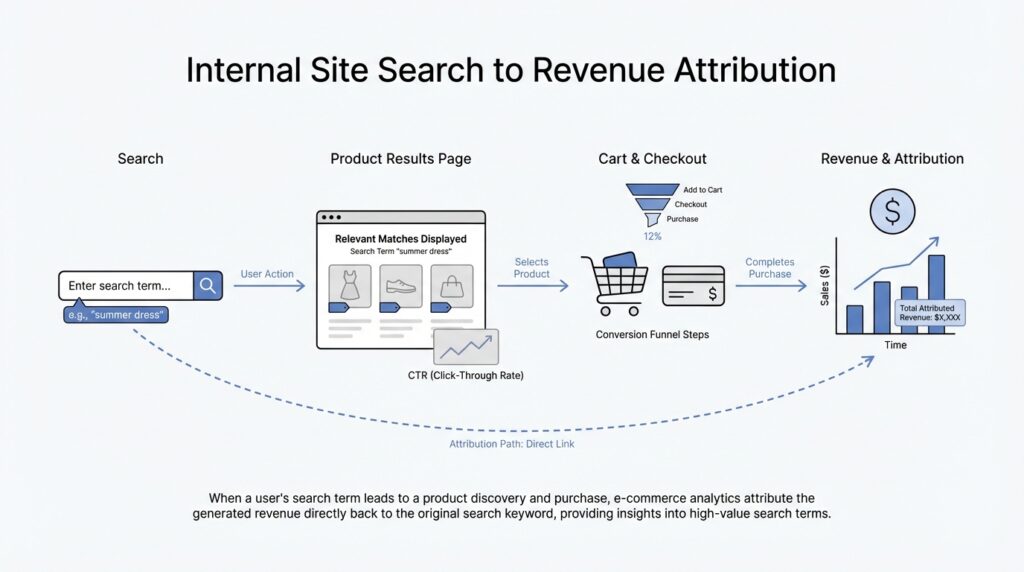
Once this tracking is in place, your site search stops being a black box and starts acting like a conversation log. You can see which phrases people use, which ones lead them deeper into the catalog, and which ones are strong enough to deserve revenue analysis later on. That is why we set up GA4 search tracking carefully now: the cleaner the event, the easier it becomes to connect a search term to a purchase when we move from measurement into attribution.
Capture Search Term Data (developers.google.com)
Building on this foundation, the next step is making sure GA4 receives the search term data in a form it can actually use later. In practice, that means sending the search phrase as the search_term parameter on a search-related event, because Google’s recommended search event uses search_term as a required parameter, and view_search_results also accepts search_term when a results page is shown. Think of it like writing the customer’s exact request on the receipt before it goes into the drawer; if the wording is missing, the story becomes much harder to trace later.
The important part is to capture the original phrase, not a watered-down version of it. If someone types “red running shoes,” that is the signal you want to keep, because it reflects intent more clearly than a generic label like “shoes” or a backend category code. How do you capture search term data without losing that nuance? You send the term as the event parameter and let GA4 map it to its built-in Search term dimension, which is designed for this exact kind of analysis.
Now that we understand the core value, it helps to treat the search term like a small piece of structured data rather than plain text floating around the page. Google’s event-parameter guidance shows that you can attach parameters to a single event or to every event on a page, and that parameters on recommended events can populate prebuilt dimensions and metrics automatically. That means you can keep the implementation tidy while still preserving the exact search phrase for reporting and later attribution work.
Here is where teams often make a subtle mistake: they add extra context, but forget that GA4 will not expose every custom value by default. If you add your own parameters alongside the search term, GA4 requires a matching custom dimension or metric before those values appear in reports. In other words, the built-in search_term is ready to use, but any extra labels you invent need their own translation step before the data becomes visible.
That is why this step matters so much for e-commerce revenue attribution. Once the search term is captured consistently, you can start comparing the phrases people search with the purchases they make, instead of guessing which queries helped move them toward checkout. Taken together, the search or view_search_results event, the search_term parameter, and any carefully defined custom dimensions give you a clean trail from intent to revenue, which is exactly what we need before we start connecting internal search behavior to sales.
Record Purchase Revenue (developers.google.com)
Building on this foundation, we now need the part that turns search intent into money: the purchase event. Think of it like the final receipt in a long conversation between your visitor and your store. GA4 uses that event to understand that a sale happened, how much it was worth, and which items were involved, so your later analysis has a trustworthy revenue anchor instead of a vague guess.
The core of purchase revenue recording is a small set of fields that carry a lot of weight. You send transaction_id, value, currency, and an items array, and GA4 uses them to calculate ecommerce and revenue metrics. The value should equal the sum of each item’s price multiplied by quantity, and it should not include shipping or tax; if you send value, currency is required, and the currency code should be a standard three-letter code such as USD.
This is also where transaction_id earns its keep. A transaction ID is the unique order number for the purchase, and GA4 uses it to avoid counting the same order twice; if the same ecommerce event is triggered again with the same transaction ID, Analytics keeps the first one and ignores the duplicate. When you are testing, that means a repeated button click can look invisible unless you give it a fresh transaction ID, which is a helpful reminder that revenue tracking needs both accuracy and discipline.
Now that the event is in place, the next question is when you actually see the numbers. Google says purchase data appears in reports, explorations, the Google Analytics Data API, and BigQuery Export after about 24 hours, and the purchase event automatically fills revenue-related measures such as item revenue, total revenue, ecommerce purchases, and BigQuery fields like purchase_revenue and transaction_id. In other words, the moment you record purchase revenue correctly, you are not only logging a sale; you are creating a clean trail that downstream reporting tools can follow without extra translation.
That is why this step matters so much for internal search attribution. Once your search tracking is already sending search_term on view_search_results, the purchase event becomes the other end of the same story: one side tells you what the visitor was looking for, and the other side tells you what they bought. How do you connect the two later? By keeping both events consistent, complete, and free of duplicate transactions, you give GA4 the raw material it needs to compare search phrases with revenue instead of with empty traffic.
Join Searches To Orders (developers.google.com)
Building on the search tracking we set up earlier, this is the moment where internal search terms start to earn their keep. BigQuery export gives you the raw event stream in a form you can query with SQL-like syntax, which means you can stitch a search event to a later purchase instead of looking at them as two separate stories. How do you connect an internal search term to e-commerce revenue? In practice, we use the search event’s search_term and the purchase event’s revenue fields as the two ends of the same thread.
The easiest place to start is the session, because GA4 already gives us a stable way to recognize one visit from one person. In BigQuery event export, the combination of user_pseudo_id and ga_session_id is the standard way to identify a unique session, and Google also notes that signed-in user_id can strengthen this picture when you send it. That is why a first-pass join usually groups the search events and purchase events by the same user and session before we try to do anything fancier. Think of it like matching receipts from the same shopping trip before we try to compare shopping trips across weeks.
Once we have the session, the next step is time. GA4 export includes event_timestamp, which is an UTC timestamp in microseconds, so we can sort the session like a little timeline and look for the search that happened right before the order. A practical pattern is to keep the most recent search event before the purchase timestamp; that is an analytical choice, not a built-in GA4 report, but it fits the way people usually shop: they search, browse, and then buy. If there are several searches in one session, this ordering step is what helps you decide which phrase most likely influenced the order.
Now that the match is clear, the revenue side becomes straightforward. The purchase event carries transaction_id, value, currency, and items, and Google uses transaction_id to deduplicate repeated sends of the same order so you do not count one sale twice. In other words, if you join a search term to a purchase, you should treat that purchase row as the source of revenue truth and carry its value forward into your analysis. That is the piece that turns internal search from a list of phrases into a revenue table.
There is one catch worth keeping in mind: session-level joins only capture searches and orders that happen in the same session, and Google notes that session-level attribution is not directly available in BigQuery export as a ready-made answer. If your shopper searches on Monday and buys on Wednesday, you will need a broader user-level approach, often using user_id when available or a custom time-window rule built from your own first-party data. That is also why BigQuery is so useful here; Google explicitly points out that you can join GA4 export with relevant first-party data and build your own attribution model when the built-in reports stop short.
With that join in place, the story becomes much easier to read: a search term leads to a session, the session leads to a purchase, and the purchase carries the revenue value you can analyze. From there, you can rank internal search terms by orders, revenue, or average order value and see which queries are doing the quiet work of moving people toward checkout. That is the real payoff of joining searches to orders: you stop guessing which words matter and start tracing the path from intent to revenue.
Build Revenue Attribution Reports (developers.google.com)
Once your search tracking and purchase events are both flowing, the next move is to turn them into a revenue attribution report. How do you build a report that tells you which internal search terms actually paid off? In GA4’s Data API, the key pieces are already there: searchTerm is a built-in dimension, and purchaseRevenue, transactions, itemRevenue, and totalRevenue are available metrics. That means you can ask for a table where each search phrase carries its own revenue trail, while BigQuery export still gives you the raw events when you need a more custom model.
Start with the simplest shape: one row per search term. GA4’s runReport requests let you combine dimensions and metrics, and you can use up to nine dimensions when you need more context. For an e-commerce view, searchTerm is usually the star of the show, while purchaseRevenue is the clearest money metric because it reflects purchase value minus refunds. If you want a broader lens, totalRevenue adds subscriptions and ad revenue, and itemRevenue strips out tax and shipping so you can focus on the product value itself. That is the heart of these revenue attribution reports: one search phrase, one money story, one row at a time.
Then we add the guardrails that make the report readable. Since Enhanced Measurement can populate searchTerm from the search_term event parameter, you can filter by date range and, when needed, by event name so you only count real search-result visits. Sorting by purchaseRevenue in descending order helps the strongest phrases rise to the top, because OrderBy can sort by metric values or dimension values. This is where a revenue attribution report starts feeling less like a log and more like a conversation: the query with the strongest buying intent is no longer buried in the noise. One caveat matters here, though: if your search phrases are very varied, GA4 can group low-frequency values into (other) in standard reports and in the Data API when cardinality gets too high.
When the story needs a truer attribution model, move into BigQuery. BigQuery export gives you raw GA events and SQL-like querying, and Google’s guidance says session-level traffic attribution is not directly available in the export, so custom attribution models are fair game when you join with first-party data. The practical ingredients are user_pseudo_id, user_id, ga_session_id, and event_timestamp, which let you line up the search event with the later purchase in time. Remember that event_timestamp is UTC microseconds, so if you compare it with UI numbers, you need to respect the reporting time zone. That extra care is what keeps your search-to-revenue analysis honest instead of merely convenient.
From there, the report becomes business-friendly: a search term, a purchase count, a revenue total, and maybe an average order value column if you calculate it downstream. You can also compare two time windows in one request, which is handy when you want to see whether a new search experience lifted revenue week over week. The real payoff is not the table itself; it is the habit of reading internal search as a revenue signal rather than a support feature. Once that clicks, the next layer is deciding which searches deserve merchandising fixes, content changes, or new product coverage.
Analyze High-Value Search Terms (developers.google.com)
Building on this foundation, the real question is not which internal search terms appear most often, but which ones actually bring in e-commerce revenue. That is where high-value search terms come into focus. In GA4, the search report is a starting point, but it does not automatically tell you which phrases are pulling their weight and which ones are only creating activity. How do you tell the difference between a popular search and a profitable one? We look at the search phrase, the purchase that follows, and the strength of that connection.
The easiest way to think about it is to separate volume from value. A term can be searched hundreds of times and still produce weak results, while a smaller phrase can quietly drive strong orders. That is why revenue per search is so useful: it shows how much money each query tends to generate, not just how many eyes it attracts. Conversion rate matters here too, because it tells you what share of search sessions end in a purchase. When you compare those two numbers side by side, you start to see which internal search terms are genuinely helping shoppers move forward.
Once that idea clicks, the next layer is intent. High-value search terms are often specific, because specific searches reveal a shopper who already knows what they want. A broad query like “shoes” may bring plenty of traffic, but a phrase like “women’s trail running shoes waterproof” usually carries more buying intent and often leads to a higher average order value. Average order value means the typical amount spent per order, and it helps you see whether a search term attracts small basket purchases or bigger carts. In practice, the best terms are often the ones that sound like a decision, not a daydream.
Now that we understand the shape of value, we can look at context. The same search term can behave differently depending on device, audience, or timing, and that is easy to miss if you only stare at totals. A phrase might look ordinary in the full report but become a strong performer on mobile, among returning visitors, or during a weekend promotion. This is why segmenting your analysis matters: it helps you see whether a search term is truly high-value overall or only powerful in a narrow situation. Think of it like hearing one instrument in an orchestra; the full song matters, but so does the section that is carrying the melody.
It also helps to look for patterns that point to action. If certain searches repeatedly lead to purchases, those terms deserve better merchandising, stronger autocomplete suggestions, and clearer landing pages. If a search phrase produces revenue but low order counts, that may signal high-ticket intent, while a high-frequency phrase with weak revenue may point to poor search results or missing products. This is where the analysis becomes practical: you are no longer counting words, you are diagnosing where the store helps shoppers and where it slows them down. In other words, high-value search terms are not just something to report; they are clues about what your customers are ready to buy.
As you compare these patterns, keep the focus on behavior rather than labels. The best internal search terms are often the ones that combine intent, efficiency, and revenue, even if they never become the most searched phrases in the report. Once you can spot that difference, you are ready to turn the analysis into decisions about merchandising, content, and search experience.