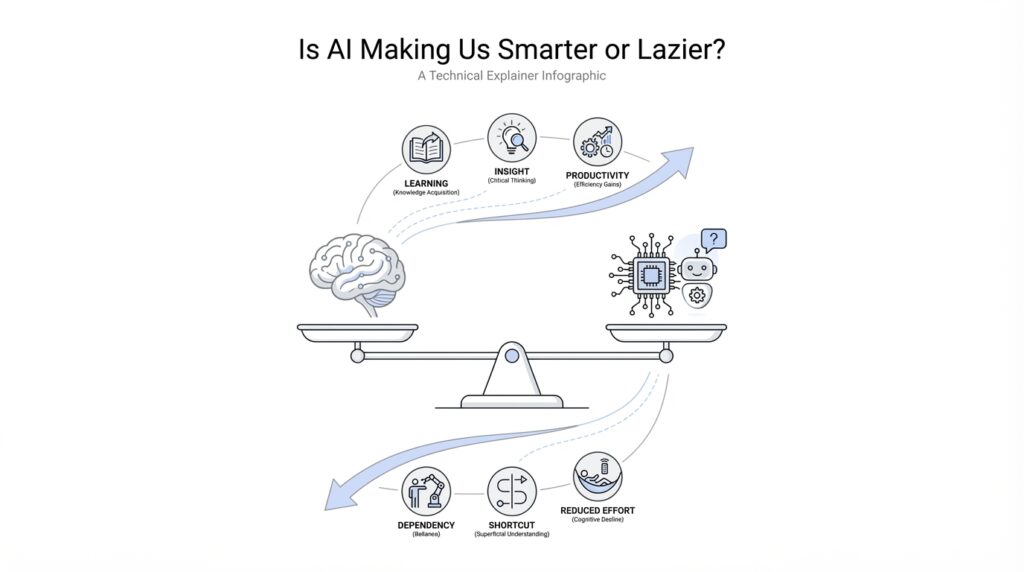
What AI Changes in Thinking
Imagine you open a blank page, and instead of staring at it alone, you have a tool that can sketch the first draft, suggest a better phrase, or point out what you missed. That is where AI changes thinking most: it does not only speed up the work, it changes the order in which your mind moves through a problem. In practice, AI makes it easier to start, easier to compare options, and easier to keep moving when you would normally get stuck. But that same convenience also asks a new question: how do you stay mentally engaged when AI can do the first pass for you?
Building on that idea, one of the biggest shifts is something called cognitive offloading, which means handing part of the mental load to a tool instead of keeping it all in your head. We already do this with calculators, calendars, and phone reminders, so AI is not a brand-new habit; it is a more powerful version of an old one. The difference is that AI can now offload not only memory, but also drafting, summarizing, organizing, and even early-stage brainstorming. That can be a gift, because your attention is freed up for higher-level thinking, but it can also make your brain less practiced at the parts you no longer use often.
This is where the conversation gets interesting. AI in thinking can make you sharper at judgment while making you weaker at recall, depending on how you use it. If you ask AI to generate three options, you still have to decide which one fits your goal, which one sounds trustworthy, and which one misses the point. That decision-making step is real mental work, and it can become a strength if you treat AI like a thinking partner rather than a substitute. On the other hand, if you accept the first answer without checking it, your mind may stay busy but never really stretch.
Now let us bring that into everyday life. A student using AI for research might understand a topic faster because the tool can summarize a long article in seconds, but that same student may retain less if they never wrestle with the material themselves. A worker using AI for emails may save time and write more clearly, yet miss the chance to notice how their own tone changes from one audience to another. This is the quiet tradeoff behind AI and mental effort: it can reduce friction, but friction is sometimes what helps ideas stick. Think of it like taking the stairs versus riding an elevator; both get you up the building, but only one asks your muscles to do the work.
Taking this concept further, AI also changes how we create ideas. Before AI, brainstorming often meant waiting for inspiration to arrive, and that waiting could feel slow or even frustrating. With AI, you can externalize your half-formed thoughts, test them quickly, and build on answers that would have taken much longer to surface alone. That makes AI useful for exploration, especially when you need to compare possibilities, outline a plan, or get past the fear of a rough first draft. The risk is that you may begin to mistake speed for depth, which is why thoughtful prompting and reflection matter so much.
So what changes in practice? You start thinking less like a vault that stores facts and more like a director who guides a team. You spend more energy asking better questions, checking results, and connecting ideas, and less energy grinding through every small step by hand. That can make AI feel like it is making us smarter, because it expands what we can attempt in one sitting. But it can also make us lazier when we let it replace the effort that builds understanding. The real shift is not whether AI helps or harms thinking; it is whether you keep your own mind in the loop while it does the heavy lifting.
Smarter Workflows, Faster Answers
Building on this foundation, the next place AI changes our lives is not in grand theories, but in the small, ordinary moments where work slows down. You are staring at a half-finished report, a messy inbox, or a task list that keeps growing, and AI steps in like a fast-moving assistant who can sort, draft, and suggest before you lose momentum. This is where smarter workflows begin: not with magic, but with fewer bottlenecks. When people ask, “How do AI workflows make work faster without making you think less?” the answer is that they shorten the distance between a question and a workable next step.
What makes this feel so powerful is that AI workflows change the shape of the work itself. Before, you might spend ten minutes finding the right file, another ten minutes deciding where to start, and another ten minutes rewriting the same sentence three different ways. Now, AI can handle the first pass, which means you can move sooner from delay to decision. That matters because every minute saved on setup gives you more room for judgment, and judgment is where your own thinking still matters most. In other words, faster answers are valuable not because they replace your mind, but because they free your mind to focus on the part only you can do.
Taking this concept further, AI also makes collaboration feel less like passing notes and more like sharing a live draft. A team can use AI to summarize meeting notes, reshape a rough idea into a clearer outline, or turn a pile of scattered thoughts into a plan everyone can react to. That kind of support creates smarter workflows because it reduces the friction between intention and action. Instead of waiting until everything is perfect, you and your team can test ideas earlier, compare options faster, and keep projects moving even when no one has the full answer yet. The workflow becomes lighter, but not shallower, as long as you keep checking the output against the real goal.
Here is where the promise of faster answers can become a little tricky. Speed feels good, and when an AI tool gives you an answer in seconds, it is tempting to treat that answer like a finished meal instead of a starting ingredient. But quick output is not the same as good reasoning, and that distinction matters more as AI becomes part of daily work. Think of it like using a map app: it can guide you quickly, but you still need to notice the traffic, the weather, and whether you are heading to the right neighborhood in the first place. The same is true in AI workflows, where the fastest path is not always the wisest one.
That is why the best use of AI is often not “ask and accept,” but “ask, inspect, and improve.” You get the first draft, and then you bring your own experience to it. You check whether the answer fits the audience, whether the tone sounds right, and whether anything important is missing. This is also where smarter workflows become a habit rather than a shortcut, because you are training yourself to use AI as a partner in the process, not a replacement for it. Over time, that habit can make you faster without making you passive.
So the real benefit is not that AI does everything for you; it is that it removes enough clutter for you to think more clearly. In that sense, AI workflows can make you feel sharper, calmer, and more productive at the same time. They can also make you lazy if you stop asking questions and let the tool carry the whole burden. The difference comes down to whether you use faster answers to deepen your thinking or to avoid it, and that choice quietly shapes every result that follows.
Cognitive Offloading and Laziness
Building on this foundation, cognitive offloading is where the promise of AI starts to feel personal. You are no longer only using a tool to move faster; you are letting it carry part of the thinking load that used to stay in your head. That can be a relief, especially when your day already feels crowded with deadlines, messages, and decisions. But it also raises a quiet worry: when does helpful cognitive offloading turn into plain old laziness?
The answer begins with a small but important distinction. Cognitive offloading means shifting memory, planning, or idea-shaping to an external tool, like when you use reminders instead of memorizing every errand. Laziness, by contrast, is not about using help at all; it is about surrendering the mental effort that helps you understand what you are doing. So the issue is not whether AI supports your thinking, but whether you stay awake inside the process. How do you know the difference? A good sign is that you can explain, question, and improve the output instead of only receiving it.
This is where AI can make us look more productive while quietly making us less practiced. If you always let an AI summarize, draft, or organize for you, your brain gets fewer chances to do the messy middle work where learning actually happens. That middle work is uncomfortable because it forces you to compare, reject, revise, and remember. It is a little like learning to cook: if you only eat the finished meal, you never learn how ingredients behave together, and you lose the feel for timing, texture, and balance. Cognitive offloading becomes risky when it replaces that hands-on practice instead of supporting it.
At the same time, we should not pretend that every shortcut is a trap. Some mental work is repetitive, and repeating it all day does not always make you wiser. AI can offload routine tasks so you can spend more energy on judgment, creativity, and problem-solving, which are the parts that benefit most from your attention. The problem starts when convenience turns into dependence, and dependence turns into passivity. That is the moment when AI laziness begins to creep in: not because you used the tool, but because you stopped asking it to serve your thinking.
One way to spot the difference is to notice what happens after the first answer appears. If you read it, test it, reshape it, and connect it to your own goal, then AI is functioning like a partner in cognitive offloading. If you copy it, accept it, and move on without reflection, then the tool has done more than assist; it has replaced a step that should have belonged to you. This matters in school, at work, and in daily life, because understanding grows through friction. When you remove every bit of friction, you may save time, but you also risk flattening the learning curve.
That does not mean you need to reject AI or force yourself to do everything manually. It means you need a habit of staying involved. Before you hand a task over, ask whether the goal is speed, understanding, or both. After AI gives you something back, ask what it missed, what it assumed, and what you still need to decide yourself. Those questions keep cognitive offloading healthy, because they preserve your role as the thinker rather than letting you become a spectator.
In the end, the line between smarter and lazier is not drawn by the tool itself. It is drawn by how much of your own mind remains active while the tool does its work. AI can lighten the load, reduce mental clutter, and make hard tasks feel less intimidating, and that is a real advantage. But if you let it do all the wrestling, you may finish faster while learning less. The deeper skill is not avoiding cognitive offloading; it is using it in a way that keeps your attention, judgment, and curiosity firmly in the loop.
Where Critical Thinking Declines
Building on this foundation, the real danger is not that AI answers too quickly, but that it answers so smoothly that your critical thinking never gets a chance to catch up. You open a chat window looking for a little help, and before long the tool has become the first voice in the room, the one you hear before your own. That is where critical thinking can begin to fade: not in a dramatic collapse, but in small moments of surrender, when you stop pausing to question, compare, and test what you were given.
The decline often starts with speed. When an AI tool produces a clean answer in seconds, your brain may treat that answer like a polished final draft instead of a rough starting point. This matters because critical thinking depends on a little resistance; you need time to notice what feels off, what is missing, and what sounds too neat to be true. Think of it like tasting soup while cooking. If you only trust the first spoonful and never adjust the seasoning, you may end up with something that looks finished but misses the point.
Another place critical thinking weakens is in the habit of accepting confidence as proof. AI can sound certain even when it is wrong, which makes its output feel more reliable than it really is. That is a tricky trap for beginners, because the words arrive in a neat paragraph with no obvious sign of hesitation. So when you ask, “How do you know when AI is helping or dulling your judgment?” the answer often begins with this question: are you reading for truth, or are you reading for convenience?
The next decline happens when AI starts doing the sorting for you. Earlier, we talked about cognitive offloading, which can be useful when it frees your mind for harder work. But critical thinking declines when the offloading spreads from memory and drafting into evaluation itself. If the tool chooses the angle, frames the argument, and fills in the gaps before you weigh anything, you are no longer guiding the process; you are watching it happen. It is a little like letting a GPS decide not only the route, but also the destination.
This is also why AI can quietly flatten your curiosity. Critical thinking grows when you sit with uncertainty long enough to ask a better question, but AI often rewards the first question you ask by giving you something usable right away. That usefulness is part of the appeal, yet it can shorten the mental walk that normally leads to insight. You may get an answer, but you might miss the more important discovery that comes from wondering, “What else could this mean?” or “What would I need to check before trusting it?”
Over time, that habit can create a kind of mental rust. The more often AI handles the messy work of comparing options, spotting weak logic, or revising an idea, the less practice your own critical thinking gets. This does not mean your mind becomes weaker overnight. It means the muscles of judgment, patience, and analysis can lose sharpness when they are rarely asked to lift anything heavy. Like any skill, thinking becomes easier to keep when you actually use it.
Still, this decline is not inevitable, and that is the hopeful part. You can keep your thinking active by treating every AI answer as a draft, a clue, or a companion piece rather than a final verdict. Before you move on, ask what the answer assumes, what evidence supports it, and what a skeptical reader might question. Those small pauses keep critical thinking alive, because they remind you that AI is strongest when it helps you think more deeply, not when it thinks for you.
That is the real turning point we need to notice. When AI makes the work feel effortless, it is easy to confuse smoothness with understanding, and that is exactly when critical thinking needs the most protection. The next step is learning how to use AI without losing your own judgment in the process.
Build Better AI Habits
Building on this foundation, the next step is not to use AI less, but to use it with more intention. That is where better AI habits begin: in the small choices you make before, during, and after you ask for help. You sit down with a task, feel the pull of a quick answer, and then you decide whether AI will be a shortcut, a coach, or a crutch. How do you use AI without letting it do all the thinking? The answer starts with treating every interaction like part of a workflow, not a one-off rescue.
The first habit is to name the job before you open the tool. If you know whether you need speed, clarity, brainstorming, or checking, you can guide AI instead of drifting with it. That sounds simple, but it changes the whole experience because vague requests produce vague thinking. For example, asking for “help with this report” invites a broad response, while asking for “a rough outline, three weak points, and one missing argument” keeps your own judgment active. When you define the task first, AI becomes a sharper assistant and your AI habits start to support learning instead of replacing it.
The second habit is to pause before accepting the first answer. This pause is small, but it protects critical thinking in a big way. You do not need to distrust every result; you need to inspect it the way you would glance over a friend’s work before handing it in. Ask what the answer assumes, what it leaves out, and whether it matches the situation in front of you. That tiny check keeps cognitive offloading healthy, because you are still carrying the responsibility for meaning, not just the tool.
Taking this concept further, better AI habits also mean leaving room for unaided thinking. It helps to do the first pass yourself sometimes, even if the result is messy, because the struggle is where understanding gets built. You might draft a paragraph before asking AI to improve it, or solve a problem on your own before comparing your approach with the model’s suggestion. This is a little like sketching before tracing: the sketch may be rough, but it teaches your hand what the line should feel like. If AI always starts first, your own thinking never gets warmed up.
Another useful habit is to separate creation from evaluation. AI is great at producing options, but you are still the one who decides which option fits the tone, the audience, and the goal. So when you use AI workflows, let the tool widen the field, then let your judgment narrow it again. That back-and-forth matters because it turns AI into a collaborator rather than an answer machine. The more often you practice this rhythm, the more natural it becomes to ask better questions, spot weak reasoning, and improve the output instead of simply consuming it.
It also helps to build a quick verification routine. If AI gives you facts, names, numbers, or steps that matter, check them before you trust them. If it gives you a summary, compare it with the original source or with your own memory of the issue. This does not have to become a heavy ritual; it can be a brief habit of confirmation, like checking the weather before leaving the house. Over time, that habit protects both your work and your confidence, because you learn when AI is reliable and when it needs a second look.
The strongest AI habits are the ones that leave you more capable after the tool is gone. If you can explain the answer in your own words, adapt it to a new situation, or spot where it might fail, then AI has supported your growth. If you cannot do those things, the tool may have saved time but cost you understanding. So the real goal is not perfect dependence or total independence; it is a balanced workflow where AI speeds you up, while your mind stays engaged, curious, and in charge of the final call.
Keep Humans in the Loop
Building on this foundation, the safest way to use AI is not to hand over the wheel, but to stay in the passenger seat with your hands near the controls. That is what keeping humans in the loop means: a person still checks the goal, reviews the output, and makes the final call. Think of AI like a powerful kitchen mixer; it can save time and handle the heavy stirring, but you are still the one choosing the ingredients and tasting the soup. Without that human check, speed can turn into drift, and drift is where mistakes quietly grow.
The reason this matters is that AI is very good at producing something that looks finished. It can write, summarize, organize, and suggest with impressive confidence, which makes it easy to treat the first answer like the right answer. But how do you keep humans in the loop when the tool feels so persuasive? We do it by slowing down at the points where judgment matters most: before we ask, while we review, and after we receive the output. That rhythm keeps AI workflows useful without letting them become automatic.
Before the tool starts working, we need to define the human role clearly. You might decide that AI can draft the first version, but only a person can decide the tone, check the facts, or judge whether the answer fits the real situation. This is especially important in tasks with consequences, like medical notes, hiring decisions, schoolwork, customer communication, or anything that affects money, safety, or trust. In those moments, keeping humans in the loop is not a luxury; it is the guardrail that keeps convenience from overrunning common sense.
Once the draft appears, the next step is review, not celebration. A good review does not mean rereading every word with suspicion; it means asking a few honest questions: What did the model assume? What did it leave out? Would I still agree with this if I had not seen the AI version first? Those questions sound small, but they protect cognitive offloading from becoming blind dependence. They also help you notice when the AI gave you a useful shortcut versus when it quietly smoothed over something important.
Here is where the human side becomes more than error-checking. People bring context, values, and lived experience, and AI does not truly have those things. A model can suggest a polite email, but it cannot feel the tension in a relationship or know that one sentence may sound too cold for a delicate moment. It can outline a plan, but it cannot fully sense the politics, urgency, or emotional weight behind that plan. In practice, keeping humans in the loop means using our judgment for nuance, not just for proofreading.
The strongest workflow is often a two-step dance: AI generates, and you refine. That pattern works because it gives you speed without surrendering ownership. You can ask the model for options, then compare them like a coach reviewing plays on a screen, choosing what fits and discarding what misses the mark. This is also where learning stays alive, because you are still wrestling with the material instead of watching it arrive fully formed. Over time, that habit makes AI support feel less like magic and more like a disciplined partnership.
There is another reason to keep humans in the loop: trust is easier to maintain when people can explain how a decision was made. If an AI-assisted answer matters to a teammate, a customer, or a teacher, the human should be able to say why it was accepted, what was checked, and where uncertainty still remains. That transparency turns AI from a black box into a working draft with supervision. It also helps teams avoid the trap of assuming that polished language equals reliable thinking.
So the goal is not to keep humans in the loop because AI is weak, but because human judgment gives AI its direction. The tool can accelerate the process, but we supply the standards, the context, and the final responsibility. When we do that well, AI workflows become smarter without becoming careless, and cognitive offloading stays balanced instead of hollowing out attention. That balance is what lets the next step feel exciting rather than risky.