Understanding Gaps and Islands (red-gate.com)
When we first look at a table full of rows, the tricky part is not the data itself—it is the pattern hiding inside it. How do you spot a run of dates, numbers, or IDs when the data keeps breaking apart? That is where gaps and islands analysis enters the story, and it is one of the clearest places to see how ROW_NUMBER() can help us turn scattered rows into something we can reason about.
A “gap” is a missing break in a sequence, and an “island” is a continuous stretch of values that belong together. If you imagine stepping stones across a stream, the stones close together form an island, while the empty water between them is the gap. In SQL, those islands might be consecutive order numbers, consecutive login days, or consecutive task IDs, and gaps and islands analysis helps us separate the runs from the breaks.
The reason this matters is that real data rarely arrives neatly sorted into perfect clusters. One customer might place orders on Monday, Tuesday, and Friday, while another has a long pause between events; one sensor might report every minute until it briefly drops out. If we only stare at the rows one by one, the pattern stays hidden, but if we compare each row to the next row in order, the shape of the data starts to appear. That is the heart of gaps and islands analysis: finding where continuity begins, where it ends, and what sits in between.
ROW_NUMBER() gives us a very useful lens for that work. A window function is a SQL tool that lets us calculate across a set of rows without collapsing them into a single result, and ROW_NUMBER() assigns a fresh position number inside an ordered set. Think of it like lining up books on a shelf and giving each book a place number from left to right. Once every row has a position, we can compare that position to the actual value in the row, and that comparison often reveals which rows belong to the same island.
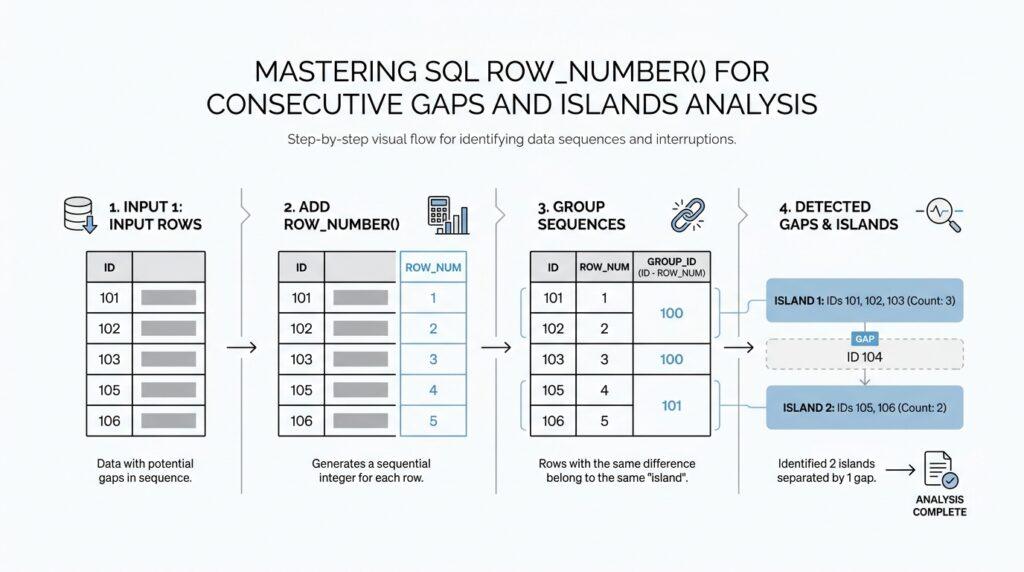
The classic trick in gaps and islands analysis is that consecutive values often keep a constant relationship to their row numbers. For example, if dates increase by one day at a time, or numbers increase by one at a time, the difference between the value and the ROW_NUMBER() often stays the same throughout one uninterrupted run. When that difference changes, we have usually crossed a boundary and started a new island. This is why ROW_NUMBER() appears so often in gaps and islands analysis: it gives us a stable frame of reference for spotting continuity.
You can picture it like walking along train cars that are already numbered. If the cars are attached in order, the gap between the car number and your walking count stays steady, and the moment a car is missing, the pattern shifts. That shift is the signal we are looking for. Instead of trying to detect islands by guesswork, we let the numbering expose the structure for us, one row at a time.
Once you understand that idea, the rest of the technique feels less mysterious. We are not asking SQL to magically find patterns; we are giving SQL a simple way to measure order, then using that measurement to group rows that move together. That is the real power behind gaps and islands analysis, and it is what makes ROW_NUMBER() such a natural tool for the job. From here, we can take that pattern and shape it into queries that identify each island, measure its length, or find the gaps between them.
ROW_NUMBER() Window Basics (learn.microsoft.com)
Now that we have the idea of islands in mind, we need a way to give each row a steady place in line. That is what ROW_NUMBER() does in SQL Server: it assigns a sequential number to rows inside a result set, and it starts at 1 for the first row in each partition. In a gaps and islands analysis, that little numbering step is powerful because it turns scattered rows into something we can compare, measure, and trust.
The piece that makes ROW_NUMBER() work is the OVER clause, which defines the window of rows the function can see. Think of a window as a small, user-defined stage inside the larger query result, where rows are grouped and ordered before the function speaks. PARTITION BY splits the data into separate groups, while ORDER BY tells SQL Server the exact sequence inside each group. If you leave out PARTITION BY, SQL Server treats the whole result as one group, which is often fine when you want one continuous count across the entire set.
So how does that feel in practice? Imagine you have login dates for several users, and you want to see each person’s run of consecutive days without mixing them together. You would partition by user, order by date, and let ROW_NUMBER() stamp each row in sequence, almost like handing out tickets at the door. That ticket number is not the answer by itself, but it gives you a stable reference point for the next step in gaps and islands analysis.
There is one detail that beginners often miss: ROW_NUMBER() only behaves predictably when the ordering is unambiguous. Microsoft notes that the function is nondeterministic, which means SQL Server does not guarantee the same numbering every time unless the partition column, the ORDER BY columns, or their combination are unique. If two rows tie on the sort key, the database may number them in a different order on different executions, and that can blur the boundary you are trying to detect. For island work, that means we should always choose an ORDER BY that reflects the real sequence we care about, and ideally breaks ties cleanly.
It also helps to remember that ROW_NUMBER() counts every row one by one, while RANK() can repeat numbers when ties appear. That difference matters because gaps and islands analysis depends on a clean, uninterrupted count that acts like a ruler laid across the data. If the ruler itself has repeated marks, the pattern becomes harder to read. ROW_NUMBER() avoids that by giving each row its own unique position within the ordered window.
Another useful habit is to treat ROW_NUMBER() as a temporary label, not a stored column. Microsoft describes it as a value calculated when the query runs, which means it exists for the result you are looking at, not permanently inside the table. If you ever need persistent numbering, SQL Server points you toward IDENTITY or SEQUENCE instead. For our purposes, though, the temporary nature is perfect, because we only need the numbering long enough to uncover the shape of the data.
Once the rows have been numbered, the rest of the pattern starts to reveal itself. We can compare the sequence number to the underlying value and notice when they move together and when they drift apart, which is the moment an island ends and a new one begins. That is why ROW_NUMBER() is such a natural first move in gaps and islands work: it does not find the island for us, but it gives us the clean frame we need to recognize it.
Build the Island Key (red-gate.com)
The island key is the little fingerprint that makes gaps and islands analysis feel less like guesswork and more like pattern recognition. When we line up the rows with ROW_NUMBER(), we are not trying to solve everything at once; we are giving each row a place in line so we can compare its position with the value it carries. That comparison is the clue: when consecutive values stay together, the relationship stays steady, and when something breaks, the island key changes with it. What are we actually looking for when the numbers sit in a neat run? We are looking for a value that stays constant across each uninterrupted island.
The classic move is to subtract the row number from the ordered value, because consecutive rows then share the same result. In other words, if integer_id rises by exactly one each time, then integer_id - ROW_NUMBER() stays locked in place until a gap appears. That constant difference becomes the island key, and it gives us a tidy label for every continuous stretch of data. In the Redgate example, this is stored as island_quantity, which is a helpful name because it reminds us that we are not counting rows yet; we are marking the island they belong to.
WITH CTE_ISLANDS AS (
    SELECT
        integer_id,
        integer_id - ROW_NUMBER() OVER (ORDER BY integer_id) AS island_quantity
    FROM dbo.integers
)
SELECT
    MIN(integer_id) AS island_start,
    MAX(integer_id) AS island_end
FROM CTE_ISLANDS
GROUP BY island_quantity;
That query shows the heart of the trick: once the island key is built, rows that belong together fall into the same group naturally. The GROUP BY step then gathers each island so we can see its first and last value, almost like tying a ribbon around each run of stepping stones. If the difference between the value and the row number never changes, we stay inside the same island; the moment it changes, we have crossed into a new one. This is why the island key is so useful in gaps and islands analysis: it turns an invisible pattern into something SQL can group, measure, and return.
There is one small snag worth keeping in view, because real data likes to be messy. If duplicate values appear, ROW_NUMBER() still gives each row a different number, which can split what looks like one island into separate pieces. In that case, DENSE_RANK() can be a better companion because it assigns the same rank to equal values and keeps the sequence free of artificial gaps. Microsoft describes DENSE_RANK() as a ranking function with no gaps in its numbers, which makes it a better fit when repeated values should behave like one continuous run.
So, when we build the island key, we are really building a stable story about order. First we number the rows, then we compare that numbering to the data, and then we let the matching difference tell us which rows travel together. Once that key exists, the next steps become much easier: we can measure each island, spot the breaks between islands, and start asking more interesting questions about how the data moves over time.
Group Consecutive Rows (red-gate.com)
Now the picture gets sharper. After ROW_NUMBER() gives each row a place in line, the next question is how to gather neighboring rows into one island instead of reading them one by one. If you have ever wondered, “How do I group consecutive rows in SQL?”, this is the moment where gaps and islands analysis starts to feel practical. We are no longer hunting for individual numbers; we are looking for runs that move together, like train cars that stay coupled until a missing car breaks the chain.
The trick is to build an island key by subtracting the row number from the ordered value. When the values are truly consecutive, that difference stays constant across the run; when a gap appears, the difference shifts and a new group begins. In the Redgate example, integer_id - ROW_NUMBER() OVER (ORDER BY integer_id) creates a label that behaves like a sticky note for each uninterrupted stretch. That is why consecutive rows that look separate at first become easy to recognize once we compare their position to their value.
Once the key exists, grouping becomes ordinary SQL. We place the calculation in a CTE, a common table expression that acts like a named scratchpad inside one query, then GROUP BY the island key and use MIN() and MAX() to reveal the start and end of each island. If we also count the rows, we get the island’s length, which is often the number we actually care about. At that point, the data stops looking like scattered entries and starts reading like a set of tidy ranges.
There is one catch worth pausing on: ROW_NUMBER() expects a clear order, and Microsoft notes that it is nondeterministic unless the partition or ordering columns are unique. If two rows tie on the sort key, SQL Server can number them differently from one run to the next, which makes island boundaries harder to trust. When duplicates should travel together instead of being split apart, DENSE_RANK() can be a better fit because it assigns ranks without gaps. Redgate shows that swapping it in protects the island key from duplicate values that would otherwise distort the grouping.
That is the heart of grouping consecutive rows: first we make order visible, then we compress matching rows into one label, and finally we let SQL tell us where each island begins and ends. The same pattern works for integers, dates, or any ordered data where continuity matters, as long as we define what “next” means for our dataset. From here, we can start asking richer questions about each island—how long it lasts, where it breaks, and what those breaks reveal about the story hidden in the rows.
Handle Dates and Duplicates (sqlpad.io)
When gaps and islands work moves from numbers to dates, the story gets more delicate. The first thing we need to notice is whether we are tracking a calendar day or a full timestamp, because SQL Server’s date type keeps only year, month, and day, while datetime2 also keeps the time of day. If you are asking, How do we handle duplicate dates in SQL?, this is where the answer begins: we decide what counts as one step before we number a single row.
If the goal is consecutive days, not consecutive moments, we want to flatten the data to day level first. A row at 9:00 a.m. and another at 5:00 p.m. may feel different in the raw table, but they belong to the same calendar day, and SQL Server’s date functions treat day logic in terms of boundaries crossed rather than elapsed clock time. That matters because gaps and islands analysis should follow the business meaning of the data, not the accidental noise of the time stamp.
Duplicates are the other place where the pattern can wobble. ROW_NUMBER() always gives each row its own position, and Microsoft notes that the function is nondeterministic when the ORDER BY columns are not unique, so identical dates can be numbered in a way that is not stable from one execution to the next. If duplicate dates should behave like one shared day in the sequence, DENSE_RANK() is often the steadier choice because equal values receive the same rank and the ranking has no gaps.
That gives us two honest paths, and which one we choose depends on the question we are really asking. If every physical event matters, we keep the duplicates and add a tie-breaker to the sort order so the numbering stays predictable. If the calendar day matters more, we collapse repeated dates first, then apply the sequence logic to the cleaned set. In both cases, the row numbering has to match the story we want the data to tell, or the island key will point us in the wrong direction.
Once the dates are clean, the island pattern starts behaving again. We line up the days in order, compare that order to a stable day-based value, and watch for the moment the relationship changes; that change is the boundary between one island and the next. This is the same basic idea behind using a day count from a fixed anchor date: the count moves in step with consecutive days until a missing day breaks the rhythm.
A small example makes the choice feel real. Suppose the data contains 2026-05-01, 2026-05-01, and 2026-05-02. If we care about events, we may want all three rows; if we care about streaks of days, we probably want two days, not three rows pretending to be three separate steps. That is why handling dates and duplicates is not a minor cleanup task in gaps and islands analysis; it is the part that decides whether the final grouping is trustworthy.
So before we let ROW_NUMBER() do its work, we pause and define the grain of the story. Are we counting rows, events, or days? Once that answer is clear, the numbering becomes stable, the duplicates stop causing false breaks, and the islands we uncover feel like the ones that were hiding in the data all along.