Why Modern Data Lakes
Imagine you’ve just inherited a mountain of information — logs, CSV exports, images, clickstreams — and your first thought is: where on earth do I put this so I can actually use it later? Right away we bump into the practical promise of a Modern Data Lake: a place built to receive and serve the messy, growing reality of big data without forcing everything into a single rigid format. What are the benefits of moving to this approach, and why do teams pick a modern data lake over older designs? Let’s walk through the reasons together.
Think of a data lake as a library for raw digital content: a data lake stores information in its native form and lets you decide how to read it later. When we say “data lake” here, we mean an architecture that uses cheap, scalable object storage to hold files and applies schema when you query them — a pattern called schema-on-read (which simply means you define structure when you read the data, not when you write it). This contrasts with classic data warehouses, where you must transform and fit everything into a fixed table before you can use it.
Cost and scale are the next characters in our story. Modern data lake architecture separates storage from compute, so you can keep vast amounts of data in low-cost object storage and spin up processing resources only when needed. That decoupling makes the design naturally scalable: you can store petabytes of logs or historical records affordably and run analytics or machine learning jobs at scale without provisioning enormous clusters all the time. For teams watching budgets, this model often unlocks experiments they wouldn’t attempt under a warehouse-only cost model.
Flexibility is where the lake shows its personality. You’ll encounter structured data (tables and rows), semi-structured data (JSON, XML), and unstructured data (images, audio) — and a modern data lake treats them all as first-class citizens. That means you can ingest raw streams and files without writing complex ETL (Extract, Transform, Load) pipelines up-front; instead, many teams use ELT (Extract, Load, then Transform) so analysts and data scientists can explore data immediately and transform it as questions arise. This freedom speeds discovery and lowers the barrier for novel analyses.
Beyond storage and flexibility, a modern data lake becomes a launchpad for advanced analytics. Because raw and processed forms coexist, machine learning workflows can access feature stores and historical snapshots side-by-side, and streaming tools can power near-real-time dashboards. To make this usable, teams add metadata systems — a data catalog, which records what each dataset contains, who owns it, and when it was updated — so people can find and trust the right sources. Metadata is the map that prevents a data lake from becoming a confusing swamp.
Of course, openness needs guardrails. Modern implementations bake in governance: fine-grained access controls, audit logs, and data lineage tracking (which tells you how a dataset was created and transformed). These safeguards let compliance, security, and analytics coexist; you get broad access for experimentation while still enforcing policies that protect sensitive information. When governance and metadata work together, the lake becomes a managed platform rather than an unruly archive.
Building on this foundation, we can see why organizations choose a modern data lake: it scales economically, supports broad data types, accelerates analytics and machine learning, and — when paired with governance — remains reliable and auditable. In the next section we’ll take this further and look at the practical building blocks you’ll use to implement this architecture, showing how each piece fits into the story we just started.
Core Architecture Components
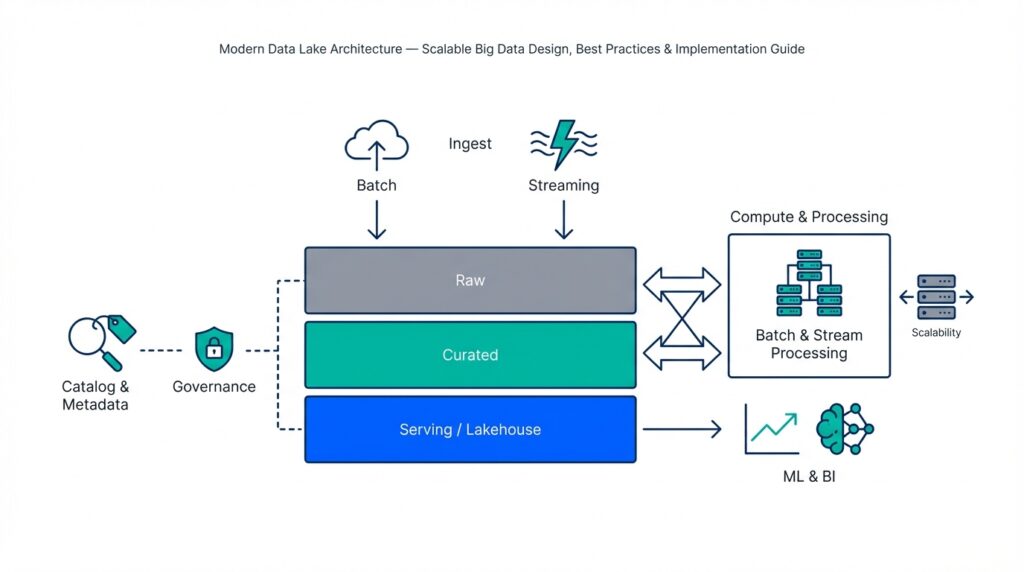
Imagine you’ve decided to build a modern data lake to tame that pile of logs, CSVs, images, and event streams — and you’re asking: how do the pieces actually fit together in a reliable, scalable way? Right away we meet the core architecture components that make a modern data lake work: cheap object storage for holding everything, ingestion paths that bring data in, compute and processing engines that transform it, a data catalog that tells you what’s there, governance to keep things safe, orchestration to automate flows, and serving layers that let analysts and models use the results. These parts work like a small city: each has a job, and they communicate by well-defined roads and rules.
First, storage and ingestion form the lake’s shore. Object storage — a type of storage that treats data as files (objects) in a flat namespace and scales cheaply — is where raw data rests. Ingestion is the doorway: batch uploads, streaming collectors, file drops, or APIs that place files into object storage. We often use schema-on-read (defining structure when you query, not when you write) so you can land messy sources quickly. Think of storage as your pantry and ingestion as the delivery dock: food arrives in whatever packaging it’s in, waiting for us to decide how to prepare it.
Next, compute and processing are the kitchen where transformation happens. Compute refers to the engines and clusters that read raw files and turn them into analytics-ready datasets — this can be Spark-like engines, SQL-on-file query engines, or containerized workloads for ML feature extraction. We choose ELT (Extract, Load, then Transform) in many modern designs so analysts can experiment before committing changes. Processing also includes incremental jobs, streaming processors, and feature stores (a service that stores model-ready features for machine learning), which let you build and reuse clean, labeled data for models and dashboards.
Metadata and the data catalog are the map and index you’ll use to find things fast. Metadata is descriptive information about datasets — schema, owner, update cadence, and quality metrics — and the data catalog is the searchable system that exposes that metadata to users. Without this map, the lake becomes a swamp; with it, teams can discover trusted sources, understand data lineage (the history of how data was derived), and attach data contracts that describe expectations about formats or SLA. For practical work, catalogs also store tags, access policies, and sample queries so new users can get oriented quickly.
Governance and security are the bylaws that keep the city functioning. Governance includes access control (who can read, write, or transform specific datasets), encryption at rest and in transit, masking or anonymization for sensitive fields, and audit logs that record who did what and when. Fine-grained permissions (row- or column-level restrictions) and automated compliance checks help you balance open exploration with regulatory requirements. We should treat governance as an enabler rather than a block: clear policies reduce accidental risk and speed collaboration.
Orchestration and observability are the conductor and dashboard that keep processes running smoothly. Orchestration tools schedule and trigger data pipelines, handle retries, and manage dependencies between jobs. Observability adds monitoring, logging, and data-quality checks so you can detect schema drift, failed loads, or late-arriving data quickly. When pipelines include automated tests and alerts, your team spends less time firefighting and more time iterating on insights.
Finally, the serving and consumption layer is where people and applications get value. Serving includes query engines, materialized views, APIs, BI connectors, and model-serving endpoints that present transformed data in a fast, consumable form. Different consumers need different formats: analysts often want columnar tables, data scientists need versioned snapshots, and real-time apps require low-latency streams or feature APIs. Designing formats, partitioning, and indexing with those consumers in mind makes retrieval efficient and predictable.
With these components sketched out, you can begin mapping them to your use case: which ingestion patterns matter, which compute engines your team knows, and how strict governance must be. In the next part we’ll walk through implementation patterns and trade-offs so you can pick concrete tools and configurations that match your scale, budget, and team skills.
Storage and Table Formats
Imagine you’ve just dumped a month of logs, CSV exports, and a few JSON streams into your new data lake and then asked: how will I find, read, and analyze this mess tomorrow? The first decision you face is where to land files. Object storage — a type of storage that treats each file as a self-contained “object” in a flat namespace and scales cheaply — becomes the pantry for raw data in a modern data lake. We like object storage because it separates cost-effective long-term storage from the compute that reads it, letting you keep everything and query selectively when needed.
Before you run queries, you also choose how to lay data out on disk. One big choice is columnar versus row-based layouts. Columnar formats store values column-by-column which makes analytical queries much faster because you only read the columns you need; row-based formats store whole rows and are better for transactional workloads. Parquet (a widely used columnar file format) and ORC are examples you’ll see everywhere; they compress similar values together and enable things like column pruning so queries read far less data.
As your use cases grow beyond simple append-only logs, you’ll meet table formats that add transactional guarantees and richer metadata. Formats like Delta Lake, Apache Iceberg, and Apache Hudi provide ACID semantics — that’s atomicity, consistency, isolation, and durability, which together mean updates, deletes, and concurrent writers behave predictably. Think of these formats as adding a ledger and index on top of files: you still store bytes in object storage, but the table format remembers versions, supports time travel (reading historical snapshots), and coordinates concurrent changes safely.
How you partition and organize files matters as much as the file format itself. Partitioning means physically grouping files by a key (date, region, customer) so queries that filter on that key read far fewer files. But partitions are a trade-off: too many small partitions creates a “small files problem” that slows reads and inflates metadata; too few partitions forces scans of irrelevant data. We usually start by partitioning on high-cardinality, time-based fields for log-like data and avoid deep nested partition trees — tune as you observe query patterns.
Practical performance comes from a few complementary techniques: pick a columnar format for analytics, use predicate pushdown (so filters run at read time), and compress thoughtfully to reduce bytes transferred. Columnar files like Parquet often compress better because similar values sit next to each other, and most query engines exploit this for vectorized reads. Also be mindful that object storage charges and read latency interact with file size — larger files reduce per-request overhead, while compacting small files improves throughput and lowers cloud egress cost in many environments.
So how do you decide what to use first, and how to evolve? Start pragmatically: land raw data in object storage using a columnar format like Parquet for analytics-friendly storage, catalog datasets so people can discover them, and add a transactional table format (Delta, Iceberg, or Hudi) when you need updates, streaming upserts, or time travel. Operate with a few simple rules: pick sensible partition keys, run periodic compaction jobs to control small files, and keep your metadata catalog authoritative. With those choices in place, we can move from storage layout into the processing patterns that make this architecture reliably useful for analytics and machine learning.
Ingestion and Processing Patterns
Imagine you’ve just pointed a floodlight at a pile of messy sources and asked: how will I get this into the data lake and make it useful without breaking things? Right away we meet two linked challenges: ingestion — the act of bringing data into the platform — and processing patterns — the ways we transform, enrich, and serve that data. Ingestion here means everything from scheduled file drops to continuous event streams, and schema-on-read (defining structure when you query, not when you write) lets you land data fast while you figure out how you’ll use it.
Start by recognizing the three classic ingestion modes you’ll use most: batch, streaming, and change data capture. Batch ingestion moves chunks of data on a schedule (think daily CSV exports), which is forgiving and easy to reason about. Streaming ingestion accepts events continuously (for example, clicks or sensor readings) and is measured in latency — how fresh the data must be. Change data capture, or CDC, captures row-level changes from operational databases so you can replicate updates and deletes into the lake; CDC acts like a live mirror that preserves history without heavy extract jobs.
Now that we’ve landed data, we must decide how to process it — and this is where two characters appear: ETL and ELT. ETL (extract, transform, load) transforms data before it lands in analytical storage, which is useful when downstream tools require tidy, relational tables. ELT (extract, load, transform) loads raw data into object storage first and transforms it later, which is the pattern we often prefer for a modern data lake because it preserves raw records for future questions. Which should you pick? Use ELT when you want exploration, versioned history, and agility; pick ETL when strict, pre-shaped datasets and strict SLAs are required.
When real-time or near-real-time answers matter, streaming processing becomes the kitchen where events are shaped into insights. Streaming jobs may be stateless (transform each event independently) or stateful (maintain running totals, session windows, or feature counters). Windowing groups events across time, like “all clicks in the last five minutes,” and watermarks tell the system when to close a window despite late arrivals. You’ll also hear about delivery semantics: at-least-once means an event may be processed more than once, and exactly-once aims to process events once — both have cost and complexity trade-offs, so match guarantees to the business need.
Some teams stitch batch and streaming together using hybrid architectures. The Lambda pattern keeps a batch layer for accurate historical processing and a streaming layer for low-latency views; the Kappa pattern simplifies this by treating all data as a stream and materializing results into serving tables. Lambda gives you correctness and freshness at the price of complexity; Kappa reduces duplication but can be harder to debug with large, mutable history. Think of the choice like kitchen equipment: one approach uses two specialized ovens, the other uses a single versatile stove.
Practical engineering details often determine success more than architecture debates. Make ingestion idempotent so retries don’t create duplicates, choose partition keys that align with common filters, compact small files into larger objects to speed reads, and plan for schema evolution so changing JSON fields doesn’t break downstream jobs. Building on the catalog and governance we discussed earlier, attach dataset ownership, quality tests, and lineage to each ingestion job so users can trust freshness and provenance.
Finally, pick patterns based on what you’re optimizing for: latency, cost, complexity, or data fidelity. Ask yourself: how fresh must answers be, who owns transformations, and how tolerant are we of complexity? With those constraints in hand, you’ll map batch, streaming, CDC, ELT, or hybrid designs to concrete pipelines that serve analysts and models effectively. In the next part we’ll translate these choices into runnable pipelines and show common orchestration and monitoring practices that keep everything humming.
Metadata and Data Catalog
Imagine you’ve just opened the file browser on a data lake and felt a tiny jolt of panic — there are folders, Parquet files, and tables, but you don’t know which one to use. Metadata is the descriptive information about a dataset — things like schema (the list and types of columns), owner, update cadence, and a plain-language description — and a data catalog is the searchable system that collects that metadata so you and your teammates can find, understand, and trust sources quickly. Think of metadata as the labels on jars in a pantry and the catalog as the kitchen index that tells you which jar contains sugar and which one contains salt.
Why does this map matter in practice? First, metadata reduces wasted time: instead of guessing whether a file is fresh or aggregated, you can read its last-updated timestamp and row counts. Second, metadata carries business context: tags like “sales-raw” or “PII” explain how a dataset should be used. Third, metadata supports automation — pipelines can pick up datasets by tag or owner and run tests automatically. When we describe schema, owner, or lineage, we’re giving machines and humans the signals they need to operate reliably.
A data catalog does more than store text fields; it provides discovery, examples, and permissions in one place. Discovery is a fast search of dataset names, tags, and column descriptions so you can surface likely matches without opening a notebook. Catalog entries often include a sample query and a preview of rows so you can verify content before running expensive analyses. Many catalogs also surface quality scores and notebooks that used the dataset, so you can see how others have worked with the data — that’s the practical difference between a pile of files and a usable dataset.
In real systems we automate metadata collection so the catalog stays current. A crawler — a lightweight process that scans storage and tables — extracts schemas, file sizes, partition keys, and statistics on a schedule and registers them in the catalog. You can also register metadata at ingest time: when a pipeline writes a new table, it emits a registration event that updates the catalog immediately. Both approaches work together: crawlers discover forgotten legacy data while registration keeps production flows synchronized.
Trust depends on observable signals, and that’s where data profiling and metrics matter. Data profiling (a scan that summarizes values, null counts, and distributions) helps detect schema drift or dropped values. Freshness metrics tell you how recently the data was updated; completeness metrics report missing partitions or unexpected nulls. Pair these checks with threshold-based alerts so your team gets notified when freshness or quality falls below acceptable levels — that way you catch regressions before downstream reports break.
Lineage gives you the “who, what, how” of a dataset’s history. Data lineage traces upstream sources, transformation jobs, and the versions of code that produced a table; it’s invaluable when you need to answer compliance questions or debug a sudden spike in values. When a catalog links to lineage, you can click from a dashboard to the exact ETL job, parameter set, and input file that created the rows you’re seeing — that traceability turns mystery hunting into a reproducible investigation.
Metadata and the catalog are also the natural place to enforce governance. Fine-grained permissions (controls that restrict access to particular rows, columns, or tables) can be attached to catalog entries so policies follow the dataset rather than being scattered across systems. Masking rules, retention labels, and audit settings stored in the catalog simplify enforcement: when a new consumer requests access, the catalog is the single source of truth that determines whether the request complies with policy.
How do you know which dataset to trust right now? Look at the catalog entry: read the description, check the owner and last-updated timestamp, review quality scores and recent test failures, and inspect lineage back to source systems. Good catalogs let you save search queries, subscribe to dataset alerts, and see example notebooks, which turns discovery into reproducible onboarding rather than guesswork.
For practical next steps start small: register your most-used datasets first, require an owner and description for each entry, and automate profile scans and freshness checks. Treat the catalog as the control plane for data operations — use its tags to drive pipelines, enforce access policies from its records, and surface lineage for critical reports. By making metadata authoritative and visible, you convert the lake from a swamp into a navigable library where exploration and governance coexist.
Building on this foundation, the catalog becomes the gatekeeper for pipelines and the guide for users; next we’ll look at how orchestration and observability tie into catalog-driven workflows so your pipelines run reliably and your team stays confident in the data they consume.
Security, Governance, Scalability
Imagine you’re standing at the edge of the platform we’ve been building and asking a practical question: how do we keep exploration safe, trustworthy, and able to grow? Start here: the everyday tension in a modern data lake is between open discovery and controlled risk. We want analysts to experiment with raw event streams while auditors, legal teams, and customers expect strong protections. That tension shapes three interlocking responsibilities: protecting data (security), defining rules and accountability (governance), and making sure the system can grow without collapsing under its own weight (scalability).
Building on the catalog and metadata foundations we discussed earlier, the first priority is practical access control — deciding who can see or change what. Role-based access control (RBAC), which assigns permissions to roles rather than individuals, lets you map business responsibilities (for example: analyst, data engineer, auditor) to capabilities in the platform. Access control also includes attribute-based policies (rules that consider properties like dataset sensitivity or user department) and row- or column-level restrictions that hide sensitive fields from unauthorized users. By attaching these policies to catalog entries and dataset metadata, we make access decisions discoverable and enforceable rather than scattered across scripts.
Protecting data in motion and at rest is the next character in our story: encryption. Encryption at rest means stored files are encoded so raw bytes are unreadable without keys; encryption in transit means data moving between services is protected from eavesdropping. Key management becomes critical here — who holds the keys and how are they rotated? We often pair encryption with tokenized access and short-lived credentials so long-term secrets don’t leak, and we add masking (replacing real values with obfuscated ones) or anonymization (removing or irreversibly altering personal identifiers) when datasets include personally identifiable information.
Governance extends beyond rules into observability and accountability: audit logs, lineage, and policy automation. Audit logs are the immutable record of who accessed or changed a dataset and when; lineage traces how a table was produced from upstream sources and transformation jobs. Together, these make compliance questions answerable rather than guesswork. Policy automation ties it together: when a dataset is tagged as sensitive in the data catalog, automated checks and enforcement (for example, denying public exports or requiring additional approvals) execute without human babysitting.
How do you balance openness with control without killing agility? One practical approach is progressive trust: start datasets as “exploratory” with broader access but require owners to certify and promote them into “production” when they meet quality and lineage standards. Promotion triggers stronger governance: stricter access rules, scheduled profiling, and retention policies. This pattern keeps the lake usable for discovery while ensuring that critical reports and models run on curated, auditable data.
Scalability is both a performance and an organizational problem. On the technical side, design for horizontal scale: separate storage from compute so you can add processing power without duplicating data, partition and compact files so queries read efficiently, and push down predicates to reduce I/O. On the organizational side, scale governance by codifying policies as code, using templates for dataset registration, and delegating ownership so teams operate semi-independently while following a shared rulebook. Scaling governance and security together prevents bottlenecks as your user base and data volume grow.
Operational resilience ties these themes into day-to-day practice. Run regular security scans and simulated audits, bake data-quality tests into pipelines, and alert on policy drift or unexpected permission changes. Use the data catalog as the control plane: surface owners, display last audit timestamps, and link to remediation playbooks so a discovered issue turns into a tracked ticket rather than a mystery. These habits make security and governance living processes instead of one-off projects.
With those practices in place, the platform supports both curious exploration and regulated production usage. We’ve taken the raw capabilities of the data lake — cheap storage, flexible formats, and a metadata map — and wrapped them with enforceable policies, observability, and scaling patterns that let teams move fast without losing control. Next, we’ll take this guarded, scalable foundation and show how orchestration and observability keep pipelines reliable as your usage grows.