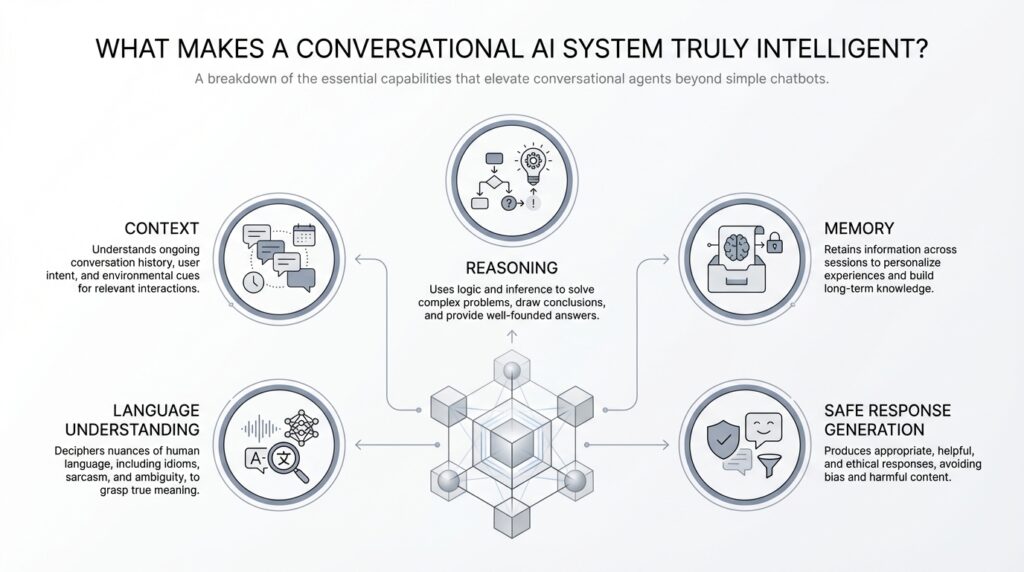
Understand Intent and Context
Building on this foundation, the first sign of a truly intelligent conversational AI system is that it understands what you mean, not just what you typed. Imagine you ask, “Can you book it for Friday?” right after talking about dinner reservations; a smart system should recognize that you are still talking about the restaurant, the time, and the plan you were shaping a moment ago. That ability comes from two ideas working together: intent, which is the goal behind your message, and context, which is the surrounding information that gives the message its meaning.
Intent is the “why” inside a sentence. When you say, “I need a charge,” you might mean a phone battery, a legal accusation, or even a burst of energy before a long day. A conversational AI system has to infer which goal fits the situation, because the same words can point in different directions. How do you tell what the user really wants when the words are vague? You look at the clues around the request, not just the request itself.
That is where context enters the story. Context is everything that helps the system interpret the message correctly: the last few messages in the chat, the time of day, the device being used, the topic already in motion, and sometimes even the user’s past preferences. Think of it like following a recipe while someone has already handed you the ingredients you need; you do not start from zero every time, because the earlier steps still matter. A follow-up like “What about tomorrow?” makes perfect sense only if the conversational AI remembers what “what” refers to in the first place.
There are really two layers of context at work here. Short-term context lives inside the current conversation, like knowing that “it” refers to the movie you just discussed or that “he” points to the person you mentioned two messages ago. Long-term context is broader, like remembering that you usually prefer morning appointments or that you always choose the same delivery address. When a system can hold both layers in view, it starts to feel less like a search box and more like a partner in conversation.
This is where intent and context become inseparable. Intent tells the system what action to take, while context tells it how to interpret the request before acting. If you say, “Send it to mom,” the system needs to know what “it” means, who “mom” is, and whether you are talking about a photo, a document, or a reminder. In contrast to a keyword-matching tool, a thoughtful conversational AI system uses intent and context together to disambiguate, which means to sort out possible meanings and choose the right one.
Sometimes the smartest move is not to guess at all. A good system may respond with a clarifying question like, “Do you mean the blue jacket or the black one?” instead of making an incorrect assumption. That may feel like a small moment, but it is a strong sign of intelligence because the system knows when the context is incomplete. In practice, this is one of the clearest ways conversational AI earns trust: it stays aware of what it knows, what it does not know, and what it needs from you next.
Once you see this clearly, the bigger picture starts to click. A conversational AI system becomes genuinely useful when it can read intent, carry context forward, and recover gracefully when either one is missing. That combination is what turns a basic reply engine into something that can keep a conversation moving in a natural, human way.
Maintain Conversation Memory
Building on this foundation, memory is where a conversational AI system starts to feel less like a clever sentence parser and more like a partner that remembers the thread. Without memory, every new message becomes a fresh start, like a cashier who forgets your order the moment you speak again. With memory, the system can carry forward what you said, what it inferred, and what it still needs to confirm, which makes the exchange feel continuous instead of fragmented. How do you keep a conversation coherent when it stretches across several turns? You preserve the important pieces, then use them to shape the next reply.
Conversation memory has two main jobs, and both matter. First, it keeps the immediate thread alive, so if you say you want the window seat and then ask, “Is that still available?”, the system knows what “that” refers to. Second, it can store longer-term preferences, which are remembered facts about you that stay useful beyond a single chat, like your preferred language, timezone, or delivery address. This is where conversational AI memory becomes practical instead of decorative. It does not remember everything; it remembers what helps the conversation move forward without making you repeat yourself.
The trick is deciding what to keep and what to let go. A strong conversational AI system treats memory like a notepad, not a scrapbook of every word ever spoken. Short-term memory holds the active context of the current exchange, while longer-term memory stores stable details that are likely to matter later. That distinction keeps the system responsive, because it can recall the right detail at the right moment instead of dragging old clutter into the present. Think of it like carrying only the ingredients you need to finish the recipe, not the contents of your entire kitchen.
This also explains why memory must be selective and reliable. If the system remembers too little, you end up repeating yourself and the conversation feels stiff. If it remembers too much, or remembers the wrong thing, it can become confusing or even intrusive, which breaks trust quickly. A good conversational AI system therefore needs memory management, which is the process of deciding when to store information, when to update it, and when to forget it. That might sound technical, but the idea is simple: the system should remember what is useful, not what is merely available.
Now that we understand the structure, the real question becomes, how does memory actually change the user experience? It lets the AI follow a moving thread without making you restate the whole story. If you ask for a dinner reservation, then switch to asking about parking, then return to the reservation time, the system can weave those pieces together because it has kept the conversation in view. That continuity is one of the clearest signs of conversational AI memory at work, and it is what separates a reply generator from a system that feels attentive. You are not talking to a blank page each time; you are talking to something that recognizes the conversation as it unfolds.
When this works well, the interaction feels lighter, faster, and more human. You can correct yourself mid-sentence, add details later, or revisit an earlier choice without rebuilding the entire conversation from scratch. That is the quiet power of memory in a conversational AI system: it reduces friction while making the exchange feel grounded in what has already happened. With memory in place, we can start to see how the system not only responds, but also stays with you as the conversation grows.
Reason Through Complex Queries
Building on this foundation, the real test comes when a conversational AI system faces a request that has more than one moving part. You are no longer asking for a single fact; you are asking it to juggle goals, limits, and hidden assumptions all at once. Imagine you say, “Find me a flight to Chicago next Friday, but I need to leave after 6 p.m., stay under $300, and arrive before my meeting.” A system that can reason through complex queries should not panic, because it knows this is not one question but several woven together.
The first step is to break the request apart. This is called decomposition, which means dividing a big problem into smaller pieces that are easier to handle. In our travel example, the conversational AI system has to identify the destination, the date, the departure window, the budget, and the arrival deadline, then keep all of them in view at the same time. Think of it like unpacking a suitcase before a trip: you cannot decide what to wear until you know where you are going, how long you will be there, and what the weather will be like.
Once the pieces are visible, the system has to connect them in the right order. That is where reasoning becomes more than pattern matching. A keyword tool might notice “flight,” “Chicago,” and “Friday,” but a thoughtful conversational AI system also understands that leaving after 6 p.m. could conflict with arriving before a meeting, or that the budget may rule out the fastest option. How do you reason through complex queries without losing the thread? You trace the dependencies, which are the parts that affect one another, and then you test whether the full request can still work.
This is also where inference matters, which means drawing a conclusion from clues instead of waiting for every detail to be spelled out. If the cheapest flight lands too late, the system can infer that the user may want a compromise, such as a different departure airport or a different day. In contrast to the previous approach, where the AI only remembered context, here it uses context plus logic to narrow choices and explain why one option fits better than another. That gives the interaction a more human shape, because the system is not only repeating information back to you; it is working through the problem with you.
Of course, real conversations are messy, and complex queries often contain hidden gaps. A strong conversational AI system does not pretend to know what is missing. If you say, “Book the usual place for Friday,” it may know your restaurant preferences from memory, but it still needs to ask whether you mean this Friday or next Friday, because a wrong guess could send the whole plan off course. That careful pause is a sign of intelligence, not hesitation, because it shows the system can separate what it knows from what it still needs to learn.
Reasoning also means comparing tradeoffs, which are the upsides and downsides of each possible answer. A system might tell you that one flight is cheaper but lands later, while another arrives on time but pushes past your budget. A useful conversational AI system should be able to explain that choice in plain language, because the best answer is not always the fastest one or the cheapest one; it is the one that fits your actual goal. When the system can rank options, weigh constraints, and surface the important differences, the conversation starts to feel like collaboration instead of retrieval.
That is why complex query handling is such a strong marker of intelligence. It shows that the conversational AI system can untangle a request, carry multiple conditions forward, and decide when to answer, when to compare, and when to ask for help. In practice, that kind of reasoning turns a simple assistant into something that can stay useful even when your question arrives bundled with exceptions, priorities, and half-finished thoughts.
Use Tools and External Data
Building on this foundation, the next leap in a conversational AI system happens when it stops pretending it knows everything and learns how to look things up. That is what tools and external data are for: they let the system reach beyond its built-in memory and work with live information, calculators, calendars, databases, or other services. Think of it like a helpful teammate who does not guess the answer when the answer lives in a spreadsheet, a weather feed, or a booking system. This is often the difference between a chatty assistant and a truly useful conversational AI system.
How do you know when a conversational AI system should look things up instead of guessing? The clue is whether the answer depends on the outside world. If you ask for tomorrow’s weather, the latest stock price, or whether a product is still in stock, the model’s training data may be outdated the moment the question is asked. In those cases, the system needs external data, meaning information pulled from a source outside the model itself, so its reply matches reality instead of memory.
This is where tool use comes in, and the idea is easier than it sounds. A tool is any external function the system can call to do a job, such as searching a database, checking a calendar, calculating a route, or fetching a live webpage. An application programming interface, or API, is the bridge that lets the conversational AI system ask another service for help in a structured way. You can picture it like a restaurant kitchen: the chat is the dining room, but the tools are the stations where real work happens.
Once we see that, the reason tools matter becomes obvious. A conversational AI system without tools may sound confident, but it is trapped inside what it already knows. A tool-enabled system can verify facts, fetch fresh numbers, and ground its response in current data, which means its answers are safer and more trustworthy. If you ask, “What time does my flight land?” the system can check your itinerary instead of estimating from memory, and that small shift makes the interaction feel much more dependable.
Tools also help the system handle tasks that are more precise than language alone. A calculator can avoid arithmetic mistakes, a map service can estimate travel time, and a database can pull your order history without forcing you to repeat it. In practice, this means the conversational AI system is not only interpreting your words; it is acting on them. That combination of conversation plus action is what makes tool use such a strong sign of intelligence.
Of course, a smart system does not call every tool for every request. It has to decide whether a question can be answered from context, whether it needs external data, or whether it should ask you for more detail first. That judgment matters because unnecessary tool use can slow the conversation down, while missing a needed lookup can lead to stale or wrong answers. So the system has to balance speed, accuracy, and caution, much like a good assistant who knows when to answer from memory and when to check the record.
This is also why external data must be handled carefully. If the source is messy, outdated, or irrelevant, the answer can become misleading even if the system used a tool correctly. A strong conversational AI system therefore needs to choose the right source, interpret the result accurately, and explain the answer in plain language you can trust. When that works well, the conversation feels grounded in the world around you, not sealed inside a private bubble of text.
Personalize Replies for Users
Building on this foundation, personalization is where a conversational AI system starts to feel like it recognizes you, not just your latest message. It is the difference between a reply that is technically correct and a reply that feels shaped for your habits, your pace, and your priorities. How do you personalize replies for users without making the assistant feel nosy or robotic? The answer is to use stable preferences, like preferred name, role, reading style, and location, to guide the response while still keeping the core meaning intact.
The easiest way to understand this is to separate memory from personalization. Memory keeps useful facts available across turns, while personalization decides how those facts should change the conversation. Think of memory as the notebook and personalization as the style of the handwriting: the content may stay the same, but the delivery changes to match the person reading it. In practice, a conversational AI system might give a longer explanation to one user, a shorter summary to another, and a more formal tone to a third, because the assistant has learned what each user tends to prefer.
That kind of personalized reply works best when the user has clear control over what the system knows. Some platforms let people set a preferred name, role, industry, or other profile details so the assistant can respond in a way that feels more natural from the start. Others let the system remember things like what to call the user, which chat agent they prefer, or which knowledge scope they want to use. This matters because personalization should feel like a helpful adjustment, not a mystery the user has to decode.
Now that we understand the source of those signals, the real craft is deciding what to do with them. A good conversational AI system does not rewrite every answer from scratch; it uses personalization to choose examples, adjust detail level, and present information in a way that fits the moment. If you prefer concise answers, the system should trim the extra framing. If you are working in a specific place or timezone, it should surface times, schedules, and location-sensitive details in the form that saves you a mental conversion step. That is one of the clearest signs of personalized replies working well: the assistant reduces effort without changing the truth of the answer.
But personalization only builds trust when it stays visible and reversible. Users should be able to review, update, or turn off memory and preference settings, because a conversational AI system that adapts too aggressively can cross the line from helpful to intrusive. Some enterprise systems also let administrators control which data sources can be connected or disable memory entirely for a team, which shows that personalization is not only a UX choice but also a governance choice. The lesson here is simple: the best personalized replies are the ones the user would agree with if they could see the reasoning behind them.
This balance is what makes personalized replies feel intelligent instead of merely customized. The system has to notice patterns, respect boundaries, and keep its tone steady enough that you still feel in control of the conversation. In more advanced assistants, that can even mean preserving a consistent conversational personality while adapting to the user’s preferences and the current context, so the experience feels human without becoming unpredictable. When that works, the conversational AI system stops sounding like a generic template and starts sounding like a reliable partner who has learned how you like to work.
So the goal is not to make every reply more colorful or more familiar; it is to make each response more useful to the person standing on the other side of the screen. Once an assistant can tune its wording, depth, and timing to the user in front of it, we can begin asking the next question: how does it decide when to sound warm, when to stay brief, and when to step back and let the facts speak for themselves?
Test Safety and Quality
Building on this foundation, the next question is not whether a conversational AI system can answer, but whether it can answer safely and well when the conversation gets messy. That is where testing enters the story. Think of it like a dress rehearsal before opening night: we want to see how the system behaves under pressure, with tricky wording, unclear intent, and unusual edge cases, before real users depend on it. If the earlier sections showed us how the system can speak, this step shows us whether we can trust what it says.
Test safety and quality means checking two things at once. Safety asks, “Can this system avoid harm, leakage, manipulation, or unsafe advice?” Quality asks, “Does the reply actually help, stay accurate, and fit the user’s needs?” Those ideas sound separate, but in practice they overlap a lot, because a high-quality answer that is wrong or reckless is not really high quality at all. How do you know when a conversational AI system is ready for people to use? You test it across normal questions, stressful prompts, and failure scenarios, then compare what it says to what it should have said.
The first layer of testing usually focuses on everyday performance. We check whether the system follows instructions, keeps context, and answers consistently when the same idea is phrased in different ways. This is where evaluation sets, which are curated collections of test prompts and expected outcomes, become useful. They work like a recipe test in a kitchen: if the ingredients are the same but the result keeps changing, something in the process needs attention. For a conversational AI system, that might mean verifying factual accuracy, tone, completeness, and whether it stays on topic.
Then we move into the harder cases, because real users do not always ask nice, tidy questions. Safety testing often includes adversarial prompts, meaning deliberately tricky inputs designed to confuse, pressure, or bypass the system’s rules. Some people try prompt injection, which is when they hide instructions inside a message to override the assistant’s normal behavior, while others probe for private data, unsafe guidance, or biased responses. In contrast to ordinary testing, this stage asks the system to prove that it can resist manipulation and refuse harmful requests without losing its helpful voice.
This is also where red teaming comes in. Red teaming means having people think like attackers or worst-case users so they can find weaknesses before others do. It is a bit like asking a friend to try every loose latch and squeaky hinge in your house before a storm arrives. In a conversational AI system, red teaming can reveal issues that simple happy-path tests miss, such as hallucinations, which are confident but incorrect answers, or moments when the model reveals more than it should. Those discoveries are valuable because they show us where the guardrails are thin.
Quality testing needs another kind of care as well: consistency across time. A conversational AI system should not give one answer on Monday and a contradictory answer on Tuesday for the same stable question, unless new information truly changed. That is why regression testing matters, which means rerunning earlier test cases after updates to make sure a new fix did not break something that already worked. Without that habit, every improvement becomes a gamble, and even small model changes can create confusing shifts in behavior.
We also have to measure the human side of the experience, not only the technical one. A reply can be factually correct and still feel poor if it is vague, overly long, too formal, or dismissive. That is why testers look at usefulness, clarity, politeness, and whether the assistant asks for clarification at the right time instead of making unsafe assumptions. In a conversational AI system, safety and quality both depend on judgment: the system has to know when to answer, when to refuse, and when to slow down and ask for more context.
One of the clearest signs of maturity is that testing happens continuously, not once at the end. We want the conversational AI system to be checked before release, monitored after release, and rechecked whenever prompts, policies, or model versions change. That ongoing loop catches drift, where a system gradually behaves differently over time, and it helps teams spot new risks before users do. When testing becomes part of the routine, safety and quality stop feeling like extra chores and start becoming part of the system’s character.
That is the real payoff: a conversational AI system earns trust not by sounding confident, but by proving it can stay useful, careful, and steady when the conversation turns unpredictable. Once we have that discipline in place, we are ready to look at how the system behaves when multiple users, devices, or channels all enter the picture at once.