Verify OAI-SearchBot Access
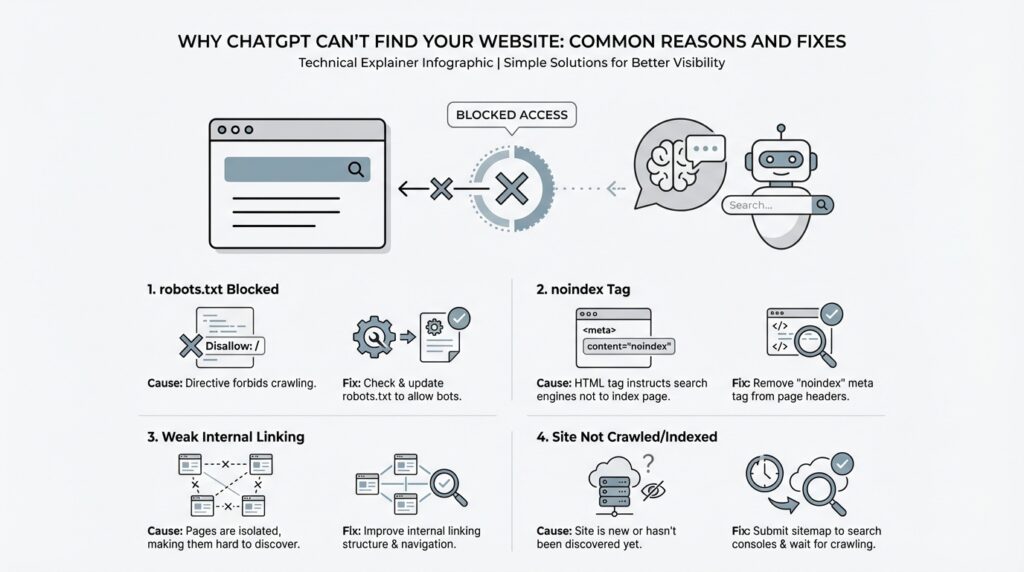
When a page feels invisible in ChatGPT search, the first question is usually the most practical one: can the crawler reach it at all? That is why checking OAI-SearchBot access comes before almost everything else. If the crawler cannot enter the front door, it cannot discover your content, quote it, or send readers to it, no matter how useful the page may be.
How do we think about that front door? OAI-SearchBot is OpenAI’s web crawler, and OpenAI says ChatGPT uses it to find, access, and surface information in ChatGPT search. In plain language, it works like a scout walking the web and reporting back what it finds. If your site blocks that scout, the site may still exist beautifully on the web, but it stays harder for ChatGPT to notice and use.
The easiest place to start is your robots.txt file, which is the instruction file that tells crawlers where they may and may not go. OpenAI’s guidance says you may need to update robots.txt so OAI-SearchBot has access. If you have a host or content delivery network, or CDN, in front of the site, that layer also needs to allow traffic from OpenAI’s published IP addresses; otherwise, the crawler may be blocked before it ever reaches the page.
If you are asking, “Why is ChatGPT not finding my website?” this is one of the first places to look. Open your robots.txt and scan for anything that excludes OAI-SearchBot, then check whether your hosting setup or CDN is filtering the crawler’s traffic. A healthy setup does not need to be complicated, but it does need to be consistent: the crawler should be allowed in by robots rules and welcomed by the infrastructure that serves the site. That combination is what OpenAI points to when it talks about verifying OAI-SearchBot access.
There is one more detail that helps set expectations. OpenAI says ChatGPT search ranking depends on multiple factors, and there is no way to guarantee top placement. So even after you verify OAI-SearchBot access, a page may still not appear exactly where you hope it will. That is not a sign that the crawler is broken; it often means the next layer of the puzzle is relevance, freshness, or how well the page matches the query.
Once the crawler can get through, we can start asking better questions about why a page still does not surface. Is the content clear enough to be understood quickly? Is the page the version you want search engines to see? Those are the kinds of checks that make sense after the door is open, and they usually feel much less mysterious once the access issue is out of the way.
Review robots.txt Restrictions
The next place to look is your robots.txt file, because this is where robots.txt restrictions quietly decide whether ChatGPT’s crawler gets a welcome or a locked door. robots.txt is the small instruction file at the root of a site that tells web crawlers where they may go, and OpenAI says you may need to update it so OAI-SearchBot has access. If you have ever wondered, “Why is ChatGPT not finding my website even though the page is live?”, this file is one of the first suspects.
Think of it like a building directory taped to the lobby wall. Most visitors can still wander around the city, but the directory decides which floors are open and which are off limits, and a crawler reads that directory before it explores your site. A single broad rule can accidentally hide more than you intended, especially if you copied a template years ago and never revisited it. That is why a quick robots.txt review often reveals the simplest explanation for missing ChatGPT search visibility.
When you scan the file, look for lines that exclude OAI-SearchBot or, more broadly, block all crawlers. A rule like User-agent: * followed by a disallow entry can keep search tools out of entire sections, and a more specific block for OAI-SearchBot can shut the door even harder. OpenAI’s guidance is straightforward here: for your content to be included in ChatGPT search snippets and summaries, you need to avoid blocking OAI-SearchBot.
It also helps to remember that robots.txt is only one layer of the check. OpenAI says your site host or content delivery network, or CDN, also needs to allow traffic from its published IP addresses, so a crawler can still get stopped after robots.txt says yes. In practice, that means you are looking for a match between policy and plumbing: the instruction file must allow access, and the infrastructure must not undo that permission a moment later.
A useful habit is to open the file and read it as if you were the crawler arriving for the first time. Ask yourself: does anything here accidentally block the whole site, a key folder, or the version of the page you actually want ChatGPT to see? This is the kind of review that catches old staging rules, leftover development locks, and overly cautious wildcard blocks before they keep your pages invisible. OpenAI also notes that there is no guaranteed top placement in ChatGPT search, so the goal here is not to force ranking; it is to make sure the crawler can actually reach the page in the first place.
If the file looks correct and the page still seems missing, that is a good sign that the mystery is moving to the next layer. At that point, we can stop asking whether ChatGPT is allowed in and start asking whether the page is the right one to surface, whether it is easy to understand, and whether it matches the search intent well enough to earn visibility. For now, though, the key win is simple: clear robots.txt restrictions, give OAI-SearchBot a path through, and make sure nothing in the site stack blocks it after the file gives the green light.
Remove noindex Tags
Once the front door is open, the next quiet lock is the noindex meta tag. This tag lives in a page’s HTML and tells crawlers not to include that page in search-style results. OpenAI says that if you do not want a page’s title and link to appear, you should use the noindex meta tag, and it also notes that its crawler has to be allowed to crawl the relevant page before it can read that tag.
That distinction matters more than it first appears. A page can be perfectly public, perfectly useful, and still stay invisible to ChatGPT if the noindex tag is sitting there like a “do not file” note on a desk. In practice, that means the page may exist on the web, but OpenAI’s search crawler is being told not to treat it as something to surface in ChatGPT search.
So if you are asking, “Why is ChatGPT not finding my website?” this is one of the first things to check after access issues. Open the live page, inspect the source or your CMS settings, and look for any noindex setting that may have been carried over from staging, a draft workflow, or a template you reused during launch. These tags often hide in plain sight because they are set once, then forgotten for months while the page itself looks completely normal. The page can look finished to you and still look temporary to a crawler.
The tricky part is that not every noindex tag is a mistake. Some pages are meant to stay out of search results, like internal landing pages, duplicate versions, thank-you pages, or content you do not want quoted broadly. OpenAI’s guidance is consistent here: if you do not want the content included, the noindex meta tag is the right signal. But if the page is one you want ChatGPT to discover, summarize, and link to, then leaving that tag in place works against you.
That is why the real question is not “Is noindex bad?” but “Does this page belong in the public path you want ChatGPT to see?” Any public website can appear in ChatGPT search, and OpenAI’s publisher guidance says content can be included in summaries and snippets when OAI-SearchBot is allowed to access it. If a page should be discoverable, removing the noindex tag tells the crawler that the page is ready to be considered alongside the rest of your public content.
After you remove the tag, pause for one careful check. Make sure the live page no longer sends the noindex signal, and confirm that nothing else in the setup is still blocking discovery, such as a leftover robots rule or an infrastructure layer that prevents crawling. OpenAI’s documentation ties these pieces together: the crawler must be able to reach the page, and the page must not be marked with a signal that tells it to stay out of search.
If the page still does not appear right away, that does not automatically mean the fix failed. Search systems need time to revisit pages, and ChatGPT search also uses more than one signal when deciding what to show. At this point, we have removed one of the most common hidden blockers, and that gives us a much cleaner starting point for the next layer of troubleshooting.
Improve Internal Linking
Once the crawler can enter, internal linking becomes the map we hand it. If a page is public but sits like a house on the edge of town with no roads leading in, ChatGPT search can have a harder time noticing it. OpenAI says ChatGPT uses OAI-SearchBot to find and surface content, and Google’s crawler guidance shows that new pages are often discovered by following links from pages it already knows, such as a hub page or category page. That is why internal linking matters so much: it helps real readers move naturally, and it helps crawlers understand where the important paths are.
So the safest place to start is the page flow your site already has in its bones. Think homepage, then category or hub pages, then the supporting articles, guides, or product pages that grow from them. Google explains that site structure and cross-page links help crawlers understand how pages relate to one another, and that pages should be reachable through navigation; it also notes that if a page is only reachable through a search box, crawlers may not submit that search. If you have been asking, Why is ChatGPT not finding my website?, the answer may be that the page exists, but it is not connected well enough to the rest of the site.
The fix is to make your most important pages easy to reach from other relevant pages. Google recommends a logical site structure with important pages linked from other relevant pages, and it also says that the more links a page has within a site, the more important it can appear to crawlers. In practice, that means your cornerstone content should not sit alone waiting to be found; it should be woven into the site wherever it naturally fits. A blog post about a specific topic should point back to the broader guide, the guide should point down to the detailed posts, and the homepage or main hub should point to the pages you most want discovered.
Anchor text matters just as much as the link itself. Anchor text is the visible wording of a link, and Google says it should be descriptive, concise, and relevant to both the page it sits on and the page it points to. That is why phrases like ‘click here’ or ‘read more’ are weak signals: they tell the crawler almost nothing, and they give the reader no promise about what waits on the other side. A good test is to read the sentence out loud and ask whether it still makes sense if the link disappears; if it does not, the link probably needs clearer wording and more surrounding context.
It also helps to think in terms of neighborhoods, not isolated rooms. When a related article mentions a topic, link to the page that expands it; when a broader guide introduces a subtopic, link to the detailed page that answers it; when a product or service page matters, link to it from the parts of the site that already get attention. Google’s documentation says that internal links help people and crawlers make sense of a site, and that every page you care about should have a link from at least one other page on your site. That is the heart of the internal linking fix: make sure no important page is floating without a path back into the rest of the site.
If we were tightening this up together, I would start by reading one page as if I had never seen the site before. I would ask where that page should sit in the hierarchy, which parent page should point to it, which sibling pages should cross-link to it, and whether the homepage or main hub should help carry it along. OpenAI also says there is no guaranteed top placement in ChatGPT search, so internal linking is not a magic switch; it is a way to make sure your best pages are discoverable once OAI-SearchBot arrives. That small structural cleanup often turns a lonely page into part of a clear, navigable path.
Fix Crawl Errors
Once the door is open for OAI-SearchBot, the next thing to check is whether the page itself is tripping over a crawl error. A crawl error is any problem that stops a crawler from reading a page cleanly, and it can look as small as a missing page or as messy as a broken redirect loop. If you are still asking, “Why is ChatGPT not finding my website?”, this is the moment to look for pages that exist in theory but fail in practice because the crawler lands on a dead end, a server error, or a page that never finishes loading properly. OpenAI says ChatGPT search can include public websites, but it depends on the crawler being allowed in and on other ranking factors too, so our job here is to remove the roadblocks first.
The cleanest place to start is the page’s HTTP status code—the number your server sends back to say what happened when the crawler arrived. A healthy page should usually return 200 OK, which means the content loaded normally. If a URL returns 404 Not Found or 410 Gone, the page is missing or intentionally removed; if it returns 5xx or 429, the server is struggling, and crawlers tend to slow down their requests. Google’s documentation also notes that a page that looks empty, nearly empty, or error-filled after rendering can be treated as a soft 404, which is a page that pretends to be there but behaves like a missing page.
That is why old links and redirects deserve a careful look. A redirect is the web’s forwarding address, and it should take the crawler straight to the right place, not on a scenic tour through several extra hops. Google advises redirecting directly to the final destination, because long redirect chains waste crawl time and can confuse both users and search systems. It also warns against sending many old URLs to an irrelevant page like the homepage, because that can be interpreted as a soft 404 instead of a real replacement for the original content.
If the page is built with scripts, the next question is whether the crawler sees the same story that a visitor sees. Some pages look complete in a browser because JavaScript fills in the missing pieces after load, but search systems may not always interpret that rendering the same way, especially if the page returns a non-200 status code or the useful content appears only after extra scripts run. In practice, that means the important text and links should already be present in the main page output whenever possible, rather than hiding behind a fragile script path that can break under crawl conditions.
Now comes the part that feels a little less glamorous but saves a lot of guesswork: verify the problem with logs or search tools, then wait for the crawler to come back. Google says Search Console can show crawl and indexing errors, and its URL Inspection tool can reveal the last crawl date, status, and canonical URL for a page. It also notes that fixes are not reflected instantly, because a crawler usually needs time to revisit the URL before the error disappears from reports. That same patience matters here too: even after you repair crawl errors, ChatGPT search still works from several signals, and OpenAI says there is no guaranteed top placement.
So the practical rhythm is straightforward: confirm the URL returns the right status, repair broken redirects, make sure the rendered page is not effectively blank, and let your monitoring tools tell you when the crawler has checked the page again. If you want to know what to fix first, start with the URLs that matter most and ask whether they respond like real pages or like broken hallways. Once those crawl errors are cleaned up, we can move from “Can ChatGPT reach this page?” to the more interesting question of which pages it should choose to show first.
Strengthen Page Relevance
Now that the crawler can reach the page, the next question is whether the page itself feels like the right answer. ChatGPT search does not reward pages for existing; OpenAI says ranking is based on several factors designed to help people find reliable, relevant information, and it also says there is no way to guarantee top placement. In practice, page relevance is about alignment: the page should sound like the exact answer a real person would want when they ask the question.
The strongest signal usually starts at the top of the page. Google’s helpful-content guidance says the main heading or page title should provide a descriptive, helpful summary of the content, which is a good reminder that clarity beats cleverness here. If someone searches, “Why is ChatGPT not finding my website?”, your title and opening lines should make that answer obvious right away instead of making the reader hunt for it.
That is why the first few paragraphs matter so much. Think of them as the front desk of the page: they should greet the visitor, name the problem, and show that this page was written for that exact search intent. OpenAI says ChatGPT may rewrite a query into more targeted searches behind the scenes, so a page that uses plain, direct language is easier to match with what the user really meant, not just the words they typed.
It also helps to make one page do one job well. A page that tries to answer everything at once often feels foggy, while a focused page feels trustworthy because it stays on topic and gives real depth. Google’s people-first guidance favors content created to help people rather than content built to chase rankings, so the practical move is to cover the main question thoroughly, use the words your reader would naturally use, and include the nearby details that make the answer complete.
When similar pages start echoing each other, relevance can blur. Google recommends choosing a canonical URL for duplicate or very similar pages, using rel="canonical" or redirects, and linking to the canonical version from within your site. That keeps your strongest page from competing with near-copies, which helps search systems settle on the best version to show and prevents your own site from splitting its signal across duplicates.
The surrounding pages should reinforce that same message. Google recommends linking important pages from other relevant pages, keeping your site structure logical, and using concise, descriptive anchor text so both people and crawlers understand what the destination page is about. In other words, we are not trying to shout the page’s topic louder; we are trying to surround it with clear context so ChatGPT search can see where it belongs.
A good final check is to read the page like a stranger who just arrived from search. Could you say, in one sentence, what the page answers, who it is for, and why it is the best match? If the answer feels broad or vague, tighten the title, rewrite the opening, or split the page into narrower pieces so the relevance is unmistakable. That is the shift that turns ChatGPT search visibility from guesswork into something much more deliberate.