Microsoft Fabric Data Science: Quick Overview
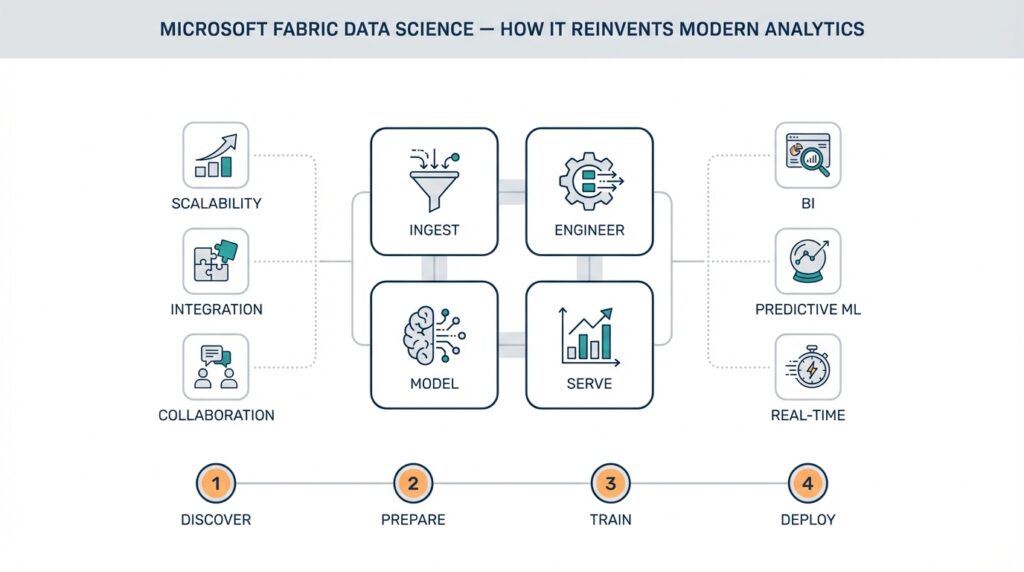
Microsoft Fabric Data Science puts an end-to-end data science environment where you can move from exploration to production without stitching together disparate tools. Right up front: Microsoft Fabric Data Science integrates interactive notebooks, Spark-based processing, model lifecycle tools, and governed data storage—so when you start an experiment you don’t lose lineage, governance, or deployment capability. This unified surface reduces context switching for teams that juggle notebooks, orchestration, and model monitoring, and it surfaces cross-team collaboration that often breaks down in multi-tool stacks.
At its core this platform treats the lakehouse pattern as a first-class tenant; a lakehouse combines the scale and flexibility of a data lake with the transactional reliability and performance of a warehouse. Building on this foundation, Fabric Data Science layers compute pools (for distributed Spark/SQL workloads), interactive notebooks (Python/R/Scala), and a model registry that understands experiments and reproducible environments. We should define MLflow when it appears: MLflow is the open-source model lifecycle toolkit Fabric commonly surfaces for logging parameters, metrics, artifacts, and models so the registry stays consistent across runs and teams.
You’ll notice the developer workflow centers on iterative notebooks that graduate into reproducible jobs. Start by profiling and prototyping with small sample files in a notebook, then scale the same code to a Spark job or a compute pool for full-dataset training. For example, you can run a local pandas prototype, port the transformation to PySpark for feature engineering, and then log the trained model with MLflow:
import mlflow
mlflow.start_run()
mlflow.log_param('model','xgboost')
mlflow.sklearn.log_model(model, 'model')
mlflow.end_run()
This pattern preserves reproducibility while enabling horizontal scale; use distributed compute for feature joins and large aggregations, and smaller dedicated compute for iterative hyperparameter tuning.
Fabric’s integrated governance and lineage features mean you don’t have to retrofit observability after deployment. When you register a dataset, its schema, access controls, and data lineage are tracked alongside the notebook and model that consumed it, which simplifies audits and debugging. This matters in regulated environments where you must show why a model made a decision: you can trace from a production prediction back through the feature pipeline, training snapshot, and source table. Consequently, collaboration across data engineers, data scientists, and compliance teams becomes practical rather than theoretical.
What concrete problems does this solve in production? Consider fraud detection: ingest raw transaction logs into the lakehouse, run nightly feature pipelines on Spark, track experiments while iterating on ensemble models, and push the best-performing model to a low-latency endpoint or batch scoring job. That same flow supports customer churn prediction or predictive maintenance—replace input sources and features, keep the same lifecycle pattern. How do you operationalize a model built in Fabric Data Science? We recommend automated CI jobs that validate model performance on holdout sets, automated registering to the model registry, and scheduled deployment to staging for canary tests before promoting to production.
Moving forward, we’ll dig into deployment patterns and cost-optimized compute strategies using the platform’s pools and autoscaling. For now, treat Fabric Data Science as a single surface where you prototype, scale, govern, and operationalize—reducing the friction between experiment and production. In the next section we’ll explore specific deployment topologies and monitoring practices so you can choose the right trade-offs for latency, throughput, and cost.
Benefits: Why Fabric Reinvents Analytics
Microsoft Fabric Data Science changes the dynamics of analytics by collapsing the experiment-to-production gap into a single, governed surface. By front-loading integration—notebooks, Spark compute pools, a model registry, and lakehouse storage—you reduce handoffs and preserve lineage from day one. That integrated experience matters because teams spend less time reconciling artifacts and more time iterating on models and features. How do you measure the benefit? Time-to-first-production model and reproducibility are two practical metrics you can track immediately.
Building on the lakehouse-first architecture we discussed earlier, Fabric Data Science removes common operational friction that plagues multi-tool stacks. When you prototype in an interactive notebook and then scale the same code to distributed Spark pools, you avoid rewriting pipelines or copying datasets into separate systems. This continuity preserves schema, metadata, and the MLflow-tracked experiment artifacts you need in the model registry, which makes rollbacks, audits, and variant comparisons straightforward. For teams, that reduces context switching and the cognitive load of maintaining parallel ETL and model environments.
Reproducibility and traceability become operational guarantees rather than ad-hoc practices. You can pin a training run to a specific dataset snapshot, compute configuration, and dependency environment, then trace a prediction back to feature transformations and source tables. That traceability is critical in regulated domains where demonstrating why a model made a decision is required; it also accelerates root-cause analysis when model performance drifts. Because Fabric surfaces lineage across data, code, and models, your incident playbooks move from detective work into deterministic replay.
Operational scale and cost-efficiency are practical benefits you’ll feel in day-to-day engineering. Compute pools with autoscaling let you run large Spark feature joins and distributed training without maintaining always-on clusters, while smaller ephemeral pools handle experiments and hyperparameter sweeps. Reusing certified datasets in the lakehouse reduces storage duplication and avoids expensive, error-prone data copying between systems. As a result, you pay for scale when you need it and keep iterative work low-cost, which changes trade-offs when optimizing CI pipelines and scheduled feature refreshes.
Collaboration and governance converge into a single workflow so cross-functional teams can move faster without losing control. Data engineers can publish governed datasets with access controls and documented schema, data scientists can reference those assets in notebooks that log MLflow metrics, and compliance teams can review lineage and permissions in the same product. This shared surface shortens review cycles for model promotions and makes reproducible deployments a matter of configuration rather than bespoke scripting. Integrating CI/CD that validates model performance against holdout sets and automatically registers winners in the model registry becomes an implementation detail, not a coordination nightmare.
From a product perspective, Fabric Data Science improves model lifecycle hygiene and reduces operational risk. You gain consistent artifact management, simpler retraining workflows, and clearer ownership boundaries—each model has a reproducible history, a registered version, and a controlled promotion path. For practical use cases like fraud detection, churn modeling, or predictive maintenance, that means you can iterate on features and architectures while preserving the ability to audit and reproduce any production prediction. The net effect is faster experimentation cycles with predictable governance and fewer last-mile surprises when you promote models into production.
Next, we’ll translate these platform-level benefits into concrete deployment topologies and monitoring practices so you can choose trade-offs for latency, throughput, and cost. In the following section we’ll show patterns for canary deployments, batch versus real-time scoring, and how to configure observability so your production signals map back to the same lineage and artifacts you used during development.
Architecture, Components, and Use Cases
Microsoft Fabric Data Science centers its architecture on a lakehouse-first foundation, a unified storage layer that preserves schema, lineage, and governed datasets while supporting both analytics and model training. From that foundation we layer Spark compute pools for scalable data processing, interactive notebook surfaces for exploration, and a model registry for reproducible model artifacts—so you keep traceability from raw ingestion to deployed endpoint. This integrated stack reduces friction between experimentation and production because metadata, access controls, and experiment artifacts live in the same platform rather than in disconnected systems. Building on that, the rest of this section breaks down how components interact and where they matter in real projects.
Start by thinking in terms of responsibilities: the lakehouse owns durable storage, metadata, and snapshots; Spark compute pools handle large-scale transformation and distributed training; interactive notebooks support iterative development and feature engineering; the model registry (the component that stores model versions, metadata, and promotion state) governs model lifecycle. Each component has clear inputs and outputs: the lakehouse provides certified datasets, compute pools consume those datasets for feature pipelines and training, and the registry records the training snapshot plus evaluation artifacts. This separation of concerns makes it easier to automate reproducible pipelines and to reason about cost and security boundaries when you design CI/CD for models.
Operationally, you’ll compose these pieces into patterns that match the workload. For heavy feature joins and distributed training use Spark compute pools with autoscaling enabled; for hyperparameter sweeps use smaller ephemeral pools or parallel jobs that push results back to the registry. When you need batch scoring, schedule Spark jobs that read a snapshot and write scored outputs to the lakehouse; when you need low-latency predictions, package the registered model into a serving artifact and deploy it to an inference endpoint. For example, convert a notebook prototype to a job with spark-submit or a managed job definition, point the job at a dataset snapshot ID, and have the job register the produced model version in the model registry with its evaluation metrics.
Which real-world problems map cleanly to this architecture? Fraud detection benefits from nightly feature pipelines (Spark), MLflow-tracked experiments for model selection, and staged deployments for canary scoring because you must compare live performance against historical baselines. Customer churn models typically run on scheduled churn refreshes and scoring pipelines that write back segments to the lakehouse for downstream campaigns. Predictive maintenance often combines streaming ingestion for telemetry with micro-batches for feature aggregation and periodic retraining using full historical windows; this hybrid flow leverages both the lakehouse and Spark compute pools. How do you choose between batch and real-time scoring? Use batch when throughput and full-historical context matter; choose real-time endpoints when latency is the primary requirement.
Beyond raw processing, governance and model operations are first-class considerations. Use the model registry to pin a model to a dataset snapshot, dependency environment, and compute configuration so you can reproduce a training run exactly. Integrate CI jobs that run validation suites on holdout sets, compute fairness and calibration metrics, and conditionally promote the model from staging to production in the registry. Instrument monitoring that ties production metrics back to the registered model version and source dataset so drift detection, root-cause analysis, and rollback become configuration items instead of ad-hoc firefighting.
There are trade-offs to plan for when implementing this stack. Persistent clusters reduce startup latency but raise cost; autoscaled compute pools minimize idle spend but add transient cold-starts for experiments. Data partitioning, file format (Delta/Parquet), and snapshot cadence affect both query performance and reproducibility, so tune partition keys and compaction policies according to your cardinality and access patterns. Storage-focused optimizations lower cost for large historical windows, while compute configuration choices determine training turnaround and CI iteration speed.
Taking these component-level choices together, you get a pragmatic set of architectural building blocks that let you move from notebook experiments to governed production with auditability and predictable cost. As we move into deployment topologies and monitoring patterns, we’ll translate these component decisions into concrete CI/CD manifests and observability configurations so you can operationalize the flows that matter most for your use cases.
Setting Up Workspace and Permissions
Microsoft Fabric Data Science changes how you organize projects, but the first engineering decision you make still shapes security, collaboration, and reproducibility: how you set up workspaces and permissions. If you get this layer wrong you’ll reintroduce the same handoffs and shadow copies that Fabric is designed to eliminate. How do you structure identity, roles, and resource boundaries so notebooks, datasets, and the model registry remain discoverable, auditable, and safe across teams?
Building on the lakehouse-first foundation we discussed earlier, treat each workspace as a bounded operational unit that owns a set of assets (notebooks, jobs, datasets, registered models, and compute pools). A workspace is a practical place to enforce lifecycle stages—development, staging, production—because it scopes metadata, lineage, and default access policies. By mapping organizational responsibilities to workspace boundaries you reduce blast radius: data engineers can publish governed datasets into a shared production workspace while data scientists iterate in isolated dev workspaces that later promote artifacts into the model registry.
Identity and authentication should rely on Azure Active Directory primitives: use groups for human access, service principals (or managed identities) for automated pipelines, and role-based access control (RBAC) to express permissions. RBAC (role-based access control) assigns permissions to principals at specific scopes, avoiding ad-hoc permissions on individual artifacts. Prefer group-based role assignments so you can manage people through your HR or identity workflow and keep permissions auditable; use short-lived credentials or managed identities for CI/CD to remove long-lived secrets from your pipeline.
Apply a least-privilege policy and separation-of-duties across workspaces. Create distinct workspaces for exploratory experiments, formal model validation, and production serving; restrict production workspace role assignments to a smaller operations group. Enforce dataset-level permissions where possible so certified tables live in a governed workspace with read-only access for consumers, while writers (ETL jobs) run under service principals with write privileges. This keeps lineage intact and makes audits straightforward because every promoted model links back to a dataset snapshot and a workspace-scoped compute configuration.
Make role assignment and automation explicit in code so permissions are repeatable and reviewable. For example, create a service principal for CI/CD and assign it workspace-level rights using the CLI template below—replace placeholders with your tenant and workspace identifiers:
az ad sp create-for-rbac --name sp-mlops --skip-assignment
az role assignment create --assignee <SERVICE_PRINCIPAL_APPID> --role "Contributor" --scope /subscriptions/<SUBS>/resourceGroups/<RG>/providers/Microsoft.Fabric/workspaces/<WORKSPACE>
Treat that configuration as part of your infrastructure repo and require pull-request approval for any role changes; that way permission drift shows up in code review rather than as a surprise in production.
Operational governance must include conditional access, audit logging, and periodic access reviews. Enable tenant-level conditional access policies (MFA, device compliance) for human users and log sign-ins and role changes to your SIEM so we can trace who promoted a model or edited a production dataset. Use resource locks or expense-guardrails on compute pools to avoid accidental cost exposure, and prefer managed identities for jobs that register models in the registry; managed identities reduce secrets sprawl and make it easier to rotate credentials.
Finally, make access patterns part of your team processes: document which workspace is for what stage, require dataset snapshots for any training run that will be promoted, and automate permission changes as part of your CI/CD pipeline so promotion equals a deterministic role transition. These practices let you keep the agility of Fabric while preserving auditability, reproducibility, and cost controls. Building on this workspace foundation, next we’ll map these permissions and identities into deployment pipelines and monitoring configurations so promotion, rollback, and drift detection remain governed and automated.
Data Preparation with Notebooks and Wrangler
Data preparation is where most model projects win or lose—if your features are noisy, mismatched, or hard to reproduce, downstream experiments and deployments become expensive and error-prone. In Microsoft Fabric Data Science, the fastest path from exploration to a production-ready feature pipeline is often a tight loop between interactive notebooks and the Data Wrangler visual canvas. That combination preserves the speed of ad-hoc analysis while generating deterministic, reviewable code you can promote into scheduled pipelines or Spark jobs.
Launch Data Wrangler directly from an active notebook to inspect summaries, preview transformations, and build a committed sequence of cleaning steps that generate runnable code. The interface shows column-level statistics and previews, lets you apply common operations (fill, split, cast, group/aggregate), and produces Python code you can export back into the notebook as a reusable function. Because Wrangler works against both pandas and Spark DataFrames from the same notebook surface, you can iterate on a small sampled DataFrame interactively and then export the transformation logic to scale later. (learn.microsoft.com)
How do you choose between prototyping transformations in raw code versus using Wrangler’s visual operations? Use notebooks for exploratory custom logic, quick-statistics, and complex control flow where you need to iterate on algorithmic ideas; use Wrangler when you want a fast, auditable path from discovery to production-ready code for standard cleaning and feature encoding patterns. For example, use Wrangler to find and impute missing timestamps, normalize categorical levels, and generate one-hot encoders quickly; reserve notebook cells for feature engineering that requires bespoke domain logic, vectorized numerical pipelines, or custom UDFs that will later be ported to Spark.
Treat the code export step as the bridge to reproducibility: apply operations in Wrangler, export them as a function into your notebook, add parameterization (sample size, random seed, or date-range), and then write a lightweight wrapper that accepts a snapshot identifier from the lakehouse. This approach makes the transformation idempotent and testable: run unit tests against small snapshots in CI, then invoke the same function in a Spark job for full-scale feature refresh. Because the exported code is explicit, it becomes an artifact you can review in PRs, link to training runs, and trace in lineage records when you register dataset snapshots and models in your workspace. (learn.microsoft.com)
Data Wrangler now includes intelligent suggestions and Copilot-powered prompts that speed common tasks and offer rule-based fixes for messy columns; use these AI-assisted recommendations to accelerate repetitive cleaning but validate each suggestion against domain logic and edge cases. When Copilot or Wrangler suggests a transformation, preview the change in the notebook and add explicit assertions (null counts, value ranges) to the exported function so automated validation can catch regressions in scheduled runs. This combined human+AI loop reduces toil while keeping you in control of correctness and governance. (learn.microsoft.com)
A pragmatic end-to-end workflow that we use in projects starts with a pandas sample in a notebook for rapid hypothesis testing, moves to Data Wrangler to formalize cleaning steps and export a function, and then ports that function into a PySpark job that reads a lakehouse snapshot and writes partitioned Delta output. Parameterize the exported function so it accepts a snapshot ID and a target partition key, add a small validation suite that checks feature distributions versus a baseline, and have your CI register the resulting dataset and run an MLflow experiment that pins the training to the exact dataset snapshot. This flow preserves lineage, makes rollback deterministic, and keeps manual intervention to a minimum. (learn.microsoft.com)
Taking these patterns further, bake Wrangler-derived functions into your infra repo and enforce change review for any transformation that touches production-certified datasets. Building on the workspace and permission practices we discussed earlier, require dataset snapshots for any run intended for promotion and include the exported Wrangler code in the same commit that updates your feature tests. In the next section we’ll translate these prepared datasets and reproducible transformations into deployment topologies and monitoring configurations so your production scoring pipelines inherit the same lineage, validation, and governance you used during development.
Train, Track, Deploy Models At Scale
Building on the lakehouse-first foundation we covered earlier, you can treat training, tracking, and deployment as one continuous pipeline rather than three disconnected phases. Microsoft Fabric Data Science gives you the primitives—governed datasets, Spark compute pools, MLflow-integrated experiment logging, and a model registry—so you can scale training and still preserve reproducibility and lineage. If you want to deploy models reliably at scale, you need to design each training run as a reproducible artifact: a dataset snapshot ID, a pinned dependency environment, compute configuration, and an MLflow run ID that binds them together. This upfront discipline turns what often becomes an ad-hoc handoff into a deterministic pipeline you can automate and audit.
When you train at scale, prefer composable patterns that let you iterate locally and then lift to distributed compute. Start with a notebook prototype for feature validation, then parameterize the same code to run on a Spark compute pool for full-historical training so you don’t rewrite transformations. Use dataset snapshots in the lakehouse as single sources of truth and attach those snapshot IDs to MLflow runs so every model version references the exact data used for training. That approach reduces variance between dev and prod training, speeds hyperparameter search by isolating compute, and makes it straightforward to rerun any historical experiment for debugging or compliance.
What does robust tracking look like in practice? Use MLflow to record parameters, metrics, artifacts, and model binaries, and promote winning runs into the model registry where you apply semantic tags (staging, canary, production) and store evaluation metadata. We recommend a naming and tagging convention so you can query the registry programmatically: include dataset snapshot, commit hash, and evaluation timestamp as tags. This makes automated promotions safe: CI jobs can validate a candidate on holdout sets, compute fairness and calibration checks, and only then push the model into a staged registry slot. By treating the registry as the single source of truth for promotion state, you avoid inconsistencies between what’s running and what’s recorded.
Deploying models at scale means choosing the right serving topology and making promotion repeatable. For high-throughput batch scoring use scheduled Spark jobs that read a model version from the registry and write scored outputs back to the lakehouse; for low-latency needs package the registry artifact into a container or a managed inference endpoint and route traffic with canaries. Integrate the model registry with your CI/CD: a pipeline that pulls a registry version, runs smoke tests against staging, and switches traffic via feature flags or load balancer rules. When you deploy models this way, rollback is a config change—repoint the endpoint to a previous registry version or rerun an older Spark scoring job against a snapshot.
Operational monitoring should map directly back to the artifacts you used to build the model so root-cause analysis is fast. Capture production metrics (latency, error rate, data-skew indicators) and business KPIs (conversion, fraud rate) tagged with model version and dataset snapshot. Use drift detection that compares online feature distributions to their training baselines and surface alerts when population statistics diverge; pair those alerts with the MLflow run and snapshot ID so you can replay the exact training run if retraining is required. For example, in fraud detection we routinely tie latency and false-positive regressions to a specific feature join or dataset partition, then use the model registry to promote a retrained version after validation.
Operationalize cost and resilience by tuning compute pools and promotion workflows. Use autoscaled Spark pools for scheduled feature refreshes and ephemeral pools for parallel hyperparameter sweeps to control spend, and bake workspace-level permissions into your CI so service principals handle registry promotions. Make reproducibility practical: attach a single manifest to each MLflow run that contains snapshot ID, conda/pip environment, and compute profile, and store that manifest alongside the model in the registry. A minimal registration snippet we use in CI looks like:
mlflow.start_run()
mlflow.log_param('snapshot_id', snapshot_id)
mlflow.sklearn.log_model(model, 'model')
mlflow.register_model('runs:/{run_id}/model', 'my-model')
Taking these practices together, you convert training, tracking, and deployment into a repeatable, governed flow that scales with your data and team while preserving the auditability and lineage that enterprises require.



