Tools and Access Setup
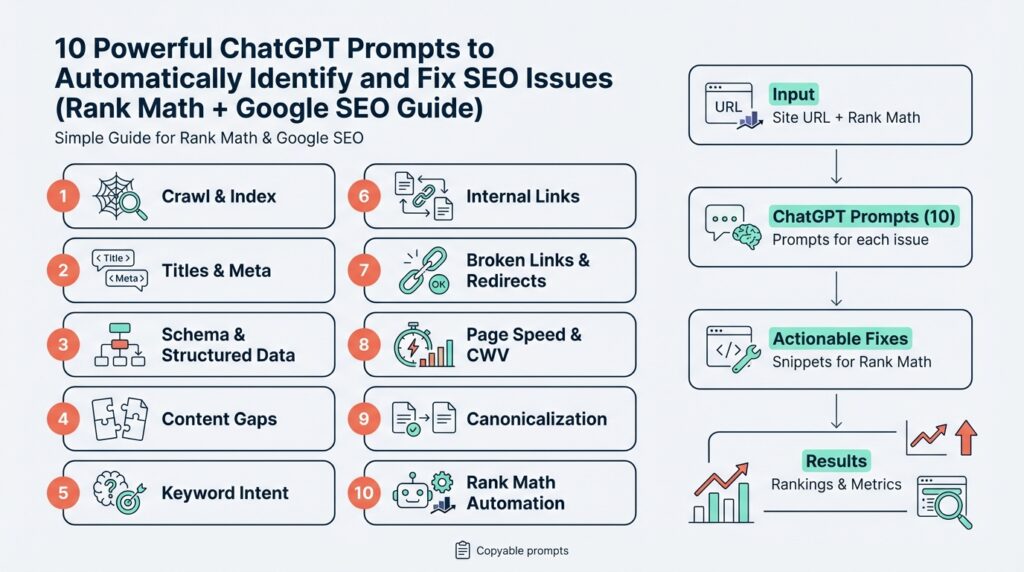
Building on this foundation, imagine you’re standing at the command center of your site, ready to use ChatGPT prompts to spot and fix SEO issues with Rank Math and Google SEO tools. Right away you need three things: the right plugins and platforms (Rank Math, Google Search Console, and Google Analytics), a safe way to share data, and the right permissions so automated prompts can access what they need. Saying those names out loud—Rank Math, Google SEO, ChatGPT prompts, SEO issues—helps us focus on the practical setup that follows.
First, let’s meet the cast of tools you’ll use and what each one does. Rank Math is a WordPress plugin that adds on-site SEO controls and reports; WordPress is the content management system many sites use, and a plugin is an add-on that changes how your site behaves. Google Search Console is a free service from Google that shows how your site appears in search results and reports indexing or coverage problems; when we mention the Search Console API, “API” means application programming interface, a way for programs to talk to Google without you clicking around. Having those three—WordPress with Rank Math, Search Console, and optionally Google Analytics—gives us the raw signals ChatGPT prompts will analyze.
Now, how do you connect them without breaking anything? Start by creating or confirming ownership of your Google account for the site. Then add and verify your site in Search Console; verification is proof to Google that you own the domain and usually happens via DNS record or an HTML file upload—DNS is your domain provider’s settings, and an HTML file is a small file you put on your site. Next install Rank Math in your WordPress dashboard and follow its setup wizard; when Rank Math asks to connect to Google services it will use OAuth, a secure way to grant access without sharing your password. If a prompt asks “How do you connect Rank Math to Google Search Console securely?” this is the secure route.
We should also set up access for programmatic checks. If you plan to automate exports or let scripts query Search Console, create a service account in Google Cloud and grant it access to the Search Console property; a service account is like a robot user you can control. Export the credentials (a JSON key file) and store them securely—think of that file like a house key, not a sticky note. For many casual uses you can avoid service accounts by using Rank Math’s built-in integrations, but if you want bulk exports or scheduled audits, a service account makes automation reliable.
Next, give the right permissions and follow the principle of least privilege. On WordPress, use an admin account only to install and configure Rank Math; for daily edits prefer an Editor role, which can modify content without full site control. In Search Console, give the least necessary role—Owner for initial setup and Delegated users as needed—so third-party tools or team members can run reports without changing ownership. Always back up your site and database before connecting unfamiliar tools; a backup is a snapshot of your site you can restore if something goes wrong.
Finally, think about the data flow for your ChatGPT prompts. We’ll often export CSV reports from Rank Math (site-wide SEO audits) and Search Console (performance and indexing data) and feed them into prompts that identify keywords, errors, and fixable issues. Treat those exports like research notes: anonymize or remove any sensitive IDs, keep copies in a safe folder, and timestamp each export. This way, when we run a prompt that patches title tags or redirects, we can track what changed and why.
With the right accounts, secure credentials, and carefully assigned permissions in place, you’re ready to feed accurate data into the prompts and let automation do the heavy lifting. In the next part we’ll write the exact prompts that read these exports, prioritize issues, and generate actionable Rank Math settings and Google-friendly fixes—so keep your keys backed up and your permissions tight, and we’ll move on together.
Export Site Data
Building on this foundation, imagine you standing at your site’s control panel with a stack of reports ready to hand to a helpful assistant — except the assistant is a set of ChatGPT prompts that need tidy, readable inputs. The first scene in our little story is this: we need clean, well-structured site data that tells a clear story about performance, indexing, and on-page issues. That clarity is what lets the prompts diagnose problems and propose fixes that work with Rank Math and Google tools. If you feel a little nervous about exports, that’s normal; we’ll walk through what to pull, how to clean it, and why each piece matters.
The most important idea to understand is what an export actually is: an export is a snapshot of information from a tool — often saved as a CSV (comma-separated values) file, which is a plain-text table you can open in a spreadsheet. A CSV holds rows and columns like a paper ledger: each row is a URL or keyword and each column is a property such as clicks, impressions, title tag, or status code. When we talk about site data, we mean these exports from Rank Math, Search Console, and your site audit reports — they become the raw evidence your ChatGPT prompts read. Knowing that CSV is just a universal spreadsheet format removes a lot of mystery.
Start by choosing which reports to export, because not every file helps every audit. Pull a performance export from Search Console that includes queries, pages, clicks, impressions, CTR, and average position; grab Rank Math’s site-audit CSV with pages, issues, and severity levels; and export a list of indexed URLs and the sitemap so we can cross-check what Google has versus what your CMS lists. If you want redirect or broken-link lists, export those too. Each of these files plays a different role: performance shows what users find, audit reports show on-page problems, and sitemaps/indexed lists reveal indexing mismatches.
With the reports chosen, follow a simple rhythm when exporting: pick a time window, apply sensible filters, then export with clear filenames. First we pick the date range (for example, the last 28 days or the previous month) so the data reflects the period we’re analyzing. Next we filter noise — perhaps exclude admin paths or staging subdomains — so the CSV is focused and smaller. Finally, name files with descriptive timestamps like site-audit_2026-03-01_to_2026-03-20.csv so you always know what you fed into a prompt.
Data hygiene matters more than you might expect, so treat cleanup as a short editing pass. Open the CSV and remove any personally identifiable information (PII) or internal IDs you don’t want in third-party prompts; anonymize means replacing emails or user IDs with placeholders. Normalize URLs so they use the same scheme (https://) and consistent trailing slashes; that prevents duplicate rows and confusion later. Save a secure backup of the raw exports before you edit, and store cleaned copies in a folder only the team and service accounts can reach.
Preparing exports for ChatGPT prompts is about structure and example rows more than clever tricks. Make sure column headers are readable (page, title, meta_description, clicks, impressions, status_code) and include one or two sample rows at the top if your automation benefits from context. If a prompt will propose title-tag edits, include the current title and the content length; if it will recommend redirects, include source and destination columns and HTTP status. Keeping the CSV tidy speeds up analysis and reduces back-and-forth.
Finally, think about cadence and automation so exports don’t become a chore. If you set scheduled exports via Search Console API, Rank Math reports, or a simple WordPress cron job, we can feed fresh CSVs into prompts weekly or after major changes. This is where the earlier setup — service accounts and least-privilege permissions — pays off: automation can pull site data safely and reliably. How do you want to receive recommendations — as a list of Rank Math setting changes, a CSV of title suggestions, or a bulk redirect plan? Decide that now so the next step (writing the prompts) knows the output format to target.
With clean, well-labeled CSVs and a routine for exporting and securing site data, we’re ready to hand a clear brief to the prompts that will find issues and suggest fixes. In the next part we’ll write those exact prompts and map how each exported column informs a specific SEO recommendation, so keep your named exports handy and we’ll convert them into action together.
Run Automated SEO Audit
Imagine you’re standing at the control console of your website and you want a fast, reliable way to spot hidden problems — an automated SEO audit becomes our trusty assistant in that moment. Building on this foundation, we’ll use Rank Math, Google Search Console, and ChatGPT prompts together so the audit can find issues without you reading every line of HTML. How do you get from noisy reports to a prioritized fix list? We’ll walk through the practical flow, what to watch for, and how to turn findings into Rank Math changes that Google can actually see.
First, let’s picture what an automated SEO audit does for you: it’s a systematic scan that inspects pages, titles, meta data, index coverage, and technical signals and then converts that information into actionable items. An audit here means a repeatable process that reads exports (CSV files, a plain-text table format) from Rank Math’s site-audit and from Google Search Console’s performance and coverage reports; an API is the bridge that lets tools talk to Search Console programmatically. Treat the audit like a health check — it diagnoses symptoms (low clicks, soft rankings, crawl errors) and points to likely causes (missing meta descriptions, duplicate titles, unindexed pages). When you think of it as diagnosis before treatment, the rest of the work becomes clearer.
Next, let’s run the routine together: trigger a site-audit in Rank Math so you get a current CSV of on-page issues, then pull a Performance export and a Coverage export from Google Search Console for the same date range. Include the sitemap and any redirect lists so the audit can cross-check what your CMS says you have versus what Google has indexed; consistency between sitemap, actual URLs, and indexed pages is a common source of trouble. We’ll feed those clean CSVs into ChatGPT prompts that parse columns like page, title, meta_description, clicks, impressions, status_code and flag items where traffic potential meets technical failure. Think of the CSV as a cast list — each row is a character in our story that the prompts will interview.
Once the audit has produced raw findings, we need a simple way to decide what to do first: prioritize by impact, ease, and risk. Ask yourself: how many clicks does this page get, how severe is the issue (broken page vs. minor meta tweak), and how complex is the fix in Rank Math or on the server? This triage — high-traffic + high-severity = top priority; low-traffic + trivial = later — keeps us from chasing cosmetic problems while real blockers (crawl errors, server 5xxs, major canonical mistakes) quietly sap organic visibility. We’ll also flag quick wins like short, descriptive title tags and missing meta descriptions because those are low-effort moves with immediate measurable returns.
What will the ChatGPT prompts return, and how do you apply the results? Expect structured outputs: suggested title tags tuned for the page’s queries, improved meta descriptions that match intent, canonical tag recommendations (a canonical tag tells search engines which URL is the preferred version of duplicate content), redirect mappings for 404s, and a short list of Rank Math setting changes — for example, enabling noindex on thin archive pages or fixing canonical outputs. Treat the prompt output as a ready-to-import checklist: copy title fixes into Rank Math’s title field, paste meta description suggestions, and stage redirect rules in your redirect manager before pushing live.
Finally, make the automated SEO audit part of your rhythm: schedule exports and audits weekly or monthly, keep timestamped snapshots of the CSVs for comparison, and always test major fixes on staging with backups in place. Building on the exports and permissions we set up earlier, automate the data pulls where possible so the prompts always work with fresh information and you can measure change over time. With that cadence, the audit becomes not a one-off chore but an ongoing conversation between your site, Rank Math, Google Search Console, and the prompts that help you prioritize and act — next we’ll convert these audit steps into specific prompts that generate the title edits, redirect lists, and Rank Math configurations you can apply immediately.
Fix Technical Issues with Rank Math
Building on this foundation, imagine your automated audit just handed you a file full of flagged items and you’re wondering where to start with Rank Math and technical SEO. You’ve already pulled CSVs from Search Console and Rank Math site-audit reports, so we have the raw evidence; now we need a plan to turn those flags into concrete changes. In the next few minutes we’ll walk through how to interpret common technical signals, prioritize them, and apply fixes inside Rank Math while keeping Google’s rules in mind. This is about turning a pile of findings into a calm, repeatable workflow you can trust.
One frequent scene is the crawl error: Google couldn’t reach a page. A crawl error means Googlebot (Google’s crawler) saw a problem fetching a URL; common flavors are 404 (not found) and 500 (server error) — those are HTTP status codes, short messages your server returns to say what happened. Another recurring signal is indexing trouble: a page that exists on your site but isn’t showing in Google’s index; indexing means Google stores and can surface a page in search results. Duplicate content and incorrect canonicalization (a canonical tag is a hint that tells search engines which URL is the preferred version of similar pages) also show up a lot in audits and quietly dilute ranking signals.
Rank Math’s site-audit and its redirection tools will be our control surfaces for most fixes, so it helps to know what each report column means before editing. When an audit row shows a status_code column with 404 or 500, that points to broken or server-failing pages you should investigate first. If the sitemap your CMS submits doesn’t match what Search Console reports as indexed, that mismatch is a sign to check your robots.txt (a small text file that tells crawlers which parts of a site to ignore) and your sitemap.xml (the list you give search engines to help them find pages). Treat these reports like a map: the path with the most traffic and the worst error gets the quickest attention.
How do you decide which technical fix to do first? We use a simple triage rule: prioritize by potential traffic impact, severity of the issue, and ease of fix. For example, a high-traffic page returning 500 should outrank a low-traffic page missing a meta description because the server error prevents any visibility at all. Use your Search Console clicks/impressions columns to score impact, and let Rank Math’s severity flags guide the effort. This pragmatic prioritization keeps you from spending hours polishing low-value items while critical blockers remain.
Now let’s translate findings into Rank Math actions you can perform today. For duplicate content, set canonical URLs in Rank Math’s Advanced tab so search engines know the preferred copy. For thin or low-value archive pages, apply a meta robots noindex (noindex tells search engines not to include a page in their index) using Rank Math’s meta robots controls. For 404s that should permanently point elsewhere, create 301 redirects (a 301 redirect is a permanent redirect that passes ranking signals to the new URL) with Rank Math’s Redirections module. When changing canonicalization or robots settings, add a short change note in your audit CSV so you can track who changed what and why.
Server-level problems often require a team handoff, so document what you tried before pinging your host or developer. If you see 5xx errors, collect request timestamps and example URLs, reproduce the error on a staging site if possible, and attach server logs — those logs are the factual record developers need. Avoid mass changes without backups: snapshot the database and files before bulk redirects or canonical rewrites, then test in staging and deploy incrementally. This protects live traffic while you iterate.
Validation is where the story closes a loop: after applying fixes, re-run the Rank Math audit and use Search Console’s URL Inspection (a tool that shows how Google sees a specific URL) to request indexing when appropriate. Monitor changes in clicks and positions over the next 2–8 weeks to confirm the fix moved the needle. Keep timestamped CSVs so you can compare “before” and “after”; that historical trail is how you learn which fixes deliver real SEO value.
Finally, treat this process as part of the automation rhythm we set up earlier: feed cleaned CSVs into your ChatGPT prompts to generate suggested titles, redirect lists, and Rank Math configuration snippets, then review and apply them in small batches. By combining prompt-driven diagnosis with careful Rank Math edits, we move from noisy reports to disciplined technical SEO maintenance — and that’s exactly the steady, repeatable work that keeps organic visibility growing. In the next section we’ll convert these repair steps into specific prompts and templates you can run automatically.
Auto-generate On-Page Optimizations
Imagine you just finished an automated audit and are staring at a long CSV of pages, flags, and performance numbers wondering where to start. You’re not alone — the challenge now is turning that raw evidence into meaningful on-page optimizations that actually move the needle. We’ll walk through how to let automation suggest sensible title tags, meta descriptions, canonical fixes, and small content nudges so you don’t have to edit dozens of pages by hand. This is about practical, repeatable steps you can trust, not magic.
Building on this foundation, the first idea to anchor is that automation needs clear inputs and a consistent language. Provide a tidy export that includes the page URL, current title, meta_description, primary query or keyword, clicks, impressions, and status_code so ChatGPT prompts can reason about intent and impact. Think of the CSV as a recipe card: the more precise the ingredients (query intent, traffic metrics, and content length), the better the generated title tags and meta descriptions will taste. When we feed this into prompts, we ask for outputs that respect length limits, include the target phrase, and match the apparent search intent from Google Search Console data.
Next, let’s make the generation predictable by using templates and rules that mimic human judgement. Start by asking the prompts to produce three title tag options and two meta descriptions per page: one strictly SEO-focused, one user-focused, and one hybrid that balances clicks and keywords. Explain your rules in the prompt: include the primary query early, keep titles under 60 characters, meta descriptions under 160 characters, avoid duplication across sibling pages, and preserve brand phrasing where appropriate. How do you keep these automated suggestions from feeling mechanical? By giving the model contextual hints from the performance export — for example, prioritize queries with rising impressions or pages with high impressions but low CTR.
Now picture a concrete example so this feels less abstract. We take a page about “best running shoes for flat feet” that has impressions but poor CTR; the prompt reads the current title and description and the top queries from Search Console, then drafts three title options that test different angles: benefit-led, feature-led, and urgency-led. The meta descriptions mirror that approach, one emphasizing benefits, one addressing common objections, and one calling to action for a specific offer or guide. These generated strings are saved in a CSV alongside the original values and a short rationale field so you and your editor can quickly review why each change was suggested.
After generation, validation becomes our safety net; never push all changes live without a review cycle. We run a lightweight QA prompt that checks for duplicate titles, missing brand mentions, truncated lengths, and mismatched intent versus query data from Google Search Console. Then we stage approved edits into Rank Math’s bulk editor or use Rank Math’s API (or its admin screens) to apply them in small batches, noting the change reason and a timestamp. This staged approach reduces risk and gives you measurable before-and-after snapshots.
Integration with Rank Math is where automation turns into action, and a thoughtful workflow makes that handoff smooth. Use the generated CSV to populate Rank Math fields: paste title tag suggestions into the SEO title, meta descriptions into the meta box, and add canonical recommendations into the Advanced tab when duplicates are detected. If redirects are suggested, convert them into 301s via Rank Math’s Redirections module and document them in your audit CSV so you can revert if necessary. By keeping the process human-reviewed and incremental, we combine the speed of ChatGPT prompts with the control Rank Math provides.
Finally, treat this as an iterative experiment and a learning loop. Schedule a re-run of the audit and generation every few weeks, track CTR and position changes for pages you updated, and refine the prompt rules based on what actually improves clicks and rankings. What changes did users respond to — benefits first, numbers in titles, or localized modifiers? With that feedback we tune the prompts, prioritize future on-page optimizations by impact, and gradually build a library of high-performing templates that scale across your site.
Verify Fixes and Monitor Rankings
Imagine you just pushed a batch of suggested title tags, fixed a handful of 404s, and flipped a few Rank Math settings—and now you’re waiting, a little nervously, to see if those changes mattered. We’ve done the detective work and made edits, but this next step is the verdict: verifying that fixes took effect and monitoring how your visibility responds. Think of it like baking a new recipe and then checking both that the oven actually ran and that people enjoy the cake; one confirms the change, the other measures the result. This is where a calm, systematic approach wins over hopeful guessing.
First, verify the mechanical fixes so you know nothing is broken by accident. Start by re-running your Rank Math site-audit (a report that scans on-page and technical SEO issues) and use Google Search Console’s URL Inspection tool—URL Inspection is a feature that shows how Google last crawled and indexed a specific page—to confirm the updated version is what Google sees. Check HTTP status codes (the three-digit server responses like 200 for OK or 404 for Not Found) to ensure redirects and repaired pages return the right signals, and view the live page to confirm title and meta changes rendered as expected. How do you know a fix actually worked? If Rank Math’s audit clears the original flag and Search Console’s live test shows an updated crawl snapshot, you’re usually in the green.
While we verify, we also set up monitoring so changes don’t vanish into noise. Pull a Performance report from Google Search Console (the report that shows clicks, impressions, click-through rate, and average position) and export it for the date range surrounding your fix so you can compare “before” and “after.” Average position is the mean ranking position for a page across queries, impressions are how often the page appeared in search results, and CTR (click-through rate) is the share of impressions that turned into clicks—watch all three, because they tell different parts of the story. Complement Search Console with behavior metrics from Google Analytics or your analytics tool to see if visitor engagement improved after the change; more clicks but worse engagement could signal mismatched intent.
Expect patience and a simple rule of thumb for timeline: early signs can appear in days for submitted URLs, but meaningful ranking movement typically shows over 2–8 weeks depending on crawl frequency and competition. Don’t overreact to single-day blips; instead compare rolling windows (for example, the four weeks before versus the four weeks after) to reduce noise. When you see no change after an appropriate interval, triage again: is the page still indexed, is the primary query competitive, or did we misunderstand user intent? Framing this as iteration—not one decisive move—keeps you experimental and data-led rather than reactive.
We should also automate verification where sensible using ChatGPT prompts tied to your exports, because automation makes repeatable checks painless. Create prompts that accept your audit CSVs and Search Console exports and return a concise comparison: which URLs show updated titles, which still return old meta tags, and which need a reindex request. Ask the prompt to flag pages whose clicks/impressions drift in opposite directions (for example, impressions up but clicks down) so you can prioritize a human review, and instruct it to prepare a one-click list of URL Inspection requests you can run from Search Console. Letting ChatGPT prompts process the data saves time and keeps the verification step consistent across every change.
Finally, keep a tidy change log and a rollback plan so every verification is traceable and reversible. Record the file name of the exported reports, the timestamp of each Rank Math or server change, a short rationale, and expected metrics to watch; this audit trail is how we learn which fixes actually move the needle and why. Before large batches go live, test on staging and keep backups so you can revert quickly if outcomes are unexpected. Building this discipline turns the nervous waiting after a fix into a manageable, measurable process—and sets us up to monitor rankings with clarity rather than guesswork.



