SQL Join Basics
When you first look at data in SQL, it can feel a little like opening several notebooks that all describe the same project from different angles. One table might list customers, another might list orders, and a third might track payments, but the story only makes sense when we bring those pieces together. That is where SQL joins come in: they let us combine rows from separate tables so we can ask better questions and see the full picture. If you have ever wondered, “How do I connect two tables in SQL without losing track of what belongs where?”, you are already thinking like a join user.
The easiest way to picture a table is as a grid, with rows holding individual records and columns holding pieces of information about those records. A join works by matching related rows across tables, usually with a shared field such as an ID number. That shared field might be a primary key, which means a column that uniquely identifies each row, or a foreign key, which is a column that points to a matching row in another table. In SQL join basics, that connection is the bridge that turns scattered facts into one readable result set, which is the collection of rows returned by a query.
To see the idea in motion, imagine a customer table with names and a separate order table with purchase details. If we want to know which customer placed which order, we do not want to copy data by hand or guess based on names alone. Instead, we tell SQL which columns should match, and the database does the pairing for us. This is the heart of SQL joins: we define the relationship, then SQL follows that relationship and assembles the rows that belong together.
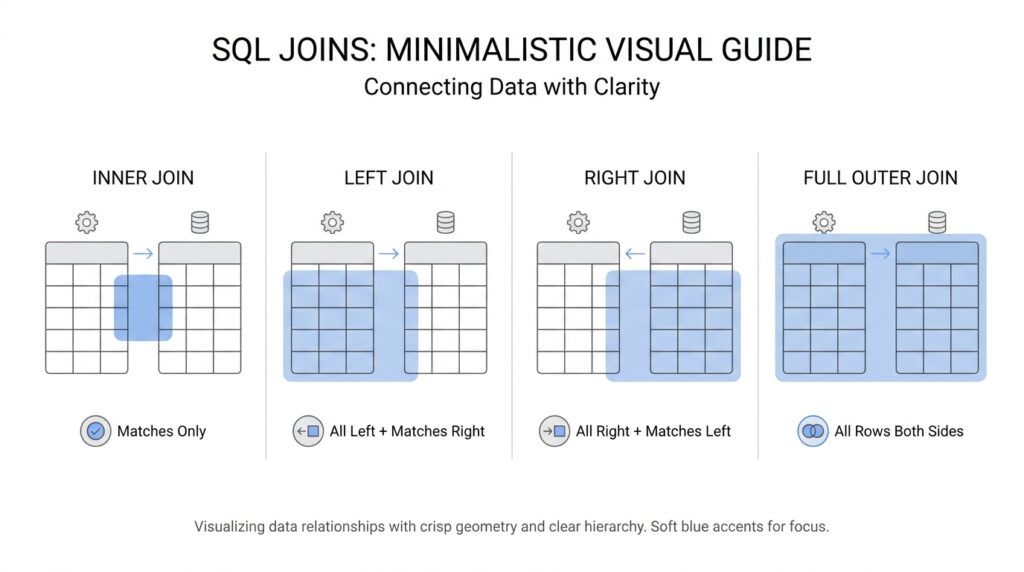
The most familiar starting point is the inner join, which keeps only the rows that match in both tables. Think of it like a Venn diagram where we keep only the overlap, because both sides must agree for a row to appear. If a customer has no matching order, or an order points to a missing customer, an inner join leaves that row out. That makes it a strong choice when you want only confirmed matches and do not need the unmatched leftovers.
Sometimes, though, the leftovers matter. A left join keeps every row from the table on the left side of the join and fills in missing values from the right side with nulls, which means “no value available here.” This is useful when you want to see all customers, including the ones who have not ordered yet, because their names still matter even if the order columns stay blank. A right join follows the same idea in the opposite direction, and a full outer join keeps all rows from both tables, matched where possible and left unmatched where not. These SQL join basics may sound similar at first, but each one answers a slightly different question.
The join condition deserves careful attention because it tells SQL how to match the tables. If the condition is too broad, you can end up pairing rows that should never meet, and your results can swell like an overstuffed suitcase. If the condition is too narrow, you may miss records that should belong together. In practice, we read joins as relationships: one row in this table should connect to one row, or several rows, in that table, and the query should reflect that logic as clearly as a sentence.
As we move forward, keep this simple idea close: joins do not create new facts, they reveal relationships that already exist in the data. Once you understand how rows find each other, the rest of SQL joins starts to feel less like memorizing syntax and more like learning how a conversation works between tables. That is the foundation we will keep using as we explore more specific join patterns and how to choose the right one for the question in front of us.
Match Rows with ON
If the last section showed us that joins are about relationships, the next question is how SQL actually recognizes those relationships row by row. That is where the ON clause comes in, and it is the part of a SQL join that says, “these two columns belong together.” When people ask, “How does SQL know which order belongs to which customer?”, they are really asking about the join condition inside ON. Think of it like matching luggage tags at an airport: the bags may look different, but the tag number tells us which ones travel together.
In practice, ON gives SQL the rule for pairing rows before anything else happens. A typical join might look like this:
SELECT customers.name, orders.order_id
FROM customers
JOIN orders
  ON customers.customer_id = orders.customer_id;
This says that a customer row should match an order row when both tables share the same customer_id. The database reads that instruction like a bridge between tables, and only rows that satisfy that match are considered connected. In other words, the ON clause is the handshake that makes SQL joins work.
That little handshake matters because the join condition must be specific enough to find the right partner, but not so loose that it matches the wrong one. If we joined customers and orders on a last name instead of an ID, two unrelated people named Smith could end up sharing rows by accident. If we used the wrong column entirely, we might get a result set that looks busy but says very little. Careful SQL join matching is less about writing more code and more about choosing the relationship that already exists in the data.
It also helps to notice that ON is not the same as WHERE, even though beginners often mix them up. ON describes how rows from two tables should match, while WHERE filters the results after the match has been formed. A JOIN ... ON clause is like deciding who gets paired at the dance, and WHERE is like choosing which pairs stay on the floor afterward. That difference becomes especially important with outer joins, because the join condition protects rows from being dropped too early.
Let’s slow down and read the logic out loud, because that is often where the idea clicks. First, SQL looks at one row from the left table. Then it searches the right table for rows that satisfy the ON condition. If the values line up, SQL keeps the pair; if they do not, the pair is ignored for an inner join, or preserved with missing values for outer joins. This is the quiet engine inside SQL joins: the ON clause decides what counts as a match, and the join type decides what to do with the rest.
When you start writing your own queries, a good habit is to name the relationship in plain language before you write the code. You might say, “Each order belongs to one customer,” or “Each payment points to one invoice.” Then you translate that sentence into the ON clause using the columns that carry that relationship in the database. That habit makes SQL joins feel less like memorizing syntax and more like telling the database a story it already understands.
Once you are comfortable with ON, you can read a join as a matching rule instead of a mystery. The next step is seeing how that rule behaves when some rows have no partner at all, because that is where different join types begin to show their personality.
Use INNER JOIN
An INNER JOIN is the version of SQL join that keeps us focused on rows that truly belong together. If ON was the matching rule, INNER JOIN is the part that says, “only show me the pairs that actually match.” When you ask, “How do I get only customers who placed an order?” this is usually the first tool we reach for. It feels a little like sorting two piles of index cards and keeping only the cards that line up on both sides.
What does an INNER JOIN return? It returns the overlap between tables, nothing more and nothing less. That means if a customer exists but has no related order, that customer stays out of the result. If an order points to a missing customer, that order also stays out. The database is not guessing here; it is being strict, which is exactly why INNER JOIN is so useful when you want confirmed relationships instead of possibly incomplete ones.
Here is a familiar example from the customer-and-order story we have been following:
SELECT customers.name, orders.order_id, orders.total
FROM customers
INNER JOIN orders
  ON customers.customer_id = orders.customer_id;
This query says, in plain language, “show me each customer name beside the orders that belong to that customer.” The shared customer_id is the bridge, and the INNER JOIN only keeps rows where that bridge connects from one table to the other. If one side has no matching customer_id, the row never appears in the final result set, which is the collection of rows a query gives back.
That strictness is what makes an INNER JOIN feel clean and dependable. Suppose you are building a sales report and only want orders that can be tied to a real customer record. In that case, matching rows are the truth you care about, and unmatched rows would only add noise. An INNER JOIN helps you avoid reporting on half-finished data, which makes it a strong choice for summaries, counts, and any question where the relationship must be proven before it is shown.
It also helps to notice how INNER JOIN behaves when one table has many related rows. If one customer placed three orders, that customer’s name will appear three times, once for each matching order. That is not a mistake; it is the database showing each valid relationship separately. This is one of the most important SQL join patterns to understand, because it explains why a result can grow larger than either table on its own.
A good mental habit is to read the query out loud before you trust the output. You might say, “Give me customers, matched to orders, where the IDs are the same.” That small sentence captures the whole idea of SQL joins in a way beginners can hold onto. If the sentence sounds right, the query usually feels easier to write and debug.
One more detail matters when you are learning to use INNER JOIN well: missing rows are not errors, they are a consequence of the rule you chose. If a row disappears, SQL is telling you that the match never happened. That can be helpful, because it lets you spot gaps in your data model, missing foreign keys, or records that were never connected in the first place. In other words, the join is not only combining tables; it is also quietly checking whether the relationship you expected is really there.
Once you get comfortable with this overlap-only behavior, the next question becomes much more interesting: what should we do with rows that do not have a partner at all?
Use LEFT JOIN
Now that we have seen how an inner join keeps only the rows that match, it is time to follow the other path: the one where some rows do not have a partner, but we still want to keep them in the story. A LEFT JOIN is the SQL join that helps us do that. If you have ever asked, “How do I show every customer even if they never placed an order?”, you are already thinking in left join terms. It keeps every row from the table on the left side and brings in matching data from the right side when it exists.
That idea matters because real data is rarely perfectly complete. In our customer-and-order example, some customers may be active but have no purchases yet, while others may have several orders waiting to be counted. A LEFT JOIN lets us keep those customers visible instead of silently dropping them. When no match exists on the right, SQL fills those columns with null, which means “there is no value here.”
Here is what that looks like in practice:
SELECT customers.name, orders.order_id, orders.total
FROM customers
LEFT JOIN orders
  ON customers.customer_id = orders.customer_id;
This query says, “show me every customer, and attach any orders that belong to them.” The database starts with the entire left table, then looks for matching rows in the right table using the ON condition, which is the matching rule we explored earlier. If a customer has three orders, that customer appears three times. If a customer has no orders at all, the customer still appears once, with null in the order columns.
That last detail is where LEFT JOIN becomes especially useful. Instead of asking only who bought something, we can ask who has not bought anything yet, which is often just as important. A marketing team might use this to find customers who need a follow-up email, and a product team might use it to see which users have not completed onboarding. In other words, LEFT JOIN keeps the full left-hand list intact, which makes it a strong choice when absence itself tells us something.
It also helps to see why LEFT JOIN is different from placing filters in the wrong place. If we add a WHERE orders.total > 100 clause after the join, we may accidentally remove the rows with null order values, which defeats the whole point of keeping unmatched customers. That is why beginners often feel confused here: the join decides which rows can meet, while WHERE decides which rows survive afterward. If we want to preserve unmatched left rows, we have to be careful not to filter them away too early.
A good way to read a LEFT JOIN out loud is this: “Keep everything from the left table, and bring in anything from the right table that matches.” That sentence sounds small, but it captures the full logic behind many SQL join examples. It also explains why the choice of left table matters so much. Whichever table you place on the left becomes the table whose rows you promise not to lose.
Once that clicks, LEFT JOIN starts to feel less like a special trick and more like a practical promise. We are telling SQL that the left side is the main cast, and the right side is supporting evidence that may or may not show up. That perspective makes it easier to choose the right join when the question is not about perfect overlap, but about keeping every important record in view while still attaching whatever related details the data can provide.
Explore RIGHT and FULL
After we get comfortable keeping the left side of the story intact, the next question feels natural: what if the important table is the one on the right? That is where a RIGHT JOIN steps in. It works like a mirror image of the left join, keeping every row from the right table and adding matching rows from the left when it can. If you have been asking, “How do I keep all orders even when some customers are missing?” this is the kind of SQL join that answers that question.
A RIGHT JOIN is useful when the right-hand table carries the records we care most about. Picture a reporting query where the right table holds every invoice, and the left table holds customer details that may be incomplete. With a RIGHT JOIN, we do not lose any invoice rows just because one customer record is missing or unfinished. The database still tries to match rows using the ON clause, but when no partner exists on the left, it leaves those left-side columns as null and preserves the right-side row anyway.
Here is the key idea: RIGHT JOIN is not a different kind of matching rule, it is the same relationship viewed from the opposite side. The join condition still says which columns belong together, and the join type still decides what to keep when a match fails. That is why SQL joins can feel like a family of related moves rather than separate tools. Once you know how ON works, the real difference is which table gets protected from being dropped.
A FULL OUTER JOIN goes one step further because it refuses to throw away unmatched rows from either side. It keeps every row from the left table, every row from the right table, and matches them when the ON condition says they belong together. When no match exists, SQL fills the missing side with null, which means the record has no partner there. In plain language, a FULL OUTER JOIN is the most generous of the common SQL join types because it shows both overlap and leftovers in one result set.
That generosity makes FULL OUTER JOIN especially helpful when you are comparing two lists and want to spot gaps. Imagine one table listing products that were shipped and another listing products that were billed. A FULL OUTER JOIN lets us see the products that appear in both places, the ones that were shipped but never billed, and the ones that were billed but never shipped. In other words, it gives us the whole comparison, not just the overlap, which is often exactly what we need when we are troubleshooting data.
If you are wondering which one to use, the easiest way to think about it is to ask what must never disappear. When the right table is the one you must preserve, RIGHT JOIN keeps that promise. When both tables matter equally and missing matches should stay visible, FULL OUTER JOIN gives you the widest view. That difference sounds small at first, but it changes the shape of the result set in a big way, especially when you are reviewing incomplete or messy real-world data.
There is one more useful habit to carry with you: read the query as a sentence before you run it. Say, “Keep all rows from the right table,” or say, “Keep all rows from both tables.” That small check helps us choose the join that fits the question instead of the one that merely looks familiar. Once you can name the story you want the data to tell, RIGHT JOIN and FULL OUTER JOIN start to feel less mysterious and more like precise ways of making sure no important row gets left behind.
Practice with Examples
The best way to make SQL joins feel real is to watch them work on actual rows. Once we see a join condition, an INNER JOIN, and a LEFT JOIN behave on small tables, the ideas from earlier stop floating in the air and start looking useful. If you have ever wondered, how do I choose the right SQL join when the tables do not line up perfectly?, this is where the answer begins to show itself. We are no longer naming the tools; we are using them to solve a small puzzle.
Imagine we have two familiar tables: one for customers and one for orders. The customer table holds names and IDs, and the order table holds purchase details and a customer ID that points back to the buyer. That shared ID is the thread we keep following, because it tells SQL which rows belong together. When we write the query, we are not inventing a connection; we are asking the database to reveal one that already exists.
SELECT customers.name, orders.order_id
FROM customers
INNER JOIN orders
  ON customers.customer_id = orders.customer_id;
This INNER JOIN example is a good place to begin because it shows the cleanest case. If Ava placed two orders, Ava appears twice; if Ben placed none, Ben does not appear at all. That may feel strict at first, but it is useful when we only want confirmed matches. In practice, SQL joins often start here because the output is easy to read: only related rows survive.
Now let’s change the question instead of the data. Suppose we want to list every customer, including the ones who have not ordered yet, because the missing orders matter just as much as the completed ones. That is where the LEFT JOIN becomes our better companion. It keeps the full customer list on the left and brings in order details only when a match exists, which turns absence into information rather than noise.
SELECT customers.name, orders.order_id
FROM customers
LEFT JOIN orders
  ON customers.customer_id = orders.customer_id;
If Ben still has no orders, Ben stays in the result with null in the order columns. If Ava has two orders, Ava appears twice, once for each matching order. That difference is small in code but big in meaning, because the join type decides whether unmatched rows disappear or stay visible. When you practice SQL joins, this is the habit to build: ask what must never be lost before you choose the join.
The next useful exercise is to look at the same query through the lens of troubleshooting. If a row vanishes from an INNER JOIN, that is not SQL being broken; it is SQL telling you the match never happened. Maybe the ID is missing, maybe the foreign key points to the wrong record, or maybe the two tables were not meant to connect that way at all. Reading the result set like a clue sheet helps you see whether the data model matches the story you expected.
Another practice trick is to compare row counts before and after the join. If the result grows more than you expected, one side may contain multiple matches for the same key, which is normal but worth noticing. If the result shrinks too much, the ON clause may be too narrow or the wrong columns may be doing the matching. That is why the join condition deserves as much attention as the join type itself: it decides which rows shake hands, and the output shows whether that handshake was correct.
As you keep practicing, try saying the query out loud in plain language before you run it. Say, “Show me every customer and their orders,” or say, “Show me only customers who have orders.” That small habit keeps SQL joins tied to real questions instead of memorized syntax, and it will make the next pattern easier to recognize when the tables get larger and the relationships become more interesting.