State The Task Clearly
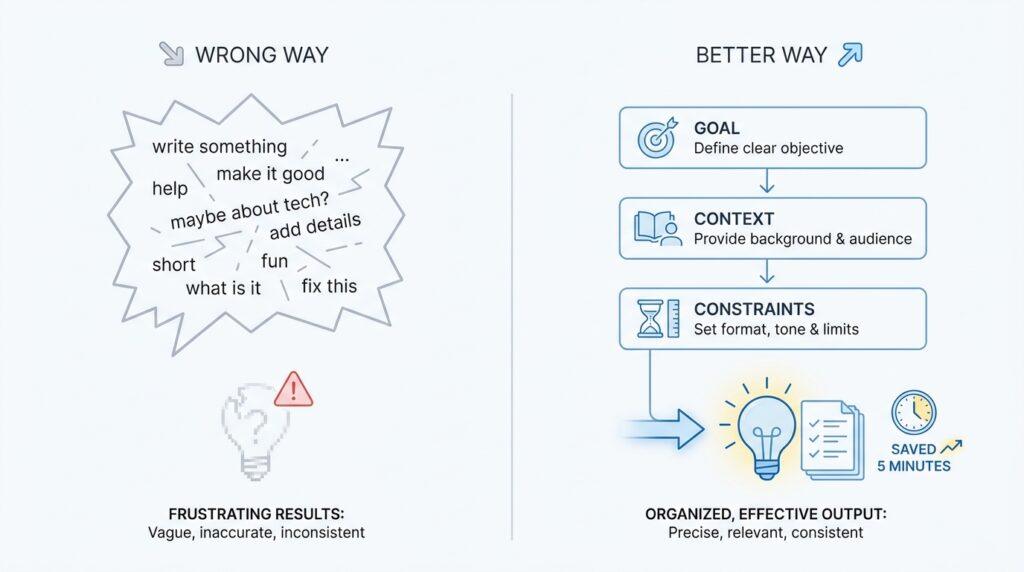
You know that moment when you open ChatGPT, stare at the blinking cursor, and think, Why did that answer feel so close, but not quite right? In many cases, the problem is not the model — it is the prompt. Clear task writing is the first small habit that changes everything, because ChatGPT works best when you tell it what game you want to play, what winning looks like, and who the answer is for. If you have ever wondered, How do I write a better ChatGPT prompt? the answer usually starts here: name the task before anything else.
Think of it like walking into a café and saying, “I need something good.” The person helping you has to guess whether you want coffee, tea, a snack, or a full meal, and every guess adds friction. A clearer request sounds more like, “I need a hot drink with little sugar that I can drink quickly before a meeting.” That same logic applies to prompt engineering, which is the practice of shaping your instructions so the AI can give you a better result. The more specifically you describe the task, the less room there is for the model to drift.
The easiest way to do this is to make the task visible from the very first line of your prompt. Instead of saying, “Help me with this,” tell ChatGPT what you actually want it to produce, such as a summary, an email draft, a checklist, a comparison, or an explanation for beginners. That one move gives the model a destination. It also helps to include the audience, because writing for a busy manager, a child, or a technical teammate are three very different tasks even if the topic is the same.
This is where many people accidentally weaken their own ChatGPT prompt. They ask for “better wording” or “ideas” when what they really need is a polished LinkedIn post, a customer apology email, or a 5-step study plan. Vague requests force the model to improvise, and improvisation is useful only when you have already given it a strong direction. Clear task statements reduce that guesswork by turning a fuzzy wish into a concrete assignment. In practice, that means you might say, “Rewrite this paragraph so it sounds calm, professional, and easy to understand,” rather than hoping the model reads your mind.
A useful task statement usually carries four pieces of information. It says what you want done, what context matters, what format you want back, and what limits the answer should respect. If you ask for a product description, say whether it should be short or detailed. If you want a study aid, say whether you need a quick explanation, a quiz, or a step-by-step walkthrough. If you want help with writing, tell the model whether the tone should feel warm, formal, persuasive, or simple enough for a beginner.
The nice part is that you do not need perfect prompt engineering to see a difference. Even a small change can make ChatGPT feel much more useful, because a clear task acts like a signpost. Instead of wandering through possibilities, the model can start building exactly what you asked for. And when you make the task obvious first, you also make the rest of the prompt easier to improve, because now every extra detail has a job to do.
So when you sit down to use ChatGPT, start by asking yourself what you want the model to do, not just what you want it to know. That single shift keeps your prompt grounded and your output far more useful, and it sets us up for the next part of the process, where we can make the request even sharper without making it longer.
Add Relevant Context
Now that we know the destination, the next thing a strong ChatGPT prompt needs is the map. Relevant context tells the model where you are starting, what has already happened, and what background matters before it answers. Without that context, even a clear task can land in the wrong place, because ChatGPT has to guess the situation around the request. That is why a better ChatGPT prompt often feels less like a command and more like a quick briefing.
Think about asking a friend for help without telling them what happened first. If you say, “Write a reply to this message,” they may write something polite, direct, or even firm, but they still do not know whether the sender is a client, a coworker, or a frustrated customer. Relevant context fills in those missing pieces. It gives your prompt the surrounding story, which helps the model choose the right tone, level of detail, and angle.
So what should you include in a ChatGPT prompt when you want better context? Start with the facts that shape the answer, not every scrap of information you have. If you want help rewriting an email, share who sent it, what they want, and what you want the result to sound like. If you want help learning something, include your current skill level, the goal you are working toward, and any tools or time limits that matter. Context works best when it acts like a flashlight, not a floodlight.
This is where many people accidentally make their ChatGPT prompt weaker by adding noise instead of guidance. They paste in pages of background that sound important but do not actually change the answer they need. The model can handle a lot, but it still benefits from clean, useful details such as audience, purpose, constraints, and history. In other words, we are not trying to tell the model everything; we are trying to tell it the right things.
A useful way to think about context is to imagine you are hiring a helper for one job. A designer, a teacher, and a support rep all need different information before they can do good work, and ChatGPT is no different. If you ask for a product description, context like brand voice, target customer, and product features helps the response feel grounded. If you ask for a study plan, context like your exam date, current level, and available study time keeps the plan realistic instead of generic. This is one of the fastest ways to improve prompt engineering without making your prompt feel bloated.
You will also get stronger results when you share the edge of the situation, not just the center. For example, if you need a message to sound confident but not aggressive, or friendly but not casual, say that out loud. If there is something the answer should avoid, name that too, because limits are part of context. A good ChatGPT prompt does not only describe what you want; it also sets the boundaries that keep the model from wandering.
Once you start adding context this way, you will notice a shift. The model stops giving you generic filler and starts responding like it understands the room you are standing in. That is the real payoff of relevant context in a ChatGPT prompt: it turns a detached answer into one that fits your actual situation, and it gives us the last ingredient we need before we fine-tune the output itself.
Specify Output Format
Once the task and context are clear, the next thing that separates a weak ChatGPT prompt from a strong one is shape. You may already know what you want the model to do and why it matters, but if you do not say how the answer should look, ChatGPT has to guess the packaging. That is why output format matters so much in prompt engineering: it turns a useful idea into a useful result.
Think of this like asking a friend to bring you groceries. If you only name the items, they may arrive in any bag, any order, and any state of organization. If you also say, “Put the cold items together and list everything by aisle,” the job becomes much easier to recognize and check. A ChatGPT prompt works the same way. The format is the container, and the container tells the model how to arrange the answer before it starts writing.
So what does it mean to specify output format? It means telling ChatGPT whether you want a paragraph, a checklist, a table, a step-by-step guide, an email draft, or a short answer. It can also mean setting structure, like asking for an opening line, three supporting points, and a closing sentence. If you have ever wondered, “How do I tell ChatGPT what format I want?”, this is the answer: name the shape directly instead of hoping the model will choose the one you had in mind.
This small instruction can change the entire feel of the response. A request for “ideas” is open-ended, so the model may give you a loose brainstorm. A request for “five ideas in a numbered list with one sentence of explanation each” creates a far cleaner result. The same is true when you ask for a comparison. In one ChatGPT prompt, you might want a side-by-side table; in another, you might want a short recommendation in plain language. The topic stays the same, but the format decides how easy the answer is to use.
Format becomes even more important when you need the response for a specific job. If you are drafting a message, you may want the answer in email form with a greeting, body, and sign-off. If you are studying, you may want a quick quiz, a summary, or a set of flashcards. If you are organizing information, a table can make the answer far easier to scan than a wall of text. In prompt engineering, this is where a good prompt starts to feel practical instead of merely clever.
A strong output format also saves time because it reduces editing. Without it, you might get the right information in the wrong shape, which means you still have to rearrange it yourself. With it, the model can do that structuring work for you. You are not asking ChatGPT to be more intelligent here; you are asking it to be more disciplined. That difference matters, because many of the best ChatGPT prompt results come from simple structure, not fancy wording.
You can be as specific as the situation calls for. If you want a brief answer, say so. If you want a response in three paragraphs, say that too. If you need the tone to stay professional, friendly, or beginner-friendly, include that alongside the format so the model does not build the right shape with the wrong voice. The more clearly you define the output format, the less room there is for drift, and the more likely you are to get something you can use immediately.
At this point, the pattern should feel familiar. First we named the task, then we added context, and now we are telling the model how to present the final answer. That combination is what makes a ChatGPT prompt feel precise instead of vague. When you give ChatGPT a clear shape to follow, you are not controlling every word; you are guiding the result so it lands in the exact form you needed.
Set Tone And Style
After you name the task, add context, and choose the shape of the answer, there is one more layer that often decides whether a ChatGPT prompt feels helpful or awkward: the tone and style. This is the part where you tell the model how to sound, not just what to say. A strong ChatGPT prompt can produce the right facts in the wrong voice, and that is why beginners often feel that something is still off. If you have ever asked, “How do I tell ChatGPT to sound more natural?” this is the missing piece.
Tone is the emotional feel of the writing, while style is the way the writing is built. Tone can sound warm, calm, direct, playful, formal, or reassuring. Style can feel simple, detailed, conversational, polished, or beginner-friendly. Those words may sound small, but they act like a steering wheel for the model. When you include them in your prompt engineering, you are not decorating the request; you are deciding how the answer will meet the reader.
Picture two people explaining the same thing. One speaks like a patient tutor, and the other sounds like a rushed memo. The information might match, but the experience feels completely different. ChatGPT works the same way, which is why tone and style deserve to appear early in your prompt, not tacked on as an afterthought. If you want a customer email, for example, “calm and professional” will lead somewhere very different from “friendly and human,” even if the topic stays identical.
The easiest way to guide this part of a ChatGPT prompt is to name the voice you want in plain language. You can ask for something like “warm and encouraging,” “clear and concise,” or “confident but not aggressive.” You can also describe the reader, because style changes when the audience changes. Writing for a beginner, for a busy executive, or for a technical teammate all ask for different levels of detail, sentence length, and vocabulary, even when the task is the same.
This is where examples become quietly powerful. If you say, “Make it sound like a friendly coach,” the model gets a useful direction, but if you also say, “Avoid sounding salesy,” the boundary becomes clearer. That mix of positive and negative guidance helps the model stay in the lane you want. In prompt engineering, tone often improves fastest when you give the model a feeling to aim for and a feeling to avoid, because both shapes matter.
You do not need a long style description to get a better result. In fact, a short, specific phrase often works better than a stack of vague adjectives. “Write this in a warm, professional tone for someone new to the topic” tells ChatGPT far more than “make it better.” That is the heart of a stronger ChatGPT prompt: you reduce guessing by turning mood, voice, and level of formality into instructions the model can follow.
Once you start treating tone and style as part of the prompt, the response stops feeling generic and starts feeling intentional. The words may not only be correct; they may also sound like they belong in the room with the person reading them. That is the real advantage here, because the best prompt engineering does more than generate information. It shapes an answer that feels right to read, and that gives us a smoother path into the final refinements that make the whole prompt work together.
Break Complex Tasks Down
When a request starts to feel heavy, the smartest move is not to force ChatGPT to carry the whole load at once. Complex tasks work better when we break them into smaller pieces, because the model can focus on one decision at a time instead of juggling everything in the air. This is one of the quiet secrets of a stronger ChatGPT prompt: you are not asking for a giant answer, you are guiding a sequence of smaller ones. That shift makes the whole process calmer, clearer, and much easier to trust.
Think about cleaning out a packed garage. If you try to sort, donate, label, and organize everything in one pass, you will probably stall halfway through. But if you start with one shelf, then one box, then one category, progress becomes visible and manageable. Prompt engineering works the same way, because a complex task often hides several smaller tasks inside it. Instead of asking ChatGPT to do all of them at once, we ask it to handle one step, then the next, then the next.
How do you break a complex task into a ChatGPT prompt? Start by naming the final goal, then ask the model to help with the first small decision that leads there. If you want a blog post, for example, you might first ask for an outline, then ask for a draft of section one, then ask for a revision pass. If you want a plan, you can ask for the priorities first, then the timeline, then the wording. Each step gives ChatGPT a narrower lane, and narrower lanes usually produce cleaner answers.
This matters because large requests often blur together more than we realize. A prompt like “help me launch my business” sounds clear in our heads, but it actually includes branding, messaging, pricing, marketing, and customer support. ChatGPT can respond to that, but the answer is often generic because the task is too broad to solve well in one shot. When you split the work, you let the model build each piece with more care, which is especially useful in prompt engineering when accuracy and usefulness matter more than speed.
A good habit is to treat each step like a checkpoint. We ask one question, read the answer, then use that answer as the starting point for the next prompt. That back-and-forth is not a weakness; it is often the fastest path to a better result. It also helps you notice where the real problem is hiding, because sometimes the first answer reveals that the task you thought you needed was not the one you actually needed.
This approach is especially helpful when the task has different kinds of work mixed together. Writing, for instance, often includes brainstorming, organizing, drafting, and polishing, and each of those needs a different kind of attention. If you ask ChatGPT to do all four at once, the result may feel crowded or uneven. If you separate them, the model can think like a workshop instead of a whirlwind, and your ChatGPT prompt becomes much easier to steer.
The best part is that breaking tasks down does not make your process slower in the long run. It usually saves time because you spend less energy fixing vague answers and more time building on useful ones. Once you start using this method, your prompts stop feeling like huge leaps of faith and start feeling like a series of small, confident steps. That is the real advantage here: a complex task becomes something we can walk through together, one clear move at a time.
Refine With Follow-Ups
Once you have a first answer, the real work often begins. A good ChatGPT prompt rarely lands perfectly on the first try, and that is not a failure — it is the normal rhythm of prompt engineering. Think of the first response as a rough sketch on a sheet of paper: useful, promising, but still in need of a few careful passes. Follow-up prompts let you refine what is already there instead of starting over, and that is where a lot of the hidden value lives.
How do you refine a ChatGPT prompt without starting over? You keep the conversation moving and tell the model what to adjust. If the answer is close but too long, ask for a shorter version. If the idea is right but the wording feels stiff, ask for a warmer rewrite. If the structure is there but the details are thin, ask for more examples or a clearer explanation. These small follow-ups work like a series of lens adjustments, bringing the same scene into sharper focus each time.
The best follow-up prompts are usually specific about one change at a time. That matters because ChatGPT can follow directions more reliably when it is not being pulled in five directions at once. Instead of saying, “Make this better,” you might say, “Keep the meaning the same, but make it simpler for a beginner,” or, “Turn this into three bullet points and remove any jargon.” In prompt engineering, precision is not about sounding technical; it is about removing guesswork so the model knows exactly what to fix.
This is also the moment to treat the answer like a draft, not a verdict. A first pass can reveal what is missing, what is too broad, or what does not sound quite right for the audience you had in mind. Maybe the tone is good but the ending feels abrupt. Maybe the content is solid, but the examples are too generic. When you read with that mindset, your follow-up prompts become more natural, because you are no longer asking ChatGPT to magically know what went wrong — you are pointing to the exact place where the draft needs care.
You can also use follow-ups to compare options instead of settling for the first version. If you are unsure which direction works best, ask for two or three alternatives with different tones, lengths, or levels of detail. For example, you might request one version that sounds more professional, one that sounds more casual, and one that sounds more persuasive. That kind of comparison turns the ChatGPT prompt into a small workshop, where you can look at the choices side by side and decide which one fits your goal.
Another powerful habit is to ask the model to explain or justify its revision when needed. If a response feels off, you can say, “Revise this and keep the same facts, but make the reasoning easier to follow,” or, “Show me a version that removes redundancy.” This kind of follow-up helps you learn as you go, because you start to see which instructions change the outcome and which ones matter less than you expected. Over time, that feedback loop makes your prompt engineering sharper without making it more complicated.
The deeper lesson is that a strong ChatGPT prompt is rarely a single perfect sentence. It is often a short conversation, with each follow-up trimming away a little more noise and adding a little more clarity. That is why the most useful users do not treat the first answer as the end of the process. They use it as the starting point, then guide the model with calm, focused revisions until the result finally matches the job in front of them.