Lakehouse Architecture Overview (docs.databricks.com)
Picture the moment when a team has outgrown scattered spreadsheets and one-off pipelines. In a lakehouse architecture, the goal is to bring those pieces into one shared home so you are not copying the same data into different systems for machine learning, reporting, and ad hoc analysis. A data lakehouse combines the flexibility of a data lake with the structure and reliability of a data warehouse, while giving you scalable storage and processing, a single source of truth, and fewer duplicated costs. That is why the lakehouse architecture has become such a useful way to think about modern data platforms.
So what does the lakehouse architecture look like when we open the hood? On Databricks, the engine is Apache Spark, which separates compute from storage so the system can scale without tying your hands to one fixed machine. The platform then adds two important layers: Delta Lake, which provides the table storage foundation, and Unity Catalog, which provides governance, lineage, and access control. In plain language, one layer helps the data behave reliably, and the other layer helps the people around the data use it safely.
The journey usually begins at ingestion, when batch data or streaming data arrives from many sources in many formats. At this first stop, the data lands in its raw form, like boxes arriving in a warehouse before anyone sorts the shelves. As those files are converted into Delta tables, Delta Lake can enforce schema rules, which means it checks whether incoming data matches what the table expects. Unity Catalog can then register those tables in a governance model that matches your organization, while also keeping track of where the data came from and how it moves.
From there, the lakehouse architecture shifts into the part where data starts to become useful. This is the curation and processing stage, where teams clean the data, combine it with other sources, and create features that data scientists or analysts can actually work with. Databricks describes this as a schema-on-write approach, which means the shape of the data is checked as it is written, and Delta Lake’s schema evolution can let the table grow or change without forcing every downstream process to be rebuilt. That matters because real-world data changes, and a good architecture should absorb that change without turning every update into a fire drill.
Then comes the serving layer, where the lakehouse hands polished data to the people and tools that need it. This is the stage where the raw material becomes a trusted dataset for reporting, dashboards, machine learning, and operational analytics. The key idea is that the same curated data can serve multiple use cases, while unified governance still lets you trace lineage back to the source. If you have ever wondered, “How can one platform support BI and ML at the same time?”, this is the answer: the data is organized once, then shaped for different workloads through layout, governance, and table design.
That is also where the lakehouse feels different from an old split between a data lake and a warehouse. Instead of forcing you to choose between open, direct access to standard file formats and the performance features needed for analytics, the lakehouse combines both. Databricks highlights benefits like low query latency, high reliability for business intelligence, and open access to data stored in standard formats in cloud object storage. Put another way, the lakehouse architecture tries to keep the freedom of a lake without giving up the discipline that makes warehouse-style analytics dependable.
Unity Catalog is what makes that shared environment feel organized instead of chaotic. It models governed assets as securable objects such as tables, views, volumes, functions, and models, and it uses a three-level namespace of catalog, schema, and object to keep everything easy to locate. It also supports access control, data discovery, lineage, auditing, classification, and data sharing, so the architecture is not only about storing data but also about knowing who can touch it and how it has changed. Once you see the lakehouse this way, the architecture stops looking like a storage diagram and starts looking like a living system for trustworthy data.
Why Open Formats Matter (docs.databricks.com)
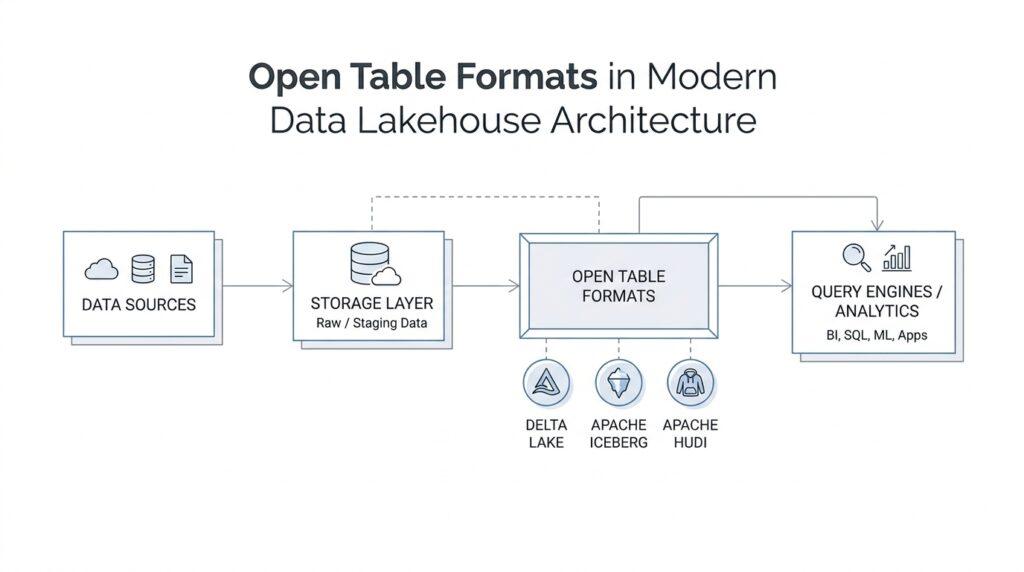
Once the lakehouse has a shared home for data, the next question becomes a practical one: how do we keep that home usable for more than one tool? Open table formats matter because they let data live in standard storage while the table definition stays understandable to multiple engines, not only the one that wrote it. Databricks supports Delta Lake and Apache Iceberg as open table storage formats, with Delta Lake as the default for managed and external tables and Iceberg as the option that connects well to the Iceberg ecosystem.
A good way to picture an open table format is to think of a recipe card attached to ingredients in a pantry. The ingredients are the data files, and the recipe card is the set of rules that explains how to read, update, and trust them. Delta Lake stores data as versioned Parquet files and keeps a transaction log to track changes, while Iceberg is an open-source table format that uses an abstraction layer over object storage and follows an open specification.
That openness matters because it keeps the table portable. If a team wants to read or write the same data from different systems, they are not forced to rebuild the data from scratch every time they change tools. Delta Lake’s connector ecosystem includes engines like Apache Spark, Apache Flink, Apache Hive, Apache Trino, and AWS Athena, and Databricks also notes secure access for non-Databricks clients through open APIs. In other words, open table formats help the data stay shared, even when the surrounding tools change.
Open does not mean loose. It means the table is published in a way that still gives you warehouse-like trust, because Delta Lake brings ACID transactions, schema enforcement, and time travel, while Iceberg supports schema evolution, time travel, and hidden partitioning. That combination is the real reason teams care: they can keep the data dependable for analytics and machine learning without locking it behind a format that only one system understands.
So when you hear people ask, “What does open mean when we talk about table formats?” the answer is not theoretical. It means your tables can be governed, queried, and maintained in Databricks while still remaining legible to other clients and ecosystems, which is why Databricks backs managed tables with Delta Lake or Apache Iceberg and emphasizes open access for non-Databricks clients. That is how open table formats protect the lakehouse from becoming a dead end and keep it flexible enough for the next tool, the next team, and the next wave of data.
Compare Iceberg, Delta, Hudi (docs.databricks.com)
Now that the lakehouse has a shared home, the next question is less about storage and more about behavior: how do open table formats keep data trustworthy when rows are constantly changing? That is where Delta Lake, Apache Iceberg, and Apache Hudi start to feel different. On Databricks, Delta Lake is the default format, and Apache Iceberg is the other primary open table storage format; both add a transactional layer on top of files in object storage, while Hudi brings a similar table abstraction with a stronger bias toward frequent writes and incremental pipelines. So how do you choose when the table keeps changing under your feet?
Delta Lake is the format that leans hardest into the Databricks experience. It extends Parquet files with a file-based transaction log, which gives you ACID transactions, schema validation on write, and the ability to review and query previous table versions; Databricks also says Delta is tightly integrated with Structured Streaming, so one copy of data can serve both batch and streaming work. Iceberg solves a similar trust problem, but it approaches it from a different angle: it follows an open table specification, writes new metadata files for each change, supports schema evolution, hidden partitioning, partition layout evolution, and time travel. In plain language, Delta feels like a well-tuned train line inside one city, while Iceberg feels like a rail system built to connect many cities without rebuilding the tracks every time.
Iceberg’s biggest strength is portability. Databricks supports Iceberg tables on managed and foreign tables, and it highlights the format as especially useful when you are integrating with the Iceberg ecosystem; Databricks also notes that external Iceberg-compatible engines such as Spark, Flink, Trino, and Kafka can work with managed Iceberg tables through the REST Catalog API. That makes Iceberg a strong choice when more than one engine needs to read or write the same data without each team learning a different house style. If your data platform feels like a shared neighborhood instead of a single apartment, Iceberg is often the format that keeps the doors open.
Hudi tells a different story, because it is built around write-heavy, near-real-time movement. Apache Hudi describes its storage format as providing incremental merges, change streams, tables, transactions, mutability, indexes, and query optimizations, and it offers two table types: copy-on-write for read-heavy workloads and merge-on-read for lower write latency and near real-time freshness. Hudi also exposes snapshot, time travel, incremental, and CDC, or change data capture, queries, which makes it feel especially natural when late-arriving data and constant upserts are part of everyday life. If Delta is a neat ledger and Iceberg is a portable contract, Hudi is the notebook where new entries are expected every minute.
The practical comparison comes down to the pressure you feel most. Choose Delta Lake when you want the tightest Databricks integration, strong schema enforcement, and a table format that is already the platform default. Choose Apache Iceberg when ecosystem portability, open metadata, and multi-engine compatibility matter most. Choose Apache Hudi when your hardest problem is upserts, incremental consumption, or keeping fresh data available with predictable write behavior. Once you see the three formats this way, the choice stops being about labels and starts being about the kind of motion your data spends its life making.
Metadata, Snapshots, and Time Travel (iceberg.apache.org)
When you first meet Apache Iceberg metadata, it helps to picture a library instead of a folder full of files. The books are the data files, but the card catalog is what tells you where everything lives, what changed, and which version you should trust. Iceberg stores table state in JSON metadata files, and each change creates a new metadata file that replaces the old one through an atomic swap, so readers always see a complete, committed view of the table. That metadata tracks the schema, partitioning, custom properties, and the table’s snapshots, while each snapshot points to the manifest files that describe the data files and their metrics.
That is why snapshots matter so much. In Iceberg, a snapshot is not a vague idea of “the table sometime around then”; it is the concrete state of the table at a point in time. Every write, update, delete, upsert, or compaction creates a new snapshot, and Iceberg keeps the older data and metadata around so readers can stay isolated from in-flight changes and still look back later. The current table version is identified by current-snapshot-id, and the table also keeps a snapshot-log, which records when the current snapshot changed over time.
So how does time travel work when the table keeps changing under your feet? Iceberg answers that by using the snapshot-log to find the snapshot that was current just before a requested timestamp, then scanning the metadata from that snapshot. In Spark, you can ask for a specific snapshot with snapshot-id, a point in time with as-of-timestamp, or even a branch or tag when you want a named reference instead of a timestamp. Tags stay tied to a specific snapshot, while branches point to a head snapshot and move forward as new commits arrive.
Once you know that, the metadata tables start to feel like the backstage windows of the whole system. The history table shows which snapshot became current and when, the snapshots table shows committed time, parent snapshot, operation, manifest list, and summary, and metadata_log_entries reveals the chain of metadata files behind the scenes. Iceberg also exposes refs, which lists branches and tags, so you can inspect named snapshot references instead of guessing which version mattered. These tables make Iceberg metadata practical, not abstract: you can audit, debug, and explain the table’s story in plain SQL.
The final piece is cleanup. Iceberg keeps old snapshots long enough to support time travel queries and rollback, but it does not keep them forever, because metadata can grow quickly if you never retire anything. The expire_snapshots procedure removes snapshots and the files that are no longer needed, while retention rules decide how many snapshots to keep and how old they can become. That balance is what makes Apache Iceberg feel reliable: it preserves history when you need to look back, and it trims history when the archive gets too heavy.
Catalogs and Governance Layers (docs.databricks.com)
Once the table format is in place, the next challenge is making the shared data feel safe instead of slippery. Catalogs and governance layers are what turn a lakehouse from a big pile of readable files into an organized system with clear boundaries, and Databricks uses Unity Catalog as the unified governance layer for that job. In this model, data and metadata live inside a metastore (the top-level container for governed assets), and objects are arranged in a three-level namespace: catalog.schema.table.
If you are wondering, “How do we keep one shared dataset open without making it a free-for-all?”, the answer starts at the catalog. A catalog is the highest-level container for data assets in Databricks, and it is a container object, which means it holds child objects like schemas. Databricks describes catalogs as the primary unit for organizing and isolating data, and it even lets you share catalogs across workspaces in the same region and account.
That hierarchy matters because permissions flow downward like water through stacked pipes. This is called privilege inheritance, which means a permission granted on a parent object can apply to everything beneath it, including future objects created later. So if someone has SELECT on a catalog, they can read tables in that catalog, but they still need the right usage privileges, such as USE CATALOG, before they can interact with anything inside it. Databricks also recommends granting only the minimum access needed, because catalog-level access is broad and powerful.
From there, the next layer down is the schema, which you can think of as a neighborhood inside the city of a catalog. Schemas are also container objects, and they group tables, views, volumes, and functions into a more specific area, often by project, team, or use case. A user needs USE SCHEMA as well as USE CATALOG to work with objects in that schema, which keeps the boundaries clear even when the data itself is widely shared.
This is where governance becomes more than a lock on the door; it becomes a way to help people find the right room. Unity Catalog treats every object in this hierarchy as a securable object (an object you can protect with permissions), and it adds discovery tools like BROWSE so users can see metadata without seeing the data itself. That is useful when a team wants to explore what exists, understand ownership, and ask for access only when they truly need it. Databricks also supports workspace binding, which can restrict a catalog to specific workspaces and even override individual grants if the catalog is not bound there.
The practical effect is that open table formats stay open, but not ungoverned. A catalog can hold managed tables, external tables, and even foreign tables from a foreign catalog, while Unity Catalog continues to control metadata, permissions, and discoverability around them. That means you can keep data portable across tools and still preserve a clear rulebook for who can read, write, or manage it. In other words, the governance layer does not close the data off; it gives the data a structure that other people can trust.
Once you see the stack this way, the mental model becomes much easier to hold onto: the metastore is the governed home, the catalog is the main organizing room, the schema is the smaller working area, and the table is the actual dataset people use. That is why catalogs and governance layers are such an important part of the lakehouse story—they let openness and control live in the same system instead of forcing you to choose one or the other.
Choosing the Right Format (docs.databricks.com)
Choosing the right open table format starts to feel real when the whiteboard turns into a working platform. Maybe one team wants fast analytics, another needs frequent updates, and a third expects to query the same data from a different engine next quarter. At that point, the choice is no longer academic; it becomes a question of which format can carry your data without forcing every team to bend around it.
The first question is how your data moves through the day. If your tables mostly receive structured batch loads and you want a format that fits neatly into the Databricks rhythm, Delta Lake often feels like the calmest path because it leans into managed behavior, strong validation, and tight integration with streaming and analytics. If your tables need constant rewrites, late-arriving records, or frequent upserts, Apache Hudi can be a better match because it is built for incremental change. If you are trying to keep the data flexible across multiple engines, Apache Iceberg becomes especially attractive because it was designed around an open specification that many systems can understand.
The next question is who needs to touch the table. An open table format only stays useful when the people and tools around it can read the same story without translation. Delta Lake works well when Databricks is the center of gravity, while Iceberg usually shines when you expect a broader ecosystem of query engines, catalogs, or streaming tools to share the same data. In practice, that means you ask whether the format should optimize for one platform doing excellent work, or for several platforms cooperating with fewer surprises.
Governance should shape the decision too, because the most elegant format can become awkward if the operating model is messy. If your team depends on Unity Catalog, managed tables, and a single place to enforce access rules, Delta Lake tends to feel familiar and low-friction. If you expect foreign engines or external systems to join the party, Iceberg can reduce the need for custom bridges, and that can save a lot of future cleanup. The best open table formats are not only technically capable; they also fit the way your organization approves access, reviews changes, and supports users.
A useful shortcut is to think in three layers: work pattern, ecosystem, and control. Work pattern asks whether the table is mostly read-heavy, write-heavy, or continuously changing. Ecosystem asks whether one platform or many platforms need to participate. Control asks whether you want the simplest possible operational path, the widest portability, or the strongest fit for incremental pipelines. Once you answer those questions honestly, the choice usually stops looking like a debate and starts looking like a match.
So if you are still wondering, “How do I choose the right table format for my lakehouse?”, start with the shape of the job rather than the branding on the file format. Pick the option that best matches how data arrives, how often it changes, and how many tools must understand it. That way, the format becomes a quiet foundation beneath the platform instead of a rule that keeps forcing you to redesign the house later.