Map Tenant Isolation Requirements
Before we compare database models, we need a clear map of tenant isolation requirements. A tenant is a customer or account using your SaaS product, and isolation means how strongly you keep one tenant’s data, actions, and failures away from another’s. If you’ve ever wondered, “Can another customer ever see my records?” you are already asking the right question, because that answer shapes the whole multi-tenant SaaS database design.
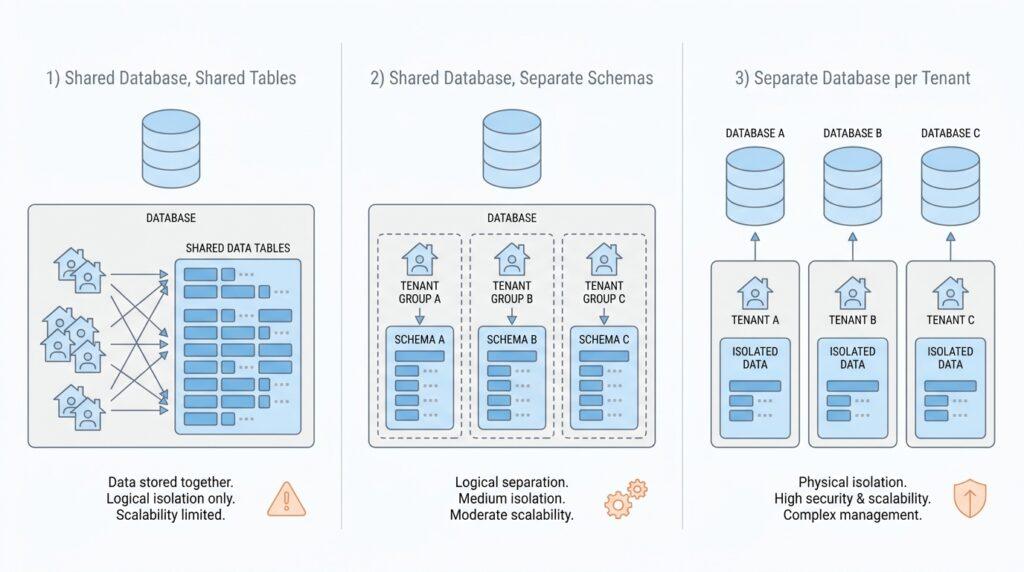
The easiest mistake here is treating isolation like a yes-or-no switch. In real products, it behaves more like a dimmer light. Some apps only need logical isolation, which means software rules keep tenants apart even though they share the same database; other apps need physical isolation, which means the separation is built with separate schemas, separate databases, or even separate infrastructure. Both can work, but they solve very different problems, and the database model should match the level of separation your customers actually expect.
So we start by listening for the pressure points. Can one tenant ever read another tenant’s rows, even by accident? Do customers need separate backups, separate restores, or separate delete requests? Can support staff inspect one tenant without touching anyone else’s data? These questions sound operational, but they are really tenant isolation requirements in disguise. They tell us whether the business needs a shared table with a tenant ID column, a stronger boundary like row-level security, or a more isolated setup altogether.
The next clue comes from risk. When a tenant handles sensitive or regulated information, a shared design may still be possible, but the cost of a mistake rises fast. If a customer expects hard separation for privacy, compliance, or internal policy, we need to treat that expectation as a design constraint, not a nice-to-have. In those cases, database-per-tenant or schema-per-tenant models often become attractive because they create cleaner fault boundaries and make it easier to reason about access, backup, and recovery.
This is where the multi-tenant SaaS database design conversation becomes practical. Think of it like housing: some neighbors are comfortable sharing a building, a hallway, and even utilities, while others want their own house with a locked gate. Neither choice is “better” in the abstract. The right choice depends on how much separation the tenant needs, how much operational overhead you can support, and how much future flexibility you want if a large customer asks for stronger isolation later.
A helpful way to map tenant isolation requirements is to write them in plain language before you touch schema design. For example, “customers can never see each other’s data,” “support can access one customer at a time,” or “one customer’s restore should not affect anyone else.” Once those statements are on paper, you can translate them into technical boundaries such as row-level security, schema boundaries, database boundaries, or account-level separation. That translation step is the bridge between business expectations and the actual database model.
By the time we finish this mapping, the choice stops feeling like guesswork. We are no longer asking which database architecture sounds modern; we are asking which one can honestly honor the tenant isolation requirements we uncovered. That clarity gives us a much better starting point for the next decision, because now the database model has a job to do instead of a vague promise to keep everyone apart.
Compare Shared and Dedicated Models
Now that we know what tenants need from isolation, the comparison between a shared database and a dedicated database becomes much easier to picture. A shared database puts many tenants in one data store, while a dedicated database gives each tenant its own store. Which one should we choose first in multi-tenant SaaS database design? The honest answer is that the shared path usually starts cheaper and simpler, but the dedicated path usually gives stronger tenant isolation and more room for tenant-specific needs.
A shared database feels a bit like a busy apartment building: everyone lives under one roof, and that keeps the footprint small. In Azure’s guidance, this model offers the highest tenant density, the lowest financial cost, and often less management overhead because there is one database to back up, secure, and monitor. That convenience comes with real trade-offs, though. A shared multitenant database can hit scale limits, suffer from the noisy neighbor problem when one tenant uses too many resources, and make tenant-specific reporting or schema customization harder to manage.
Shared data also asks you to be disciplined about access rules. If we keep many tenants in one database, every query must stay inside the right tenant’s rows, and row-level security is one way to help with that. Row-level security is a database feature that checks each row before it can be read or changed, so only the right rows are visible to the right user. That protection is powerful, but it also means your application has to carry both user identity and tenant identity through every request, which adds design and testing complexity.
A dedicated database feels more like giving each tenant its own house with a locked gate. Azure describes this model as one where each tenant’s data is isolated from the others, and where customization for a single tenant becomes straightforward. That extra separation makes it easier to reason about backup, restore, and recovery at the tenant level; Azure even notes that you can restore one single-tenant database without impacting others. The cost, of course, is that you now provision and manage more data resources, so operational automation becomes essential instead of optional.
This is where the decision starts to feel practical instead of abstract. If your product needs strong tenant isolation, tenant-specific schema changes, separate recovery paths, or clearer performance boundaries, a dedicated database is the safer fit. If your tenants are small, your schema is uniform, and you want the lowest cost per tenant, a shared database is often the better starting point. In other words, multi-tenant SaaS database design is not about picking the fanciest architecture; it is about matching the shape of the data model to the promises you made earlier about isolation.
The useful middle ground is that you do not have to freeze every tenant into the same model forever. Azure explicitly recommends mixed patterns, where most tenants stay in a shared database while tenants with unusual requirements or higher service tiers move to dedicated databases. That hybrid approach gives you a practical escape hatch: start with shared infrastructure for density, then promote a tenant when their workload, compliance needs, or support expectations grow beyond the common pool. With that comparison in mind, we are ready to turn the chosen model into the schema and access rules that make it real.
Evaluate Cost and Operational Load
Once the isolation boundary is clear, the next question in multi-tenant SaaS database design is not only which model is safer, but which model your team can afford to run every day. A shared database usually starts with the lowest financial cost and less management overhead because there is one database to secure, back up, and monitor, while dedicated setups trade that simplicity for stronger separation and more moving parts. So the real question becomes: how much will this choice cost us to operate month after month?
A shared database is attractive because it keeps the footprint small, but it also asks your team to stay alert. When many tenants share the same resource, one busy tenant can slow everyone else down, which is the classic noisy neighbor problem. That means cost savings on infrastructure can come with hidden operational work: more monitoring, more throttling, more rate limiting, and more time spent watching for overlapping usage peaks that turn into unpredictable performance.
This is where operational load starts to show its teeth. A shared model is easiest when the schema stays uniform, but the moment you begin adding tenant-specific exceptions, the work compounds quickly. Microsoft explicitly warns against patterns that become hard to manage at scale, such as manual schema changes or designs that keep shifting for only a few tenants, because those choices make it difficult to know which version applies where. In other words, a low-cost shared database can become expensive if your team spends its time untangling special cases.
A dedicated database tells a different story. It gives each tenant its own space, which makes backup, restore, recovery, and tenant-specific customization easier to reason about, and Azure notes that the highest-isolation patterns help avoid noisy neighbor issues. The trade-off is obvious: every additional tenant becomes another unit to provision, patch, observe, and automate. Azure SQL can support very large numbers of databases, and features like automatic indexing exist precisely because database-per-tenant only works when much of the routine work is handled for you.
That is why the middle ground often matters so much. Azure SQL elastic pools let multiple databases share pooled resources, which can lower cost because the pool is sized for the combined workload instead of each database being provisioned alone. Microsoft also recommends sizing the pool based on aggregate compute and storage demand, and it points out that elastic jobs can remove much of the tedium of managing large numbers of databases. For many products, that combination gives you a practical balance: more isolation than a fully shared database, but less operational sprawl than one fully dedicated database per tenant.
As we weigh cost and operational load, the best choice usually depends on how predictable your tenants are. If most customers are small, similar, and unlikely to demand special handling, a shared database keeps the team lean and the bills lower. If customers expect separate restore paths, stricter performance boundaries, or tenant-specific changes, the extra automation of dedicated databases or elastic pools is worth paying for. The guiding principle is simple: pick the model that your team can support confidently when usage grows, because the cheapest design on day one is not always the cheapest one to live with later.
Plan for Security and Compliance
Once we know how tenants are separated, we need to make that separation believable to customers, auditors, and our own future selves. In multi-tenant SaaS database design, security and compliance are not a polish layer; they are the proof that the model can keep its promises. What happens when an auditor asks where one tenant’s data lives, or which engineer could have seen it last week? Azure’s compliance guidance is built around obligations like GDPR, HIPAA, and PCI DSS, and it also points teams toward data residency and data subject request resources, which is a reminder that legal requirements reach all the way into database choices.
The first control to line up is identity. The cleanest pattern is to authenticate people and services through Microsoft Entra ID, and to use managed identities for workloads so the app never carries long-lived passwords or connection secrets. Microsoft describes managed identities as a way to access Azure resources without managing credentials, and Azure SQL also supports Microsoft Entra-only authentication, which turns off SQL authentication altogether. That may sound strict, but it gives multi-tenant SaaS database design a smaller attack surface and a much clearer story for access reviews.
From there, we move to row-level protection. Row-level security is the guard at the door inside the database: it checks each request and returns only the rows that belong to the right user or tenant. Microsoft’s guidance for multitenant SQL apps says this approach enforces logical separation directly in the database tier, which makes the rule harder to bypass than if we relied only on application code. In a shared table model, that is the difference between hoping every query is polite and having the database enforce the boundary for us.
Next comes data protection at rest. Azure SQL offers transparent data encryption, and with customer-managed keys you can bring your own key, control the key lifecycle, and separate key management from data administration. Microsoft also notes that if tenants must supply their own encryption keys, separate databases are worth considering, because the key boundary becomes part of the tenancy boundary. For especially sensitive columns, Always Encrypted gives us end-to-end protection so the raw values stay hidden from more of the stack.
Compliance is not only about protecting data; it is also about proving what happened to it. Azure SQL auditing can write events to Azure Storage, Log Analytics, or Event Hubs, and Microsoft says those logs help maintain regulatory compliance and spot anomalies that could signal security issues. If someone asks who accessed a record and when, the audit trail is what lets you answer with evidence instead of guesses. That is why planning for security and compliance in multi-tenant SaaS database design should always include logging, retention, and review workflows, not just database permissions.
As the design grows, policy becomes your safety net. Azure Policy includes regulatory compliance built-ins for Azure SQL Database and SQL Managed Instance, and Microsoft even documents controls such as requiring Microsoft Entra-only authentication. That matters because the most secure plan is often the one you can check automatically during deployment, not the one you trust people to remember in a rush. When a control can be expressed as policy, compliance stops being a spreadsheet and starts becoming part of the infrastructure.
The practical takeaway is that security should match the tenancy model you chose earlier. Shared databases demand stronger in-database controls, careful identity handling, and disciplined auditing, while dedicated databases make key management, evidence collection, and tenant-specific exceptions easier to isolate. If a tenant’s requirements start bending the rules, such as custom keys, stricter access reviews, unusual retention, or special legal obligations, treat that as a signal to move them into a more isolated pattern rather than force the shared model to absorb every exception. That is how multi-tenant SaaS database design stays secure without becoming brittle.
Design for Scaling and Migrations
The moment a SaaS product starts working, it also starts changing. One tenant grows fast, another stays tiny, and a third suddenly asks for dedicated resources, so the question becomes: how do we scale one customer without dragging everyone else along? In multi-tenant SaaS database design, the safest answer is to build a path for growth and migration from the beginning, instead of treating every tenant as if they will live in the same shape forever. Microsoft’s guidance explicitly notes that the tenant model affects management, that switching models later can be costly, and that workload-based scaling can be independent of the number of databases you run.
That is why a tenant catalog matters so much. A catalog is the system of record that maps each tenant to the database, shard, or URI where its data lives, and it becomes the address book that lets us move customers without losing track of them. In practice, this gives multi-tenant SaaS database design a clean seam: we can start with a shared setup, scale a database up when needed, or place some tenants into separate databases when their workload or service tier changes. Azure SQL also supports elastic pools, which share compute across multiple databases and let you add or remove databases with only a brief connection drop at the end of the operation.
That small detail about moving databases in and out of pools is more important than it looks. It means the migration step does not have to feel like a grand reset; it can feel more like changing a tenant’s apartment inside the same building. You create or choose the target database, move the workload, update the catalog, and then let the application route future requests to the new home. Because Azure SQL lets a single database be moved into or out of an elastic pool, this becomes a practical middle step for customers who outgrow the shared pool but are not ready for a fully isolated environment.
When growth gets bigger than a single database can comfortably hold, sharding enters the story. Sharding means splitting tenant data across multiple databases so each database carries only part of the load, and Microsoft’s split-merge tooling exists specifically to move data between those shards. The tool updates the shard map, moves shardlets, and marks affected tenants offline during the move so the mapping stays consistent while the data is in transit. In plain language, it is the moving truck that makes “we need more capacity” turn into an actual, controlled database migration instead of a risky manual copy job.
This is also where planning for scale becomes a discipline, not a rescue mission. Azure SQL’s multitenant guidance emphasizes that database-per-tenant patterns are plausible at large scale because the platform includes built-in backups, high availability, and automation-friendly management features such as automatic indexing. That matters because a healthy migration story depends on repeatable operations: if we can script schema changes, monitor resizes, and move databases between pools, then multi-tenant SaaS database design stays manageable as the tenant count rises.
The real goal is to avoid dead ends. We want a design where small tenants can stay shared, growing tenants can move into reserved capacity, and special tenants can be isolated without forcing a rewrite of the whole product. If we treat the catalog, the pool, and the shard map as migration tools rather than afterthoughts, scaling feels much less like upheaval and much more like a series of careful relocations that keep the business moving forward.
Choose Your Default Database Model
Now that we have mapped tenant isolation and weighed the shared-versus-dedicated trade-offs, the next step in multi-tenant SaaS database design is choosing the model that will carry the most everyday traffic. Think of this as your home base: the place your product returns to unless a tenant’s needs clearly demand something stronger. The default database model should fit the most common customer shape, keep your team moving, and leave room to grow without forcing a rewrite later.
If most of your tenants are small, similar, and comfortable with logical separation, a shared database is usually the most practical default. It keeps infrastructure lean, reduces duplication, and gives you one place to monitor, back up, and tune. The important part is that you do not treat “shared” as “loose”; you still need tenant boundaries built into the application and the database, often through a tenant ID field and row-level security, which is a database rule that only exposes the rows allowed for that tenant. That combination makes the default database model workable without pretending every tenant is identical.
On the other hand, if your first customers already expect hard separation, a dedicated database should become the baseline instead of the exception. This is the right move when the conversation is really about privacy, compliance, special retention rules, customer-managed keys, or a contract that treats isolation as part of the product promise. In that situation, a shared model may look cheaper at first, but it can quietly create more risk and more apologizing later. The safest default database model is the one that makes the common case safe without asking your team to invent workarounds every week.
A lot of teams get stuck by trying to choose the model that could survive every future scenario on day one. That usually leads to overbuilding. A better question is, “What model can we support confidently for the next stage of growth, and what will it take to move a tenant when their needs change?” That question keeps multi-tenant SaaS database design grounded in reality, because the default is not supposed to be perfect forever; it is supposed to be stable enough that tomorrow’s exceptions do not break today’s system.
This is where planning for migration matters more than choosing a clever architecture name. If you start with a shared default, build the habit of promoting special tenants into a more isolated environment when they outgrow the common pool. If you start with a dedicated default, automate provisioning so you are not hand-creating databases every time a new customer arrives. Either way, the default database model should feel like a well-marked first stop, not a locked room. That way, when a customer asks for something unusual, we already know how to move them without losing our footing.
So the practical answer is less dramatic than people expect: choose the model that fits the majority of your tenants, your current team size, and your operational comfort, then make sure the escape hatch is real. For many products, that means starting shared and reserving dedicated databases for tenants with stronger isolation needs. For others, especially when trust and separation are central to the sale, dedicated should be the default from the beginning. Once that choice is clear, the next layer of multi-tenant SaaS database design becomes much easier to shape, because the schema and access rules can finally support a decision instead of guessing at one.