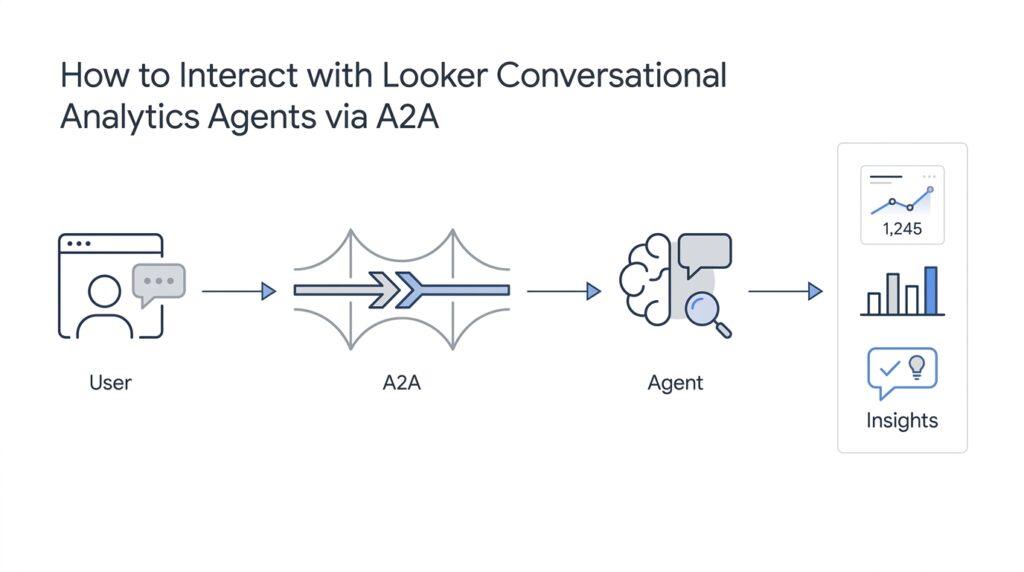
Configure Looker Access
Looker access is the first gate you open before a conversational analytics agent can answer a single question. Think of it like a venue check: the room may exist, but you still need the right badge to walk in. In Looker, that starts with enabling Gemini in Looker for the instance, and for Looker (original) instances it also means turning on the Conversational Analytics setting; if your instance uses an IP allowlist, you also need to allow Google Cloud services so the connection can reach through.
Once the door is open, the next layer is deciding who can actually talk to the data. For chat with an agent, Looker expects a mix of feature access and data access: access_data, gemini_in_looker, and chat_with_agent, plus View access on the agent itself. If the person is chatting with a Looker Explore instead, the permissions expand to include chat_with_explore as well. That sounds fussy at first, but the pattern is consistent: one set of permissions unlocks the experience, and another set points to the exact model or Explore behind it.
If you are creating or maintaining agents, the permissions story becomes a little richer, because editing is not the same as chatting. To create, edit, share, or delete Conversational Analytics data agents, users need access_data, gemini_in_looker, chat_with_agent, chat_with_explore, and save_agents on the relevant models, unless they have the broader admin_agents permission. Looker also limits agent creation to the Explores covered by the user’s model permissions, which keeps each agent tied to the data the person is actually allowed to work with.
Sharing is where many teams get their first surprise, because content access and data access travel separately. If you share an agent with someone, that does not automatically give them access to the Explore or model behind it, so they may still need the matching model permissions from a Looker admin. The creator of the agent can manage individual access by sharing it, and if access is later removed, existing conversations can linger for a minute or two before the change fully takes effect. So if someone can see the agent but cannot keep asking questions, the missing piece is often model access rather than the agent itself.
To make Looker access easier to manage, Looker bundles these permissions into default roles. The Conversational Analytics Agent Manager role lets a user create, edit, share, delete, and chat with agents they can manage, while the Conversational Analytics User role lets a user chat with agents they can view. The newer Conversational Analytics Viewer role lets users see agents they have View access to, but it still requires access_data on the right models before the agent can truly interact with them. And of course, the Looker Admin role still has the broadest reach across the instance.
At this point, the configuration starts to feel less like a maze and more like a checklist: enable the instance feature, grant the right role, share the agent, and confirm the model permissions behind it. If you are wondering, “Why can’t my teammate chat with the agent even after I shared it?” this is usually where the answer lives. Once the Looker access model is in place, you can move on with confidence to the actual conversation flow from the Agents tab or the Explores tab, knowing the permissions will behave the way you expect.
Discover the Agent Card
Once the permissions puzzle is out of the way, the next thing you meet is the Agent Card, which works like the agent’s name tag at the front desk. In A2A, the Agent Card is a JSON metadata document that tells you who the agent is, what it can do, where it lives, and what kind of access it expects. The A2A specification says servers must publish one, because clients use it to discover an agent and decide whether it fits the job they want to do.
That discovery step is a little like looking up a restaurant before you walk in. You can find the Agent Card through a well-known address, usually /.well-known/agent-card.json, or through a registry, catalog, or direct URL that someone has already given you. The card is meant to expose public information, not hidden credentials or internal implementation details, so it gives you enough to start the conversation without giving away the kitchen.
What makes the Agent Card useful is that it turns a vague “agent” into a set of concrete promises. The card describes the agent’s capabilities, which are the features it supports, and its skills, which are the kinds of tasks it is designed to handle well. In A2A, those capabilities can include things like streaming responses, push notifications, or an extended card for authenticated users, and clients are expected to check those flags before trying an operation that depends on them.
If you have ever wondered, “Which door should my client actually use?” that is where supportedInterfaces comes in. This field lists the transport options the agent understands, and the order matters because the first supported entry is the preferred one. A2A clients are supposed to read that list, choose the first transport they can speak, and then use the matching URL, which keeps the interaction from feeling like guesswork.
The Agent Card also carries the trust signals that matter before any real work begins. Its securitySchemes and security fields tell the client what authentication method to use, and the A2A spec even allows cards to be signed with JSON Web Signatures, a standard way to prove a document has not been tampered with. If a card advertises an authenticated extended Agent Card, the client can fetch a fuller version after signing in, which is a neat way to keep public details broad and private details gated.
For Looker Conversational Analytics agents, this is the moment where the story becomes practical. The Agent Card is the bridge between the agent you shared in Looker and the A2A client that wants to talk to it, because it spells out the agent’s identity, access requirements, and communication shape before a single question is sent. Once you know how to read that card, you can judge whether the agent is the right one for your use case, whether it can stream answers, and whether its interface matches the way you plan to connect.
Authenticate A2A Requests
When you move from reading the card to sending traffic, A2A authentication starts to feel less like a mystery and more like a front-door routine. The public Agent Card tells the client which security schemes the agent accepts, and the A2A spec says the client must authenticate requests using one of those declared schemes. If the agent offers an authenticated extended card, that extra detail is also behind authentication, so the card is not only a map of the agent but also a set of rules for how we approach it.
The useful part is that A2A does not force every agent to use the same kind of lock. A SecurityScheme can describe API keys, HTTP auth such as Bearer tokens, OAuth 2.0, OpenID Connect, or mutual TLS, and the public card exposes those choices through securitySchemes and security. In practice, that means the client reads the card first, then sends credentials in the form the agent already said it understands instead of guessing at a custom header or inventing a new handshake.
That small sequence matters: discover the card at /.well-known/agent-card.json, check whether the agent supports an extended authenticated card, and then fetch that richer version only after the client has signed in. The spec says the extended-card endpoint must require authentication, may return more detail based on the client’s identity, and should replace the cached public card for the active authenticated session or until the card version changes. It also recommends HTTPS for integrity, and it allows Agent Cards to be signed with JSON Web Signatures so the client can verify the document before trusting it.
For Looker-backed agents, there is one more layer to keep in mind: the A2A connection is not the same thing as permission to see data. The Looker user or service account behind the connection still needs the required Looker permissions on the models being queried, including access_data and gemini_in_looker, and the connection method depends on the instance type. Looker API keys work for some setups, but access tokens are required for Looker (Google Cloud core) with private connections, and access tokens also preserve row- and column-level rules such as access_filters, access_grants, and sql_always_where.
That is why troubleshooting often comes down to separating the outer door from the room inside it. If a client can discover the agent card but cannot talk to the agent, we check three things in order: does the declared security scheme match the credential we are sending, does the authenticated extended card require a logged-in session, and does the Looker identity behind the agent actually have the model permissions it needs? Once those pieces line up, the A2A request feels ordinary again, and we can move on to the message exchange itself with much less friction.
Send Your First Question
Now that the agent is reachable, your first question is where the setup turns into a real conversation. In Looker, you open Conversations, choose the Agents tab, pick the data agent, and type into the Ask a question field; when you begin a new conversation, Looker may suggest starter questions, and the conversation stays unnamed until your first question gives it a title. The important part is that you do not need special syntax, only a question that belongs to the Explore or agent you selected.
If you are wondering how to phrase that first question, think of it like asking a teammate who already knows the dataset. Looker lets you choose Fast for a direct fact lookup or Thinking for a more layered analysis, and it keeps that mode through the conversation unless you change it. So a good opening question is usually plain, specific, and tied to one thing you want to learn, such as a metric, a comparison, or a trend. How do you send your first question to a Looker conversational analytics agent through A2A? You turn that same natural-language request into a message the agent can process.
In A2A, that first question becomes a Send Message request, usually a POST to /message:send. The payload carries a message with role set to user and one or more parts, and a single text part is enough for a simple query. The spec says the agent can answer with either a Task when work needs tracking or a direct Message when the answer is immediate, which is why the first response may feel more like a handoff than a final result. For a Looker conversational analytics agent, this is the bridge between the chat box you see and the protocol call your client makes behind the scenes.
If the agent supports streaming, you can send the same first question to /message:stream and watch updates arrive as the work happens. A2A also supports multi-turn conversations through context identifiers and task references, so your first question does not have to stand alone; the next question can stay attached to the same thread. When the agent needs more detail, it may return a task with an input-required status, which is its way of handing the conversation back to you and asking for the missing piece. That makes the opening question less like a one-shot command and more like the first step in a back-and-forth.
The easiest way to think about the first question is this: start with one clear sentence, send it as a user message, and let the agent answer or clarify from there. In the Looker interface, Conversational Analytics can rephrase your query, suggest follow-up questions, and keep earlier answers in the active conversation, which helps you build momentum instead of starting over each time. Once you see that rhythm, the Looker conversational analytics agent feels much less mysterious, because you are no longer testing whether it works—you are learning how it thinks.
Handle Task Updates
Once your first question is in flight, the real skill is learning to read the agent’s movement. An A2A task is the unit of work the agent uses to track progress, and A2A task updates tell you whether it is still working, waiting on you, or already done. In a Looker conversational analytics agent, that often shows up as a brief pause followed by a clarification request instead of a final answer, which is a normal part of the flow rather than a dead end.
Think of the task as a little journey with signposts. A2A defines status updates and artifact updates as separate event types: status updates describe where the task is in its lifecycle, while artifact updates carry the useful output the agent has produced along the way. The lifecycle can move through states like TASK_STATE_WORKING, TASK_STATE_INPUT_REQUIRED, TASK_STATE_AUTH_REQUIRED, and then end in TASK_STATE_COMPLETED, TASK_STATE_FAILED, TASK_STATE_CANCELED, or TASK_STATE_REJECTED. When you subscribe to a task, the stream starts with the current Task and then sends those updates until the task reaches a terminal state.
If you are wondering how to keep track of all that motion, A2A gives you three paths. You can poll with Get Task, which is the most straightforward route and works well when updates are occasional. You can subscribe to the task for a live stream, which is better when you want near-real-time progress and your client can hold a persistent connection. Or you can register push notifications, which let the agent send webhook calls to your client when something changes, making them a good fit for long-running tasks or situations where your client might disconnect.
The trickiest moments usually happen when the agent stops to ask for help. If a task moves into TASK_STATE_INPUT_REQUIRED, the agent is asking for more detail, and the client continues the same conversation by sending a new message with the same taskId and contextId. If the task moves into TASK_STATE_AUTH_REQUIRED, the agent needs authorization before it can continue, and A2A expects the client to resolve that request, negotiate it, or provide the needed credential. That is why a Looker conversational analytics agent can feel conversational instead of mechanical: the task is not failing, it is sometimes waiting for the missing piece.
A good way to stay calm is to treat every update as a clue, not a verdict. If the stream is interrupted, A2A warns that streaming clients may miss some status messages, so the safest habit is to keep the taskId handy and fall back to Get Task when you need the latest state. If the agent returns a clarification or a partial result, read it as an invitation to continue the same thread rather than starting over. That mindset makes Looker conversational analytics agent updates feel less like edge cases and more like the natural rhythm of the conversation.
Continue the Conversation
The moment the first answer lands, the work is not finished—it is where the conversation starts to breathe. In Looker Conversational Analytics, each set of questions lives inside one conversation, and the system keeps earlier questions and answers in mind as you continue that same thread. If you jump to a different conversation, though, Looker does not carry old Q&A with it, so the safest habit is to stay in the original thread when you want continuity. That is why continuing a Looker conversational analytics agent conversation feels more like picking up a half-finished thought than starting a brand-new search.
On the A2A side, that continuity shows up as a task that can pause and ask for more information. A2A examples and docs show that when a request needs clarification, the agent can return a task in input-required state, and the client continues by sending the next message with the same taskId and contextId. Think of those two IDs like a claim ticket and a conversation thread: one tells us which piece of work we are talking about, and the other keeps the back-and-forth stitched together. In other words, the agent is not forgetting you; it is waiting for the missing piece so it can keep going.
That matters because continuing a Looker conversational analytics agent conversation through A2A is not about starting over with a fresh request every time. It is about replying in the same lane, so the agent can connect your follow-up to the earlier question, the intermediate calculation, or the clarification it asked for. When the agent says something feels ambiguous, your next message should answer that gap directly instead of rephrasing the entire problem from scratch. If you keep that rhythm in mind, the exchange stays smooth and the agent can preserve the logic of the original question.
If you are watching updates live, A2A gives you more than one way to keep up. The protocol supports message/stream for streaming replies, tasks/get for checking the latest state, and tasks/resubscribe for reconnecting to task updates, which is handy if your client loses the live feed and needs to rejoin the conversation. In plain language, you are not hunting for a new answer—you are checking whether the same conversation is still moving. This is a little like peeking through a kitchen door while dinner is still being prepared: the meal is the same, but you are simply seeing where it is in the process.
The best follow-up question is usually the one that sounds the most human. If the agent asked for a missing dimension, give that dimension; if it returned a partial result, ask for the next slice; if it needs authorization or more context, resolve that first so the thread can keep moving. That rhythm fits both Looker’s conversation model and A2A’s task model, where the exchange stays tied to one active thread until it reaches a terminal state like completed, failed, or canceled. It also means the next message should feel like a reply, not a reset button.
If the agent asks for a clarification, treat that as an invitation to keep talking, not a sign that something broke. Looker keeps the conversation open so you can build on the last answer, and A2A lets the client send the next turn in the same task context, which is what makes the whole exchange feel conversational instead of transactional. When the thread gets long, that shared context is doing a lot of quiet work in the background, keeping the story coherent from one turn to the next.
So when you continue the conversation, you are doing something much gentler than it first sounds like: you are simply picking up the same thread and letting it unfold one turn at a time. Keep the original conversation open in Looker, answer the agent’s clarifying prompts in A2A, and reuse the task context instead of launching a fresh one unless you truly want a new line of inquiry. That is what makes a Looker conversational analytics agent feel less like a search box and more like a teammate that remembers the last thing you both said.