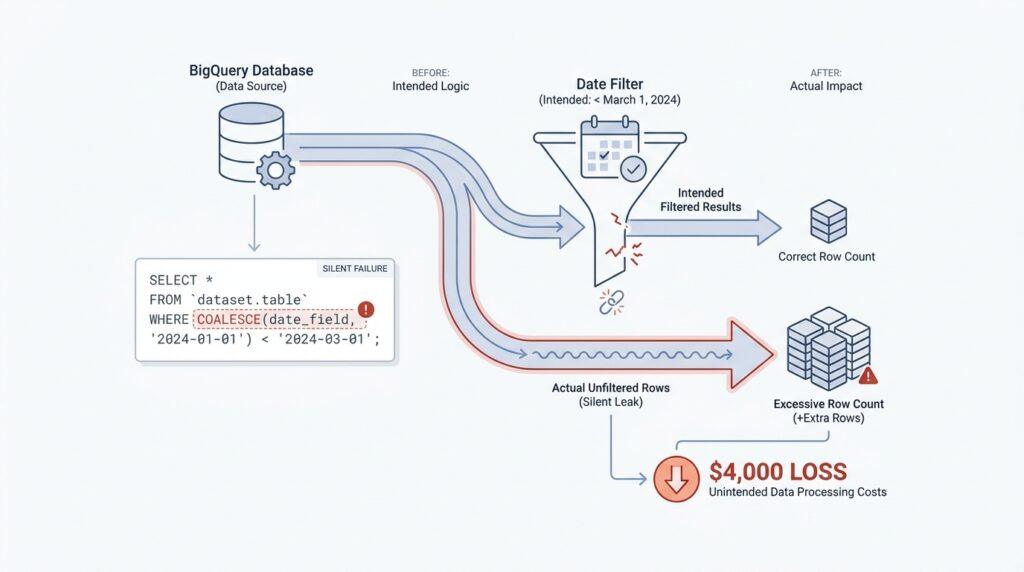
Reproduce the Broken Date Filter
The fastest way to understand the BigQuery COALESCE date filter bug is to watch it fail on a tiny table. When a filter looks like it should keep only recent records, we expect a clean line between old and new data. In the broken version, that line quietly disappears because the expression stops behaving like a real date filter and starts behaving like text. BigQuery’s COALESCE returns the first non-NULL value, and it only works when every input can be coerced to a common supertype, so one small type mismatch can change the whole shape of the filter.
So we start by shrinking the problem until it fits in our hands. BigQuery DATE values are calendar dates, independent of time zone, while CURRENT_DATE() returns a DATE too, which is why date filters usually feel so stable when everything stays typed correctly. The question is: what happens when we feed COALESCE something that looks like a date but is really just a string? That is where the BigQuery date filter bug begins to show its teeth.
Here is the smallest repro that makes the failure obvious:
WITH sample AS (
  SELECT '2024-1-2' AS order_date, 1 AS id UNION ALL
  SELECT NULL, 2 UNION ALL
  SELECT '2024-01-10', 3
)
SELECT id, order_date
FROM sample
WHERE COALESCE(order_date, '9999-12-31') >= '2024-01-05';
On paper, that looks like a harmless date filter. In practice, it lets the wrong rows through because the values are being handled as strings, not as calendar dates. The row with 2024-1-2 can slip past a cutoff like 2024-01-05 even though January 2 should be excluded, and the NULL row gets replaced by the far-future fallback. That is the kind of silent failure that makes a BigQuery COALESCE date filter so expensive: the query still runs, the dashboard still fills, and nobody gets an error message.
The reason is buried in BigQuery’s type rules. String literals in canonical date format can coerce to DATE when a DATE is expected, but that safety net only works when the expression is actually being treated as a date expression. Once the values live in STRING, comparisons happen codepoint by codepoint, which means BigQuery is comparing characters, not time. That is why COALESCE can feel so trustworthy in a date filter and still lead us off a cliff.
To prove the fix, we change only the types and keep the same sample data. If the source really is a string, we turn it back into a date first with PARSE_DATE, which converts a STRING to a DATE, and then we keep the fallback typed as DATE too. If the column is already a DATE, we use a DATE literal such as DATE '9999-12-31' so the filter stays in date-land from start to finish. That tiny change is what turns a suspicious BigQuery COALESCE date filter into a reliable one.
Once we can make the bug appear on three rows, the production failure stops feeling mysterious. We are no longer guessing about the warehouse; we are watching the same logic trip over type coercion in a controlled setting, and that makes the next debugging step much easier to trust.
Understand NULL Date Behavior
When the filter reaches a NULL value, the story changes in a way that feels invisible at first. A NULL is not a blank date and not a zero date; it means “missing” or “unknown,” which is why BigQuery treats it carefully instead of pretending it knows the answer. That is the heart of the BigQuery COALESCE date filter bug: once a NULL shows up, we are no longer comparing a real calendar value unless we replace it with one on purpose. If you have ever wondered, “Why did my date filter keep rows I expected to lose?” this is usually the moment where the trap is hiding.
The tricky part is that NULL does not behave like an ordinary value in comparisons. In SQL, which is the query language BigQuery uses, any comparison with NULL does not return TRUE or FALSE; it returns NULL, which acts like “unknown.” That matters because a WHERE clause keeps only rows where the condition is TRUE, so an unknown result is effectively treated as a rejection. In plain language, if BigQuery cannot tell whether a row is recent, it errs on the side of not including it.
That sounds safe, but it becomes confusing when COALESCE enters the scene. COALESCE is the function that returns the first non-NULL value in a list, so it often appears to be the perfect way to patch missing dates. We give it a fallback, such as a far-future date, and expect the filter to keep working like a tidy gatekeeper. The surprise is that this only feels simple because we are thinking about the intent, not the actual comparison rules that BigQuery applies behind the curtain.
Here is the part that makes the BigQuery COALESCE date filter bug so expensive in real life: a NULL can disappear into the fallback, but only if the fallback is truly a date value. If the expression slips into string handling, the NULL row may still get replaced, yet the comparison no longer follows calendar order in the way we expect. That is why a row that should be excluded can survive the filter, and why the query can look healthy even while it quietly misclassifies missing dates. The engine is not guessing wrong; it is following the type rules we accidentally handed it.
The safest way to think about this is to treat NULL as a signal, not as a value waiting to be compared. First, decide what a missing date should mean in your business logic. Should it be excluded because it is unknown, or should it be assigned a placeholder date so it falls safely inside or outside the range? Once you answer that question, you can make the filter reflect that decision instead of letting COALESCE improvise for you.
This is also where DATE typed values matter so much. A DATE is a real calendar day in BigQuery, so a date comparison like order_date >= DATE '2024-01-05' asks a clear question and gets a clear answer. But when the same logic gets wrapped around a NULL and a string fallback, the filter can stop behaving like a date filter and start acting like a text comparison. That is why the BigQuery date filter bug feels so slippery: the row does not look broken, the query does not fail, and yet the meaning has shifted underneath us.
Once we understand how NULL behaves, the rest of the debugging path becomes much less mysterious. We are not chasing a random warehouse glitch; we are tracing how missing values, fallback values, and data types interact in one expression. That mental model gives us a reliable way to inspect every COALESCE-based date filter and ask the right question before the cost starts to climb again.
Trace the COALESCE Logic
Once the broken filter is in front of us, the next move is to trace the COALESCE logic the same way we would follow a trail of footprints. Why does the BigQuery COALESCE date filter bug only show up after the query looks finished? Because COALESCE returns the first non-NULL value, and BigQuery requires every input to be coercible to a common supertype, so the expression can quietly shift shape when one part is a string and another part is a date. That is the first clue: the logic is not only about missing values, but also about what type of value survives the trip through the expression.
From there, we look at the fallback value, because that is where many date filter bugs hide. A DATE literal such as DATE '9999-12-31' is a real date constant, while a canonical date string can only be treated like a date when BigQuery has a date context to coerce it into. If the source column is really a STRING, the safer path is to turn it into a DATE first with PARSE_DATE, which converts a string into a date value before the comparison happens. That keeps the filter in one language from start to finish instead of letting it drift between dates and text.
Now we follow the condition inside the WHERE clause, because that is where the final yes-or-no decision gets made. BigQuery keeps only rows whose WHERE expression evaluates to TRUE; rows that evaluate to FALSE or NULL are discarded. So when we say, “Why did this row survive?”, we are really asking whether the comparison produced a true date comparison or a text comparison that only looked like one. That small distinction is often what separates a reliable filter from a silent BigQuery COALESCE date filter failure.
The most revealing test is to inspect the two possible paths separately. If order_date is already a DATE, then COALESCE(order_date, DATE '9999-12-31') stays inside calendar logic, and the comparison follows date order. If order_date is a STRING, then the comparison can fall back to string rules, and BigQuery compares strings codepoint by codepoint rather than as calendar values. That is why a value like 2024-1-2 can behave differently from 2024-01-10 even though both are meant to describe January dates.
This is the moment to read the expression like a sentence: first pick the first real value, then decide what type it is, then compare it against the cutoff. If that sentence contains a string in the wrong place, the BigQuery COALESCE date filter bug becomes much easier to understand. We are not dealing with a mysterious warehouse glitch; we are watching the engine honor the exact types we handed it. That is why tracing the logic line by line often reveals the problem faster than staring at the final result set.
The clean mental model is to ask one question at each step: is this value a real DATE, or is it still just text wearing a date costume? BigQuery dates are independent of time zone, and the DATE type has a fixed calendar range, so once the value is truly a date, the comparison behaves predictably. If it is still a string, we have not reached the safe part of the logic yet, even if the query runs without complaint. That is the habit that makes the bug visible before it costs us again.
Compare DATE and TIMESTAMP Types
After we trace the COALESCE logic, the next question is the one that quietly decides whether the filter behaves or breaks: are we working with a calendar day, or with an exact moment? BigQuery’s DATE type is a Gregorian calendar date that stays independent of time zone, while TIMESTAMP represents an absolute point in time, also independent of time zone or daylight saving changes. That difference sounds small at first, but it changes the whole shape of the comparison, because one type answers “which day?” and the other answers “which instant?”
This is where the mental model starts to matter. A DATE value is like a square on a calendar page, while a TIMESTAMP is like a pin dropped at a precise minute on a clock face. If your report is about daily activity, a DATE comparison keeps the story clean; if your data is about event timing, a TIMESTAMP comparison preserves the exact order of events. BigQuery even provides conversion helpers that make the boundary visible, such as DATE(timestamp_expression, time_zone_expression), which turns a timestamp into a date in a chosen time zone.
That time zone piece is where many BigQuery COALESCE date filter bugs start to feel slippery. A timestamp does not store a time zone, but BigQuery uses a time zone when converting between civil time and absolute time, and the date you get from a timestamp can change depending on that zone. So an event that happened late in the evening in UTC may belong to the previous calendar day in America/Los_Angeles, which means the same record can land on a different DATE depending on how you ask the question. That is not a bug in the engine; it is the natural result of comparing a day-level concept to a moment-in-time concept.
So when we compare DATE and TIMESTAMP types, the safest habit is to make the business question choose the type first. If the filter is really about a daily cutoff, convert the timestamp once with DATE(...) and compare dates to dates. If the filter is about a precise cutoff, move the boundary into TIMESTAMP form and compare timestamps to timestamps. BigQuery’s conversion rules also remind us that coercion and supertyping exist, which is helpful for literals, but it is not a reason to let a filter drift between day logic and instant logic without checking it first.
What does that look like in practice? It means asking, “Are we trying to keep everything from January 5, or everything after 2024-01-05 08:00:00 UTC?” The first question belongs to DATE; the second belongs to TIMESTAMP. Once we answer that out loud, the COALESCE wrapper becomes much less mysterious, because we know exactly what kind of value the fallback should produce and what kind of comparison the WHERE clause should perform. That is the real protection against the silent BigQuery COALESCE date filter failure: we stop mixing calendar logic with clock logic and let each one do the job it was built for.
Fix with Explicit WHERE Conditions
Once we know the bug is coming from type drift, the fix starts to feel less like a database trick and more like a clear conversation with BigQuery. How do you fix a BigQuery COALESCE date filter bug? You spell out the rule in the WHERE clause instead of letting COALESCE guess what you meant. That means we decide, row by row, what should happen when the date is real and what should happen when it is missing.
The first step is to name the business rule in plain language. If missing dates should not pass the cutoff, we write that directly: WHERE order_date IS NOT NULL AND order_date >= DATE '2024-01-05'. If missing dates should stay in the result set, we say that too: WHERE order_date IS NULL OR order_date >= DATE '2024-01-05'. Those two versions look simple, but they are powerful because they make the logic visible instead of hiding it inside a fallback value.
That is the big difference between a clever filter and a reliable one. IS NULL and IS NOT NULL are direct checks for missing data, while AND and OR are the connective tissue that tells BigQuery whether both conditions must be true or whether either one can pass. In other words, the query stops pretending that missing dates are ordinary dates, and it starts treating them like the special case they really are. Once we do that, the BigQuery COALESCE date filter bug loses most of its hiding places.
If the source column still arrives as text, we keep the same idea but move the type cleanup earlier. We convert the string to a real DATE first, then filter with explicit conditions on the typed column, so the WHERE clause can stay honest about what it is comparing. For example, a small staging step can turn order_date from text into a date, and then the filter becomes something like WHERE typed_order_date IS NOT NULL AND typed_order_date >= DATE '2024-01-05'. That extra step matters because it separates parsing from filtering, the way we separate washing vegetables from cooking them.
Here is why that separation saves money and confusion. A fallback date inside COALESCE can hide the shape of the data, which makes it easy to miss bad rows until the bill arrives. An explicit WHERE condition, on the other hand, tells us exactly which rows are allowed through and why. There is no secret sentinel value to remember, no silent string comparison to wonder about, and no need to guess whether the engine is comparing calendar days or characters.
This also makes reviews and debugging much easier. When someone else reads the query, they do not have to decode intent from a nested expression; they can read the logic straight off the page. If the rule is “keep only real dates on or after the cutoff,” then the condition says exactly that. If the rule is “keep unknown dates too,” the OR order_date IS NULL branch makes that choice obvious instead of burying it in a fallback that looks harmless until it misbehaves.
The nicest part is that this pattern scales with the rest of the query. Once you get comfortable writing explicit conditions, you can add more business rules without turning the filter into a guessing game. That is the habit that turns a fragile BigQuery COALESCE date filter into a clean, readable test of intent, and it gives us a solid base for everything that follows.
Validate Results and Add Guardrails
Once the filter is repaired, the real work begins: we have to prove it behaves the way we think it does. The safest way to validate a BigQuery COALESCE date filter is to compare the old query and the new one side by side, then look at the rows that change at the boundary. That matters because COALESCE returns the first non-NULL value and BigQuery requires every input to coerce to a common supertype, so a bug can hide in type handling even when the SQL still runs.
This is where we slow down and ask the question a reader would naturally search for: how do I know my date filter is actually filtering dates? We answer it by checking a few known rows, especially edge cases like a missing value, a date exactly on the cutoff, and a date just before it. In BigQuery, a WHERE clause keeps only rows whose condition is TRUE; rows that evaluate to FALSE or NULL are discarded, so the boundary behavior is not a detail we can ignore.
I like to treat this step like testing a bridge with sandbags before anyone drives across. We run the fixed query against a tiny sample where we already know the answer, and we confirm that the result set matches our expectations row by row. If the source column is text, we make sure we convert it with PARSE_DATE, which turns a STRING into a DATE; if the source is already typed, we keep the fallback as a real DATE literal so the expression stays in date-land the whole way through.
That same habit gives us a simple guardrail for production. When a filter depends on a calendar day, we should keep the comparison on DATE values, because BigQuery defines DATE as a Gregorian calendar date that is independent of time zone, while TIMESTAMP represents an absolute point in time. If we ever need to move from one to the other, BigQuery provides explicit conversion functions, including DATE(timestamp_expression, time_zone_expression), which makes the boundary visible instead of implicit.
A second guardrail is to make the missing-data rule obvious in the SQL itself. Instead of burying the decision inside a fallback, we write the behavior out loud: keep only real dates, or keep missing dates too, but do not let the expression guess for us. That is not just cleaner to read; it also keeps us from relying on hidden coercion, because every input to COALESCE still has to fit a common type, and the safest way to prevent drift is to remove the ambiguity before the comparison starts.
The final protection is to build a small review habit around every future date filter. Before we ship, we check the source type, the fallback type, and the comparison type; if all three are DATE, we are usually in good shape. If one of them is a string, we pause and ask whether that string is being parsed intentionally or merely tolerated, because BigQuery date literals are real date constants, not decorative text.
Once we start validating this way, the bug stops feeling mysterious and starts feeling preventable. We are no longer hoping the query is right because it returns rows; we are proving it by testing the cutoff, the missing values, and the types together. That is the kind of guardrail that keeps a BigQuery COALESCE date filter from quietly drifting back into trouble.