Capability vs Experience Gap
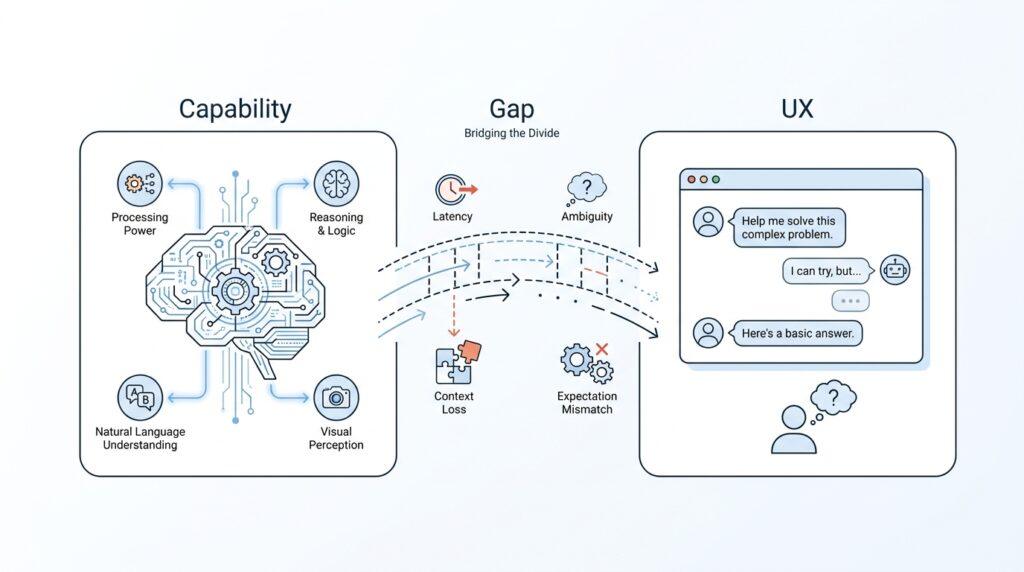
The strange feeling many people have with AI model interactions comes from a mismatch: the model may be capable, but the experience still feels clumsy. One part of the system knows how to answer, summarize, and generate, while another part has to make that intelligence feel smooth, trustworthy, and easy to guide. That difference is the capability vs experience gap, and it helps explain why a powerful model can still leave you thinking, Why does this feel off?
Capability is the model’s raw ability to produce useful output. Experience is what it feels like to work with that ability in real time, through a chat box, a prompt, or an app. Those two things are not the same, and that separation matters more than beginners usually expect. A model can be excellent at prediction and pattern matching, yet still give you a user experience that feels hesitant, overly wordy, or strangely generic.
Think of it like a brilliant mechanic who can repair any engine but works through a tiny window in the wall. The skill is there, but the way you interact with it changes everything. In the same way, AI model interactions depend not only on intelligence, but also on how well the system handles context, turn-taking, and clarity. If the model cannot see enough of your goal, or if the interface does not help you express it, the experience gap grows quickly.
Why does an AI model that can write an essay still feel awkward to use? Usually because the model knows how to generate language, but it does not automatically know what kind of help you wanted in that moment. Maybe you needed a short answer, a cautious answer, or an answer aimed at a beginner, but the model had to guess. That guesswork is where the user experience starts to wobble, because the output may be technically good while still feeling misaligned with your real need.
Another part of the gap comes from the hidden work a person normally does in conversation. When humans talk, we read tone, notice confusion, and adjust on the fly. An AI model does not naturally share that social rhythm, so the experience has to be built with structure: better prompts, clearer feedback, stronger memory handling, and more helpful defaults. Without those supports, the system may feel like it has capability trapped behind a narrow doorway.
This is why the experience gap shows up in so many small frustrations. The model might answer correctly but too broadly, or it might be capable of precision but fail to signal uncertainty in a way that feels natural. It may also remember the wrong slice of context, which can make a conversation feel like it is drifting even when the underlying AI model is still working hard. In practice, the user is not only evaluating intelligence; they are evaluating whether the interaction helps that intelligence show up at the right moment.
The useful shift here is to stop asking whether the model is smart enough and start asking whether the interface lets that smartness reach you cleanly. When we separate capability from experience, we can see where the friction really lives: in the prompt, the product design, the feedback loop, or the model itself. That distinction gives us a better way to diagnose awkward AI model interactions, and it prepares us to look at what happens when the system knows the answer but still cannot deliver it in a way that feels natural.
Prompt Ambiguity
When an AI answer feels off, the problem is often not the model’s intelligence but the shape of the request it received. An unclear prompt leaves the system standing in a foggy room, trying to guess what you meant from a few scattered clues. That is where the experience starts to wobble, because the model may be capable of many things while your prompt only points toward one of them in a vague way.
This is why people ask, “Why does AI give me the wrong kind of answer even when I worded it pretty clearly?” The honest answer is that clarity is more fragile than it looks. A request can sound fine to us while still hiding missing details such as audience, length, tone, format, or purpose, and those missing pieces create room for the model to improvise. That improvisation is useful when you want creativity, but frustrating when you wanted a specific result.
Think of a prompt like handing a friend a map with the destination circled but no road names filled in. They can still move in the right direction, but they have to make guesses at every turn. The same thing happens with AI model interactions: the system sees patterns, not mind-reading intent, so it fills gaps with the most likely interpretation. When the prompt is ambiguous, the model is not broken; it is being asked to complete a puzzle with several missing pieces.
The tricky part is that ambiguity often hides inside ordinary language. Words like “better,” “short,” “professional,” or “simple” can mean different things to different people, and the model has to pick one meaning before it can answer. If you say, “Write an explanation for beginners,” you might picture a friendly overview, while the model may choose a dense but technically correct response that still feels unhelpful. That mismatch is the heart of prompt ambiguity: the request looked complete, but it still left the outcome open-ended.
Good prompting starts to feel less like ordering coffee and more like giving directions to someone driving in a new city. The clearer you are about the route, the smoother the ride becomes. You do not need perfect language, but you do need enough structure to reduce guesswork, and that is why specifics matter so much in AI model interactions. When you name the audience, the desired format, the level of detail, and the goal, you narrow the search space and make the output feel more aligned.
We can also see why small ambiguities create outsized frustration. If a prompt is missing one key detail, the model may still produce a polished answer, which makes the mistake harder to notice at first. Then the response feels polished but misdirected, like a well-dressed guide who took you to the wrong neighborhood. In practice, prompt ambiguity does not just affect accuracy; it affects trust, because you start wondering whether the system understood you at all.
The helpful shift is to treat every prompt as a conversation with assumptions that need checking. Instead of assuming the model knows the shape of your need, we can spell out the pieces that matter most and leave less to chance. That does not mean writing long prompts every time; it means making the important parts visible so the model has a clear path to follow. Once we do that, AI model interactions begin to feel less like guessing games and more like guided collaboration, which sets us up to look at how context changes that experience even further.
Context and Memory Limits
If the earlier section was about a prompt being a map with missing street names, this part is about what happens after the map is handed over. AI model interactions can still feel off because the system has only a limited working space, often called a context window—the amount of conversation and material it can actively “see” at one time. That limit matters because a model may be capable of impressive reasoning, yet still miss the thread of what you meant if the useful details fall outside that window.
A good way to picture this is to imagine carrying a small tray while walking through a crowded room. You can only hold so many items before something has to be put down, and the same thing happens in an AI context window. The model does not store the entire history of your conversation in a human-like memory; it keeps only a slice of recent text and uses that slice to decide what to say next. When the slice is too small for the task, the interaction starts to feel strangely forgetful.
That is why people ask, “Why does AI forget what I told it?” The answer is usually not that the model is careless, but that it is operating under memory limits, which means it must trade depth for space. It may remember the last few turns well, while older details get pushed out to make room for new ones. In a long AI model interaction, that can make the assistant seem confident in one moment and oddly detached in the next, even when the underlying model is still performing as designed.
This limitation shows up in subtle ways. The model may repeat itself because it no longer has the earlier wording in view, or it may shift tone because it cannot fully recover the style you established several turns ago. Sometimes it will answer a follow-up as if it is starting fresh, which makes the conversation feel more like a series of disconnected notes than a continuous exchange. The experience feels off not because the model lacks capability, but because the working memory available to it is smaller than the conversation you are trying to have.
Here is the important part: context is not the same as memory in the everyday sense. Context is the text the model can currently use to make its next prediction, while memory is the broader idea of retaining information over time. A model can have a strong short-term context window without true long-term memory, and that distinction helps explain many frustrating AI model interactions. If you want to know what is happening under the hood, this is one of the biggest clues.
The practical effect is that you often have to become the keeper of the thread. When a conversation gets long, it helps to restate the goal, remind the model of key constraints, and bring forward the details that matter most. That is not a sign that you are doing the work the system should do; it is how we work around memory limits so the AI context window stays filled with the right information. In other words, you are helping the model look through the right part of the window.
This also explains why summaries can feel so valuable. A short recap acts like packing the important items back onto the tray before the walk continues, so the model does not have to rely on distant turns that may have slipped away. You might ask, “How do I keep AI from losing context?” The answer is to re-anchor the conversation with the facts, goals, and assumptions you want carried forward, especially when the discussion is long or layered.
Once you see context and memory limits clearly, the awkwardness starts to make more sense. The model is not only answering your question; it is also juggling space, relevance, and recency in real time. That juggling act is one of the quiet reasons AI model interactions can feel less fluid than the raw capability suggests, and it leads us naturally toward the next issue: what happens when the system remembers enough to continue, but still fails to use that context in the way you expected.
Hallucinations and Trust
Now we reach the part where AI model interactions can feel the most unsettling: a response that sounds polished, confident, and wrong at the same time. That is what people usually mean by AI hallucinations—not a literal dream state, but a model producing information that looks believable while being inaccurate or invented. Once you have seen that happen, trust starts to wobble, because the problem is no longer only whether the model can answer, but whether you can rely on the answer it gives.
Why does AI sound so sure when it is wrong? The key is that the model is built to predict likely text, not to sit inside the world and verify facts the way a person might. It is excellent at completing patterns, which can make false details arrive wrapped in the same smooth language as true ones. That is why AI hallucinations feel so jarring in practice: the output may read like a careful explanation, even when it is quietly filling in gaps with its best guess.
This is where trust becomes more than a feeling. In an AI system, trust means you believe the model is not only useful, but also appropriately cautious, consistent, and honest about what it knows and does not know. That sounds simple, yet it is fragile in everyday use. If the model gives one confident answer that is incorrect, you do not only question that sentence—you start questioning the whole interaction, and sometimes even the tool itself.
The tricky part is that hallucinations are not always obvious. Sometimes the model fabricates a small detail, like a date, a name, or a citation, and the rest of the response still looks smooth enough to pass a quick glance. Other times it blends a true idea with a false one, which makes the error harder to spot because the answer feels partially right. In both cases, the user experience suffers in the same way: the model’s polish creates a false sense of security, and trust gets weaker precisely because the answer sounds so coherent.
A useful way to think about this is to imagine a guide who speaks fluently but sometimes improvises landmarks. You might still enjoy the conversation, but you would not want to navigate a new city based on every direction they gave you. AI model interactions work the same way when hallucinations appear. The model can be helpful for brainstorming, drafting, and exploring possibilities, but trust depends on whether the system helps you notice when it is guessing rather than stating something solid.
That is why trustworthy AI is not the same as perfect AI. In practice, we build trust by seeing a model do a few important things well: admit uncertainty, stay within the evidence it has, and avoid pretending that a guess is a fact. When a model says, “I’m not sure,” or asks for more context, it may feel less impressive for a moment, but it often feels more dependable in the long run. That kind of restraint matters because it shows the system understands the boundary between capability and confidence.
The experience gets even better when the model’s behavior matches the task. If you are asking for creative ideas, a little flexibility is welcome; if you are asking for a factual answer, you want the system to slow down and stay grounded. This is one reason AI hallucinations matter so much in product design: the model is not only generating text, it is shaping whether the whole AI model interaction feels safe to use. When the system knows when to be tentative, it earns more trust than one that sounds certain all the time.
So the real lesson is not that every mistake destroys trust, but that trust grows when the system makes its limits visible. The more clearly the model separates facts from guesses, the easier it becomes for you to decide how much weight to give each answer. And once we see hallucinations as a trust problem as much as an accuracy problem, we are ready to ask a deeper question: how do we design interactions that help the model stay honest before the wrong answer ever reaches you?
Latency and Flow
After we have seen how prompts, context, and trust can shape an AI conversation, the next thing that often feels off is the pace. Latency is the delay between your message and the first useful response, and flow is the sense that the exchange is moving smoothly instead of stopping and starting. In AI model interactions, even a tiny pause can change how the whole moment feels, because your brain is always listening for rhythm. If the reply arrives too slowly, too abruptly, or in uneven bursts, the interaction can feel heavier than the actual work happening underneath.
That is why a question like “Why does AI feel slow even when the answer is good?” comes up so often. The model may already be working through your request, but you experience only the gap before the words appear. To you, that gap feels like waiting at a door that might open at any moment; to the system, it is the time needed to process your input, generate the next token, and check what should come next. A token is a small chunk of text, such as part of a word or a short word, and the model produces them one step at a time.
This step-by-step generation is one reason flow matters so much. Human conversation has tiny overlaps, half-finished sentences, and quick back-and-forth corrections, so our ears expect a natural cadence. AI model interactions often break that rhythm because the model cannot truly speak before it has predicted enough text to be useful. Even when the content is strong, the delivery can feel like someone pausing after every few words to gather themselves, which makes the system seem less confident than it really is.
We notice latency even more when we are waiting for the model to “get going.” A short delay before the first line can feel larger than it really is because it leaves you without momentum, and momentum matters in conversation. If the response then arrives in a dense block, the experience can feel like a curtain lifting all at once rather than a person leaning into the exchange. That is why streaming output, where text appears gradually as it is generated, often feels more alive than a single delayed reveal.
Still, speed alone does not create good flow. A fast answer can feel just as awkward if it jumps straight to the conclusion without easing you into the logic. Good AI model interactions usually need a balance: quick enough that you stay engaged, but paced in a way that lets you follow the thread. When that balance is missing, you may not think, “This is too slow,” so much as, “This doesn’t breathe like a conversation.”
The same idea shows up when the model pauses between parts of a response. Those pauses may be caused by longer reasoning, heavier context, or the system preparing the next section, but the user experiences them as hesitation. That matters because flow is not only about raw latency; it is also about whether the response feels continuous, organized, and easy to anticipate. If the model shifts tone mid-answer or delays just long enough to break your attention, the interaction starts to feel stitched together instead of naturally unfolding.
So how do we make AI model interactions feel better here? We can lower the burden on the model by asking for the format we want, keeping requests focused, and using shorter back-and-forth turns when the task is complex. We can also choose interfaces that stream responses, preserve conversation state well, and make it obvious when the system is still working. None of that removes latency entirely, but it can turn a jarring wait into a smoother handoff, which is often the difference between an answer that feels mechanical and one that feels usable.
Once we look at latency and flow together, the pattern becomes easier to see. The model may already be capable of answering well, but the timing and pacing determine whether that capability reaches us as a conversation or as a series of delays. And that is why the most frustrating AI model interactions are not always the wrong ones; sometimes they are the right ones delivered in a way that breaks the rhythm we were expecting.
Designing Better UX
When you open an AI tool and it asks one thoughtful follow-up instead of rushing ahead, you can feel the difference immediately. Better UX for AI model interactions is not about making the model look smarter; it is about helping that intelligence land in the right shape, at the right moment, for the right person. That means the interface has to act like a good guide at the front desk, quietly gathering what matters before sending you deeper into the conversation. If we want the experience to feel less off, we have to design for the moments where the model would otherwise have to guess.
The first step is to reduce guesswork before it starts. A strong AI user experience often begins by asking for the missing pieces a human would normally infer in conversation, like audience, tone, length, or goal. This is where prompt design and interface design meet: the product can nudge you toward clarity with examples, templates, and small follow-up questions instead of leaving everything inside one blank text box. Have you ever wondered why AI feels easier when it gives you a few buttons to choose from? That is the system doing some of the thinking work with you, which lowers the chance of a mismatch later.
Good UX also makes context visible instead of hidden. A context window is the slice of information the model can actively use right now, and users usually need help understanding what is inside it and what may have fallen out of view. If the conversation is long, the product can surface a running summary, key instructions, or pinned facts so you do not have to keep retyping the same anchor points. That small design choice turns a fragile exchange into a more stable one, because the model is less likely to drift away from the thread you care about.
Another part of better UX is making uncertainty feel normal rather than alarming. When a model is unsure, the interface should encourage it to say so in plain language instead of dressing up a guess as certainty. That might mean showing confidence cues, asking for confirmation before acting, or separating draft ideas from verified answers. In other words, the product should help the AI model interactions stay honest, because trust grows when the system reveals where it is confident and where it is still reaching.
We also need interfaces that let people correct the machine without starting over. A good experience gives you editable outputs, easy follow-up prompts, and clear ways to revise the last step instead of forcing a full reset. This matters because the best conversations do not come from perfect first answers; they come from quick recovery when the first answer lands slightly off target. When a tool makes correction feel natural, you stop treating every mistake like a failure and start treating it like part of the workflow.
Pacing matters too, and this is where flow becomes a design problem, not just a model problem. If the system takes time to think, it should show that it is working in a way that feels calm and readable, not frozen and mysterious. Small signals like streaming text, brief status updates, or staged responses can make latency feel less like waiting and more like progress. That may sound subtle, but in AI model interactions, rhythm shapes trust almost as much as accuracy does.
The best AI UX also respects the fact that people arrive with different levels of confidence. A beginner may need a guided path with examples and plain-language explanations, while an experienced user may want fewer prompts and more control. Progressive disclosure, which means revealing options gradually instead of all at once, helps the product meet both needs without overwhelming either group. It is a quiet but powerful way to keep the interface from feeling like a dense control panel when all someone wanted was a useful answer.
So the real design challenge is not making the model do more; it is making the conversation do less unnecessary work. When we give people clearer prompts, visible context, honest uncertainty, and a smoother way to correct course, AI model interactions start to feel cooperative instead of slippery. That is the heart of better UX: not perfecting every answer, but shaping the path so the answer can arrive in a form that actually helps you use it.