Generative AI Fundamentals (platform.openai.com)
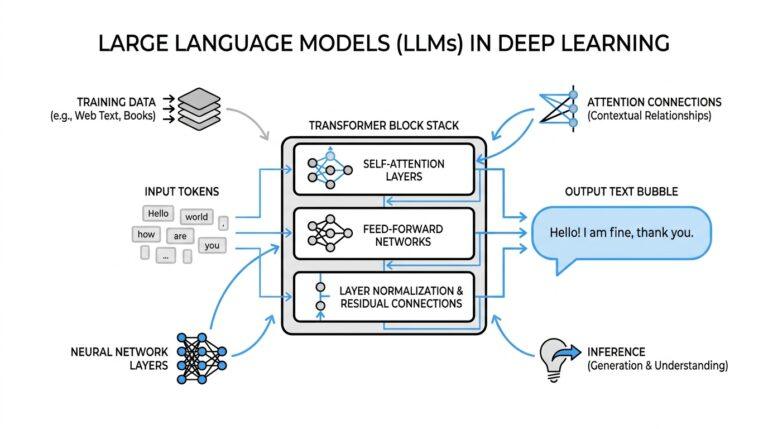
If you’re meeting generative AI for the first time, the easiest way to picture it is as a very capable writing partner that learns from patterns instead of memory. A large language model (LLM, or large language model) can turn a prompt into code, prose, structured JSON, equations, and more, which is why prompt quality matters so much from the start. What is generative AI, and why does prompt quality matter so much? Because the model is not following a fixed script; it is predicting the most useful next output from the instructions we give it.
That leads us to the first idea that unlocks everything else: prompt engineering. In plain language, prompt engineering is the practice of writing instructions that help the model produce the kind of answer you actually want, again and again. OpenAI describes this as a mix of art and science, because outputs are non-deterministic, which means the same prompt can sometimes produce slightly different results. Once we accept that uncertainty, we stop fighting the model and start guiding it.
The next step is to think about prompts as conversations with roles, not as a single block of text. OpenAI’s guidance shows that developer messages and user messages can carry different jobs: one can set the rules, while the other supplies the request. That separation gives the model cleaner boundaries, like placing ingredients into labeled bowls before cooking begins. When we make those boundaries visible with Markdown headings or XML tags, we help the model tell instructions apart from reference material, which often leads to more reliable responses.
As you start building, you’ll notice that examples often teach better than explanations alone. This is where few-shot learning comes in, which means showing the model a small handful of input-and-output pairs so it can infer the pattern and apply it to a new request. If you want a classifier, a formatter, or a customer-support assistant, a few good examples can do more than a paragraph of vague instructions. The trick is to make those examples varied enough that the model learns the shape of the task, not just one lucky answer.
Model choice matters too, and this is one of the first places where generative AI fundamentals become practical engineering. OpenAI notes that different model types, and even different snapshots within the same family, can respond differently, so a prompt that works well in one setting may shift in another. That is why production apps should pin a specific model snapshot and use evals, or evaluations, to measure prompt behavior over time. Think of evals as your test drive: they tell you whether your prompt still behaves the way you expect after a model upgrade.
There is also a useful reminder for reasoning-focused models: more dramatic prompting is not always better prompting. OpenAI’s reasoning guidance says that asking these models to “think step by step” or to reveal their reasoning is unnecessary, because they perform reasoning internally. In practice, that means we get further by being clear about the task, the constraints, and the desired output format than by trying to narrate the model’s hidden thought process. If we keep our instructions precise, we give the model room to do the hard work without cluttering the path.
Finally, good prompt engineering also means protecting the conversation from confusion and misuse. OpenAI’s best practices highlight prompt injection, which is when untrusted text tries to override your instructions, and recommend limiting user input and keeping strong boundaries around context. That is why the safest prompts feel a little like a well-run workshop: tools are labeled, materials are separated, and the rules are clear before the work begins. Once you see generative AI this way, you are no longer just asking a model for answers; you are learning how to shape the space in which those answers are made.
LLM Basics and Tokenization (platform.openai.com)
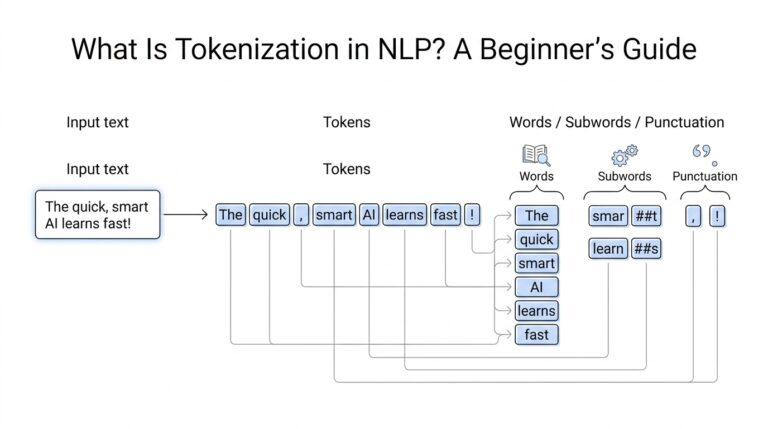
If prompt engineering felt like learning how to speak to a model, tokenization is where we learn how the model actually hears us. A large language model does not see a paragraph as one big idea; it receives your text in smaller pieces, then generates its reply from those pieces. That matters because the same prompt can behave very differently depending on how many pieces it contains and how much room the model has left to answer. OpenAI’s docs frame this as a practical part of building with models, not a side detail.
Tokens are the model’s working units, and they are smaller than most beginners expect. In English, a token can be as short as a single character or as long as a whole word, and OpenAI notes a rough rule of thumb of about 4 characters or 0.75 words per token. That is why a word like tokenization may split into multiple pieces, and why a short-looking prompt can still use a surprising number of tokens. The easiest way to see this in action is with OpenAI’s tokenizer tool, which is built with the tiktoken library.
Once we understand tokens, the idea of a context window becomes much less mysterious. The context window is the maximum number of tokens a model can use in a single request, and it includes the text you send, the text the model returns, and, for some reasoning models, reasoning tokens as well. If we pile too much into one request, the model can run out of space and produce a truncated answer, which is the AI version of trying to stuff one more book into an already full backpack. How long can a prompt be before it gets cramped? The answer depends on the model, but the limit is always real.
This is where LLM basics start to affect real design choices. A long prompt is not automatically a better prompt, because extra tokens can add cost, crowd the context window, and bury the instruction the model needed most. That is why the earlier habit of separating rules, user input, and reference text is so useful: it helps the model spend its tokens on the right material instead of wading through a messy pile of text. OpenAI also recommends pinning specific model snapshots and using evals, or evaluations, because different models and snapshots can respond differently even to similar prompts.
A good way to build intuition is to count tokens before you build scale. If you are drafting a prompt, adding examples, or passing in a long document, use the tokenizer or tiktoken first so you can see what the model will actually receive. Then trim anything that does not help the task, because every extra token competes for the same limited space. In practice, tokenization teaches us a simple engineering habit: write for clarity, measure the size, and keep only the parts that move the answer forward. That habit will make the next step, shaping prompts into reliable workflows, feel much more grounded.
Prompt Engineering Techniques (platform.openai.com)
Now that we’ve seen how tokens shape the room a model has to work in, prompt engineering techniques are where we start arranging the furniture. OpenAI defines prompt engineering as writing effective instructions so a model consistently produces the kind of output you want, even though outputs are non-deterministic. In other words, we are not memorizing a magic sentence; we are learning a repeatable way to guide the model.
The first habit is to separate roles and boundaries. In OpenAI’s API, developer messages carry the application’s rules and are prioritized ahead of user messages, which supply the request; the docs even compare the relationship to a function and its arguments. Markdown headings and XML tags help the model see where one kind of information ends and another begins, so instructions do not blend into reference text.
That same idea becomes even more useful when you add few-shot learning, which means showing a small set of input-output examples before asking for a new answer. OpenAI recommends using diverse examples so the model learns the shape of the task, not one lucky phrase. This works especially well when you want consistent formatting, classification, or a support-style response.
How do you write a prompt that works when the model is doing the hard thinking for you? OpenAI’s reasoning guidance says that asking a reasoning model to think step by step is not always helpful and can even hurt performance, because the model handles reasoning internally. So instead of narrating the hidden process, we get better results by stating the task, the constraints, and the exact format we want back.
The next technique is about safety, because a prompt can be clever and still be fragile. Prompt injection is when untrusted text tries to override your instructions, and OpenAI recommends limiting the amount of user input and keeping clear boundaries around context. That is why the safest prompt engineering techniques feel less like improvisation and more like a workshop with labeled bins and locked drawers.
Once a prompt starts working, the job shifts from creativity to maintenance. OpenAI recommends pinning production apps to specific model snapshots and using evals, or evaluations, to measure whether prompt behavior stays consistent as models change. It also suggests placing static instructions and examples near the beginning of the prompt for caching benefits, while keeping variable user-specific content near the end. Reusable prompts in the dashboard can make that workflow easier, and they give us a cleaner path from experiment to application.
With those habits in place, prompt engineering techniques start to feel less like trial and error and more like a build process we can trust.
Embeddings and Vector Search (docs.aws.amazon.com)
Now we’re moving from the art of writing prompts to the art of giving the model a memory. When a generative AI app needs to answer from your own documents, embeddings and vector search become the bridge between the question and the right source material. In AWS’s lifecycle guidance, that means thinking early about whether a retrieval-augmented generation setup will need a vector database and whether the right storage options are available as the system grows. How do we find the right paragraph when the user does not remember the exact wording? We search by meaning instead of exact words.
An embedding is the model’s way of turning text into a set of numbers that preserve meaning in a compact form. You can picture it like giving each chunk of text a fingerprint: two passages about the same idea end up closer together than two passages about unrelated topics. Amazon Bedrock explains that it first splits content into manageable chunks, then converts those chunks into embeddings, and keeps a mapping back to the original document so the app can trace results to their source. That chunking step matters because the model is not memorizing whole files; it is organizing pieces of knowledge so they can be compared later.
Once the data is embedded, vector search does the real detective work. A user question is also converted into a vector, and the vector index looks for chunks that are semantically similar, which means similar in meaning even if the words are different. Amazon Bedrock describes this as querying the vector index, retrieving the best matching chunks, and then adding that context back into the prompt before generating the answer. This is the heart of retrieval-augmented generation, or RAG, which is really just a way of saying, “look up the right facts first, then write with those facts in hand.”
The storage layer is where many beginner-friendly decisions become real engineering choices. A vector store, also called a vector database, holds those embeddings so the app can search them quickly, and Bedrock notes that the choice of embeddings model and vector dimensions can affect which vector store you can use. Most supported embedding models use floating-point vectors by default, while some support binary vectors; binary vectors use less storage, but they are less precise. AWS also notes that Amazon OpenSearch Serverless and Amazon OpenSearch Managed clusters are the only vector stores that support binary vectors, so the format you choose shapes the rest of the stack.
This is where cost and quality start to trade places on the same scale. AWS recommends reducing vector length when you want lower embedding and vector database costs, but it also warns that smaller vectors can reduce retrieval performance, so you may need to adjust chunk size, add overlap between chunks, or test a different search approach. In other words, vector search is not a “set it and forget it” feature; it is a tuning problem, and good teams measure latency, load, and answer quality as they refine it. That fits neatly into the wider lifecycle mindset we saw earlier: choose carefully, deploy deliberately, and keep improving based on real usage.
If you’re asking, “What should I build first?” the safest path is to start small: take one document set, chunk it well, embed it, and test whether vector search finds the passages a human would expect. Then compare the results against your answer quality goals, because the best embedding setup is the one that retrieves the right context reliably, not the one with the fanciest model name. Once that foundation feels solid, the rest of the system becomes much easier to reason about, because the model is no longer guessing from memory alone.
RAG Pipelines and Retrieval (huggingface.co)
When we talk about RAG pipelines, we’re really talking about the moment an AI app decides to look things up before it speaks. That shift matters because retrieval-augmented generation connects a language model to outside documents, which gives it fresher and more traceable context than memory alone. If the data lives in an enterprise system or on premises, this lookup step becomes the bridge between private knowledge and a fluent answer. What makes a RAG pipeline feel reliable instead of magical? Usually, it is the quality of retrieval working quietly behind the scenes.
The movement through a RAG pipeline is surprisingly human: the question arrives, the retriever searches for relevant passages, and the generator writes from what it found. Hugging Face describes RAG models as a combination of pretrained dense retrieval and sequence-to-sequence models, where the retriever gathers documents and the generator turns them into the final response. The configuration even reflects that rhythm, with settings for how many documents to retrieve, how long the combined context can be, and whether duplicate generations should be removed. In plain language, the system is trying to choose a small stack of evidence and hand it to the writer in one clean bundle.
That evidence step is where retrieval earns or loses trust. The Ragas paper breaks RAG systems into two pieces—a retrieval module and an LLM-based generation module—and says evaluation has to look at multiple dimensions: whether retrieval finds focused passages, whether the model uses them faithfully, and whether the answer itself is good. It also calls out reference-free evaluation, which means you can measure a pipeline without waiting for perfect human labels on every example. For us, that is a helpful reminder that retrieval is not a side detail; it is one of the main things we should test and improve.
This is also where architecture matters more than many beginners expect. Hugging Face’s 2604.01395 paper frames on-premises RAG as an engineering problem, not only a modeling problem, and it highlights end-to-end architecture, a reference application, and best practices for deployment, development, and CI/CD pipelines. That framing is useful because retrieval often touches search systems, security boundaries, and document stores at the same time. Once you see that, you stop treating RAG pipelines like a single model call and start seeing them as a service that must fit real infrastructure.
So when you build your first RAG pipeline, the best habit is to inspect what the retriever actually returns before you judge the final answer. Hugging Face’s RAG configuration supports returning retrieved document data, which makes it easier to check whether the system pulled the passages you expected and whether duplicates are muddying the context. From there, you can tune the number of documents, tighten the context budget, and compare retrieval quality against answer quality instead of guessing. That is the quiet craft of retrieval: not making the model sound smart, but making sure the model has the right notes in front of it when it starts to write.
Fine-Tuning, Evaluation, and Safety (docs.aws.amazon.com)
Now that we have prompts and retrieval working together, the next question is whether the model needs a deeper lesson. How do you know when fine-tuning is worth it instead of another round of prompt tweaks? In Amazon Bedrock, model customization means providing training data so a foundation model performs better on a specific use case, and supervised fine-tuning uses labeled examples to teach the model which outputs belong with which inputs. That makes fine-tuning feel less like rewriting the whole model and more like coaching it in your team’s exact style.
The easiest way to picture the process is to think of it as organizing a small, clean study set before the exam. AWS asks you to prepare training data, and for many customization jobs that means creating .jsonl files, where each line is one JSON object, plus a validation set when the method supports it. The dataset format, record limits, and token limits depend on the model and task, so the shape of the data matters as much as the content itself. In practice, that means we do not throw random examples at the model; we build a careful, representative dataset that teaches the behavior we want to repeat.
Once the training data is ready, the model still needs a few dials turned with care. A hyperparameter is a training setting, such as the learning rate or the number of epochs, and AWS says you set those when you submit the customization job. One epoch means the training data passes through the model once, and Bedrock recommends starting with the default settings because larger datasets usually need fewer passes while smaller ones may need more. This is one of those moments where fine-tuning becomes real engineering: a better result often comes from measured adjustments, not from pushing every setting higher.
Then comes the part that keeps the work honest: evaluation. Amazon Bedrock evaluations can measure model performance, knowledge base behavior, and even RAG sources, using automatic scoring, human reviewers, or a judge model, which is another LLM that scores responses and explains its choices. The key idea is simple but powerful: we compare the model’s answer against ground truth, meaning the expected output, so we can see whether the custom model is actually improving rather than merely sounding confident. If we are tuning a model for a real workflow, evaluation is where we prove that the change helped.
Good evaluation also means comparing the custom model with the base model, not trusting memory or a single lucky demo. For reinforcement fine-tuning, AWS even recommends validation metrics, side-by-side testing in the Playground, and Bedrock Model Evaluation to check whether the custom model generalizes beyond the training examples and handles edge cases well. That matters because a model can look polished on familiar prompts and still stumble when the wording shifts a little. In other words, evaluation is the mirror that shows us whether the model has really learned or merely memorized the rehearsal.
Safety is the other half of the story, because a better model is not automatically a safer one. Amazon Bedrock Guardrails evaluates both user inputs and model responses, and you can combine policies such as content filters, denied topics, sensitive information filters, word filters, and image content filters. If a guardrail blocks a prompt, the model call is discarded; if it blocks a response, Bedrock can block or mask the output instead. That makes safety feel less like a warning label and more like a checkpoint that sits between the user and the final answer.
The useful habit here is to test safety the same way we test quality: deliberately and repeatedly. AWS lets you inspect guardrail behavior with traces, see what was blocked and why, and modify the guardrail as your application changes. This is where the lifecycle becomes a loop rather than a straight line, because fine-tuning, evaluation, and safety all feed back into one another as the system grows. If the model drifts, the data changes, or the risks shift, we adjust the training set, rerun evaluation, and tighten the guardrails until the behavior matches the product we actually want to ship.