Spot Repeating Data
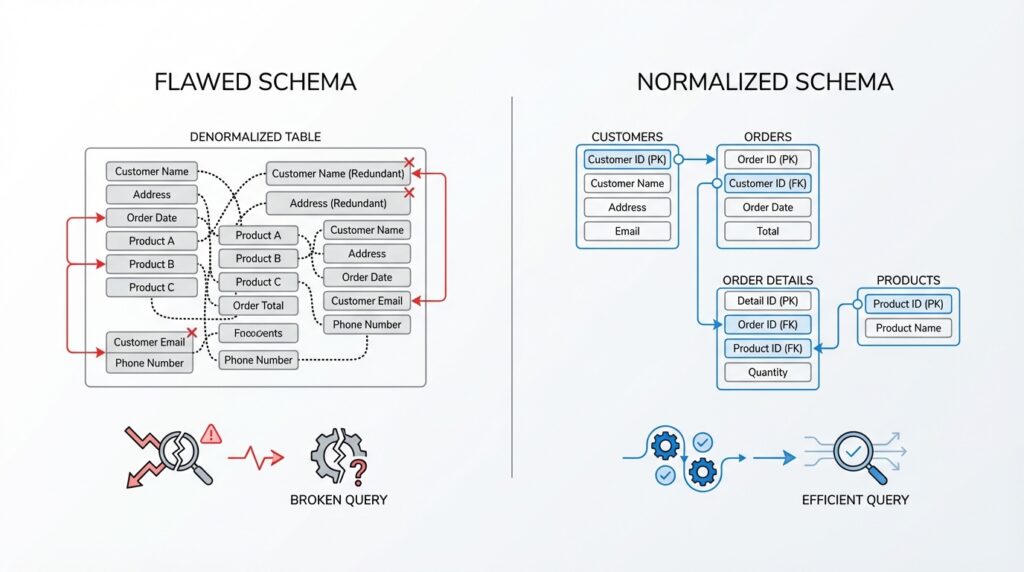
Building on this foundation, the first clue is often the easiest one to spot: the same information keeps appearing again and again in different rows. In database design, that repeated information is a warning sign, because repeating data often points to a schema that is trying to store too many ideas in one place. Imagine an order table where every purchase repeats the customer’s name, email, and shipping address. At first, that may look convenient, but it is one of the classic normalization problems that later turn into fragile queries and confusing updates.
Here is where the pattern starts to reveal itself. When you see the same value copied across many records, you are usually looking at a repeating group or duplicated attribute, which means the table is carrying more than one responsibility. One part of the row describes the order, while another part describes the customer, and those are not really the same kind of fact. What causes this to matter? Because queries now have to sift through extra copies of the same information, and every copy becomes another chance for inconsistency.
Think of it like a notebook where you rewrite your home address on every page instead of keeping it in one place. That might feel harmless until you move and only change half the pages. In a database, the same thing happens when repeated data is stored in many rows: one row gets updated, another does not, and suddenly your reports disagree with each other. This is exactly the kind of schema issue normalization is designed to prevent, because normalization pushes each fact into the table where it belongs.
As we discussed earlier, clean database design depends on separating different kinds of facts so each table tells one clear story. Repeating customer details inside an orders table blurs that story. The table no longer answers a single question like “what happened in this order?” Instead, it starts answering two questions at once: “what happened in this order?” and “who is this customer?” That overlap is what makes queries harder to write and easier to break, especially when you later need to filter, group, or join the data.
You can spot repeating data by asking a simple question: if one value changes, how many rows would I have to touch? If the answer is “many,” that is usually a sign the data is stored in the wrong place. A customer’s phone number, for example, should usually live once in a customer table, not repeated in every order row, every support ticket row, and every invoice row. Once that single source of truth exists, your queries become calmer because they can join tables instead of chasing duplicate copies of the same fact.
Taking this concept further, normalization helps you notice that repeated values are not just messy; they are also expensive in practical terms. They waste space, they invite contradictions, and they make maintenance feel like chasing shadows across the schema. More importantly, they are often the first clue that a table contains hidden dependencies, which means one piece of data is relying on another piece that should have been separated. When you see that pattern, you are not just looking at duplicate data—you are looking at a design that will eventually make queries harder to trust.
So when you scan a schema, look for the same names, addresses, categories, or status labels appearing over and over in places that do not need them. That is usually the moment where normalization starts to pay off, because it turns repetition into structure and turns fragile tables into clearer ones. Once you learn to spot repeating data, you begin to see the real shape of the database underneath the clutter.
Remove Redundant Columns
Building on this foundation, the next move is to trim away the columns that say the same thing twice. In database design, redundant columns are fields that repeat information already stored somewhere else, and they often sneak in when a table starts carrying too many jobs at once. Imagine an orders table that keeps customer_id, customer_name, and customer_email side by side. The identifier belongs there, but the name and email are usually repeating facts, which means normalization is asking us to move them out and keep them in one clearer place.
So how do you know a column is redundant? A good test is to ask whether the value can be looked up from another table without losing meaning. If customer_name always comes from the customer record attached to customer_id, then storing it again in the orders table adds duplication, not understanding. That duplication may feel harmless at first, but it creates schema issues because now one customer can exist in two versions, and your queries have to guess which one is correct.
This is where the idea becomes practical rather than theoretical. Suppose a customer changes their email address, and your database stores that email in every past order row as well as in the customer table. If you update one place and miss another, your reports start disagreeing with each other, and a simple search like “What email belongs to this customer?” becomes surprisingly fragile. Removing redundant columns gives you one source of truth, which is the quiet strength behind normalization and cleaner database design.
It helps to think of this like carrying a contact card in your wallet and also rewriting the same phone number on every receipt. If the number changes, every copy becomes a little trap. In a database, a redundant column works the same way: it is a copy that can drift away from the original fact. Once that happens, queries may still run, but they stop telling a consistent story, and consistency is exactly what a well-designed schema is supposed to protect.
While we covered repeated values earlier, now we are looking at the column level, which is a slightly different kind of clutter. A table can have no obvious duplicate rows and still be full of redundant columns that mirror data already available through a relationship. For example, an order line might store product_name even though product_id already points to a products table. That extra text might make the row look more complete, but it also means the line item is now shadowing another table instead of depending on it.
The key question is not “Does this column feel useful?” but “Does this column belong here?” If the answer depends on another table, then the column is probably redundant in the core schema. That does not mean the information is unimportant; it means the information has a home elsewhere, and keeping it there makes joins more reliable and updates less risky. In practice, this is one of the clearest signs that normalization is doing its job: each fact gets one place to live, and queries can connect those facts when they need to.
Taking this concept further, you will often find that redundant columns also hide hidden dependencies. A table may store city, state, and zip_code alongside a full address, even though the address already implies those parts, or it may store both status_code and status_label when one can describe the other. These extra fields can be tempting for convenience, but they make schema issues harder to spot because the table starts answering the same question in more than one way. Once you remove those overlaps, the structure becomes easier to reason about, and your queries stop having to choose between competing copies of the truth.
As you scan a schema, look for any column that feels like a duplicate note in the margin. If a field can be derived, joined, or looked up from a related table, it may be better left out of the row entirely. That is the moment where normalization starts to feel less like an abstract rule and more like a practical habit: keep each fact in one place, remove the redundancy, and let the table tell one clean story.
Identify Query Anomalies
Building on this foundation, the next thing to watch is how the database behaves when you start asking it real questions. Query anomalies are the awkward spots where a query becomes harder to write, harder to trust, or harder to keep consistent because the schema is carrying more than one idea at once. If you have ever felt that a simple report needs too many joins, too many fixes, or too many special cases, you are already standing near the problem. In database design, that discomfort is often a clue that normalization has not gone far enough.
While we covered repeating data earlier, now we are looking at the same issue from the angle of everyday use. A schema can look tidy on paper and still produce strange results when you try to filter, group, or summarize it. For example, if an orders table stores customer details, product details, and shipping details all together, one query may answer your question today, but a slightly different query tomorrow may expose contradictions or missing pieces. That is what makes query anomalies so important: they do not always break the database outright, but they make it unreliable in subtle ways.
So how do you spot them in practice? Start by noticing when the same business fact has to be rebuilt in more than one query. If you keep joining the same tables in the same pattern just to recover one clear answer, that is a sign the schema is forcing extra work onto the query layer. A healthy design should feel like a well-organized kitchen: ingredients live in the right cabinets, and you do not have to hunt through three drawers to make one meal. When the structure is off, every query feels like a workaround instead of a direct question.
Another clue appears when small changes create big ripples. Suppose a customer changes their email address, and one report shows the new value while another still shows the old one because different tables store different copies. Or imagine a product category changes, but older rows still carry the outdated label because the label was duplicated instead of referenced. What causes this? Usually, the schema is mixing facts that should be separate, which means one update has to be repeated in several places. That is one of the clearest signs of a query anomaly because the query is no longer reading a single truth; it is choosing between several versions of it.
Taking this concept further, look for queries that seem to need too many exceptions. If you keep writing conditions like “unless this row came from the legacy table” or “except when the status was copied manually,” the problem is probably not the query itself. The schema is often hiding the real issue by storing overlapping information in multiple places. Normalization helps here because it moves each fact into one home, so your queries can rely on joins and keys instead of compensating for duplicate or drifting values. That is why good database design makes query logic calmer: the query can ask for data, not reconstruct it.
You can also test for query anomalies by asking a simple, practical question: what breaks first when the business changes? If you add a new customer status, rename a shipping method, or split one product into several variants, a fragile schema will make the query layer feel brittle right away. Reports may need rewrites, filters may stop matching, and summary totals may no longer line up. Once you learn to notice those failure points, you begin to see that normalization is not only about cleaner tables; it is about protecting the questions you will ask later. And when those questions stay clear, the schema starts doing its job quietly in the background, exactly where it belongs.
Split Related Entities
Building on this foundation, the next step is learning when two ideas should live side by side instead of squeezed into one row. In database design, related entities are different things that connect to each other, like a project and its tasks, or a classroom and its students. When you keep them together for convenience, the schema may look friendly at first, but it often turns into a cramped room where every change is harder than it should be. That is where normalization starts to help in a very practical way: it gives each entity its own table, then lets the relationship do the talking.
Think of an entity as a real-world thing your database needs to remember, and a relationship as the bridge between two things. A project can have many tasks, but a task belongs to one project. A playlist can contain many songs, and a song can appear in many playlists. When you see that kind of structure, one wide table is usually the wrong shape, because it forces one row to pretend it is both the parent and the child. Splitting related entities lets the schema reflect reality instead of flattening it.
What does that look like in practice? Imagine a course table that stores course details, instructor names, and a long list of enrolled students in separate columns. That design quickly breaks down because one course can have many students, and one student can enroll in many courses. A better design gives the course its own table, the student their own table, and the enrollment table a job of its own as the connector. That connector often uses a foreign key, which is a column that points to a row in another table, so the database can keep the relationship without copying the whole story into every record.
This separation matters because each table can now do one clear job. The course table can answer questions about the class itself, the student table can answer questions about the learner, and the enrollment table can answer questions about who is registered for what. In contrast to the previous approach, you are no longer forcing a single row to carry multiple meanings. That makes queries easier to read, because instead of untangling a mixed-up table, you can join tables together in a way that mirrors the real relationship between them.
How do you know when to split related entities? A good clue is when a part of the row can repeat on its own. If one project has many tasks, one order has many line items, or one article has many tags, that repeating pattern usually belongs in a separate table. The parent table holds the main identity, while the child table stores the repeating details. This is a classic normalization move, and it keeps the schema from turning one business object into a row full of comma-separated lists or awkward numbered columns.
Taking this concept further, splitting related entities also protects your queries from confusion later on. If you want every task for a project, or every tag for an article, the database can fetch them through a join instead of digging through bundled text or duplicated fields. That means filters, counts, and updates all work against a cleaner structure. When someone asks, “How do you tell whether two facts belong in the same table?” the answer is usually whether they describe one thing or several things that happen to be connected.
This is also where normalization feels less like a rulebook and more like a map. You are not breaking the data apart randomly; you are tracing the natural boundaries in the business itself. One table becomes the place where a thing is defined, and another table becomes the place where the relationship is recorded. Once you start seeing those boundaries clearly, the schema becomes calmer, and your queries stop fighting the structure underneath them.
As we discussed earlier with repeated data and redundant columns, the goal is to keep each fact in one place. Splitting related entities takes that idea one step deeper, because now you are separating not only repeated values but also repeated roles. That is the moment when a messy schema starts to feel intentional, and the database becomes much easier to trust.
Apply Third Normal Form
Building on this foundation, we now reach the point where a table can look neat on the surface and still hide a deeper tangle underneath. Third normal form in database normalization asks us to remove facts that depend on other facts, not on the table’s main identifier. In plain language, if one non-key column is really explaining another non-key column, the schema is still carrying extra weight. That is where schema design starts to feel less like storage and more like storytelling gone sideways.
To make that idea concrete, imagine an employees table with employee_id, employee_name, department_id, department_name, and department_phone. At first glance, this seems helpful because one row contains everything you might want to know about an employee. But department_name and department_phone do not belong to the employee itself; they belong to the department. In third normal form, that means we split the department details into their own table and let department_id act as the bridge.
Why does that matter so much? Because when a department changes its phone number, you do not want to update every employee row that happens to mention it. If the same department data is copied across dozens or hundreds of rows, one missed update creates a mismatch that can quietly break reports and filters. That is the practical cost of skipping third normal form: the database still runs, but the story it tells becomes unreliable. Normalization protects you from that by keeping each fact in one home.
The key idea here is called a transitive dependency, which is a phrase that sounds more intimidating than it really is. A transitive dependency happens when a column depends on another non-key column instead of depending directly on the row’s primary key, which is the column that uniquely identifies the record. In the employee example, department_name depends on department_id, and department_id depends on employee_id. That extra hop is the signal that the table is not yet in third normal form.
So how do you spot this in practice? Ask yourself, “If I already know one column, am I using that to figure out another column?” If the answer is yes, that second column may belong in a different table. A reservation row, for example, should describe the booking itself, not also store the restaurant’s phone number, manager name, and dining room address just because those details are related. When one row starts describing a different subject, the schema is asking one table to carry two stories at once.
This is where third normal form becomes especially useful for queries. When you remove transitive dependencies, your joins become more honest because each table represents one kind of fact. The employee table tells you who the employee is, and the department table tells you what the department is. Instead of hoping every copied value stayed in sync, your query can ask the database to connect the facts at read time, which is exactly what good database design is supposed to make comfortable.
Taking this concept further, third normal form also makes future changes less painful. If the business renames a department, moves it to a new location, or changes its contact details, you update one row in one table instead of chasing duplicates through the schema. That is the quiet strength of database normalization: it turns maintenance from a guessing game into a predictable routine. Once you start separating facts that depend on other facts, your tables stop overlapping, your queries stop second-guessing themselves, and the structure becomes much easier to trust.