What Is a Database?
When you first hear the words database, it can sound like a locked room full of technical jargon. In practice, a database is the place where an application keeps the information it needs to remember things over time, like customer names, product details, or order histories. Officially, it is an organized collection of structured information stored electronically, and it is usually managed by a database management system, or DBMS, which is the software that helps store, retrieve, update, and protect that data.
So what is a database when you meet it in real life? Think of it like a well-run filing cabinet that never forgets where anything goes. The cabinet is not the whole story; the DBMS acts like the person who labels the drawers, keeps the folders in order, and makes sure the right information can be found quickly. That is why people sometimes use the word database to mean the data itself, the software that manages it, or the whole database system together.
The most familiar kind of database is a relational database, which stores information in tables made of rows and columns. A row holds one record, like one customer or one order, while a column holds one type of detail, like a name or date. This layout makes it easier to search, update, and connect related information, which is why relational databases became such a common choice for business software.
A database becomes even more useful when you see how people interact with it. Many relational databases use SQL, which stands for Structured Query Language, a language used to ask for data, add new records, change existing ones, and control access. If that sounds abstract, picture a librarian who can instantly fetch every book from a certain shelf, update the catalog, and lock away sensitive files when needed. That quiet behind-the-scenes work is what makes a database feel reliable in everyday use.
Not every database looks the same, and that variety matters. Some databases are built for strictly organized information, while others are designed to handle semi-structured or unstructured data, such as documents or multimedia content. Even so, the basic idea stays the same: a database gives us a system for storing data in a way that makes it easier to find, organize, and use later. That is the reason databases show up everywhere, from shopping carts and banking apps to booking systems and internal business tools.
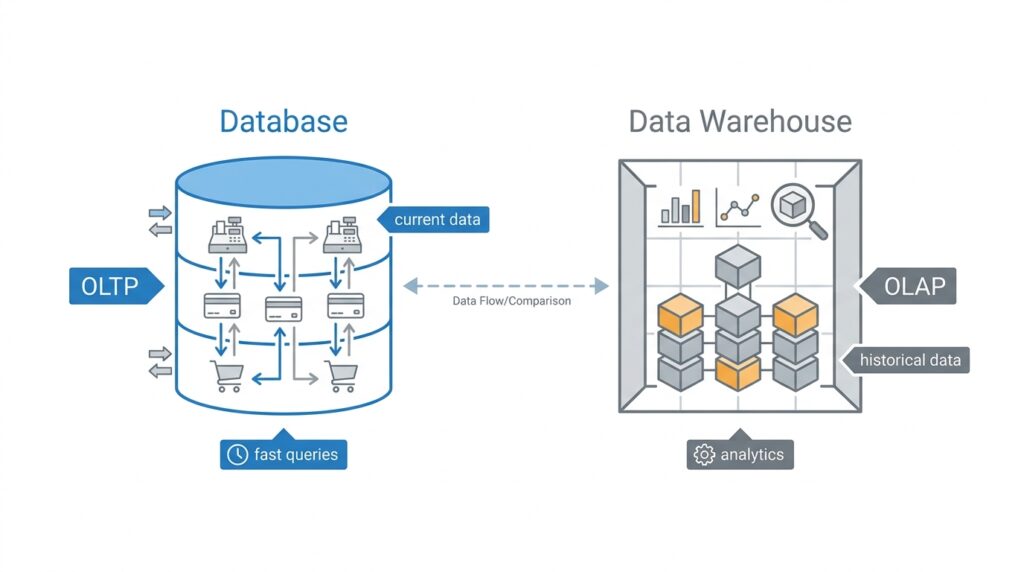
This is the point where the difference between a database and a data warehouse starts to come into view. A database is usually the active workspace where software reads and writes information as events happen, while a data warehouse is built more for analysis across large amounts of historical data. In other words, the database keeps the day-to-day story moving, and the warehouse helps us look back and understand the bigger pattern. With that picture in mind, we can now compare how each one serves a different job.
What Is a Data Warehouse?
If a database is the place where day-to-day work happens, a data warehouse is the place where the bigger story slowly comes into focus. It gathers information from many different systems, keeps it in one organized place, and prepares it for analysis instead of for constant updating. When people ask, what is a data warehouse?, the answer is that it is a storage system built to help us study patterns, trends, and history across a business.
That difference matters because the warehouse is not trying to move fast in the same way a live application does. Imagine a busy kitchen during dinner service versus a recipe book filled with years of notes, tasting comments, and lessons learned. The kitchen is where orders are handled in the moment, while the recipe book helps us step back and understand what has worked over time. A data warehouse plays that reflective role for business data.
A data warehouse usually collects information from several sources, such as sales systems, marketing tools, finance records, or customer support platforms. Instead of leaving that information scattered in separate rooms, it brings the pieces together so they can be compared and studied side by side. This is one reason the data warehouse is so valuable for reporting, business intelligence, and analytics, because it gives us a broader view than a single operational system can provide.
So what does that look like in practice? Picture a company that wants to know how last quarter’s promotions affected both revenue and customer retention. One system may know what products were sold, another may know which emails were opened, and a third may know which customers returned. A data warehouse can combine those clues into one place, making it easier to ask questions that span many departments instead of looking at each one in isolation.
Another important idea is that data warehouses usually store historical data, which means information collected over time rather than only the most recent version. That historical record helps teams spot seasonality, growth, declines, and other long-term patterns that would be hard to notice in a live database alone. In other words, a database helps answer, “What is happening now?” while a data warehouse helps answer, “What has been happening, and what does it mean?”
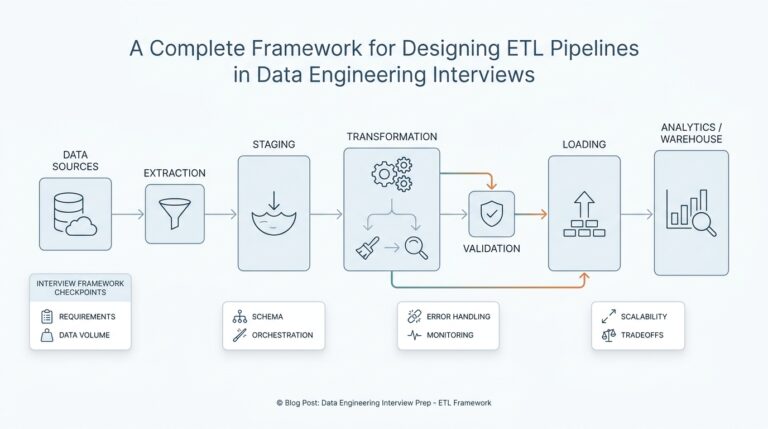
Behind the scenes, the data often goes through a process called ETL, which stands for extract, transform, and load. Extract means pulling data out of source systems, transform means cleaning and reshaping it into a consistent format, and load means placing it into the warehouse. That extra preparation can feel like sorting ingredients before cooking, but it makes the final analysis much more trustworthy because the numbers from different systems can actually line up.
This is also why a data warehouse is built differently from the database we discussed earlier. A database is usually optimized for frequent reading and writing during daily operations, while a data warehouse is optimized for large queries, summaries, and analysis across lots of records. If you searched for data warehouse vs database, this is the heart of the difference: one supports transactions in the moment, and the other supports insight after the fact.
Once you see that role clearly, the data warehouse starts to feel less mysterious and more like a careful archive with a purpose. It does not replace the database; it extends it, giving businesses a wider lens for understanding their own activity. And with that wider lens in place, we can next look at how the two systems compare in real-world use.
OLTP vs OLAP Workloads
When we talk about OLTP vs OLAP workloads, we are really talking about two very different kinds of work happening inside data systems. OLTP, or Online Transaction Processing, is the kind of workload that handles fast day-to-day actions like placing an order, updating a profile, or recording a payment. OLAP, or Online Analytical Processing, is the kind of workload that asks bigger questions, like which products sold best last quarter or how customer behavior changed over time. That difference is the bridge between the database and the data warehouse you just met.
Think about a store at opening time. OLTP is the cashier scanning items, taking payment, and printing a receipt while a line of customers waits. The system has to respond quickly, protect every transaction, and keep each record accurate in the moment. In a database, that usually means lots of small reads and writes happening all day long, each one handled with care because even a tiny mistake could affect a real customer.
OLAP works more like the manager in the back office reviewing weeks of sales slips spread across a desk. The goal is not speed for a single click or checkout; the goal is insight from many records at once. An OLAP workload might scan millions of rows, compare different time periods, and summarize results into totals, averages, or trends. That is why OLAP workloads fit so naturally with a data warehouse, where history is organized for analysis instead of constant updating.
What does that mean in practical terms? An OLTP system usually favors short, focused queries, because it needs to answer one small question quickly and move on to the next. It also needs strong consistency, which means the data must stay correct even when many people use the system at the same time. OLAP workloads, by contrast, often tolerate longer-running queries because they are asking broader questions that need more data, more scanning, and more calculation before the answer appears.
The difference also shows up in how each system stores and shapes data. OLTP systems often keep data in highly normalized tables, which means related information is split into tidy pieces to reduce duplication and make updates safer. OLAP systems usually prefer denormalized or lightly organized structures, which means some data may be repeated so analysis can run faster and with fewer joins, or table links. If that sounds technical, the easy way to picture it is this: OLTP keeps the kitchen organized for fast cooking, while OLAP arranges the pantry so a chef can study every ingredient together.
You might also ask, why can’t one system do both jobs equally well? The answer is that OLTP vs OLAP workloads pull in opposite directions. A system tuned for transaction processing must protect many tiny actions at once, while a system tuned for analytics must read huge amounts of history efficiently. If you force one design to do both, it usually becomes less effective at each task, which is why businesses often keep the live database and the analytical warehouse separate.
That separation is what makes the earlier comparison feel so practical now. The database supports OLTP workloads, helping software record what is happening right now, while the data warehouse supports OLAP workloads, helping teams understand what those transactions mean over time. Once you see that pattern, the two systems stop feeling like competing tools and start feeling like partners, each doing the kind of work it handles best before we move into how they differ in structure and performance.
Schema and Data Modeling
Once we understand that one system serves day-to-day transactions and the other serves analysis, the next question almost always follows: how do they shape the data itself? That is where schema and data modeling step into the story. A schema is the blueprint for how data is organized, and data modeling is the process of designing that blueprint so the system can store and use information the right way. In a database vs data warehouse comparison, this is one of the clearest places where their purposes begin to diverge.
In a live database, schema and data modeling usually focus on protecting fast updates and keeping records accurate. Think of it like planning the layout of a busy grocery store so shoppers can move quickly and staff can restock without chaos. The design needs clear aisles, tidy shelves, and rules about where each item belongs. In practical terms, that often means splitting information into related tables, reducing duplication, and making sure each change touches only the records it should. That structure helps OLTP systems stay reliable when thousands of small actions happen at once.
A data warehouse approaches schema and data modeling from a different angle. Here, the goal is not to make a cashier’s job faster; it is to make analysis easier to follow. That is why warehouses often use dimensional modeling, a way of organizing data around business questions instead of around individual transactions. You may see terms like fact table, which stores measurable events such as sales, and dimension table, which stores the descriptive context around those events, such as time, product, or region. If you have ever sorted receipts into labeled folders so you could spot patterns later, you already understand the idea.
This is why warehouse schemas often feel more spacious than database schemas. A common design is the star schema, where one central fact table connects to several dimension tables, like the center of a wheel with spokes around it. That layout makes it easier to ask questions such as “Which products sold best in each region?” or “How did monthly revenue change by customer segment?” What is a data warehouse without that kind of model? It becomes much harder to turn raw history into clear answers.
The contrast also shows up in how much the data changes. In a database, schema and data modeling assume that rows will be inserted, updated, or deleted all day long. In a warehouse, the data model usually assumes that historical records will stay mostly stable once loaded, because analysts need a consistent record of what happened. That stability lets teams compare one period against another without worrying that yesterday’s numbers were quietly rewritten. So when people ask how a data warehouse vs database design differs, the answer often starts with this simple truth: one is built for motion, the other for memory.
You may also notice that warehouse models often sacrifice a little convenience in storage so they can gain clarity in analysis. A single business event might be linked to several descriptive tables, and that can sound more complicated at first. But the point of schema and data modeling is not to make the data look neat for its own sake; it is to match the shape of the data to the job it needs to do. In the warehouse, that job is to help people read across time, compare categories, and trust the story the numbers are telling.
So the heart of schema and data modeling is really about intention. A database models data for speed, precision, and safe updates, while a data warehouse models data for comparison, history, and insight. Once you see that difference, the rest of the picture starts to lock into place, and we can move on to how those design choices affect storage, queries, and performance in the real world.
Performance and Query Patterns
This is where the database vs data warehouse split starts to feel less like theory and more like behavior. A database usually spends its time on OLTP (Online Transaction Processing), which means many small reads and writes for live app actions, while a data warehouse leans toward OLAP (Online Analytical Processing), which means heavier read-focused analysis and reporting. Microsoft describes OLTP as handling smaller reads or updates to a limited set of data, while OLAP centers on complex calculations and reporting over larger datasets.
If you have ever wondered, why does a database feel quick for saving one order but a warehouse feels better for quarterly trends?, that is the difference showing up in query patterns. A transactional database is built for short, focused questions like “What is this customer’s status right now?” because it needs to answer fast and keep the application moving. A data warehouse is built for broader questions like “What changed over the last 12 months?” because analytical queries usually compare, summarize, and aggregate many rows before they reveal anything useful.
The storage layout helps explain why those workloads diverge. Row-wise storage fits OLTP well because live transactions often read or update most of the fields for a small number of records, which is exactly how a checkout page or profile update behaves. Columnar storage fits a warehouse better because analytical queries often need only a few columns from a very large number of rows, so the engine can skip a lot of irrelevant data and reduce disk I/O, meaning the number of reads from storage. Amazon Redshift and BigQuery both describe columnar storage as a key reason warehouse-style queries run efficiently.
Warehouses also lean on parallel execution in a way that databases usually do not need to at the same scale. BigQuery separates storage and compute, then spreads query work across multiple workers; Amazon Redshift uses massively parallel processing, columnar storage, and compression to improve query performance. In plain language, that means the warehouse can hand different pieces of a large question to different workers at the same time, almost like a team sorting through a stack of papers instead of one person reading every page alone. That design is a major reason data warehouse queries handle large scans and aggregations so well.
So when we compare performance, we are really comparing two different promises. A database promises fast, steady response for lots of tiny actions, which is why it stays comfortable in the middle of an active application. A data warehouse promises strong performance for broad, history-heavy questions, which is why it can power dashboards, trend lines, and cross-team reporting without getting bogged down in day-to-day updates. Some platforms do support mixed workloads, but the core tradeoff still remains: one system is tuned for constant motion, and the other is tuned for analysis over time.
That gives you a practical way to think about performance and query patterns: if the question is small, immediate, and tied to a live transaction, the database is usually the better fit; if the question spans time, categories, or many records at once, the data warehouse is usually the stronger choice. This is why the two systems often sit side by side rather than replacing each other. One keeps the present running smoothly, and the other helps us read the bigger story hidden in the data.
Choosing the Right Option
When you reach the choice point in the data warehouse vs database conversation, the clearest guide is not the technology itself but the question you want answered. If your software needs to remember a purchase, update a profile, or save a message right now, a database is the right home. If you want to study months of activity, compare teams, or look for trends across many sources, a data warehouse belongs in the picture. The real decision starts with the kind of work you are trying to support, not with the brand name of the system.
If you are building something that serves live users, the database usually wins first place. That is because an operational system needs to respond quickly while keeping each small change accurate, whether someone is checking out, logging in, or editing a record. In that setting, the database acts like the front desk of a busy hotel: it handles arrivals, updates, and small requests all day long without losing track of who is where. When the job is immediate and transactional, a data warehouse would feel like using a library archive to answer a question at the cash register.
The opposite is true when the goal is analysis. A data warehouse shines when you want to step back and read the story hidden inside the numbers, such as which regions grew fastest or how customer behavior changed after a campaign. Here, the key word is historical data, meaning information collected over time rather than only the latest version. If you are asking, “What happened across the last quarter, and why?” the warehouse is built for that kind of curiosity in a way a live database usually is not.
That said, the smartest choice is not always either-or. Many teams use both systems together because they solve different problems at different speeds. The database captures the present, while the data warehouse gathers the past into a place where analysis becomes easier and more trustworthy. Think of it like keeping a notebook at your desk for daily notes and then later moving the important pages into a scrapbook where the patterns become visible. In the database vs data warehouse decision, combining them often gives you the calmest and clearest result.
Scale matters too, but not in the dramatic way people sometimes expect. A small business may begin with a single database because it is enough for orders, accounts, and records, and that is a perfectly sensible starting point. As reporting questions grow more complex, the warehouse can enter later and take on the heavier analytical load. The right option is therefore not the one with the most features; it is the one that matches your current workload without making everyday work harder than it needs to be.
A helpful way to choose is to ask where the data will spend most of its time. If the data will be written and updated constantly, stay with a database. If the data will be read, summarized, and compared across long time spans, move toward a warehouse. If both patterns are equally important, the strongest answer is often to let each system do its own job. That separation keeps live operations responsive while giving analysis the breathing room it needs.
So when you stand at this fork in the road, remember the simple rule underneath all the technical language: use the database for action, and use the data warehouse for understanding. That one distinction explains most real-world decisions and keeps the rest of the comparison from feeling overwhelming. With that choice in mind, we can now look at how teams put the two systems together in a practical workflow.