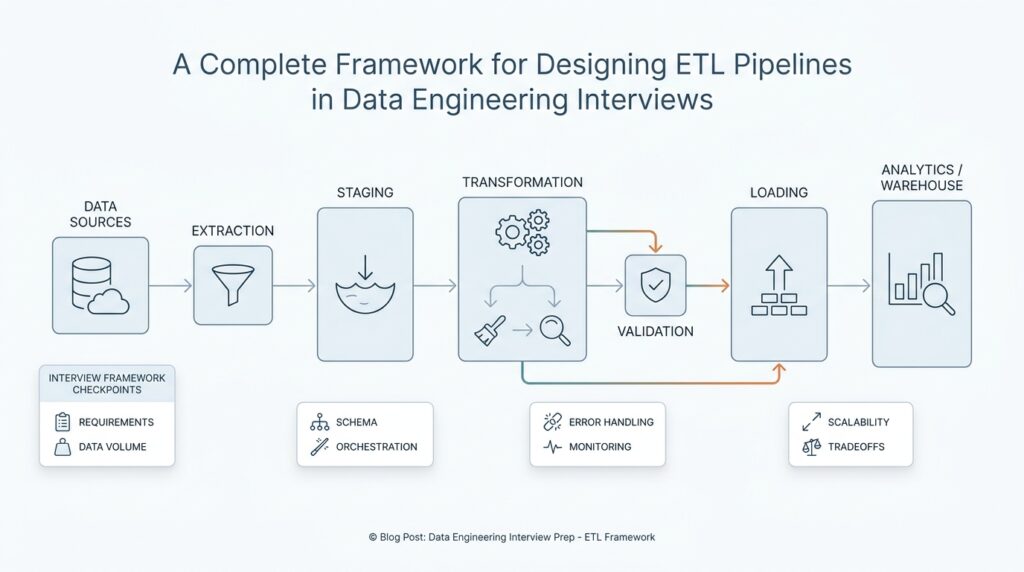
Interview Requirements and Constraints
When we start talking about an ETL pipeline in data engineering interviews, the first thing interviewers want is not architecture—it is clarity. They are asking, in plain language, what problem are you solving, who depends on the data, and what rules the pipeline must obey? If we skip this step, we may design something elegant that fails the real test, which is whether it can deliver the right data at the right time for the right people.
This is why the requirements conversation matters so much. A requirement is a need the pipeline must satisfy, and in an interview it often appears as a business question dressed in technical clothing: How fresh does the data need to be? How many records arrive each day? Which teams use the output, and what happens if it is late? Once you frame the ETL pipeline around those questions, the design stops feeling abstract and starts looking like a response to a real-world job.
The easiest way to think about requirements is to imagine we are planning a delivery route. Before we choose the truck, we need to know what we are carrying, how fragile it is, and when it must arrive. An ETL pipeline works the same way. If the data feeds dashboards used by executives, then freshness and reliability may matter more than raw speed. If the data supports billing, then correctness and auditability become the center of the conversation.
Interviewers also listen for constraints, which are the boundaries that limit our options. A constraint is anything that narrows what we can build, such as a fixed budget, a slow source system, a strict security rule, or a requirement to finish processing within one hour. In data engineering interviews, constraints often decide whether we use batch processing, which moves data in groups on a schedule, or streaming, which processes data continuously as it arrives. What looks like a technical choice is often really a constraint choice in disguise.
A strong answer usually separates functional requirements from non-functional requirements. Functional requirements describe what the ETL pipeline must do, such as ingest customer orders, clean missing values, and load curated tables. Non-functional requirements describe how well it must do it, such as latency, scalability, reliability, and cost. That distinction helps us avoid a common interview trap: describing the transformation steps without explaining the performance and operational limits that make those steps realistic.
Here is where the interview starts to feel like a conversation instead of a checklist. If the source system changes its schema, meaning the shape of the incoming data changes, how will the pipeline handle that? If late-arriving records show up after the daily run, do we backfill, which means we reprocess past data, or do we accept a small delay? If compliance rules require masking, which means hiding sensitive fields, where should that happen? These are the kinds of constraint questions that show whether we can design an ETL pipeline for the messy world, not just the clean whiteboard version.
We also want to show that we can prioritize. Not every requirement carries the same weight, and interviews reward candidates who can say which trade-offs matter most. For example, a reporting pipeline may tolerate a few minutes of delay if it keeps costs low, while a fraud-detection pipeline may need near-real-time processing even if the system becomes more expensive. When we explain those trade-offs out loud, we sound like someone who can work with product teams, analysts, and engineers instead of speaking only in technology terms.
A good search-style question to keep in mind is: what requirements should I clarify before designing an ETL pipeline? The answer is usually data volume, refresh rate, data quality expectations, failure recovery, access controls, and cost limits. Once we name those constraints early, the rest of the design becomes much easier to justify, because every later choice points back to a visible need rather than a guess.
By the end of this part of the interview, the goal is not to impress with complexity. The goal is to show that we can hear a vague business need, turn it into concrete ETL pipeline requirements, and then design within the constraints with confidence.
Map Sources and Destinations
Once we have the requirements in view, the next move in an ETL pipeline interview is to trace the data’s journey from start to finish. This is where we map sources and destinations, which means identifying where the data comes from, where it needs to land, and what shape it should have at each stop. If you are wondering, what are the sources and destinations in an ETL pipeline?—this is the part where we answer that with enough clarity to make the rest of the design feel grounded.
In practice, source systems are the places where raw data lives before the ETL pipeline touches it. A source could be an operational database, which is the system a company uses to run day-to-day work like orders, accounts, or payments. It could also be application logs, event streams, partner files, or third-party APIs, which are programmatic ways for software to exchange data. The important thing is not the technology name itself, but the role it plays in the story: this is the first room in the house, where the data is still in its original form.
That original form matters because not all sources behave the same way. Some sources are tidy and predictable, like a customer table in a well-managed database. Others are messy and change often, like clickstream events or CSV files dropped by an external team at odd hours. When we map sources and destinations in an ETL design, we are really asking how each source behaves, how often it changes, and how much trust we can place in it. Those answers help us decide whether the pipeline should pull data in batches, meaning on a schedule, or handle it continuously as events arrive.
The destination is where the data goes after we transform it, and this is usually where the business value becomes visible. A destination might be a data warehouse, which is a storage system optimized for analysis and reporting, or a data lake, which stores large amounts of raw or lightly processed data for flexible use later. In some cases, the destination is a curated table that powers dashboards, while in others it feeds machine learning models or downstream applications. We do not choose the destination first and fill in the blanks later; we choose it because we know who needs the data and how they will use it.
This mapping step is powerful because it exposes the transformation path in a very concrete way. Raw data from the source rarely matches the format the destination needs, so the ETL pipeline has to clean, standardize, and reshape it along the way. For example, an operational database might store a customer name in separate fields, while the analytics team wants a single full-name column. Or a payment source might record timestamps in local time, while the destination requires a standard time zone for reporting across regions. The source and the destination together tell us what the transformation must accomplish.
Good interview answers also show that you understand data movement across different systems, not just the happy path. If a source is slow, the ETL pipeline may need to extract only new records instead of copying everything every time. If a destination is shared by many teams, we may need stronger validation before loading data so we do not publish broken numbers. If a source can disappear or change schema, meaning the structure of its data changes, we need a plan for resilience. These details show that we are mapping a real data journey, not drawing a cartoon version of one.
The cleanest way to think about this stage is to imagine shipping boxes through a warehouse. The source is the loading dock, the destination is the final shelf, and the ETL steps are the labels, inspections, and repackaging in between. Once we know where the boxes start and where they must end up, the pipeline design becomes much easier to defend. From here, we can move into the mechanics of extraction and loading with a much sharper picture of what the ETL pipeline is actually serving.
Design Ingestion and Transformations
Now that we know where the data starts and where it needs to end up, we can slow down and look at the middle of the journey. This is where ETL pipeline design becomes concrete, because ingestion and transformations are the parts that turn a rough stream of source data into something the business can actually trust. If you have ever asked, “How do I design ingestion and transformations in an ETL pipeline?” this is the stretch of the answer where the moving pieces begin to click together.
Ingestion is the act of bringing data into the pipeline, and it is a little like opening the front door before sorting packages inside. The key question is not only how to pull the data, but also how to pull it safely, consistently, and at the right pace. Some pipelines ingest data in batches, which means they collect records on a schedule, while others ingest data as streams, which means they handle events continuously as they arrive. In an interview, it helps to explain why one pattern fits the source and the business need better than the other, because ingestion is often the first place where design trade-offs show up.
The next thing we usually think about is freshness versus cost. A batch ETL pipeline may be a better fit when the data can wait until the hour or the day ends, because it keeps the system simpler and often cheaper. Streaming, on the other hand, helps when the business wants near-real-time visibility, such as fraud detection or live monitoring. Neither choice is automatically better; the better choice is the one that matches the requirement we already clarified, which is exactly the kind of reasoning interviewers want to hear.
Once the data enters the pipeline, transformations begin. A transformation is any change we make to the data so it becomes cleaner, safer, or more useful, and this stage is where raw records start to behave like a curated dataset. We might remove duplicates, which are repeated records that would distort analysis, standardize date formats, or filter out rows that do not meet basic quality checks. We might also normalize data, meaning we reshape values into a consistent format so different sources speak the same language. These steps sound small, but together they protect the rest of the ETL pipeline from bad inputs.
Transformations also help us reconcile the differences between source systems and the destination we mapped earlier. One source may record amounts in cents while another uses dollars, one may store names in separate fields while another combines them, and one may use local time while another needs UTC, which means Coordinated Universal Time, the standard time reference used across systems. When we explain these examples out loud, we show that we understand why transformation is not cosmetic work; it is the bridge that makes the data usable across teams and tools. That is a strong signal in ETL pipeline interviews, because it shows we are designing for reality rather than for a perfect schema on paper.
Good transformation design also includes data validation, which is the process of checking whether incoming values follow the rules we expect. For example, a delivery date should not be in the past if the business logic says it cannot be, and an email field should have a structure that looks like an email address. If records fail validation, the pipeline can reject them, quarantine them for review, or keep them aside for later correction. The important part is to describe the rule and the response together, because a pipeline that spots problems but cannot handle them is only half-designed.
As the data grows, we also need to think about how transformations affect scale. A heavy join, which combines data from two tables based on a shared key, may be fine for a small dataset but expensive at large volume. Likewise, a pipeline that enriches records by looking up extra attributes from another system may need caching, which stores frequently used data so we do not keep asking the source for the same thing. This is where a thoughtful ETL pipeline design starts to feel like engineering rather than scripting, because we are balancing correctness, speed, and cost at the same time.
The best interview answers make this stage feel intentional. We ingest in a way that matches the source behavior, transform in a way that matches the business rules, and keep the pipeline resilient enough to handle messy real-world data. When we explain those choices clearly, the rest of the ETL pipeline design becomes easier to defend, because the loading step is no longer taking in raw noise, but a dataset that has already been shaped with purpose.
Add Validation and Schema Handling
After we have a clean transformation flow, the next question in an ETL pipeline is a deeply practical one: how do we keep the data trustworthy when the inputs start to wobble? This is where validation and schema handling enter the story, because even a well-designed ETL pipeline can stumble if it accepts bad records or ignores changes in the data structure. If you have ever wondered, “How do I add validation and schema handling to an ETL pipeline?” the answer starts with treating data quality as part of the design, not as an afterthought.
Validation is the habit of checking whether data matches the rules we expect before we let it move дальше through the system. A rule can be as simple as “this field must not be empty” or as specific as “this order total must be greater than zero.” In plain language, validation is the pipeline’s gatekeeper: it looks at each record and decides whether it is fit to continue, whether it needs to be set aside, or whether it should be rejected entirely. That small step matters because one broken value can spread confusion into dashboards, reports, and downstream models.
Good ETL pipeline design usually separates different kinds of validation so the logic stays readable. Structural validation checks whether the fields we expect are present, type validation checks whether a value looks like a number, date, or text string, and business-rule validation checks whether the value makes sense in context. For example, a shipping date can be present and correctly formatted, but still fail if it appears before the order date. That distinction helps us explain in an interview not only that we validate data, but also that we understand what kind of problem each validation rule is meant to catch.
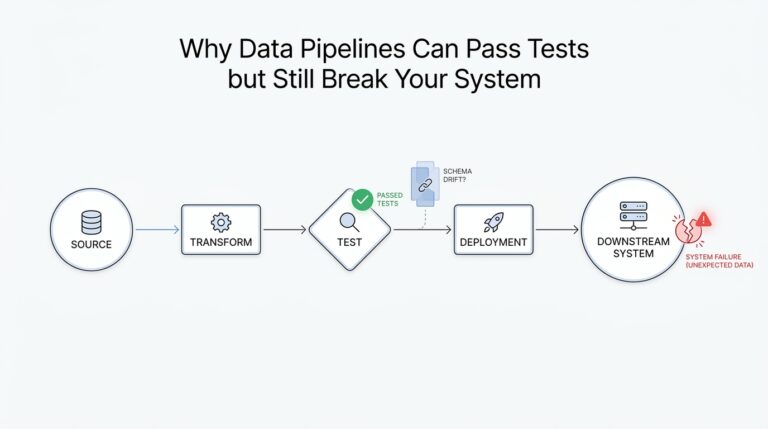
Once validation is in place, schema handling becomes the next layer of protection. A schema is the blueprint of a dataset: it describes the fields, their types, and how they fit together. Schema handling means deciding what the pipeline should do when that blueprint changes, which is common in real systems because teams add fields, rename columns, or alter data types over time. This change is often called schema drift, and it is one of the most common reasons a pipeline that looked fine last month suddenly starts breaking today.
So how do we handle schema drift without turning the pipeline into a fragile guessing game? We define an expected contract, which is a shared agreement about what the incoming data should look like, and we compare each new batch or event against that contract. If a new optional field appears, we may accept it and pass it through. If a required field disappears or a data type changes, we may stop the load, quarantine the records for inspection, or route them into a fallback path. In interview terms, this is a strong signal that you are designing an ETL pipeline that can survive real change instead of assuming the source will stay still forever.
This is also where schema versioning earns its place. Schema versioning means tracking changes to the structure of the data over time so the pipeline can tell the difference between old and new formats. That idea matters because a pipeline may need to process yesterday’s data and today’s data at the same time, and those records may not share the exact same shape. By acknowledging versions, we can support smoother transitions, reduce surprise failures, and make backfills, which means reprocessing past data, much safer to run.
The most useful interview answer ties validation and schema handling to business impact. If the destination feeds finance reporting, we may choose strict validation and fail fast when something looks wrong. If the destination powers exploratory analytics, we may allow more flexibility while still logging schema changes and quarantining suspicious rows. That trade-off shows judgment, and judgment is what interviewers are really listening for when they ask how you would protect an ETL pipeline from messy data.
When we design this part well, we are no longer treating data as a raw stream that must be swallowed whole. We are giving the ETL pipeline a set of guardrails, a memory for structure, and a way to react when the world changes underneath it. That makes the next step, loading the curated data into its final home, feel much safer and much easier to defend.
Plan Orchestration and Recovery
With validation and schema handling in place, the ETL pipeline can finally begin to feel like a system instead of a pile of steps. Now we need to decide how those steps run together, which ones wait for others, and what happens when something breaks halfway through the journey. This is where pipeline orchestration and recovery come in, and it is often the part that separates a neat design from one that can survive a real production day. If you are asking, how do I plan orchestration and recovery in an ETL pipeline? the answer starts with treating the pipeline like a sequence of dependent promises.
Orchestration is the coordination layer that tells each part of the ETL pipeline when to start, what it depends on, and how the pieces fit together. A workflow engine, which is software that schedules and manages tasks, often sits in this role like a conductor guiding an orchestra. Instead of letting every job run whenever it wants, orchestration keeps the pipeline in order: extract first, validate next, transform after that, and load only when the earlier pieces are ready. In interviews, this is a powerful place to show structure, because it proves you understand that data movement is not only about code, but also about timing.
The easiest way to picture orchestration is as a map of doors that only open in the right order. A dependency is one task that must finish before another can begin, and a directed acyclic graph, or DAG, is a visual way to show those dependencies without loops. That may sound technical, but the idea is familiar: you cannot pack a suitcase before you have chosen what to bring, and you cannot publish a dashboard before the tables behind it are loaded. When we design an ETL pipeline this way, we make the logic visible, which helps both engineers and interviewers trust the flow.
Recovery is the other half of the story, because even a well-planned ETL pipeline will eventually face a failed job, a timeout, a bad file, or a source system that disappears for an hour. Recovery means deciding how the pipeline responds when that happens. Do we retry, which means run the same step again after a short wait? Do we skip the broken record and keep going? Do we stop the entire run and alert someone immediately? These choices matter because recovery is not only about fixing errors; it is about deciding how much damage an error is allowed to do.
A strong recovery plan usually includes retries, checkpoints, and idempotency. A checkpoint is a saved progress marker that tells the pipeline where it left off, so it does not need to begin from the very start. Idempotency means that running the same step more than once produces the same final result, which protects us from duplicates when a job is replayed after failure. These ideas are especially important in ETL pipeline design because they let us recover with confidence instead of worrying that a second run will corrupt the destination tables or double-count records.
We also need to think about where failed data goes while we investigate it. A quarantine area, sometimes called a dead-letter queue, is a holding place for records that could not be processed safely. That gives the rest of the pipeline room to keep moving while we inspect the problem, instead of forcing every small error to block the whole batch. In an interview, this is a useful detail because it shows you are designing for operations, not only for happy-path execution. It also shows that you understand the trade-off between strictness and resilience, which is one of the quiet themes of ETL pipeline work.
The best orchestration and recovery plans make failure feel expected rather than shocking. We define the task order, we set clear dependencies, we retry when failure looks temporary, and we stop or quarantine when the data itself is unsafe. We also pair those mechanics with monitoring and alerts so someone knows when a pipeline is drifting off course instead of discovering it the next morning. By the time you explain this in an interview, the ETL pipeline no longer sounds like a fragile chain of scripts; it sounds like a managed process that can keep its footing even when the road gets rough.
Optimize Storage and Monitoring
After orchestration and recovery, the ETL pipeline still has one quiet job: keep storage efficient and keep the system visible. If you are asking, “How do we optimize storage in an ETL pipeline without making monitoring harder?” the answer is to shape the data around how people query it, then watch for the first signs that the shape is slipping. Storage optimization and monitoring work as a pair here, because the same choices that make data cheaper to read also make problems easier to spot.
For storage, the first lever is partitioning, which means splitting a large table into smaller pieces based on a column such as time. Google Cloud documents that partitioning can improve query performance and control cost by reducing the bytes read, because queries can skip partitions that do not match the filter. Clustering goes one step further by grouping similar values together inside storage blocks, so filters can prune even more data. In interview terms, we choose these patterns based on access behavior: daily reporting usually fits time partitions, while filters on customer, region, or product may benefit from clustering.
The next lever is file layout, because storage can look fine on paper and still perform badly if it is fragmented. Microsoft Fabric guidance warns that a large number of small Parquet files, which is a columnar file format that speeds up queries, creates overhead and hurts performance, and it recommends keeping file sizes balanced so the engine can scan efficiently. The lesson for an ETL pipeline is to batch writes sensibly, compact when needed, and avoid turning every retry or micro-batch into another tiny file. That kind of detail sounds small, but in practice it is often the difference between a pipeline that feels calm and one that slowly drifts into clutter.
Once storage is under control, monitoring becomes the next safety net. Airflow’s official documentation shows the shape of good pipeline monitoring: logs for tasks, metrics for failures and duration, and callbacks that can notify us when a task fails or hits a deadline. Airflow also supports health checks and real-time error notification integrations, which is a useful reminder that observability is not one tool but a set of signals working together. When we explain this in an interview, we sound like people who know that a healthy ETL pipeline does not only run; it also tells the truth about how it is running.
The most useful monitoring story is usually the simplest one. We want to know how long tasks take, how often they fail, and how far behind schedule the pipeline gets, because those signals tell us whether storage choices or workload growth are starting to strain the system. Airflow exposes metrics such as task duration, task failures, and schedule delay, which gives us a clean way to talk about backlog before it becomes an outage. If storage is the warehouse shelf, monitoring is the set of bright labels and motion sensors that tell us when the shelf is filling up too fast.
That is why a strong interview answer ties the two ideas together instead of treating them as separate chores. We choose partitions and clustering to make reads cheaper, we compact files to avoid storage noise, and we watch metrics and alerts so the pipeline can tell us when the design stops fitting reality. Once you can explain those choices clearly, the ETL pipeline sounds less like a pile of scripts and more like a system that can stay healthy after it goes live.