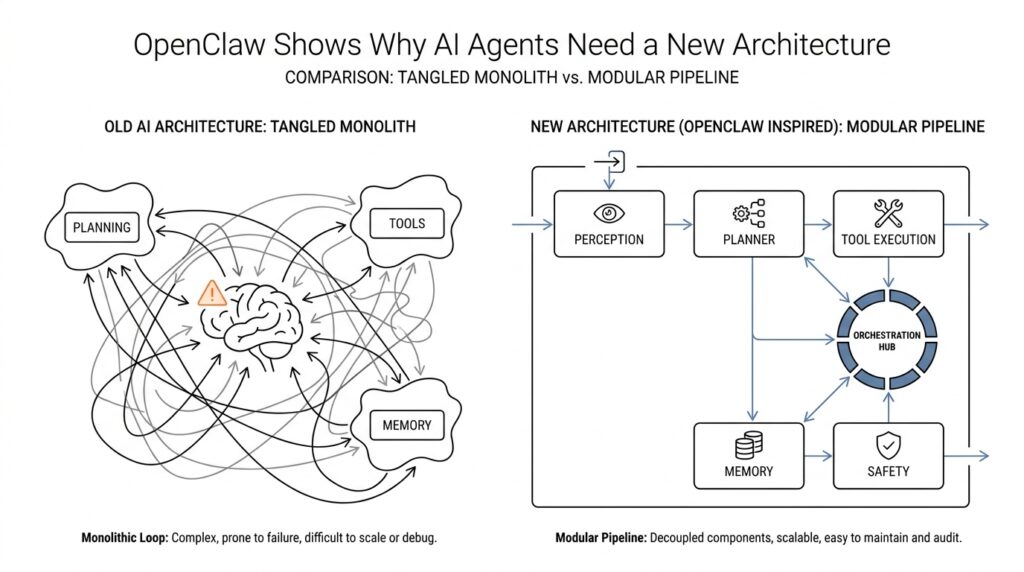
Why Old Agent Designs Fail
When people first build an AI agent, the failure usually feels mysterious: the assistant sounds smart for one turn, then forgets the plan, misses the tool it needed, or acts as if the last five minutes never happened. That is the core reason old agent designs fail. They were often built like chatbots wearing a backpack of extras, while real agents need an AI agent architecture that can remember, plan, and act across time. OpenClaw’s docs make that gap explicit: chatbots are reactive and session-bound, while agents need persistent memory, tools, multi-step reasoning, and proactive behavior.
The first weak spot is memory. Old designs usually treat each exchange like a clean slate, which works fine for a one-off question but breaks the moment a task stretches over hours or days. You can think of it like trying to run a project while carrying every note in your head instead of keeping a notebook on the desk. OpenClaw’s agent model separates short-term context from long-term storage, and its docs describe memory as a distinct layer rather than an optional add-on. That separation matters because an AI agent design that cannot preserve state will repeat itself, contradict itself, and lose the thread the instant the conversation moves on.
The second failure is action. A plain language model can talk about sending the email, checking the file, or looking up the answer, but it cannot reach into the world by itself. Old agent designs often stop at text generation, which means the model describes work instead of doing it. OpenClaw’s tool layer exists specifically to solve that problem: the agent issues a tool call, OpenClaw runs it in a sandboxed environment, and the result comes back for the agent to use in its next step. In other words, the agent stops pretending to work and starts actually working.
Then comes planning, and this is where many early systems quietly fall apart. A single response is not the same thing as a task plan, because real work needs decomposition: first gather information, then choose a path, then verify the result, then continue. OpenClaw describes older chatbot-style behavior as “single response” planning, while agents need multi-step reasoning and task decomposition. That difference sounds small until you watch a system get halfway through a job and then restart from scratch, or re-ask for information it already had. The architecture is the problem, not the prompt. That is an inference from the design model OpenClaw documents, but it matches the behavior you see in practice.
A fourth weakness is the interface itself. Old designs often assume one chat window, one workflow, and one kind of user interaction, but real life does not stay that tidy. You may start in Slack, continue in email, finish in a browser, and still expect the same agent to know it is all one job. OpenClaw’s channel layer exists for exactly this reason, and its docs describe more than 50 channel integrations plus support for multiple agents with different models, skills, and memory stores. Once you see that, the limitation of older designs becomes obvious: they are built for a single doorway, while real agents need to live in a house with many doors.
There is also a safety problem hiding inside the architecture problem. When an agent has broad access to files, services, and persistent state, the blast radius grows fast if the system is not designed with clear boundaries. A recent safety analysis of a live OpenClaw instance found that broad privileges and persistent state across capability, identity, and knowledge create a larger attack surface than sandboxed evaluations capture. That is another reason old agent designs fail: they treat access as a detail, when it is really part of the core design. If we want agents that can work reliably in the real world, we have to stop bolting intelligence onto a chatbot shell and start treating memory, tools, channels, and security as one connected system.
OpenClaw’s Core Architecture
Now that we have seen where older agent designs crack, the next question is the one that really matters: what does a better blueprint look like? OpenClaw’s core architecture answers that by treating an AI agent architecture as a working system, not a single conversation. Instead of one giant prompt doing all the heavy lifting, the agent is built like a workshop with separate stations for thinking, remembering, acting, and moving across contexts. That separation matters because real work rarely stays in one place for long.
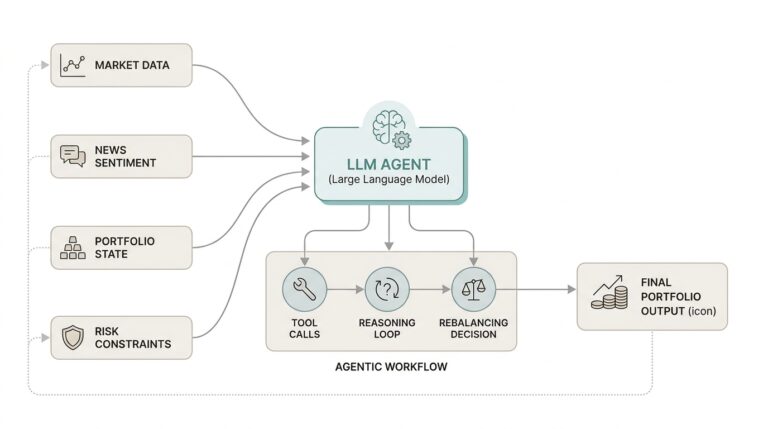
The center of that workshop is a loop, and the loop is what turns a model into an agent. The system observes what is happening, decides what matters, takes an action, and then checks the result before moving again. You can picture it like cooking a meal: you taste, adjust, and taste again instead of following one line of instructions and hoping for the best. In OpenClaw, that control flow is the quiet engine behind the experience, because it keeps the agent from behaving like a one-shot responder and helps it behave like something that can follow through.
Memory sits beside that loop like a notebook opened on the desk. Short-term context holds the thread of the current task, while long-term memory keeps durable information that should survive beyond one exchange. That distinction sounds small, but it changes everything when a task stretches across time, devices, or channels. Without that separation, the agent keeps rebuilding the same picture from scratch, which is why a thoughtful AI agent architecture has to treat memory as a first-class layer rather than a hidden storage drawer.
Tools are where the architecture stops talking about work and starts doing it. The model can decide that it needs to search, calculate, edit, or fetch something, but the tool layer is what actually carries out the action in a controlled environment. Think of it like a painter who can sketch the plan, then reaches for the right brush instead of trying to paint with words alone. In OpenClaw, that handoff between reasoning and execution keeps the system grounded, because the agent can move from intention to result without pretending that language itself is the action.
Channels widen the stage so the agent is not trapped in one narrow interface. A channel is the place where the agent meets the outside world, whether that means a chat window, email, or some other service that carries the conversation forward. This is where OpenClaw starts to feel less like a chatbot and more like an operating system for work, because the same core intelligence can travel across different environments without losing the thread. And once we add multiple agents with different strengths, the architecture begins to look less like a lone speaker and more like a coordinated crew.
That coordination is the real lesson hidden inside OpenClaw’s core design. The system does not ask one layer to do everything; it lets each layer carry a clear responsibility and then connects them through a steady control loop. Memory remembers, tools act, channels deliver, and the agent loop keeps the whole process moving in order. When we look at AI agent architecture through that lens, the shape of the solution becomes easier to trust, because the agent is no longer improvising every step from a blank slate. It has a structure that can carry the next task, and the next one after that.
Building the Agent Loop
When you start building an agent, the hard part is not picking a model; it is deciding what happens after the first message arrives. OpenClaw treats that decision as the agent loop, the full run that carries a message from intake to context assembly, model inference, tool execution, streaming replies, and persistence. In practice, that loop is what turns an AI agent architecture from a clever prompt into a system that can keep its footing across time. What happens after the model answers, and how does it remember where it left off? That is the question the loop is built to answer.
Think of the loop like a kitchen line with stations arranged in order. First we receive the ticket, then we gather the ingredients already on hand, then we cook, taste, and plate, and only after that do we clean the station and save what mattered for next time. OpenClaw’s loop follows that same rhythm: it validates the request, resolves the session, prepares the workspace, assembles the system prompt, and then runs the model with the right context already in place. That sequence matters because a reliable AI agent architecture depends on order as much as intelligence.
The next piece is concurrency, and this is where many first attempts get messy. OpenClaw serializes runs per session, and it can also route them through a global lane so tool calls and session history do not collide with one another. It also uses a session write lock before transcript changes, which keeps separate writers from trampling the same memory at the same time. In plain language, the agent does not try to juggle every turn at once; it waits its turn so the thread of work stays intact.
Once the loop reaches action, tools become the agent’s hands. OpenClaw says everything beyond text generation happens through tools, and those tools can read files, run commands, browse the web, send messages, or interact with devices. The model does not perform the action itself; it decides which tool to call, and the platform carries that call out in a controlled way. Skills add another layer here by telling the agent when and how to use those tools, while plugins package capabilities so the loop can stay clean instead of becoming a tangle of special cases.
This is also where hooks make the loop feel alive instead of rigid. OpenClaw exposes checkpoints before model resolution, before prompt building, before tool calls, after tool calls, and at the end of an agent run, so you can shape behavior without rewriting the whole system. That gives you a practical kind of control: you can inject context, block a risky action, or adjust the final reply at the exact moment it matters. For a beginner, the important idea is that a strong AI agent architecture leaves room for intervention at the seams, not only at the center.
Memory has its own quiet rhythm inside the loop, and that rhythm prevents the agent from losing the plot. OpenClaw’s memory layer includes memory_search for finding relevant notes and memory_get for reading specific files or lines, and its automatic memory flush writes important context before compaction happens. The docs also say retries reset in-memory buffers and tool summaries so the agent does not produce duplicate output. That combination is easy to miss, but it is one of the reasons the loop can support long, messy work instead of only short chat turns.
By the time the reply reaches the user, the loop has usually done more than generate text. It has streamed assistant and tool events, shaped the final payload, and buffered chat output so the conversation still feels smooth on the outside even though a lot happened underneath. That is the real lesson in building the agent loop: you are not wiring a single response, you are designing a repeatable cycle that can think, act, recover, and continue. Once you see AI agent architecture that way, the loop stops looking like plumbing and starts looking like the heartbeat of the whole system.
Adding Memory and Tools
Once the loop can think and respond, the next question is whether it can carry anything from one moment to the next. That is where memory and tools enter the picture, and they change an AI agent architecture from a talking machine into a working one. What do you do when the task stretches across a morning, a week, or several apps at once? You give the agent a notebook for remembering and a toolbox for acting, because language alone cannot hold everything or do everything.
Memory is the notebook, but it helps to be precise about what kind of notebook we mean. Short-term context is the small stack of notes the agent keeps open for the current task, while long-term memory is the durable storage that survives after the conversation moves on. In plain language, short-term context is what the agent is paying attention to right now, and long-term memory is what it should not forget later. That separation matters because a strong AI agent architecture needs both: one layer to stay focused, and another layer to keep useful facts from evaporating.
This is where many early designs stumble. They treat memory like a hidden drawer, when it really behaves more like the working surface of a desk. If the agent cannot retrieve the right note at the right time, it will repeat questions, lose decisions, or rebuild the same plan again and again. OpenClaw’s approach makes memory a first-class part of the system, which means the agent can remember user preferences, task history, and prior outcomes without pretending that every exchange is brand new.
Tools solve the other half of the problem, because remembering something is not the same as doing something about it. A tool is any external capability the agent can call, such as searching, reading a file, sending a message, or running a command. When the model decides it needs one, it does not perform the action through words; it makes a tool call, and the platform carries out the work in a controlled environment. That handoff is the difference between an agent that describes a next step and an agent that actually takes it.
The best way to think about this is that memory tells the agent why it is here, and tools let it move in the world. Suppose the agent remembers that you wanted a report updated before lunch. It can pull that goal from memory, use a tool to inspect the latest file, call another tool to calculate or transform the data, and then store the result so it does not have to rediscover the same information later. In an AI agent architecture, memory and tools are not separate features bolted on after the fact; they are paired capabilities that let the system stay oriented while it acts.
That pairing also keeps the agent more reliable for beginners and advanced users alike. If the model only has memory, it can recall plans but remain trapped in text. If it only has tools, it can act but forget why it acted or what happened before. OpenClaw’s design avoids that split by letting the agent remember across sessions and reach outward through tools in the same flow, which is why the system feels more like an assistant with continuity than a chatbot with a few extra buttons. Once you see memory and tools working together, the rest of the architecture starts to make more sense, because the agent is no longer guessing from scratch each time it speaks.
Locking Down Permissions
When we get to permissions, the story shifts from capability to restraint. An AI agent architecture can remember, plan, and act, but that power only feels trustworthy when we decide where the agent may step and where it must stop. In OpenClaw, the workspace is the agent’s home directory, but it is not a hard sandbox by itself; true containment comes from sandboxing, workspace access settings, and keeping ~/.openclaw/ private so config, credentials, and session data do not spill into the wrong places. That is why locking down permissions is not an afterthought here—it is part of the shape of the system.
The first thing to notice is that OpenClaw splits permission checks into layers, and that split is what prevents a lot of confusion. A tool can look allowed in the agent settings and still fail if the sandbox has its own tool filter, because tools.sandbox.tools has to permit it too. The same goes for networking: Docker sandboxes run with network access off by default, so a web tool can be present on paper and still go nowhere in practice. What feels like a mystery at first is really the system protecting itself by requiring both the invitation and the doorway to be open.
That layered design becomes even clearer when the agent reaches for the host machine. OpenClaw’s exec approvals act as a guardrail for shell commands, and they only let a command run when policy, allowlist, and optional user approval all agree; if elevated mode is set to full, approvals are skipped, but that is the broadest and riskiest path. The docs also say the effective rule is the stricter combination of tools.exec.* and the approvals file, which means a local host setting can remain more restrictive than a session request. In plain language, the agent does not get to outrun the tightest rule in the room.
That same idea applies when we talk about trust over time, not just trust in a single turn. Exec allowlists are per agent, and host-local approval state can keep prompting even when a session prefers a softer policy like ask: "on-miss"; a local ask: "always" still wins. OpenClaw also gives you commands like openclaw approvals get, openclaw exec-policy show, and openclaw sandbox explain so you can see the effective policy instead of guessing at it. For anyone learning an AI agent architecture, that visibility matters because permissions are only useful when you can inspect the rules that are actually active.
OpenClaw extends the same mindset to message intake, which is easy to overlook because it happens before the agent does anything interesting. Its security model includes DM access modes such as pairing, allowlist, open, and disabled, and those policies can gate inbound direct messages before the message is processed at all. The docs also call out DM session isolation and secure DM mode, which shows that permissions are not only about files and commands; they also shape which conversations the agent is even willing to enter. That is a small detail with a big payoff, because a safer AI agent architecture blocks bad input at the door instead of hoping the model will sort it out later.
The practical habit, then, is to treat permission changes like infrastructure changes, not like cosmetic tweaks. If you update sandbox settings, OpenClaw recommends recreating runtimes so old containers do not keep running with stale rules, and the docs note that regularly used runtimes may otherwise survive indefinitely until they are explicitly refreshed. The security pages also say openclaw doctor can warn about weak file permissions and help tighten them, which is a nice reminder that the system is designed to catch common mistakes before they become habits. Once we start thinking this way, locking down permissions stops feeling like friction and starts feeling like the reason the agent can be powerful without becoming reckless.
Running Agents at Scale
Once the loop is in place, scale becomes a very different kind of problem. We are no longer asking whether one agent can answer a message; we are asking how an AI agent architecture stays orderly when many messages, many channels, and many sessions all want attention at once. OpenClaw’s answer is to treat each run as a serialized session, then add lanes, queues, and routing rules so the system can keep moving without tangling itself. That is what makes running agents at scale feel less like improvisation and more like orchestration.
The first thing that changes at scale is identity. In OpenClaw, one agent is not just a prompt with a label; it has its own workspace, agentDir, session store, and auth profiles, and multiple agents can live side by side in one Gateway. That matters because a support agent, a research agent, and a deep-work agent should not share the same mental drawer unless we explicitly choose to connect them. When people search for how to run agents at scale, this is the hidden answer: give each agent a clear home, then route traffic to it on purpose.
Then comes traffic control, which is where many systems either slow to a crawl or start stepping on their own toes. OpenClaw serializes inbound auto-reply runs through a queue, guarantees only one active run per session, and then caps overall parallelism through a global lane. How do you keep one agent from stepping on another when dozens of messages arrive at once? You let the queue decide who goes first, use modes like collect, steer, and followup to shape the flow, and keep messages from different channels or threads draining separately so the routing stays intact.
That routing layer matters even more when the same person talks to the agent in different places. OpenClaw routes direct messages, group chats, rooms, cron jobs, and webhooks into different session behaviors, and by default DMs share one session while group chats stay isolated per group and cron jobs start fresh each run. That design helps the agent preserve continuity where it should, but it also gives us a switch for DM isolation when multiple people can reach the same bot. In a busy deployment, that is the difference between a helpful shared assistant and a privacy problem waiting to happen.
Scale also means maintenance, because memory and transcripts can grow faster than we expect. OpenClaw bounds session storage over time with session maintenance settings, and it can run in warning mode or enforce automatic cleanup with limits like pruneAfter and maxEntries. Its memory tooling is also designed to work per configured agent, which keeps indexing and search from becoming one giant shared pile of notes. If the architecture is a library, this is the librarian’s job: keep the shelves usable so the agent can still find what matters tomorrow.
And as the number of agents rises, security stops being a side note and becomes part of capacity planning. Microsoft’s security guidance says OpenClaw should be treated as untrusted code execution with persistent credentials, and recommends isolated environments such as a dedicated virtual machine or separate physical system with non-privileged credentials. That warning is easy to overlook when you are focused on throughput, but it becomes more important, not less, as more agents gain access to files, apps, and accounts. A scalable AI agent architecture has to scale boundaries too, not only behavior.
What OpenClaw shows us is that scale is not just “more of the same.” It is a careful arrangement of sessions, agent identities, queues, routing rules, storage limits, and safety boundaries so the system can keep its shape under pressure. Once those pieces are in place, the agent does not feel bigger in a messy way; it feels steadier, because every new task enters a structure that already knows how to hold it.