Reactive vs Proactive Basics
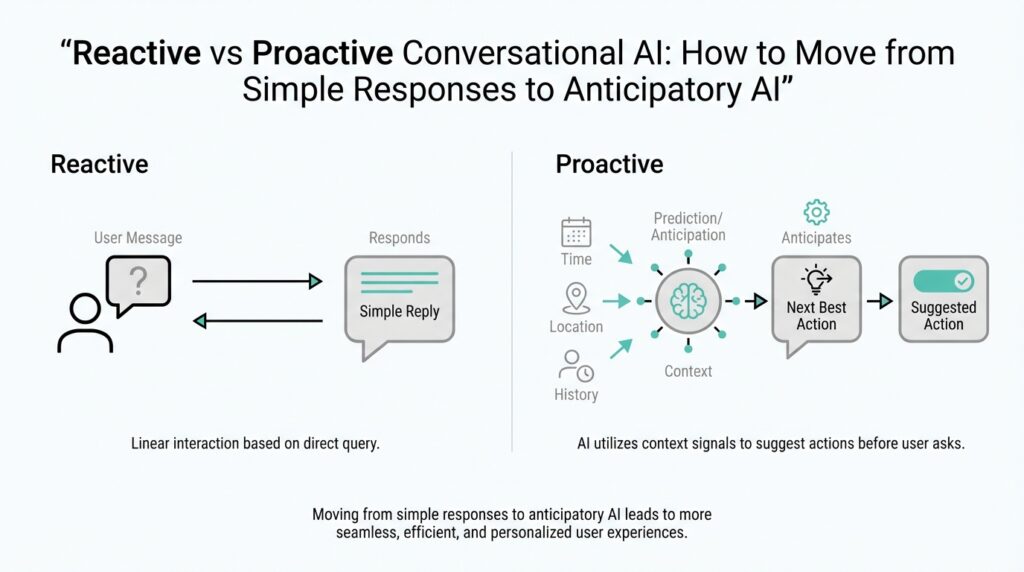
Building on this foundation, imagine you have just opened a chat with an AI assistant and you are waiting to see what it will do next. A reactive system is the type that waits for you to speak first, then answers the message in front of it. A proactive system, by contrast, can notice patterns, anticipate what you might need, and offer help before you ask. That difference is the heart of reactive vs proactive basics in conversational AI, and once you see it, the rest of the topic starts to make sense.
A reactive conversational AI works like a helpful shop clerk standing behind the counter. You ask a question, it listens, and it responds to that exact request. If you say, “What is my order status?” it looks up the order and gives you the answer, but it does not usually volunteer anything beyond that. This kind of conversational AI is valuable because it is predictable, focused, and easy to understand, which is why many beginner-friendly chatbots start here.
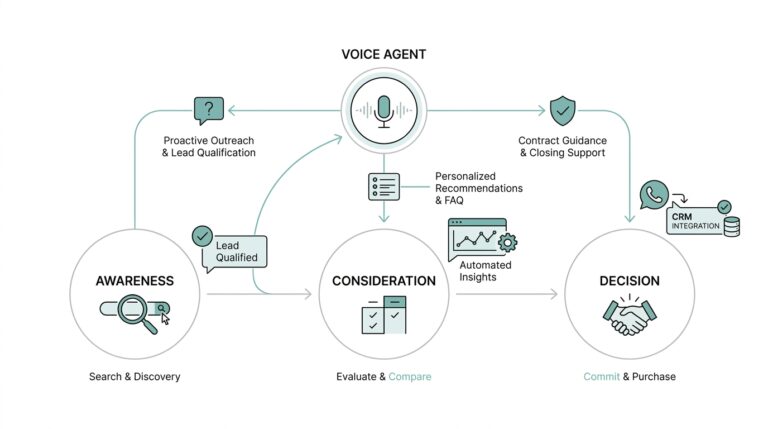
Proactive conversational AI behaves more like a thoughtful assistant who notices the bigger picture. Instead of waiting for every prompt, it uses context, history, or signals from the moment to decide whether to step in with a useful suggestion. For example, if you are asking about a delayed package, a proactive system might also mention the expected delivery window, a tracking link, or a refund policy before you remember to ask. That does not mean it is guessing wildly; it means it is using information it already has to reduce the number of back-and-forth turns.
So what does that mean in practice? Reactive and proactive conversational AI are not really opposites in a battle; they are two ends of a spectrum. Most real systems mix both behaviors, because a chat experience needs to be responsive first and anticipatory second. Think of it like cooking: a reactive assistant hands you the ingredients you request, while a proactive one also notices that you are making soup and suggests the stock, salt, or serving bowls you will probably need soon. The value comes from timing, not just intelligence.
When should you choose one approach over the other? If your goal is to answer clear questions with low risk, reactive design is often the safer starting point. It keeps the interaction simple, reduces unwanted interruptions, and gives the user control over the conversation. If your goal is to save time, reduce friction, or guide the user through a process, proactive behavior becomes more useful. In other words, reactive conversational AI is about responding well, while proactive conversational AI is about helping earlier and with less effort from the user.
This is where things get interesting for conversational AI design, because the best experiences often feel reactive on the surface and proactive underneath. You ask a question, and the system answers directly; then it quietly adds the one extra detail that keeps you moving. That balance can make an assistant feel attentive without feeling pushy, which is why thoughtful design matters so much. When you understand reactive vs proactive basics, you start to see that the real challenge is not choosing one forever, but deciding when the conversation should wait and when it should step forward.
Map Context Signals
Building on that foundation, the next question is not whether an assistant should react or act ahead of time, but how it knows which clues matter. That is where context signals come in: the pieces of information surrounding a conversation that help a conversational AI understand what the user probably needs next. Think of them like the little details a good host notices at a dinner table—who arrived late, who has an empty glass, who is looking for the restroom—before anyone has to ask. When we map context signals well, proactive conversational AI starts to feel helpful instead of random.
The first step is to separate the signals the user gives on purpose from the ones the system notices in the background. Explicit signals are direct clues, like a typed question, a button click, or a chosen option. Implicit signals are softer clues, such as how long someone has been stuck on a page, whether they opened the same help article twice, or whether their last three messages all point toward the same goal. In conversational AI design, both matter, but they do not carry the same weight. The clearer the signal, the more confidently the system can respond.
Once you can name the clues, the next step is to map them into categories. Some context signals describe intent, which means the user’s goal; others describe state, which means what is happening right now; and others describe history, which means what has already happened in the session or across earlier sessions. Imagine a travel assistant noticing that you asked about flights, then baggage rules, then airport transfer times. Those signals all point in the same direction, and the system can begin to see a trip planning task instead of three separate questions. That is the practical heart of mapping context signals: turning scattered data into a readable story.
How do you decide which context signals should trigger a proactive conversational AI response? We start by asking whether the signal changes the likely next step. If a user is filling out a form and pauses on a payment step, that pause may matter more than a general browsing pattern. If a customer repeatedly checks an order status page, the system may infer uncertainty and offer tracking details or support options. This is not about reading minds; it is about weighing evidence. A strong proactive system uses a few meaningful signals, not a flood of noisy ones.
That is why context signals also need priority. Not every clue should push the assistant to speak, and not every signal deserves equal attention. A recent message from the user may matter more than an old preference saved in a profile, while a delivery delay may matter more than the color scheme they chose last month. One useful way to think about this is a spotlight: the most relevant signals sit in the beam, while the rest stay in the shadows unless the situation changes. This kind of prioritization keeps proactive behavior timely, calm, and useful.
We also need to think about where the signals come from, because source matters almost as much as content. Some context signals live in the conversation itself, while others come from the product, the device, the time of day, or the user’s past behavior. A support assistant, for example, might use the current chat, the account status, and the open ticket history together to decide whether to ask a follow-up question or offer a shortcut. When these sources are mapped clearly, the assistant can move from reactive conversational AI toward a more anticipatory experience without losing the user’s trust.
The real payoff comes when you treat context signals like a map rather than a pile of clues. A map shows relationships, distance, and direction, so the assistant can decide not only what is happening, but what should happen next. That is the difference between an answer that lands and an answer that guides. With that map in place, we can start looking at how to turn those signals into timing, thresholds, and actions.
Predict User Intent
Building on this foundation, we now move from spotting signals to making sense of them. A conversational AI can collect clues all day long, but that does not mean it understands what the person wants. The real shift happens when the system begins to infer user intent, which means recognizing the goal behind the words instead of stopping at the words themselves. Think of it like hearing someone say, “I’m cold,” and realizing they may want a blanket, not a weather report.
That is why intent matters so much in proactive conversational AI. If you only react to the last message, you may answer accurately but miss the bigger moment. If you can read the pattern behind the request, you can offer the next helpful step before the conversation stalls. How do you know what someone is likely to do next? You look for consistency across the question, the context, and the path they have taken so far.
This is where intent prediction starts to feel less like guessing and more like careful listening. A support chatbot, for example, might hear a user ask about a failed payment, then notice they have also opened help articles about card verification and billing updates. Together, those clues suggest the person is trying to complete a purchase, not just asking for information. In a conversational AI system, that insight can trigger a more useful response, such as offering payment troubleshooting or a direct path to update billing details.
To make that work, we need to separate surface language from underlying purpose. Surface language is the exact sentence the user types, while purpose is the reason they typed it. A question like “Where is my package?” might sound simple, but the intent could be tracking an order, reporting a delay, or checking whether a gift will arrive on time. Once you start looking for purpose, proactive conversational AI becomes better at meeting people where they are instead of making them repeat themselves.
Of course, intent is not always obvious, and that is part of the challenge. Sometimes the same words can lead to very different goals, especially when the user is frustrated, rushed, or vague. In those moments, a good system does not pretend to know more than it does. It uses the strongest available context signals, assigns them a confidence level, and decides whether to answer directly, ask a clarifying question, or offer a likely next step. That balance keeps the experience helpful without becoming intrusive.
The best way to think about this is through probability rather than certainty. A strong conversational AI does not need perfect insight; it needs a good enough sense of what is most likely true. If a user asks about delivery after checking the same order page three times, the system can reasonably assume concern about shipment status. If the same user then opens refund information, the likely intent may be shifting toward resolution options. This is why intent prediction works best as a moving estimate, updated every time the conversation changes.
Once we can infer intent well, the assistant can act with more confidence and less friction. It can surface the right answer, suggest the next step, or remove a small obstacle before the user has to ask for help. That is the heart of conversational AI that feels attentive: it does not wait passively, but it also does not rush ahead without evidence. As we discussed with context signals, the goal is not to overwhelm the user with cleverness, but to make the next turn feel natural, timely, and useful.
Build Memory Layers
Building on this foundation, memory layers are where a conversational AI stops feeling like a goldfish and starts feeling like a companion that remembers the shape of the journey. The idea is straightforward: not every piece of information should live in the same place or last for the same amount of time. A good system keeps a few things in immediate reach, stores some things for later in a session, and saves only the most useful facts for the long term. That layered approach is what lets proactive conversational AI feel helpful without becoming overloaded or forgetful.
The first layer is often called working memory, which means the small amount of information the system is actively using right now. Think of it like the notes you hold in your hand while cooking: the next ingredient, the current step, and the stove setting all matter, but the full recipe book does not need to sit open on the counter. In conversational AI, working memory might include the user’s last message, the current task, and the most recent context signals. This layer keeps the assistant focused, fast, and able to respond coherently from one turn to the next.
Once the conversation stretches out, session memory comes into play, and this is where the assistant keeps track of what has happened during the current visit. Session memory is temporary memory that lasts for one conversation or one app session, like a notebook you carry from room to room while solving a problem. If a user says they need a refund, then later asks about shipping, the assistant can remember that both questions belong to the same support request. Without this layer, conversational AI would keep asking the same follow-up questions and make the experience feel clumsy.
The next layer is longer-term memory, which stores stable facts that help the assistant feel consistent across visits. These are the kinds of details that do not change every minute, such as a user’s preferred language, a saved communication style, or a recurring goal like “I’m planning a trip next month.” The trick is to store only what is genuinely useful, because memory in conversational AI should behave like a well-organized filing cabinet, not a junk drawer. If you save too much, the system becomes noisy; if you save too little, it feels like every conversation starts from zero.
How do you decide what deserves to be remembered? We start by asking whether the memory will help the next conversation become clearer, faster, or more personal. A one-time complaint may belong in session memory, while a preferred delivery address or a consistent accessibility need may belong in long-term memory. This is where memory layers support proactive conversational AI in a careful way, because the system can anticipate needs based on stable preferences instead of guessing from one-off messages. The goal is not to remember everything; the goal is to remember the right things.
It also helps to separate factual memory from behavioral memory. Factual memory stores explicit information, like a chosen time zone or account setting, while behavioral memory records patterns, like a user often asking for summaries or preferring short answers. These two types work together, but they should not carry the same weight. A strong conversational AI uses behavioral memory as a suggestion, not a command, because people’s habits can change from day to day.
Privacy and trust matter here more than almost anywhere else. If memory feels hidden, permanent, or uncontrolled, the assistant can quickly become unsettling instead of useful. That is why good memory layers need clear limits, visible controls, and a sensible expiration policy, which means rules for when information should fade away or be removed. When users know what the system remembers and why, they are more likely to accept proactive help because it feels earned rather than invasive.
When these layers work together, the assistant no longer treats every message as a new puzzle. It can answer the current question, recall the useful parts of earlier context, and carry forward the details that make future help smoother. That is the quiet power of memory layers in conversational AI: they turn isolated replies into an ongoing relationship. And once memory is organized this way, we can start using it to support timing, personalization, and more confident next-step suggestions.
Design Proactive Triggers
Building on this foundation, the next challenge is not collecting more signals but deciding when a proactive conversational AI should speak up. That moment matters more than it first appears, because a trigger is the bridge between quiet observation and useful action. If the bridge is too short, the assistant interrupts too often; if it is too long, the help arrives after the moment has already passed. So how do you design proactive triggers that feel timely instead of pushy? You start by treating each trigger like a carefully timed knock on the door, not a shout from the hallway.
A good trigger begins with a clear event, which is simply something meaningful that happens in the conversation or product flow. That event might be a user pausing on a checkout page, opening the same help article twice, or returning to the same unresolved question after a delay. In proactive conversational AI, events matter because they tell us when the user may be stuck, uncertain, or ready for the next step. We are not trying to react to every tiny movement; we are looking for moments that change the odds of what the user needs next.
Once we have an event, we need a threshold, which means the line at which the system decides, “Now we have enough evidence.” Think of it like filling a cup: one drop does not spill over, but enough drops together create a clear signal. A single page visit may not mean much, but repeated visits, a long pause, and a related question can add up to a strong case for action. This is where context signals become practical, because the assistant is no longer reading them one by one; it is weighing them together to decide whether to step in.
The best proactive triggers are rarely based on one signal alone. They usually combine state, behavior, and timing so the system can tell the difference between curiosity and friction. For example, a user who is browsing shipping information after placing an order may simply be checking details, while a user who keeps returning to the same tracking page after a delay may be signaling anxiety. That distinction is important in conversational AI design, because a helpful nudge depends on the difference between “I’m looking around” and “I’m waiting and worried.”
Timing also needs a sense of restraint. If the assistant interrupts too early, it can feel overeager; if it waits too long, it misses the moment when help would have been most useful. One useful approach is to pair triggers with a short delay or a cooldown period, which is a pause that prevents the system from repeating itself too quickly. This keeps proactive conversational AI from feeling chatty in the wrong way and gives the user space to keep working before the assistant steps in.
It also helps to decide what kind of action each trigger should produce. Not every trigger should launch a full response, because sometimes the best move is a quiet suggestion, a helpful shortcut, or a single clarifying question. A support assistant might offer a tracking link, a form assistant might highlight the missing field, and a shopping assistant might suggest size guidance when the user hesitates on a product page. The trigger matters, but the response matters just as much, because good design turns awareness into a next step the user can actually use.
Another piece of the puzzle is control. Users should always have a way to dismiss, delay, or disable proactive help, because a trigger that cannot be managed starts to feel like a trap instead of a service. In practice, that means designing with transparency, so the assistant’s behavior feels understandable rather than mysterious. When users can predict why the system intervened, they are more likely to trust it, and trust is what makes proactive conversational AI worth using in the first place.
The final test is whether the trigger improves the conversation without stealing the user’s attention. A strong design feels like a gentle handoff: the assistant notices a likely need, waits for the right cue, and offers help that fits the moment. When you design proactive triggers this way, you are not teaching the system to interrupt more often; you are teaching it to intervene with better judgment. And that is what turns context signals, memory, and intent into a conversational experience that feels genuinely attentive.
Measure Quality and Safety
Once the assistant starts stepping in on its own, the question changes from “Can it act?” to “Should it act here, and did that help?” That is where measuring quality and safety becomes the real work of proactive conversational AI. You are no longer grading a single answer; you are checking whether the whole interaction felt useful, calm, and trustworthy. Think of it like testing a helpful guide who sometimes points things out before you ask: the guide is only good if the suggestions land at the right time and never lead you somewhere unsafe.
Quality starts with usefulness, because a proactive response that arrives early but solves nothing is still a miss. One way to measure that is through task success, which means whether the user actually completed the goal they came for. We can also look at resolution rate, which tells us how often the assistant solved the issue without forcing extra back-and-forth. In conversational AI, these numbers help us see whether the system is reducing friction or just adding more words.
But quality is not only about the final outcome. It is also about timing, which is often the difference between a thoughtful nudge and an annoying interruption. If the assistant speaks too soon, users may ignore it; if it waits too long, the moment passes. So we measure things like interruption rate, which shows how often the system interrupts when the user did not need help, and acceptance rate, which shows how often people actually use the suggestion. How do you know if a proactive conversational AI is helping rather than hovering? You watch whether people choose its advice and keep moving.
Safety asks a different question: could this response cause confusion, frustration, or harm? That includes obvious risks, like giving the wrong answer, and quieter ones, like exposing private information or sounding overly certain when the system is unsure. A safe assistant should know when to stop, when to ask a clarifying question, and when to hand off to a human. In practice, we measure safety by tracking escalation quality, refusal accuracy, and error severity, because not every mistake has the same cost.
One useful habit is to separate harmless misses from risky misses. If a proactive suggestion is slightly off, the user may shrug and continue. If the same assistant predicts sensitive intent too aggressively, reveals personal details, or nudges someone in a vulnerable moment, the failure matters much more. That is why safety reviews should look at categories such as privacy, bias, compliance, and emotional tone. A proactive conversational AI should feel attentive, not intrusive; helpful, not nosy; confident, not reckless.
To make those measurements real, teams usually test on a set of scenarios before launch. These scenarios are like rehearsal scenes in a play: some are normal, some are messy, and some are deliberately tricky. We want to see how the assistant behaves when the user is vague, frustrated, or asking for something sensitive. This kind of evaluation helps us catch patterns such as over-triggering, under-triggering, or overconfident responses before they reach real users.
After launch, the picture gets richer because actual users reveal things lab tests cannot. You can compare proactive suggestions against later outcomes, watch opt-out rates, and see whether people keep engaging or quietly abandon the conversation. If users dismiss the assistant repeatedly, that is a clue that the quality bar is too low or the timing feels forced. If they accept the help and finish tasks faster, that is a strong sign the experience is working.
The best measurement practice combines numbers with human review. Metrics tell us where the system is behaving strangely, but human judgment tells us why. A reviewer can spot when a response is technically correct but emotionally clumsy, or when a suggestion is accurate but poorly timed for the situation. That balance matters in conversational AI, because the safest systems are not the ones that say the most; they are the ones that know when to speak, what to say, and when to stay quiet.
When you measure quality and safety together, you give proactive conversational AI a clear standard: help the user move forward without surprising them, overwhelming them, or putting trust at risk. That is the real goal behind all the metrics. We are not trying to prove the assistant is smart; we are trying to prove it is reliable in the moments that matter. With that standard in place, the next step is learning how to improve the system when the measurements show gaps.