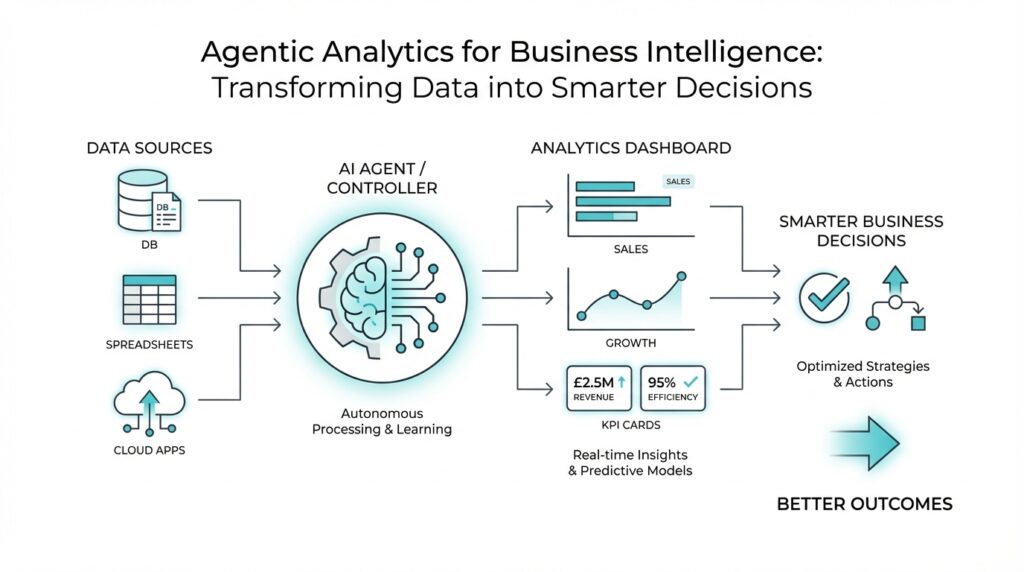
What Agentic Analytics Means
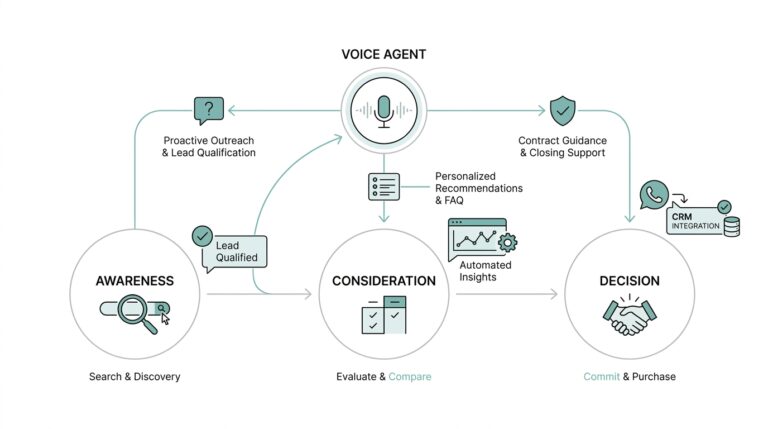
Imagine you open a dashboard and it tells you sales slipped, inventory rose, or customers started churning. Traditional business intelligence can show you that pattern, but it usually leaves the next move in your hands. Agentic analytics changes that rhythm. It is a way of working with data where AI agents do more than summarize what happened; they watch for signals, interpret the situation, choose a response, and can carry out that response on your behalf. In other words, agentic analytics turns reporting into action.
That word agent is the heart of the idea. A data agent is not a passive report or a fixed dashboard; it is software designed to make decisions from data, adapt as conditions change, and operate with a degree of self-direction. Think of it less like a filing cabinet and more like a teammate who keeps an eye on the numbers while you focus on the bigger picture. The important shift is that the system does not wait politely for you to ask the right question. It can notice a change, weigh what it means, and move forward with the next step.
Of course, that does not mean we hand over the keys and disappear. The best version of agentic analytics still depends on clear business rules, trusted definitions, and human oversight. A semantic layer, which is a business logic layer that sits between raw data and analytics tools, helps define metrics, joins, security rules, and other shared meanings so the agent is working from the same playbook as the business. That is what keeps the system from guessing wildly and helps it produce repeatable, governed results instead of clever-sounding ones. In practice, agentic analytics is strongest when it augments people, not when it tries to replace them.
So what does that look like in daily work? Picture a retail team watching stock levels across hundreds of products. A traditional tool might flag the issue and wait for someone to act, while an agentic system can notice that a popular item is running low, trigger a replenishment workflow, and help prevent a stockout before customers feel it. Microsoft has also described agents that help marketers gather and interpret data far faster, shrinking a task that once took hours into seconds. The pattern is the same in both cases: the value comes not from prettier charts, but from faster movement between insight and execution.
That is why agentic analytics matters so much for modern business intelligence. It sits at the point where analytics stops being a place you visit and starts becoming a capability that acts inside your workflow. Once that clicks, the phrase becomes much less mysterious: you are still using data, but now the system can help carry the weight of routine decisions, surface the next best action, and keep momentum going while the work is still happening. With that foundation in place, we can look at how these systems fit into the tools and processes you may already use.
Build a Trusted Semantic Layer
Building on this foundation, the next challenge is making sure the system speaks one clear business language. Imagine your sales team, finance team, and AI agent all asking the same question—What were revenue and margin last week?—and getting three slightly different answers. That is where a semantic layer, a business translation layer between raw data and analytics tools, becomes the quiet hero of agentic analytics. It turns scattered tables into shared meaning, so business intelligence does not wobble every time someone changes a dashboard or writes a new query.
A trusted semantic layer does more than label columns. It defines the metrics people rely on, such as revenue, active customer, or churn, so everyone uses the same formula instead of inventing their own. It also handles joins, which are the rules for connecting tables together, so the system knows that an order belongs to a customer and not to a warehouse. When these definitions live in one place, your agentic analytics workflow can move faster without drifting into guesswork, because the AI agent is reading from the same playbook as the rest of the business.
How do you build trust into something that sits between the data and the decision? We start by treating the semantic layer like a contract, not a convenience. That means naming metrics carefully, writing business definitions in plain language, and keeping the logic versioned so changes are visible instead of hidden. It also means setting row-level security, which limits who can see which records, so a regional manager sees their territory while the agent stays within the right boundaries. In other words, trust grows when the system is both understandable and controlled.
This is where many teams feel the tension between speed and governance. On one hand, agentic analytics is powerful because it can act quickly; on the other hand, quick action is risky if the definitions are loose. A strong semantic layer resolves that tension by making the rules reusable across reports, self-service dashboards, and automated agents. If a marketer asks for campaign performance, and an operations lead asks the same thing, both should land on the same answer, because the business meaning has already been settled upstream.
Think of it like a recipe kitchen. If every cook uses a different definition of “a cup,” the final dish changes every time, even if the ingredients look the same. A semantic layer gives you standard measures, standard filters, and standard access rules, so the recipe stays consistent whether a person is cooking or an AI agent is preparing the first draft. That consistency matters even more in agentic analytics, because the agent may trigger actions, not just display insights. When the definition of a metric is stable, the action built on top of it is far less likely to misfire.
As we discussed earlier, the promise of agentic analytics is not prettier charts; it is faster movement from insight to action. The semantic layer is what keeps that movement grounded. It gives the agent context, protects sensitive data, and prevents the same metric from becoming a moving target across teams. Once that shared layer is in place, you can start connecting it to approvals, alerts, and workflows with much more confidence, because the numbers underneath those decisions finally mean the same thing to everyone.
Automate Data Quality Checks
Building on this foundation, the next question is practical: how do you keep trusted metrics from turning into polished but unreliable numbers? Automated data quality checks are the quiet guardrails here. Think of them like the checklist a pilot reads before takeoff: before the dashboard starts telling a story, the data needs to pass a few non-negotiable tests, such as whether required fields are present, keys stay unique, and values fall inside expected ranges. Great Expectations describes these checks as verifiable assertions, while Dataplex Universal Catalog and AWS Glue both provide built-in ways to define and enforce data quality rules in pipelines.
Once we start looking, the rules feel less mysterious. A missing customer ID is like a package without an address; duplicate order numbers are like two tickets with the same seat; an unexpected category value is a label that no longer matches the shelf. Tools such as Great Expectations, Dataplex Universal Catalog, and AWS Glue let you express these ideas as repeatable tests for nulls, uniqueness, row counts, and custom conditions. In Google Cloud’s Dataplex, for example, you can automate scans, validate data against defined rules, and log alerts when requirements are not met.
How do you keep the checks from becoming another manual chore? You schedule them. Great Expectations supports recurring validations through a schedule or orchestrator, and AWS Glue Data Quality can enforce checks in ETL pipelines both at rest and in transit. That means the test runs where the data already lives, instead of relying on someone to remember a spreadsheet review at the end of the week. In practice, automation matters because late checks are expensive checks: by the time a bad file has fed a report, the mistake has already multiplied across decisions.
Here is where the workflow becomes truly useful for agentic analytics. When a validation fails, the system can surface the issue immediately, attach the unexpected values, and route the problem to the right person instead of quietly letting broken data flow downstream. Great Expectations generates human-readable validation docs, and Google Cloud’s automated data quality can publish results, log alerts, and show the latest scan status so teams know what passed and what failed. That creates a feedback loop: the agent does not need to guess whether the data is safe to use, because the quality signal is already part of the workflow.
That is the real payoff: automated data quality checks turn trust from a one-time promise into a running system. Instead of waiting for a human to spot a broken dashboard, you define the rules once, let the pipeline validate each new batch, and only escalate when something changes in a meaningful way. For a beginner, the simplest way to picture it is a smoke detector for analytics, except it is tuned to the business rules that matter to you. Once these checks are in place, the data layer becomes far safer to automate, because every downstream action starts with numbers that have already been challenged and cleared.
Design Decision-Making Agents
Building on this foundation, we can now design decision-making agents that do more than watch data go by. In agentic analytics, the agent is the part that notices a pattern, weighs what it means, and chooses the next move, so the design question becomes: how do we give it enough structure to act well without making it rigid? Think of it like training a capable new teammate. You want them to understand the rules, recognize when something is unusual, and know when to pause and ask for help.
The first step is to give the agent a clear job description. A decision-making agent works best when it has one narrow purpose, such as flagging a revenue drop, reordering inventory, or escalating a churn risk, rather than trying to solve every business problem at once. That focus matters because agentic analytics becomes far more reliable when each agent has a specific decision boundary, which is the line between what it can handle on its own and what it must hand to a human. How do you design decision-making agents that feel helpful instead of unpredictable? You start by making the task small enough to judge.
Once the role is clear, we need to shape how the agent thinks. Most decision-making agents follow a simple rhythm: observe the signal, compare it with business rules, choose an action, and check whether that action succeeded. That may sound abstract, but it works like a good kitchen workflow: first you notice the ingredients, then you decide what dish you can make, then you cook, and finally you taste the result. In agentic analytics, that same loop might mean the agent sees a surge in demand, checks stock thresholds in the semantic layer, and then recommends or triggers a replenishment workflow.
The next design choice is memory, which is the agent’s short record of what it has already seen and done. Without memory, an agent can feel like someone who keeps rereading the first page of a book; with it, the agent can remember recent trends, previous alerts, and past outcomes. This is especially useful in decision-making agents because many business decisions depend on context, not just a single number. If a campaign has already been adjusted twice this week, for example, the agent should know that before suggesting the same fix again.
Now comes the part that protects the business from overconfidence: guardrails. Guardrails are the limits that keep an agent inside safe, approved behavior, and they are essential in agentic analytics because action is more powerful than observation. You can require human approval for high-impact steps, set confidence thresholds for automatic execution, and block actions that touch sensitive data or break policy. In practice, this means the agent can act quickly on routine cases, while unusual cases are routed to a person who can review the situation with fuller judgment.
Good agents also need a way to explain themselves in plain language. If an agent recommends a refund, a reorder, or a customer outreach step, the business user should be able to see why it chose that path and which data supported it. That explanation does not need to sound academic; it just needs to be clear enough for a manager to say, “Yes, that logic makes sense” or “No, this case needs review.” In agentic analytics, that transparency is what turns automation into trust.
Finally, we should design for learning, not perfection. A decision-making agent improves when we compare its recommendations with actual outcomes, then adjust the rules, thresholds, and prompts that guide it. That is how the system gets sharper over time without drifting away from the business meaning established earlier in the semantic layer and protected by the quality checks we already discussed. With those pieces working together, decision-making agents stop feeling like a black box and start feeling like a dependable extension of the analytics workflow, ready to move from insight to action when the moment is right.
Add Human Oversight
Building on this foundation, we need to talk about the part that keeps agentic analytics useful instead of reckless: human oversight. Once AI agents can recommend actions or carry out routine decisions, the question changes from “Can the system act?” to “When should it pause and let a person step in?” That is where human oversight, which means a deliberate review and approval process by people, becomes the safety net for business intelligence. In practice, it keeps agentic analytics grounded in real business judgment, especially when the stakes are high or the situation is unusual.
Think of it like a pilot using autopilot. The system can handle a lot of the steady work, but the crew still watches the route, the weather, and the instruments. The same idea applies here: an AI agent may spot a trend, draft a recommendation, or even trigger a workflow, but a human can still review the context before the action becomes final. This is especially important in agentic analytics because the best decision is not always the fastest one. How do you know when to trust the agent and when to intervene? The answer usually starts with clear approval rules.
Those rules work best when they are specific. A low-risk action, such as flagging a report anomaly or drafting a routine alert, may move automatically, while a high-impact action, such as changing pricing, pausing a campaign, or sending a customer-facing message, should require human sign-off. This approach is often called human-in-the-loop, which means a person stays involved at key decision points instead of letting the system run completely on its own. That balance matters because human oversight does not slow everything down; it slows down only the moments where judgment matters most.
Now that we have the basic idea, the next question is how people stay informed enough to make a good call. The answer is not more clutter; it is better visibility. A strong oversight process shows the reasoning behind the agent’s recommendation, the data it used, the threshold it crossed, and the action it wants to take. If a manager can see that inventory dropped below a defined level, demand is still rising, and a replenishment request is already prepared, the decision becomes much easier to review. In agentic analytics, transparency is what turns a surprising suggestion into a trustworthy one.
That same visibility also creates an audit trail, which is a record of what the system did, when it did it, and who approved or rejected it. Audit trails matter because they let teams trace a decision backward if something goes wrong later. If a report triggered an alert, a workflow, or a customer outreach step, the business can check the path instead of guessing. This is where human oversight and governance meet: people are not only approving actions, they are helping preserve a memory of why those actions happened in the first place.
Of course, oversight works best when it is not treated as a one-time setup. The real payoff comes when humans use their reviews to improve the agent over time. If people keep rejecting the same kind of recommendation, that is a signal that the rules, thresholds, or prompt need adjustment. If the agent performs well in one region but not another, the oversight process can reveal that difference before it becomes a costly pattern. In that sense, human oversight is not just a brake; it is also a feedback loop that helps agentic analytics learn where its boundaries should be.
That is why the strongest systems in business intelligence do not ask you to choose between automation and judgment. They combine both. The agent handles speed, scale, and routine pattern detection, while people handle context, exceptions, and accountability. When those roles are clear, human oversight makes the entire workflow feel calmer and more dependable, because you always know where the final responsibility lives. And once that trust is in place, the next step is making sure the right alerts, approvals, and review paths are built directly into the workflow itself.
Measure Business Impact
Now that the system can act, the real question is whether those actions changed anything that matters. How do you know whether agentic analytics is actually improving the business? You start with a baseline, which is the current state before the agent goes live, and then compare the same signal after deployment. Microsoft’s guidance on AI value measurement is clear about this: capture baselines before launch, compare results after the change, and keep leadership dashboards tied to business metrics rather than raw usage alone.
The next step is choosing the right signals, because not every useful metric looks like revenue on day one. Some measures are operational, such as time saved, faster resolution, throughput, and cost; others are strategic, such as better decision quality, capacity reallocation, and governance insight. Microsoft groups AI value into efficiency, effectiveness, and experience, while Google Cloud recommends business-impact metrics like adoption rate, frequency of use, session length, queries per session, abandonment rate, and user satisfaction. In other words, business impact is broader than one number, and that is a good thing.
Here is where measurement becomes useful instead of decorative. If an agent drafts alerts, recommends actions, or starts routine workflows, we can track whether people accept those recommendations, whether tasks finish faster, and whether errors or escalations fall over time. That gives you a story that connects the AI agent to business intelligence, not just to activity inside the tool. A high usage count can look impressive, but if the workflow still takes the same amount of time or produces the same mistakes, the agent is busy rather than valuable. Google Cloud and Microsoft both point toward this kind of outcome-based measurement.
When you want stronger proof, it helps to use a control group. An A/B experiment, which is a randomized test with a control group and an experimental group, lets you compare the old approach with the new one and estimate the agent’s actual impact instead of guessing from a trend line. Google Cloud’s guidance stresses that the two versions should stay the same except for the change being tested, because poor experiment design adds noise and weakens the results. That matters in agentic analytics, because seasonal swings, promotions, and workload spikes can otherwise make a good idea look bad or a bad idea look great.
The final piece is making measurement a habit, not a one-time report. Microsoft’s value guidance recommends standard templates with an expected benefit, a metric, a baseline, and an owner, plus regular comparison across agents so teams can see which patterns deliver the most impact. That is how ROI, or return on investment, becomes more than a finance term: it becomes a practical way to ask whether the gains in speed, quality, or revenue are worth the effort and cost of the system. Once those numbers are visible, agentic analytics stops feeling experimental and starts feeling manageable.