Start With Query Patterns
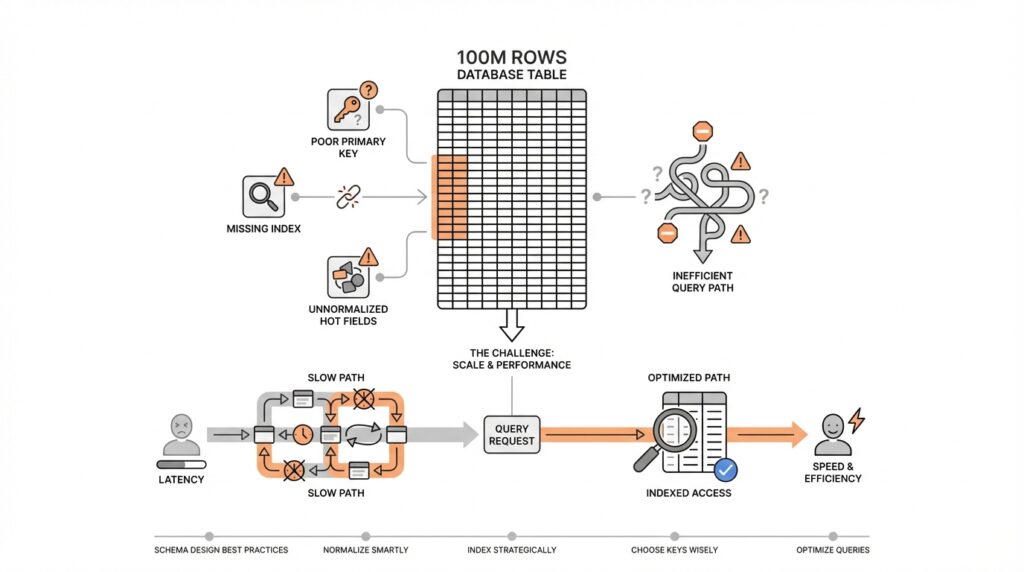
Imagine you are staring at a table that has grown to 100 million rows, and your first instinct is to blame the size. In database schema design, that is a tempting story, but it often misses the real culprit: the way your application asks for data. Query patterns are the everyday habits of your database, and they matter more than raw row count because they reveal what the system actually does under pressure. How do you know whether a schema is working well? You start by watching the questions your app asks most often, not by staring at storage totals.
That is where query patterns become the map. A query pattern is the repeated shape of a request: maybe users always filter orders by customer and date, maybe they sort products by popularity, or maybe they fetch a conversation and its latest messages together. Each of those patterns puts a different kind of pressure on the schema, much like different roads wear down a city in different places. Some paths need fast lookups, some need efficient joins, and some need stable ordering. Once you see those habits clearly, database schema design starts feeling less like guesswork and more like matching the table to the journey.
Before we go further, it helps to notice that not all queries are equal. A search screen that runs once a minute and an invoice lookup that runs thousands of times an hour do not deserve the same treatment. In practice, you want to identify the hot paths, meaning the queries that happen often enough to shape user experience or system cost. Those are the places where query patterns tell the truth: if a request always filters by the same columns, then those columns deserve special attention in the schema. If a query repeatedly joins three tables just to display one page, that is a sign the data model may be fighting the application instead of helping it.
Think of it like packing for a trip. If you know you will spend most of your time walking in one city, you pack shoes, not skis. In the same way, if your product mostly reads recent activity, your schema should make recent activity easy to find. If your product mainly reports on totals across many records, then aggregation-friendly structures and careful indexing matter more than obsessing over whether a table has 10 million or 100 million rows. This is why query patterns are the starting point for database schema design: they tell you what kind of movement the data needs to support.
Once you start looking for patterns, the next step is to group them by purpose. Some queries are retrieval queries, where speed matters most because a user is waiting on a page to load. Some are write-heavy, where inserts and updates must stay cheap and predictable. Others are analytical, where the database must scan lots of rows and summarize them without slowing down everything else. These differences matter because a schema that feels perfect for one workload can become awkward for another. That is also why “How many rows can this table hold?” is often the wrong first question; a more useful question is, “What does this table need to answer quickly, and how often?”
The practical move is to study real application behavior, not assumptions. You can look at logs, trace the most common endpoints, review product flows, and ask which screens or jobs would hurt the most if they slowed down. That gives you a realistic picture of query patterns before you redesign anything. From there, you can decide whether a table should be shaped for lookup speed, join simplicity, write efficiency, or reporting. This approach keeps schema changes grounded in usage, which is exactly what prevents a large table from becoming the false villain in the story.
When query patterns lead the design, the rest of the decisions become easier to reason about. Indexes, table boundaries, and column choices stop feeling like isolated tricks and start looking like responses to specific access habits. That is the key shift to keep in mind as we move forward: the schema should reflect the questions your system asks most often, because those questions are what define performance in the real world.
Normalize Core Entities
Building on this foundation, we now turn from the questions your application asks to the things your data actually is. In database schema design, that shift matters a lot, because the next step is often to normalize the core entities: the people, orders, products, accounts, or projects that sit at the heart of your system. If query patterns tell us how data is used, normalization tells us how data should live. A messy structure can make a 100M-row table feel far heavier than it really is, while a cleaner one can keep the same workload calm and understandable.
The easiest way to think about core entities is to treat them like the nouns in your story. These are the stable things that keep showing up across screens, reports, and workflows. A customer is still a customer whether they place one order or one hundred, and a product is still the same product whether it appears in one cart or many. When you give each of those ideas its own table, you are building a normalized schema, which means you store each fact once instead of copying it everywhere. That may sound like extra structure at first, but it is really a way of keeping the truth in one place.
Imagine an online store where every order row also repeats the customer’s name, email, shipping address, and product details. At first, that looks convenient because one query can pull everything in a single sweep. But the convenience hides a trap: when the customer moves or the product name changes, you now have to update many rows, and one missed update creates conflicting data. Normalization removes that risk by splitting the story into parts, such as customers, orders, and order items, so each fact has one home. A join, which is the database’s way of stitching tables together for one answer, then brings those pieces back together when you need them.
How do you know when a core entity deserves its own table? A good rule is to ask whether the same fact would be painful to change in more than one place. If the answer is yes, that fact probably belongs in one table, not scattered across several. This is where database schema design starts protecting you from update anomalies, which are the errors that happen when duplicate copies drift apart and no longer agree. It also makes the system easier to reason about, because you no longer have to wonder which copy of a value is the real one.
That same idea applies when several workflows depend on the same record. If support, billing, and reporting all need the same customer information, normalizing that customer entity keeps everyone aligned. You can still tailor the schema to match your query patterns later, but the foundation stays clean and trustworthy. In practice, that means the database spends less time untangling duplicate data and more time doing useful work. So while earlier we focused on what the system asks most often, here we are making sure the answers all point back to one reliable source.
Choose Stable Primary Keys
Building on this foundation, we now need a row’s anchor point: the identifier that keeps every record from drifting out of place. In database schema design, a primary key is the column, or small set of columns, that uniquely identifies one row; a stable primary key is one that never changes after the row is created. That stability matters because every related table, index, and lookup quietly depends on it. How do you keep a 100M-row table from turning into a maintenance headache? You choose an identifier that behaves like a permanent name tag, not a detail that might change next month.
This is where many schemas get into trouble. It can feel natural to use a business value such as an email address, a phone number, or a product code as the primary key because those values already look meaningful. The problem is that meaningful data is often mutable data, and mutable data is a shaky foundation. People change emails, companies rename products, and account numbers get reformatted; when that happens, the primary key starts acting like a moving target, and every foreign key that points to it has to move too.
A foreign key is the column in one table that refers to the primary key in another table, and it is one of the quiet workhorses of a relational database. If the parent key changes, the database has to update every child row or reject the change, and either path adds friction. That is why stable primary keys are such a practical part of database schema design: they keep relationships calm. Instead of asking, “What business value will never change?” we usually ask, “What identifier can we give this row that will stay fixed even if the business meaning around it shifts?”
That question leads us to a common pattern: use a surrogate key, which is a generated identifier with no business meaning of its own. An auto-incrementing number or a random unique identifier works like a coat check ticket; it helps us find the right record without caring what the record is about. Meanwhile, the meaningful data—like an email address or SKU, which is a stock keeping unit, or product code—can still live in separate columns with unique constraints, which are rules that prevent duplicates. This separation gives you the best of both worlds: a stable primary key for structure, and business fields that can evolve without shaking the whole table.
You can feel the difference most clearly when the application grows. A customer updates their email address, and the row stays exactly where it is because the primary key never changed. An order references that customer, analytics jobs still point to the same record, and caches or logs do not have to be rewritten just because one attribute was edited. In contrast to the previous approach, where a business value doubles as identity, this design keeps database schema design resilient under real-world change. It also makes merges, imports, and integrations easier because the system has one unambiguous way to say, “This is the same row we already know.”
There is also a performance story hiding here. Stable primary keys tend to make indexing and joins more predictable because the database can rely on a single, compact identifier instead of a wide or frequently edited business field. A smaller key can make indexes easier to store and compare, while an unchanging key avoids the churn that comes from rewriting references over and over. So while we covered query patterns earlier, now we are making sure the rows those queries reach have a dependable address. That is the quiet payoff of stable primary keys: less confusion, less cascading change, and a schema that can grow without losing its sense of identity.
Add Targeted Secondary Indexes
Building on this foundation, we can now give the database a few well-placed shortcuts. A secondary index is an extra lookup structure that helps the database find rows without scanning the whole table, and targeted secondary indexes are the ones we build for specific high-value query patterns. Think of them like the tabs in a thick notebook: you are not rewriting the notebook, you are making the pages easier to reach. For a 100M-row table, that difference can decide whether a screen feels instant or painfully slow.
The key word here is targeted. Not every column deserves an index, and adding one to everything can create a different kind of trouble. Every secondary index takes space, and every insert, update, or delete has to keep those indexes in sync, so an overly indexed table can become sluggish in the very places you meant to help. How do you know when to add secondary indexes? You look for the queries that repeat often, filter on the same columns, or sort by the same fields, because those are the paths where the database keeps walking the same ground.
As we discussed earlier, query patterns tell us what the application asks most often, and indexes are how we answer faster. If users constantly search orders by customer_id and created_at, a composite index, which is an index built from more than one column, can help the database narrow the search and keep the results in the right order. That is more useful than indexing customer_id alone when the real request is always “show me this customer’s latest orders.” In database schema design, the best secondary index is the one that matches the question, not the one that looks neat on paper.
Here is where the story gets practical. Imagine a support dashboard that loads a customer profile and the ten newest tickets every time an agent opens a case. Without a matching index, the database may have to sift through huge portions of the tickets table before it finds the right slice of data. With a targeted secondary index on customer_id and created_at, the database can jump closer to the answer and stop sooner, which is exactly what you want when a human is waiting for the page to appear.
It helps to remember that indexes are a tradeoff, not a free upgrade. A read-heavy query may get much faster, but a write-heavy table may slow down because each change must update the index too. That is why database schema design works best when it treats indexes like tools for specific jobs, not decorations for every column. If a field is rarely used in filters, joins, or sorting, indexing it may add more maintenance than value.
The same logic applies when you are choosing between a single-column index and a broader composite index. A single-column index works well when the database often searches by one field alone, while a composite index shines when queries consistently use the same combination and order of columns. In contrast to the previous approach of hoping the primary key can handle everything, this gives you a second path that matches the way the application actually moves through the data. Small design choices like this can save enormous time once the table starts growing.
The safest way to make these decisions is to test them against real queries, not guesses. You can inspect the slowest endpoints, watch which filters users rely on most, and confirm whether the database is filtering, joining, or sorting on the same columns again and again. Once that pattern is clear, targeted secondary indexes become a precise response rather than a broad reaction. That is the real win: your 100M-row table does not need to feel massive if the schema gives the database the right shortcuts in the right places.
Partition By Access Pattern
Building on this foundation, we can take the next step and give the table a physical shape that matches how people actually use it. Partitioning by access pattern means splitting one large table into smaller pieces based on the way your application reads and writes data, so the database can reach the right slice faster. In database schema design, that matters because a 100M-row table often feels heavy not because every row is expensive, but because the same hot rows keep getting touched over and over. How do you partition a table in a way that helps instead of hurting? You start by asking which records are usually read together, updated together, or aged out together.
Think of it like organizing a kitchen. You would not store everyday spices in the back of a basement shelf just because they are part of the same pantry. You keep the ingredients you reach for most often close at hand, and you put the long-term storage elsewhere. Partitioning works the same way in database schema design: recent orders, active subscriptions, or current support tickets can live in one partition, while older records move to another. The database can then skip whole partitions when a query only cares about one time window or one customer group, which is far more efficient than scanning everything.
The most common clue is repetition. If your application always asks for the newest data first, a time-based partition can line up neatly with that pattern, because recent rows are where the action is. If your product serves many tenants, meaning separate customers share the same schema but should not constantly interfere with one another, a tenant-based partition can keep each customer’s data isolated enough to query cleanly. In contrast to the previous approach of adding more indexes, partitioning changes where the data lives, not just how it is found. That is why it can reduce both read cost and maintenance cost when the access pattern is clear.
Here is where it gets interesting: partitioning is most valuable when the table has a strong “shape” in real usage. For example, an order table might be read constantly for the last 30 days and only rarely for older history. In that case, we can separate active data from archived data so the database spends its energy on the rows that matter right now. This is a practical move in database schema design because it keeps the working set small, which means less I/O, smaller scans, and faster backups or cleanup jobs. The same idea applies to logs, events, metrics, and other records that naturally collect over time.
But partitioning is not a magic trick, and it can create friction if the boundaries do not match your queries. If your application often searches across all time ranges or all tenants at once, a poorly chosen partition key can force the database to check many partitions instead of one. That is why the partition key should reflect the access pattern, not just the shape of the data on paper. A good rule of thumb is to ask, “What causes this table to be touched in the first place?” If the answer is recent activity, customer ownership, or region, then those are strong candidates for the split.
You also want to think about operations, not just speed. Partitioning can make it easier to archive old data, drop expired records, or load new batches without disturbing the hottest part of the table. It can also make database schema design more resilient because each partition becomes easier to manage in smaller pieces. Still, you should be careful not to over-partition, because too many tiny partitions can add planning overhead and make the system harder to understand. The goal is not to carve the table into confetti; the goal is to line up storage with the rhythm of your workload.
When the access pattern is clear, partitioning becomes a quiet but powerful fit. The table still looks like one logical object to your application, but underneath, the database can move with more precision, touching only the data that matters for the current request. That is the real payoff: your schema stops treating every row as equally urgent and starts reflecting the way the business actually runs. In database schema design, that is often the difference between a table that merely survives growth and one that keeps feeling responsive as it grows.
Check Writes, Locks, And Skew
Building on this foundation, we need to look at the part of database schema design that often hides behind a smooth demo: what happens when real users start writing data all day long. A schema can look elegant on paper and still struggle if every insert, update, or delete has to do too much work. That is why we check writes, locks, and skew together, because those three pressures often show up as one problem in disguise. If you have ever wondered, “Why does my fast table become slow only when traffic rises?”, this is usually where the answer lives.
The first thing to watch is the write path, which is the route a change takes through the database before it becomes durable, meaning safely stored. Each write is a little like putting a package into a busy shipping system: the package may need a label, a shelf, a scan, and a receipt before it is done. In database schema design, every extra index, trigger, or validation rule adds another stop on that path. That is not automatically bad, but it means a design that helps reads can quietly make writes heavier, especially when the table is already large.
This is where targeted tradeoffs matter. Earlier, we talked about secondary indexes as shortcuts for common queries, and that still holds, but every shortcut has a maintenance cost. When a row changes, the database must update the table and every affected index, which creates write amplification, meaning one logical change produces several physical updates. On a small table, you may never notice. On a high-traffic table, that extra work can turn a clean schema into a busy one, so database schema design has to respect both the reader and the writer.
Now we move to locks, which are the database’s way of keeping two operations from stepping on each other at the same time. A lock is a temporary control that tells other sessions whether they can read or write a row, page, or table while a change is in progress. This matters because a schema that concentrates too many updates on the same area can force transactions to wait, and waiting is how slowdown turns into a visible bottleneck. The database is not being dramatic here; it is protecting consistency, but that protection has a cost when too many requests collide.
You can picture this like several people trying to use the same narrow doorway. If one person is carrying something large, everyone else has to pause, even if the building itself is spacious. The same thing happens in database schema design when many requests hit one hot row, one hot partition, or one heavily updated index page. How do you reduce that pressure? You spread out contention, keep transactions short, and avoid designs that funnel too much activity through a single shared point.
That leads us to skew, which means the data or traffic is unevenly distributed. A skewed workload might send most writes to the newest records, most lookups to one customer, or most updates to one region. In contrast to the previous approach of assuming all rows matter equally, skew reminds us that a table can be large and still behave like a small number of hot spots. This is why a 100M-row table is not the real problem by itself; the real problem is often that a tiny slice of it gets all the attention.
Skew can also make a good partitioning plan look bad. If one partition receives most of the writes, it becomes a hot partition, which means it does far more work than the others and may start to lag. The same idea applies to locks: if many sessions update the same tenant, customer, or date range, they compete for the same resources and slow each other down. So while partitioning can be a smart move, it only helps when the split reflects the real access pattern instead of an abstract idea of balance.
The practical habit is to test the write side with the same care you gave the read side. Look for updates that happen repeatedly to the same rows, inserts that all land in the same time bucket, and workflows that hold transactions open longer than they should. Then ask whether the schema is concentrating heat in one place or spreading it out naturally. That is the real check here: not whether the table is large, but whether the writes, locks, and skew are making the database work harder than it needs to.
When you keep those three signals in view, database schema design becomes much easier to reason about. You are no longer guessing whether the problem is size, because you can see whether the pain comes from extra write work, blocked transactions, or an uneven workload. And once you can name the pressure accurately, you can shape the schema with more confidence, knowing you are fixing the real bottleneck instead of chasing the wrong villain.