What Is a Tensor?
Imagine you open a machine learning project for the first time and see a pile of numbers that seem to mean everything and nothing at once. That is usually the moment tensors enter the story. A tensor is a way to organize data made of numbers so a computer can store it, move it around, and learn from it. In machine learning, tensors are the basic containers for almost everything: a single value, a list of values, a table, or even a larger grid of data.
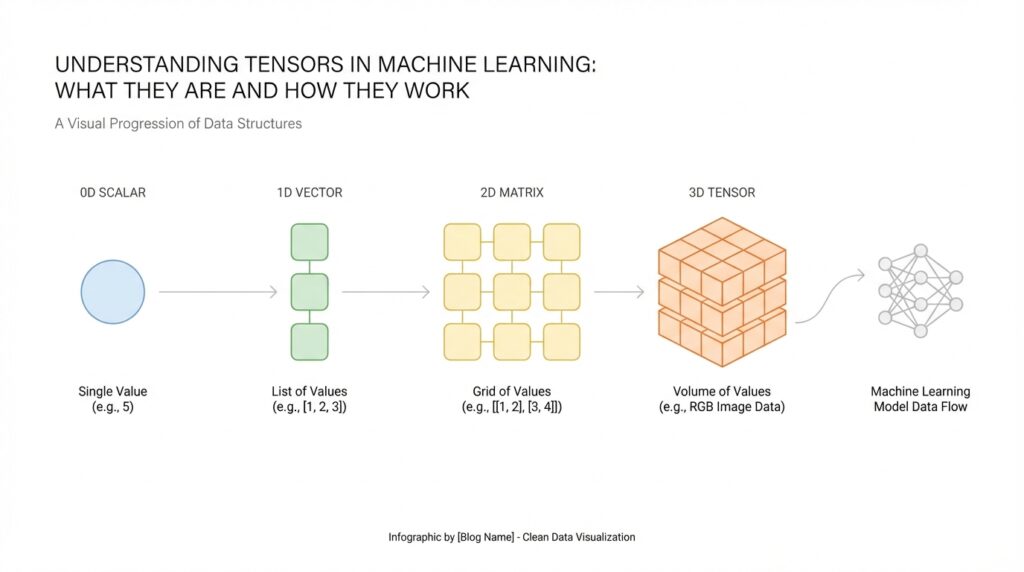
The easiest way to picture a tensor is to think about shapes. A scalar is one number, like the temperature outside. A vector is a line of numbers, like a shopping list with quantities. A matrix is a rectangle of numbers, like a spreadsheet with rows and columns. A tensor extends that idea further, giving us a flexible structure that can hold data in one dimension, two dimensions, or many dimensions. When people ask, “What is a tensor?” the short answer is that it is a multi-dimensional array of numbers.
This matters because machine learning does not work with vague ideas; it works with organized data. A photo, for example, is not just a picture to a model. It is a tensor holding pixel values arranged by height, width, and often color channels. A sentence can also become a tensor after we convert words into numbers, because the model needs a numeric form it can process. So when we talk about tensors in machine learning, we are really talking about the shape of the information the model sees.
Now that we have the basic picture, let us make the idea feel more concrete. Think of a tensor like a neatly labeled set of drawers. One drawer might hold a single number, another might hold a row of numbers, and another might hold many rows stacked into a cube-like block. The important part is not only the numbers themselves, but also their arrangement. That arrangement is called the shape of the tensor, and shape tells the model how the values relate to one another.
How do you know whether a piece of data should be a vector, a matrix, or a higher-dimensional tensor? You look at how many axes it has, where an axis is one direction of organization in the data. A vector has one axis, a matrix has two axes, and a tensor can have three or more. This idea may feel abstract at first, but it is one of the most important habits to build in machine learning, because the shape determines what operations the model can perform. If the shape is wrong, the data may not fit the model at all.
There is another reason tensors are so useful: they keep related values together in a form that computers can handle efficiently. During training, a model constantly performs math on tensors, comparing predictions with real answers and adjusting its internal settings. Because tensors are structured, libraries can move them through these calculations quickly and consistently. That is why tensors are not just a fancy name for numbers; they are the language machine learning systems use to understand the world.
As we keep moving forward, this definition will become more practical, because once you can recognize a tensor, you can start seeing how data flows through a model. The next step is learning how tensor shapes, dimensions, and operations work together, since that is where the real mechanics of machine learning begin to click.
Tensor Ranks and Shapes
Building on this foundation, tensor ranks and shapes are the labels that tell us what kind of data we are holding and how it is laid out. When you first look at a tensor, the numbers themselves matter, but the arrangement matters just as much. Think of it like opening a box of LEGO pieces: before you start building, you want to know whether you have one small pile, several sorted trays, or a whole set organized into layers. In machine learning, that organization is what helps the model read the data correctly.
The easiest way to separate these ideas is to remember that rank tells us how many directions a tensor has, while shape tells us how many values sit along each direction. Rank is the number of axes, and an axis is one line of organization in the data. Shape is written as a list of sizes, one for each axis, such as “3,” “2 x 3,” or “28 x 28 x 3.” So when we talk about tensor shapes, we are describing the exact structure of the data, not just its contents.
Now let us start with the smallest case and work outward. A single number is a scalar, which has rank 0 because it has no axes at all. A list of numbers, like [4, 7, 9], is a vector with rank 1, and its shape is “3” because there are three items in one line. A table of numbers is a matrix with rank 2, and its shape might be “2 x 3,” meaning two rows and three columns. These tensor ranks and shapes may feel abstract at first, but they are really just different ways of counting and arranging data.
Taking this concept further, rank becomes even more useful when the data has layers. An image, for example, is often stored as a three-dimensional tensor with height, width, and color channels. A batch of images adds another axis, because now we are stacking many images together for the model to process at once. That is why the same picture can have one shape when viewed alone and a very different shape when viewed as part of a training set. Once you see this pattern, tensor shapes start to feel less mysterious and more like a map of the data.
So why does rank matter so much in practice? Because machine learning operations expect data in a specific form, a bit like a recipe that only works if you add ingredients in the right order. If a model expects a matrix and you give it a vector, the math may fail or produce nonsense. If the rank is correct but the shape is not, the data still may not fit. How do you know whether you have the right tensor shape? You check how many axes the model needs, then match the size of each axis to the data you are feeding it.
This is also where beginners often have one of their first real “aha” moments. A shape is not just bookkeeping; it tells the model what each number means in context. A row in a matrix might represent one sample, while a column might represent one feature, such as age or price. Change the shape, and you change the story the data tells. That is why tensor ranks and shapes sit at the center of machine learning workflows: they help you move from raw numbers to organized information the model can actually use.
As we discussed earlier, tensors are the containers machine learning systems rely on, and shape is what gives those containers structure. Once that structure clicks, the next step is learning how tensors move, stretch, and combine during model operations, because that is where the real mechanics begin to unfold.
Data Types and Values
Building on this foundation, the next thing we need to notice is that a tensor is not only about shape; it is also about what the values mean. Two tensors can have the same size and look identical from the outside, yet behave very differently if one holds whole numbers and the other holds decimal numbers. That difference comes from the tensor data type, often shortened to dtype, which means the kind of values a tensor is allowed to store. In machine learning, this choice matters from the very beginning because it affects how the model reads the numbers, how much memory they use, and how much detail they can keep.
Think of it like packing the same-sized box with different items. One box might hold marbles, another might hold coins, and another might hold small glass pieces, even though the box itself has the same shape. A tensor works the same way: the shape tells us how the data is arranged, while the data type tells us what the entries are made of. When people ask, “Why does a tensor care about its values?” the answer is that the model is not looking at numbers as decoration; it is using them as instructions, measurements, or signals.
The most common tensor data types in machine learning are integers, floating-point numbers, and booleans. Integers are whole numbers, like 3 or 42, and they are useful when you want countable values, such as class labels or pixel intensities before scaling. Floating-point numbers are numbers with decimals, like 0.25 or 3.14, and they are the workhorse of training because models often need fine-grained adjustments. Booleans are true or false values, and they are handy for masks, filters, and conditions where something is either included or excluded. Once you see these value types side by side, you can start matching the tensor to the job it needs to do.
Here is where the story gets practical. Imagine a photo stored as a tensor: the values might begin as integers from 0 to 255, where each number represents brightness or color intensity. Before training, we often convert those tensor values into floating-point numbers so the model can work with smoother, more precise calculations. That conversion is not cosmetic; it changes how the model processes the data and can make training more stable. In other words, the same image can tell a slightly different story depending on the data type it uses.
Why does this matter so much in practice? Because tensor values affect both precision and performance. Precision means how accurately a number can be represented, while performance refers to how quickly and efficiently the computer can work with it. A smaller data type may save memory and speed things up, but it can also lose detail if the values need more accuracy. A larger data type keeps more precision, but it may cost more memory and computation time. Choosing the right tensor data type is a bit like choosing the right container for a trip: you want enough space for what matters, but not so much weight that carrying it becomes a burden.
As we discussed earlier, machine learning tensors are meant to move through many calculations, and the values inside them need to stay consistent while that happens. That is why tensors usually hold one data type at a time, rather than mixing integers, decimals, and text in the same array. If you have mixed information, you first turn it into numbers in a format the model can use, such as labels, token IDs, or embeddings, which are numeric representations of words and concepts. This is one of the quieter but more important ideas in machine learning: the model cannot learn from raw meaning until we translate that meaning into compatible tensor values.
So when you look at a tensor, try to read it in two layers. First, ask how it is arranged, which you already know comes from shape. Then ask what kind of values it stores, because the data type tells you how those values behave. That second question often answers the first troubleshooting problem beginners run into: “Why does this tensor work in one place but fail in another?” More often than not, the issue is not the numbers themselves, but the kind of numbers they are. Once that clicks, we are ready to see how these values flow through operations and start changing as the model learns.
Creating Tensors in Code
Building on this foundation, the first time you create a tensor in code can feel a little like turning a sketch into a real object. Earlier, we talked about tensors as organized containers for numbers; now we are at the point where you actually build one and see that idea take shape. In practice, tensor creation means taking data that already exists, such as a list of numbers or an image, and placing it into a format a machine learning library can work with. How do you create tensors in code without getting lost in the details? We start with the simplest forms and let the structure grow from there.
The most common starting point is a tensor constructor, which is a function that creates a tensor from raw values. In Python, a programming language used heavily in machine learning, you often begin with a regular list, which is just an ordered collection of items, and convert it into a tensor using a library such as PyTorch or TensorFlow. A list like [2, 4, 6] becomes a one-dimensional tensor, while a nested list like [[1, 2], [3, 4]] becomes a two-dimensional tensor. That small move is important because the data is no longer just sitting in memory as plain text-like structure; it now has the shape, type, and behavior needed for tensor operations.
Once that idea clicks, tensor creation becomes a matter of choosing the right source of data. Sometimes you want to build a tensor from scratch, and sometimes you want to convert existing data into one. If you already have numbers in a Python list, a NumPy array, or another array-like object, you can wrap them in a tensor so the model can process them. NumPy, for context, is a Python library for working with arrays of numbers, and an array is a compact way to store values in a grid-like structure. This is one of the quiet strengths of creating tensors in code: you are not always inventing new data, you are often translating familiar data into a machine-learning-friendly form.
Taking this concept further, many libraries also give you helper functions for common starting points. You can create a tensor filled with zeros when you need a blank canvas, ones when you need a simple placeholder, or a range of numbers when you want a patterned sequence. You can also specify the tensor’s data type at creation time, which matters because the library needs to know whether the values should behave like whole numbers or decimal numbers. In other words, creating tensors in code is not only about placing values into memory; it is also about deciding how those values should be interpreted from the start.
Here is where things get especially practical. When you create tensors for machine learning, you usually think about both shape and dtype together, because they work like a blueprint and a material choice. A tensor shaped like a 3 x 2 grid can hold six values, but those values may be stored as integers, floating-point numbers, or booleans depending on the task. If you are preparing image data, for example, you might create a tensor with pixel values and then convert those values into floating-point numbers so the model can compute with them smoothly. If you are creating labels, you might keep them as integers because the model only needs category IDs, not decimal precision.
Another useful habit is reshaping, which means changing the arrangement of values without changing the values themselves. Imagine you have six numbers in a single line, and you want to view them as a 2 x 3 table instead. The numbers stay the same, but their layout changes, and that layout can make all the difference to a model. This is why tensor creation in code often happens alongside reshaping, stacking, or slicing, which are basic operations that organize data into the exact form a model expects. If the tensor shape does not match the model’s needs, the code may fail before training even begins.
As we discussed earlier, tensors are the language machine learning systems use to understand data, and code is how we write that language down. When you create a tensor, you are making a promise to the model: here is the data, here is its shape, and here is how to read its values. That is why this step matters so much. It is the moment when abstract numbers become structured input, ready to move into the next stage of the machine learning workflow.
Reshaping and Broadcasting
Building on this foundation, reshaping and broadcasting are the two moves that make tensor data feel flexible instead of rigid. Reshaping changes the arrangement of values without changing the values themselves, while broadcasting lets tensors with different shapes work together in element-wise math when their dimensions line up in the right way. If you have ever wondered, “What happens when my numbers do not fit the shape the model expects?”, these are the tools that usually answer that question.
Reshaping is the gentler of the two ideas, because it is really about changing the furniture in the room, not the room’s contents. A tensor can keep the same total number of elements and still be rearranged into a new shape, and libraries such as PyTorch and TensorFlow describe reshaping that way: same data, new layout. That is why a flat list of 6 values can become a 2 x 3 table, but it cannot become a 4 x 4 grid, because the number of elements would no longer match. Many libraries also let you use -1 for one dimension and infer its size automatically, which is a small but helpful shortcut when you are flattening or rebuilding data.
There is one subtle detail that beginners often miss: reshaping may or may not copy the data. In PyTorch, view() creates a tensor that shares storage with the original tensor, and reshape() returns a view when it can, but may create a copy when the layout does not allow a cheap view. That matters because changing a view can affect the original tensor too, which is powerful when you want efficiency and surprising when you do not expect it. So when you reshape tensors in machine learning, you are not only asking, “Does this shape fit?” but also, “Am I looking at the same underlying data in a different arrangement?”
Broadcasting feels a little magical the first time you see it, but the rule behind it is very simple. When two tensors take part in an operation like addition or multiplication, libraries such as NumPy compare their shapes from the rightmost dimension moving left, and each pair of dimensions must either match or one of them must be 1; missing dimensions are treated like 1 as well. That is why a scalar can act like it has been copied across every entry in a larger tensor, even though the system usually avoids making a physical copy in memory. In NumPy’s words, broadcasting lets smaller arrays be stretched across larger ones so computations stay efficient.
A classic example is an image tensor with shape 256 x 256 x 3, where the last axis holds the three color channels. If you multiply that image by a one-dimensional tensor with three values, the model can broadcast those three values across every pixel in the image, one channel at a time. That is the kind of trick that makes broadcasting so useful in real workflows: you can scale, shift, or combine data without manually repeating values everywhere. It is a bit like using one paint roller for every wall section instead of squeezing the same paint onto each square by hand.
So how do reshaping and broadcasting fit together in practice? Usually, you reshape first so the axes line up with the meaning of your data, then you broadcast so the math can happen cleanly across those axes. A bias term, for example, might start as a single row of values and need to be reshaped before it can be added across a batch of predictions, while a flattened tensor may need to be reshaped back before a later layer can read it properly. When these two habits click, tensor work stops feeling like guesswork and starts feeling like following a map: first make the shape fit, then let broadcasting do the repetition for you.
Tensors in Training Pipelines
Building on this foundation, tensors become most interesting when they start moving through a training pipeline. A training pipeline is the path data follows from storage to model updates, and tensors are the format that keeps that path organized. Think of it like a kitchen line: ingredients arrive, get portioned, get cooked, and finally get tasted before the recipe is adjusted. In machine learning, that same flow takes raw examples, turns them into input tensors, and feeds them through the model so it can learn from each pass.
The journey usually starts with loading data and grouping it into batches, which are small sets of examples processed together. A batch is a chunk of training data, and a mini-batch is simply a smaller batch chosen to make training faster and more manageable. This matters because models rarely learn from one example at a time; they learn more efficiently when tensors arrive in groups with consistent shapes. If you have ever wondered, “How do you know the data is ready for training?”, the answer is often that the inputs have been loaded, normalized, and packed into batches the model can read.
Once the batch is ready, the tensor enters the forward pass, which is the moment the model makes a prediction. A forward pass means data moves from the input layer through the model’s layers until it produces an output tensor, such as a class label score or a numeric prediction. Each layer transforms the tensor a little, like passing a message through a chain of translators who each refine the wording. This is where tensor shapes become practical again, because every layer expects a specific arrangement of values, and the training pipeline depends on those shapes staying aligned.
After the prediction comes the loss tensor, which measures how far the model’s output is from the correct answer. Loss is a number, or sometimes a tensor of numbers, that tells us how much the model missed by. You can think of it like a scoreboard after each round of practice: it does not train the player by itself, but it shows whether the last move helped or hurt. In machine learning, a lower loss usually means the prediction was closer to the target, and that signal becomes the starting point for learning.
Now that the model has feedback, the pipeline moves into backpropagation, short for backward propagation, which is the process of tracing the error backward through the model. During backpropagation, the system computes gradients, which are tensors that describe how much each model parameter should change to reduce future error. A parameter is a value the model learns during training, such as a weight or bias, and a gradient acts like a direction marker showing how to adjust it. This is one of the most important moments in the whole training pipeline because the model does not learn from the loss alone; it learns from how that loss flows backward through the tensor operations.
Then the optimizer steps in. An optimizer is the part of the training system that uses gradients to update the model’s parameters, nudging them toward better predictions over time. You can picture it as a careful coach who reviews the feedback, decides how much to adjust, and applies the correction without overreacting to one bad play. Different optimizers use tensors in slightly different ways, but the idea stays the same: gradients point the way, and the optimizer turns that direction into actual learning.
As we discussed earlier, tensor data types and shapes matter before training begins, and they keep mattering here because a single mismatch can break the whole flow. A batch with the wrong shape may fail in the forward pass, while the wrong data type can slow training or distort the math. This is why beginners often spend time checking input tensors, labels, and output dimensions before they ever worry about model quality. Once those pieces line up, the training pipeline feels less like a pile of moving parts and more like a clear sequence: load, batch, predict, measure, correct.
The real takeaway is that tensors are not sitting still inside training; they are the thread that connects every stage. They carry the inputs, store the predictions, hold the loss, and pass the gradients that drive learning forward. When you start reading a training pipeline this way, the process becomes easier to follow because each step is just a new transformation of the same structured data.