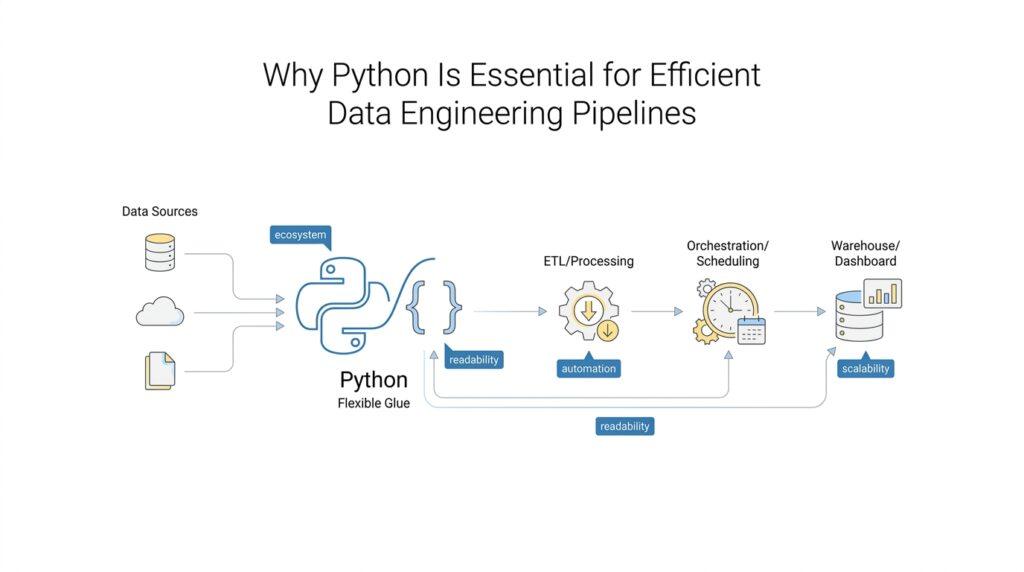
Python’s Pipeline-Friendly Syntax
When a data engineering pipeline starts small, it can feel like a clean row of stepping stones: read a file, clean a column, write the result, move on. The trouble begins when the path gets longer, because tiny bits of confusion in the code start to slow every step after it. That is where Python’s pipeline-friendly syntax earns its place, because it keeps the shape of the work visible while you are still building it. How do you write Python code that stays readable when the pipeline grows? Python leans hard toward clarity, and its indentation-based blocks make the structure of the logic easy to see without extra braces or clutter.
That visual clarity matters more than it first appears. In Python, indentation is not decorative; it defines the block of code that belongs together, and the standard style guidance recommends 4 spaces for that indentation. For a beginner, that means the code often reads like a set of nested ideas on the page, almost like outlines inside an outline. In data engineering pipelines, where one step often depends on the result of the step before it, that shape helps you follow the story of the data without constantly decoding the syntax.
The next comfort comes from the way Python lets you express data movement in compact, familiar language. A list comprehension is a short way to build a new list by looping over another iterable, which is any object you can step through one item at a time; a generator expression does the same kind of work but produces values lazily, one at a time, instead of all at once. In practice, that means you can describe a pipeline step like “take these records, strip the whitespace, keep only the useful ones” in a form that stays close to the idea itself. For data engineering pipelines, that kind of pipeline-friendly syntax reduces the gap between what you mean and what the code says.
Python also helps when the pipeline needs to speak clearly about its own outputs. Formatted string literals, or f-strings, let you place Python expressions inside a string so you can build messages, paths, and summaries without awkward concatenation. That may sound like a small convenience, but anyone who has watched a pipeline log grow muddy knows that clean messages save time, especially when you are tracing a failed run or checking whether a transformation behaved as expected. In other words, Python’s pipeline-friendly syntax does not only make the code shorter; it makes the pipeline easier to explain to the next person who opens the file.
Then comes the part of the story where pipelines meet reality. Files, network connections, and other resources need to be opened and closed carefully, and Python’s with statement wraps that cleanup in a readable block so the resource gets released even if something goes wrong. When errors do happen, Python distinguishes between syntax errors and exceptions, and exceptions can be handled instead of ending the whole run immediately. That combination is a quiet strength in data engineering pipelines: the code stays readable, the resource handling stays visible, and the failure handling stays close to the work it protects.
If you are wondering why this matters so much, the answer is that pipeline code is rarely written once and forgotten. It gets adjusted, extended, and handed to someone else, often under pressure, and Python’s pipeline-friendly syntax keeps those changes from becoming a maze. The result is code that feels more like a guided walk through the data than a puzzle box, and that makes a real difference when the pipeline moves from a one-off script into something people depend on every day. That clarity gives us a natural bridge into the next step, where we look at how Python keeps that readability working at scale.
Automating Data Ingestion Tasks
When the pipeline moves from a one-time script to a daily habit, the real challenge is not writing one good ingest step. It is making that step happen the same way every time, whether the source is a file drop, an application programming interface (API, a service that lets one program request data from another), or a database that keeps changing under your feet. This is where Python turns data ingestion into a repeatable routine instead of a midnight chore. Because the language is readable and flexible, you can build small automation pieces that check for new data, pull it in, and prepare it for the next stage without turning the whole process into a tangle.
What does automating data ingestion in Python look like in practice? Picture a doorbell that rings whenever a package arrives. The script watches a source, notices when new data is available, and then acts on it in a predictable order. That might mean downloading a CSV file, reading a JSON response from an API, or copying records from a warehouse into a staging area, which is a temporary workspace where data gets inspected before it moves forward. Python is a strong fit here because it lets us write those steps in plain, sequential logic, so the automation feels closer to following instructions than to wrestling with machinery.
The next piece of the story is timing. Ingestion jobs often run on a schedule, which means they need to start on their own instead of waiting for a person to remember them. Python works well with schedulers, which are tools that trigger code at specific times, and with orchestration tools, which are systems that coordinate many tasks in the right order. That matters because data ingestion rarely stands alone; one job may fetch raw files, another may validate them, and a third may load them into storage. Python helps us keep those responsibilities separated while still making them easy to connect.
Reliability becomes the real test once the automation is live. Sources fail, networks blink, and files sometimes arrive half-finished, so a good ingestion pipeline needs retries, checks, and clear failure messages. Python supports that kind of careful handling without burying the logic in noise. We can add validation rules, which are checks that confirm the data looks the way we expect, and we can make the script skip duplicate records so we do not load the same information twice. That last idea, called idempotency, means running the job again will not accidentally create duplicate results, and that is a quiet superpower in data ingestion workflows.
Python also makes it easier to work with different shapes of incoming data. One source may send neatly structured rows, while another may send nested fields that look more like a set of boxes inside boxes. Instead of forcing every source into the same mold immediately, we can write small adapters that translate each format into the structure our pipeline expects. That flexibility is one reason Python is so common in data ingestion: it gives us enough structure to stay organized, but enough freedom to meet messy real-world data where it lives.
And because ingestion scripts often become shared infrastructure, the code has to be understandable after the first author has moved on. Python helps here by keeping the automation readable enough for someone else to open, trace, and fix when the source changes. In other words, data ingestion automation is not only about moving data faster; it is about making the movement trustworthy, repeatable, and easy to maintain. Once that foundation is in place, we can start thinking about how to scale the same approach across more sources, more schedules, and more moving parts.
Transforming Data Efficiently
Once the raw data is inside the pipeline, the next question is not what to do with it, but how to do it without wasting time or memory. That is where transforming data efficiently becomes the quiet heart of the work, because every extra second spent reshaping rows, cleaning fields, or joining datasets multiplies as the pipeline grows. You can think of it like preparing ingredients in a kitchen: if we chop and sort them in a sensible order, dinner moves smoothly; if we keep reaching for the same knife over and over, the whole process slows down. Python helps us keep that preparation organized, readable, and fast enough to support real data engineering pipelines.
What does it mean to transform data efficiently in Python? At the simplest level, it means choosing the form of work that fits the data instead of forcing every record through a slow, manual loop. A loop is a repeated set of instructions, but in data work, repeated instructions can become expensive when the dataset is large. Python gives us better options by letting us work with collections as a whole, especially through data structures like a list, which is an ordered collection of items, and a DataFrame, which is a table-like object used to store rows and columns. When we transform data efficiently, we spend less time narrating every tiny move and more time describing the result we want.
That is why batch-style thinking matters so much. Instead of asking Python to touch one row at a time when the same rule applies to thousands of rows, we can often apply a transformation across an entire column at once. Libraries such as pandas, a Python library for tabular data, make this style of work feel natural, while NumPy, a Python library for numerical computing, gives us fast array operations behind the scenes. In practice, this means we can trim whitespace, convert timestamps, normalize text, or calculate derived values in a way that feels close to the shape of the data itself. The code stays shorter, and the machine does more of the heavy lifting.
There is also a memory story hiding inside the speed story. If a dataset is large, loading everything at once can feel like trying to carry every grocery bag in one trip. Python gives us ways to work in chunks, which are smaller pieces of the data processed one at a time, so we can transform records without overwhelming the available memory. This approach pairs well with generators, which produce values lazily instead of all at once, because we only handle what we need when we need it. That makes Python especially useful for transforming data efficiently when the pipeline handles files, logs, or event streams that keep getting bigger.
Of course, efficiency is not only about raw performance; it is also about avoiding unnecessary work. A good transformation step should clean, standardize, and shape the data once, then pass forward a version that later steps can trust. For example, if we convert messy date strings into real dates early, downstream code no longer has to guess at their format. If we remove duplicates before enrichment, we avoid repeating calculations that would only slow the pipeline down. This is one reason Python fits so well into data engineering pipelines: it lets us write transformations that are compact enough to maintain, but deliberate enough to keep the whole workflow moving.
The best part is that Python makes these improvements visible to the reader, not hidden behind a maze of machinery. When we choose clear transformation steps, name them well, and structure them in the same order the data actually changes, the pipeline becomes easier to debug and easier to extend. That matters because transforming data efficiently is rarely a one-time trick; it is a habit of writing code that respects both the data and the people who will touch it next. And once we have that habit, we are ready to look at how Python helps the pipeline keep that speed without losing control as the data grows.
Orchestrating Workflows with Airflow
When a pipeline grows beyond one script, the question changes from “Can we run this task?” to “How do we keep many tasks moving in the right order?” That is where Airflow enters the story. Apache Airflow is a workflow orchestration tool, which means it coordinates jobs so they run when they should, in the order they should, and with the right checks in between. If you have ever wondered, how do you orchestrate data engineering pipelines with Airflow?, the short answer is that Airflow gives us a clear stage, a schedule, and a way to connect each step without losing the plot.
The first idea to meet in Airflow is the DAG, short for directed acyclic graph, a simple way to draw tasks and their one-way dependencies. That sounds formal, but the picture is easy to imagine: each task is a stop on a route, and the arrows tell us which stop must finish before the next one starts. In data engineering pipelines, this matters because ingestion, validation, transformation, and loading often depend on each other in a strict order. Airflow turns that order into something visible, which helps us reason about the whole workflow instead of staring at a pile of disconnected jobs.
Once the route is drawn, Airflow needs pieces that actually do the work. Those pieces are called operators, which are predefined task templates that tell Airflow what kind of action to perform, such as running Python code, moving files, or checking whether data has arrived. You can think of them like different crew members on a film set: one handles the camera, another handles sound, and another cues the lights. In the same way, Airflow operators let us assign a specific job to each step of the pipeline while keeping the overall workflow readable.
That structure becomes especially helpful when tasks fail, because real pipelines do fail. Airflow lets us define retries, which are extra attempts after a failure, and it can pause between those attempts so a temporary issue has time to clear. It also keeps logs, which are records of what happened during a run, so we can inspect a problem instead of guessing at it. Because Python sits at the center of Airflow, those rules feel close to the code we already write for ingestion and transformation, which makes the workflow easier to understand and maintain.
Airflow also helps us move from “run this once” thinking to “run this every day at 2 a.m.” thinking. The scheduler, which is the part of Airflow that watches the clock and launches work at the right time, makes that possible. It can trigger a DAG on a schedule, respond to dependencies, and keep older runs separate from newer ones so we can see what happened on Monday versus what happened on Tuesday. That separation is a quiet but important part of workflow orchestration, because it gives us a history instead of a blur.
Another strength shows up when the pipeline needs to wait for the world outside to catch up. Airflow can use sensors, which are tasks that check for a condition before letting the rest of the workflow continue, such as waiting for a file to land in storage or for a table to finish loading. That may sound like a small detail, but it saves us from writing fragile loops that keep checking the same thing over and over. In practice, sensors make data engineering pipelines more patient and more reliable, especially when multiple systems have to line up before work can continue.
Airflow also fits the way teams actually build pipelines: one person writes a task, another adjusts a dependency, and a third reads the workflow after something breaks. Because the DAG lives in Python, the logic stays close to the code people already use for transformations and validation. That means the same language can describe the work and organize the work, which reduces the mental handoff between writing a task and placing it inside a larger system. When you are managing several data engineering pipelines, that shared language becomes a real advantage.
The real payoff is that Airflow gives structure without locking the pipeline into a black box. We can see what runs first, what waits, what retries, and what depends on a finished step, all in a form that is still readable to someone new to the project. That clarity is what turns a collection of Python scripts into a workflow orchestration system that people can trust and extend, and it sets us up for the next challenge: keeping those workflows observable when the pipeline grows even more complex.
Scaling with PySpark and Multiprocessing
When the pipeline has already learned to move on schedule, the next bottleneck is usually speed. That is where PySpark and multiprocessing start to feel less like tools and more like two different roads for the same journey: PySpark, the Python API for Apache Spark, helps you process data at large scale in a distributed environment, while Python’s multiprocessing module lets one machine split work across multiple processes so it can use more than one processor. If you have ever wondered, how do we scale a Python pipeline without turning it into a mess? this is the point where the answer begins to split into “spread the data out” and “spread the work out.”
PySpark matters when the dataset outgrows a single laptop or a single memory budget. Spark’s Python docs say PySpark is built for real-time, large-scale processing, and its DataFrame API lets you read, write, transform, and analyze data efficiently while using the same underlying execution engine as Spark SQL. In plain language, that means we can keep writing Python while the heavy lifting happens across a cluster instead of inside one process. For data engineering pipelines, this is the moment when a familiar script turns into something that can keep up with production-sized tables and streaming inputs.
Multiprocessing solves a different problem. Instead of distributing data across machines, it distributes a function across several processes on the same machine, and the official docs note that this side-steps the Global Interpreter Lock, or GIL, the CPython mechanism that allows only one thread to execute Python bytecode at a time. The Pool object and ProcessPoolExecutor both exist to parallelize repeated work, which makes them useful when one step in a pipeline has to chew through many similar items, such as files, partitions, or batches of records. Think of it like opening several checkout lanes instead of making everyone stand in one line.
The real skill is knowing where each approach fits. PySpark is the better fit when the data itself is the problem, because Spark can fan that data out across multiple nodes and keep the work moving in parallel; multiprocessing is the better fit when the data is already manageable on one machine but the computation is still expensive. This split is an inference from the two models’ design: Spark scales the dataset, while multiprocessing scales the local CPU work. Python’s multiprocessing docs also remind us that processes usually communicate by message passing through queues or pipes, and that objects moving between processes are serialized, which is why we tend to use it for work that can be cleanly divided into chunks.
That division gives us a practical pattern inside data engineering pipelines. We can use PySpark for the big, table-shaped transformations where distributed execution matters, and we can use multiprocessing for local parsing, validation, or other CPU-heavy helper work that benefits from several cores. The two approaches do not compete so much as hand work to different stages of the same assembly line. PySpark keeps the wide river of data moving, and multiprocessing keeps the smaller but still demanding steps from clogging up the path.
The payoffs show up fast: less waiting, fewer bottlenecks, and a clearer mental model for the pipeline. When you choose PySpark for distributed scale and multiprocessing for local parallelism, you stop asking one tool to do every job badly and start matching the tool to the shape of the work. That is the real scaling lesson here, and it sets us up to think next about how we keep those faster pipelines observable when more moving parts enter the picture.
Testing and Monitoring Data Quality
Once the pipeline is moving, data quality testing becomes the quiet guardrail that keeps us from shipping broken rows downstream. If you have ever asked, “How do we test data quality in a Python pipeline before the damage spreads?”, this is where the answer starts: Python gives us a built-in unittest framework for automating checks, organizing them into test cases, and comparing what arrived with what we expected. That matters because data engineering pipelines are not only about moving data quickly; they are about moving trustworthy data.
The shape of the test matters as much as the test itself. unittest supports test fixtures, which are the setup and cleanup steps around a test, so we can create temporary files, sample tables, or sandbox databases without leaving a mess behind. In practice, that lets us isolate one rule at a time: a missing column, a bad date, an unexpected null, or a duplicate record. When the checks are small and focused, the pipeline feels less like a mystery and more like a series of clear yes-or-no questions.
That same logic works inside the transformation code itself, where we can keep simple validation close to the data. The unittest docs highlight assertion methods like assertEqual(), assertTrue(), assertFalse(), and assertRaises(), and those ideas translate well to data quality testing because each check says, “This value should look like this.” So instead of waiting until a bad batch lands in storage, we can stop early and ask whether the shape, type, and content of the data still match the rules we set. In Python data engineering pipelines, that early feedback is often the difference between a quick fix and a long debugging session.
Monitoring is the second half of the story, because a passing test today does not guarantee a clean run tomorrow. Python’s logging package helps us keep a running trail of what the pipeline saw, what it changed, and where it paused, and its configuration model centers on loggers, handlers, and formatters. A logger is the named source of a message, a handler decides where that message goes, and a formatter decides how it looks. That structure makes data quality monitoring feel less like guesswork and more like reading a well-kept notebook.
Once we bring orchestration back into the picture, those monitoring signals can turn into action. Airflow supports task and DAG callbacks such as on_success_callback, on_failure_callback, and on_retry_callback, and it invokes them when a task or DAG changes state because of worker execution. In plain language, that means a failed validation step can trigger an alert, a notification, or a follow-up check without waiting for someone to notice the logs manually. For teams running Python data engineering pipelines, that closes the loop between detection and response.
The practical win is that testing and monitoring start to support each other. Tests tell us whether the data is safe to trust at the moment it enters or changes shape, while logs and callbacks tell us when reality has drifted away from our rules. Together, they make the pipeline more honest: if a source changes format, if a column starts arriving empty, or if a transformation quietly stops behaving, we find out early enough to act. That is what mature data quality monitoring looks like in Python data engineering pipelines, and it gives us a stable bridge to the next question: how do we keep that trust intact as the system grows?