Understand In-Band SQLi
When we first meet in-band SQLi, the clue is in the name: the attack and the response travel on the same road. That means the malicious input goes into the application through one request, and the data comes back through that same web page or error message. If you are wondering, why does in-band SQLi feel so direct? it is because nothing gets hidden in a side channel; the database answers right where the user is already looking. That directness is what makes this style of SQL injection so important to understand when we talk about pulling data from other tables.
To see the idea clearly, picture a restaurant where you hand the server a note, and the reply comes back on the same napkin. In a normal app, the note might ask for one product name, and the app returns one product name. With SQL injection, an attacker bends that note so the database no longer follows the intended script. Instead, the query can be reshaped to ask for data from another table, such as a table that stores user accounts, customer records, or internal notes. The key idea is not magic; it is that the database is tricked into answering a different question than the one the developer intended.
This is where in-band SQLi becomes especially useful for learning how attackers retrieve data. In-band means the response is visible immediately in the application’s own output, which can happen in two common ways. One is error-based SQL injection, where the database reveals clues through an error message. The other is UNION-based SQL injection, where the attacker uses the SQL UNION operator, a feature that combines the results of two queries into one result set, so the application displays rows from another table alongside the original results. Both approaches keep the conversation in the same channel, which is why they are grouped together.
The practical story usually starts with a page that expects a small, ordinary answer, like one product or one blog post. Then the attacker tests whether the input is being inserted into a database query without proper safety checks. If the application is vulnerable, the attacker can steer the query so it returns rows from a different table instead of, or in addition to, the original one. At that point, the page may display names, email addresses, order history, or other sensitive records that were never meant to be shown together. That is the heart of in-band SQLi: the output appears harmless at first, but the database is quietly being persuaded to reveal more than it should.
What makes this technique easier to recognize than other forms of SQL injection is the feedback loop. You do not have to wait for a separate communication path or dig through hidden logs; the result appears right away, which gives the attacker quick clues about whether the injection worked. For a beginner, that immediate response can feel almost like a conversation: send a prompt, get a reply, adjust, repeat. From a security point of view, that speed is exactly why in-band SQLi is so dangerous. A single vulnerable field can become a direct window into other database tables.
Once you understand that pattern, the next step is seeing how the attacker aligns their injected query with the database’s expected shape. The original query may ask for one set of columns, and the attacker has to make the added result fit that shape so the application accepts it. That is why terms like UNION matter here, because the database will only merge results cleanly when the structure matches. We are building toward the moment where the data from another table slips into view, and once you can picture that movement, the rest of the retrieval process starts to make sense.
Find Column Count
At this point, the missing piece is the shape of the original query. If you’re wondering, “How do you find column count in SQL injection?”, the reason it matters is that a UNION can only combine result sets that line up in structure. The database expects the same number of columns on both sides, and the corresponding columns need compatible data types. That rule turns column count from a small detail into the lockpick for UNION-based SQL injection.
Think of it like trying to join two train cars at the coupler. If one car has three links and the other has four, they do not fit neatly together, no matter how carefully you push them. SQL engines enforce the same kind of fit, which is why a mismatched UNION does not quietly adjust itself; it fails, and that failure is often the first clue that the query shape is wrong. For a beginner, that can feel frustrating at first, but it is also what makes the database’s behavior readable.
In practice, the goal is not to guess blindly but to listen for the boundary. A tester often works by nudging an ordinal ORDER BY reference upward and watching when the page or database stops accepting it, because SQL Server documents that ORDER BY can refer to a column by its position in the select list. That behavior gives you a way to infer the column count step by step: the query behaves normally until the ordering reference goes past the number of available columns. This is an inference based on documented SQL behavior, not a special feature built for attackers.
What makes that feedback so useful is that it turns the application into a guide. Each response tells you whether you are still inside the frame or have reached the edge, and that edge is exactly what you need to map before a UNION payload can fit. Different database systems may phrase the problem differently, but the underlying rule stays the same: the result set has a fixed shape, and the injected query has to match it. Once you see column count as shape rather than math, the testing process starts to feel more like measuring a doorway than cracking a code.
This is also why the column count step matters so much before anything else. If you try to move too fast, the database rejects the mismatch long before any data from another table can appear on the page. But if you know the exact number of columns, you can start building a UNION query that fits the original response instead of fighting it. In other words, finding column count is the moment where SQL injection shifts from random probing to a controlled conversation with the database.
Once that shape is clear, the next question becomes more interesting: which of those columns can carry visible data back to you? That is where the retrieval story starts to open up, because the structure is now known and the remaining work is about choosing the right places for the results to show up. The column count is the frame; everything that follows has to fit inside it.
Match Data Types
Now that we know the number of columns, the next hurdle is matching data types. Think of it like reaching a doorway that has the right width but the wrong key: the shape is close, but not close enough to open cleanly. In a UNION query, the database expects the same number and order of columns on both sides, and the corresponding columns need compatible data types. SQL Server notes that mismatched types may be handled through implicit conversion and type precedence, while PostgreSQL describes the inputs as needing to be “union compatible” for the same reason.
Why does a UNION-based SQL injection fail even when the column count is right? Because the database still has to decide whether each value belongs in a text-shaped slot, a number-shaped slot, or a date-shaped slot. If the engine can safely convert the value, it may do so behind the scenes; if it cannot, the query breaks and the page often gives us a clue that the shapes do not line up. That is why this step feels less like forcing a lock and more like fitting puzzle pieces together one by one.
When we slow down and look at the page, the original output starts to tell us what kind of value each column wants. A username field usually expects text, an order total expects a number, and a date column expects something the database can treat as a date. That is an inference we make from the way UNION compatibility works: the injected result has to behave like the original result, or the application will refuse to show it. So the real skill here is observation, not guesswork.
This is also why beginners often think in terms of “type-shaped placeholders.” If the original query displays text, we aim for a text-like value; if it displays a numeric result, we aim for something numeric. SQL Server’s documentation shows that compatible types can be converted implicitly, but that does not mean every mix will behave the same way across databases or even across columns in the same query. The safest mental model is still to match the expected type as closely as possible, because that keeps the UNION query from collapsing under its own mismatch.
Once the types line up, the database stops arguing with the query and starts treating both sides as one combined result set. That is the moment when data from another table can pass through the normal page output instead of being blocked by a conversion error. So if column count gave us the frame, matching data types is the fit that lets the picture appear inside it. With that fit in place, the next part of the story becomes much easier to follow.
Use UNION SELECT
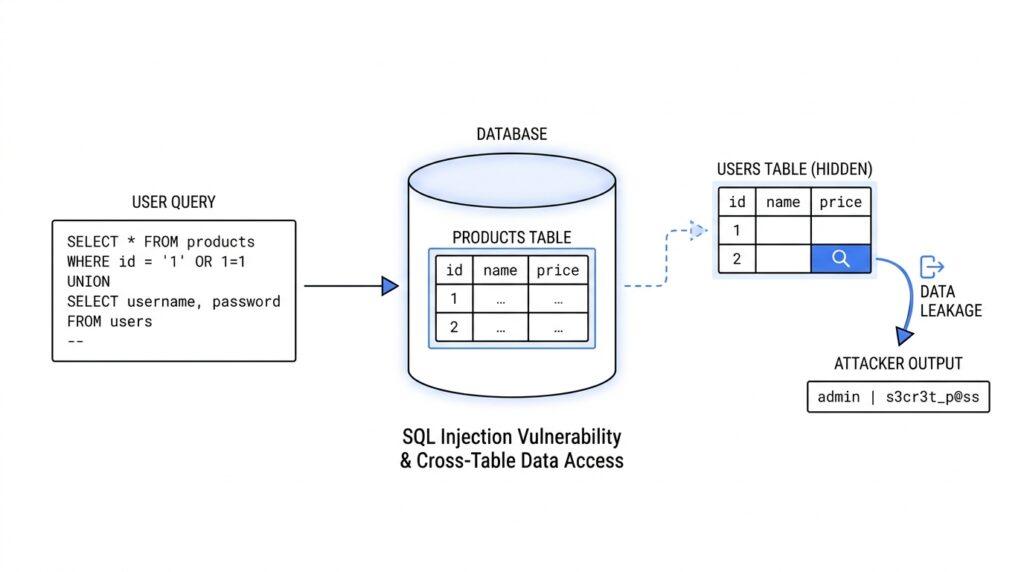
With the column count and data types already mapped out, UNION SELECT becomes the part where the hidden picture starts to come into focus. At this stage, we are no longer guessing whether the database can accept the injected query; we are using the shape we discovered to make a second result set fit beside the first. That is the heart of UNION SELECT in SQL injection: it lets one query borrow the normal response path so data from another table can appear in the page’s own output.
If that sounds a little abstract, picture two transparent sheets laid on top of each other. The first sheet is the application’s original query result, and the second sheet is the data an attacker wants to reveal. UNION is what lets those sheets line up, while SELECT is the part that picks the values to place on the second sheet. When the rows match correctly, the database does not treat the extra data as a separate event; it merges the results into one response, and the page shows the combined output as if it belonged there all along.
The next question is the one readers usually search for: how do you use UNION SELECT to retrieve data from other tables? The answer begins with choosing values that fit the existing columns and then swapping in the table data you want to expose. In many cases, only one or two columns are visible on the page, so the injected query has to route the interesting values into those visible spots. The rest of the columns still matter, but they often act like supporting actors whose only job is to keep the database satisfied with the structure.
This is where the earlier work on column count and compatible types pays off. If the original query expects a text value in one column and a number in another, the attacker needs the UNION SELECT output to behave the same way, or the page may reject the result before anything useful appears. Think of it like filling out a form with the right fields in the right places. If you place the wrong kind of answer in a field, the form complains; if you match the expected format, the information slips through cleanly. That alignment is what turns a failed probe into a working UNION-based SQL injection test.
Once the structure is right, the attacker’s focus shifts from the original table to the target table. That target might be a user table, an orders table, or some other source of information stored elsewhere in the database. The database does not care that the rows come from different places; it only cares that the final result set looks valid. From the application’s point of view, the data simply appears on the page, which is why UNION SELECT is so effective for retrieving data from other tables when the application fails to protect its query properly.
A useful way to picture this is as a relay race. The original query starts the run, but the injected UNION SELECT hands the baton to a second SELECT statement that carries the attacker’s chosen values to the finish line. If we place the right table fields into the right output columns, the browser displays what the database returns without knowing that the response now includes information from two different sources. That is what makes UNION SELECT such a memorable lesson in SQL injection: it does not break the page open with force, it persuades the page to reveal more than it meant to.
As you follow the flow, the important lesson is not the trick itself but the logic underneath it. UNION SELECT works because the database is willing to combine compatible results, and the application is willing to show whatever those results contain. Once you understand that, the rest of the retrieval process becomes easier to picture: first we learn the frame, then we fit the second query into it, and finally we watch the chosen data surface in the original response. From here, the next step is usually about identifying which output column gives us the clearest view.
Dump Target Table Data
Once the query shape is known, the story shifts from testing to dumping target table data. This is the moment where the attacker stops asking, “Will the page accept my injected query?” and starts asking, “Which table should I pull from, and where will its values appear?” In a UNION SELECT attack, that means directing the second query toward the table that holds the records you want and placing those values into the columns the page actually shows. The result is a SQL injection path that turns a normal web page into a very unwilling display window for data from another part of the database.
A good way to picture this is a library with many drawers and only one glass panel on the front. You can open any drawer you can reach, but only the items placed behind the glass are visible to everyone walking by. That is exactly how target table data gets exposed here: the database can return many fields, but only the ones mapped into visible output columns show up on the page. So the task is not to grab everything at once; it is to match the useful table columns to the output slots the application will render.
This is why people often ask, “How do you dump target table data in SQL injection without breaking the page?” The answer is to keep the structure stable while swapping in the table you care about. You already learned how to align the number of columns and keep the data types compatible, so now the focus is on choosing the right source table and the right fields inside it. If the table stores account records, for example, we might be looking at names, email addresses, or other profile details; if it stores orders, we might be looking at customer and transaction information.
At this point, the database is doing something very ordinary for itself and very dangerous for the application. It runs the attacker’s second SELECT statement against the target table, produces rows, and hands them back through the same response channel the page uses for normal content. The browser does not know those rows came from somewhere else, so it prints them as if they belonged there all along. That is the quiet power of UNION SELECT: the page remains familiar, but the data inside it has changed.
To make this work in practice, we usually think in layers. First, the injected query must point at the correct table. Next, the selected fields have to fit the columns the page can show. Finally, the values need to be arranged so the interesting data lands in the visible parts of the response, not in hidden or ignored positions. That careful alignment is what turns a rough probe into a controlled data retrieval path, and it is also why dump target table data feels more like mapping than guessing.
There is one more subtle piece worth noticing. A database table may contain many columns, but not all of them are equally useful for display, and not all of them are equally readable in the browser. Text fields tend to surface most cleanly, while other values may need to be converted into something the page can render without complaint. In other words, the attacker is not only choosing a table; they are choosing a presentation path for the data, which is why UNION-based SQL injection is often about both structure and visibility.
Once you understand that pattern, the whole process becomes easier to follow. The attacker learns the query shape, points the second SELECT at the target table, and lets the application display whatever comes back. From the outside, it looks like a normal page loading information. Underneath, though, the database is answering a different question than the one the developer intended, and that is how target table data ends up exposed through the original response.