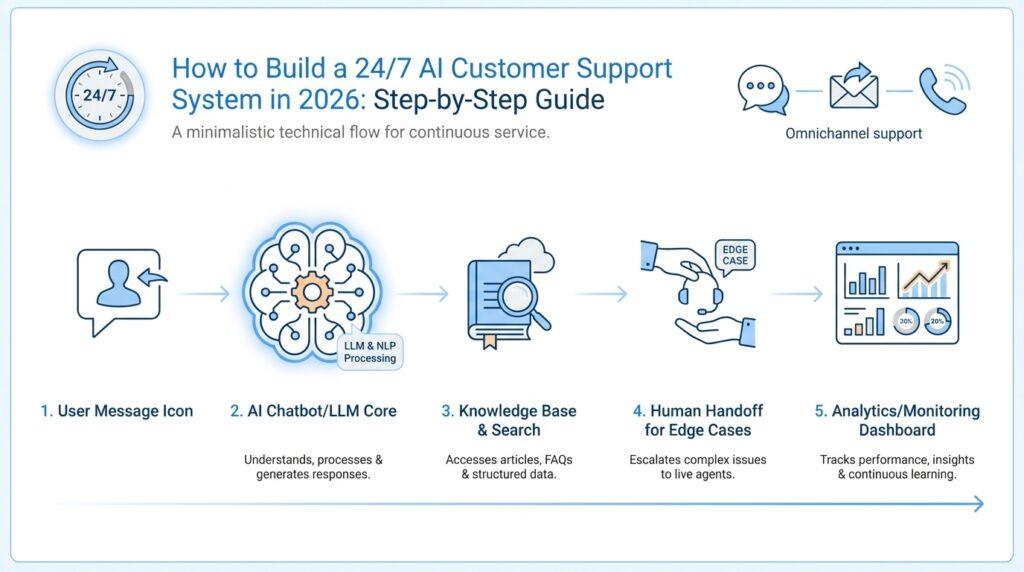
Define Support Channels
When you start planning an AI customer support system, the first real question is not about the model or the dashboard. It is about where your customers will actually meet you. A support channel is any place a customer can ask for help and receive a response, whether that means live chat on your website, email, phone, social media direct messages, or even a help center with a contact form. If we do not define those paths early, the system can feel polished on the inside but confusing on the outside.
Think of support channels like the doors into a busy store. Some people walk in and want help right away, while others leave a note and come back later. Which support channels should an AI customer support system handle first? That question matters because each channel carries a different kind of conversation. Live chat is immediate and fast-moving, email is slower and better for detail, phone is personal and time-sensitive, and social media messages often arrive with high emotion and little context. Once we see those differences, we can design the AI customer support system around real behavior instead of guesswork.
The easiest way to separate channels is to ask how the conversation feels in time. Synchronous support happens in real time, like chat or phone calls, where both sides are present at once. Asynchronous support gives people space to wait, like email or ticketing, where the reply can come later. This distinction is important because an AI customer support system does not need the same speed or style everywhere. A chatbot can answer a quick order question instantly in chat, while a more complex billing issue might move into email so the customer has room to explain what happened.
Once we know the pace, we can look at the kind of problems each channel attracts. Customers often use chat for small, urgent tasks such as tracking an order or resetting a password. They use email when they need documentation, screenshots, or a detailed explanation. They use phone support when the issue feels stressful, personal, or hard to type out. Social media DMs often capture public frustration that needs a calm, careful response. By mapping these patterns, we give the AI support channels a clearer job, and the automation becomes more useful because it matches the moment the customer is living through.
This is also where handoffs matter. A handoff is the move from one support path to another, such as when the AI answers a chat question but escalates the case to a human agent. If we define support channels well, those transitions feel smooth instead of abrupt. The customer should not have to repeat the same story three times just because the conversation moved from chat to email or from email to phone. In a strong AI customer support system, the channel changes, but the context follows along like a luggage tag on a suitcase.
Not every business needs every channel on day one, and that is a relief rather than a limitation. A startup might begin with website chat and email because those are easier to manage and easier to automate. A larger brand might add phone support or social media because customers already expect help there. The right mix depends on where your customers already ask questions, how quickly they expect answers, and how much complexity your team can handle without losing quality. This is why defining support channels is less about collecting options and more about choosing the right lanes for the traffic you already have.
As we move forward, this channel map becomes the foundation for everything else: how the AI is trained, what it should answer first, when it should escalate, and how success gets measured. Once those doors are named and organized, the rest of the system can start to feel intentional instead of improvised.
Build Unified Knowledge Base
Once the channels are mapped, the next job is to give your AI customer support system a memory. A unified knowledge base is that memory: one organized library of approved answers, troubleshooting steps, and policy details that both people and AI can trust. What does a unified knowledge base actually look like when customers are coming in from chat, email, and self-service at the same time? It looks like a single place where the same truth lives, so a customer does not get one answer from a chatbot, another from a help article, and a third from an agent. Intercom describes Knowledge as a centralized system for managing the content that powers human support, AI assistants, and self-service, which is the right mental model to keep in view.
We usually start by gathering every useful answer we already have, even if it lives in different corners. A unified knowledge base can include public help center articles, internal articles for agents, snippets, and content synced or imported from tools like Zendesk, Confluence, Guru, Notion, websites, and PDFs. That matters because the first version of the system should not ask your team to reinvent every answer from scratch; it should bring the scattered pieces onto one shelf. The point is not to hoard content. The point is to make one clean library where AI and humans read from the same page.
Once the content is together, we need to decide who can touch what. Permissions are the rules that say who can view, create, edit, import, or publish content, and they matter because a knowledge base becomes messy fast if everyone can rewrite everything. Intercom lets teams restrict Knowledge content management and separate public article permissions, while Zendesk uses user segments and management permissions to control viewing, editing, and publishing at the article level. This is the quiet part of building a unified knowledge base, but it protects quality: experts can draft, reviewers can approve, and customers only see finished answers. That structure keeps the AI support system grounded in approved information.
Then comes the part that keeps the library alive: treating every support conversation as a clue. Zendesk recommends setting up a process for flagging knowledge base issues, and its knowledge tools support article revisions and restoring earlier versions, which makes it easier to correct mistakes without losing the trail. In practice, this means a failed answer is not a dead end; it is a signal that the article needs a clearer definition, a better example, or a more precise policy note. If a customer keeps asking the same thing in chat, we should feel that friction as a flashlight pointing at the gap in the unified knowledge base.
The final step is to watch the library work. Help center analytics can show article views, votes, comments, subscriptions, and other usage patterns, which tells you not only what people read but also what they found helpful, confusing, or worth returning to. That is how a unified knowledge base becomes more than storage; it becomes a living system that improves the AI customer support system with every question it answers. When we keep content centralized, permissioned, corrected, and measured, the AI has a cleaner source of truth and your team spends less time repeating itself. The result is fewer contradictions, faster self-service, and a support experience that starts to feel coordinated instead of improvised.
Connect CRM and Help Desk
Once your knowledge base is in place, the next question is whether your AI can see the customer standing in front of it. Connecting the CRM, or customer relationship management system, to the help desk gives your AI customer support system that memory. A CRM keeps relationship history in one place, while the help desk holds the live support conversation, and vendors like Salesforce and Zendesk describe that connection as a way to bring support tickets and customer data into the same workflow so teams do not have to jump between systems.
If you are wondering, how do you connect CRM and help desk without creating a mess? the answer starts with treating the two tools like neighbors who need shared keys, not separate houses. A help desk can consolidate incoming messages into tickets, while a CRM can show customer records, account details, and relationship history; HubSpot’s help desk workspace, for example, connects channels so incoming messages become tickets, and Zendesk’s HubSpot and Salesforce integrations surface ticket activity inside customer profiles or CRM pages. That gives agents and AI the same basic picture before they answer.
The real value is context, because context keeps support from sounding robotic. When a support agent or AI assistant can see open tickets, recent ticket history, account ownership, or the customer’s stage in the relationship, it can answer with fewer follow-up questions and less repetition. Salesforce and Zendesk both describe this kind of integration as a unified view that helps teams collaborate, reduces the need to switch systems, and lets support staff access CRM data while managing tickets. In other words, the connection is not just technical plumbing; it is what lets your AI customer support system behave like it remembers the last conversation.
Before we sync anything, we need to decide which fields should travel together. A field is a single piece of stored information, like an email address, ticket status, company name, or account owner, and a good CRM-help desk setup usually maps only the fields that matter for support decisions. Zendesk’s Salesforce guidance shows that integrations can sync tickets to cases, contacts to users, leads to users, and accounts to organizations, and that match logic matters because the system may create a new contact if it cannot find the right one. That is why we test carefully: the goal is to keep records clean, not to merge unrelated people into one confusing trail.
This is also where trust is earned. If the CRM says one thing and the help desk says another, your AI will inherit the contradiction and repeat it with confidence, which is exactly what we want to avoid. The safer path is to define one source for each kind of truth, then decide whether the CRM or the help desk should own updates for that field. Zendesk’s integration docs also show that admins need proper permissions and can use integration settings and logs to monitor sync activity, which is a helpful reminder that connected systems need governance, not only setup.
Once the connection is live, we should watch the first few days like a pilot watching the dashboard. Integration logs can reveal whether ticket sync, contact sync, or account sync is behaving the way we expected, and that matters because small mapping mistakes are easier to fix early than after thousands of conversations. If an account looks blank, a contact appears twice, or a ticket is linked to the wrong record, that is not a failure of the whole AI customer support system; it is a signal that one mapping rule needs attention. With the CRM and help desk aligned, the AI stops guessing and starts working from a shared customer story, which is the foundation for every faster and more personal reply that comes next.
Train AI Support Agents
Now that your knowledge base and CRM can speak to each other, we get to teach the AI support agents how to use that shared memory. This is the part where the system stops feeling like a pile of connected tools and starts feeling like a helper with judgment. How do you train AI support agents so they sound helpful instead of canned? You begin by showing them the kinds of customer questions they should recognize, the approved answers they should trust, and the moments when they should hand the conversation to a human. Zendesk and Intercom both frame this work around content sources, use cases or procedures, guidance, and review loops rather than a one-time setup.
The easiest way to start is to gather the conversations that already tell the story. Unresolved transcripts and conversation logs are like the scratched-up notebook pages where customers admit what they were actually trying to do, and official docs from Zendesk recommend reviewing those transcripts to find knowledge gaps, common questions, and patterns in successful answers. Intercom takes the same path in a different language, encouraging teams to analyze chat conversations, set a success metric, and then train Fin on the content that matches those real customer needs. In plain terms, we are not guessing what the AI should learn; we are letting the customer’s own words point to the lesson.
From there, we teach the agent in two layers: content and behavior. Content is the library of approved facts, articles, PDFs, snippets, and other knowledge sources the AI can quote from, while behavior is the guidance that tells it how to speak, when to ask follow-up questions, and which channel rules to obey. Intercom describes Fin’s Content and Guidance areas as the places where teams centralize what the agent learns and shape its tone and policies, and Zendesk describes use cases as the topics the AI matches to the right dialogue or procedure. That split matters because a smart answer without the right behavior can still feel rude, vague, or risky.
Next, we make the training feel more like coaching than coding. A good AI customer support system does not need a giant lecture; it needs clear examples, a few carefully written instructions, and enough labeled situations to understand what “good” looks like. Zendesk’s docs show that advanced AI agents can use generated or manually created use cases, and Intercom’s docs show that Fin can be trained on public articles, internal articles, external sources, and even procedures drafted from help-center content and historical conversations. Think of it like teaching a new teammate: first we show them the map, then we walk one route together, and only then do we let them travel alone.
This is also where handoff rules become part of training, not an afterthought. If the AI customer support system sees a billing dispute, a frustrated customer, or a request that falls outside approved policy, it should gather the useful details and move the case to a human without making the customer repeat everything. Zendesk notes that AI agents can collect information during handoff to help human agents get up to speed, and Intercom explains that Fin can follow a handover path immediately when a customer asks for a human. That kind of training protects trust, because the fastest answer is not always the right answer.
After the first version is live, we keep training through review. Zendesk recommends checking automated resolution transcripts, unresolved conversations, and feedback signals to spot gaps, while its QA tools let teams assess performance and leave comments on bot conversations. Intercom also exposes conversation events and feedback-oriented views so teams can see which guidance was used and how the agent behaved. This loop is the heartbeat of training AI support agents: we watch, we learn, we revise, and we send the system back out a little wiser than before.
When this part is done well, the AI support agents do not feel like a separate layer on top of your service operation. They feel like apprentices who have learned the house rules, know where the right answers live, and know when to call in a senior teammate. That is the real goal of training in an AI customer support system: not perfection on day one, but a calm, repeatable way to make the agent better every day.
Configure Smart Routing
Now that the AI can answer basic questions, the next step is deciding where each conversation should go. That is what smart routing does in an AI customer support system: it reads the clues in a message, compares them with your team structure, and sends the conversation to the best place instead of the nearest available place. In practice, that can mean routing by issue type, language, sentiment, agent skill, or team capacity, depending on the platform and the channel you use. Intercom Workflows can route conversations using message content, conversation attributes, and customer data, Zendesk intelligent triage can classify intent, language, and sentiment, and Salesforce Omni-Channel can route work by skills and capacity.
To configure smart routing well, we start by naming the signals that matter to your business. This is where AI customer support becomes less like a general assistant and more like a dispatcher who knows the floor plan. Zendesk’s intelligent triage lets you route based on intent, language, sentiment, and even custom entities, while Intercom’s Fin Attributes and workflow rules let you classify conversations into structured values such as issue type, urgency, or spam. The important part is to keep those labels clear and specific, because the AI uses them to make routing decisions, and vague labels lead to vague destinations.
From there, we translate those signals into routing rules. If a customer writes in Spanish, that conversation should not wander into an English-only queue; if a billing issue needs specialists, it should not land with a generalist team; if a VIP account arrives, it may deserve a faster path. HubSpot supports skill-based routing after a channel is connected to the help desk, Zendesk lets you attach skills through triggers or routing rules, and Salesforce lets you map work-item field values to skills so the right service rep receives the work. This is the heart of smart routing: the AI is not guessing who is free, it is matching the request to the right kind of help.
We also need a fallback plan, because real support is messy and not every perfect match will be available at the perfect moment. Zendesk allows skills to time out and fall back to omnichannel routing if no matching agent appears quickly enough, and it can also enforce matching when the issue truly cannot be handled without a specific skill. Salesforce follows a similar logic by requiring the needed skills and available capacity, while Intercom workflows can branch based on team capacity so conversations move differently when a team is already full. If you are asking how to configure smart routing without creating bottlenecks, this balance between precision and fallback is the answer.
Another quiet but important choice is whether the routing should happen at the start of the conversation or later in the flow. Intercom’s workflows can begin with the first customer message, then branch by topic, team capacity, or detected attributes, which makes the path feel intentional rather than improvised. Zendesk’s intelligent triage is built from the first public comment in a ticket, and Salesforce evaluates skills when a work item enters the queue, so the moment of classification matters as much as the classification itself. When we think about smart routing, we are really deciding when the system should notice the clue and when it should act on it.
Before we trust the setup, we test it with real examples from your support history. Intercom recommends testing routing workflows, Zendesk suggests checking that skills and views behave as expected, and Salesforce documents how routing changes when skills are missing or dropped, which is exactly the kind of edge case you want to catch early. In a live AI customer support system, a small misroute can snowball into repeated handoffs, so we watch for the cases that land in the wrong inbox, the wrong queue, or the wrong specialist. Once those examples route cleanly, your smart routing starts to feel less like automation and more like judgment, which is the real goal.
Add Human Handoff
Now that routing is in place, we reach the moment where the AI customer support system has to know when to step aside. A human handoff is the point where the AI stops being the first responder and a live agent takes over, and that change matters most when the customer asks for a person, shows strong frustration, or gets stuck repeating the same problem. What happens when the AI reaches the edge of what it should answer? The best systems treat that moment as a guided exit, not a dead end. Zendesk describes handoff as removing the AI agent as the conversation’s first responder, while Intercom’s Fin is designed to escalate when the customer asks for human help or appears frustrated.
The next job is to make the handoff carry context forward, because nothing frustrates people faster than repeating the same story twice. Zendesk says that when a conversation is escalated, the ticket history is backfilled so the human agent can see what happened before the handoff, and its voice AI flow can post a transcript and summary to the ticket before sending the call onward. Intercom takes a similar approach by letting Fin ask for more information before handover, so the AI can gather details that help the teammate troubleshoot faster. In a good AI customer support system, the handoff should feel like passing a folder across a desk, not asking the customer to rebuild the whole case from memory.
That is why we should decide, in advance, what the AI must capture before it hands off. A clean handoff usually includes the customer’s goal, the exact error or symptom, any relevant order or account details, and a short summary of what the AI already tried. Zendesk’s handoff flow moves the conversation to the agent through the established routing path, and once the transfer happens the AI no longer responds in that thread. That one-owner-at-a-time rule keeps the conversation from splitting into two voices, which is where support experiences start to feel messy and unreliable.
We also want the transition to feel human, because the customer should never feel trapped inside a machine. Intercom explains that Fin offers escalation conversationally in chat, and it can even offer escalation more than once in the same conversation if the customer still needs help. It also supports a “bot only” mode, where no human route is configured and the conversation ends with a get-more-help outcome instead of a live transfer. That gives you a useful design choice: if your AI customer support system can genuinely solve the issue, let it continue; if not, let the human handoff happen with grace and without drama.
Before we trust it, we test the handoff path with the same care we used for routing and knowledge. We look for the moments where customers ask for a human, where the AI should gather one last detail, and where the agent should receive the case with enough context to move quickly. Zendesk’s AI agent tickets show how escalation changes a read-only AI conversation into a regular editable ticket, which is a helpful reminder that the system should preserve history while handing ownership to a person. When the human handoff is working well, customers feel heard, agents feel prepared, and the AI feels like a teammate that knows when the next best move is to step back.