Context Memory Basics
How does conversational AI remember what a customer said three messages ago without making them repeat everything? That is the heart of context memory, and it is what makes a support chat feel continuous instead of starting over every time the user adds one more detail. In customer service, that matters because people rarely speak in tidy, finished sentences; they correct themselves, change direction, and expect the assistant to stay with them. Context memory is the mechanism that keeps the thread of the conversation alive so the model can respond to the whole situation, not just the last line.
The first piece to understand is the context window, which is the amount of text a model can look at when it creates the next reply. Think of it like the space on a desk: the model can work with what is still in front of it, but it cannot see papers that have already been filed away. OpenAI’s docs explain that this window has a token limit, and that input, output, and reasoning all count toward it, so long conversations can crowd the space and even cause truncation. Anthropic describes the same idea as a model’s working memory, which is a helpful reminder that context memory is not magical recall; it is careful use of limited room.
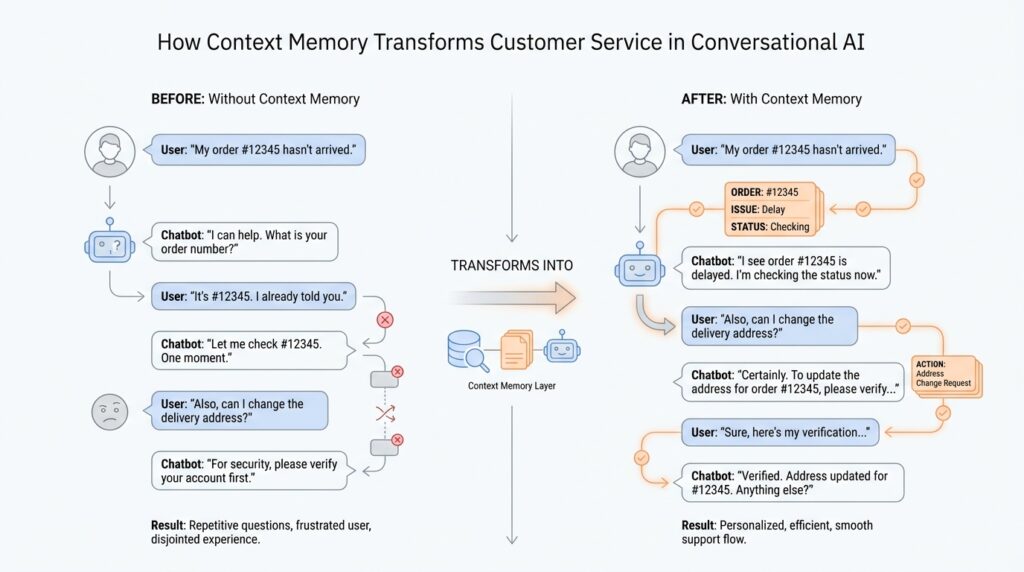
From there, short-term memory does the day-to-day work. It keeps the current session intact by holding the recent messages, the customer’s latest question, and any tool results the assistant has already used. Google Cloud describes this as the memory needed for a single ongoing conversation, which usually means tracking session state as the exchange unfolds. In a support setting, that might include the order number, the shipping issue, and the last troubleshooting step, so the AI does not ask for the same detail twice.
Long-term memory enters the scene when the conversation ends but the relationship continues. Instead of replaying every past message, many systems store a compact summary, a preference, or a resolved issue so the next visit starts with useful context already in place. Amazon Bedrock’s memory feature works this way by loading stored conversation history and summaries back into a new session for the same user. That is especially valuable in customer service, where one chat may solve part of a problem and the next chat may pick up the rest days later.
This is why context memory is not the same as keeping a giant transcript. More text does not automatically mean better answers, and Anthropic explicitly notes that a larger context window is not always better because accuracy can degrade as the amount of text grows. In practice, the model performs best when we feed it the right details, not every detail. That is a subtle but important shift for support teams: the goal is not to store everything, but to preserve the information that actually helps the assistant stay accurate, calm, and relevant.
Once that foundation is in place, the customer experience starts to change in visible ways. The assistant can remember what was already tried, ask better follow-up questions, and keep moving toward resolution instead of looping through the same ground again. Zendesk’s work with OpenAI shows this in practice, using multi-turn conversation and retrieval-augmented generation to ground replies in context and guide users toward a result. That is the real promise of context memory: not perfect recall, but the right memory at the right moment, so the conversation can keep flowing naturally.
Stateless Bots and Friction
A stateless bot is the kind of support assistant that treats every message like a brand-new conversation. In customer service, that means the conversational AI may answer the current question well, but it does not carry forward who the customer is, what they already tried, or why they reached out in the first place. From the customer’s side, that can feel a lot like walking into a store, speaking to one employee, and then being asked to start over with the next person at the counter. The information is there for a moment, but the thread keeps slipping away.
That is where friction begins. How does a stateless bot feel when you are trying to solve a real problem? It feels slow, repetitive, and a little tiring, because the customer has to keep supplying the same basics: the order number, the device model, the failed step, the billing issue, the exact symptom. None of those questions are strange on their own, but when they come back one after another, the support experience starts to feel like work. In conversational AI, that repeated effort is not a small annoyance; it is the difference between a helpful exchange and a broken one.
The trouble is not that a stateless bot lacks intelligence. The trouble is that it lacks continuity. Each turn is handled as if it arrived from nowhere, so the assistant has no built-in sense of the path the conversation has taken. That means the bot may ask for details that were already shared, offer advice that was already rejected, or miss the clue that would have pointed it in the right direction. In customer service, this creates a hidden tax on every message, because the user spends energy rebuilding the conversation instead of advancing it.
That friction shows up in small moments before it becomes a major failure. The customer explains a shipping delay, then re-explains the tracking number, then re-explains that the package was marked delivered but never arrived. A stateless bot may still respond politely, but the exchange feels like three separate first meetings instead of one ongoing problem-solving session. The result is not only longer resolution times; it is also a more fragile sense of trust. When a support assistant forgets obvious details, people begin to wonder whether it can really help them at all.
This is why stateless bots often struggle most in the middle of a conversation, right where support work gets interesting. The early message may be easy because the question is simple, but the real story usually unfolds later, after the customer adds context, corrects themselves, or shifts to a related issue. A truly useful conversational AI has to follow those changes without making the person feel like they are dragging the system along behind them. When it cannot, the exchange becomes a loop: ask, repeat, clarify, restate, and hope the next reply lands closer to the mark.
We can think of it like a conversation with someone who writes every sentence on a new sticky note and then throws the old one away. Nothing is technically lost in the moment, but nothing connects either. Context memory solves that by letting the assistant keep the important pieces in view, which is why it matters so much after we have already seen what happens when a bot has no memory at all. The contrast is sharp: stateless bots create friction by forcing people to rebuild the conversation, while memory-aware systems reduce that friction by preserving the path forward. Once we see that difference clearly, the rest of the support experience starts to make sense.
Short- and Long-Term Memory
When we move from a stateless bot to a memory-aware assistant, the conversation stops feeling like a series of disconnected replies and starts feeling like one continuous thread. Short-term memory keeps the current exchange alive, while long-term memory carries useful details into the next visit, which is why context memory matters so much in customer service. What does short-term memory do when a customer changes direction mid-chat? It holds the live conversation in place long enough for the assistant to respond to the real problem, not the last isolated sentence.
Short-term memory is the model’s working space during an active session. In practice, that means the assistant can look back at recent messages, tool results, and the state of the conversation while it decides what to say next. OpenAI describes this as the context window, and notes that input, output, and sometimes reasoning tokens all count toward it; Anthropic describes the same space as the model’s “working memory.” Google Cloud adds a useful operational angle here: short-term memory is not only the chat history, but also the session state that helps an agent understand where the conversation stands right now.
That distinction matters the moment a support issue gets messy. If a customer gives an order number, then corrects it, then mentions a shipping delay, short-term memory lets the assistant keep all three beats in view without asking the same question again. The agent can remember the last verification step, the tool output from a lookup, and the customer’s latest clarification, which is exactly how a support chat starts to feel responsive instead of mechanical. In other words, short-term memory is the part of context memory that helps the assistant stay in the room with you.
Long-term memory picks up where the session ends. Instead of replaying every old message, many systems store a compact summary, a preference, or a resolved issue so the next conversation can begin with something useful already in place. Amazon Bedrock’s memory feature does this by loading stored conversation summaries back into a later session through a memory identifier, and Google Cloud’s Vertex AI documentation treats sessions as a source of long-term memory while keeping temporary state separate. That is the difference between remembering the whole transcript and remembering what the next conversation actually needs.
This is why long-term memory is usually selective rather than exhaustive. More text does not automatically create a better assistant, because the context window is still finite and longer prompts can make handling harder rather than easier. Anthropic explicitly notes that the context window is a working memory with limits, and OpenAI warns that large prompts can run into truncation if they crowd the window. So in practice, memory-aware systems try to preserve the useful pieces, like a customer’s preferred language, an unresolved billing issue, or the troubleshooting step that already failed.
For customer service, that balance changes the whole rhythm of the interaction. Short-term memory keeps the current ticket steady, and long-term memory helps the next visit start a few steps ahead instead of from zero. The assistant can greet a returning customer with the right context, avoid repeating solved steps, and ask sharper follow-up questions because it knows what has already been tried. That is the practical promise of context memory in conversational AI: less repetition, less frustration, and a conversation that feels like it belongs to one person, not a stack of disconnected sessions.
If we want the simplest picture, we can think of short-term memory as the notes sitting on the desk and long-term memory as the folder cabinet beside it. The desk keeps the current case moving; the cabinet keeps the next visit from starting empty-handed. Once we separate those two jobs, the role of context memory becomes much easier to see, and we can start thinking about how assistants decide what to keep, what to summarize, and what to let go.
Personalization in Support Chats
Personalization in support chats is where context memory starts to feel human. Instead of treating every message like a fresh ticket, the assistant can remember the customer’s tone, the issue they came for, and the details that make the exchange easier to continue. How does personalization in support chats actually work when someone is tired, frustrated, and in a hurry? The short answer is that the system learns from conversation history, saved preferences, and session state so it can respond in a way that feels more relevant and natural.
Once we see that, the next piece becomes clearer: personalization is not about guessing wildly, but about noticing patterns. If a customer always prefers brief replies, uses a specific channel, or keeps returning with the same billing problem, the assistant can adapt its style and focus to match that pattern. Google’s personalization docs describe this kind of memory as a way to provide more relevant, context-aware assistance, while Zendesk’s AI materials point to tone matching and customer-specific guidance as part of the support experience. In practice, that means the chat can sound less like a script and more like a conversation that has been paying attention.
The important trick is deciding what to keep. A good support assistant does not need every word the customer has ever typed; it needs the right facts at the right moment. That is why memory systems often combine a profile, recent conversation history, and compact summaries of past sessions, rather than storing a giant transcript that overwhelms the model’s context window, which is the amount of text the model can actively use at once. OpenAI documents that context is finite, AWS Bedrock uses stored conversation history and summaries to generate later responses, and Google Cloud describes long-term memory as a way to support highly personalized interactions.
You can feel the difference most clearly when the customer comes back later. A memory-aware support chat can remember that the shipping issue was already escalated, that the user prefers email follow-up, or that the last troubleshooting step did not work. That makes the next reply feel like a continuation instead of a restart, and it lowers the chance that the customer has to repeat the same explanation in a new session. AWS Bedrock explicitly describes memory as carrying conversation history and summaries across sessions, and Google Cloud’s memory features are designed to help agents maintain continuity and keep responses relevant over time.
Of course, personalization only works when it stays respectful. People want a support assistant that remembers enough to be helpful, but not so much that it feels invasive or difficult to control. That is why memory controls matter: Google’s docs explain that users can manage, update, or delete saved memories and turn off personalization, and AWS lets teams clear stored memory and set retention periods. The healthiest support design treats memory like a notebook on the desk, not a locked filing cabinet nobody can open.
When we put all of that together, personalization in support chats becomes less about flashy AI and more about good manners at scale. The assistant remembers what helps, forgets what it should not carry, and adjusts to the person behind the message without making them work for it. That is the quiet power of context memory in customer service: it lets the conversation stay local to the customer, even when the system itself is doing the heavy lifting behind the scenes.
Seamless Agent Handoffs
The real test of context memory comes when the assistant has to step aside. If the conversation is already warm and moving, a good transfer should feel like passing a note across the room, not starting a new meeting. What happens when the bot reaches the edge of its knowledge? In Zendesk, a handoff changes the first responder from the AI agent to a live agent, and Google Cloud describes handoff as transferring an end-user conversation from a virtual agent to a human agent. That is why smooth transfers matter so much in conversational AI: the goal is not to keep the bot talking forever, but to keep the customer from losing the thread.
The next question is what the human agent receives on the other side. Strong systems do not open a blank slate; they backfill the conversation so the ticket already contains useful context. Zendesk says escalation adds the conversation history to the ticket, and its voice workflow can send a full transcript, a concise summary, and detected intent to the agent so they start informed. Google Cloud’s Agent Assist also follows the live conversation and uses that context to suggest search queries and answers for human agents. This is where context memory becomes practical handoff data: the agent gets the shape of the problem, not just the last message.
A good handoff packet is small but complete. It should carry the customer’s goal, the latest correction, what has already been tried, and any signals that help the next responder move faster. Google Cloud’s chat summarization tools describe summaries that capture the resolution, the situation, and the action, and they treat transfer points as separate segments. That is a useful design clue for customer service: we are not trying to preserve the whole transcript in the agent’s head, only the pieces that let the next human continue the same story without rereading the whole book.
From the customer’s side, the benefit is relief. Instead of repeating the order number, the failed troubleshooting step, and the reason for the call, the customer can feel the conversation move forward. Zendesk explicitly says full-context escalation helps agents start informed and reduces the need for customers to repeat themselves, and its Agent Workspace includes a context panel with customer interaction history to support that work. In practice, the transfer feels less like a handoff desk and more like one teammate handing another teammate a well-labeled folder.
The tricky part is remembering that context memory is still limited. OpenAI notes that models have a maximum combined token limit, which is why long prompts often need summarizing instead of endless accumulation; AWS Bedrock’s memory feature takes the opposite approach by storing conversation summaries and reloading them with the same memory ID on later sessions. So the real skill behind these smooth transfers is selective memory: keep the facts that help, compress the rest, and let the next person begin with enough context to stay calm, accurate, and human. That is what turns context memory into a better support experience, not because the system remembers everything, but because it remembers what matters at the exact moment the conversation changes hands.
Privacy and Data Retention
Once the assistant starts remembering a customer’s preferences, privacy stops being a side note and becomes part of the experience itself. That is the real challenge of privacy and data retention in conversational AI: we want the system to feel informed, but we do not want it to feel nosy or permanent. How do we keep a memory-aware support bot helpful without turning it into a data hoarder? The answer is to store only what helps the next conversation, to separate live session context from longer-term records, and to make deletion and retention rules easy to understand.
A useful way to think about this is to split information into three buckets: the live conversation, the operational logs, and the long-term memory. OpenAI treats abuse monitoring logs and application state as different kinds of data, and says API data is not used to train models by default; those logs are retained for up to 30 days unless a customer qualifies for Zero Data Retention or Modified Abuse Monitoring, which are controls that exclude customer content from those logs. Google Cloud’s Agent Assist documentation makes a similar separation by letting teams configure data redaction and a retention window, with 30 days as the default and maximum window. In plain language, that means the assistant can keep the pieces it needs to answer now, while the system keeps a tighter, more deliberate record of what happened later.
Redaction is the next guardrail, and it matters because transcripts have a way of spreading sensitive details farther than people expect. Redaction means masking or removing personally identifiable information (PII), such as names, email addresses, or phone numbers, before that data becomes part of a ticket, summary, or analytics view. Google Cloud explicitly frames redaction as a privacy and trust feature, and Zendesk offers deletion schedules plus permanent redaction tools, including advanced retention policies for more conditional deletion needs. This is where good customer service design starts to look like good housekeeping: we clean up the visible surface, and we also make sure the clutter does not get copied into every corner of the system.
Retention settings decide how long the cleaned-up record stays around, and this is where careful teams avoid the temptation to keep everything forever. Amazon Bedrock lets you enable agent memory and set a memory duration anywhere from 1 to 365 days, with a 30-day default, and it also lets you clear memory by deleting stored sessions. OpenAI gives qualifying organizations data-retention controls, including a zero-data-retention option on the API platform, and it says deleted ChatGPT content is removed from its systems within 30 days unless legal or safety reasons require longer storage. Zendesk takes a similar approach with standard deletion schedules and conditional retention policies. The lesson is simple but important: retention should be a policy choice, not an accidental by-product of using AI.
When we put these pieces together, the privacy-friendly pattern becomes clear. Keep short-term context lean, store long-term memory intentionally, redact sensitive details early, and give customers or admins clear ways to delete what should not stay. Zendesk’s documentation also notes that its generative AI features are powered by OpenAI’s zero-data-retention endpoints or by models hosted so the provider never sees prompts or outputs, which shows how service teams can pair useful automation with stronger privacy boundaries. That is the real promise of privacy and data retention in conversational AI: the assistant remembers enough to feel continuous, but not so much that the conversation starts to feel like surveillance.



