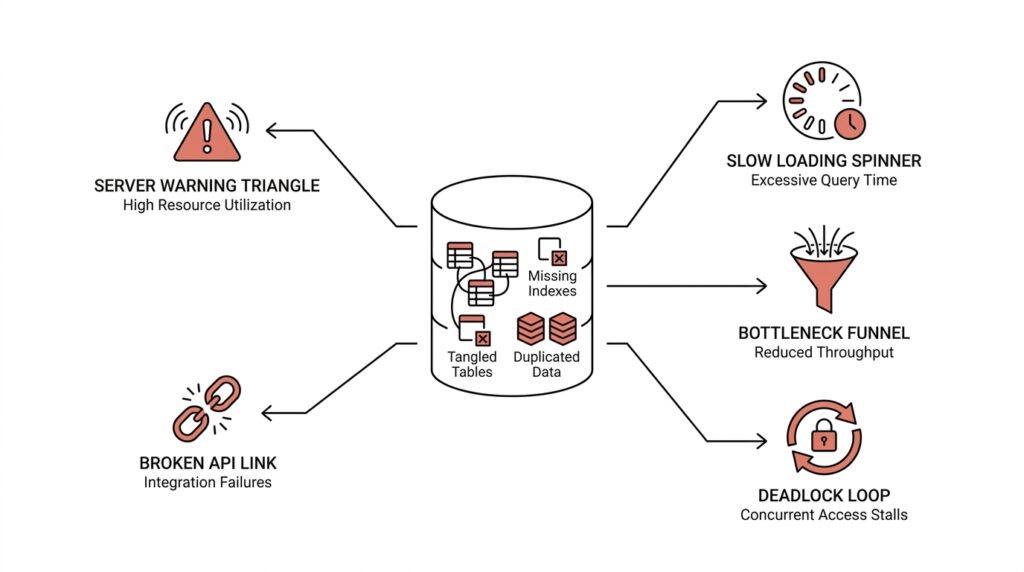
Identify Access Patterns First
Imagine we’re sketching a database for an app before the first user ever logs in. It is tempting to start with tables, columns, and shiny diagrams, but the real starting point is more human than that: we need to understand how the system will reach for data in everyday use. An access pattern is the regular path an application takes to read, filter, sort, update, or group information, and that pattern should shape the database design from the beginning.
This is where many system design failures quietly begin. A team builds around the data they have, not the data behavior they expect, and the mismatch grows later like a crack in the foundation. If most requests will look up one user by email, that is a very different world from a reporting dashboard that scans millions of orders by date. What does the app ask the database to do most often? That question is the one we want to answer before we choose indexes, table shapes, or even the database model itself.
When you identify access patterns first, you stop treating the database like a storage box and start treating it like a traffic system. Every query is a road, and every frequent query deserves the clearest lane possible. A relational database, for example, is often a good fit when you need flexible joins and strongly connected records, while a document store can work well when the app usually reads a whole object at once. The point is not to pick a winner in the abstract; the point is to match the design to the paths your data will actually travel.
This step also helps you spot hidden costs before they become outages. A query that looks harmless on paper can become expensive if it forces a full table scan, which means the database must inspect many rows to find the few you want. If you know the access pattern ahead of time, you can decide whether you need an index, a denormalized read model, or a separate table built for fast lookups. That is how good database design turns messy demand into predictable performance instead of surprise slowdowns.
Think about an online store. If customers constantly check product pages, we care about fast reads for product details, price, and availability. If the business team later asks for “all sales in the last 24 hours by region,” that is a different access pattern entirely, and it may deserve its own structure rather than forcing the main transaction table to do double duty. This is why system design should begin with questions like “Who reads this data?” and “How often do they read it?” before we ever worry about clever optimizations.
The same idea protects you from overbuilding too soon. Beginners sometimes design for every possible query they can imagine, which leads to complicated schemas that are hard to maintain and still slow in the wrong places. Instead, we want to design for the real, repeated paths first, then add flexibility where the product genuinely needs it. That keeps the database design honest: lean where the workload is simple, and deliberate where the workload is heavy.
Once we understand access patterns, the next decisions become much clearer. We can choose indexes with purpose, split reads from writes when necessary, and decide whether to keep data together or separate it into specialized stores. In other words, the database stops being a guess and starts becoming a response to real behavior, which is exactly what strong system design asks for.
Balance Normalization and Redundancy
Now that we know how the data will be used, we can face one of the most delicate choices in database design: how much to normalize and how much to repeat. Normalization means organizing data so each fact lives in one place, while redundancy means storing the same fact more than once on purpose. That sounds like a contradiction at first, but in practice it is more like learning when to pack lightly and when to carry a spare jacket. Good database design is often about finding the point where the structure stays clean without making every read painfully expensive.
This is where beginners often swing too far in one direction. If we normalize everything aggressively, the schema can become beautifully tidy but awkward to use, because the application must keep joining many tables to rebuild one simple view of the world. A join is a database operation that combines related rows from different tables, and while joins are powerful, too many of them can slow down common requests. On the other hand, if we add redundancy everywhere, we may make reads faster at first, but we also create extra places where data can drift out of sync. The real question is not “Should we normalize or duplicate?” but “Which parts of the system need a clean source of truth, and which parts need quick access?”
Imagine an online store again. A product’s name, category, and base price might live in one canonical table, because those values should stay consistent across the system. But a product listing page may also keep a copied version of the display name or thumbnail path in a read-optimized table, because the page needs to load quickly and repeatedly. That copied data is redundancy, but it is deliberate redundancy, not careless duplication. In other words, we normalize the parts that must remain stable and reuse them everywhere, then we duplicate the parts that help the user experience stay fast.
A useful way to think about database normalization is as a guard against accidental confusion. When one fact has one home, it is much harder for the system to disagree with itself. If an address changes, for example, you want to update it once rather than hunt through five tables and hope you found every copy. This is especially important for data that affects billing, permissions, or legal records, where inconsistency can become more than a technical nuisance. Strong database design respects that some data deserves a single truth, even if that choice makes reads a little less convenient.
But redundancy has its own place, and this is where system design becomes practical instead of theoretical. If a dashboard constantly asks for totals by day, region, or status, it may be smarter to keep those aggregates in a separate table instead of recalculating them from raw events every time. An aggregate is a precomputed summary, like a daily count or total sum, and it trades a bit of extra storage for much faster reads. What looks like duplication on paper may actually be a safety valve for the whole system, especially when traffic grows and the same report gets requested again and again.
The trick is to let access patterns lead the decision, not habit. If a piece of data changes often and must stay perfectly consistent, keep it normalized. If a piece of data is read constantly, changes predictably, or powers a slow query that appears everywhere, consider adding a redundant copy or a separate read model, which is a table or structure built for fast reading rather than writing. That balance keeps the database design honest: stable where correctness matters most, and flexible where performance matters most.
When we get this balance right, the database starts working like a well-run kitchen. The pantry holds the ingredients in one sensible place, but the chef also preps a few commonly used items so the busiest orders do not stall the line. That is the heart of normalization and redundancy working together: not purity, not chaos, but a thoughtful arrangement that matches the way the system actually lives day to day.
Index Only Critical Queries
Once we know which data paths matter most, the next question becomes sharper: which queries deserve an index, and which ones should stay simple? This is where database indexing starts to separate healthy system design from expensive guesswork. An index is a special lookup structure that helps the database find rows faster, a little like the index in the back of a book that saves you from flipping every page. If we build one for every possible request, though, we can end up slowing the whole system down instead of helping it.
The safest habit is to index the queries that the system depends on every day. These are the lookups that appear constantly in user flows, background jobs, or reports the business cannot live without. When you ask, “Which query will hurt the most if it becomes slow?” you are thinking like a system designer instead of a table collector. That question matters because every index takes up space, needs maintenance, and adds work whenever rows are inserted, updated, or deleted.
That tradeoff is easy to miss when we focus only on read speed. A database index can make a search feel instant, but it is not free; every write has to update the index too. In a busy system, too many indexes can turn a fast transaction into a sluggish one, much like adding too many toll booths to a highway. So good database design does not ask, “Can we index this?” It asks, “Should we index this because it protects a truly important path?”
This is why critical queries deserve the first and best indexes. If your app repeatedly looks up a user by email, filters orders by status, or fetches the latest messages in a conversation, those patterns are worth supporting directly. A well-chosen index can turn a full table scan into a targeted lookup, which means the database checks only a small part of the data instead of searching every row. That difference can be the line between a system that feels responsive and one that starts to buckle under load.
But index design becomes even more useful when we match it to the exact shape of the query. If a request filters by one column and sorts by another, a single-column index may not be enough, while a composite index, which stores more than one column in a useful order, may fit the job better. If a page needs only a few fields, a covering index, which holds all the columns the query needs, can let the database answer without going back to the main table at all. Have you ever wondered why one query is fast while another looks almost identical and still crawls? Often the answer is that one of them aligns with the index and the other does not.
That is also why we should resist the urge to index every field that seems important in the moment. A database indexing strategy works best when it follows real frequency, not imagined importance. A rarely used admin search can survive a slower path, but the checkout flow, login lookup, or live dashboard probably cannot. When we reserve indexes for the paths that truly carry the application, we keep the system lean enough to write quickly and structured enough to read quickly.
The best part is that this approach keeps our design honest. We are not pretending the database can be infinitely fast at everything; we are choosing where to spend its energy. A few thoughtful indexes on the right columns often outperform a large pile of scattered ones, because they support the queries that shape the product’s everyday experience. That is the deeper lesson here: strong database indexing is not about collecting shortcuts, but about protecting the handful of queries that the whole system leans on.
When we take that stance, the database starts to feel less like a maze and more like a set of clear roads. The important routes get signs, lanes, and smooth turns, while the less common paths remain available without forcing the entire city to be rebuilt around them. That balance is what keeps critical queries fast without letting the rest of the system pay the bill.
Avoid Hot Keys and Skew
When a database design looks fine in a diagram but starts to stumble under real traffic, the problem is often not the storage itself but where the traffic lands. A hot key is one key, row, or partition that receives a disproportionate share of reads or writes, and skew means the workload is spread unevenly instead of across the system in a balanced way. In database design, that imbalance can turn one small spot into the busiest intersection in town. How do you avoid hot keys in a distributed database? We start by noticing that the problem is usually caused by predictable human behavior, not bad luck.
The pattern is easy to miss at first because the system may look healthy in testing. Then a launch, a popular item, or a single active customer account creates a traffic magnet, and one shard or partition starts carrying far more load than the others. That one place becomes a bottleneck, which means requests queue up, latency rises, and the rest of the cluster sits mostly idle. This is why skew matters so much in system design: even a large database can feel small if most of the work keeps knocking on the same door.
A common source of skew is choosing a partition key, which is the value a distributed database uses to decide where data lives, that sounds convenient but groups too many requests together. If we partition by country, for example, a huge share of traffic may pile into just a few popular countries. If we partition by timestamp, then today’s records may all land in one place while older data sits elsewhere, and the newest partition becomes the hot spot. The design looks tidy on paper, but the workload tells a different story the moment users arrive.
This is where high cardinality helps, which means the key has many distinct values. A partition key with high cardinality gives the system more possible buckets to spread data across, much like opening many checkout lanes instead of funneling everyone to one register. User ID often works better than region for this reason, because it usually spreads requests more evenly. We still need to think about behavior, though, because a key can have many values and still become hot if the same few values dominate traffic.
One practical way to reduce hot keys is to add a little randomness, often called salting, to a key that would otherwise concentrate traffic. Salting means attaching an extra value so the same logical item can be distributed across multiple physical partitions, which helps when one account, product, or conversation attracts unusually heavy traffic. Another approach is to separate the read path from the write path, so a busy counter or feed does not force every request through the same record. These choices are not about making the data look clever; they are about giving the workload more than one place to breathe.
We also want to watch for “celebrity” records, because a tiny number of items can create outsized pain. A viral product page, a global settings row, or a single shared counter can all become hot keys if every user keeps touching them. In those cases, the fix is often to stop pretending one row should do all the work. We might shard the counter, cache the popular read, or split one overloaded entity into several smaller ones so the system can serve it without turning into a single-file line.
This is one of the most important lessons in database design: balance is not automatic, and a schema that looks elegant can still fail if the traffic pattern is lopsided. We are not only asking whether a key is unique or indexed; we are asking whether it will stay evenly used when real users arrive. That is why access patterns, indexing, and partitioning all belong in the same conversation. A good design does not merely store data well. It keeps the load moving so one hot key does not quietly drag the whole system down.
When we think this way, skew stops being a mysterious performance bug and starts looking like a design choice we can shape. We choose keys that spread traffic, we avoid patterns that funnel everyone into one partition, and we treat popular records as special cases instead of hoping they will behave like ordinary ones. That mindset keeps the database design resilient long before the first hotspot appears.
Minimize Locking and Contention
After hot keys, the next traffic jam usually comes from locking and contention. Locking is the database’s way of protecting data while a transaction is working, and contention is what happens when several operations want the same row at the same time. How do you minimize locking and contention in a database without making the design fragile? The answer starts with treating shared data like a busy doorway: if too many people need to pass through one spot, the line forms even when the rest of the building is empty.
The first habit is to keep transactions short and focused. In PostgreSQL, row-level locks are held until the transaction commits or rolls back, and those locks block other writers to the same row; the database also tries to use the least restrictive lock mode it can. That means the longer we keep a transaction open, the longer we leave the door shut for everyone else. So we want to move slow work, like network calls, user prompts, and extra calculations, outside the transaction whenever possible, and reserve the transaction itself for the exact database changes that must stay together.
When read traffic is heavy, row versioning and optimistic concurrency can soften the pressure. Row versioning is a technique where the database keeps earlier versions of rows so readers do not need to block writers as often, and Microsoft’s SQL Server documentation notes that row-versioning-based isolation reduces shared locks on reads. Optimistic concurrency takes a different approach: it assumes conflicts are rare, does not lock up front, and checks on save whether the data changed in the meantime. That sounds subtle, but the idea is easy to feel in practice: instead of making every reader wait in line, we let them look at a stable snapshot and only handle the rare conflict when two writers truly collide.
This is where database design starts to protect itself from its own success. A single counter, status row, or “last updated” record can become a meeting point for hundreds of updates, and row-level locking means those writers will still contend on that exact row. If that pattern appears in your workload, it is often wiser to split the work into smaller pieces: one bucket per user, per shard, or per time window, then combine the results later in a separate read path. In other words, we stop asking one row to carry the whole conversation.
We can also reduce contention by changing how we think about writes. If a feature only needs to show the latest state eventually, we do not always need to update the “final” table immediately; we can write events first, then summarize them in the background into a read model, which is a structure optimized for fast reads. That pattern keeps the busiest write path narrow and lets the expensive work happen away from the user’s request. It also helps with database design because the system no longer forces every small change to compete with every other change in real time.
The deeper lesson is that minimizing locking and contention is less about magic settings and more about making fewer operations fight over the same shared resource. We do that by shortening transactions, avoiding unnecessary shared rows, choosing concurrency controls that fit the workload, and separating write-heavy paths from read-heavy ones. When we design this way, the database stops behaving like a single checkout lane and starts feeling like a system with enough room for everyone to move.
Decouple Shared Database Dependencies
When a shared database starts causing trouble, the pain usually arrives in small, ordinary moments: one team adds a column, another service still expects the old shape, and a release that looked harmless suddenly breaks something elsewhere. That is what shared database dependencies do best—they turn one database change into everyone’s problem. AWS describes this as development-time coupling and runtime coupling, and Microsoft’s guidance makes the same point more bluntly: when services share a data store, they end up tied together through the same schema and the same failure surface.
The first move toward relief is to give each service a private home for its own data. In a database-per-service design, one service owns one data store, other services do not reach in directly, and the data is accessed only through APIs. That boundary matters because it keeps one service’s schema change from rippling across the system, and it also reduces the chance that one database becomes a single point of failure. If you have ever wondered, “How do we decouple shared database dependencies without rewriting everything?”, this ownership rule is the place to start.
Once ownership is clear, we can stop asking the database to solve every cross-service question at once. Some requests still need information from more than one service, but that does not mean we should put all the data back into one shared table. AWS recommends API composition, where an aggregator calls the services that own the data and combines the results in memory, and Microsoft’s CQRS guidance shows another path: keep a separate read model, meaning a data structure built for fast querying rather than updates. A read model often stores a denormalized copy, which is a simplified version of the data shaped for the question the user is asking.
That idea is easy to miss because duplication can feel wrong at first. But in practice, a small copy in the right place can remove a large amount of friction from the system. Microsoft notes that a read model can avoid complex joins and improve query performance, while AWS points out that local data can keep a service running even if the source service is temporarily unavailable. In other words, we are not duplicating data carelessly; we are moving a copy closer to the work that needs it, the way a cook keeps frequently used tools on the counter instead of in a back room.
During a transition, you may still have a shared database, and that is where discipline matters most. AWS warns that this pattern requires backward-compatible changes, hot tables should be avoided, and schema changes must be coordinated across current and previous versions of every service that depends on the database. That means adding columns is safer than ripping them out, and changing tables should happen slowly enough that older service versions do not suddenly lose their footing. Shared database dependencies become dangerous when we treat the database like a private implementation detail for multiple services at once; the safer move is to treat it like a shared contract that must not surprise anyone.
What we gain from this separation is not only cleaner architecture, but also calmer day-to-day operations. Azure notes that isolating each service’s data store limits the scope of change and preserves independent deployment, while AWS says decoupling data stores improves resiliency and lets each service scale on its own terms. That is the real payoff: fewer coordination meetings, fewer surprise breakages, and a system that can grow without every new request dragging the whole database along with it.



