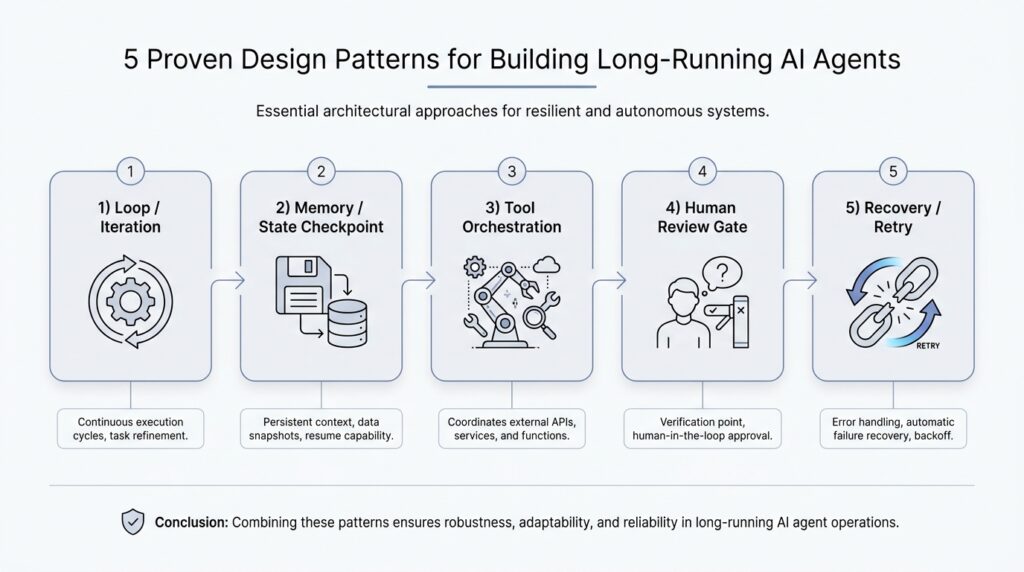
Understand Long-Running Constraints
When we start thinking about long-running AI agents, the first surprise is that the real challenge is not intelligence alone, but endurance. An agent that works for minutes can lean on memory, a fixed prompt, and a single burst of attention. An agent that works for hours or days has to survive delays, interruptions, changing inputs, and its own mistakes. That is why understanding long-running constraints matters so much: it tells us what the system can realistically hold onto, what it must forget, and where it needs guardrails.
What does it actually mean for an AI agent to run for a long time? It means the agent is no longer answering one neat question and walking away. It may be watching a workflow, using tools repeatedly, waiting for events, or making decisions across many steps. Along the way, it will hit limits like latency, which is the delay before a response comes back, and the context window, which is the amount of text the model can keep in its working memory at once. If we ignore those boundaries, even a clever agent can become confused, slow, or expensive.
This is where the idea of long-running constraints starts to feel a lot like planning a road trip. You would not pack as if every snack, map, and backup plan could fit in one pocket, and you would not assume the car can drive forever without fuel. In the same way, a long-running AI agent has finite memory, finite time, and finite budget. It may also face rate limits, which are caps on how often an application programming interface, or API, can be called in a given period, and those limits can shape the rhythm of the entire system.
We also need to think about the environment around the agent, because long-running work rarely happens in a vacuum. Data can change while the agent is still processing. A task that looked simple at the start may become outdated by the end, and a tool call that worked five minutes ago may fail now. That is why the constraints are not only technical, but operational: the agent needs ways to notice drift, recover from errors, and keep its place when the world moves underneath it. In practice, this means designing for retries, which are repeated attempts after a failure, and checkpoints, which are saved progress markers the agent can return to later.
Once we name those limits, the design choices become much clearer. A long-running AI agent should not keep everything in one giant conversation thread and hope for the best. Instead, it should store important state outside the model, summarize what matters, and separate durable facts from temporary chatter. That distinction is crucial because the model’s context window is like a desk, not a warehouse: useful things can sit on it, but only for so long before the workspace becomes cluttered. When we respect that boundary, the agent feels steadier and more predictable.
Cost is another constraint that quietly shapes every decision. Each extra tool call, each extra retry, and each extra round of reasoning can add latency and money. If the agent is meant to run continuously, those small costs can compound into something meaningful over time. So when we design long-running constraints, we are really asking a practical question: how do we keep the agent useful without letting it drift into slowness, waste, or runaway failure?
That is the heart of the problem. A strong long-running AI agent is not one that never struggles; it is one that knows its limits and behaves well inside them. When we understand those boundaries early, the patterns that follow make much more sense, because they are all different ways of helping the agent remember, recover, and continue without losing the thread.
Pick a Durable Orchestration Model
Now that we know a long-running AI agent has to live inside real limits, the next question becomes practical: what keeps the whole system moving when the model cannot hold everything in memory? This is where a durable orchestration model enters the story. Orchestration is the control layer that decides what happens next, which task runs now, which task waits, and how the agent recovers when something breaks. Durable means that control layer can survive pauses, crashes, and restarts without forgetting the agent’s place.
Think of it like a theater stage manager rather than the actors themselves. The model may improvise, reason, and talk, but the orchestration model decides when the curtain rises, when a prop changes, and when the next scene starts. If you are asking, “What is the best orchestration model for long-running AI agents?” the honest answer is that the best one is the one that can keep state outside the model and resume work cleanly after interruption. That is the difference between a clever demo and a system you can trust overnight.
The first thing we want is a clear separation between thinking and coordination. The model can generate ideas, plans, and responses, but the orchestration layer should own the durable facts: what step came before, what tool succeeded, what failed, and what still needs attention. This separation keeps the long-running AI agent from depending on a single conversation thread as its only memory. When the agent wakes up again after a delay, the orchestration model can reconstruct the situation from stored state instead of forcing the model to guess.
That choice matters even more when work arrives in pieces. Some agents need to wait for human approval, some need to poll external systems, and some need to keep retrying until a file appears or a service responds. A durable orchestration model gives each of those pauses a safe place to land. Instead of holding everything in the model’s context window, we move the important steps into a workflow, a job queue, or a state machine, which is a system that tracks exactly which stage the agent is in and what transitions are allowed next.
Different teams pick different shapes for that control layer, and each shape tells a slightly different story. A simple event loop works well when the agent mostly reacts to new inputs and can finish quickly between checks. A workflow engine fits better when the path is longer, because it stores step-by-step progress and can restart from the middle. An actor model, which gives each worker its own mailbox and state, can be useful when many independent tasks need to run at once without stepping on each other. The pattern you choose should match the kind of waiting, retrying, and branching your agent actually does.
The safest choice is usually the one that makes failure boring. A durable orchestration model should support checkpoints, which are saved progress markers, and idempotency, which means repeating an action does not accidentally create duplicate results. It should also make retries visible, because retries without memory can turn a small glitch into repeated damage. In other words, the orchestration layer should not only move the agent forward; it should also know how to pause, rewind a little, and continue without confusion.
We also want to keep the model honest about cost and time. Every extra turn through the loop, every tool call, and every retry adds latency, which is the delay before something happens, and that cost compounds in a long-running AI agent. A durable orchestration model helps us see those tradeoffs clearly, because it turns a vague chain of prompts into a traceable sequence of steps. Once we can see the sequence, we can trim waste, shorten delays, and avoid letting the agent wander.
So the real goal is not to pick the fanciest control system. It is to choose an orchestration model that can remember where it is, recover when the world changes, and keep the work moving without depending on fragile luck. When we get that layer right, the rest of the agent becomes much easier to reason about, because the conversation no longer has to carry the whole burden of continuity.
Design Persistent Agent Memory
When the orchestration layer can pause and resume the agent, the next question is what the agent should remember when it comes back to life. That is where persistent agent memory enters the story. It is the part of the system that keeps useful facts, preferences, and decisions after the current conversation has faded, so the agent does not have to relearn the same lesson every time it wakes up. How do you design persistent agent memory without turning it into a junk drawer? We start by treating memory as a carefully managed notebook, not a dump truck.
The easiest mistake is to confuse the model’s working memory with durable memory. Working memory is the text the model can see right now inside its context window, which is like a whiteboard that gets erased as the session grows. Persistent agent memory lives outside that whiteboard, in storage the system can read later, so important details survive restarts, delays, and new tasks. When we separate those two layers, the agent stops depending on luck and starts depending on design.
That separation also helps us decide what deserves to be remembered at all. Not every sentence should become a permanent record, because memory that holds everything quickly becomes noisy and expensive to search. Instead, we want to store stable facts such as user preferences, long-term goals, completed decisions, and lessons learned from prior attempts. This is the heart of persistent agent memory: keep what will still matter tomorrow, and let the rest stay in the session where it belongs.
A good way to think about this is to split memory into layers. Recent memory keeps the last few turns or the latest task state, which helps the agent stay oriented in the moment. Long-term memory keeps durable profile information, project history, and recurring patterns, which helps the agent recognize you or a workflow over time. We can also keep task memory, which is the record of what happened on this specific job, because a long-running AI agent often needs to remember why it chose one path instead of another.
The next design choice is retrieval, which means bringing the right memory back when it is needed. If we pull everything back all the time, the agent becomes slow and cluttered; if we pull back too little, it forgets the very thing that would help. Many systems use semantic search, which finds information by meaning rather than exact words, so a memory about “prefers short summaries” can still surface when the user asks for “brief answers.” That makes persistent agent memory feel less like a filing cabinet and more like a helpful assistant who knows where to look.
We also need rules for writing memories, because bad memory policies create bad habits. A memory should be earned, not automatic, which means the system should write only after it sees repeated behavior, an explicit user preference, or a decision that matters later. It should also label memories by confidence and freshness, because some facts are strong and stable while others are temporary and likely to change. In practice, this means the agent can say, in effect, “I think this matters, but I should check before I act on it.”
There is one more subtle part of persistent agent memory: forgetting. That may sound backward, but it is what keeps the system trustworthy. Old memories can become stale, conflicting, or no longer relevant, so we need expiration, overwrite rules, and a way for the user to correct mistakes. If the agent remembers too rigidly, it starts acting like a person who cannot let go of an outdated note.
So the goal is not to build the biggest memory store possible. The goal is to build persistent agent memory that is selective, searchable, and easy to update, so the long-running AI agent can carry forward what matters without dragging along clutter. Once we have that discipline in place, the agent can feel consistent across sessions, while still staying light enough to adapt when the world changes.
Implement Checkpoints and Resumes
When a long-running AI agent has been working for a while, the real fear is not that it will think badly for one moment. It is that it will lose its place after a crash, a timeout, or a human interruption, and then have to start guessing. That is why checkpoints and resumes matter so much in long-running AI agents: they turn fragile progress into something the system can safely set down and pick back up later. If orchestration is the stage manager, checkpoints are the marked spots on the script where the actor can stop, breathe, and continue without forgetting the scene.
A checkpoint is a saved snapshot of the agent’s progress at a specific moment. In plain language, it is the note that says, “Here is what we know, here is what we already did, and here is what still remains.” A resume is the act of restoring that saved state and continuing from the right point instead of replaying the whole journey. That sounds simple, but in practice it is one of the most important habits for building a resilient AI agent, because it keeps work from disappearing when the environment gets noisy or unpredictable.
So what should we actually save in a checkpoint? We want the pieces that let the agent rebuild its thinking without dragging along every temporary detail. That usually means the current task stage, the last successful tool call, the parameters used for that call, any output that changes the next decision, and any pending human approval or external dependency. Think of it like pausing a recipe: we do not need the entire kitchen history, but we do need to know which ingredient went in, which step came next, and whether the oven is already on.
The safest checkpointing strategy is to save state at meaningful boundaries, not after every tiny token or minor thought. If we save too often, the system slows down and fills storage with noise; if we save too rarely, we risk losing too much work. A good checkpoint feels like a camera shutter at the end of a clean action: fetch data, write file, ask for approval, finish a subtask. That rhythm makes the long-running AI agent easier to resume because each saved point corresponds to a real step in the workflow, not a half-formed thought.
The next question is the one readers usually search for: how do you resume an agent without causing duplicate actions? The answer is to pair checkpoints with idempotency, which means repeating an action does not create a second copy of the same result. If an agent already sent an email, booked a ticket, or wrote a record, the resume logic should know that and avoid doing it again. This is where checkpoints and resumes become more than convenience; they become protection against accidental double execution, which can be much worse than a simple retry.
Resuming also means checking whether the world has changed since the last checkpoint. A saved state is only useful if it still matches reality, so the agent should verify any external data that might have gone stale while it was paused. For example, if the agent was waiting for a file, a payment confirmation, or a fresh API response, it should confirm those conditions before moving forward. That small pause for verification keeps the resume path honest and prevents the agent from continuing with an outdated assumption.
It also helps to separate the resume logic from the task logic. The task logic decides what the agent should do next; the resume logic decides how to reconstruct the last safe stopping point. When those two responsibilities stay apart, the system becomes easier to debug because a failure in recovery does not tangle itself with the agent’s reasoning. In practice, that means your long-running AI agent can restart after a crash, reload the last checkpoint, and continue with the confidence that it is standing on solid ground rather than improvising from memory.
This is the deeper value of checkpoints and resumes: they make continuity a design feature instead of a lucky accident. Once we can stop and continue safely, the agent no longer has to survive on a single uninterrupted stretch of attention. It can move through a workflow the way a careful traveler moves through a long train ride, keeping track of each station so the next step is always clear.
Add Human Approval Steps
When a long-running AI agent reaches a decision that could affect money, data, or trust, human approval steps become the safety rail that keeps the whole journey steady. This is the moment where the agent stops acting like a solo performer and starts working like part of a team. If you are wondering, how do you add human approval steps without slowing everything to a crawl?, the answer is to treat approval as a designed part of the workflow, not as an awkward interruption.
The best place for a human-in-the-loop check is at moments of real consequence. That might mean sending an email, changing a record, spending budget, deleting data, or making a recommendation that someone else will rely on. We do not want the agent to ask for permission every few seconds, because that would turn progress into paperwork. Instead, we define clear approval gates, which are decision points where the agent pauses, presents its reasoning, and waits for a person to confirm or reject the next move.
This works best when the approval request is small, clear, and easy to judge. A reviewer should not have to reconstruct the whole story from scratch, so the agent should bundle the context into a short, readable packet: what it wants to do, why it wants to do it, what changed since the last checkpoint, and what the likely impact will be. That is where the earlier ideas about checkpoints and resumes start paying off, because the agent can hand the human a precise snapshot instead of a messy trail of half-finished steps. In a good approval workflow, the human is not doing detective work; they are making a well-informed call.
The next design choice is deciding which actions need approval and which do not. If every low-risk action requires a person, the agent becomes sluggish and frustrating. If no high-risk action ever gets reviewed, the agent becomes dangerous in a quieter, harder-to-notice way. The sweet spot is a tiered policy: routine actions can continue automatically, while sensitive actions trigger human approval steps based on cost, confidence, or potential impact.
That tiering also helps the agent stay calm when uncertainty rises. A long-running AI agent should learn to say, in effect, “I can keep going on my own,” or “This is the point where I should ask a person to weigh in.” That kind of behavior makes the system feel reliable because it does not bluff its way through uncertainty. It also creates a healthy human-in-the-loop pattern, where people handle the calls that need judgment and the agent handles the repetitive work that benefits from speed.
We also need to think about what happens while the agent waits. Approval is often a pause that may last minutes or hours, so the agent should save its state, remember why it stopped, and avoid duplicating the request if it restarts. A clean approval workflow includes reminders, timeouts, and fallback paths, so the system knows whether to keep waiting, escalate, or cancel the task. That way, human approval steps become a controlled pause rather than a dead end.
There is one more subtle benefit here: approvals create trust over time. When users can see that the agent asks before taking consequential actions, they begin to rely on it for bigger jobs. The approval record also leaves an audit trail, which is a history of who approved what and when, making it easier to review decisions later. In other words, human approval steps do more than prevent mistakes; they teach the whole system how to behave responsibly.
Used well, this pattern makes the long-running AI agent feel less like an autonomous machine running loose and more like a capable teammate that knows when to stop and ask. The agent keeps moving, but it does not confuse momentum with permission. That balance is what lets us trust the next step, and it sets up the final question: how do we keep the agent dependable when it has to operate across many actions, many pauses, and many kinds of risk?
Instrument Logging and Recovery
When a long-running AI agent behaves well, it can feel almost invisible. The real test comes later, when something slows down, breaks, or returns an odd result, and we need to understand what happened without guessing. That is where instrument logging and recovery become the agent’s flashlight and spare tire: logging helps us see the path, and recovery helps us keep moving when the road turns rough. If you have ever asked, “How do I debug a long-running AI agent after it has been running for hours?” this is the layer that gives us an answer.
Instrumentation means adding measurement points to the system so it tells us what it is doing as it works. A log is a record of an event, and a structured log is a log with consistent fields, such as task ID, step name, tool name, status, and error message, so machines can search and filter it reliably. For long-running AI agents, those details matter because a vague note like “tool failed” is not enough to explain which tool failed, for which task, and after which checkpoint. When we instrument the agent well, we create a breadcrumb trail that makes the long-running AI agent easier to inspect, explain, and trust.
The most useful logs are the ones that let us follow one story from start to finish. A correlation ID is a unique label that ties together every event in one run, so even if a task bounces between services, retries, and human approval steps, we can still recognize it as one journey. A trace is the full path of that journey across steps and tools, while a metric is a number over time, such as failure rate or average latency. Together, these three views tell us not only what broke, but where it broke, how often it breaks, and whether the pattern is getting worse. That is the heart of instrument logging for long-running AI agents: we are not collecting noise, we are collecting evidence.
Good logging also captures decision points, not just failures. We want to know when the agent chose a tool, when it waited, when it retried, when it escalated, and when it moved forward after a checkpoint. Those moments reveal the agent’s reasoning in a practical sense, even if we do not store every internal thought verbatim. The goal is to make the recovery path understandable later, because a system that cannot explain its own last few moves is very hard to repair with confidence.
Once we can see clearly, recovery becomes a disciplined process instead of a hopeful scramble. Recovery means restoring the agent after a failure so it can continue from a safe point, which may involve retrying a tool call, reloading a checkpoint, or replaying a missed step. The key is to distinguish between a temporary glitch and a real break in the workflow. A network timeout might call for a retry, while a corrupted output might require rolling back to the last clean checkpoint and re-running the step with fresh input.
This is also where idempotency, which means repeating an action does not create duplicate side effects, becomes essential again. If recovery replays work, then the agent must know whether an action already happened, such as writing a record, sending a message, or booking a resource. Without that guardrail, recovery can create a second problem while trying to fix the first. A strong recovery design treats every external action like a door with a receipt: before opening it again, we check whether the agent already went through.
The best recovery plans are boring in the best possible way. They define what to retry automatically, what to pause and inspect, what to escalate to a human, and what to abandon safely after repeated failure. They also keep a clear audit trail, so when the system recovers, we can still answer why it made that choice and whether it followed the expected path. In practice, that makes instrument logging and recovery feel less like emergency surgery and more like a well-rehearsed drill.
That is why this pattern matters so much for long-running AI agents. Logging gives us the map, and recovery gives us the route back when the map and the terrain disagree. When we design both together, we stop treating failures as mysteries and start treating them as normal events the agent already knows how to survive.



