Tool Overviews & Use Cases
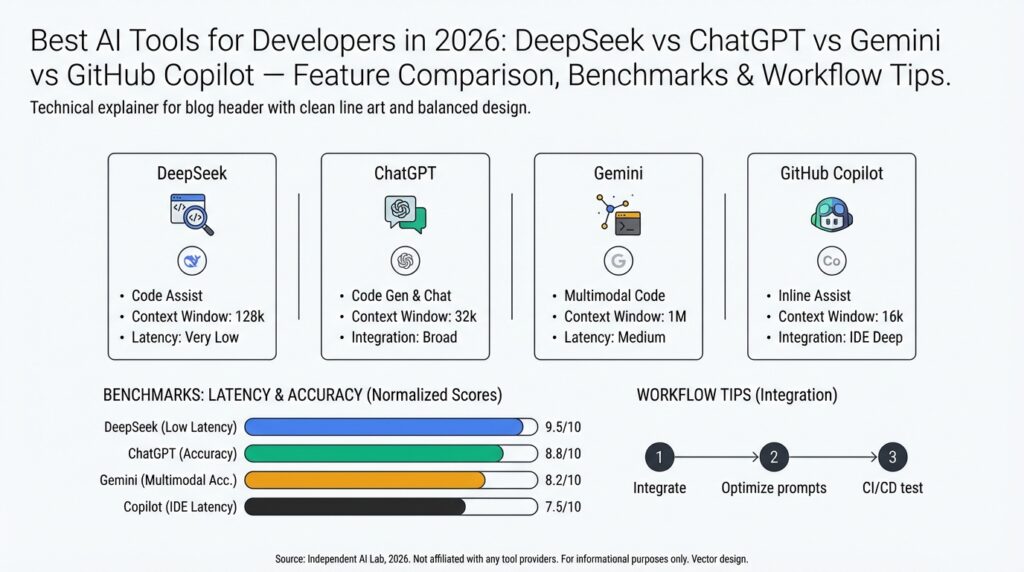
Building on this foundation, we now look at how each platform actually performs in day-to-day developer workflows so you can pick the right tool for the job. The pragmatic differences between DeepSeek, ChatGPT, Gemini, and GitHub Copilot show up in latency, context handling, and specialized features like semantic search or repo-aware completions. For developers evaluating AI tools for developers, the key questions are: which tool reduces cognitive load for review and refactor work, which integrates cleanly into CI and editor workflows, and which one scales for retrieval-augmented generation in production? We’ll treat each tool by its primary strength and concrete use cases you’ll encounter on projects.
DeepSeek shines when you need vector search and semantic retrieval tightly coupled to your codebase or documentation. Its typical deployment pattern is: index repository artifacts (code, design docs, issues), attach metadata (module, owner, commit hash), then run intent-based queries to retrieve canonical snippets. In practice, teams use DeepSeek to accelerate incident response—searching for “how did we migrate payment processing to queue-based retry?” returns the migration PR, schema diff, and related runbooks, which reduces mean time to resolution. When you have complex stateful traces and observability artifacts, DeepSeek becomes the glue between telemetry and human reasoning.
ChatGPT remains a versatile assistant for exploratory tasks, design discussion, and multi-turn code synthesis. You’ll reach for ChatGPT when you want conversational debugging, language-agnostic algorithm sketches, or to quickly prototype API clients and tests. For example, ask for a bounded implementation: “Generate a Rust parser for nested JSON with detailed error types and example unit tests,” and iterate in the same thread until edge cases are resolved. This back-and-forth is invaluable during architecture reviews and when you need readable explanations alongside code suggestions rather than raw completions.
Gemini positions itself as an all-purpose multimodal model with strengths in reasoning and code clarity across large prompts. Use Gemini when you need long-context planning—refactoring across dozens of files, generating architecture diagrams from prose, or summarizing large PR threads. In a refactor sprint, Gemini can produce a migration plan that lists changed modules, estimated test coverage impacts, and a stepwise rollout strategy. When you must balance creative rework with maintainability constraints, Gemini’s strength is in structured output (tables, checklists, stepwise plans) that engineers can operationalize.
GitHub Copilot is the editor-first tool that accelerates day-to-day coding with inline completions and test generation. Copilot excels at boilerplate, idiomatic patterns, and quick unit-test scaffolding inside VS Code or JetBrains IDEs, reducing repetitive typing and helping enforce local style. A practical pattern is to use Copilot for first-pass implementation and unit tests, then push a branch that triggers CI-based DeepSeek/semantic checks and a ChatGPT/Gemini-assisted PR summary for reviewers. This combined flow keeps iteration fast while preserving rigorous review and traceability.
How do you choose between these in practice? Use Copilot for high-velocity local development, ChatGPT for conversational design and exploratory debugging, Gemini for long-form reasoning and cross-file planning, and DeepSeek for production-grade retrieval and observability correlation. In a typical workflow we scaffold code with Copilot, validate and document design with Gemini or ChatGPT, and instrument both code and docs into DeepSeek so CI and on-call teams can surface context-rich results. This integrated approach turns AI tools for developers from curiosities into a repeatable, accountable part of your delivery pipeline.
Taking this concept further, the next step is operationalizing these patterns: add semantic indexes to CI artifacts, standardize prompt templates for review automation, and measure the impact on lead time and review velocity. When you instrument these feedback loops, you’ll see the real ROI—fewer context switches, faster incident resolution, and clearer PR narratives that reviewers can act on. In the following section we’ll compare performance benchmarks and concrete pipeline recipes that implement the combined workflow described here.
Feature-by-Feature Comparison
Building on this foundation, we need a practical, feature-driven lens to decide which AI tools for developers do the heavy lifting in your daily workflows. Start by thinking about semantic search and vector search as the retrieval backbone for production knowledge—these capabilities determine how well a model finds the right context for a prompt. Equally important up front are code completions and retrieval-augmented generation (RAG) support, because they shape whether a tool is best for fast local edits, long-form planning, or production incident response.
Compare each platform across a few clear axes: context handling (window size and session state), latency (interactive vs batch), integrations (editor, CI, observability), and trust boundaries (on-prem embeddings, data retention). Context handling dictates whether you use a model for single-file completions or multi-file refactors; latency determines if you get instant inline suggestions or batched PR analyses. Integrations determine operational cost—editor plugins reduce friction, while CI hooks and webhooks enable automated RAG checks and provenance for regulatory needs.
DeepSeek is optimized for retrieval-first scenarios: high-quality embeddings, chunking strategies, and metadata-aware ranking make it the go-to when semantic search must return canonical artifacts with provenance. In practice we index commits, runbooks, test fixtures, and telemetry traces, attach metadata like module and commit_hash, and serve those vectors to a RAG pipeline that conditions generation on the most recent, authoritative snippets. A typical pattern looks like embedding(chunked_file, metadata={“module”:”billing”,”commit_hash”:”abc123”}) and then using the top-k hits to ground a model’s output—this reduces hallucination and speeds up incident resolution at scale.
ChatGPT is the conversational workhorse for exploratory debugging and iterative code synthesis. Use it when you want to iterate on a failing test, refine edge-case logic, or translate error stacks into actionable fixes through back-and-forth prompts. Its strength is interactive context: you can show code, run a small change, describe the result, and iterate without leaving the thread—ideal for design reviews and producing human-readable explanations that reviewers can act on. However, for cross-repo refactors you’ll want to combine conversational outputs with a retrieval layer to ensure accuracy.
Gemini shines when you need structured, long-context reasoning and multimodal inputs for cross-file planning. Use Gemini for migration plans, architecture diagrams derived from code, or multi-file refactors where the output must include stepwise checklists, test coverage estimates, and rollout strategies. When you assemble a RAG pipeline that feeds Gemini with contextually relevant files, you get a plan that’s actionable and auditable—especially useful for teams that require clear migration steps and impact analysis before merging significant changes.
GitHub Copilot is the editor-first tool optimized for developer velocity: inline code completions, idiomatic patterns, and test scaffolding inside IDEs. Use Copilot for first-pass implementations, smoke tests, and iterating on local code where immediate completions reduce friction. It’s not a replacement for repo-wide reasoning; instead, we treat Copilot as the rapid prototyping layer that feeds branches into CI where DeepSeek and a larger LLM validate correctness and generate PR summaries for reviewers.
How should you choose in practice? Ask whether you need immediate local velocity, deep cross-file reasoning, or provable retrieval in production. If you prioritize speed and local coding flow, use Copilot; if you need conversational iteration and explainability, use ChatGPT; for long-form planning and multimodal synthesis reach for Gemini; and for production-grade semantic search and RAG pipelines choose DeepSeek. Measure tradeoffs—latency vs depth, on-prem privacy vs cloud convenience—and instrument each step in CI so you can compare lead time, review velocity, and incident MTTR in the next benchmarking pass.
Benchmarks: Speed and Accuracy
Building on this foundation, the practical question for any engineering team is how to trade off speed and accuracy across the AI tools for developers you operate with every day. We care about speed (latency and throughput) because it shapes developer flow, and we care about accuracy because it determines whether suggestions are actionable or dangerous. How do you balance speed and accuracy when selecting tools? In the paragraphs that follow we’ll compare measurable axes you should instrument and the real-world patterns that push you toward Copilot-style immediacy or RAG-backed, retrieval-first rigor.
Start by defining the benchmarks that matter for your workflows: interactive latency (p50/p95/p99), cold vs warm response times, throughput for batched analyses, and accuracy metrics such as precision/recall on retrieval, hallucination rate on generations, and acceptance rate for inline completions. Context window behavior also changes both speed and fidelity—models designed for very long contexts shift cost into token processing rather than network round-trips, which affects how you design tests and cache results. When you evaluate long-context models for cross-file reasoning, verify both end-to-end latency and where the model offloads work to pre-indexed context so you’re not surprised by hidden costs. (blog.google)
If your priority is developer velocity, measure the editor experience: inline completion latency, average suggestion length, and the acceptance rate of suggestions in real code. Editor-first tools that prioritize sub-second inline completions change the rhythm of typing, reducing cognitive context switches and speeding local iteration; in practice these tools often deliver sub-second suggestions for small snippets and 200–900ms for warm multi-line completions on modern hardware and networks. For rapid prototyping and test scaffolding, prefer the tool that gives you immediate, high-precision snippets so you and your team can iterate without leaving the IDE. (pxlpeak.com)
For production-grade correctness and incident response, prioritize retrieval quality and provenance over raw wall-clock speed. Retrieval-augmented generation (RAG) pipelines and vector search systems increase factual accuracy by grounding outputs in source artifacts, but they add retrieval and reranking steps that raise latency and token cost. In enterprise scenarios we often accept a 100–500ms retrieval overhead per grounded query because the reduction in hallucination and the ability to return a commit hash or runbook fragment materially lowers mean time to resolution. Design your SLOs accordingly: set separate latency and accuracy targets for inline vs retrieval-backed flows. (servicesground.com)
Concrete benchmark patterns help you make decisions that align with those SLOs. Build microbenchmarks that simulate cold and warm paths: measure a cold-code-index query (empty cache), then a warmed vector-db hit, then the full RAG generation time including reranker and model inference. Use labeled QA pairs, golden snippets, and adversarial queries to quantify hallucination rates; measure retrieval recall with both BM25 and vector-based candidates to see when hybrid retrieval improves correctness. Track p50/p95/p99 for each pipeline stage and measure developer acceptance rate in the IDE—these metrics surface whether speed gains are improving friction or merely producing noise. (getathenic.com)
In practical pipelines we combine approaches: use Copilot-like models for first-pass implementation and unit tests, then run CI jobs that index commits and docs into your vector store for DeepSeek-style retrieval and a long-context model to produce grounded PR summaries or migration plans. Measure impact on review velocity (time to first review), PR churn, and incident MTTR to see real ROI. When you instrument both accuracy (recall/precision, hallucination) and speed (latency percentiles, throughput), you can make deliberate trade-offs instead of guessing which tool to reach for.
As we move into concrete pipeline recipes, keep this principle front and center: match the tool to the latency budget and accuracy requirement of the task, then validate with targeted benchmarks that reflect your codebase, scale, and failure modes. That instrumentation will be the difference between theoretical performance and operational reliability in your AI-driven developer workflows.
Coding Workflows and Examples
Building on the foundation we’ve already laid, the practical question becomes how you stitch DeepSeek, ChatGPT, Gemini, and GitHub Copilot into daily coding flow without creating chaos. You want local velocity, provable retrieval, and reproducible PR narratives all at once — and that requires explicit handoffs between tools. How do you combine these tools in a single CI pipeline so developers experience minimal context switching and reviewers get grounded, auditable outputs? This section shows concrete patterns and examples that you can adapt for your repos and teams.
Start with the local edit-compile-test loop: GitHub Copilot (or an editor-first model) should be the default accelerator inside your IDE. Use Copilot for first-pass implementations and unit-test scaffolding, then run a lightweight pre-commit that validates style and runs the unit tests Copilot helped generate. Keep the pre-commit fast (sub-30s) by running a focused test subset and linters; that preserves the rapid feedback cycle while preventing low-quality suggestions from reaching CI. This pattern preserves developer velocity and reduces noisy commits that slow review.
For cross-file reasoning and retrieval-augmented generation, build a RAG stage that indexes code, docs, runbooks, and test fixtures into DeepSeek’s vector store as part of CI. In practice you’ll embed chunked artifacts with metadata (module, commit_hash, author), then surface the top-k hits to a long-context model like Gemini or ChatGPT for grounding. Example index step (pseudocode): embed(chunk, metadata={"module":"billing","commit":"abc123"}) followed by search(query, top_k=5). That ensures PR summaries and migration plans cite concrete commits and file snippets rather than unsupported assertions.
In the PR pipeline orchestrate three distinct jobs: fast editor-style checks, retrieval and grounding, and narrative generation. The first job runs unit tests and Copilot-originated smoke tests; the second indexes the new commit and runs vector-search validations to flag missing docs or test coverage gaps; the third posts a grounded PR summary using a template filled by Gemini or ChatGPT that includes top-k evidence links and a risk checklist. Keep the template deterministic (sections for changed modules, tests added, expected impact) so reviewers can scan quickly and auditors can trace claims to artifacts indexed by DeepSeek.
When you triage incidents, combine telemetry-driven retrieval with conversational synthesis: query DeepSeek for correlated traces and runbook snippets, then ask ChatGPT or Gemini to produce a triage checklist and rollback instructions. Use concrete prompts like: Given these logs and top-3 runbook hits, produce a prioritized mitigation plan with exact commit hashes and commands. That pattern makes the assistant output actionable commands you can paste into runbooks or an incident channel, and it reduces MTTR because the recommendations are grounded in provenance rather than inference alone.
Takeaway for implementers: standardize handoffs, instrument each stage, and treat prompts and templates as first-class code. We recommend committing prompt templates and RAG configurations to the repo so they’re versioned, reviewed, and testable in CI. Building these workflows lets you exploit the unique strengths of each AI tool for developers—GitHub Copilot for speed, DeepSeek for provenance, ChatGPT for conversational iteration, and Gemini for long-context planning—while keeping your delivery pipeline auditable and predictable. In the next section we’ll translate these workflow patterns into measurable pipeline recipes and benchmark targets that you can use to validate ROI.
Integration, Pricing, and Security
Building on this foundation, the practical decisions that determine whether an AI workflow saves time or creates risk are integration strategy, recurring cost structure, and data governance controls. These three dimensions shape adoption: a tool that integrates into your existing CI/editor flow but blows your budget or exposes secrets will slow teams more than it helps. Front-load these trade-offs early when you evaluate DeepSeek, ChatGPT, Gemini, and GitHub Copilot so you know where to invest engineering time and budget.
Integration quality drives developer velocity and operational reliability. Treat editor plugins, CI hooks, and vector-store connectors as first-class integration surfaces: install Copilot or an editor SDK for inline velocity, wire a pre-commit step that runs quick linters and smoke tests, then push a CI job that indexes new commits into your vector database with embed(chunk, metadata={"module":"billing","commit_hash":"abc123"}). Use deterministic PR jobs that call your RAG pipeline (top-k retrieval → reranker → model) so outputs are reproducible and auditable. Prioritize integrations that expose observability (traces, p95/p99 latency) and retry semantics so you can SLO each stage independently.
Pricing is multi-dimensional and easy to underestimate if you only look at per-token charges. You must budget inference tokens, embedding compute, vector-db storage and query costs, and orchestration (lambda or k8s) runtime. For example, a nightly CI RAG job that re-indexes large docsets will incur embedding costs repeatedly unless you cache embeddings and only re-index deltas; conversely, on-demand RAG in a high-traffic incident channel can create unexpected per-inference spend. Optimize by batching embeddings, using hybrid retrieval (BM25 prefilter + vector top-k), and measuring cost per grounded answer so you can trade latency for lower token costs when acceptable.
Security choices determine where you can safely send code, logs, and telemetry for model conditioning. Decide up front whether embeddings and models live in a cloud tenant, a VPC-restricted private endpoint, or on-prem; each option changes your IAM, encryption, and audit requirements. Enforce SSO and RBAC on model APIs, rotate and audit keys, enable encryption at rest and in transit, and implement retention and purge policies for ephemeral prompts that contain secrets. For provenance-sensitive flows, attach immutable metadata (commit_hash, author, time) to every vector so generated recommendations can link back to source artifacts during audits.
Choose patterns based on sensitivity, scale, and team velocity. If you handle regulated data, prefer on-prem vector stores with a hosted inference model behind a private endpoint, or run embeddings in your VPC and use a short-lived key for cloud models; if you need rapid iteration, a hosted model plus strict ingress/egress rules and data tagging may be acceptable. Consider RAG instead of fine-tuning when you want lower governance overhead—RAG confines factual grounding to indexed artifacts while fine-tuning introduces new model weights that require retraining controls and validation datasets. How do you balance integration complexity, recurring costs, and security requirements? Measure cost-per-incident, time-to-first-review, and acceptance rate for suggested fixes to inform the balance.
Operationalize controls and measure ROI so your choices stay defensible. Version prompt templates, RAG configurations, and embedding schemas in the repo so you can code-review prompt changes and run unit tests against golden queries; instrument hallucination rates with labeled QA and sample model outputs regularly. Capture audit logs for every model call, track token spend per pipeline stage, and create SLOs that separate inline-editor latency (sub-second for completions) from retrieval-backed synthesis (100–500ms extra for grounding). With these controls in place, you can safely deploy AI tools for developers at scale, trade off speed against accuracy, and iterate on integration and pricing decisions based on measurable operational metrics.