Project Overview
Before the first table or diagram appears, a courier management system database design starts with a simple question: what story should the data tell? In practice, that story includes parcels, customers, couriers, branches, payments, and status updates that must stay connected as a shipment moves from one hand to another. An ER diagram, or entity relationship diagram, gives us that bird’s-eye view by showing the entities in the system and the relationships between them before we dive into table details. That early map matters because it becomes the conceptual layer for the rest of the database work.
What does a courier management system database actually need to do? At the overview stage, we answer that by naming the system’s main jobs: recording bookings, tracking shipment progress, linking each parcel to a sender and receiver, and preserving a history of where the parcel has been. This is less about drawing lines for their own sake and more about deciding which real-world things deserve a place in the model. Once we know that, the rest of the design has a clear center of gravity, and the project report can explain the system with confidence.
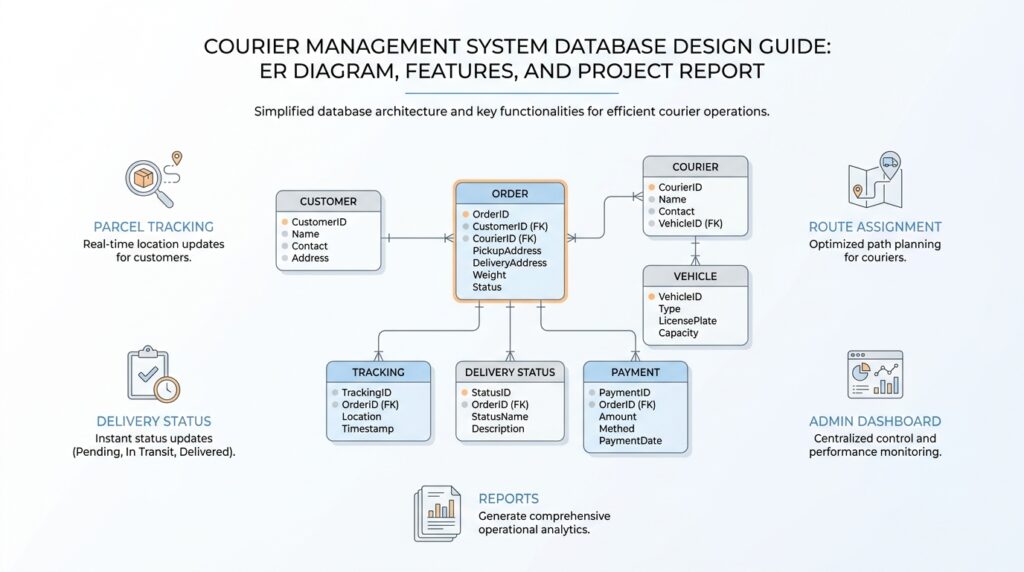
From there, the main characters start to appear. A customer places a shipment, a courier carries it, a branch receives it, and a tracking record marks each handoff, while a payment record closes the loop. In database terms, each of those pieces becomes an entity, and the links between them are carried by primary keys and foreign keys, the identifiers that let one table point to another. That structure is what keeps a courier management system database from turning into a pile of disconnected notes.
This is also the moment where normalization enters the story. Normalization is the design habit of keeping each fact in one place so the same detail does not get copied across many rows, which helps avoid redundancy and update problems. If a customer moves to a new address, you want to change it once, not chase the old address through every shipment row. That discipline may feel fussy at first, but it is what keeps the courier management system database steady as the data grows.
The project overview also helps the reader understand why the ER diagram matters later in the report. An ERD shows the entities, their attributes, and the relationships between them, so it becomes the bridge between a business idea and an implementable schema. In other words, the overview tells us what the system must remember, while the ER diagram shows how we will organize that memory. Once those two pieces line up, the features and tables stop feeling random and start feeling connected.
By the time we finish this overview, we have the project’s map in hand. We know the scope, the core entities, and the reason the design leans on keys, relationships, and normalized tables. That gives us a clean path into the next stage, where the courier management system database design becomes more concrete and the diagram begins to take shape.
Core System Features
Now that we have the map, the next question in courier management system database design is what the system must do every day. A courier platform lives or dies by the features it supports, because those features decide which data has to be stored, updated, and retrieved at speed. If you are wondering, “What features should a courier management system database include?”, the answer begins with the working routines of the business: booking a parcel, moving it through checkpoints, and making sure every change is recorded in the right place.
The first core feature is shipment booking, because every delivery story starts with a customer handing over an item and a clerk or app entering the details. In the courier management system database design, this means capturing sender information, receiver information, parcel weight, service type, origin, destination, and expected delivery time. Think of it like opening a folder for a new trip: once that folder exists, every later update has somewhere to live. Without a solid booking feature, the rest of the courier management system feels like trying to track a package with no label on the box.
From there, tracking becomes the heartbeat of the system. Tracking is the feature that records where a parcel is, who handled it last, and what status it holds right now, such as picked up, in transit, out for delivery, or delivered. This is where the courier management system database design starts to feel alive, because the data is no longer static; it moves with the parcel. A tracking history also gives the customer service team a clear trail when someone asks why a shipment is delayed, and that trail can calm a tense conversation fast.
Next comes assignment and dispatch, which is the part where the system matches a parcel with a courier, vehicle, or branch team. This feature matters because deliveries do not move themselves, and the database has to remember who is responsible at each stage. In practical terms, the system should store assignment time, handoff details, and delivery staff identity so that the same parcel does not wander through the process without ownership. When we design a courier management system database, this feature helps turn a loose chain of events into a controlled workflow.
Payment and billing form another essential layer. A courier service often needs to record whether a shipment has been prepaid, paid on delivery, or billed later, and the database should keep that financial record tied to the shipment itself. This does more than support accounting; it also helps the team confirm that a parcel is ready to move, release invoices, and resolve disputes without digging through paper slips or separate systems. In a well-planned courier management system database design, payment data should feel connected to the shipment record rather than floating beside it.
The last feature to think about is visibility, which includes status updates, alerts, and reports. Status updates tell everyone what changed; alerts tell customers when something important happens; reports help managers see delays, branch workload, and delivery performance over time. These features may sound like extras at first, but they are often the part people rely on most because they turn raw records into usable answers. A good courier management system database does not only store data; it helps people understand the journey that data describes.
Once these features work together, the design starts to feel purposeful instead of merely organized. Booking creates the parcel record, tracking follows its movement, assignment gives it an owner, payment closes the transaction, and reporting turns the whole process into something the business can improve. That is the real strength of courier management system database design: each feature supports the next one, so the system behaves like one continuous service instead of a scattered collection of tables.
Identify Main Entities
Now the design starts to feel real, because we move from features to the actual things the database must remember. In courier management system database design, an entity is a real-world thing we store as a table, like a customer, a parcel, or a payment. If you are asking, “What are the main entities in a courier management system database?”, the answer begins with the people and objects that appear in every delivery story. Once we name them clearly, the rest of the model has something solid to stand on.
The first entity to bring into focus is the Customer, because every shipment begins with someone who sends or receives something. In practice, we usually think about both the sender and the receiver, since a single parcel connects two people at once. This entity holds details such as name, phone number, email address, and address, which act like the contact card for the whole delivery process. Without a customer entity, the courier management system database design would lose the human side of the transaction and the package would have nowhere meaningful to belong.
Next comes the Shipment or Parcel entity, which is the heart of the system. This is the object that moves through the network, so it needs its own identity, not just a note inside another table. Here we record weight, dimensions, origin, destination, service type, and current status, along with a unique shipment number that keeps one parcel from being confused with another. A parcel entity is like a suitcase with a strong label on it: every update, scan, and handoff follows that same label through the journey.
What about the people and places that make the movement happen? That is where the Courier and Branch entities enter the picture, and they often work as a pair. A courier is the person or vehicle team responsible for delivery, while a branch is the office, hub, or location that receives, stores, or dispatches shipments. In courier management system database design, these entities help us answer practical questions like who handled the parcel, which office processed it, and where the shipment was at each stage. They turn a vague transport process into a traceable chain of responsibility.
Once we have the moving parts, we need a way to record movement itself, and that is the job of Tracking or Status Update. This entity stores each checkpoint in the parcel’s journey, such as picked up, in transit, arrived at branch, out for delivery, or delivered. Think of it as the parcel’s diary, where every important event gets a line of its own instead of overwriting the last one. In a well-built courier management system database, this history is valuable because it lets us see not only where the parcel is now, but how it got there.
Payment is another main entity because delivery is not complete until the business side is accounted for. The Payment entity keeps track of amount, payment method, payment date, and billing status, linking the shipment to the financial record that supports it. If the customer pays online, pays at delivery, or is billed later, the database should store that clearly so the team can reconcile orders without guessing. When we include payment in courier management system database design, we make sure the operational story and the financial story stay in step.
Finally, many designs also include a Staff or User entity when employees need login access, role-based permissions, or internal workflow tracking. This is useful because not every action should be anonymous; sometimes we need to know which employee created a booking, updated a status, or confirmed delivery. Together, these main entities give the model its shape: customer, shipment, courier, branch, tracking, payment, and sometimes staff. Once you can see those clearly, the ER diagram becomes less like a sketch and more like a map of how the whole courier management system database design will actually work.
Build ER Diagram
Now that we know the main entities, the next step in courier management system database design is to arrange them into a picture that feels more like a working story than a list of table names. This is where the ER diagram, or entity relationship diagram, earns its place, because it shows how the customer, shipment, courier, branch, tracking, payment, and staff records connect to one another. If you have ever wondered, “How do I build an ER diagram for a courier system?” the answer starts by drawing the relationships first and the table details second.
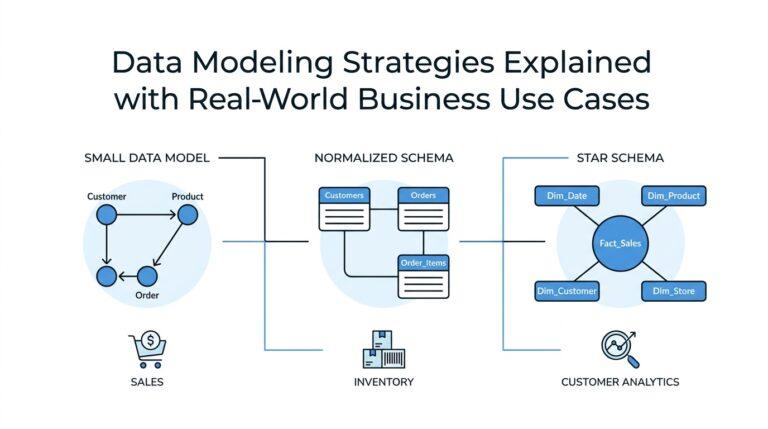
We usually begin with the strongest relationship in the system: one customer creates many shipments, but each shipment belongs to one sender and one receiver. That idea matters because it tells us where the keys must flow later. In simple terms, a primary key is the unique ID of a record, and a foreign key is the field that points to that ID in another table. When we place those links on the ER diagram, we are not decorating the page; we are showing how the database will remember ownership, identity, and movement without confusion.
From there, we give each entity its own set of attributes, which are the details that describe it. A shipment might carry shipment number, weight, dimensions, service type, origin, destination, and current status, while a customer might carry name, phone, email, and address. The point of the courier management system database design is not to cram every detail into one box, but to let each box hold one kind of truth. That way, when a customer updates their phone number, we update one customer record instead of chasing the same value through every parcel row.
The next scene in the diagram is the movement of the parcel itself. A shipment usually has many tracking updates, and each update belongs to one shipment, which gives us a clear one-to-many relationship. This is one of the most important patterns in an ER diagram for a courier system, because tracking history is what turns a static database into a live operational record. We can also show that a branch may process many shipments, and a courier may handle many deliveries, while each shipment is assigned to one active courier at a time, depending on the business rules we choose.
Sometimes the relationship is less direct, and that is where the diagram helps us pause and think. For example, if a shipment can pass through multiple staff members or a courier can handle many shipments over time, we may need a junction entity, which is a linking table that sits between two many-to-many relationships. This keeps the courier management system database design clean because it avoids repeating the same data in several places. It also gives us room to store useful details like assignment time, handoff status, or delivery notes, which would feel awkward if they were squeezed into the wrong table.
As we draw the ER diagram, we also mark whether a relationship is mandatory or optional. That sounds small, but it changes how the system behaves in real life. A shipment should not exist without a customer, yet a payment record might be optional until the customer has paid, and a tracking update might appear only after the parcel has started moving. These choices help the diagram reflect reality instead of forcing every record to behave the same way.
Once the lines, symbols, and key fields are in place, the diagram becomes more than a planning sketch; it becomes the blueprint that guides the rest of the build. It tells us which tables need to exist, which fields connect them, and where the business rules live inside the data model. In other words, a careful ER diagram turns courier management system database design into something you can build confidently, because every relationship already has a place in the story.
Design Database Tables
Now the diagram begins to harden into something you can build, and that is where the courier management system database design becomes practical. We stop thinking in shapes and start thinking in tables, because a table is the database’s way of lining up facts in neat rows and columns. The good news is that the table structure usually follows the ER diagram very closely, so the map we already drew now gives us a clear path. If you are asking, “How do I design database tables for a courier management system?”, the answer is to give each main entity its own table and let the keys do the linking.
The first table usually becomes the customers table, because every delivery begins with people. Here we store one row per customer, with columns such as customer ID, full name, phone number, email address, and address, so one person’s details live in one place instead of being copied into every shipment. That separation matters because it keeps the courier management system database design clean when a customer places several bookings over time. A shipments table then holds the delivery record itself, including shipment ID, sender customer ID, receiver customer ID, parcel weight, service type, origin, destination, and current status.
Once the core tables exist, we connect them with primary keys and foreign keys, which are the labels that keep the tables speaking to each other. A primary key is the unique identifier for a row, while a foreign key is the field that points to a matching row in another table. In practice, the shipments table might store sender_customer_id and receiver_customer_id, both pointing back to customers.customer_id. That design answers a real question the business will always ask: which customer sent the parcel, and who is supposed to receive it?
Tracking deserves its own table, because a parcel’s journey is not one event but a chain of moments. A tracking_updates table can store tracking ID, shipment ID, status, location, update time, and remarks, with each row representing one checkpoint in the parcel’s life. This is one of the most important parts of courier management system database design, because it lets us preserve history instead of overwriting the last known state. The shipment stays in one row, while the tracking table records the story of how that shipment moved from pickup to delivery.
The next layer is responsibility, and that is where couriers, branches, and sometimes shipment_assignments come in. A couriers table can hold courier ID, name, contact number, vehicle or route details, and login-related information if the courier also uses the system. A branches table stores branch ID, branch name, address, and phone number, while an assignment table can connect a shipment to the courier and branch handling it at a specific time. This extra table is useful when one parcel changes hands more than once, because it keeps the handoff history organized instead of forcing one shipment row to carry too much detail.
Payment deserves the same careful treatment, because money should never feel disconnected from the delivery it supports. A payments table can store payment ID, shipment ID, amount, payment method, payment date, and payment status, giving the team a clear financial trail for each parcel. In a courier management system database design, this table helps customer service, accounting, and operations answer the same question without confusion: has this shipment been paid for, and how was it settled? When payment data lives beside shipment data through a foreign key, the business can reconcile orders much faster.
Finally, we polish the design by checking for repetition, missing links, and awkward places where too many facts end up in one table. Normalization, which means organizing data so each fact is stored once in the right place, helps us avoid duplicate customer addresses, repeated branch names, and inconsistent status values. This is where the table design starts to feel reliable instead of crowded, because every row has one clear job. And that is the real goal of courier management system database design: to create tables that are easy to maintain, easy to query, and steady enough to support the daily flow of bookings, tracking, assignments, and payments.
Write Project Report
By the time we reach the project report, the courier management system database design already has a shape, and the report’s job is to make that shape understandable to someone who was not in the room while we built it. This is where the design stops feeling like scattered notes and starts reading like a guided story. If you are wondering, “How do you write a project report for a courier management system database design?”, begin by treating the report as a bridge between the problem, the model, and the final tables. The strongest reports explain not only what was designed, but why each choice helps the business.
The opening section should set the scene in plain language. Here, we describe the courier business problem, the need for parcel booking, tracking, assignment, payment, and reporting, and the reason a database is the right tool for organizing all of that movement. This is also the place to state the project objective, which is to build a structured system that stores delivery data without confusion or duplication. In a good courier management system database design report, the reader should quickly understand the business challenge before they meet any technical terms.
Once the problem is clear, the report should walk the reader into the system analysis. This part explains the core users and the main actions they perform, such as creating bookings, updating shipment status, assigning couriers, and recording payments. You can think of this section like introducing the characters before the plot begins, because every later design decision grows out of these everyday tasks. When we write a project report this way, the database no longer looks abstract; it looks like a direct response to real operational needs.
After that, we move into the conceptual design, where the ER diagram becomes the star of the page. The report should explain the main entities, their attributes, and the relationships between them in the same order a beginner would naturally discover them. A customer places a shipment, a shipment receives many tracking updates, a courier handles deliveries, and a branch supports the process at different points along the route. This is the heart of courier management system database design, and the report should show how the diagram turns business activity into a clean data model.
The next section should translate that diagram into database tables. Here, the report can describe how each entity becomes a table, how primary keys identify each record, and how foreign keys connect related tables without repeating information everywhere. A useful report does not merely list table names; it explains why the structure matters, especially when one customer sends many parcels or one shipment collects many tracking records. This is also a good place to mention normalization, the practice of storing each fact once so the data stays consistent as the system grows.
A strong report also includes implementation and testing notes, because a design becomes more convincing when we can see how it behaves in practice. This section can describe the SQL commands used to create tables, the sample records inserted for testing, and the kinds of queries used to confirm that shipments, customers, and payments are linked correctly. It helps to answer questions like, “Can we find a parcel quickly?” and “Can we trace its full history from booking to delivery?” Those checks show that the courier management system database design is not just neat on paper but usable in real life.
The final part should summarize what the design achieves and what could come next. You do not need to end with a grand speech; instead, bring the reader back to the purpose of the project, which is to support fast, accurate, and traceable delivery operations. A polished project report leaves the reader with confidence that the model can grow, whether that means adding notifications, route optimization, or a richer staff workflow later. In that way, the report closes the loop: it shows how the courier management system database design solves a practical problem and prepares the system for future improvement.