Understanding Context Memory Basics
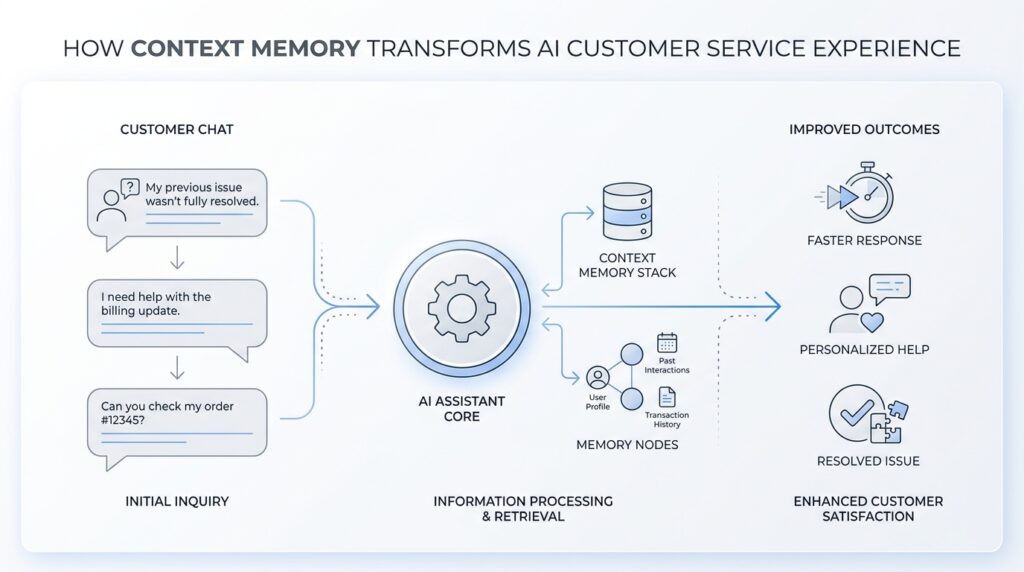
Context memory is what keeps AI customer service from feeling like a string of disconnected replies. If you have ever wondered, How does an AI remember what I already told it? you are asking the right question, because that tiny ability is what turns a chatbot from a fast answer machine into something that can follow a real conversation. In AI customer service, context memory is the thread that helps the system stay oriented as the dialogue moves forward.
The easiest way to picture it is to think of a helpful support agent with a notepad beside them. They do not memorize every word forever, but they keep track of the details that matter right now. That is what context memory does: it holds the live conversation in working memory, which means the information is available while the interaction is still unfolding. It is different from long-term storage, which is more like a filing cabinet kept for later use.
This matters because customer service rarely happens in neat, one-question moments. Real people come in with layered problems, changing details, and follow-up questions that depend on what came before. With context memory, an AI can connect those pieces instead of forcing you to repeat yourself every time the chat turns a corner. That is a big part of why the AI customer service experience can feel either smooth and reassuring or clumsy and exhausting.
Here is what context memory usually holds: the issue you described, the product or account you mentioned, the steps already tried, and any preferences you have made clear along the way. It may also keep track of the conversation’s intent, which means the goal behind your words, not just the words themselves. So if you start by asking about a refund and then shift to asking about shipping, the system can notice that you are still talking about the same order rather than treating each message like a brand-new puzzle.
That live tracking is the heart of context memory basics. The AI reads earlier messages, picks out the useful pieces, and updates its understanding as new information arrives. You can think of it like stacking sticky notes on a desk: the newest note does not erase the old ones, but the most important notes stay visible so the next reply makes sense. In practice, that lets the AI answer with continuity, which is why it can say things like, “I see you already tried restarting the device,” instead of asking you to begin from scratch.
Of course, context memory is helpful, but it is not magic. It works best when the conversation stays within a manageable length and when the details are clear enough to recognize. If a chat goes on for a long time or a customer changes topics without much warning, the system can lose track of something important, the same way any person might if they are juggling too many notes at once. That is why good support design still leaves room for clarification, confirmation, and a human hand when the situation gets messy.
Once you understand that, the bigger picture starts to come into focus. Context memory is not about making AI act human in every way; it is about helping it stay present, responsive, and connected to what you have already said. And when we build from that foundation, we can start to see how context memory changes the whole service journey, not only the next reply.
Why Support Needs Memory
When you reach out for help, you are rarely asking a single, isolated question. You are usually carrying a little trail of history with you: the order that never arrived, the app that stopped working after an update, the refund you already asked about yesterday. That is why support needs memory, because AI customer service becomes far more useful when it can keep that trail in view instead of treating each message like a fresh start. Without context memory, every turn in the conversation can feel like opening the same door again and again.
Think about what happens in a real support exchange. You explain the problem, the system asks a follow-up, you answer, and then the situation grows a little more specific with each message. If the AI forgets what came before, it forces you to repeat the parts you already shared, and that repetition turns a simple request into a tiring one. With context memory, the AI can carry the conversation forward the way a careful support agent would, which makes AI customer service feel steady instead of scattered.
This matters most when the issue is layered. A billing question can turn into a shipping question, which can turn into a replacement request, and all of those pieces may still belong to the same case. Have you ever wondered why does support need memory when the question seems straightforward at first? The answer is that customer problems often unfold in stages, and context memory lets the system understand those stages as one connected story rather than a pile of disconnected notes.
Memory also helps the AI avoid awkward mistakes that frustrate people fast. If the system remembers that you already tried restarting the device, it does not waste your time by suggesting the same step again. If it remembers which product you own, it can give you instructions that fit your situation instead of sending you down the wrong path. That kind of continuity is one of the quiet strengths of customer support memory: it reduces friction, and friction is often what makes support feel slow even when the reply arrives quickly.
There is another reason this matters, and it has less to do with speed than with trust. When the AI remembers details accurately, it signals that it has been listening, and that changes the emotional shape of the conversation. You feel less like you are feeding information into a machine and more like you are being guided through a problem by someone who understands the full picture. In AI customer service, that sense of being known can be the difference between a conversation that calms you and one that adds more stress.
Memory also makes handoffs smoother when a situation needs human help. A support agent who joins late should not have to ask you to replay the entire story from the beginning, and the AI should not make you become the messenger between systems. Good context memory preserves the useful parts of the exchange, so the next person or tool can pick up from the same point. That is especially important in customer support memory, where every extra repetition can feel like another delay.
At the same time, memory needs boundaries, because support is not a scrapbook where every detail matters equally. The AI has to keep the right information in focus, hold onto the active issue, and let go of noise that would only cloud the conversation. That balance is what turns context memory from a technical feature into a service advantage, and it is why the best AI customer service experiences feel less like answering a form and more like continuing a conversation that already knows where it has been.
Separate Session And User Memory
When a support chat ends and another begins, the first question is usually the most practical one: what should carry over, and what should stay behind? That is where the split between session memory and user memory matters in AI customer service. Session memory is the short-term record of the current conversation, while user memory is the longer-term set of stable details the system keeps for future chats. When those two layers stay separate, context memory feels helpful instead of messy.
Think of session memory as the notebook open on the desk right now. It holds the live case: the order number, the error message, the troubleshooting steps you already tried, and the part of the problem you are actively solving. OpenAI’s conversation-state docs describe this kind of memory as state that can be carried through a conversation, even across responses, instead of rebuilding the whole thread from scratch every time. That is the kind of memory that keeps AI customer service from asking you to repeat yourself after every turn.
User memory is different because it plays the role of a personal profile, not a case file. It stores high-level preferences and details that are likely to matter again, such as a preferred language, a dietary preference, or a communication style, and OpenAI notes that memory should not be used for exact templates or large blocks of text. In other words, user memory is the AI’s way of remembering who you are in broad strokes, while session memory remembers what this specific conversation is about. That separation is what lets context memory stay useful without becoming cluttered.
Why bother separating them at all? Because the wrong detail in the wrong place creates friction fast. If a customer asked about a delayed laptop order last week, that order should not drift into today’s printer question just because the AI remembers the person. A system that keeps session memory and user memory apart can forget the temporary mess while still keeping lasting preferences, which is exactly what makes AI customer service feel respectful instead of nosy. OpenAI’s temporary chat mode makes this boundary visible: it starts from a blank slate and does not use or update memory.
This split also helps when a support journey stretches across more than one place. A customer might begin in chat, move to a different channel, or return days later with a fresh problem, and the AI needs to know whether it is continuing the same case or meeting a familiar person in a new one. In the OpenAI API, conversation state can be persisted as a durable object, while in ChatGPT projects, memory can be kept project-only so context stays inside the right boundary instead of leaking across unrelated work. That is the design idea we want in customer support too: keep the current session close, keep personal memory selective, and keep unrelated cases out of the room.
Once that boundary is in place, the conversation starts to feel much more human in the best way. The AI can remember the thread of the current issue without dragging old baggage into the next one, and it can remember stable preferences without treating every preference like permanent truth. That balance is what makes context memory in AI customer service feel calm, accurate, and trustworthy, especially when the next question arrives and the system already knows which kind of memory it should use.
Capture Key Customer Signals
When a customer starts describing a problem, the most useful details rarely arrive as a neat summary. They show up as signals—small clues in the words, timing, and tone of the conversation that tell the AI what really matters. In AI customer service, context memory becomes powerful when it does more than remember facts; it learns to capture key customer signals and keep them in view as the chat unfolds. That is how a system moves from hearing words to understanding need.
What are the key customer signals in AI customer service? They are the pieces of information that change how the next reply should look and feel. A customer might mention urgency, frustration, a product name, a recent order, or a step they already tried. Each signal acts like a road sign, guiding the AI toward the right response without forcing the customer to restate everything from scratch. When those signs are captured well, the conversation feels steadier, faster, and more human.
This is where context memory does its quiet work. Instead of treating every message as equal, the system separates the noise from the clues that shape the case. A sentence like “I already rebooted it twice” is not just background chatter; it is a troubleshooting signal that changes the next recommendation. A phrase like “I need this before tomorrow” is not decorative either; it carries urgency, and that should affect priority, wording, and escalation. In other words, the AI customer service experience improves when the system knows which details deserve a place in the spotlight.
The best capture happens when the AI listens for patterns, not just isolated words. Suppose a customer begins with a billing issue, then mentions a failed delivery, then asks whether a replacement is possible. The surface topic changes, but the deeper signal is the same: the customer wants the order resolved with as little back-and-forth as possible. That is why memory matters so much; it keeps the active case connected even as the customer’s story grows more specific. Without that connection, the system may answer correctly and still miss the point.
Tone is another signal that should not be ignored. People do not type like spreadsheets, and support conversations often carry hints of stress, impatience, confusion, or relief. When context memory preserves those clues, the AI can adjust its style to match the moment, offering shorter guidance when someone is overwhelmed or more detailed steps when they seem ready to troubleshoot. This is not about acting emotional for its own sake; it is about reading the room well enough to respond with care.
Capturing signals also helps the system ask better follow-up questions. Instead of reaching for a generic script, the AI can notice what is still missing and close only the real gaps. If the customer has already identified the product and the problem but not the timing, the next question should focus on when the issue started, not on the basics they already gave. That kind of selective attention is one of the clearest signs of mature context memory, because it reduces repetition while keeping the conversation accurate.
There is a practical benefit here too: the right signals make handoffs cleaner. When an issue needs a human agent, the AI should pass along the important clues, not a wall of text. A good summary might preserve the problem, the urgency, the steps already tried, and the customer’s preferred outcome, which gives the next person a real head start. That is the difference between AI customer service that merely stores messages and AI customer service that actually understands what the messages mean.
Inject Relevant Context Safely
When we start feeding context into an AI support flow, the real challenge is not collecting more information—it is choosing the right information. In AI customer service, context memory works best when it is given a clean, useful snapshot of the conversation, not a messy dump of everything the customer has ever said. Think of it like handing a helpful agent a well-organized case file instead of a shoebox full of receipts. What should the system keep, and what should it leave out? That question matters because safe context injection is what keeps the reply focused, accurate, and calm.
The first step is to separate signal from clutter. A good support system should inject only the details that change the next answer: the customer’s goal, the product or order involved, the latest status, and any steps already tried. It should not drag in old guesses, duplicate notes, or unrelated side stories that only blur the picture. This is where AI customer service gets more reliable, because the model is not trying to solve the case with noisy background chatter. It is working from a short, relevant thread that reflects the live problem.
Safety matters just as much as usefulness, especially when the conversation includes private details. Sensitive information means data that could identify or harm a person if exposed, such as passwords, full payment details, or account numbers. A careful system should redact that information, which means removing or hiding it before it enters the memory layer or the prompt, the instruction text the AI reads before answering. That way, context memory supports the conversation without turning into a storage bin for information it never needed in the first place.
We also want the AI to remember the shape of the case, not every word in it. A strong context summary sounds more like a short briefing than a transcript. It might say that the customer’s package arrived damaged, they already uploaded a photo, and they want a replacement instead of a refund. That kind of summary gives the model enough structure to answer well without overloading it. If you have ever asked, “How do you inject relevant context safely without overwhelming the model?” the answer is to compress the story while keeping the pieces that guide the next move.
Another important habit is to preserve freshness. Context injection should favor the newest, most confirmed details over older guesses that may no longer be true. If a customer first says they cannot log in and later reports that the password reset worked but two-factor authentication failed, the newer update should take priority. This keeps the AI customer service experience from circling back to already-solved problems. In practice, it is a little like following a trail of breadcrumbs: the latest crumb tells us where the customer actually is now.
It also helps to label context by purpose. Some details belong to the active case, some belong to long-term preference, and some should never be reused outside the current exchange. When the system knows why a detail is being injected, it can decide how strongly to rely on it. That distinction makes customer support memory feel disciplined instead of slippery, because the AI is not treating every fact as equally permanent or equally important.
The safest systems also keep a human path open. If the conversation includes conflict, legal risk, payment disputes, or highly unusual edge cases, the AI should not guess from partial context. It should ask one more clarifying question or hand the case to a person with the right authority. That restraint is part of what makes context memory trustworthy: it knows when to hold the thread and when to stop pulling on it. And when we design that boundary well, AI customer service becomes not only smarter, but more careful with the people it serves.
Measure Resolution And Satisfaction
Once the AI has carried a customer through a conversation, the next question is the one that really tells us whether it helped: did the problem actually get resolved, and did the person feel good about the experience? In AI customer service, context memory is only valuable if it leads to real resolution and genuine customer satisfaction. That means we have to measure more than speed. We need to look at whether the issue ended cleanly, whether the customer had to repeat themselves, and whether the interaction left them feeling understood.
The clearest place to begin is with resolution, which means the customer’s problem reached a usable end point. One common way teams measure that is first contact resolution, or FCR, which means the issue was solved in the first conversation without a follow-up. That number matters because context memory should help the AI keep the thread intact long enough to finish the job. If the system remembers the right details, it can avoid dead ends, ask better follow-ups, and guide the customer toward an answer that sticks.
But resolution is not only about whether the case closed; it is also about whether it stayed closed. A support team may see a conversation end successfully, only to discover that the customer returns the next day with the same problem. That is why repeat contact rate is such a useful companion metric. If people keep coming back for the same issue, the AI customer service experience may look efficient on the surface while still failing to deliver real progress.
This is where context memory starts to show its value in a very practical way. When the AI remembers what has already been tried, it can avoid sending the customer in circles, which reduces both frustration and wasted effort. It can also help lower customer effort, which means the amount of work a person has to do to get help. A lower-effort conversation often feels better even when the answer itself is not dramatic, because the customer does not have to act as the system’s memory for it.
Now let’s turn to satisfaction, because resolution alone does not tell the whole story. Customer satisfaction, often shortened to CSAT, is a simple measure of how happy someone felt with the support interaction. In plain language, it asks, “Was this a good experience?” If context memory keeps the conversation coherent, respectful, and personal enough to avoid repetition, CSAT usually has room to improve. That makes satisfaction a useful signal for whether the AI customer service experience felt smooth, not just technically correct.
A helpful question to ask is: why do some resolved cases still score poorly? The answer is that people remember how hard the journey felt. If the AI solved the issue but made the customer restate their order number three times, the result may count as resolution while still producing disappointment. Context memory helps here by reducing that drag, which is why satisfaction scores often rise when the conversation feels continuous instead of fragmented.
Teams can also measure whether the AI is making better decisions as it goes. If context memory is working well, the system should get more cases to the right outcome with fewer clarifying loops, fewer unnecessary escalations, and fewer moments where the customer has to correct it. Those are not flashy metrics, but they matter because they reveal whether the support experience is becoming more human in the useful sense: organized, attentive, and calm. In other words, AI customer service gets stronger when memory supports both the outcome and the feeling of the exchange.
The most useful measurement strategy combines hard numbers with human feedback. Metrics like FCR, repeat contact rate, and CSAT show us the shape of the experience, while customer comments explain why those numbers moved. That mix helps us tell the difference between a system that is merely fast and one that is truly helpful. And once we can see both resolution and satisfaction clearly, we can keep refining context memory so each conversation ends with less friction and more trust.



